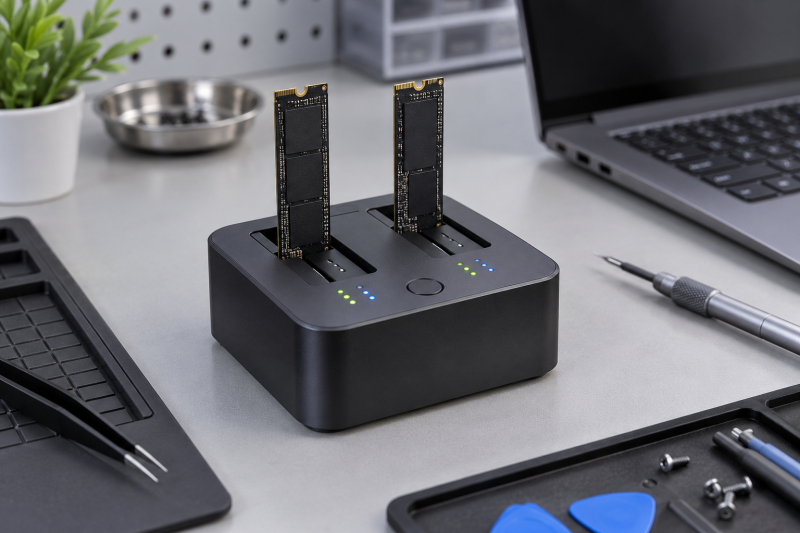
An NVMe duplicator copies a removed SSD without consuming a second internal M.2 slot in the repair laptop. The checks to make are the source and target drive protocol, the target capacity, supported M.2 key and length, and whether the unit clones without a computer. A drive dock can expose two slots without being able to copy every combination between them.
The six docks here all list standalone or offline cloning, but several also mix NVMe and SATA storage. Read which clone directions the dock supports before inserting drives, because a dock that mixes interfaces can still limit its supported offline copy paths. For a separate external-drive workflow, compare these clone stations with a dual-bay drive dock or a portable NVMe enclosure, which solve different jobs.
For any standalone clone, the target must meet the product’s stated capacity rule. A target drive that is smaller than the source is not a valid match for these listed workflows.NVMe Duplicators Compared



1. StarTech M2-HDD-DUPLICATOR-N1 — Best for Fast Standalone NVMe Duplication
StarTech suits a bench that only copies NVMe drives and needs specified figures to plan around. Its listing says it performs standalone sector-by-sector duplication up to 90GB per minute, works with any file format, supports PCIe M-Key drives including drives with pre-installed heatsinks, and requires the target disk to be equal to or larger than the source.
The dock also lists USB 3.2 Gen 2×2 20Gbps host access, LEDs for power, progress, and SMART status, an audible completion buzzer, and active plus passive cooling. The host link suits a bench that needs a stated clone rate and an external USB-C dock after the clone.
Our Take Buy StarTech when the bench runs a dedicated NVMe clone workflow and wants all three of the stated 90GB-per-minute rate, top-loading M-Key fit, and 20Gbps host link. Look at FIDECO, GRAUGEAR, or SABRENT instead when SATA drives also belong on the same repair bench.
- Standalone sector-by-sector duplication is listed at up to 90GB per minute for NVMe drives.
- PCIe M-Key support includes drives with pre-installed heatsinks in its top-loading design.
- USB-C 3.2 Gen 2×2 20Gbps host access adds an external-drive workflow after cloning.
- Progress, SMART-status, and power LEDs make the listed operating state easier to follow.
- An audible completion buzzer can signal when a listed standalone duplication cycle has ended.
- The NVMe-specific design does not add a SATA drive bay for mixed repair-bench media.
- The target drive must be equal to or larger than the source for listed cloning.
- Its M-Key-only layout excludes B+M Key formats listed by the AMZPILOT dock.
- A dedicated NVMe workflow is less flexible when older 2.5-inch or 3.5-inch media arrives.
- The listed 20Gbps host link needs a matching USB-C port to use that connection.
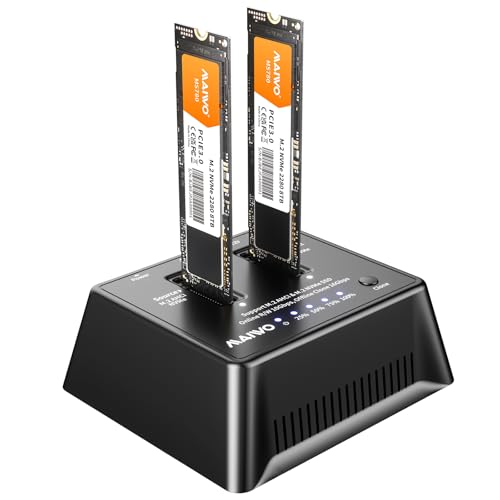
2. MAIWO K3017AN NVMe Cloner — Best for AHCI NVMe Drive Sizes
MAIWO lists an offline, bit-for-bit NVMe clone path and M-Key support for 2230, 2242, 2260, 2280, and 22110 drive lengths. Each bay is listed up to 8TB, and the target must be equal to or larger than the source. That length range is the main reason to consider it for a repair bench handling several laptop generations.
Its USB 3.2 Gen 2 host link is listed at up to 1250MB/s, with a vertical open-air design for cooling. The listing also says it supports AHCI. Match those facts against the removed drive before the clone starts rather than inferring them from the M.2 shape alone.
Our Take Buy MAIWO when the repair bench regularly sees M-Key NVMe drives from 2230 through 22110 and the 8TB-per-bay figure is useful. StarTech is the more focused choice for a stated 90GB-per-minute clone rate and 20Gbps host connection.
- M-Key support from 2230 through 22110 covers several common laptop NVMe drive lengths.
- Each bay is listed up to 8TB, with a target capacity equal to or larger.
- A vertical open-air design is listed for cooling around the inserted NVMe drives.
- The listed offline bit-for-bit clone path suits a bench that works without a host laptop.
- USB 3.2 Gen 2 is listed up to 1250MB/s for host-side drive access.
- Its listed host connection is USB 3.2 Gen 2, not StarTech’s 20Gbps Gen 2×2 link.
- The listing’s AHCI support still requires matching the removed SSD before cloning begins.
- M-Key support does not make the dock a stated fit for B+M Key drives.
- The target-capacity rule still applies even when both drives share an advertised capacity.
- Its NVMe-focused layout does not add a listed 2.5-inch or 3.5-inch SATA bay.
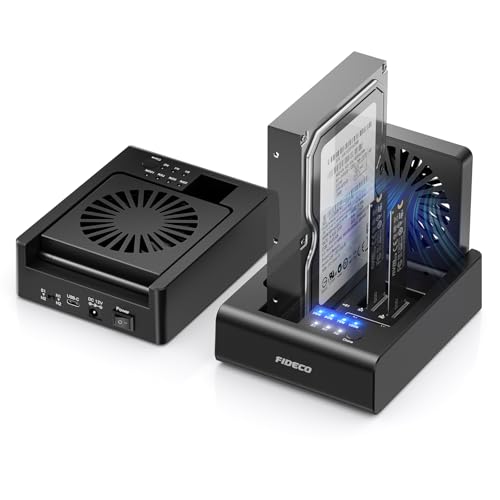
3. FIDECO MS02 Three-Bay Cloner — Best for Mixed NVMe and SATA Bench
A bench that handles both laptop NVMe drives and older SATA drives needs a dock that takes both, and FIDECO does. Its three-bay design lists two M.2 NVMe slots plus one 2.5- or 3.5-inch SATA HDD or SSD bay, with access to all three drives at once. The listing says offline clone supports NVMe-to-NVMe and 2.5/3.5-inch SATA-to-NVMe, so those are the two directions to plan around.
It also lists USB 3.2 Gen 2 10Gbps transfer, a foldable cooling fan, tool-free insertion, and a supplied USB-C to USB-C cable with USB-A adapter. It suits a bench that moves between laptop NVMe drives and older 2.5- or 3.5-inch SATA media.
Our Take Buy FIDECO when one repair bench needs both NVMe and 2.5/3.5-inch SATA access, with the exact offline clone direction checked first. A dock with only NVMe bays is simpler when no SATA work is involved.
- Two NVMe bays plus one 2.5- or 3.5-inch SATA bay support mixed storage work.
- The listing states NVMe-to-NVMe and SATA-to-NVMe offline clone paths for the dock.
- A foldable cooling fan and tool-free drive access suit repeated repair-bench drive changes.
- All three listed bays can be accessed together when the bench needs mixed media.
- A supplied USB-C cable and USB-A adapter suit different laptop host-port layouts.
- The mixed interface design needs its clone-direction rule checked before every source-target pairing.
- Its listed host transfer is 10Gbps, below StarTech’s stated 20Gbps host connection.
- The listing does not describe every possible NVMe-to-SATA offline clone direction.
- Three bays take more bench space than a simple two-NVMe standalone duplicator.
- A varied drive layout requires identifying both source and target interfaces before copying.
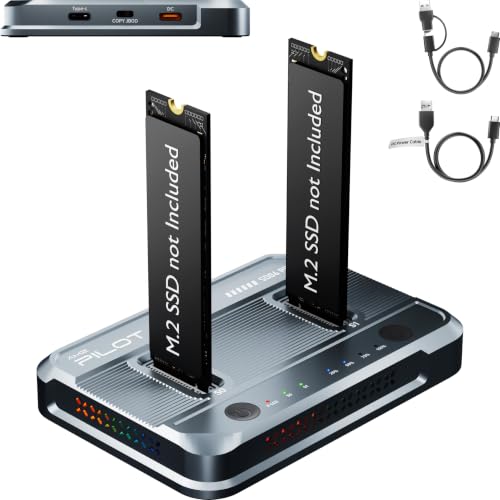
4. AMZPILOT SD06 Pro Dual-Bay Cloner — Best for Mixed M-Key and B+M Key Access
AMZPILOT supports M-Key PCIe and B+M Key NGFF drive formats in 2230, 2242, 2260, 2280, and 22110 lengths. The listing says it can access two disks with up to 8TB per slot, provides USB 3.2 Gen 2 10Gbps host access, and uses a dedicated Type-C DC input.
Its mixed-format support comes with a stated condition. Cross-protocol copying is unsupported, and when two drives with different protocols are connected to a computer simultaneously, only one is recognized. So AMZPILOT suits a bench with known matching source and target protocols, not a universal copy path.
Our Take Buy AMZPILOT when the bench needs broad listed M-Key and B+M Key access across five drive lengths and both drives use a supported matching protocol. FIDECO, GRAUGEAR, and SABRENT are clearer mixed NVMe/SATA dock choices.
- M-Key and B+M Key support spans listed 2230, 2242, 2260, 2280, and 22110 sizes.
- Two slots are listed up to 8TB each for larger repair-bench drive access.
- Dedicated Type-C DC input and LED progress bars are listed operating details for the dock.
- USB 3.2 Gen 2 10Gbps host access provides a stated connection for laptop use.
- The two-slot layout can hold matching supported drives within its listed 8TB-per-slot limit.
- Cross-protocol copying is expressly unsupported, so source and target protocol must be checked.
- Two different protocols connected to a computer can leave only one drive recognized, per listing.
- Its dedicated Type-C DC input adds a separate power connection to plan on the bench.
- Mixed M-Key and B+M Key access does not create a stated cross-protocol clone path.
- The listing’s 10Gbps host link is lower than StarTech’s stated 20Gbps connection.
5. GRAUGEAR 18140 NVMe and SATA Dock — Best for Bidirectional SATA and NVMe Cloning
GRAUGEAR pairs one M.2 NVMe slot with one SATA position that can take M.2 SATA, 2.5-inch SATA SSD/HDD, or 3.5-inch SATA HDD. Its listing says it supports bidirectional SATA-to-NVMe and NVMe-to-SATA offline cloning, gives NVMe transfer up to 10Gbps and SATA up to 6Gbps, and includes a three-speed cooling fan.
That layout is useful when a repair bench moves data between a removed laptop NVMe drive and older SATA media. The stated clone direction is the decision point. GRAUGEAR is not described as a duplicator for two NVMe drives, so follow the listed source and target arrangement exactly.
Our Take Buy GRAUGEAR when a repair job needs either stated SATA-to-NVMe or NVMe-to-SATA cloning and a single NVMe plus SATA dock keeps the bench compact. StarTech and MAIWO are more focused when the work is exclusively NVMe to NVMe.
- One NVMe slot plus flexible SATA support covers several older and newer repair-bench drive types.
- The listing specifies bidirectional SATA-to-NVMe and NVMe-to-SATA offline cloning for mixed media.
- A three-speed cooling fan gives stated Off, Low, and High airflow options for drives.
- The SATA position accepts M.2 SATA plus 2.5-inch and 3.5-inch SATA storage media.
- Listed NVMe 10Gbps and SATA 6Gbps host links clarify each interface’s connection ceiling.
- Its listed clone modes do not make it a dedicated two-NVMe standalone duplicator.
- The single NVMe slot limits simultaneous direct access compared with two-NVMe dock designs.
- Its two interface ceilings require matching the drive type to the stated host connection.
- A mixed dock is unnecessary when every repair job uses only one M-Key NVMe drive.
- The two-direction clone path still needs the chosen source and target media identified correctly.
6. SABRENT DS-UNHC USB-C Dock — Best for NVMe and SATA with Supplied Cables
SABRENT is a combined NVMe and SATA dock with stated single- and dual-drive modes, offline clone capability, and simultaneous drive access. The listing names M.2 PCIe, 2.5-inch/3.5-inch SATA support, thermal padding, an aluminum M.2 heatsink, an external power adapter, and both USB-A-to-USB-C and USB-C-to-USB-C cables.
It lists 2242, 2260, and 2280 M.2 form factors and USB 3.2 Gen 2 10Gbps with an appropriate host port. The external power adapter is stated as required for 3.5-inch and multi-drive use, so plan for it as part of the bench setup.
Our Take Buy SABRENT when the repair bench needs one kit with cables supplied for M.2 PCIe and SATA access, plus offline cloning. Confirm the M.2 length and whether the planned multi-drive job needs the included external power adapter.
- M.2 PCIe plus 2.5-inch and 3.5-inch SATA support covers mixed removed-drive workflows.
- USB-A-to-USB-C and USB-C-to-USB-C cables are supplied for different laptop host ports.
- Thermal padding and an aluminum M.2 heatsink are listed cooling aids for PCIe drives.
- Single- and dual-drive modes give the dock a stated path for several bench setups.
- USB 3.2 Gen 2 10Gbps host access supports the listed external-drive connection path.
- Its listed M.2 support starts at 2242, excluding shorter 2230 drives supported by MAIWO.
- 3.5-inch and multi-drive use requires the external power adapter, according to the listing.
- Its 10Gbps host link is lower than the StarTech dock’s stated 20Gbps connection.
- The combined SATA and PCIe layout still requires selecting a supported source-target pairing.
- Thermal padding and a heatsink do not remove the stated external-power requirement for multi-drive work.
Buying Guide: Choosing an NVMe Duplicator for a Repair Bench
Confirm the source and target protocol first
StarTech and MAIWO are NVMe-focused, while FIDECO, GRAUGEAR, and SABRENT combine NVMe with SATA storage. AMZPILOT lists M-Key and B+M Key formats but says cross-protocol copying is unsupported. A drive’s physical M.2 shape does not establish its protocol.
FIDECO lists NVMe-to-NVMe and SATA-to-NVMe offline copy, while GRAUGEAR lists bidirectional SATA-to-NVMe and NVMe-to-SATA cloning. Write down the source and target interfaces before inserting them, then select only the clone direction the listing explicitly supports. SABRENT combines M.2 PCIe with 2.5-inch and 3.5-inch SATA access, but read its listing for the intended clone arrangement instead of treating it as a universal converter.
Match target capacity to the stated rule
StarTech and MAIWO both state that the target must be equal to or larger than the source. FIDECO repeats the same condition before its offline clone. Capacity matching is a required setup check, so do it before a clone starts.
The visible capacity label is only part of that comparison. Use the dock’s stated rule and the actual drives selected for the job, rather than assuming a target with the same marketing capacity will be accepted in every workflow. MAIWO lists up to 8TB per bay and AMZPILOT lists up to 8TB per slot, but those figures are listed bay limits, and the clone target rule applies.
Check M.2 key and length at the repair bench
MAIWO lists M-Key support from 2230 through 22110, AMZPILOT lists M-Key and B+M Key across those same lengths, and SABRENT lists 2242, 2260, and 2280. Measure the removed SSD and identify its key before choosing a dock.
Short 2230 drives need a dock that explicitly lists that length. A multi-length dock can simplify a varied queue of laptop repairs, while a narrower set of listed form factors is enough for a predictable bench. MAIWO and AMZPILOT both list 2230 through 22110 support, whereas SABRENT starts at 2242. That one difference can decide the fit before any clone procedure or host-speed figure comes into play.
Separate standalone clone speed from host transfer speed
StarTech lists standalone duplication at up to 90GB per minute and USB-C 20Gbps host access. MAIWO, FIDECO, AMZPILOT, GRAUGEAR, and SABRENT list USB host links up to 10Gbps in their own configurations. Offline clone figures and computer-transfer figures are different claims.
Choose the figure that matches the task. A repair bench doing unattended copies needs the clone condition. A bench used as an external dock needs the host connection and the laptop’s available port. StarTech’s 90GB-per-minute duplication figure and 20Gbps host link apply to two separate jobs, while the other listed 10Gbps host links are relevant when the station is connected to the repair laptop.
Plan power and cooling as part of the job
StarTech lists active and passive cooling, FIDECO a foldable fan, GRAUGEAR a three-speed fan, and SABRENT thermal padding plus an aluminum M.2 heatsink. Cooling features are listed hardware details, and the drive’s own operating conditions apply.
SABRENT says its external adapter is required for 3.5-inch and multi-drive use, while AMZPILOT lists a dedicated Type-C DC input. Connect the required power before starting a clone, rather than treating it as optional bench clutter. FIDECO’s foldable fan and GRAUGEAR’s Off, Low, and High fan settings are separate listed hardware features that help define each station’s physical bench setup.
Frequently Asked Questions
Can these docks clone without a laptop?
Yes, each listing describes standalone or offline cloning. StarTech calls its process standalone duplication, MAIWO describes an offline bit-for-bit clone, and SABRENT lists offline clone functionality. The exact source and target drive rules still differ by product.
Use the stated clone procedure for the specific dock. Standalone capability does not remove the need to confirm the drive protocol, capacity, and supported clone direction. StarTech’s sector-by-sector description and MAIWO’s bit-for-bit description identify standalone modes, while FIDECO’s stated NVMe-to-NVMe and SATA-to-NVMe directions still determine which drives belong in that procedure.
Does every M.2 drive fit every duplicator here?
No. MAIWO lists M-Key drives from 2230 to 22110, AMZPILOT lists M-Key and B+M Key formats, and SABRENT lists 2242, 2260, and 2280. The required physical length and key vary across the products.
Check the removed drive’s length and key before buying a dock. A physically similar M.2 drive can still fall outside the particular model’s listed support. A 2230 M-Key SSD points toward MAIWO or AMZPILOT’s listed range, while SABRENT’s 2242 minimum makes it a different fit despite its mixed SATA and PCIe layout.
Can a SATA drive clone directly to NVMe?
Some products say it can. FIDECO lists SATA-to-NVMe offline clone, and GRAUGEAR lists bidirectional SATA-to-NVMe and NVMe-to-SATA offline cloning. AMZPILOT explicitly says cross-protocol copying is unsupported, so it should not be treated the same way.
Follow the stated direction on the chosen dock. Mixed drive bays do not automatically mean every possible source and target combination is supported. Compare GRAUGEAR’s stated bidirectional SATA and NVMe path with AMZPILOT’s cross-protocol restriction. The exact direction decides whether the planned clone works, however many bay types the dock has.
Why must the target be equal to or larger than the source?
StarTech, MAIWO, and FIDECO all state that condition for their clone workflows. It is a listed requirement that prevents treating any smaller target as a valid destination for the source drive.
Compare source and target capacity before starting the clone. The exact dock instructions remain the final authority for its supported setup and button sequence. StarTech, MAIWO, and FIDECO all put that condition ahead of their listed standalone copy modes, so it belongs in the written bench checklist before the drives are inserted.
Do I need external power for a repair-bench clone?
It depends on the dock and drive combination. SABRENT says its included power adapter is required for 3.5-inch and multi-drive use, while AMZPILOT lists a dedicated Type-C DC input. Other models list their own included or operating arrangements.
Set up the required power path before beginning the copy. A dock’s data cable and its power requirement can be separate parts of the bench setup. SABRENT supplies both USB-A-to-USB-C and USB-C-to-USB-C cables for host connection, but its 3.5-inch and multi-drive condition still calls for the supplied external power adapter.
Bottom Line
For a repair bench that copies NVMe drives without a spare laptop slot, StarTech is the first pick for a dedicated NVMe workflow, MAIWO gives broad listed M-Key length support, and FIDECO, GRAUGEAR, or SABRENT make more sense when SATA drives also enter the workflow. Match protocol, target capacity, and drive form factor before cloning.