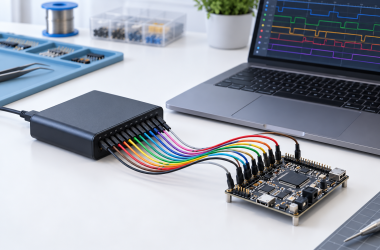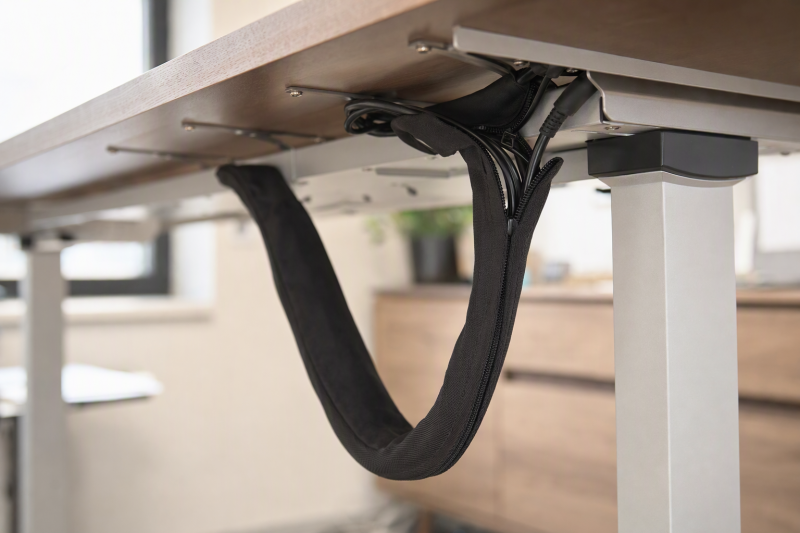
Monitor and USB cables often hang in separate loops behind a standing desk. A sleeve can make that moving run easier to follow and less likely to snag, but slack and cable safety come before neatness. The sleeve must bend through the desk’s full lift without pulling a connector or hiding a cord that needs to stay uncovered for cooling.
This guide compares six exact Amazon US sleeves with active New offers. They differ in length, zipper or split opening, and how readily a new cable can be added. Their listings do not establish movement-cycle or heat ratings for these applications. Electrical-safety guidance warns that covering cords can trap heat, so use these mainly for signal and data leads and follow the instructions for any power or extension cord rather than assuming all can be sleeved. For the powered box itself, our USB-C docking guide covers connection choices, not cord routing.
First prove that every unsleeved cable reaches the desk’s highest position without tension. A sleeve does not add cable length.Cable Sleeves Compared
| Image | Product | Details | Check Price |
|---|---|---|---|
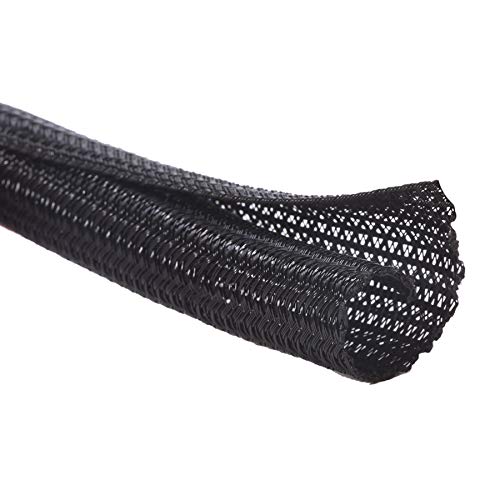 | Alex Tech split loom | Length: 10 ft Opening: 1/2-in self-closing split Material: Listing does not specify in checked bullets Best fit: Long modest-size data-cable run | Check Price on Amazon |
 | Wrap-It zipper four-pack | Length: 4 x 24 in Opening: Full-length zipper; 4-in flat width Material: Not stated in checked bullets Best fit: Several short modular bundles | Check Price on Amazon |
 | AGPTEK white two-pack | Length: 2 x 5 ft Opening: 1.2-in self-closing claim Material: Flame rating claimed, unverified Best fit: Long light-colored run | Check Price on Amazon |
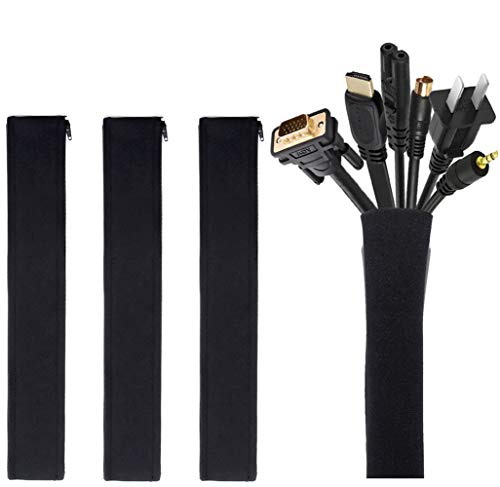 | JOTO neoprene four-pack | Length: 4 x 19-20 in Opening: Zip closure; 1.2-in zipped diameter Material: Stretch neoprene Best fit: Short flexible sections | Check Price on Amazon |
 | CrocSee split loom | Length: 25 ft, cut to length Opening: 1/2-in inner diameter split Material: Polyethylene Best fit: Several long narrow runs | Check Price on Amazon |
 | Wrap-It hook-and-loop two-pack | Length: 2 x 48 in Opening: Full-length hook-and-loop; 4.5-in flat width Material: Not stated in checked bullets Best fit: Reopenable longer desk drop | Check Price on Amazon |
1. Alex Tech 10-Foot Split Loom — Best Single Long Run
Alex Tech supplies a 10-foot length with a 1/2-inch diameter. Cables press into the split side without disconnecting both ends, and the side then closes around the bundle. The sleeve suits a run where a few display and USB leads travel together from the top down toward a fixed point. Measure the actual cable bundle diameter, because 1/2 inch may be too narrow once thick connectors or multiple display leads are included.
The seller claims broad temperature tolerance, UL recognition, and protection against pets chewing cords. We did not validate those claims or test how the material bends over repeated sit-stand cycles. A wrap around cables is not a pet-proof conduit or an electrical rating for the whole assembled bundle. Do not hide a warm extension cord inside the sleeve just because the product title mentions power cords. Leave a gentle, visible loop near both desk and wall ends so the sleeve never holds the cables taut.
Our Take Choose Alex Tech for a long run of a few data leads. You should pick it by bundle diameter and bend path, not by its unverified pet or safety language.
- Ten-foot length and 1/2-inch diameter are stated.
- Split opening permits later access.
- Small diameter can fill quickly.
- Pet and certification claims were not checked.
2. Wrap-It Zipper Four-Pack — Best Short Reopenable Sections
The set contains four 24-inch sleeves, each listed as 4 inches wide while flat. A zipper runs along each section, so a cable can be added or removed without cutting a wrap apart. The four short sections can help organize several zones: a monitor-arm lead near the desk, a USB run across the back, and a visible drop. Four sections are not the same as one uninterrupted eight-foot sleeve, because gaps and joining points remain.
The seller shows power, HDMI, and charger cables grouped together, but it does not establish safe heat conditions for every electrical cord. Apply the power equipment’s instructions first. When a standing desk moves, align the zipper so it does not rub the frame or catch a bracket. Leave the actual slack loop outside any tight section. The manufacturer does not provide data on long-term zipper durability or bundle flexibility through repeated height changes.
Four 24-inch pieces give several access points, not one continuous long run.Our Take Choose the Wrap-It zipper sleeves for a changing cable layout that works in short sections. Check the moving bend and zipper orientation before fastening every segment.
- Four sections and their lengths are stated.
- Full-length zipper makes changes easy.
- Sections leave gaps on a longer run.
- Zippers may catch if placed against moving hardware.
3. AGPTEK White Two-Pack — Best Light-Colored Long Runs
AGPTEK lists two five-foot white sleeves with a 1.2-inch opening claim and self-closing sides. White may blend with a light desk or wall and leave individual cables accessible. The seller says the material can be cut to length. Confirm the actual usable opening and avoid overfilling, because a packed sleeve can resist a gentle loop as the desk moves even if the material itself is flexible.
The listing suggests applying fire to a cut end to prevent fraying. Do not do that. Use a manufacturer-approved finishing method that does not introduce a flame near furniture or cables. The listing also makes child/pet and flame-class claims that were not independently verified. A sleeve is not an insulation substitute or proof that a power lead can be covered. Keep the bundle where you can inspect it and stop desk movement if any cord pulls tight.
Our Take Choose AGPTEK for a longer run in white if the opening fits your bundle. Treat its safety promises and cut-end advice skeptically, and keep the cable loop free to move.
- Two five-foot lengths are listed.
- Self-closing access and light color offer layout flexibility.
- Pet and flame claims were not verified.
- Seller’s flame-cut suggestion is unsuitable near wiring.
4. JOTO Neoprene Four-Pack — Best Short Flexible Sections
JOTO supplies four 19-20-inch zipper sleeves made of stretchy neoprene. The seller lists a 1.2-inch zipped diameter and says each piece can contain eight to ten cables, with the possibility of zipping two together for a wider bundle. Cable count depends heavily on actual cord thickness. Do not assume ten thick display leads fit or bend safely. A zipped section can be opened when a monitor or dock is replaced.
Neoprene’s soft feel may let a sleeve follow a gentle curve, but the listing does not specify durability through movement or heat behavior. Avoid a tight bundle at the desk’s pivot point. Position each short piece where it can move without rubbing against the lift column or chair. If the cables need to separate to reach ports at different heights, leave the branch points outside the sleeve rather than stretching one lead inside.
Our Take Choose JOTO for short, flexible zones rather than a single floor-to-desk sheath. Size it by the thickest cables in your bundle, not the seller’s maximum cable count.
- Four pieces and 1.2-inch zipped diameter are stated.
- Stretch material and zipper permit changes.
- Short pieces may leave visible gaps.
- Eight-to-ten-cable claim depends on cord size.
5. CrocSee 25-Foot Split Loom — Best Multiple Narrow Runs
CrocSee lists 25 feet of polyethylene split loom with a 1/2-inch inner diameter. It can be cut into several runs: one behind a monitor, one beside the dock, and another down a fixed desk leg. The seller says it holds three to four cables, a useful planning clue only if those cables are slim. Check actual diameters and connector exits before cutting the roll.
A split opening allows later additions, but frequent cable changes can still spread a tightly filled seam. The listing calls the material abrasion- and heat-resistant and claims pet-chewing protection. None of the three was independently tested here. Do not assume a small split loom is appropriate around a warm power strip cord if that cord’s instructions prohibit covering it. Cut ends should not rub a cable jacket or expose a sharp edge at a moving part.
Twenty-five feet is useful across several separate runs, but a half-inch interior still limits each individual bundle.Our Take Choose CrocSee for a workspace with many narrow data-cable routes. It is less useful for one thick mixed-power bundle and does not replace a sleeve run along the desk’s whole moving path.
- Long cut-to-fit roll is stated.
- Split access supports later cable changes.
- Half-inch inner diameter fills quickly.
- Heat and pet claims were not validated.
6. Wrap-It Hook-and-Loop Two-Pack — Best Long Reopenable Drop
Wrap-It lists two 48-inch sleeves, each 4.5 inches wide while flat, with hook-and-loop closure along the full length. The closure makes it simple to open the moving drop at any point and replace one monitor cable without undoing an entire zipper. The seller says the material can be trimmed with scissors. Measure the desk-to-wall run before cutting, because fabric cut too short cannot restore a cable’s missing slack.
The closure can be reconfigured for branches but should not be pulled so tightly that it bends cables sharply. A four-foot section may still be shorter than the full path between a high standing desk and a low wall receptacle, so let the cables and fabric move independently where needed. The manufacturer does not specify grip durability after repeated opening or whether the fabric snags on underside surfaces. Keep the floor end clear of wheels and walking paths.
Our Take Choose the Wrap-It hook-and-loop pair for a changing workstation that needs long, flexible sections. Its reopenable seam is useful only after the underlying cables have enough slack for the desk’s movement.
- Two four-foot lengths are stated.
- Full-length hook-and-loop can open at a branch.
- Four feet may not cover the whole moving path.
- Closure wear and snag behavior are undocumented.
Buying Guide
1. Prove the Desk’s Moving Slack
Run the desk from its lowest to highest position with every cable visible and unbundled first. Watch for a signal lead that pulls at a monitor or dock port, a power cord that lifts its wall plug, or a loop that drags into the lift column. Add length or change routing before adding a sleeve. A tidy sheath can hide a developing strain point.
Leave a gentle moving loop with no sharp bend at the desk and wall ends. Test the path again after sleeving, slowly and with a hand near the stop control. A sleeve is not a spring or cable extender. It should guide a route that is already safe. Hubs covered in our USB-C hub guide can simplify some data connections but still need cord slack.
2. Choose Access and Diameter
A split loom such as Alex Tech or CrocSee can take a few small data leads without unplugging them. A zipper section from JOTO or Wrap-It is easy to reopen but has a fixed piece length. Hook-and-loop can open at any point along the run. Choose based on how often devices change and whether the bundle branches to several ports.
Measure bundle diameter at its fullest point, including cable jackets. Do not force connector heads into an opening. The 1/2-inch looms are narrow, and the 1.2-inch zipped sleeves offer more room. A seller’s “ten cables” figure cannot replace a measurement because USB, HDMI, and monitor power cords vary greatly.
3. Keep Power-Cord Rules Separate
Electrical-safety guidance warns that covering a cord can trap heat. Some sleeve listings show extension or power cords in their examples, but those photos do not override the cord and power-strip makers’ instructions. If covering a cord is prohibited or would prevent inspection or cooling, route it separately and leave it visible.
Do not use a sleeve as chew-proof armor, insulation repair, or fire protection. Replace a damaged cable and use proper household safety measures for pets or children. Never hide a hot brick or splice inside the moving bundle. Where power and data need different paths, a sleeve for the data leads alone may be the safer, clearer choice.
FAQ
Can I put a power strip cord inside a cable sleeve?
Yes, but only if the cord and strip makers permit covering that specific cable and it remains cool, inspectable, and free of strain. Electrical-safety guidance warns that covered cords may trap heat. A product title mentioning “power cord” is not enough to establish safety for your setup.
When uncertain, leave the AC cord separate and use the sleeve for monitor signal, USB, or network leads. Do not use the sheath to conceal a damaged or overheating cord.
Is a long sleeve better than several short pieces?
A long sleeve is not automatically better. One long piece hides a continuous run, while short sections make it easier to branch near a monitor or dock. Long cable trays such as Mzmaxy’s solve a different problem. They hold the power bricks near the desktop. A sleeve only groups the leads that still need to travel.
Map the actual route and choose gaps where a cable must leave for a port. Do not stretch a short piece across a moving span just to make it look continuous.
Will these sleeves protect wires from pets?
No, do not rely on them for pet protection. Manufacturer listings do not provide verified pet-resistance ratings, and split seams or exposed ends can still leave cords reachable. None of them is a substitute for protecting the animal and replacing a damaged cable.
Keep wiring out of reach where possible and use appropriate household electrical precautions. A sleeve may make loose data cables tidier, but a chewed live cord needs immediate replacement, not another layer of fabric or plastic.
Bottom Line
Alex Tech and CrocSee offer cut-to-fit split routes in different lengths. The Wrap-It zipper and hook-and-loop models are made for reopening, and JOTO supplies short flexible sections. Choose after measuring the bundle and proving the desk’s full moving path. Keep power-cord safety separate from visual cable organization.