A Raspberry Pi 5 can use its PCIe connection for fast NVMe storage, and the case you choose decides how the board is cooled, powered, reached by cables, and placed on a desk. The differences that count are the M.2 arrangement, whether the case holds one drive or two, the cooling hardware, whether a PCIe board or power supply is included, whether it supports displays, and whether it suits a simple desktop, a NAS, or a feature-rich Pi workstation.
The eight cases below all explicitly pair a Pi 5 enclosure with an M.2 NVMe or PCIe NVMe path. A basic aluminum case can be the right answer for one fast system disk, while dual-drive cases add RAID options and much more physical hardware. Decide the storage layout and cooling plan before you pay for a screen, camera, or AI-expansion path.
Pick the NVMe layout and cooling method first, then decide whether a complete kit, RAID, display output, or desktop extras help your Pi 5 build.Best Raspberry Pi 5 NVMe SSD Enclosure Cases Compared
| Image | Product | Details | Check Price |
|---|---|---|---|
 | Argon NEO 5 | Best fit: Simple active-cooled NVMe enclosure Storage: M.2 NVMe Build: Aluminum Cooling: Active | Check Price on Amazon |
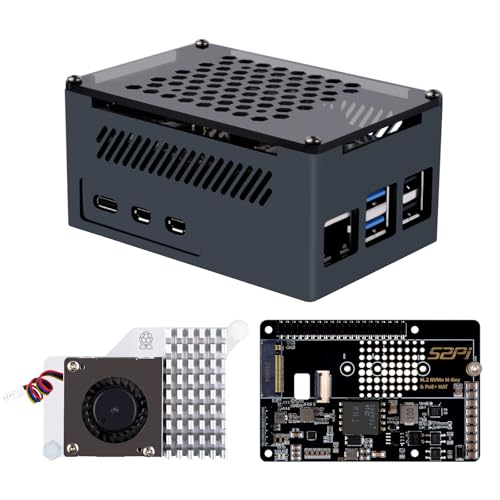 | GeeekPi P33 case | Best fit: PoE+ and NVMe HAT build Storage: M.2 NVMe 2230 to 2280 Network power: PoE+ HAT Cooling: Official Pi 5 active cooler | Check Price on Amazon |
 | Argon ONE V3 | Best fit: Aluminum PCIe NVMe base Storage: M.2 NVMe PCIe base Build: Aluminum Cooling: Case cooling | Check Price on Amazon |
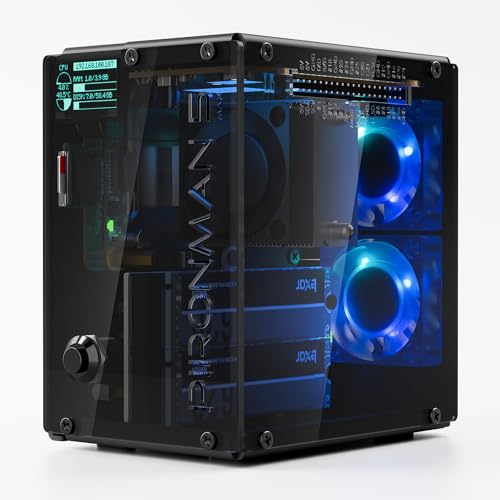 | SunFounder Pironman 5 MAX | Best fit: Dual-NVMe NAS or RAID build Storage: Two M.2 NVMe, RAID 0 or 1 Cooling: PWM tower cooler, dual fans Extras: OLED, Hailo-8L compatibility | Check Price on Amazon |
 | Geekworm P579 | Best fit: Top-mounted M.2 HAT case Storage: Top M.2 NVMe HAT Build: Metal Cooling: Active-cooler support | Check Price on Amazon |
 | Argon ONE V5 | Best fit: NVMe case with display and DAC support Storage: M.2 NVMe Build: Cast aluminum heatsink Extras: Dual display, DAC | Check Price on Amazon |
 | GeeekPi N04 case kit | Best fit: Complete NVMe case and power kit Storage: M.2 NVMe 2230 to 2280 Cooling: Official Pi 5 active cooler Power: 27 W USB-C supply included | Check Price on Amazon |
 | SunFounder Pironman 5 Pro Max | Best fit: Feature-rich dual-NVMe Pi desktop Storage: Dual NVMe, RAID 0 or 1 Display: 4.3-inch touchscreen Cooling: Tower cooling and PWM fans | Check Price on Amazon |
If the Pi becomes a permanent desktop or network appliance, a Pi 5 storage build also goes with a USB-C power meter, NVMe enclosure, mini UPS, USB-C dock, Ethernet switch, desk cable clips, compact keyboard, and monitor riser.
1. Argon NEO 5 — Best Simple Active-Cooled NVMe Case
A Pi that needs one fast system drive does not need a multi-drive NAS structure or a bundle of unrelated desktop hardware. Argon NEO 5 is an aluminum Raspberry Pi 5 enclosure with M.2 NVMe support and active cooling. The listing frames the case around booting a Pi 5 from NVMe storage for improved storage capacity and reliability.
The aluminum body and active cooling are the main features, so judge this case as a compact way to store and cool one drive. It does not claim a dual-NVMe RAID design, touchscreen, camera, or power-supply bundle. Choose the simpler specification when one NVMe disk and a tidy aluminum enclosure serve you better than a larger stack of accessories.
Decision point: M.2 NVMe support, an aluminum enclosure, and active cooling suit a compact Pi 5 system-drive upgrade. Our TakeChoose Argon NEO 5 when the goal is a straightforward Pi 5 NVMe build with active cooling and a compact aluminum body. It fits a fast single-drive desktop, server, or appliance better than an elaborate dual-drive workstation.
- Stated M.2 NVMe support gives a Pi 5 a path to fast storage without a separate enclosure.
- Active cooling covers the thermal plan for both the Pi 5 and the installed NVMe drive.
- The aluminum body suits a compact, durable desktop or appliance enclosure.
- The single-drive design skips the RAID decisions that dual-NVMe Pi 5 cases require.
- The listing does not offer dual M.2 NVMe slots or RAID 0 or 1 options for storage redundancy.
- No 27 W USB-C power supply is listed, unlike the more complete GeeekPi N04 case kit.
2. GeeekPi P33 Case — Best PoE+ and NVMe HAT Build
GeeekPi P33 fits a network-oriented Pi 5 build where a single Ethernet run can be part of the power plan. The manufacturer specifies an aluminum Pi 5 case with a P33 M.2 NVMe M-Key PoE+ HAT, the official active cooler, and support for 2230, 2242, 2260, and 2280 NVMe SSD sizes, so the storage module also gets flexible drive-length support.
According to the listing, the aluminum case is designed for the P33 HAT and keeps access to most Pi board ports. Choose it for the PoE+ plus NVMe arrangement, since it is not a generic case shell. Confirm your network-power setup and SSD size before you order, because the HAT-based layout is more specialized than a simple case with active cooling.
Decision point: PoE+, M-Key NVMe support for 2230 through 2280 drives, an aluminum case, and official active cooling suit network-powered Pi builds. Our TakeChoose GeeekPi P33 when the Pi 5 will live near Ethernet infrastructure and a PoE+ HAT belongs in the storage plan. It fits a wired appliance build that needs an M-Key NVMe drive and active cooling in one case.
- The P33 M-Key PoE+ HAT puts NVMe storage and network power in one stated Pi 5 arrangement.
- Support for 2230, 2242, 2260, and 2280 sizes gives buyers several listed NVMe length choices.
- An official Pi 5 active cooler is included, so you get a known cooling component rather than a bare case.
- The aluminum case keeps access to most Raspberry Pi board ports according to the listing.
- PoE+ can simplify a fixed network deployment by making Ethernet part of the stated power design.
- The specialized PoE+ HAT layout adds a dependency on network infrastructure for buyers who only need a local powered desktop.
- It uses one M.2 NVMe path rather than the dual-drive RAID arrangement on Pironman cases.
- The case is designed around the P33 HAT, so it is less of a generic enclosure choice.
3. Argon ONE V3 — Best Aluminum PCIe NVMe Base
A single NVMe build is simplest when the case and the drive connection come as one enclosure, and Argon ONE V3 is set up that way. It is an aluminum cooling case with an M.2 NVMe PCIe base for Raspberry Pi 5. The listing describes the base as a way to use the Pi 5 PCIe port.
Aluminum cooling is central to its design. It does not claim a bundled power supply, dual-drive RAID, or touchscreen. Choose it if you want an aluminum Pi case with the PCIe storage path built in and no need for the broader desktop hardware in Pironman configurations.
Choose Argon ONE V3 when an aluminum case with a dedicated PCIe NVMe base is the entire requirement. It is a clear middle ground between Argon NEO 5’s active-cooled simplicity and the larger dual-NVMe cases.
- The M.2 NVMe PCIe base gives the Pi 5 PCIe port a stated storage route built into the case.
- An aluminum cooling case puts the enclosure and thermal hardware together in one coordinated Pi build.
- The single M.2 design skips RAID configuration for users who need one system drive.
- Its Pi 5-specific PCIe base is more focused than using a separate generic NVMe accessory.
- One M.2 NVMe path cannot provide the dual-drive RAID 0 or 1 options stated for Pironman 5 MAX.
- No included 27 W power supply is listed, so power is a separate purchase decision.
4. SunFounder Pironman 5 MAX — Best Dual NVMe RAID Build
SunFounder Pironman 5 MAX suits a NAS, edge-computing, Home Assistant, or desktop build where two drives and cooling are the main reasons to choose a larger case. It is a Pi 5 case with dual M.2 NVMe slots and RAID 0 or 1 support, using a PCIe Gen2 switch. The listing also names a PWM tower cooler, dual RGB fans, OLED module, safe shutdown, and Hailo-8L compatibility.
Two drives change the purchase decision. RAID 0 and RAID 1 solve different storage goals, so do not treat them as interchangeable. The case also lists dual transparent panels, cable management, and full-size HDMI. Those extras can make a permanent Pi workstation tidier, but they add scope for buyers who only need one NVMe boot disk.
Decision point: Dual M.2 NVMe slots, RAID 0 or 1, a PCIe Gen2 switch, PWM tower cooling, dual fans, OLED, and Hailo support favor feature-rich Pi builds. Our TakeChoose Pironman 5 MAX when a Pi 5 needs two NVMe drives, a chosen RAID mode, and substantial cooling in a permanent case. It fits a storage-oriented or expanded desktop build and is not the minimal enclosure for one system drive.
- Dual M.2 NVMe slots provide a stated two-drive storage layout rather than a single system-disk path.
- RAID 0 or 1 support lets buyers choose between pooled performance and a mirrored storage arrangement.
- A PCIe Gen2 switch is listed as the component that handles storage expansion for the dual-NVMe layout.
- The case lists PWM tower cooling and dual RGB fans, a detailed active cooling specification.
- An OLED module and safe shutdown add stated desktop-management features beyond the storage hardware.
- Dual drives and RAID modes require more planning than a one-NVMe Argon or Geekworm case.
- The tower cooler, dual fans, OLED, and transparent panels add physical complexity for a simple appliance build.
5. Geekworm P579 — Best Top-Mounted M.2 HAT Case
A builder who prefers a metal case organized around a top storage HAT gets that layout with Geekworm P579, a metal PCIe case for Raspberry Pi 5 with a top M.2 NVMe HAT and active-cooler support. Its listing notes the P579-V2 update, including a case-height change from 35.8 mm to 40.8 mm. With the HAT mounted on top, the case height and clearance are more important than a generic claim about an NVMe case.
The P579 supports active cooling but does not state a bundled active cooler, dual drives, RAID, or a screen. Check which P579 revision is offered before you plan add-ons, because the listing acknowledges mixed V2, V3, and V4 stock.
Decision point: A metal PCIe case, top M.2 NVMe HAT, active-cooler support, and 40.8 mm updated height suit a top-mounted storage layout. Our TakeChoose Geekworm P579 when a top-mounted M.2 HAT and metal case are the preferred physical arrangement. It suits builders who will pick their own cooling and storage components instead of buying a large all-in-one desktop package.
- A top M.2 NVMe HAT provides a distinct physical storage arrangement for Raspberry Pi 5 builds.
- The metal PCIe case is a stated durable construction around the storage hardware.
- Active-cooler support lets buyers include thermal management in the build plan.
- The 40.8 mm case-height figure for the updated revision helps a buyer judge physical clearance.
- The listing notes mixed V2, V3, and V4 stock, so buyers should verify the offered P579 revision.
- Active-cooler support does not state that a cooler is included with the metal PCIe case.
- One top M.2 HAT does not provide the dual-NVMe RAID layout available in Pironman 5 MAX.
6. Argon ONE V5 — Best NVMe Case with Display and DAC Support
A Pi that sits at a desk with screens and audio gear needs display and audio connections as well as an NVMe drive. Argon ONE V5 is an M.2 NVMe case for Raspberry Pi 5 with dual display and DAC support. Its cast aluminum construction and listed built-in 30 mm PWM fan make the storage enclosure part of the Pi cooling plan.
The dual-display and DAC claims set V5 apart from a simple headless case. It is a single-NVMe design and not a RAID enclosure. Choose it for a Pi used at a desk with screens and audio hardware, and skip it for a storage appliance that only needs a network connection.
Decision point: M.2 NVMe storage, cast aluminum with a listed 30 mm PWM fan, dual display support, and DAC support suit a Pi 5 desktop media build. Our TakeChoose Argon ONE V5 when an NVMe Pi 5 also needs dual-display and DAC support in a cast-aluminum enclosure. It is the single-drive choice for a desktop media or productivity setup where those I/O features are needed.
- Stated M.2 NVMe support gives the Pi 5 a path to fast storage inside the desktop enclosure.
- Cast aluminum and a listed built-in 30 mm PWM fan give the case an active cooling plan.
- Dual display support suits a Pi workstation that needs two screen connections from one compact case.
- DAC support gives audio-focused builders a stated output feature beyond storage and cooling.
- The single-drive layout avoids RAID choices when a desktop Pi only needs one NVMe system disk.
- The built-in 30 mm PWM fan is a smaller active cooling arrangement than Pironman 5 MAX’s tower cooler and dual fans.
- One M.2 NVMe drive cannot provide the RAID 0 or 1 options listed on dual-NVMe Pironman cases.
7. GeeekPi N04 Case Kit — Best Complete NVMe Case and Power Kit
A first NVMe build is simplest when the storage, cooling, and power parts arrive together, and GeeekPi N04 case kit is the package that does that. It includes a metal Raspberry Pi 5 case, N04 M.2 NVMe PCIe board, official active cooler, and a rated 27 W USB-C power supply, and supports listed 2230, 2242, 2260, and 2280 NVMe SSD sizes. Buyers who would rather start with coordinated storage, cooling, and power components than source each separately get all of them in one kit.
According to the listing, the kit is compatible with Pi 5 4 GB and 8 GB boards. It is a single-drive configuration, without RAID or display-oriented features. The included 27 W supply simplifies an initial build, although buyers who already own a suitable supply may prefer a case without a duplicated power brick.
Choose GeeekPi N04 case kit when you are assembling a Pi 5 NVMe system from scratch and want a coordinated case, PCIe board, active cooler, and included 27 W power supply to reduce separate purchase decisions. It is the most complete single-drive package here.
- The N04 M.2 NVMe PCIe board gives the metal case a stated storage connection component.
- Listed 2230, 2242, 2260, and 2280 support gives a buyer four NVMe length options.
- An official Pi 5 active cooler is included instead of requiring an additional cooling purchase.
- The included 27 W USB-C power supply means power comes with the stated complete-kit specification.
- The package is a single-NVMe layout without the RAID 0 or 1 options of dual-drive cases.
- Buyers who already own a suitable 27 W supply may not need the kit’s included power hardware.
- The listing targets Pi 5 4 GB and 8 GB boards, so the buyer should match that stated compatibility.
8. SunFounder Pironman 5 Pro Max — Best Feature-Rich Dual NVMe Pi Desktop
SunFounder Pironman 5 Pro Max is a Pi 5 enclosure for a visually equipped desktop, AI, NAS, or smart-home project, not a basic drive case. It combines dual NVMe RAID 0 or 1, a 4.3-inch touchscreen, adjustable camera, USB microphone, built-in audio amplifier, and M.2 Hailo-8 or 8L compatibility. It also lists a PCIe Gen2 switch, tower cooling, PWM RGB fans, OLED display, dual full-size HDMI, and USB-C power.
The extra hardware means more planning. The camera, microphone, audio amplifier, screen, and storage options help only when the project uses them. It is a strong option for an all-in-one Pi workstation, but a headless service with one SSD is better served by the simpler Argon or GeeekPi choices.
Decision point: Dual NVMe RAID, a 4.3-inch touchscreen, camera, microphone, audio amplifier, Hailo M.2 support, tower cooling, and dual HDMI favor an all-in-one Pi desktop. Our TakeChoose Pironman 5 Pro Max when the Pi 5 is becoming a visible, interactive, dual-drive desktop or edge project. Its screen, camera, audio, cooling, and RAID capability are useful for an all-in-one build but unnecessary for a small headless server.
- Dual NVMe slots with RAID 0 or 1 support give a stated storage foundation for expanded Pi builds.
- The 4.3-inch touchscreen gives the case a dedicated place to show status and take touch input.
- Camera, USB microphone, and audio amplifier hardware suit projects that need local visual and audio I/O.
- M.2 Hailo-8 or 8L compatibility adds a stated accelerator path beside the dual storage layout.
- Tower cooling, PWM fans, OLED, and dual full-size HDMI make for a detailed desktop workstation specification.
- The screen, camera, audio, and accelerator features add complexity beyond a basic single-NVMe Pi appliance.
- Dual-drive RAID requires a deliberate storage-mode choice before treating the system as a simple desktop.
Buying Guide: Choosing a Raspberry Pi 5 NVMe SSD Enclosure Case
Decide between one NVMe drive and a dual-drive arrangement
One NVMe drive is the simpler storage path for a Pi 5 system disk. Argon NEO 5, Argon ONE V3, Argon ONE V5, Geekworm P579, and GeeekPi N04 each describe one M.2 route. A single drive suits a desktop, network appliance, or small server where the decision comes down to drive capacity, cooling, and the physical enclosure.
Dual drives change the project into a storage-layout decision. Pironman 5 MAX and Pironman 5 Pro Max list RAID 0 or 1, so the buyer must choose pooled performance or mirroring deliberately. Do not buy a dual-drive enclosure only because it has more hardware when a single system disk is the actual requirement.
Match the NVMe board and SSD length to the case
Check the storage interface before you buy, not after. GeeekPi P33 and N04 support 2230, 2242, 2260, and 2280 SSDs, so they are useful when you already own an NVMe drive with a specific length. The P33 M-Key board and the N04 PCIe board are named parts of each case configuration.
Other cases use a different physical arrangement. Geekworm P579 uses a top M.2 NVMe HAT, while Argon ONE V3 uses an NVMe PCIe base. Confirm the specific storage module and its clearance before ordering a drive, particularly when a case revision or top-mounted HAT affects the build shape.
Choose cooling for the workload and enclosure style
NVMe storage and a Pi 5 both need a thermal plan in a compact case. Argon NEO 5 lists active cooling, and GeeekPi N04 includes an official Pi 5 active cooler. Those two cases suit buyers who want active cooling that is explicitly stated or included.
Other models bundle more substantial cooling hardware. Pironman 5 MAX lists a PWM tower cooler and dual fans, while Argon ONE V5 lists a built-in 30 mm PWM fan with its cast aluminum body. Choose the cooling design that fits your drive layout, expected workload, and noise tolerance, and do not assume every aluminum case works the same way.
Check power and network needs before committing to a case
Power either comes in the case bundle or is a separate purchase. GeeekPi lists a manufacturer-rated 27W USB-C supply with the N04, which can simplify a first build. A buyer who already owns an appropriate supply may value a simpler enclosure more than another bundled brick.
Network power is a separate reason to choose a case. GeeekPi P33 includes a PoE+ HAT, so it fits a fixed Ethernet deployment where that infrastructure is already available. The PoE+ HAT adds a network-power requirement, so settle that before you pick this enclosure for a local desktop.
Pay for screens, audio, and AI hardware only when they serve the project
Some Pi cases are deliberately more than storage enclosures. Argon ONE V5 lists dual display and DAC support, which can help a small media or productivity desktop. The display and DAC features are useful when screen connections and audio output belong on the same Pi, and not when the board will run headlessly.
Pironman 5 Pro Max adds a 4.3-inch touchscreen, camera, USB microphone, audio amplifier, and Hailo M.2 support. Those components suit interactive edge or desktop projects, but they add cost and setup scope. Start with the role the Pi will play, and do not let feature density replace a clear storage and cooling decision.
Frequently Asked Questions
Do I need a case with two NVMe slots for Raspberry Pi 5?
No, a single NVMe case is enough when the Pi only needs one system or data drive. Argon NEO 5 and Argon ONE V3 each provide one M.2 NVMe route, so the build stays focused on storage, cooling, and a compact enclosure.
Choose two slots when the storage design needs them. Pironman 5 MAX and Pro Max list RAID 0 or 1, and that brings a different capacity, performance, or mirror decision than installing one faster SSD.
Which Pi 5 NVMe cases include cooling hardware?
Several listings include cooling hardware as part of the case specification. Argon NEO 5 lists active cooling, GeeekPi P33 includes an official active cooler, and GeeekPi N04 includes an official Pi 5 active cooler.
Cooling hardware varies by case design. Pironman 5 MAX lists a PWM tower cooler and dual fans, while Argon ONE V5 lists a built-in 30 mm PWM fan with its cast aluminum body. Match the cooling style to your build and enclosure arrangement.
Will these cases support my 2280 NVMe SSD?
Some listings explicitly state 2280 support. GeeekPi P33 and N04 each list 2230, 2242, 2260, and 2280 support, so those are the clearest choices when a 2280 drive is already selected.
Other cases describe NVMe compatibility without publishing the same four-size list. Argon NEO 5 and Argon ONE V3 state M.2 NVMe support, so verify the supported drive length for that exact enclosure before ordering an SSD.
Is PoE+ useful in a Raspberry Pi 5 NVMe case?
PoE+ is useful when the Pi will sit near network equipment and power can arrive through the Ethernet infrastructure. GeeekPi P33 combines a PoE+ HAT with M-Key NVMe support, which makes it the network-powered storage choice in this group.
PoE+ is not essential for a local desktop. The manufacturer-rated 27W USB-C supply included by GeeekPi gives a conventional way to power the Pi, while Argon cases let the buyer plan power separately. Choose PoE+ only when the network installation benefits from it.
What Pi 5 case is best for a visible desktop build?
Choose a desktop-oriented case when you need local display, audio, or status controls. Argon ONE V5 lists dual display and DAC support, which gives a single-NVMe Pi desktop a direct I/O reason to use that enclosure.
For a much more integrated build, Pironman 5 Pro Max lists a 4.3-inch touchscreen, camera, microphone, amplifier, dual HDMI, and dual NVMe RAID. That feature set suits an interactive Pi project rather than a headless server.
Bottom Line
Choose Argon NEO 5 for a simple active-cooled single-NVMe Pi 5 enclosure. Choose SunFounder Pironman 5 MAX when dual drives and RAID 0 or 1 define the build. Choose GeeekPi N04 case kit when a metal case, NVMe PCIe board, active cooler, and manufacturer-rated 27W supply should arrive together.