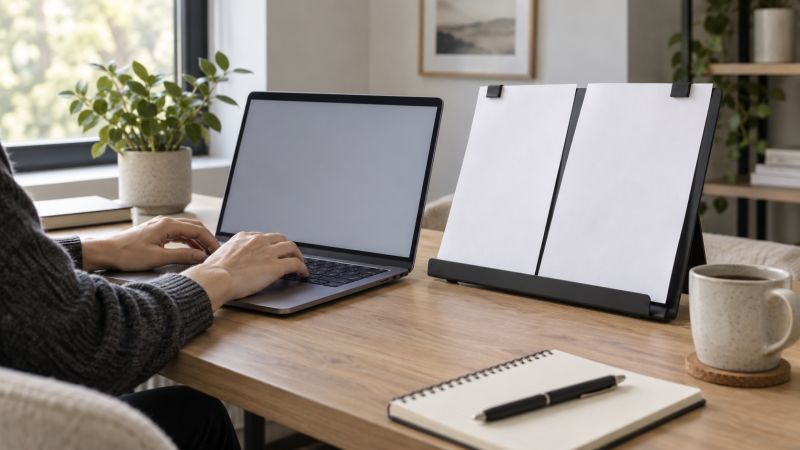
Typing from printed notes becomes awkward when the page lies flat beside a laptop. A holder brings it closer to the screen’s sightline and frees a hand from pinning the sheet to the desk. The right format depends on where the paper can sit, how many pages it must hold, and whether anything may attach to the laptop or monitor.
The five holders below are a desktop stand, an adhesive swing arm, a padded gooseneck clip, a tiny A4 page holder and a pack of hinged clips. We have not tested their grip or their effect on viewing comfort. Product dimensions, capacities and attachment descriptions below are seller-stated.
Before clipping or sticking anything to a display, check the laptop or monitor maker’s guidance for the bezel and finish. A free-standing holder avoids that attachment question.Document Holders Compared
| Image | Product | Details | Check Price |
|---|---|---|---|
 | TONOS Desktop Stand | Best fit: Full-page desk reference Mount: Free-standing Adjustability: 7 positions stated Paper limit: Confirm listing Footprint: 2.48 in base depth stated | Check Price on Amazon |
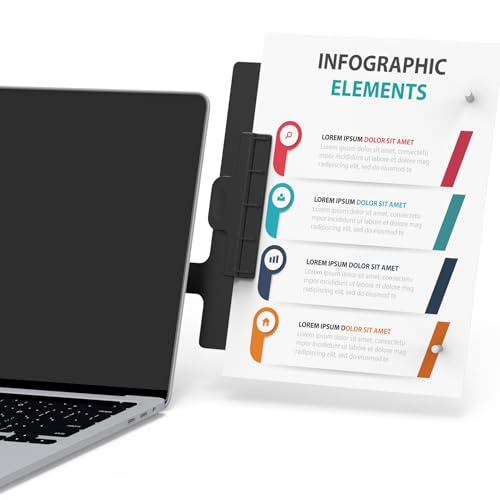 | HAUTOCO Swing Arm | Best fit: Sheets beside screen Mount: Adhesive base Adjustability: 180° swing stated Paper limit: Up to 10 sheets stated Storage: Removable arm | Check Price on Amazon |
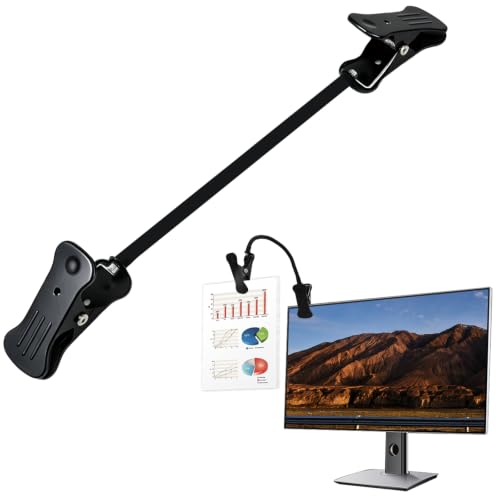 | Chrotopic Gooseneck | Best fit: Movable padded clip Mount: Screen or desk edge Adjustability: Flexible neck Paper limit: Not established Storage: Portable | Check Price on Amazon |
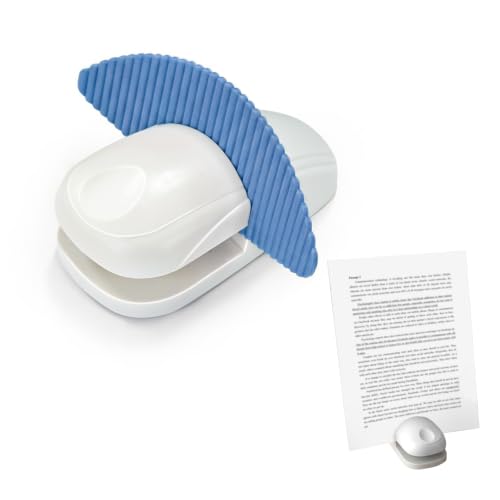 | Compact A4 Holder | Best fit: Small desktop footprint Mount: Free-standing Adjustability: Not stated Paper limit: Up to 20 sheets stated Footprint: 3.82 x 4.62 in | Check Price on Amazon |
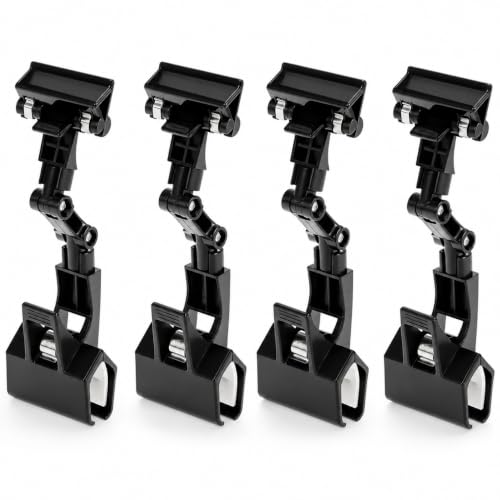 | QWORK Double Clips | Best fit: Several work areas Mount: Double-ended clips Adjustability: Hinged Paper limit: Not established Pack: 4 clips | Check Price on Amazon |
1. TONOS Desktop Stand — Best Full-Page Reference
TONOS is a free-standing paper support rather than a clip attached to the display. The seller describes seven viewing positions, a stainless-steel backplate, ABS parts and bottom arms that support pages. A stand makes sense for longer printed material or a full-page reference that a small monitor-side clip cannot easily hold. The stand also takes some desk area behind or beside the laptop.
The listing gives approximate dimensions of 9.05 inches wide by 12.08 inches high, with a 2.48-inch base depth, and says the stand folds for storage. Check how far it leans at the angle you actually want. Base depth alone does not describe the full desk footprint in use. Stability with a thick packet or book is not specified. Use the current listing’s pictures to verify that your paper size sits between the support arms.
A desk stand can hold more visible page area, but it must not force the keyboard too far forward or block the laptop screen.Our Take Pick TONOS for full-page reference at a fixed desk when you do not want to attach a clip to the display. Choose a monitor-side holder when keyboard and paper must share a narrow desktop.
- Seven seller-stated viewing positions.
- Full-page backplate and support arms.
- Folds for storage, according to the listing.
- Takes desk area near the laptop.
- In-use lean may exceed the listed base depth.
2. HAUTOCO Swing Arm — Best Paper Beside the Screen
HAUTOCO describes a 180-degree adjustable swing arm with a clip that holds up to ten sheets. It uses an adhesive base that the seller says can attach to a monitor, desk or wall. The arm can then be removed from the base. The arm can put a short printed script or set of notes near the screen without occupying the main work surface.
The tradeoff is the adhesive mounting surface. A laptop lid, display bezel and desk finish are not interchangeable. Check what the device maker allows, and consider placing the base on the desk rather than a sensitive screen. The ten-sheet claim does not establish how well a stack stays aligned while the arm swings. Leave room for the laptop lid to open and close without striking the paper.
Our Take Choose HAUTOCO for a few sheets that should sit beside the display, provided you have a suitable adhesive surface. A free-standing desk holder avoids attachment concerns.
- 180-degree arm adjustment stated.
- Up-to-ten-sheet listing claim.
- Removable arm can simplify storage.
- Adhesive may not suit every display or desk finish.
- Swing path needs space beside the screen.
3. Chrotopic Gooseneck — Best Soft-Padded Clip
Chrotopic’s holder uses a flexible gooseneck and a padded clip. The seller describes a lightweight metal body and soft foam where it contacts papers or a screen edge. The clip method differs from HAUTOCO’s adhesive swing arm. You can move the clip between locations without leaving a base stuck to one surface.
The listing says it can attach to laptops and flat displays, but it does not provide a reliable sheet capacity or clamp-force figure in the material used here. A thin modern bezel may be a poor grip point even with foam padding. Check the monitor or laptop maker’s guidance, avoid covering pixels or ports, and test the clip on a non-sensitive edge before leaving papers hanging from it. The gooseneck’s flexibility may also let a heavier page sag.
A padded clip can reduce contact risk, but padding does not prove that a screen edge is designed to carry an accessory.Our Take Pick Chrotopic for a movable, light-paper clip when a safe mounting edge exists. Choose a desktop stand for thicker reference packets or delicate screen bezels.
- Gooseneck position can be adjusted without adhesive.
- Foam contact points described.
- Lightweight format for moving between desks.
- Sheet capacity is not established.
- Clip suitability depends on the display edge.
4. Compact A4 Holder — Best Tiny Desk Footprint
This small blue stand advertises a 3.82-by-4.62-inch base and a 0.17-pound listed weight. It is designed to hold A4 papers upright next to a keyboard rather than support a full stiff board behind them. A compact base helps at a narrow laptop desk, but it also gives the page less broad support than TONOS’s backplate.
The seller claims the slide-in clamp can hold up to 20 sheets and describes rubber pads under the base. The figure is a capacity claim, not a test result. A tall stack can obscure the line you are copying from or pull a light stand forward. The product description does not establish adjustable viewing positions. Check whether the fixed angle and paper height align with your laptop screen before choosing it for lengthy transcription.
Our Take Pick this compact stand when an A4 page must fit beside a laptop on a crowded desk. Choose an adjustable full-page stand if viewing angle is more important than footprint.
- Small published base footprint.
- Up-to-20-sheet seller claim.
- Rubber base pads described.
- No adjustable angle established.
- Light base may be less forgiving with a tall packet.
5. QWORK Double Clips — Best Multi-Desk Pack
QWORK’s exact offer is a pack of four double-ended clips. One end attaches to a monitor, laptop edge or other support. The other end holds a reference sheet. The seller describes multiple hinges for changing the angle and a folding format for storage. The pack may be useful when a shared workspace needs lightweight paper holders at several screens without buying four larger stands.
The clips are described as reinforced PP plastic, but the listing used here does not specify a reliable page-weight limit or which modern bezel thicknesses are compatible. A pack count is not a promise that every clip will fit your devices. Compare the attachment points with the current product photos, and avoid clamping over a screen’s active area or onto a fragile lid. For full-page documents handled repeatedly, a separate stand may be more stable.
Our Take Choose QWORK when several desks need occasional single-sheet reference clips. For one workstation and longer documents, prioritize a holder with a broader support surface.
- Four holders in the exact pack.
- Hinged, foldable double-clip design.
- Can be moved between compatible support edges.
- No documented page-weight limit here.
- Thin display edges need a compatibility check.
Buying Guide
1. Put paper close to the screen’s sightline
Place the printed page where your eyes already return between typed lines. A side-mounted sheet near the laptop display can reduce the distance you move your gaze across the desk, while a desktop stand may be easier for a large page or packet. The best position varies with screen height, page size and your seated posture. If the laptop screen itself sits too low, a laptop stand and separate keyboard may help the whole work area. A clip alone cannot fix screen height.
Check viewing distance as well as angle. A page beside the screen can still be too close or far compared with the display, and repeated refocusing is tiring. Move the holder before committing adhesive to one spot. A home-office monitor guide helps with screen placement, but the paper and display should both be legible from the same comfortable chair position.
2. Choose attachment versus a free-standing base
A desktop stand uses some space but avoids loading the laptop lid or monitor edge. TONOS supports a page on a backplate. The compact A4 holder uses a much smaller base. Check that either stand leaves room to type without pushing the laptop to an awkward distance. A shallow desk may favor a side clip if there is a safe place to mount it.
A screen-side holder needs a known attachment surface. Adhesive, padded gooseneck and hinged double clips each have different contact demands. A manufacturer might not approve attaching anything to a display bezel or lid. Do not infer safety from “compatible with laptops” in a marketplace title. If you often carry the laptop away, consider how quickly the accessory can be removed without leaving adhesive or stressing the screen.
3. Match paper support to the document
A single loose page can work with a simple clip. Several sheets, heavy paper or a booklet need a broader base or a holder whose seller specifies sufficient capacity. The table shows these designs separately and does not assume that a stated sheet count applies equally to all paper types. Try the exact page size and orientation you will type from.
For long transcription sessions, check whether the holder makes it easy to move from one line or sheet to the next. A programmable shortcut keypad can help with repeated computer commands, but it does not solve a page that slips or falls when turned. Keep the paper holder away from the webcam and microphone area if calls share the same laptop desk.
FAQ
Will a clip damage a laptop screen?
It depends on where and how it attaches. A soft pad does not prove that the bezel or lid can safely support a clip, and adhesive may affect a finish. Check the laptop maker’s instructions and avoid the active display area, hinges, vents and camera. We have not tested these accessories on any specific laptop.
A free-standing desk holder is the simpler option when compatibility is uncertain. If you use a clip, attach and remove it according to its instructions rather than pulling sideways on the screen edge.
Is a monitor-side clip better than a desk stand?
Neither is universally better. A clip can save desktop area and put a light page near the display. A stand can support a larger page or thicker packet without loading the monitor. The right choice depends on available desk area, paper weight and whether the display has a safe attachment point.
Place both the page and screen where you can read them from a comfortable typing position. A side clip that forces constant head turning is not an improvement over a stand in front of you.
How many pages can these holders carry?
Only some listings state a numerical sheet capacity. The HAUTOCO and compact A4 stand sellers state sheet counts in their offers, but paper weight, orientation and movement can change practical holding behavior. Other products here do not provide a reliable comparable figure in the material used for this article.
For a thick packet, consider a backplate or a different document-reading setup rather than overloading a small clip. Verify the current seller instructions before putting heavy paper on any holder attached to a screen.
Bottom Line
Choose the holder that keeps the paper visible without creating a new desk or display problem. TONOS supports full-page material. HAUTOCO brings a short packet beside the screen. Chrotopic moves without adhesive, the compact A4 stand saves desk space, and QWORK supplies several hinged clips for light references. Check attachment safety and actual paper size before buying.