An external USB-C Blu-ray writer lets a thin laptop burn BD, DVD, and CD discs. The choice comes down to the disc capacity you need, the cable your laptop needs, and the burning or playback software you already own.
Each of the six drives below has an Amazon listing that states Blu-ray writing and a Type-C cable or connector. For ordinary CDs and DVDs, see our external DVD drive guide. For files recovered from a removed laptop drive, use a SATA-to-USB adapter instead of trying to treat an optical writer as a storage enclosure.
USB-C is only the plug. The disc types a drive writes and the software on your computer decide whether a Blu-ray job finishes.Best External USB-C Blu-Ray Writers Compared
| Image | Product | Details | Check Price |
|---|---|---|---|
 | ASUS SBW-06D5H-U | Best fit: M-DISC archiving USB connection: Type-C and Type-A cables Write capability: 6x BD-R Extra I/O: None stated Software note: Bundles CyberLink Power2Go 8 and Nero BackItUp | Check Price on Amazon |
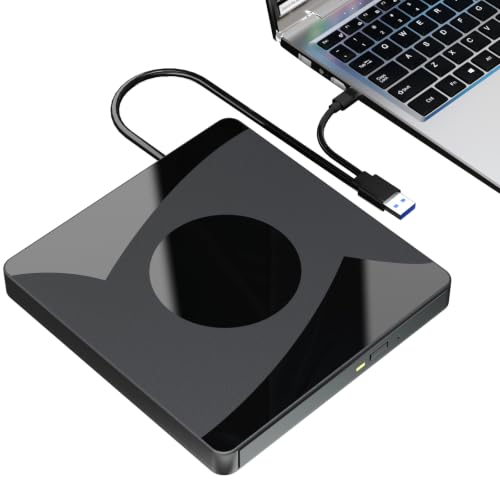 | Taopjwr XD032 External Blu-ray Drive | Best fit: 50GB Blu-ray discs USB connection: Built-in USB 3.0 and Type-C cable Write capability: Up to 6x BD, 8x DVD, 24x CD Extra I/O: None stated Software note: Playback and burning software not included | Check Price on Amazon |
 | GOOBOX GBX-BD100 | Best fit: Cable stored under the drive USB connection: Integrated USB 3.0 and Type-C cable Write capability: Up to 6x BD, 8x DVD, 24x CD Extra I/O: None stated; external power cable included Software note: Blu-ray playback needs third-party software | Check Price on Amazon |
 | JOYIN-BURN BU50N | Best fit: Aluminum case USB connection: Type-C and USB 3.0 cables Write capability: BD, DVD, and CD Extra I/O: None stated Software note: Playback and writing software not included | Check Price on Amazon |
 | Wbacon 7-in-1 External Blu-ray Drive | Best fit: 100GB discs and card slots USB connection: 2-in-1 USB 3.0 and Type-C cable Write capability: 100GB discs; BD, DVD, and CD Extra I/O: SD, TF, two Type-C, USB 3.0, USB 2.0 Software note: Playback and writing software not included | Check Price on Amazon |
 | BUNUD 5-in-1 External Blu-ray Drive | Best fit: Two USB ports and card slots USB connection: USB and Type-C cables Write capability: Blu-ray, DVD, and CD read/write Extra I/O: Two USB ports, SD and TF slots Software note: None stated | Check Price on Amazon |
1. ASUS SBW-06D5H-U — Best for M-DISC Archives
ASUS describes the SBW-06D5H-U as a portable USB 3.1 Gen 1 Blu-ray burner with 6x BD-R writing and M-DISC support. The Amazon title also lists BDXL, which ASUS’s own product page does not mention, so confirm BDXL on the Amazon page before buying 100GB discs.
ASUS supplies a Type-C cable and a Type-A cable, so the drive connects to a USB-C laptop or a USB-A computer. ASUS says it works with Mac OS X and Windows without any installation, and it bundles CyberLink Power2Go 8 for burning and Nero BackItUp for archiving.
Our Take
Buy the ASUS SBW-06D5H-U when you want M-DISC archiving stated by the maker, cables for both common laptop ports, and burning software included. Skip it if you need a card reader or extra USB ports, because ASUS lists neither, and the Wbacon and BUNUD below include both.
- ASUS states 6x BD-R writing for the SBW-06D5H-U.
- ASUS states M-DISC support for the SBW-06D5H-U, and no other drive on this page names M-DISC.
- ASUS supplies a Type-C cable and a Type-A cable with the SBW-06D5H-U, so the drive connects to a USB-C laptop or a USB-A computer.
- ASUS bundles CyberLink Power2Go 8 and Nero BackItUp with the SBW-06D5H-U, covering both burning and archiving.
- The Amazon title lists BDXL for the SBW-06D5H-U, but ASUS’s own product page does not mention it, so BDXL support needs confirming on the Amazon page.
- ASUS lists no card slots or extra USB ports for the SBW-06D5H-U, so skip it if you need a card reader or extra ports.
2. Taopjwr XD032 External Blu-ray Drive — Best for 50GB Blu-ray Discs
The Amazon listing for the Taopjwr XD032 states a built-in 2-in-1 USB 3.0 and Type-C cable, speeds up to 6x BD, 8x DVD, and 24x CD, and 50GB Blu-ray discs for both reading and writing. Amazon shows Taopjwr as the brand and XD032 as the model, although the title names neither, so check both on the product page.
The listing says no driver is needed and that the drive works with Windows, macOS, and Linux. It says playback and burning software is not included, names PowerDVD, Leawo, Macgo, and VLC as options, and states that 4K Ultra HD Blu-ray discs are not supported. It also claims 3D Blu-ray playback.
Taopjwr says 4K Ultra HD Blu-ray discs are not supported and that burning software is not included.Our Take
Buy the Taopjwr XD032 when you want a USB-C-capable writer with stated 50GB disc support and both host connectors built into the cable. Choose the ASUS for M-DISC support stated by its maker, or the GOOBOX if you want an external power cable included.
- Taopjwr states a built-in USB 3.0 and Type-C cable for the XD032, so one cable covers both host connectors.
- Taopjwr states 50GB Blu-ray disc support for both reading and writing.
- Taopjwr states speeds up to 6x BD, 8x DVD, and 24x CD for the XD032, covering all three disc types.
- Taopjwr states that the XD032 works with Windows, macOS, and Linux and needs no driver.
- Taopjwr says playback and burning software is not included with the XD032 and that 4K Ultra HD Blu-ray discs are not supported.
- Taopjwr lists no card slots or extra USB ports for the XD032.
3. GOOBOX GBX-BD100 — Best with Built-In Cable Storage
The Amazon listing for the GOOBOX GBX-BD100 describes a 2-in-1 integrated cable with USB 3.0 and Type-C connectors, kept in a storage slot on the bottom of the drive so the cable does not get lost. GOOBOX states maximum speeds of 6x for BD, 8x for DVD, and 24x for CD, and support for BD-ROM, BD-R/RE, DVD±R/RW, DVD-RAM, and CD-R/RW.
GOOBOX says to connect the included external power cable on low-power devices, and that Blu-ray playback needs third-party software such as VLC, Leawo, or PowerDVD. For 3D Blu-ray playback it says a 3D-capable display and compatible software are required. The listing excludes Chromebooks, TVs, tablets, iPads, and car systems.
GOOBOX advises connecting the included external power cable on low-power devices.Our Take
Buy the GOOBOX GBX-BD100 when the drive travels between USB-C and USB-A computers and you want the cable stored under the drive with a power cable included. Choose the ASUS for M-DISC support stated by its maker.
- GOOBOX stores the GBX-BD100’s integrated USB 3.0 and Type-C cable in a slot under the drive, so the cable does not get lost.
- GOOBOX states speeds of 6x BD, 8x DVD, and 24x CD for the GBX-BD100.
- GOOBOX includes an external power cable with the GBX-BD100 for low-power devices.
- GOOBOX states that the GBX-BD100 supports BD-R/RE, DVD±R/RW, DVD-RAM, and CD-R/RW discs.
- GOOBOX says the GBX-BD100 needs third-party software such as VLC, Leawo, or PowerDVD for Blu-ray playback.
- GOOBOX says 3D Blu-ray playback on the GBX-BD100 needs a 3D-capable display and compatible software.
- GOOBOX lists no card slots or extra USB ports for the GBX-BD100.
4. JOYIN-BURN BU50N — Best Aluminum-Case USB-C Option
The Amazon listing for the JOYIN-BURN BU50N describes a full aluminum case, tray loading, two supplied cables for Type-C and USB 3.0 connections, and reading and writing of BD, DVD, and CD discs. Its title and first bullet also claim full-function UHD 4K Blu-ray playback with suitable third-party software.
The listing says 4K Ultra HD playback and writing software is not included, and it excludes BD recorders, tablets, iPads, Surface tablets, TVs, projectors, smartphones, and cars. It names Nero, Leawo, iDeer, CyberLink PowerDVD, Mac Blu-ray Player, and Macgo for Blu-ray playback, and says CD and DVD playback needs no software. Treat the drive as a computer accessory.
Our Take
Buy the JOYIN-BURN BU50N if you want an aluminum case, two cables, and the only listing on this page that claims UHD 4K Blu-ray playback, and you already own disc software. Skip it for a television or tablet, which the listing excludes, and choose the Wbacon or BUNUD if you want card slots.
- JOYIN-BURN states a full aluminum case for the BU50N.
- JOYIN-BURN supplies two cables for the BU50N’s Type-C and USB 3.0 connections.
- JOYIN-BURN states that the BU50N reads and writes BD, DVD, and CD discs.
- JOYIN-BURN claims full-function UHD 4K Blu-ray playback with suitable third-party software, which no other listing on this page claims.
- JOYIN-BURN says playback and writing software is not included with the BU50N, so you need your own application before the first disc.
- JOYIN-BURN excludes TVs, projectors, tablets, smartphones, and cars from the devices the BU50N supports.
- JOYIN-BURN lists no card slots or extra USB ports for the BU50N.
5. Wbacon 7-in-1 External Blu-ray Drive — Best for 100GB Discs and Card Slots
The Amazon listing for the Wbacon 7-in-1 says it reads and writes 100GB discs and lists an SD slot, a TF slot, two Type-C ports, one USB 3.0 port, one USB 2.0 port, and a 2-in-1 USB 3.0 and Type-C cable for data transfer or charging. It also says the SD and TF slots cannot be used at the same time, although either works alongside the USB ports.
The listing says Blu-ray playback and writing both need software that is not included, and it names PowerDVD, Leawo Blu-ray Player, and VLC. It gives reading speeds of up to 6x for Blu-ray, 8x for DVD, and 24x for CD but no writing speed, and it states that UHD 4K Blu-ray playback is not supported.
Our Take
Buy the Wbacon 7-in-1 External Blu-ray Drive when 100GB discs and card slots belong in the same backup setup. Choose the ASUS for M-DISC support stated by its maker, or the BUNUD if two USB ports and card slots are enough.
- Wbacon states 100GB disc read and write support for the 7-in-1.
- Wbacon lists SD and TF slots on the 7-in-1 for transferring music, movie, and data files.
- Wbacon lists two Type-C ports, one USB 3.0 port, and one USB 2.0 port on the 7-in-1.
- Wbacon supplies a 2-in-1 USB 3.0 and Type-C cable with the 7-in-1.
- Wbacon says Blu-ray playback and writing both need software that is not included with the 7-in-1.
- Wbacon says the 7-in-1’s SD and TF slots cannot be used at the same time, although either works alongside the USB ports.
- Wbacon says the 7-in-1 does not support UHD 4K Blu-ray playback.
6. BUNUD 5-in-1 External Blu-ray Drive — Best with Two USB Ports and Card Slots
The Amazon listing for the BUNUD 5-in-1 calls it a Blu-ray burner with read and write support, two USB ports, and SD and TF slots, and says it comes with two cables, USB and Type-C, with the cable embedded in the body for storage. The title names no brand, and Amazon shows BUNUD as the brand and BUNUD_5IN1 as the model, so check both on the product page. The title calls the drive both a burner and a reader and gives no disc capacity or writing speed.
The listing says the drive does not play 4K Ultra HD discs and does not work with iPads, tablets, projectors, TVs, Chrome OS, cars, or smartphones. It describes the interface as low power consumption without giving a power requirement, and it states no playback or burning software.
BUNUD pairs a Blu-ray writer with two USB ports and SD and TF slots, and it states no playback or burning software.Our Take
Buy the BUNUD 5-in-1 External Blu-ray Drive when you want a USB-C or USB-A disc writer with two USB ports, card slots, and a cable stored in the body. Skip it if you need 100GB disc support, which its listing does not mention, and choose the Wbacon instead.
- BUNUD lists two USB ports and SD and TF slots on the 5-in-1.
- BUNUD says the 5-in-1 comes with USB and Type-C cables and embeds the cable in the body for storage.
- BUNUD describes the 5-in-1 as a Blu-ray burner with read and write support.
- BUNUD says the 5-in-1 does not play 4K Ultra HD discs.
- BUNUD says the 5-in-1 does not work with iPads, tablets, projectors, TVs, Chrome OS, cars, or smartphones.
- BUNUD lists no software for playing or burning discs on the 5-in-1.
Buying Guide
1. Does USB-C change Blu-ray burning?
USB-C is the plug, not a disc-speed rating. The ASUS SBW-06D5H-U states 6x BD-R writing, while the Taopjwr XD032 and GOOBOX GBX-BD100 each state speeds up to 6x BD, 8x DVD, and 24x CD. Compare the writing speeds and disc types a drive states before assuming a newer port makes a disc burn faster.
All six listings state a Type-C cable or connector, so a laptop with only USB-C can use any of them without an adapter. Plug the drive straight into the laptop for the first burn rather than through a hub.
2. Which discs need BDXL or M-DISC support?
BDXL is the higher-capacity Blu-ray format. The Amazon title for the ASUS SBW-06D5H-U lists BDXL, but ASUS’s own product page does not mention it, while the Wbacon 7-in-1 says it reads and writes 100GB discs without using the BDXL name. Read the label on the blank disc, because a BD-R, a BD-RE, and a 100GB disc do not ask the drive for the same thing.
M-DISC is a separate media claim. The ASUS SBW-06D5H-U is the only drive here that names M-DISC, and the ASUS product page states it. Match that support to the exact disc you plan to burn before an archive project depends on it.
3. Does a laptop port supply enough power?
Only one listing gives clear power guidance. The GOOBOX GBX-BD100 says to connect its included external power cable on low-power devices. The BUNUD 5-in-1 describes low power consumption without a figure, and the ASUS SBW-06D5H-U, Taopjwr XD032, JOYIN-BURN BU50N, and Wbacon 7-in-1 state no power requirement.
The extra ports on the Wbacon and BUNUD are listed for cards and file transfer. For a long burn, leave other storage unplugged and run the laptop from its charger.
4. What do Windows and Mac users need for playback and burning?
A writer is hardware, and software is a separate step. The ASUS SBW-06D5H-U bundles CyberLink Power2Go 8 and Nero BackItUp. The Taopjwr XD032, JOYIN-BURN BU50N, and Wbacon 7-in-1 say playback or burning software is not included, and the GOOBOX GBX-BD100 says Blu-ray playback needs third-party software. The BUNUD 5-in-1 states no software either way.
Check the operating system before buying. The ASUS page lists Mac OS X and Windows, and the Taopjwr, GOOBOX, Wbacon, and BUNUD listings also name Linux. Confirm that your software supports the disc format you need, whether that is data burning, DVD playback, or Blu-ray playback.
FAQ
Can a USB-C Blu-ray writer burn DVDs and CDs too?
Five of the six listings state DVD and CD along with Blu-ray. The Taopjwr XD032, GOOBOX GBX-BD100, JOYIN-BURN BU50N, and Wbacon 7-in-1 each state BD, DVD, and CD writing, and the BUNUD 5-in-1 title states read and write for Blu-ray, CD, and DVD. The ASUS SBW-06D5H-U page and title name Blu-ray and M-DISC burning and do not mention DVD or CD.
The blank disc determines the task. Use a DVD-burning application for a DVD, and choose Blu-ray authoring or data-burning software for BD media.
Do external Blu-ray writers play 4K UHD Blu-ray movies?
Only the JOYIN-BURN BU50N claims it, with full-function UHD 4K playback using suitable third-party software. The Taopjwr XD032, Wbacon 7-in-1, and BUNUD 5-in-1 each say they do not play 4K Ultra HD discs.
Read each listing’s UHD statement before buying for a movie library. A writer chosen for data backups may not suit UHD movies, and playback also needs software that supports the disc.
Does a USB-C cable provide enough power for burning?
The listings give little guidance. The GOOBOX GBX-BD100 says to connect its included external power cable on low-power devices, and the BUNUD 5-in-1 describes low power consumption without a figure. The ASUS SBW-06D5H-U, Taopjwr XD032, JOYIN-BURN BU50N, and Wbacon 7-in-1 state no power requirement.
Start with a direct laptop connection. If a burn is interrupted, disconnect other peripherals and try again with the laptop on its charger.
What is BDXL, and do I need it?
BDXL is a higher-capacity Blu-ray format for discs beyond ordinary dual-layer media. The Amazon title for the ASUS SBW-06D5H-U lists BDXL, though ASUS’s product page does not mention it, and the Wbacon 7-in-1 says it reads and writes 100GB discs.
You need BDXL support only when your blank discs require it. Check the media packaging and the drive’s stated formats before buying. For CD, DVD, or ordinary BD-R burns, BDXL may not affect the decision.
Can these drives work with a TV, tablet, or Chromebook?
Four of the six listings exclude TVs and tablets by name. The JOYIN-BURN BU50N excludes BD recorders, tablets, iPads, Surface tablets, TVs, projectors, smartphones, and cars. The Taopjwr XD032 excludes Chromebooks, smartphones, tablets, TVs, and car players, and the GOOBOX GBX-BD100 excludes Chromebooks, TVs, tablets, iPads, and car systems. The BUNUD 5-in-1 excludes iPads, tablets, projectors, TVs, Chrome OS, cars, and smartphones.
Plan on a Windows or Mac computer, with Linux where the listing names it. For a television setup, look for a dedicated player designed for that display rather than an external writer.
Bottom Line
The ASUS SBW-06D5H-U is the pick for M-DISC archives, because ASUS states M-DISC and 6x BD-R writing. ASUS also supplies Type-C and Type-A cables and bundles burning software. Choose the Taopjwr XD032 for stated 50GB disc support, the GOOBOX GBX-BD100 for a cable stored under the drive and an included power cable, or the JOYIN-BURN BU50N for an aluminum case. For card slots, the Wbacon 7-in-1 adds 100GB disc support and the BUNUD 5-in-1 adds two USB ports.