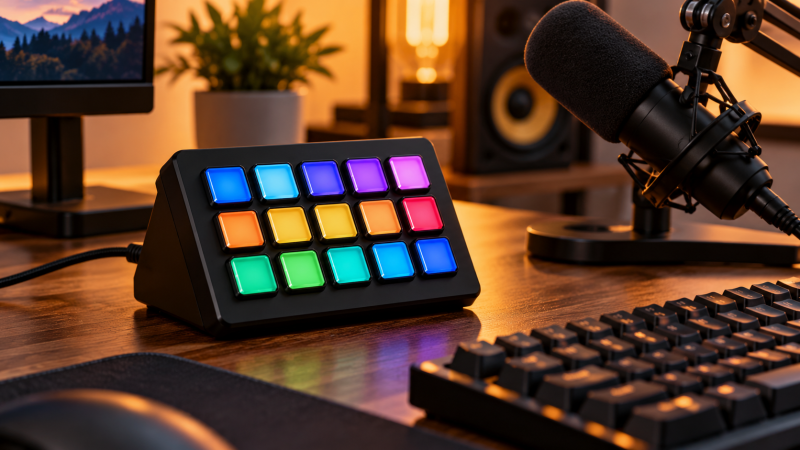
A desktop stream controller puts labeled actions within reach of your hand, so a live scene change or an editing command isn’t buried inside an application menu. The differences that decide the purchase are the number of visual keys, physical dials, status displays, connection requirements, software support, and whether the controller can handle both broadcast work and ordinary desktop shortcuts.
Choose the control count before chasing decorative extras. A 15-key deck can keep a streaming profile visible at once, while a six-key deck with dials can be the better fit beside a small keyboard. The listings below all state individual LCD or visual keys, so they are not static macro pads presented as stream controllers.
Choose the number of visual keys first, then decide whether dials, scene buttons, status displays, or numeric-keypad behavior will make daily control faster.Best Desktop Stream Controllers with Integrated LCD Keys Compared
| Image | Product | Details | Check Price |
|---|---|---|---|
 | VSDINSIDE VSD M18 | Best fit: 15 LCD keys plus three physical buttons Controls: 15 LCD keys, 3 physical buttons Connection: USB-C Compatibility: Windows 11+, macOS 11+ | Check Price on Amazon |
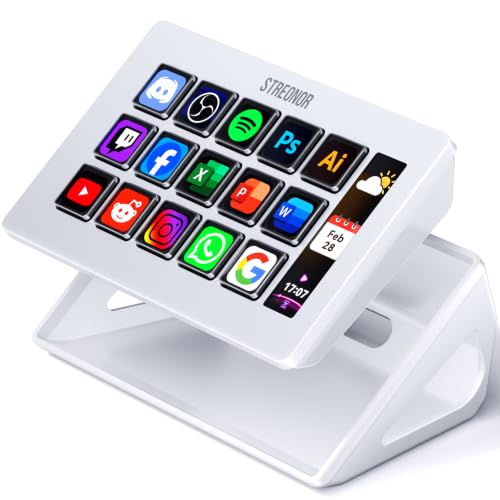 | Streonor S15 | Best fit: Visual controls with separate status displays Controls: 15 LCD keys, 3 status displays Connection: USB Compatibility: Windows 10+, macOS 11+ | Check Price on Amazon |
 | FIFINE AmpliGame D6 | Best fit: 15-key streaming and editing workflows Controls: 15 LCD macro keys Visual feedback: Dynamic key displays, 9 RGB modes Apps: OBS, Streamlabs, Twitch, YouTube | Check Price on Amazon |
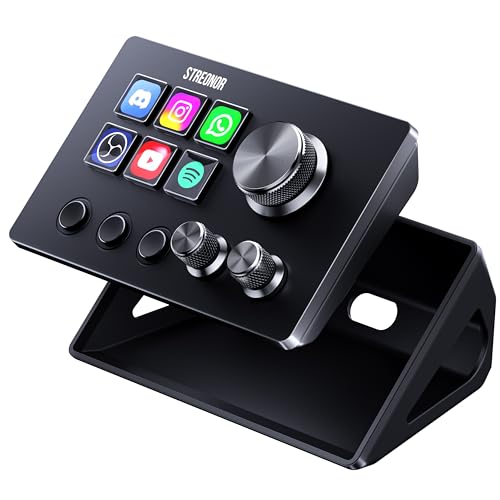 | Streonor S6 | Best fit: Compact control with physical dials Controls: 6 LCD keys, 3 knobs, 3 scene keys Connection: USB 3.0 recommended Compatibility: Windows 10+, macOS 11+ | Check Price on Amazon |
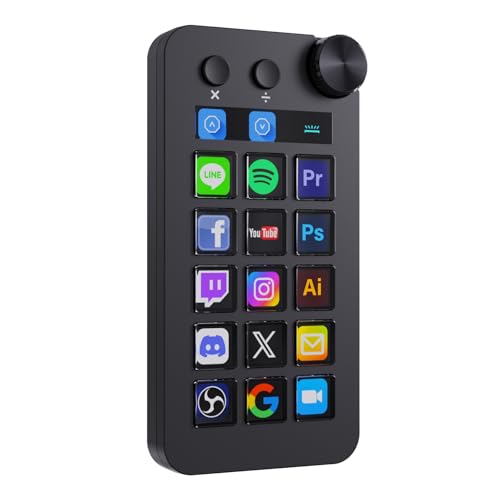 | TreasLin N1 | Best fit: Mixed visual keys and numeric-keypad mode Controls: 15 LCD keys, 2 click buttons, 1 knob Modes: Shortcut, calculator, numeric keypad Compatibility: Windows, macOS | Check Price on Amazon |
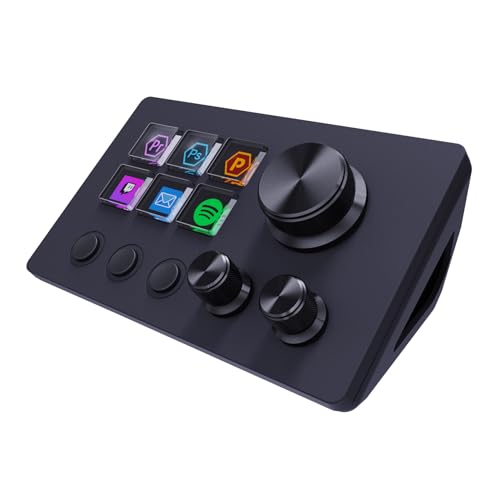 | ActionRing N3 | Best fit: Six-key dial control for small desks Controls: 6 LCD keys, 3 dials Icons: JPG, PNG, GIF Compatibility: Windows, macOS | Check Price on Amazon |
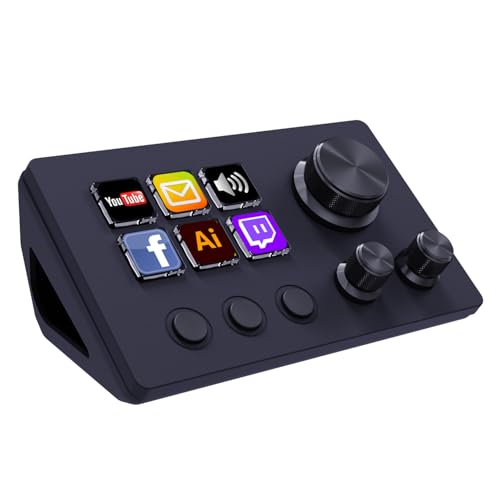 | TreasLin N3 | Best fit: Twelve-control compact macro deck Controls: 6 LCD keys, 3 tap buttons, 3 rotary buttons Icons: Dynamic animated icons Compatibility: Windows, macOS | Check Price on Amazon |
A broadcast desk also benefits from a USB microphone, webcam, monitor arm, quiet keyboard, headphone amplifier, USB-C dock, desk cable clips, and studio monitor wall mounts when the controller has to fit on a working desk.
1. VSDINSIDE VSD M18 — Best 15-Key Visual Control
If your streaming or editing profile needs many commands in view, VSDINSIDE VSD M18 combines 15 customizable LCD visual keys with three physical buttons, giving it 18 stated programmable controls. Each LCD key accepts JPG, PNG, and GIF images or animations, so a streaming scene, app command, or repeated editing action can be identified at a glance. The three physical buttons are a separate place for commands that do not need a changing icon.
The listing states USB-C connection and support for Windows 11 or newer and macOS 11 or newer. It names OBS, Streamlabs, YouTube, Discord, Excel, Word, and Photoshop among compatible software, which makes this a broad desk controller rather than a streaming-only purchase. Linux is specifically not listed as plug-and-play, so mixed-platform buyers should check their operating systems before building a profile.
Decision point: 15 LCD keys, three physical buttons, USB-C, and stated Windows 11 or macOS 11 support suit a control-heavy creator desk. Our TakeChoose VSD M18 if your live or editing profile needs fifteen visual keys and you still want three plain physical buttons. It suits buyers who want one desktop controller to handle scenes, apps, media, and repeated office tasks.
- Fifteen LCD keys give a large visual map for streaming scenes, editing commands, and application shortcuts.
- Three physical buttons raise the stated control count to 18 without consuming visual-key space.
- JPG, PNG, and GIF support lets the 15 LCD keys carry recognizable static or animated labels.
- USB-C connection suits modern desk routing and the listing names Windows 11 and macOS 11 support.
- OBS, Streamlabs, Photoshop, Excel, Word, and Discord are named for a wider creator and office workflow.
- The 15-key layout takes more planning than a six-key controller when only a few commands are repeated.
- Linux is not listed for plug-and-play use, which limits a controller intended for that desktop environment.
2. Streonor S15 — Best Visual Keys with Status Displays
If you want system readouts without spending action keys on them, Streonor S15 has 15 customizable LCD keys plus three non-touch status display panels. The separate panels can show supported weather, time, CPU temperature, GPU status, memory use, or system-performance information, while the visual keys keep actions such as OBS scenes, audio controls, and app launches within reach. Putting status on separate panels keeps passive readings apart from command labels more clearly than a controller with only visual buttons does.
The listing describes profiles for streaming, editing, office work, and gaming, as well as multi-action flows, plugins, icons, GIFs, and custom layouts. It supports Windows 10 64-bit or later and macOS Big Sur 11 or later, but says Linux is not supported. Connect it directly with a USB 2.0 or higher cable and remove similar controller software before setup, according to the listing guidance.
Decision point: 15 LCD keys plus three separate status displays suit a desk that needs command icons and at-a-glance system information together. Our TakeChoose Streonor S15 if you need many visual commands and would rather show system information on three dedicated status panels than fill action keys with it. It is the natural choice for buyers who want a streaming deck to double as a small display of desktop status.
- Fifteen customizable LCD keys give a full page of labeled commands for streaming, editing, and office work.
- Three status displays can show supported time, temperature, memory, GPU, or CPU information separately from actions.
- Multi-action flows let one visual key run an ordered sequence instead of consuming several controls.
- The listing names more than 100 plugins, providing a stated starting point for extending application controls.
- Windows 10 64-bit and macOS 11 support makes the S15 viable for many mixed desktop setups.
- Three non-touch status panels inform the user, but they do not add three more pressable controls.
- Linux is explicitly unsupported, so the Windows and macOS compatibility claim cannot be extended further.
- The setup guidance calls for a direct USB 2.0-or-higher connection and removal of similar controller software.
3. FIFINE AmpliGame D6 — Best 15-Key Streaming Workflow
FIFINE AmpliGame D6 provides 15 customizable LCD macro keys for triggering actions from one visible surface. The listing names scene changes, audio-level control, application launches, folders, media playback, and separate control pages. The range of actions is useful when the deck must move between a live broadcast, a video edit, and normal desktop work without leaving unlabeled keystrokes to remember.
OBS Studio, Streamlabs, Twitch, and YouTube are specifically named, while the listing describes a software store with plugins and icons. The D6 also lists dynamic button displays and nine controllable RGB modes around the controller. Those lights can fit a themed desk, but the buying choice should stay with the 15-key visual grid and the named software ecosystem rather than the RGB ring.
Choose AmpliGame D6 when a conventional 15-key visual layout is the priority and the workflow centers on OBS, Streamlabs, Twitch, or YouTube. It fits buyers who want a single page of large shortcuts with changeable labels without adding dials or separate status displays.
- Fifteen LCD macro keys provide a familiar high-capacity grid for scenes, media, apps, and audio control.
- OBS Studio and Streamlabs are named, which gives streamers direct listed software targets for profiles.
- Dynamic button displays give the 15 keys visual feedback after commands and profile labels are assigned.
- Folders and independent scenes let a buyer organize more workflows than one 15-key page can display.
- Nine controllable RGB modes provide a stated visual option for a themed streaming or gaming desk.
- The 15-key grid does not include the three rotary dials available on the smaller Streonor S6.
- The listed RGB ring supports appearance choices, but it does not increase the 15 macro-key control count.
4. Streonor S6 — Best Compact Dial and Scene Control
On a small desk, Streonor S6 places six LCD keys, three rotary knobs, and three scene-switching keys on a compact controller. The six visual keys hold shortcuts, macros, folders, apps, and media commands, while the dials are listed for volume, microphone level, scrolling, zooming, or editing timelines. The three separate scene buttons make this a better fit for a small desk that benefits from tactile changes instead of a larger all-screen grid.
The listing states Windows 10 64-bit or newer and macOS Big Sur 11 or newer compatibility, alongside more than 100 plugins and personalized icon resources. It recommends connecting directly with USB 3.0 rather than a hub, and says Linux is not supported. The visual-key capacity is smaller than on the larger decks above, so buyers should reserve this model for the six actions that benefit most from an icon.
Choose Streonor S6 when the desk needs physical dial control and dedicated scene changes more than a 15-key screen grid. It makes sense beside a compact keyboard where volume, microphone level, zoom, and scene changes should be available without opening another application panel.
- Six LCD keys keep the controller compact while still giving repeated commands readable visual labels.
- Three rotary knobs are listed for volume, microphone level, scrolling, zooming, and editing-timeline adjustments.
- Three dedicated scene keys separate scene switching from the six visual shortcut assignments.
- More than 100 plugins are listed for buyers who need application-specific controls beyond basic hotkeys.
- Windows 10 64-bit and macOS 11 support fits many compact mixed-platform creator desks.
- Six visual keys show fewer commands at once than a 15-key deck, requiring more deliberate profile organization.
- The listing recommends direct USB 3.0 rather than a hub, which affects an already crowded port plan.
5. TreasLin N1 — Best Mixed Macro and Numeric Control
TreasLin N1 has 15 visual LCD buttons, two clickable buttons, and one rotary knob for 18 stated controls. Its distinguishing feature is three listed operating modes: shortcut-key mode, calculator mode, and numeric-keypad mode. The extra modes make it more useful than a streaming-only deck for a buyer who enters numbers, runs ordinary desktop shortcuts, and still needs a dedicated OBS or editing page.
The listing says VSD Craft software can assign each control and supports icons through drag and drop, screenshots, or selected images. Windows and macOS compatibility is stated, with USB-C connection, OBS Studio, Streamlabs, and common creative applications also named. The mixed control layout suits a desk used for both office and creator work, but you should decide whether numeric behavior earns its place over a simpler visual controller.
Decision point: 15 visual buttons, two click buttons, one knob, and shortcut, calculator, or numeric-keypad modes suit hybrid office and creator work. Our TakeChoose TreasLin N1 when a stream controller also needs to act like a compact numeric or calculator accessory. It is the flexible choice for people whose desk alternates between live controls, creative apps, spreadsheets, and repetitive data entry.
- Fifteen visual LCD buttons provide the same stated screen-key capacity as larger streaming-focused controller layouts.
- Two clickable buttons and one rotary knob create 18 stated controls for mixed shortcut and tactile use.
- Shortcut, calculator, and numeric-keypad modes make the controller relevant to office work beyond streaming scenes.
- USB-C connection and stated Windows or macOS support fit modern creator and productivity desk arrangements.
- Its three operating modes add a decision layer for buyers who only want a simple fixed streaming profile.
- One rotary knob provides less physical adjustment capacity than the three knobs on Streonor S6.
- The 15 visual buttons use a larger command grid than buyers with only six or fewer recurring actions need.
6. ActionRing N3 — Best Six-Key Dial Controller
ActionRing N3 combines six customizable LCD keys and three dials for a compact nine-control arrangement. The listing says the key icons can use JPG, PNG, or GIF images and animations, while the dials can adjust volume, fast-forward, rewind, and other assigned actions. The result is a small controller for a desk where physical media or level changes occur frequently and a full 15-key grid would be excessive.
It lists Windows and macOS compatibility plus common apps including OBS, PowerPoint, YouTube, Discord, Excel, Word, Photoshop, and Adobe Premiere Pro. The listing also says the application space includes hundreds of plugins and 60 icon packs. Consider its six-key visual limit before the plugin count. The value is a compact front panel for a few highly repeated controls, not a replacement for every shortcut across a complex broadcast.
Decision point: Six LCD keys, three dials, JPG or PNG or GIF icons, and named Windows and macOS compatibility suit a small media-control zone. Our TakeChoose ActionRing N3 when a compact deck should prioritize dials for media or audio actions and only six visual commands are needed. It is a practical fit for a workstation that needs tactile adjustment without turning the desk into a wide control surface.
- Six LCD keys keep recurring shortcuts visible without requiring the desktop area of a 15-key controller.
- Three dials provide physical adjustment for listed volume, fast-forward, and rewind actions during active work.
- JPG, PNG, and GIF support lets each of the six visual keys use a recognizable custom icon.
- Windows and macOS compatibility is stated alongside OBS, PowerPoint, Discord, Excel, Word, and Premiere Pro.
- Hundreds of plugins and 60 icon packs give a stated resource pool for tailored control pages.
- Six visual keys limit how many labeled actions can stay visible compared with a 15-key deck.
- Three dials suit repeated adjustment, but users needing dedicated scene keys should prefer Streonor S6.
7. TreasLin N3 — Best Compact Twelve-Control Deck
TreasLin N3 uses six visual LCD buttons, three tap buttons, and three rotary buttons for 12 stated controls. Its visual buttons support dynamic animated icons, while the tap and rotary controls can be assigned to commands, audio adjustment, media playback, or scene changes. The mixed layout works for buyers who want more controls than a six-key deck but do not need a full 15-key visual grid.
The listing states Windows and macOS compatibility and names OBS Studio, Streamlabs, Twitch, YouTube, Discord, Spotify, Voicemod, Excel, Word, and Photoshop. It also describes a marketplace with more than 200 plugins, icons, profiles, and scenes. The controls come in three different types, so assign the LCD buttons to commands that need recognition and reserve taps or rotary buttons for habits you can use by feel.
Choose TreasLin N3 when twelve mixed controls are enough, but only the six most important commands need visual LCD labels. It offers a measured middle ground for buyers who prefer separate physical controls for audio or scenes over another large button grid.
- Six visual LCD buttons keep the most important commands labeled with support for dynamic animated icons.
- Three tap buttons and three rotary buttons bring the stated total to 12 controls without a 15-key grid.
- More than 200 listed plugins, icons, profiles, and scenes support varied streaming and desktop workflows.
- Windows and macOS compatibility is stated with OBS Studio, Streamlabs, Twitch, Discord, and Spotify named.
- Only six controls have visual LCD labels, fewer than the 15 display keys on VSD M18 or Streonor S15.
- The three tap and three rotary buttons need memorized assignments when a changing visual label would be clearer.
- Its 12-control layout offers fewer stated controls than VSD M18 or TreasLin N1.
Buying Guide: Choosing a Desktop Stream Controller with LCD Keys
Start with visible-key capacity
Choose the visual-key count based on how many commands must remain visible in one profile. Fifteen LCD keys on VSD M18, Streonor S15, and FIFINE AmpliGame D6 suit an OBS page with scenes, microphone controls, recording, chat, markers, and application launches. Those layouts reduce page switching when a buyer has more than a few repeated commands.
Six-key controllers make a different desk tradeoff. Streonor S6 and ActionRing N3 each use six LCD keys, which keeps the controller small enough to sit beside a compact keyboard or laptop stand. Use the smaller grid for actions that benefit from recognition, then put familiar volume or transport actions on dials rather than trying to duplicate every keyboard shortcut.
Decide whether dials solve a real repeated action
Rotary controls earn space when an adjustment happens repeatedly while the user watches a screen. Streonor S6 lists three knobs for volume, microphone level, scrolling, zoom, or timeline work, and ActionRing N3 lists three dials for media adjustment. A dial can be more direct than hunting for a software slider, but it is not automatically better for a command that only happens once at the start of a session.
Mixed hardware can divide responsibilities cleanly. TreasLin N3 has three tap buttons and three rotary buttons beside its six LCD keys, while TreasLin N1 has two click buttons and one knob beside 15 visual keys. Plan the assignments before purchase: put changing scenes and apps on visual buttons, then keep physical controls for actions you can perform without looking down.
Keep passive status separate from actions when needed
A command key and a passive information display perform different jobs. Streonor S15 has three non-touch status panels that can show supported time, CPU, GPU, memory, temperature, or weather information while its 15 LCD keys keep handling actions. That arrangement works when system feedback belongs on the desk, rather than taking over a valuable stream-control icon.
The other controllers put their emphasis on actions, not a separate system dashboard. FIFINE D6’s dynamic key displays can show labels for assigned controls, but buyers should not treat visual-key feedback as the same thing as dedicated status panels. Decide whether the main problem is triggering commands quickly or seeing machine data continually, because the best physical layout follows that answer.
Match platform and connection requirements before profiles
Check software compatibility before you design icons or browse plugins. VSD M18 lists Windows 11 and macOS 11 support, while Streonor S15 and S6 list Windows 10 64-bit and macOS 11 support. The Streonor listings explicitly exclude Linux, so a Linux-centered desk should not assume a Windows or macOS claim transfers.
Connection advice also affects a crowded workstation. Streonor S6 recommends a direct USB 3.0 connection rather than a hub, and S15 calls for a USB 2.0-or-higher direct cable. Count the controller as a permanent USB device when planning a dock, power budget, and cable run, rather than treating it as an occasional accessory.
Choose a control pattern for the work beyond streaming
The best stream controller is often used outside a live broadcast. TreasLin N1 offers shortcut, calculator, and numeric-keypad modes, which may suit a desk that moves from OBS to spreadsheets or data entry. That flexibility is useful only if number entry is part of your workflow. Otherwise a simpler controller can keep the profile easier to learn.
Check the named applications to see the broadest intended workflows. ActionRing N3 names PowerPoint, Excel, Word, Photoshop, and Premiere Pro, while TreasLin N3 names Spotify and Voicemod as well as streaming applications. Build a first page around the five to fifteen actions repeated every day, then add plugins or secondary profiles after those basic controls become automatic.
Frequently Asked Questions
How many LCD keys should a desktop stream controller have?
Choose fifteen LCD keys when a full streaming or editing profile should remain visible at once. VSD M18, Streonor S15, and FIFINE D6 each list 15 LCD keys, which allows scenes, recording, audio, chat, and application actions to share one visual page.
Choose six visual keys when desk space and a few repeated commands are a higher priority than broad on-screen capacity. Streonor S6 and ActionRing N3 list six LCD keys, so their physical dials can handle frequent adjustments while the display keys carry the actions that need names or icons.
Are rotary knobs better than LCD keys for audio control?
Rotary knobs are better for repeated gradual adjustments such as volume, microphone level, zoom, or media position. Streonor S6 lists three knobs for those kinds of actions, so the user can make an adjustment without locating a software slider first.
LCD keys are better when the command needs a changing label, icon, or multi-action flow. FIFINE D6 lists 15 LCD macro keys, which suits named scenes and app launches better than dedicating a physical dial to a command that is simply pressed once.
Can these controllers work with both streaming and office software?
Yes, several listings name both creator and ordinary desktop applications. VSD M18 lists OBS, Streamlabs, Excel, Word, Photoshop, and Discord, while ActionRing N3 lists PowerPoint, Excel, Word, Photoshop, and Premiere Pro alongside OBS.
The practical limit is profile organization, not the broad software list. TreasLin N1’s shortcut, calculator, and numeric-keypad modes offer a useful approach for mixed work, but the buyer should keep the first page limited to commands used frequently enough to remember.
Do status displays replace extra LCD action keys?
No, status displays and action keys have separate jobs. Streonor S15’s three non-touch status panels show supported information such as time, CPU, GPU, memory, or weather, while its 15 LCD keys remain available for pressable commands.
That division is helpful when passive system information should stay visible during a stream or edit. Fifteen visual keys on other controllers still identify commands clearly, but they do not create a separate dedicated surface for ongoing system readouts.
Will a stream controller work on Linux?
Do not assume Linux support from a controller that lists Windows and macOS. Streonor S15 and S6 explicitly say Linux is not supported, and VSD M18 says native Linux plug-and-play support is unavailable.
Check the operating-system claim before choosing profiles or accessories. Windows 10 or 11 and macOS 11 support is clearly listed for several of these controllers, but that is not a substitute for a specific Linux compatibility statement.
Bottom Line
Choose VSDINSIDE VSD M18 for a full 15-LCD-key layout plus three physical buttons and stated Windows 11 or macOS 11 support. Choose Streonor S6 when three knobs and three scene keys solve the daily control problem on a smaller desk. Choose TreasLin N1 for 15 visual buttons with shortcut, calculator, and numeric-keypad modes across a hybrid office and creator workflow.