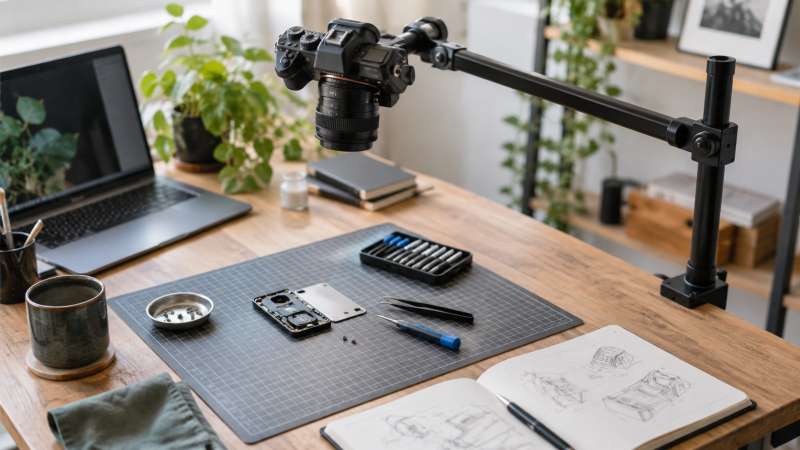
An overhead camera mount creates a clear top-down view for repair work, drawing, cooking, unboxing, document capture, and product demonstrations. The right support keeps the camera out of the working area while making framing repeatable. The wrong one can shake when the desk moves, sag under an extended camera, block the tutorial surface, or clamp poorly to the desktop.
This guide compares eight active-new overhead mounts from the supplied product records. They range from compact articulated arms to wide crossbar frames. We prioritized the stated load at the camera position, reach and height adjustment, clamp or base requirements, included device holders, and the difference between a whole-frame rating and an accessory-arm limit. Always keep the mounted equipment below the weakest connection, tighten every joint, and verify stability before placing a camera over valuable work.
The TARION TKA01-L is our best overall pick because its toothed joints, 38-inch reach, and separate vertical and horizontal ratings suit repeatable desk tutorials. The NEEWER ST100 is the better freestanding option for a wide desk that can accommodate its 39.4-inch minimum placement requirement. For a compact clamp arm and a lighter camera, the CACENCAN Articulating Mount combines a phone holder, ball head, and a three-section articulated arm.
Overhead Camera Mount Comparison
| Image | Product | Details | Check Price |
|---|---|---|---|
 | CACENCAN Articulating Overhead Camera Mount | Support style: Three-section C-clamp arm Stated capacity: 5 lb Adjustment range: 15 to 25 inches high; 360-degree ball head Desk requirement: 0.5 to 2.1-inch thickness Included holder: Universal phone holder | Check Price on Amazon |
 | JEBUTU MS05 Heavy-Duty Overhead Camera Desk Mount | Support style: Detachable three-section C-clamp stand Stated capacity: 6.6 lb Adjustment range: 14.76 to 41.14 inches; 180 degrees per section Desk requirement: Clamp opens to 1.96 inches Included holder: No phone holder listed | Check Price on Amazon |
 | InnoGear PMS75 Overhead Phone and Camera Stand | Support style: Weighted-base boom stand Stated capacity: Not stated Adjustment range: 180-degree ball-head rotation; reach not stated Desk requirement: Free desktop area for 3.62 lb base Included holder: 2.5 to 5.5-inch phone clamp | Check Price on Amazon |
 | NEEWER ST100 Tabletop Overhead Camera Rig | Support style: Freestanding two-column steel crossbar Stated capacity: 10 lb Adjustment range: 24 to 39 inches high; 14 positions Desk requirement: At least 39.4 inches wide Included holder: 1/4-inch camera lift head; phone clamp sold separately | Check Price on Amazon |
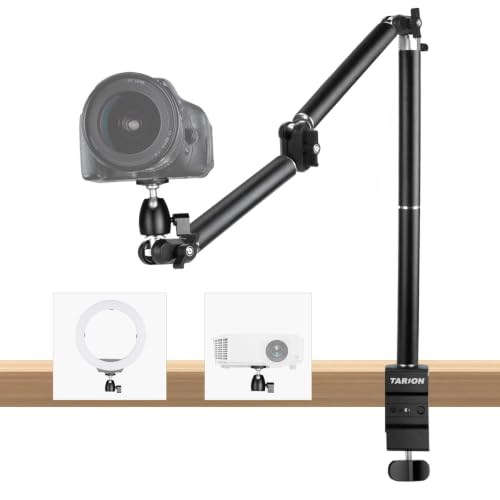 | TARION TKA01-L Geared Overhead Camera Desk Mount | Support style: Three-joint geared C-clamp arm Stated capacity: 8.8 lb vertical; 6.6 lb horizontal Adjustment range: 38-inch reach; 180-degree tilt and 360-degree rotation Desk requirement: Clamp opens to 2.36 inches Included holder: Removable 1/4-inch ball head on 3/8-inch end | Check Price on Amazon |
 | TARION Titanrig Desktop Lite Z Overhead Arm | Support style: Double-clamp articulating pole stand Stated capacity: 17.6 lb total Adjustment range: 18.9-inch arm; 0 to 21.85-inch camera height Desk requirement: 0.6 to 2.95-inch thickness Included holder: 5.5 to 10.63-inch tablet clamp | Check Price on Amazon |
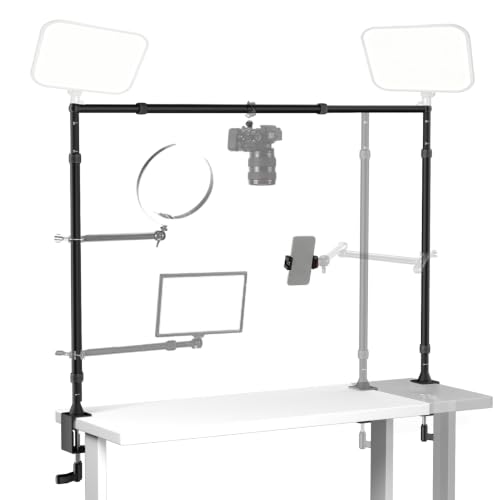 | EMART Adjustable Overhead Camera Mount Rig | Support style: Dual-clamp adjustable crossbar frame Stated capacity: 26.5 lb frame Adjustment range: 27.2 to 48 inches high; 25.2 to 47.2 inches wide Desk requirement: Edges up to 3.5 inches thick Included holder: 2.2 to 3.3-inch phone holder | Check Price on Amazon |
 | NEEWER NK002 Overhead Camera Mount Rig | Support style: Dual-clamp adjustable crossbar frame Stated capacity: 26.5 lb frame; 3.3 lb included ball-head clamp Adjustment range: 27.2 to 48 inches high; 25.2 to 47.2 inches wide Desk requirement: Clamp opens to 2.6 inches Included holder: 2.2 to 3.3-inch phone holder | Check Price on Amazon |
Pay close attention to where each capacity applies. The NEEWER NK002 frame is rated much higher than its included ball-head and super-clamp camera connection, while the TARION TKA01-L gives different values for vertical and horizontal use. An overhead camera usually creates more turning force than the same equipment positioned close to a vertical pole, so extension and balance count as much as weight.
1. CACENCAN Articulating Overhead Mount — Best Compact Budget Arm
A small desk and a simple top-down shot call for an arm that takes no desktop space. The CACENCAN is a three-section articulated arm that clamps to a table instead of using floor or desktop space for a base. The package includes a universal phone holder, a 1/4-inch camera screw, and a 360-degree ball head, so it can support a phone, webcam, or compatible camera without an immediate adapter purchase.
Its three-section articulated design suits a compact tutorial area but offers less reach than the larger TARION or crossbar systems. Keep the camera, lens, ball head, holder, and any accessory balanced over the desk, with additional margin when the arm is extended horizontally.
The rubber-padded C-clamp is rated to fit desktops from 0.5 to 2.1 inches thick. Check the underside for a flat clamping area and avoid placing it on an unsupported edge or decorative lip. The CACENCAN is a practical small-format choice for hands-on demonstrations, but a larger camera and long lens may benefit from the geared joints of the TARION TKA01-L.
[greenbox] Best for a phone, webcam, or light camera over a compact work area with a suitable desk edge. [/greenbox] Our TakeBuy the CACENCAN if you shoot with a phone, webcam, or light camera at a small desk. It covers the basic overhead job with the necessary holder and ball head included, and its three-section articulated design makes it a better match for lighter creator equipment than a large DSLR setup.
- Phone holder and ball head included
- Three-section articulated arm
- Padded clamp is rated to fit 0.5 to 2.1-inch desks
- Shorter reach than full-size arms
- Large cameras need a more clearly rated arm
2. JEBUTU MS05 Three-Section Desk Stand — Best Detachable Pole Design
The JEBUTU MS05 uses three detachable extension poles rather than one permanently jointed arm. Each section can be connected to a light stand, and the assembled adjustment range is listed from 14.76 to 41.14 inches. The pole design supports several height and angle arrangements and can break down into smaller parts for storage.
Each section adjusts 180 degrees left or right for 360-degree overall positioning. The aluminum stand weighs 2.2 lb and has a stated capacity near 6.6 lb. Every pole terminates in a 1/4-inch screw for cameras, webcams, lights, small softboxes, or other compatible gear. A phone holder and ball head are not identified in the package list.
JEBUTU specifies that the padded clamp opens to 1.96 inches and uses a longer handle rather than a small knob, which may be easier to tighten under a desk. The supplied package contains the clamp, three poles, and manual. If the camera must move vertically along a main post with quicker locks, the TARION Titanrig Lite Z offers a different approach.
[bluebox] Best for creators who want detachable 1/4-inch pole sections that can be reconfigured or packed away. [/bluebox] Our TakeBuy the MS05 if you want useful reach and a respectable stated load from a light stand. Its package is simpler than all-in-one kits, so confirm any holder or angle head needed for the camera.
- Three detachable pole sections
- Up to 41.14 inches of stated extension
- 6.6 lb capacity
- Clamp opens only to 1.96 inches
- No phone holder listed in the package
3. InnoGear PMS75 Weighted-Base Stand — Best No-Clamp Option
The InnoGear PMS75 is the only product here built around a weighted desktop base rather than a C-clamp or wide frame. InnoGear specifies the base weight at 3.62 lb and the complete stand at 5.07 lb. The weighted base avoids compatibility problems with a thick, rounded, glass, or obstructed desk edge, provided the desktop itself has enough free area and can support the stand securely.
A standard 1/4-inch thread and adjustable ball head support webcams, small lights, and other compatible devices. The included padded phone clamp is rated to fit devices 2.5 to 5.5 inches wide. The boom arm can be removed for a shorter setup, giving the stand a more compact mode when full overhead reach is unnecessary.
The supplied record does not state a payload capacity, boom length, or maximum height, so keep the load conservative and favor a phone or webcam rather than assume DSLR suitability. For a smaller clamp-on arm, compare the CACENCAN Articulating Mount.
[graybox] Best for phone-based tutorials on a desk where edge clamping is impossible or undesirable. [/graybox] Our TakeBuy the PMS75 if your desk edge can’t take a clamp. The heavy base solves the installation problem and makes the stand easy to move, but because no payload or reach is stated, it is best treated as a phone and webcam stand rather than a heavy camera support.
- No desk-edge clamp required
- 3.62 lb nonslip metal base
- Phone clamp and ball head included
- No listed boom length
- Reach and height are not stated
- No payload capacity supplied
4. NEEWER ST100 Tabletop Overhead Rig — Best Freestanding Crossbar
The NEEWER ST100 uses two steel side columns, T-shaped feet, and a crossbar to span the work surface. Unlike a single edge-mounted arm, the frame distributes support across both sides and keeps the camera position on the crossbar. It is intended for flat-lay photography, tutorials, cooking, drawing, unboxing, and stop-motion work.
The structure supports a stated 10 lb or 4.5 kg load. A 1/4-inch lift head positions the camera face down and adjusts its height. Each column provides 14 spring-loaded positions from 24 to 39 inches. Twelve crossbar mounting points can hold accessories with the included M6 screws, while clamps for lights or monitors are sold separately.
This rig requires a flat desk at least 39.4 inches wide, or it can stand on the floor. A phone clamp and backdrop are also separate purchases, though two L-shaped brackets and clips can hold a compatible backdrop. The size makes sense when a broad work zone must remain unobstructed. For a width-adjustable clamp frame that includes a phone holder, see the EMART Overhead Rig.
[greenbox] Best for a permanent wide tutorial desk that needs a stable freestanding crossbar rather than an edge clamp. [/greenbox] Our TakeBuy the ST100 if you have a wide desk that can stay set up. It is a dedicated top-down platform, and its steel frame and lift head suit repeatable framing, but the 39.4-inch desk requirement rules out compact workspaces.
- Freestanding two-column steel frame
- 10 lb stated load
- Fourteen height positions per column
- Needs a desk at least 39.4 inches wide
- Phone clamp and accessory super clamps cost extra
5. TARION TKA01-L Geared Overhead Arm — Best Overall
The TARION TKA01-L uses three toothed gear joints instead of friction-only hinges. Each locking joint supports 180-degree tilt and 360-degree rotation. Toothed engagement can make a camera angle more repeatable and reduce gradual droop during long repair, document-scanning, macro, or stop-motion sessions.
Its 1.18-inch steel tubes carry a stated 8.8 lb vertical load and 6.6 lb horizontal load. The lower horizontal figure is the relevant one for a camera extended over the desk. The arm reaches 38 inches, which gives it enough coverage for a larger work area without requiring a full crossbar frame.
The end uses a 3/8-inch screw with a removable 1/4-inch ball head. A dual-slot C-clamp opens to 2.36 inches, includes a metal anchor structure, and lets the pole mount from the top or side slot. Extra 1/4-inch and 3/8-inch threads can hold a microphone, monitor, or light. For a much higher stated total capacity and double-clamp base, compare the TARION Titanrig Lite Z.
[bluebox] Best for repeatable camera positioning over a medium-to-large desk without committing to a two-column frame. [/bluebox] Our TakeBuy the TKA01-L if you want repeatable camera positions over a medium-to-large desk. The geared joints, long reach, and separate horizontal rating make it a transparent all-around choice. Keep the actual overhead load under the 6.6 lb horizontal figure, not the higher vertical number.
- Three locking toothed joints
- 38-inch stated reach
- Separate horizontal and vertical ratings
- Horizontal capacity is lower than vertical capacity
- Clamp requires a suitable edge up to 2.36 inches
6. TARION Titanrig Lite Z Double-Clamp Arm — Best High-Capacity Articulating Stand
The Titanrig Desktop Lite Z uses a two-section main pole, an 18.9-inch articulating arm, and a double C-clamp base. The arm adjusts through 360 degrees vertically and 180 degrees horizontally, while its ball head adds another 360 degrees of camera rotation. Flip locks release the arm and height positions for quicker changes.
TARION states an 8 kg or 17.6 lb total capacity for the aluminum structure. The stand itself weighs 7 lb, and the camera height can move from 0 to 21.85 inches along the main pole. The source does not provide separate fully extended or per-connection ratings, so keep additional margin when the arm is horizontal.
The double clamp fits desks from 0.6 to 2.95 inches thick and uses silicone pads. A tablet clamp for devices 5.5 to 10.63 inches wide is included, along with 1/4-inch and 3/8-inch connection choices. The top of the pole can accept a second device such as a light. If the desk lacks a usable edge, the InnoGear PMS75 avoids clamping altogether.
[greenbox] Best for a heavier creator rig that needs a double-clamp base and an additional mounting point atop the main pole. [/greenbox] Our TakeBuy the Titanrig Lite Z if a heavier creator rig needs a double-clamp arm. It has the strongest stated capacity among the articulated single-side stands, but without an extended-arm rating the 17.6 lb figure should be treated conservatively for top-down camera placement.
- Double C-clamp base
- 17.6 lb stated total capacity
- Tablet holder included
- No separate horizontal-extension rating
- 7 lb stand is heavy for a portable setup
7. EMART Adjustable Overhead Rig — Best Wide Adjustable Frame
The EMART rig is a two-column crossbar system with adjustable height and width. EMART specifies a span from 25.2 to 47.2 inches wide and a rise from 27.2 to 48 inches. Scale markings help return the frame to a known position, which can improve consistency across a series of drawing, repair, or product tutorials.
The aluminum frame has a stated 12 kg or 26.5 lb maximum load. It provides dual 1/4-inch screws and a 5/8-inch stud for cameras, lights, webcams, reflectors, or backdrop hardware. A phone holder for devices 2.2 to 3.3 inches wide is included. The record does not separate the capacity of each individual camera connection from the frame maximum.
According to the manufacturer, the two edge clamps fit desks up to 3.5 inches thick and use dual rubber pads. Clamping saves foot space compared with the freestanding ST100 but requires two suitable desk edges at the selected width. The structure disassembles for storage, and extra magic arms or tablet holders are sold separately. For a similar frame with a clearly stated 3.3 lb ball-head limit, compare the NEEWER NK002.
[bluebox] Best for a wide desk that needs adjustable frame width, two edge clamps, and an included phone holder. [/bluebox] Our TakeBuy the EMART if a wide desk needs an adjustable frame. It covers a broad adjustable workspace and has a high stated total capacity, but because no per-camera-head limit is supplied, verify every attachment and avoid assigning the full frame rating to one small screw or arm.
- Adjustable height and width with scales
- 26.5 lb stated frame capacity
- Phone holder included
- Needs two clear desk edges
- No separate camera-connection capacity stated
8. NEEWER NK002 Dual-Stand Overhead Rig — Best for Two-Column Lighting Expansion
The NEEWER NK002 also uses two clamp-on columns and an adjustable crossbar. Its 28 mm aluminum tubes adjust from 27.2 to 48 inches high and from 25.2 to 47.2 inches wide. Scale markings support symmetrical setup, while twist locks control the telescoping sections.
The stand structure is rated to 12 kg or 26.5 lb, but the included dual-ball-head super-clamp assembly has a much lower 1.5 kg or 3.3 lb maximum. The smaller number controls the camera attached through that assembly. The ball heads rotate through 360 degrees and the super clamp tightens to the crossbar by hand.
Each column clamp opens to 2.6 inches and uses nonslip pads. Two 1/4-inch screws and 5/8-inch studs on the stand adapters can accept lights. A phone holder for 2.2-to-3.3-inch devices is included, while optional crossarms and many other accessories are sold separately. For a camera over 3.3 lb, use a differently rated connection that remains within the frame limits or choose a system with a suitable supplied head.
[graybox] Best for a two-column tutorial station where the camera is light and the stand adapters also support two lights. [/graybox] Our TakeBuy the NK002 for a two-column station with a light camera and two lights. It is a useful expandable platform that shows the difference between frame and camera-head capacity, but the supplied ball-head clamp limits the mounted camera to 3.3 lb.
- Wide height and width adjustment
- Two additional light-mount positions
- Phone holder included
- Included camera assembly is limited to 3.3 lb
- Optional crossarms are not included
Buying Guide: Choosing an Overhead Camera Mount
Choose between an arm and a crossbar frame
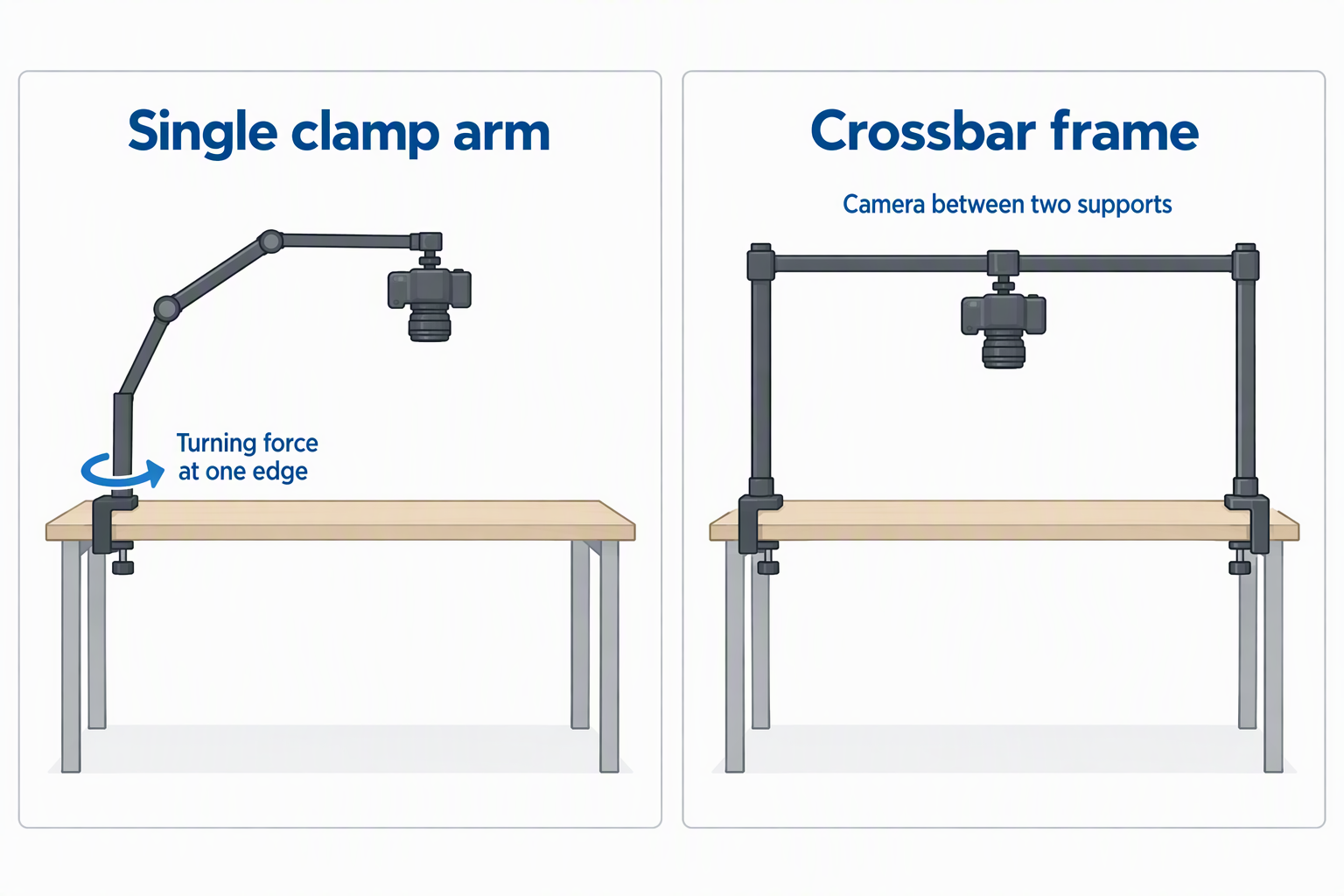
A single clamp arm consumes little space and can swing away when the tutorial ends. It is a good fit for smaller work areas and lighter cameras, but its off-center load puts turning force on one desk edge. An arm is the compact choice, provided the clamp, joints, and horizontal rating match the camera.
A crossbar rig places the camera between two supports and can cover a wider surface. It is more suitable for permanent flat-lay or production tables and can add positions for lights or backdrops. The tradeoff is width, assembly time, and the need for two clear edges or broad freestanding feet. A frame is better for repeatable wide coverage.
Measure the desk before comparing payloads
Measure desktop thickness, edge depth, underside clearance, and any apron, drawer, cable tray, or rounded profile. A clamp needs flat opposing surfaces, not merely a thickness inside its published range. Clamp geometry must match the actual desk edge or the mount can shift even when the screw feels tight.
Wide rigs introduce a second measurement: usable span. The ST100 asks for a desk at least 39.4 inches wide, while the EMART and NK002 adjust between 25.2 and 47.2 inches. Check whether both support points remain clear at the desired camera position. Width range and edge access must work together.
Calculate the load at the camera connection
Add the camera, lens, battery, plate, ball head, phone holder, adapter, cable strain, and any accessory sharing the arm. Do not use camera-body weight alone. Every mounted component belongs in the load calculation, and a reasonable margin is preferable to operating at the stated maximum.
Separate frame ratings from head or arm ratings. The NK002 structure lists 26.5 lb, but its included dual-ball assembly lists only 3.3 lb. The TKA01-L distinguishes an 8.8 lb vertical load from a 6.6 lb horizontal load. The lowest applicable connection rating controls the setup.
Account for reach and turning force
Moving a camera farther from the pole or clamp increases the force trying to rotate the mount and desk edge. A long arm may support its published load close to the post yet show more movement when fully horizontal. Use the shortest reach that frames the work area. Position the clamp near a structurally supported part of the desk.
Crossbar rigs also benefit from centering the camera between their columns. An off-center camera changes the load on each support and may increase vibration. Keep heavy accessories close to a column or distribute them carefully. Balanced placement improves stability without adding weight.
Select joints for repeatability or speed
Friction hinges and ball heads make fine angle changes fast, but they depend on sufficient tightening. Toothed gear joints lock into defined positions and can resist gradual movement during long takes. Geared joints favor repeatability, especially for stop-motion, document capture, or repair steps that must align between sessions.
Ball heads remain useful for leveling a camera and correcting small framing errors. Confirm the plate or screw cannot loosen when the camera points down. Tighten with the camera supported by hand, then perform a stationary hold test above an empty surface. Never make the first load test above the tutorial subject.
Plan camera, light, and cable positions together
An overhead tutorial often needs lights on both sides, a microphone outside the work area, and a cable routed away from the hands. Frames such as the ST100, EMART, and NK002 provide extra crossbar or column positions, though some clamps are sold separately. Accessory expansion should not obstruct the working surface.
Secure cables with enough slack for adjustment but not enough to fall into tools, food, paint, or moving parts. A cable should not pull sideways on the camera or prevent an arm from folding. Mount lights so their weight and heat remain within the hardware limits. Cable routing is part of mechanical stability.
Related Creator Rig Guides
These guides cover adjacent camera, mounting, monitoring, and capture decisions for tutorial production:
- Camera top handles for handheld creator rigs
- Mirrorless camera cages for desk video rigs
- Camera suction mounts for vehicle creator shots
- HDMI loop-out capture cards for camera monitoring
- HDMI capture dongles for laptop streaming
- Monitor hoods for color-critical editing desks
- Display colorimeters for creator monitors
- VESA adapter plates for non-VESA monitors
Frequently Asked Questions
Can an overhead mount hold a DSLR or mirrorless camera safely?
Yes, when the complete camera setup stays below the rating of every relevant component and the desk or base is suitable. Use the horizontal or camera-head limit when one is provided, since a general frame or vertical rating may not apply to the actual overhead position.
Count the lens, ball head, plate, adapter, and cable force, then leave margin. Test the assembled mount over an empty padded area before placing it above electronics, artwork, food, or a repair project. Recheck joints after changing camera position.
Is a C-clamp arm better than a weighted base?
A C-clamp arm usually saves desktop space and can provide more reach, but it requires a strong, flat, accessible edge. A weighted base is better when clamping is impossible or when the stand must move between desks without installation.
The weighted base itself occupies work area and can become unstable if a boom extends too far. The InnoGear PMS75 lowers its center of gravity with a 3.62 lb base, but no payload is stated. Use it conservatively and keep the camera close to the center of support.
How high should the camera be above the desk?
Set it only high enough to frame the required work area with the selected lens. Lower placement usually reduces required reach and magnification loss, while a higher camera can cover a wider surface but may demand more support height and lighting power.
Use the camera’s field of view rather than a fixed height rule. Leave room for hands and tall objects, and make sure the lens cannot be struck during the demonstration. Mark successful height and width positions for repeat episodes.
Why does an overhead camera shake when the desk is touched?
The clamp and camera share the desk, so keyboard input, tool impacts, or leaning on the surface can travel through the support. Long arms and loose joints can amplify that movement. Shorter extension and tighter structural connections reduce visible vibration.
Mount near a supported desk section, avoid touching the table during critical shots, and keep heavy accessories close to the pole or frame column. A freestanding crossbar may distribute load differently, but it can still receive vibration through its feet or clamps.
Do I need a ball head for top-down shooting?
A ball head is useful for leveling the camera and pointing it straight down when the arm or crossbar is not perfectly aligned. It provides fine framing adjustment, but it also adds weight and another joint that must be tightened.
Some products include a ball head, while the ST100 uses a dedicated lift head and the JEBUTU package does not list one. Confirm the head supports the full camera weight in a downward orientation and that the screw cannot loosen as the camera is rotated.
Bottom Line
The TARION TKA01-L is our best overall overhead arm because its toothed joints, 38-inch reach, and explicit 6.6 lb horizontal rating make the working limits easier to understand. The CACENCAN is the better compact choice for a phone, webcam, or light camera, while the Titanrig Lite Z offers a double-clamp structure and a higher stated total capacity than the other arms for heavier equipment.
For a permanent wide desk, choose between the freestanding NEEWER ST100 and a clamp-on frame. The ST100 provides a dedicated 10 lb steel platform but needs at least 39.4 inches of desk width. The EMART adjusts across a broader width range, while the NEEWER NK002 is attractive for lighting expansion as long as its included 3.3 lb camera-head limit is respected. Measure first, use the lowest applicable capacity, and test stability above an empty surface.
Product dimensions, mounting hardware, manufacturer load claims, included accessories, and availability were checked against the supplied Amazon product records dated October 14, 2026. Verify current compatibility, package contents, and desk suitability before purchase.