In a shared library, a fan that ramps up during a search can be more distracting than the work itself. Fanless is the clearest acoustic promise, but it is not the only workable design. Several fan-cooled laptops stay quiet during light reading and typing. A quiet-mode setting helps only when it is turned on, and a keyboard or coil whine can still be audible.
These five exact Amazon US laptops were selected based on active New offers. They cover a fanless MacBook, a Windows model with a maker-described silent mode, and three light-work candidates with different screens. Noise measurements for these exact marketplace units are not provided, so treat review or maker noise evidence as a selection aid, not a guarantee for your library seat.
Choose fanless when silence is non-negotiable. Otherwise test your actual workload in the quietest available power mode.Quiet-Cooling Laptops Compared
| Image | Product | Details | Check Price |
|---|---|---|---|
 | Apple MacBook Air 13 M5 | Cooling: Fanless Screen: 13.6 inch Memory: 16 GB listed Library fit: No fan noise | Check Price on Amazon |
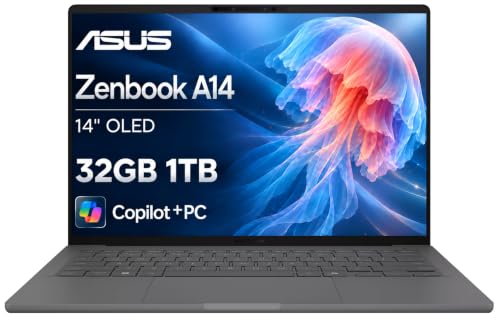 | ASUS Zenbook A14 Snapdragon X | Cooling: 0 dB Whisper mode claimed Screen: 14 inch OLED Memory: 32 GB listed Library fit: Quiet-mode Windows | Check Price on Amazon |
 | Microsoft Surface Laptop 13.8 (2026) | Cooling: Fan, workload dependent Screen: 13.8 inch touch Memory: 16 GB listed Library fit: Light-task premium pick | Check Price on Amazon |
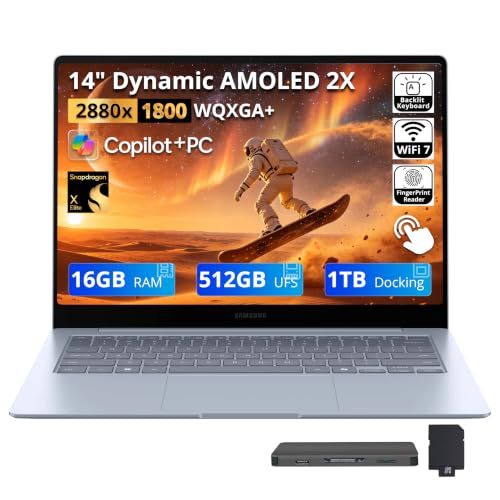 | Samsung Galaxy Book4 Edge 14 | Cooling: Quiet mode, model-family test Screen: 14 inch AMOLED Memory: 16 GB listed Library fit: OLED study desk | Check Price on Amazon |
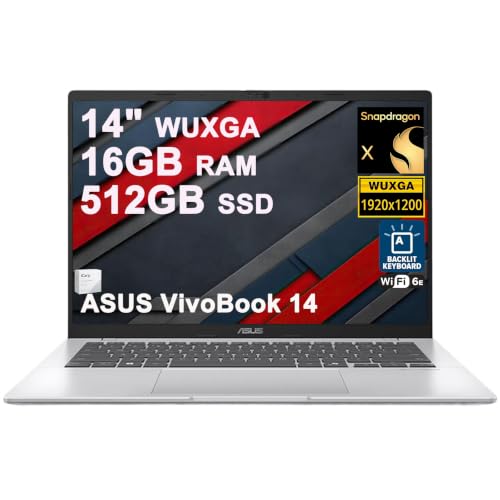 | ASUS Vivobook 14 Snapdragon X | Cooling: Maker calls family quiet Screen: 14 inch anti-glare Memory: 16 GB listed Library fit: Window-side reading | Check Price on Amazon |
1. Apple MacBook Air 13 M5 — Best Fanless Pick
The M5 MacBook Air is the straightforward answer when a cooling fan cannot make any noise. Apple says the Air has no fan. The exact active-New offer lists a 13.6-inch display, 16 GB unified memory and 512 GB SSD. For writing, PDFs and a modest browser session, the absence of a fan removes one variable that a quiet-mode setting cannot fully remove.
Fanless does not mean the whole workstation is inaudible. Keys, notification sounds and an external drive can still disturb someone nearby. Nor does passive cooling promise identical performance under a sustained heavy load. Check that your editor, library VPN and citation workflow run on macOS before buying for silence alone. A USB-C hub can add ports, but test any peripheral and its driver with the Mac.
Compared with the Zenbook A14, the Air has a simpler no-fan acoustic claim but a different operating system. If your coursework or employer requires Windows-only software, a quiet Windows model may be the better fit even if it occasionally starts a fan.
Our Take Pick the M5 Air for the strongest cooling-noise case. Test the keyboard and required software too. Fanless hardware cannot make a loud typing style or incompatible app disappear.
- No cooling fan to spin up.
- 16 GB memory and 512 GB SSD in the exact offer.
- Compact 13.6-inch work surface.
- macOS may not fit Windows-only school or work apps.
- Keyboard and accessories can still make noise.
2. ASUS Zenbook A14 Snapdragon X — Best Windows Quiet-Mode Pick
If the software requires Windows, the Zenbook A14 offers a more explicit low-noise plan than a generic thin laptop. ASUS says its Snapdragon X UX3407QA family has dual fans and a 0 dB Whisper mode. The quiet claim depends on that mode, not on a fanless design. The exact Amazon offer lists a 14-inch FHD+ OLED screen, 32 GB memory and 1 TB SSD.
The extra local storage can hold downloaded references, but it does not establish that a Windows-on-Arm editor or plug-in works. Test the exact apps and any specialist device drivers before relying on the machine for study. In a library, enable Whisper mode and then repeat a realistic session with your browser and files. A portable monitor can help at home, but a second screen adds desk space and cabling in a shared room.
The OLED screen may look good for reading, yet glare depends on the window, brightness and your seat. Try a long page rather than assuming a display label predicts comfort. The Vivobook 14 offers an anti-glare listing if reflections are the bigger distraction.
Whisper mode is the condition for ASUS’s 0 dB claim. Do not describe this dual-fan laptop as fanless.Our Take The A14 is the clearest Windows choice here when you can work in its quiet mode. Verify that your normal workload stays responsive and your required apps run on Arm before committing to it.
- ASUS documents a 0 dB Whisper mode.
- 32 GB memory and 1 TB SSD listed.
- Compact 14-inch form factor.
- Quiet claim depends on the selected mode and workload.
- Arm software and driver fit require testing.
- OLED reflections need a seat-specific check.
3. Microsoft Surface Laptop 13.8 (2026) — Best Premium Light-Task Pick
The exact 2026 Surface Laptop offer lists a 13.8-inch touch display, Snapdragon X2 Elite, 16 GB RAM and 512 GB SSD. A published test of the related 2026 13.8-inch X2 Plus model reports its fan is usually off during light work, but rises under heavier loads. That test is useful family context, not a noise measurement of this X2 Elite marketplace configuration.
Use Microsoft’s Recommended power setting and see how the delivered laptop behaves during the actual library routine: open saved PDFs, search notes and keep the necessary browser tabs. Microsoft says fan speed changes with load, room temperature and charging state. A Windows update or large export may briefly make it louder. A USB-C monitor can improve a home desk, but will not change the fan’s response to a heavy workload.
This Surface gives more screen and a newer listed processor than a tiny entry laptop, without occupying a 16-inch table area. Its touch panel may help with document navigation, but it is not a substitute for a quiet keyboard. Compare it with the MacBook Air if your software works on both systems and fan certainty is more important than touch.
Our Take Choose the 13.8-inch Surface if you want a compact premium Windows machine and can accept a fan that may become audible under load. Try the actual power mode and workload before a strict quiet-room purchase.
- Compact 13.8-inch touch layout.
- 16 GB and 512 GB listed in this offer.
- Related family review supports quiet light-work behavior.
- Fan can become louder during heavy work.
- Noise result is not from this exact X2 Elite SKU.
4. Samsung Galaxy Book4 Edge 14 — Best Quiet-Mode OLED Pick
The Galaxy Book4 Edge 14 offers a different quiet-room compromise: a 14-inch AMOLED touch screen and an available low-noise mode. The exact Amazon bundle lists Snapdragon X Elite and 16 GB RAM. A model-family review found the fans exceptionally quiet in Optimized and Quiet modes, but louder in High Performance. The review is evidence for how to configure and test it, not proof this seller’s unit will match the reviewer sample.
The listing’s apparent 1.5 TB capacity needs a second look. It breaks down to 512 GB built into the laptop plus a separate 1 TB dock. The dock does not make local files available when left at home. For library use, store the reading pack and working files on the laptop, then make a deliberate backup. An external SSD is an option, but another peripheral can add cable clutter to a shared table.
AMOLED can be appealing for text and illustrations, while its glossy surface may reflect the room’s lights. The Vivobook 14 is a sensible comparison when the library has bright windows. Neither panel tells you whether the keyboard sound suits nearby readers.
Select a quiet or optimized mode before judging the Samsung’s library fit. High-performance behavior is different.Our Take The Book4 Edge fits a reader who wants OLED and can keep ordinary library work in a quiet mode. Check the exact bundle’s internal storage and ignore any claim that the separate dock is built in.
- Model-family test documents quiet operating modes.
- 14-inch AMOLED touch screen in the offer.
- 16 GB memory listed.
- High-performance mode is louder.
- Only 512 GB of the bundle is internal storage.
- Glossy reflections may distract near windows.
5. ASUS Vivobook 14 Snapdragon X — Best Anti-Glare Library Pick
Cooling is only one library issue. When a seat faces a bright window, reflections can interrupt reading more often than a low fan. This exact Vivobook offer lists a 14-inch WUXGA anti-glare screen, Snapdragon X 8-core CPU, 16 GB RAM and 512 GB SSD. ASUS describes the Snapdragon Vivobook 14 family as cool and quiet, but there is no measured noise result for this exact seller configuration in our evidence.
The missing measurement makes it a conditional pick. Before buying for a silent room, use a return-friendly trial to run your actual browser, editor and video-call workload in a quiet power setting. A heavier task can change fan behavior. The anti-glare claim comes from the offer, not a measured reflection test, so inspect the screen under the room’s light as well. A USB-C laptop stand can lift the screen at a desk, but may make typing less comfortable unless you bring a separate keyboard.
The Zenbook A14 has a clearer maker noise-mode claim and more listed memory. The Vivobook’s role is an anti-glare alternative, not a promise of fanless operation. As another Windows-on-Arm system, it also needs your exact app and driver check.
Our Take Vivobook 14 suits you when glare is the bigger problem and a 14-inch Windows screen fits your table. Buy it only after the actual fan and keyboard noise prove acceptable.
- Anti-glare WUXGA screen stated in the listing.
- 16 GB RAM and 512 GB SSD listed.
- 14-inch size fits a shared desk.
- No exact-unit fan measurement available here.
- Maker family wording is weaker than a measured test.
- Arm app support needs checking.
Buying Guide
1. Separate silence from a quiet fan mode
Fanless removes the cooling-fan variable. The M5 Air has no fan. The other laptops here should not be described as silent in every condition. A zero-decibel mode means the fan can stop or remain inaudible under that mode’s conditions, not that the same machine is quiet while compiling, updating or exporting a video. If complete fan silence is a hard requirement, start with a genuinely fanless design and verify the exact model.
Test the mode you plan to use. On a fan-cooled Windows laptop, set the maker’s quiet mode or Windows Recommended power setting before a realistic session. Open the same number of tabs, documents and apps that you use in the library. Try it while charging too. Heat and charging can alter fan behavior. A USB-C charger may simplify the desk, but its wattage alone does not predict fan noise.
2. Listen for the sounds the specification omits
Listen for keyboard and coil noise in a silent room. A fanless Mac still has keys. A quiet-mode Windows laptop may have a faint electrical sound. Reviews and maker claims usually isolate the cooling system, while the person next to you hears the whole desk. Type a full page in a quiet setting, adjust screen brightness and listen near the charger before deciding that a laptop is suitable.
Keep accessories in the test. A hub, drive or external keyboard can introduce clicks, indicator lights or power noise. A USB-C hub should be chosen for the actual ports you need, not added reflexively. Bring only the devices your workflow requires and verify that their drivers work on macOS or Windows on Arm.
3. Balance the screen with the library table
Choose for the seat, not only for the display label. An anti-glare Vivobook may suit a window-facing desk. An OLED A14 or Samsung may appeal in a dimmer corner. Neither label guarantees comfortable long-form reading. Try your usual brightness and text scaling, then look for reflections, eye fatigue and whether your neck position is comfortable over an hour.
Check the footprint and the operating system. The 13.6-inch Air and 13.8-inch Surface fit narrow tables more easily than a 16-inch laptop, but may require more window switching. The Air runs macOS. The Windows choices here use Arm processors. An application that launches is not necessarily fully usable if a plug-in, printer or VPN driver fails. Verify the whole task before treating quiet cooling as the only buying criterion.
FAQ
Is the Zenbook A14 fanless like the MacBook Air?
No. ASUS describes the A14 UX3407 family as using two small fans and a heat pipe. Its 0 dB Whisper setting is conditional. The M5 Air’s cooling system is fanless, which is a different physical design.
If you need absolutely no fan spin, the Air has the stronger evidence. If you need Windows, try the A14 in Whisper mode with your actual apps and room temperature. A demanding workload can change the tradeoff between speed and noise.
Can I trust a review’s decibel result for the Amazon unit?
Use it as a clue, not an exact prediction. Reviewers may have a different processor tier, firmware, power profile or room temperature. The 2026 Surface review here tested an X2 Plus model. The Amazon offer selected is X2 Elite.
Compare the review configuration with the listing, then test the delivered unit under your workload. Avoid treating a family-level result as a measurement of the exact SKU. Quietness is especially sensitive to background updates and charging.
Will a laptop with a quiet fan stay quiet during video calls?
Not necessarily. Camera processing, screen sharing and browser tabs can raise CPU load even when a text editor alone does not. Some power modes also switch behavior while the charger is connected.
Make a trial call using the same apps and accessories you will bring to the library. If calls are frequent, use a permitted room or headset and test mic pickup as well as fan noise. A headset is a separate audio choice, not proof the computer’s cooling will stay quiet.
Bottom Line
The M5 Air is the strongest no-fan choice. The A14 offers a documented Windows quiet mode, while the Book4 Edge has a related-model low-noise test and OLED screen. The Surface 13.8 and Vivobook 14 need a particularly careful exact-unit trial. Buy the laptop whose complete workload, keyboard and cooling are acceptable in the room where you will use it.