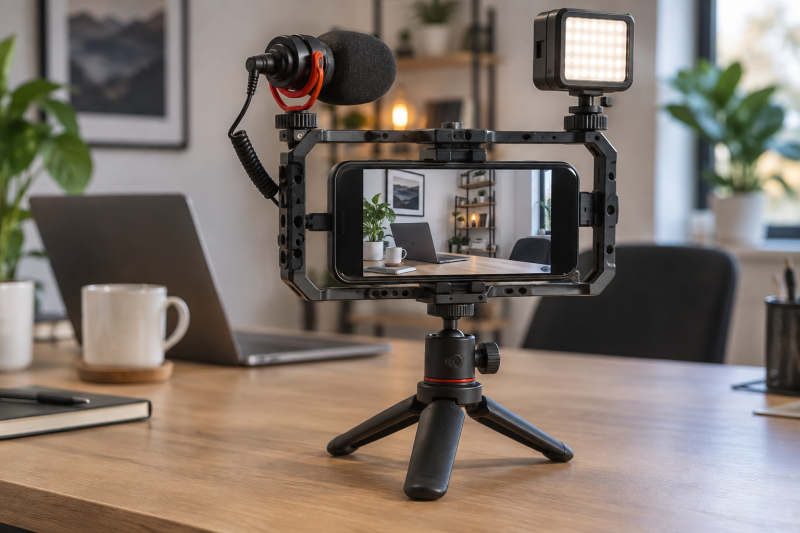
A phone cage can turn a desk camera into a small rig with places for a microphone, light, handle, and tripod. For a creator desk, the important checks are phone width, case clearance, tripod thread, and where accessories sit relative to the phone camera. A cage with many shoe mounts can still be a bad fit if the clamp covers side buttons, blocks a lens, or puts a microphone and light in each other’s way.
These six Amazon US smartphone rigs have active New offers. They vary from a basic universal frame to a dual-handle cage, a kit that bundles a light and microphone, and a model with a remote. Check your phone with its normal case, the orientation you record in, and the desk tripod or arm before buying. For related tools, see our desk video-light guide and phone tripod guide.
A phone cage should make the desk setup repeatable. Confirm its clamp range, camera clearance, and accessory layout before choosing the one with the most mounts.Smartphone Video Cages Compared
| Image | Product | Details | Check Price |
|---|---|---|---|
 | SmallRig 4121 | Best fit: Dual-handle aluminum cage Fit: Universal listed Handles: 2 side handles Mounts: Shoe mounts listed | Check Price on Amazon |
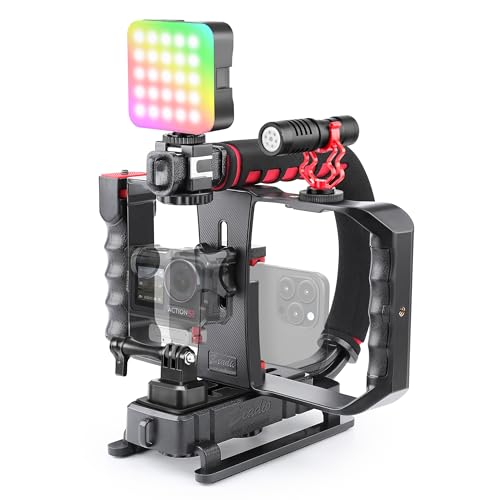 | Zeadio All-in-One Kit | Best fit: Cage with bundled light and mic Fit: 4.7-6.7in phones Shoes: 3 listed Threads: 5 1/4in listed | Check Price on Amazon |
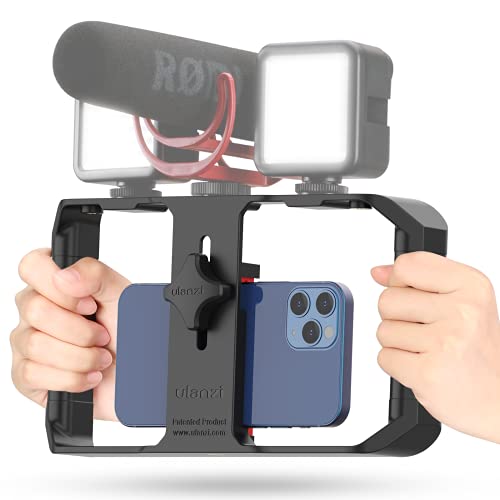 | ULANZI U Rig Pro | Best fit: Basic universal rig Fit: 2-3.5in width Shoes: 3 listed Threads: 2 1/4in-20 | Check Price on Amazon |
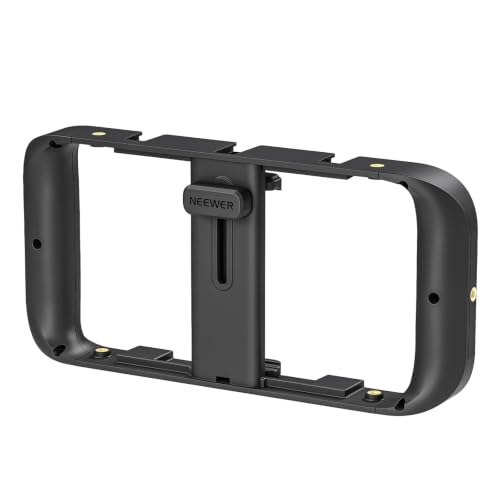 | NEEWER Mobile Video Rig | Best fit: Many accessory mounts Fit: 55-100mm listed Shoes: 5 listed Threads: 6 1/4in listed | Check Price on Amazon |
 | Taisioner Hand Grip Rig | Best fit: Ergonomic side grip Fit: 2.2-3.9in width Shoes: 3 listed Threads: 4 1/4in listed | Check Price on Amazon |
 | Zeadio Remote Grip Rig | Best fit: Solo remote control Fit: 4.7-6.7in phones Shoes: 3 listed Remote: Detachable listed | Check Price on Amazon |
1. SmallRig 4121 — Dual-Handle Aluminum Cage
For a desk rig that needs a stable two-hand grip before it goes onto a tripod, the 4121 is a useful starting point. SmallRig lists it as a universal phone cage with two side handles, multiple expansion interfaces, and a one-piece aluminum alloy frame. The listing says the handles use anti-slip silicone and that the rig can take a microphone, video light, top handle, tripod, and more.
The listing names many phone families, but fit depends on the phone’s dimensions and the case you use. Build the rig with the phone’s camera clear, then add each accessory one at a time. A large microphone or light can change how easily you reach the phone screen or cable port.
Our Take Buy the SmallRig 4121 if a dual-handle aluminum cage and an expandable accessory layout fit the phone. It is the cage pick here, but check camera clearance with your case installed.
- Two side handles are listed.
- Multiple accessory interfaces are listed.
- Actual case fit must be checked.
- Accessories can crowd phone controls.
2. Zeadio All-in-One Kit — Cage With Bundled Light and Mic
A bundle can reduce the number of separate pieces to choose, which is useful for a first setup for desk video. Zeadio lists a U-handle kit with a universal cage, RGB video light, directional microphone, and action-camera adapter. The cage is stated to fit 4.7 to 6.7-inch phones, with three cold shoes and five 1/4-inch threaded holes.
The included microphone and light are not proof that every phone connection will work. The listing gives a specific TRRS cable note, and the light needs charging. Test audio, phone camera framing, and light reflection before relying on the kit for a recorded tutorial or live call.
Our Take Buy the Zeadio kit if a bundled cage, light, and microphone fit your planned workflow. It is convenient, but test every included connection instead of treating the bundle as a ready-made studio.
- Light, microphone, and cage are listed together.
- Three shoes and five threads are listed.
- Accessory connections need testing.
- Light requires charging before use.
3. ULANZI U Rig Pro — Basic Universal Rig
The U Rig Pro is the simpler route when the job is mounting a small light and microphone around a phone for desk recording. ULANZI lists it with three cold shoes, two 1/4-inch-20 threads, and a bottom tripod thread. The listing says its clip fits phones from 2 to 3.5 inches wide, including phones with or without a case.
The frame is less elaborate than a cage with multiple handles or many threads. The simpler frame can make setup easier, but it also leaves fewer ways to route cables or change accessory positions. Check that the clip grips the phone without touching side buttons and that the camera stays level on the tripod connection.
Our Take Buy the ULANZI U Rig Pro if you want a basic universal phone rig with the essential shoe and tripod mounts. It suits a small desk setup that does not need a large accessory system.
- Three shoes and two threads are listed.
- Listed phone range includes many compact cases.
- Fewer mounting paths than larger cages.
- Phone buttons and camera need checking.
4. NEEWER Mobile Video Rig — Many Accessory Mounts
Many mounts are useful when a desk rig needs an LED light, a microphone, an arm, or a top handle in specific positions. NEEWER lists an adjustable holder for phones from 55 to 100 mm wide, with five shoe holders and six 1/4-inch threaded holes. The listing also says it can mount vertically or horizontally on a table tripod, handle, or light stand.
More mounts give you more choices, but they do not make the rig stable on their own. Place a heavy light close to the center of the rig and avoid putting every accessory on one side. Check the phone’s lenses in both portrait and horizontal framing because a cage can clear one orientation and block another.
Our Take Buy the NEEWER if many shoe and thread positions are more useful to you than a bundled accessory kit. It suits a desk creator who already owns the light and microphone they want to attach.
- Five shoes and six 1/4-inch threads are listed.
- Portrait and horizontal mounting are listed.
- Accessory balance needs planning.
- Camera clearance differs by orientation.
5. Taisioner Hand Grip Rig — Ergonomic Side Grip
A side grip can make a quick hand-held adjustment easier when moving a phone from a desk tripod to a short walk-and-talk clip. Taisioner lists an adjustable holder for phones 2.2 to 3.9 inches wide, a hand grip, three cold shoes, and four 1/4-inch threaded holes. The grip is the reason to compare it with a plain rectangular rig.
The listing says the rig can mount on a tripod in portrait or horizontal framing. Check the grip location against the phone camera and cable before tightening it. A comfortable grip helps only if it leaves the screen and capture controls available for the shot.
Our Take Buy the Taisioner if you want a side grip and a modest accessory layout for moving between a desk tripod and hand-held shots. It is a practical frame for basic accessory mounting and does not replace a proper stabilizer.
- Hand grip and three shoes are listed.
- Portrait and horizontal mounting are listed.
- Grip placement may affect phone controls.
- Does not prove stabilized footage.
6. Zeadio Remote Grip Rig — Solo Remote Control
The remote is the main feature of this rig for a solo shooter. It can let the creator start or control a supported phone capture setup while standing away from the desk camera. Zeadio lists a universal phone rig with a detachable wireless remote, three cold shoes, an adjustable clamp for 4.7 to 6.7-inch phones, and a side handle.
The listing claims broad iOS and Android use, but test the remote with your phone’s camera app before recording. Confirm the cage does not hide a lens in horizontal mode, and check that the remote stays paired after the phone is mounted in the rig.
Our Take Buy the Zeadio Remote Grip Rig if a listed detachable remote is useful for solo desk filming. It is the pick here for remote control, provided it works with the phone and camera app you use.
- Detachable wireless remote is listed.
- Three cold shoes and side handle are listed.
- Remote needs testing with the camera app.
- Phone camera clearance varies by model.
Buying Guide: Smartphone Video Cages for a Desk Setup
Check the phone, case, and camera before adding accessories
A universal clamp has a limited size range. Compare the listed range with your phone’s width while it is in the case you normally use. A phone may physically fit but still have side buttons, cable ports, or camera lenses too close to the frame.
Test portrait and horizontal framing separately. A cage that clears the lenses in horizontal mode can block a lens or control when turned vertical. Mount the phone, open the camera app, and confirm every rear and front camera view is clear before attaching other gear.
Choose accessory mounts around the real desk workflow
Cold shoes make light and microphone placement simple. A basic rig with three shoes can support a small light and microphone. More shoe and thread positions can help when you already own accessories, but they also make it easier to put too much weight on one side.
Threads make tripod placement repeatable. Use the listed 1/4-inch threads with a compatible desk tripod or arm, then check whether the camera horizon stays level. A phone cage is useful when it fixes the phone in the same position each time, and it is a problem when it adds another wobbly connection.
Treat bundled accessories and remotes as separate checks
A bundled light and microphone still need a test recording. Check charging, cable type, audio source selection, and whether the light causes unwanted reflections on the desk or glasses. A kit saves shopping time but does not remove setup work.
A remote is helpful only if it works with your capture path. Pair it before a shoot, test start and stop from the place you will stand, and keep a way to operate the phone directly. The phone app, operating system, and connection state all affect whether a remote behaves as expected.
Frequently Asked Questions
Do I need a phone cage for a desk camera?
Not always. A simple phone clamp on a tripod can be enough when the phone is the only device in the setup. A cage becomes useful when you need a microphone, LED light, handle, or repeatable mounting points around the phone.
Choose a cage when it solves a connection or positioning problem. Do not add one only for appearance, because extra metal and accessories can make a small desk setup harder to manage.
Will a phone cage fit with a case on the phone?
Some listings say their clamp works with a case, but case thickness and shape vary. Measure the phone in its normal case and compare it to the listed clamp range. Then check camera and button clearance after installation.
Remove the case only if doing so is acceptable for the shoot and makes the cage fit safely. A secure fit counts for more than forcing a phone and case into a narrow clamp.
Can a phone cage improve video stabilization?
A cage can provide a better grip and a place to mount the phone on a tripod, but it does not prove the stabilization of a gimbal or guarantee smoother hand-held video. The creator’s movement, phone stabilization, rig weight, and lens choice still affect the footage.
Use a desk tripod or arm for a fixed shot from the desk camera. For moving shots, test the cage and handle with the phone before depending on the rig for an important take.