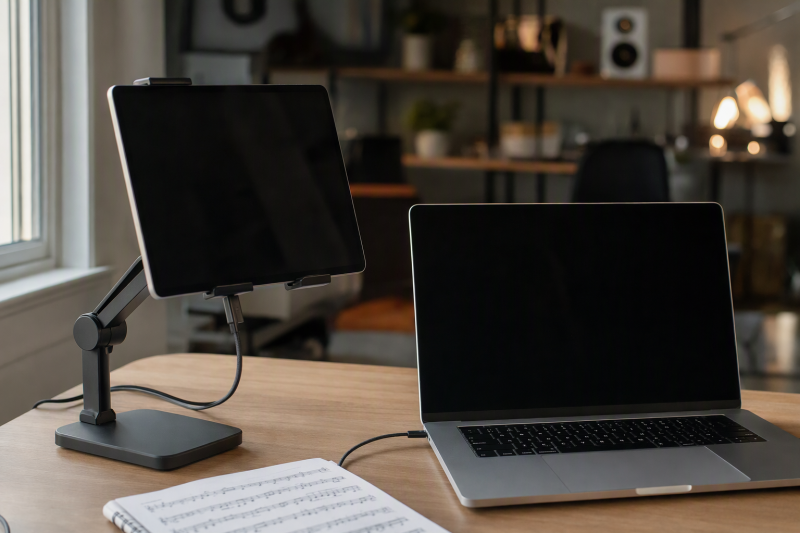
A tablet that shows music should be easy to read without making the player turn away from the instrument or laptop. Height, angle, and stability therefore count for more than looks. A low folding stand can hold reference notes beside a keyboard, and a tall weighted stand can bring a full score closer to eye level. Rotating bases help share annotations. Firm hinges are important when every page turn means tapping the screen.
The eight desktop stands below cover devices from 4 to 17 inches, cases up to 0.8 inch thick, and stated capacities up to 4.4 pounds. They are tabletop supports, not floor music stands or clamp-on arms. The best fit depends on tablet size and weight, vertical or horizontal page view, desk height, tapping frequency, cable access, and whether the stand must fold into a laptop bag.
COOPER TabStand is the strongest eye-level choice because it rises from 13 to 20 inches, rotates through 360 degrees, and supports devices up to 4.4 pounds. COOPER TabHolder offers the same capacity in a lower 7-to-10-inch format. Lamicall STDT02-B is the balanced travel choice with a 0.59-inch folded profile, weighted base, rotating platform, and support for cases up to 0.75 inch.
Tablet Stand Comparison
| Image | Product | Details | Check Price |
|---|---|---|---|
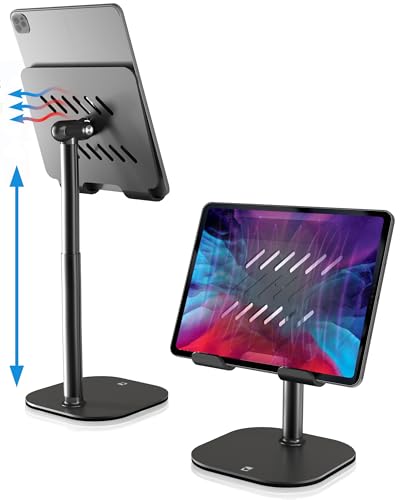 | COOPER TabHolder | Best fit: Low stable support for a heavy tablet Height range: 7-10 inches Tilt: 270 degrees Weight capacity: 4.4 lb Base: Weighted metal with EVA padding | Check Price on Amazon |
 | LOXP TS04 | Best fit: Large screen or case up to 0.8 inch Device range: 4.7-16.9 inches Case limit: 0.8 inch Base movement: 360-degree rotation Base: Weighted metal | Check Price on Amazon |
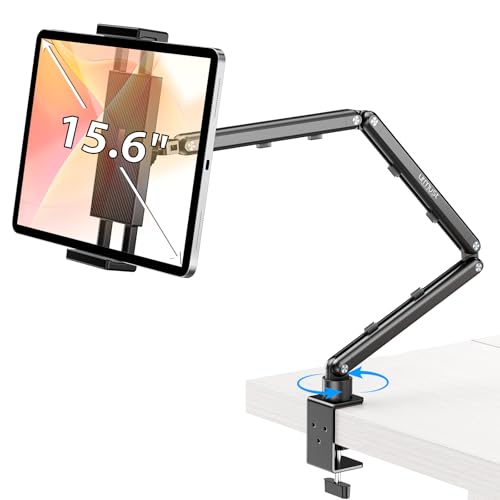 | Urmust Tab-03 | Best fit: Score stand with integrated cable clips Device range: 4.7-15.6 inches Weight capacity: 2.42 lb / 1.1 kg Base movement: 360-degree rotation Material: Aluminum alloy | Check Price on Amazon |
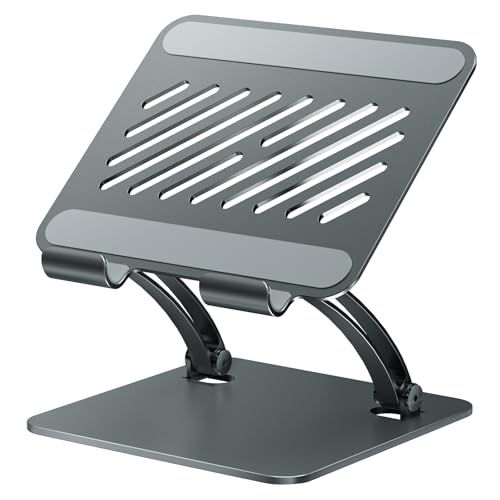 | tounee TS04 | Best fit: All-metal locking support for large tablets Device range: 4.7-16.9 inches Adjustment: Height and angle locking mechanism Base: Weighted all-metal alloy Storage: Folds flat | Check Price on Amazon |
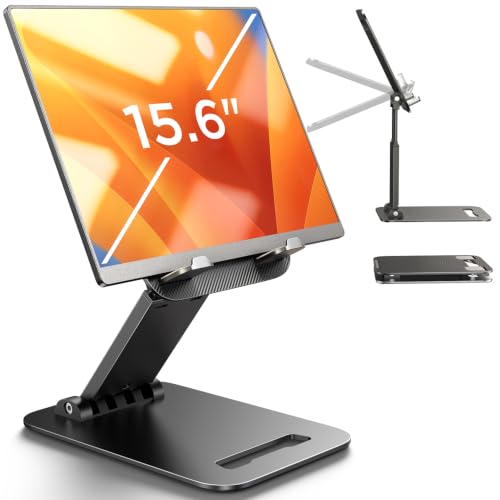 | LISEN 2E56 | Best fit: Gravity cradle with adjustable joint tension Device range: 4-15.9 inches Device thickness: Under 0.7 inch Stand weight: 15.2 oz / 0.95 lb Holder: Gravity-based; no clips or magnets | Check Price on Amazon |
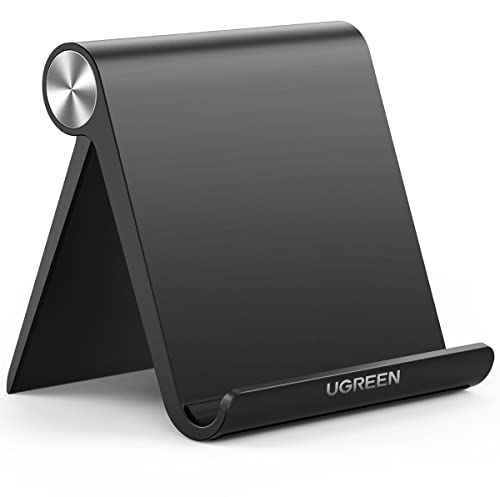 | UGREEN 50748 | Best fit: Pocket-size stand for a small score tablet Device range: 4-11 inches Device thickness: Up to 0.55 inch Angle range: 15-100 degrees Folded footprint: 4.7 x 4.2 inches | Check Price on Amazon |
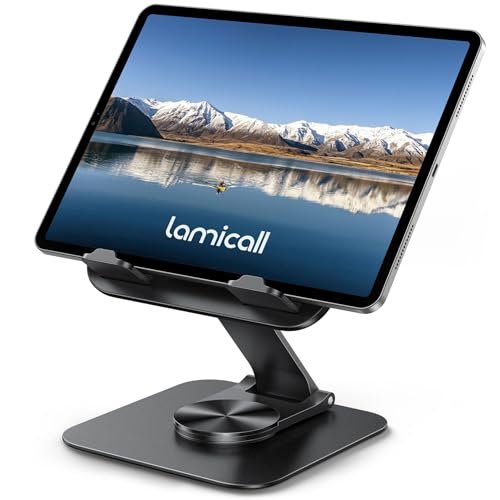 | Lamicall STDT02-B | Best fit: Slim folding metal stand for travel Device range: 4.7-13 inches Case limit: 0.75 inch Folded thickness: 0.59 inch Base movement: 360-degree rotation | Check Price on Amazon |
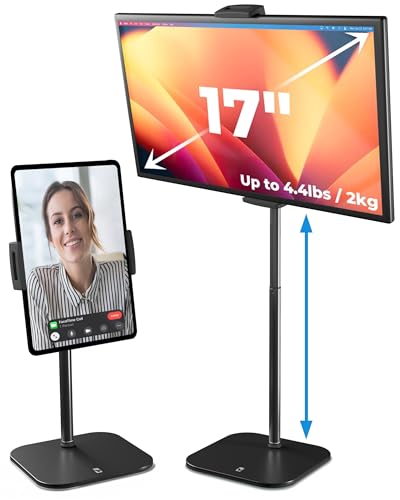 | COOPER TabStand | Best fit: Eye-level digital score beside a laptop Height range: 13-20 inches Weight capacity: 4.4 lb Holder movement: 360-degree rotation Base: Weighted metal with anti-slip surface | Check Price on Amazon |
Device diagonals alone do not settle compatibility. Check tablet weight, case thickness, hook depth, and the center of weight at the intended angle. A stand can physically accept a large screen and still become less stable when the tablet is raised, tilted far back, or tapped near an upper corner.
1. COOPER TabHolder — Best Low Stand for Heavy Tablets
COOPER states the TabHolder adjusts from 7 to 10 inches and tilts through 270 degrees. The manufacturer rates it to support tablets and portable monitors up to 4.4 pounds, including iPad Pro 12.9, Kindle, Galaxy Tab, and listed 15.6-to-17-inch monitors. That capacity suits a heavy score-reading tablet beside a laptop.
The manufacturer specifies that the stand combines a weighted metal base, EVA non-slip layer, aluminum rod, steel base, and a holder plate described as 40 percent wider. Silicone padding protects the supported device, while cooling openings leave part of the back exposed. The lower height suits a seated keyboard desk or a tablet placed beside a raised laptop rather than a full eye-level music position.
Our Take: Choose TabHolder as a stable low stand when the tablet or portable display is heavier than the 2.42-pound limit Urmust specifies. Its 10-inch maximum is the tradeoff for that compact weighted format.
[su_box title=”PROS” style=”soft” box_color=”#2e7d32″] – The 4.4-pound limit gives large-tablet and portable-monitor users a clear capacity. – A 7-to-10-inch range fits low seated reading and reference-screen positions. – The 270-degree tilt range supports steep score and annotation angles. – Weighted metal, EVA grip, and silicone padding protect both device and desk. [/su_box] [su_box title=”CONS” style=”soft” box_color=”#c62828″] – The 10-inch maximum may be below comfortable eye level for upright performance. – The listing does not state a maximum case thickness or exact hook depth. [/su_box]2. LOXP TS04 — Best for Thick Cases and Large Screens
LOXP states the TS04 accepts devices from 4.7 to 16.9 inches and cases up to 0.8 inch thick, the largest stated case clearance here. Dual adjustable hinges change height and tilt, while a 360-degree rotating base lets a teacher or collaborator see the score without lifting the stand.
The weighted metal base and the silicone on the base and hooks are meant to limit tipping, sliding, and scratches. The full stand folds flat for transport. LOXP explicitly says the stand is not designed for laptops, even though its upper size limit includes many portable monitors.
Our Take: Choose TS04 for a thick-cased tablet or a large digital score display. Because no weight limit is stated, a large 16.9-inch device still needs a careful stability check.
[su_box title=”PROS” style=”soft” box_color=”#2e7d32″] – The 4.7-to-16.9-inch range covers phones, tablets, e-readers, and large screens. – Hooks accept cases up to 0.8 inch thick without requiring case removal. – A rotating base makes score sharing easier without moving the weighted stand. [/su_box] [su_box title=”CONS” style=”soft” box_color=”#c62828″] – No supported-weight figure is stated for devices near the 16.9-inch ceiling. – Dual adjustable hinges change height and tilt for a reading position. – The stand is explicitly not designed to support laptops. [/su_box]3. Urmust Tab-03 — Best for Managed Charging Cables
Urmust rates the Tab-03 to support 4.7-to-15.6-inch devices up to 2.42 pounds. Its arm changes height and angle, while the manufacturer specifies the base rotates through 360 degrees. Integrated cable clips help in long rehearsals or studio sessions where a charging lead needs to stay clear of the music keyboard and laptop.
The aircraft-grade aluminum-alloy stand is intended only for a flat, stable table. An included wrench tightens joint screws if the tablet begins to sag. The seller warns against headboard use because wobbling or slipping can occur, which also shows why the stand needs a solid desktop beside the laptop.
Our Take: Choose Tab-03 when a charging cable must follow the stand neatly and the tablet stays below the rated 2.42-pound limit. It fits a wide range of device sizes but supports less weight than the two COOPER stands.
[su_box title=”PROS” style=”soft” box_color=”#2e7d32″] – A 2.42-pound rating states the device-weight boundary directly. – Support from 4.7 to 15.6 inches covers common music and reference tablets. – Integrated clips keep a charging lead routed along the stand. – An included wrench lets the user restore joint tension if the arm sags. [/su_box] [su_box title=”CONS” style=”soft” box_color=”#c62828″] – The 2.42-pound limit excludes some large portable displays. – Tabletop-only use requires a flat, stable surface rather than a soft support. – The listing does not state maximum case thickness. [/su_box]4. tounee TS04 — Best All-Metal Locking Stand
Tounee states the TS04 fits devices from 4.7 to 16.9 inches and uses a locking mechanism to hold its chosen height and angle. The dual-rod structure and weighted all-metal alloy base are intended to resist wobble while the screen is read, tapped, or annotated. Silicone at the base and holder protects the tablet and desktop.
The stand folds flat for travel or compact storage. Its upper compatibility range includes portable monitors, though the product is not designed for laptops. No supported weight, case-thickness limit, exact height range, or angle range is provided, so a matching screen size does not guarantee a stable stand.
Our Take: Choose tounee if you want an all-metal base and a locking hold more than exact adjustment numbers. You will need to check the device weight yourself, because the listing does not state it.
[su_box title=”PROS” style=”soft” box_color=”#2e7d32″] – The 4.7-to-16.9-inch range includes large score-reading tablets and monitors. – A locking mechanism holds the selected height and angle against normal adjustment. – An all-metal weighted base provides a solid desktop foundation. – Silicone protects the device and desk at their contact points. [/su_box] [su_box title=”CONS” style=”soft” box_color=”#c62828″] – Supported weight and maximum case thickness are not stated. – Exact height and angle ranges are absent from the product details. – The stand is not intended to carry a laptop despite its large screen range. [/su_box]5. LISEN 2E56 — Best Gravity-Based Folding Stand
LISEN 2E56 uses a gravity-based holder without clips or magnets. The tablet rests against the back tilt, and the seller recommends the lowest angle for the most stability during tapping or typing. Height and angle adjust through joints whose tension can be changed with the included bridge-screw adjustment rod.
LISEN specifies the ABS stand weighs 15.2 ounces and folds into a compact shape. A metal panel and anti-slip silicone reinforce the base. According to the manufacturer, it accepts 4-to-15.6-inch devices less than 0.7 inch thick, but heavy-duty cases are excluded. Phones are supported only in horizontal orientation, while the supplied details place no orientation limit on tablets.
Our Take: Choose 2E56 if you want a compact stand with an open gravity cradle and an adjustable joint tool. It is less suitable for thick protective cases or frequent tapping at a steep angle.
[su_box title=”PROS” style=”soft” box_color=”#2e7d32″] – The 4-to-15.6-inch range covers phones, tablets, and many portable displays. – A gravity cradle avoids clamps pressing tablet buttons or case edges. – The included adjustment rod restores joint tension as the stand wears. [/su_box] [su_box title=”CONS” style=”soft” box_color=”#c62828″] – Devices must be under 0.7 inch thick, and heavy-duty cases are excluded. – The lowest angle is recommended for tapping, which may reduce reading height. – Phones are supported only in horizontal orientation. [/su_box]6. UGREEN 50748 — Best Pocket-Size Score Stand
UGREEN specifies the 50748 measures 4.7 by 4.2 inches and folds for pocket or bag storage. The manufacturer states it supports 4-to-11-inch phones, e-readers, and tablets up to 0.55 inch thick including the case. That compact range suits a smaller score tablet or e-reader carried with a laptop to lessons, rehearsals, or practice spaces.
The hinge is rated for viewing angles from 15 to 100 degrees. Premium ABS forms the stand, while silicone on the bottom reduces sliding and scratching. There is no height extension, rotation, or stated weight capacity, so the tablet stays close to desk level even at the steepest angle.
Our Take: Choose UGREEN as the smallest travel stand for an 11-inch or smaller tablet in a slim case. It saves bag space but does not raise a score toward eye level.
[su_box title=”PROS” style=”soft” box_color=”#2e7d32″] – A 4.7 by 4.2 inch folded footprint is easy to carry with a laptop. – The 15-to-100-degree range provides a clear set of reading angles. – Support for 4-to-11-inch devices covers common compact score tablets. – Silicone protects the desk and helps the ABS base resist sliding. [/su_box] [su_box title=”CONS” style=”soft” box_color=”#c62828″] – A 0.55-inch thickness limit excludes many rugged cases. – The stand does not provide telescoping height or base rotation. – No maximum device weight is stated. [/su_box]7. Lamicall STDT02-B — Best Slim Folding Metal Stand
Lamicall specifies the STDT02-B folds to 0.59 inch thick yet supports devices from 4.7 to 13 inches in cases up to 0.75 inch. Two adjustable hinges change height and tilt, while the base is rated to rotate through 360 degrees for sharing a page or switching between the laptop and another player.
A weighted metal base and high-strength alloy-steel connecting rod support the tablet. The included wrench adjusts hinge tension to match the device. Lamicall notes that the tight hinges may need firm force the first time the stand unfolds, which fits a design that favors holding a position over moving easily.
Our Take: Choose STDT02-B as the travel pick for a normal-size tablet because it combines a slim folded body, thick-case clearance, metal base, rotation, and adjustable hinge tension.
[su_box title=”PROS” style=”soft” box_color=”#2e7d32″] – A 0.59-inch folded profile slides easily into a laptop or music bag. – The 4.7-to-13-inch range covers mainstream score-reading tablets. – Widened hooks accept cases up to 0.75 inch thick. – Full base rotation and two hinges support sharing and angle changes. [/su_box] [su_box title=”CONS” style=”soft” box_color=”#c62828″] – No maximum device weight or exact height range is stated. – Tight hinges may require firm force during the first unfolding. – An included wrench may be needed as device weight and joint tension change. [/su_box]8. COOPER TabStand — Best Tall Eye-Level Stand
COOPER rates the TabStand to rise from 13 to 20 inches, making it the only stand here clearly designed to bring a tablet close to eye level beside a laptop or portable monitor. The manufacturer specifies support for devices from iPad mini through 13-inch iPad Pro and listed 17-inch portable monitors up to 4.4 pounds.
The reinforced silicone-padded clamp is rated to rotate through 360 degrees for vertical or horizontal score pages. An aircraft-grade aluminum post sits on a weighted, anti-slip metal base. The tall assembly requires more clear desk area than a folding cradle, but its height can reduce the need to look down during a long rehearsal or arrangement session.
Our Take: Choose TabStand when score height is more important than packing size. Its 4.4-pound limit and 20-inch maximum are stated more clearly than the limits of most large-device stands.
[su_box title=”PROS” style=”soft” box_color=”#2e7d32″] – The 13-to-20-inch range brings a score closer to seated eye level. – A 4.4-pound rating supports large tablets and listed portable monitors. – Full rotation switches between vertical pages and wider horizontal layouts. – A weighted anti-slip base supports the tall aluminum structure. – The silicone-padded clamp restrains the device rather than relying on gravity alone. [/su_box] [su_box title=”CONS” style=”soft” box_color=”#c62828″] – A 20-inch stand occupies more desk and bag space than folding cradles. – The listing does not state maximum case thickness. [/su_box]Buying Guide: Choose a Tablet Stand for Digital Scores
Set the Score at a Comfortable Reading Height
Height should match the player, chair, and instrument. COOPER TabStand spans 13 to 20 inches for eye-level placement, while COOPER TabHolder spans 7 to 10 inches. A lower stand can fit beside a laptop on a raised shelf, but it may sit too low on a piano desk.
Do not trade stability for maximum elevation. Keep the tablet centered over the weighted base and raise only as far as needed. A keyboard stand sets the instrument height and the tablet stand holds the score, so choose each one separately.
Check Tablet Weight and Case Thickness
A weight rating is a firmer limit than screen size. TabStand and TabHolder support up to 4.4 pounds, while Urmust Tab-03 supports 2.42 pounds. LOXP, tounee, LISEN, UGREEN, and Lamicall provide size ranges without a stated weight capacity.
Case clearance varies from 0.55 to 0.8 inch. UGREEN is the narrowest, LISEN requires under 0.7 inch and excludes heavy-duty cases, Lamicall allows 0.75 inch, and LOXP TS04 allows 0.8 inch. Measure the complete tablet and case, not the bare device.
Choose an Orientation and Holder Type
Vertical pages resemble printed music, while horizontal layouts can show wider systems. TabStand rotates through 360 degrees, as do LOXP, Urmust, and Lamicall. The cradle should not cover notation, page controls, charging ports, or speakers in either position.
Clamps, hooks, and gravity cradles work differently. TabStand uses a reinforced clamp, while LISEN 2E56 relies on back tilt and recommends its lowest angle during tapping. A MIDI expression pedal serves a separate DAW-control job and does not make an unstable tablet holder safer.
Plan for Taps, Annotation, and Page Turns
Touch input places force above the base. Tounee’s locking mechanism and Lamicall’s adjustable hinge tension help resist movement. Urmust includes a wrench for sagging joints, while LISEN also supplies a joint-adjustment tool. For frequent handwritten notation, keep the screen lower and test corner taps.
External controls can reduce screen contact but need their own setup. Do not assume every pedal or keyboard command will turn pages in every app. A desktop rack stand organizes audio hardware, not the tablet, and should not crowd its weighted base.
Manage Charging, Audio, and Desk Space
Long score sessions may require wired power. Urmust includes cable clips, while the other listings do not specify active cable management. Leave some slack for rotation and keep the connector from carrying the tablet’s weight. A wireless charging desk mat should remain clear of the metal base unless the tablet and charger are designed to align there.
Keep related studio hardware in its own support system. Rack shelves hold non-rack equipment, and an audio cable tester checks patch leads. A USB headset can handle remote-lesson audio without adding a speaker to the tablet base. None of these items replaces a stable tablet stand with enough device capacity.
Frequently Asked Questions
How Tall Should a Tablet Stand Be for Reading Music?
The best height keeps the main score area near a relaxed sightline. TabStand reaches 20 inches, TabHolder reaches 10 inches, and smaller folding products raise the screen less. The right height depends on chair, desk, keyboard, and laptop height.
Start lower if tapping stability is a concern. Raising the tablet increases force on the base when you touch an upper corner. Center the device and confirm that page turns do not shift the chosen angle.
Can These Stands Hold a Portable Monitor?
Several listings name portable monitors. TabHolder and TabStand support listed displays up to 17 inches and 4.4 pounds. LOXP and tounee accept devices up to 16.9 inches, while Lamicall accepts up to 13 inches.
Size support is not the same as a weight rating. Use the 4.4-pound COOPER limit where applicable, and verify weight before placing a monitor on a stand with no stated capacity. None of these products is described as a laptop stand.
Will a Rugged Tablet Case Fit?
It depends on total thickness. LOXP allows up to 0.8 inch, Lamicall 0.75 inch, LISEN under 0.7 inch, and UGREEN 0.55 inch. LISEN specifically says heavy-duty cases are unsupported.
Measure around the part that enters the holder. Raised corners, keyboard covers, and uneven grips can prevent seating even when the broad case dimension seems acceptable. Make sure hooks do not press controls.
Which Stand Is Easiest to Carry with a Laptop?
UGREEN has the smallest stated footprint at 4.7 by 4.2 inches. Lamicall folds to 0.59 inch thick, while LOXP, tounee, and LISEN also fold flat. These stands suit travel better than the 20-inch COOPER model.
Choose portability after confirming device support. A compact stand that cannot hold the tablet and case is not useful. A separate phone stand may be smaller, but it should not be assumed to support a score tablet.
Can I Rotate the Tablet to Show Someone Else?
Yes, several bases rotate through 360 degrees. LOXP, Urmust, Lamicall, and TabStand all state full rotation. Rotation helps a teacher, collaborator, or engineer see the current page without moving the entire stand.
Check the cable before rotating. Leave enough slack for the planned movement and keep the lead clear of the base. A plugged-in tablet can pull a light stand out of position if the cable catches.
Final Recommendation
COOPER TabStand is the best pick when a digital score needs to sit high beside a laptop because its 13-to-20-inch range, 4.4-pound capacity, padded clamp, and full rotation cover the main fit questions. COOPER TabHolder provides the same capacity at a lower height, while Lamicall STDT02-B is easier to carry and accepts cases up to 0.75 inch.
Measure the tablet with its case, check weight, and decide whether vertical pages, horizontal layouts, or frequent rotation will dominate. Then set the stand low enough to remain stable during taps while placing the score high enough for a relaxed reading position.