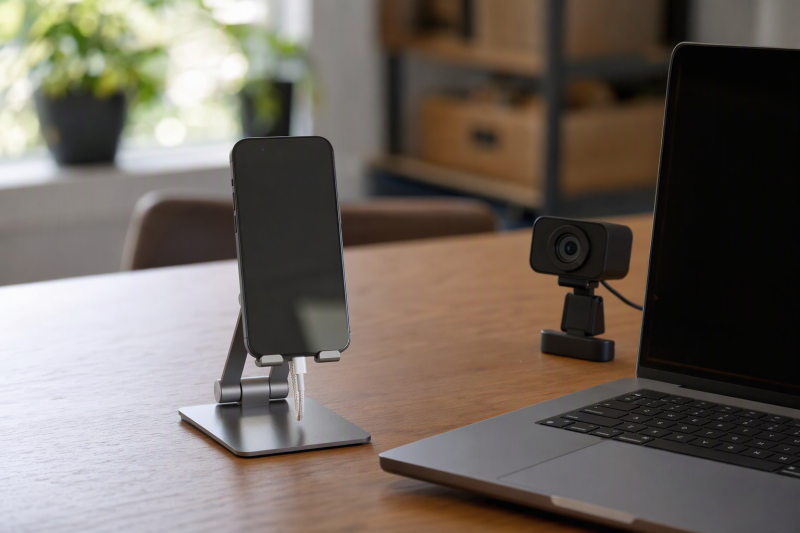
A phone beside a laptop can serve as a second camera, a reference screen, a live-chat monitor, or a tighter alternate angle during a call. Whether that companion shot looks intentional depends on the stand. A short cradle may be fine for reading messages, but a face-level camera usually needs more height. An overhead shot needs an articulated arm, while a magnetic mount gives up universal clamping in exchange for faster phone placement.
The eight stands below cover 7.1-to-14.96-inch height ranges, folding cradles, weighted clamp stands, a magnetic MagSafe-compatible design, and one overhead arm. The right choice depends on camera position, phone and case dimensions, vertical or horizontal framing, charging-cable clearance, and how often the stand must travel.
DIMONCOAT lists the K100 as rising to 14.96 inches, rotating through 360 degrees, and flipping through 180 degrees to clamp phones from 4 to 7 inches. COOPER specifies the MagStand offers magnetic placement from 9 to 13 inches for compatible phones and cases. SIORGDMN is the specialized top-down choice for showing a keyboard, repair, drawing, or product directly below the camera.
Phone Stand Comparison
| Image | Product | Details | Check Price |
|---|---|---|---|
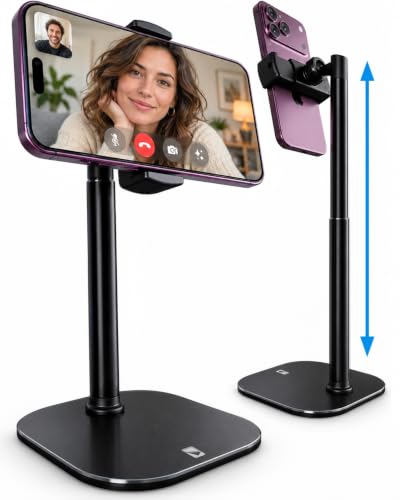 | COOPER ChatStand | Best fit: Simple universal face-level companion shot Height range: 9-13 inches Base: Weighted metal; non-slip padding Holder: Universal extra-wide cradle Use: Calls and desk recording | Check Price on Amazon |
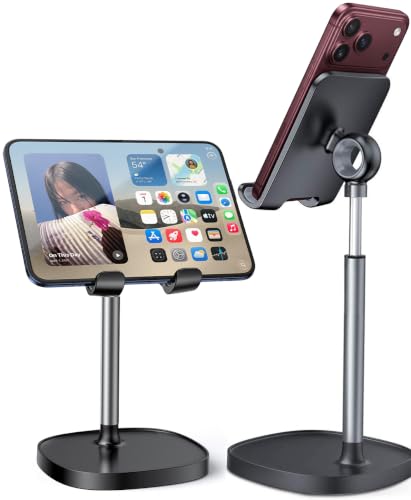 | LISEN LE752 | Best fit: Low reference screen beside a laptop Height range: 7.1-8.5 inches Angle range: 5-85 degrees Charging: Opening and cable management Protection: Anti-skid silicone | Check Price on Amazon |
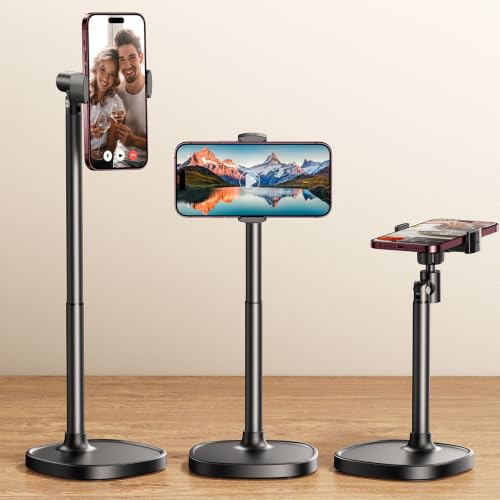 | DIMONCOAT K100 | Best fit: Tall rotating stand for cased phones Height range: 8.66-14.96 inches Movement: 180-degree flip; 360-degree rotation Device range: 4-7 inches Case limit: 0.75 inch | Check Price on Amazon |
 | Lamicall DP13 | Best fit: Portable folding cradle for thick cases Device range: 4-8 inches Case limit: 0.71 inch Height extension: Up to 3.2 inches Base: Weighted metal | Check Price on Amazon |
 | OCYCLONE OCY-STAND-B | Best fit: Multi-joint folding stand for varied screen sizes Device range: 4-13 inches stated Adjustment: 4 points Storage: Fully foldable Charging: Reserved port space | Check Price on Amazon |
 | SIORGDMN Overhead Arm Stand | Best fit: Top-down desk companion shot Arms: 2 x 180-degree swivel Structure: Carbon-steel pole; aluminum arms Base: Solid with rubber pads Storage: Foldable | Check Price on Amazon |
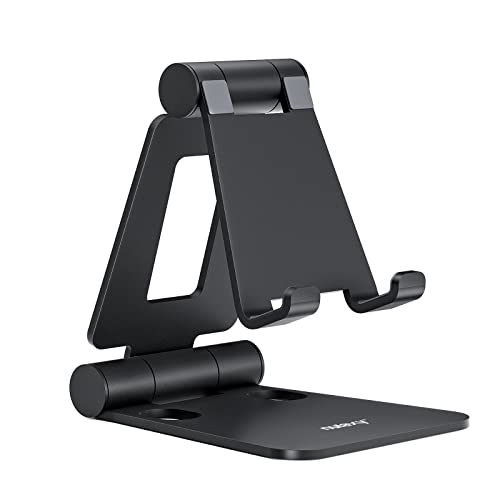 | Nulaxy A4 | Best fit: Full-aluminum folding reference stand Device range: 4-8 inches Case limit: 19 mm / 0.74 inch Frame: Aluminum Large-device position: Landscape for 6-8 inches | Check Price on Amazon |
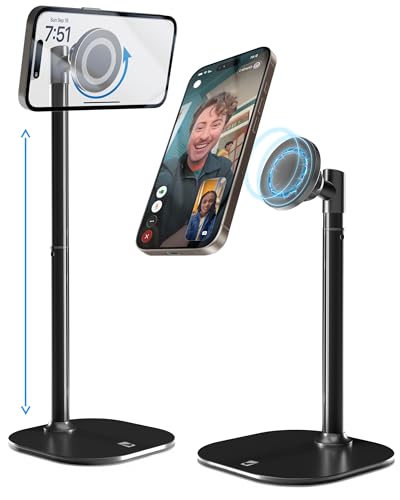 | COOPER MagStand | Best fit: Fast magnetic face-level placement Height range: 9-13 inches Movement: 360-degree rotation; 55-degree tilt Attachment: MagSafe-compatible magnetic head Base: Weighted metal alloy with EVA padding | Check Price on Amazon |
A stand can improve framing, but it does not change the phone camera’s field of view or the laptop webcam’s position. Decide where the lens must sit first, then choose a base and holder that can keep the phone stable at that point without blocking the screen, microphones, charging port, or camera array.
1. COOPER ChatStand — Best Simple Face-Level Cradle
COOPER states the ChatStand adjusts from 9 to 13 inches, which puts a phone higher than most compact cradles. The extra-wide holders accept iPhone, Samsung, and other Android devices, and the telescoping post lets you move the camera from a low reference-screen position toward a more natural video-call angle.
The weighted metal base uses non-slip padding to resist sliding and tipping on a desk, so the stand suits a secondary shot that stays beside the laptop rather than moving around the room. The listing does not state holder width, case-thickness limits, tilt range, rotation range, or supported weight, so heavily cased phones need a fit check.
Our Take: ChatStand is the straightforward cradle for users who want face-level height without magnetic compatibility or a long articulated arm. Its stable base and 9-to-13-inch range are the main reasons to choose it.
[su_box title=”PROS” style=”soft” box_color=”#2e7d32″] – A 9-to-13-inch range reaches higher companion-camera positions than short cradles. – The weighted metal base provides a stable footprint for desk recording. – Non-slip padding protects the surface and reduces movement during calls. – A universal holder supports iPhone, Samsung, and other Android phones. [/su_box] [su_box title=”CONS” style=”soft” box_color=”#c62828″] – Holder width, maximum case thickness, tilt, rotation, and device-weight limits are not stated. [/su_box]2. LISEN LE752 — Best Low Adjustable Reference Stand
LISEN states the LE752 adjusts from 7.1 to 8.5 inches and tilts from 5 to 85 degrees. This height range suits a phone beside a low laptop screen, a chat window, or a preview monitor better than a camera aligned with a tall external display. The wide tilt range helps you aim the screen toward yourself without moving the base.
A charging opening and a cable-management path keep the bottom port accessible. Anti-skid silicone covers the back and base to protect both phone and desk, and the holder is described as compatible with thick OtterBox-style cases. Assembly includes the stand, one screw, a hex driver, and instructions.
Our Take: LE752 is the best compact option for a low companion screen or secondary camera beside a laptop. Its 8.5-inch maximum may sit below eye level when the main webcam is above a large monitor.
[su_box title=”PROS” style=”soft” box_color=”#2e7d32″] – The 5-to-85-degree tilt range adapts between screen viewing and camera framing. – A 7.1-to-8.5-inch height range fits compact laptop-side arrangements. – Built-in charging clearance and cable routing keep the bottom port usable. [/su_box] [su_box title=”CONS” style=”soft” box_color=”#c62828″] – An 8.5-inch maximum may remain below a monitor-mounted webcam. – The listing does not state phone-size, holder-width, or weight limits. – Initial assembly requires the included screw and hex driver. [/su_box]3. DIMONCOAT K100 — Best Tall Rotating Clamp Stand
DIMONCOAT states the K100 spans 8.66 to 14.96 inches, the highest maximum among the upright stands here. The manufacturer specifies the holder flips through 180 degrees and rotates through 360 degrees, which makes it easy to switch between vertical and horizontal framing or point the rear camera across the desk. It is rated to accept devices from 4 to 7 inches.
According to DIMONCOAT, the silicone-lined clip fits phones in cases up to 0.75 inch thick. A weighted metal base and matching EVA mat add stability and protect the desk. Because the post can rise nearly 15 inches, keep the phone centered over the base when possible. A tall, off-axis load creates more tipping force even when the base is weighted.
Our Take: K100 is the most flexible face-level companion stand for a cased phone. Its height and rotation range cover more framing needs than a short cradle does, provided the base has clear desk space.
[su_box title=”PROS” style=”soft” box_color=”#2e7d32″] – The 8.66-to-14.96-inch range reaches the tallest upright position in this group. – Full rotation and 180-degree flip support vertical, horizontal, and rear-camera framing. – A silicone clip accepts 4-to-7-inch devices with cases up to 0.75 inch thick. – The weighted base and EVA mat improve grip while protecting the desk. [/su_box] [su_box title=”CONS” style=”soft” box_color=”#c62828″] – A nearly 15-inch extension needs more base clearance than a compact cradle. – Tall off-center positions create more tipping force on the stand. [/su_box]4. Lamicall DP13 — Best Folding Thick-Case Cradle
Lamicall states the DP13 fits phones and small tablets from 4 to 8 inches and accommodates cases up to 0.71 inch thick. According to the manufacturer, its telescoping section extends by as much as 3.2 inches, while the holder tilts toward a vertical position. The extension and tilt give a compact desk cradle enough movement for reference viewing and modest camera elevation.
The bi-folding structure collapses for a bag or backpack. A weighted metal base, metal telescoping rod, groove, and silicone pads stabilize the device and protect contact surfaces. The Lamicall listing gives extension travel rather than total minimum and maximum height, so if you need exact lens alignment, do not assume a final camera height.
Our Take: DP13 is the travel-friendly cradle for thick cases and devices up to 8 inches. It offers more packing convenience than the tall weighted stands, but less predictable face-level placement.
[su_box title=”PROS” style=”soft” box_color=”#2e7d32″] – Support for 4-to-8-inch devices includes many large phones and small tablets. – A 0.71-inch case limit gives thick-case users a clear fit boundary. – The bi-folding design collapses into a compact shape for travel. – Weighted metal in the base and rod adds stability without a separate clamp. [/su_box] [su_box title=”CONS” style=”soft” box_color=”#c62828″] – The listing states 3.2 inches of extension but not total stand height. – A cradle position offers less camera rotation than a ball head or full swivel. – Larger devices can change stability even when they fit the stated size range. [/su_box]5. OCYCLONE OCY-STAND-B — Best Four-Point Folding Stand
OCYCLONE uses four adjustable points to change height and viewing angle across low typing, medium call, and higher viewing positions. The listing states compatibility with 4-to-13-inch phones and tablets in cases, which gives it the broadest device-size claim in this group. A reserved opening leaves room for a charging cable during use.
The stand folds into a slim shape for a pocket, backpack, or laptop bag. Reinforcement and anti-slip pads at the base and support surface are intended to reduce shaking and scratches. No exact height range, angle range, case-thickness limit, or load rating is supplied, so the large 13-inch claim should be treated as a fit ceiling rather than proof of equal stability at every position.
Our Take: OCYCLONE is the highly adjustable folding option for users who switch between phones and larger screens. It gives fewer exact framing numbers than DIMONCOAT or COOPER.
[su_box title=”PROS” style=”soft” box_color=”#2e7d32″] – Four adjustment points provide more joint control than a simple hinged cradle. – The stated 4-to-13-inch range covers phones and many tablet-sized devices. – Full folding makes the stand easy to store with laptop accessories. [/su_box] [su_box title=”CONS” style=”soft” box_color=”#c62828″] – Exact height, angle, case-thickness, and load limits are not stated. – A 13-inch device may be less stable at high or steep positions. – Multiple hinges take longer to reproduce between camera sessions. [/su_box]6. SIORGDMN Overhead Arm Stand — Best Top-Down Companion Shot
SIORGDMN is the only option here designed around an overhead or extended-angle shot. SIORGDMN states that two arms each swivel through 180 degrees, while flexible head and arm joints change height and direction. The arm layout can hold a phone above a keyboard, drawing, craft, repair, or product while the laptop webcam continues to show the presenter.
The stand combines a solid base, carbon-steel pole, aluminum arms, and soft rubber at the base and phone contact points. It folds for storage and transport. The listing does not give base dimensions, arm lengths, phone-size limits, case limits, or load capacity, so test maximum extension cautiously over a clear surface before you place valuable work underneath.
Our Take: Choose SIORGDMN when the companion shot has to look straight down at the desk. Its dimensional limits are not stated, so check desk space and balance before relying on it.
[su_box title=”PROS” style=”soft” box_color=”#2e7d32″] – Two 180-degree arms support overhead, side, and oblique camera positions. – Carbon-steel and aluminum structure provides a metal support path. – Rubber contact pads protect both the phone and desk surface. – Folding construction makes an articulated stand easier to store between shoots. [/su_box] [su_box title=”CONS” style=”soft” box_color=”#c62828″] – Base size, arm length, phone range, and load capacity are not stated. – An extended overhead phone creates more tipping force than an upright position. – Multiple joints require more setup and repeatability work than a fixed cradle. [/su_box]7. Nulaxy A4 — Best Full-Aluminum Folding Cradle
Nulaxy specifies a full-aluminum dual-folding frame for 4-to-8-inch phones and e-readers. The 18 mm hook accepts devices and cases up to about 0.71 inch thick. Its hinges adjust height and angle, then collapse into a compact form for a laptop bag.
Rubber pads prevent metal contact with the phone and add grip at the base. Nulaxy recommends vertical or horizontal placement for 4-to-6-inch devices, but horizontal orientation for 6-to-8-inch devices to improve stability. The orientation guidance makes it easier to avoid a top-heavy vertical setup with a large phone or small tablet.
Our Take: A4 is the durable folding cradle for a thick-cased phone that normally sits below webcam height. It is better as a stable reference or low companion angle than as a face-level stand.
[su_box title=”PROS” style=”soft” box_color=”#2e7d32″] – Full-aluminum construction gives the folding cradle a rigid material base. – The 18 mm hook accepts devices and cases up to about 0.71 inch thick. – Compatibility from 4 to 8 inches covers phones, e-readers, and small screens. [/su_box] [su_box title=”CONS” style=”soft” box_color=”#c62828″] – Devices from 6 to 8 inches should use horizontal orientation for better stability. – No exact total height, angle range, or load rating is stated. – The folding cradle cannot reach the height of a 13-to-15-inch stand. [/su_box]8. COOPER MagStand — Best Magnetic Face-Level Stand
COOPER states the MagStand adjusts from 9 to 13 inches, rotates through 360 degrees, and tilts through 55 degrees. According to the manufacturer, the magnetic head supports MagSafe-compatible iPhones and cases, while the package includes two steel rings for other compatible phone setups. Magnetic attachment leaves the bottom edge clear for charging and allows fast changes between vertical and horizontal framing.
A wide weighted metal-alloy base uses EVA padding for grip and desk protection. The stand is aimed at face-level calls, filming, streaming, and study. Magnetic performance depends on the phone, case, ring placement, and alignment, so do not assume a thick non-magnetic case is secure just because the device fits physically.
Our Take: MagStand is the fastest face-level option for a confirmed magnetic setup. It combines the useful 9-to-13-inch range with rotation and tilt, but universal cradles are safer when magnetic compatibility is uncertain.
[su_box title=”PROS” style=”soft” box_color=”#2e7d32″] – A 9-to-13-inch height range aligns with many laptop and monitor camera positions. – Full rotation makes vertical and horizontal framing quick to change. – A 55-degree tilt range supports screen and lens-angle adjustment. – The weighted metal-alloy base uses EVA padding for stability and desk protection. [/su_box] [su_box title=”CONS” style=”soft” box_color=”#c62828″] – Secure holding depends on magnetic phone, case, or steel-ring compatibility. – The listing provides no device-weight limit or base dimensions. [/su_box]Buying Guide: Position a Phone Beside a Webcam
Choose Face-Level, Low, or Overhead Framing
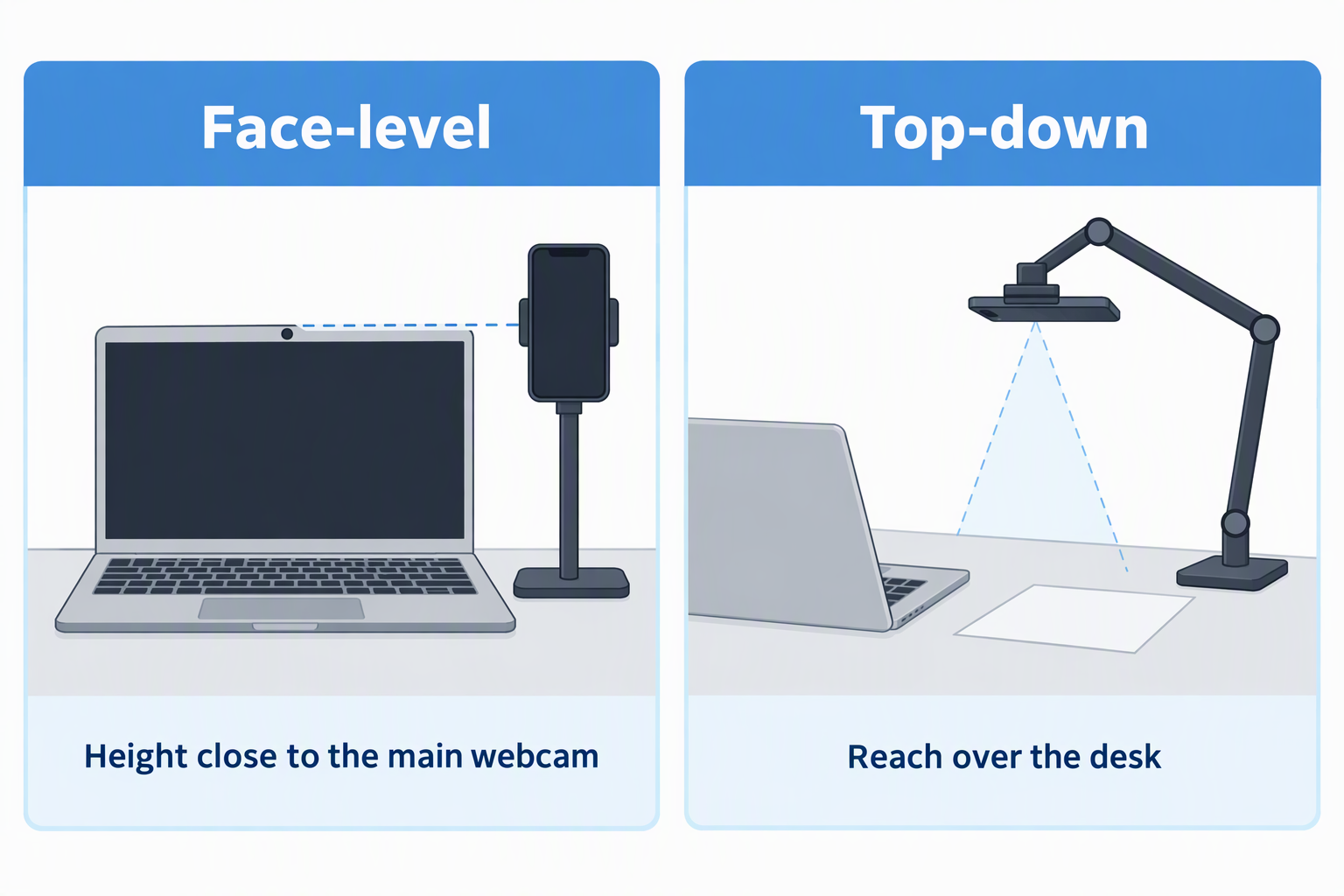
Face-level shots need enough height to approach the main webcam. DIMONCOAT K100 reaches 14.96 inches, while COOPER ChatStand and MagStand reach 13 inches. Position the phone close to the laptop camera if you want eye movement between angles to look small.
Top-down work needs reach rather than only height. SIORGDMN uses two articulated arms for desk views. A dedicated overhead camera mount may offer another path when the phone stand’s unspecified reach or load limits do not fit the shot.
Match the Holder to the Phone and Case
Cradle depth and clip opening determine case fit. Lamicall lists the DP13 as accepting cases up to 0.71 inch, DIMONCOAT specifies a 0.75-inch limit, and Nulaxy A4 provides an 18 mm (roughly 0.71-inch) hook. A case can fit by thickness yet still interfere with side buttons.
Magnetic attachment requires a compatible surface. COOPER MagStand works directly with MagSafe-compatible phones and cases, with steel rings named in the product title for other arrangements. Keep a wireless charging desk mat separate if the mat’s charging coil and the stand cannot align safely at the same time.
Protect Stability at Full Extension
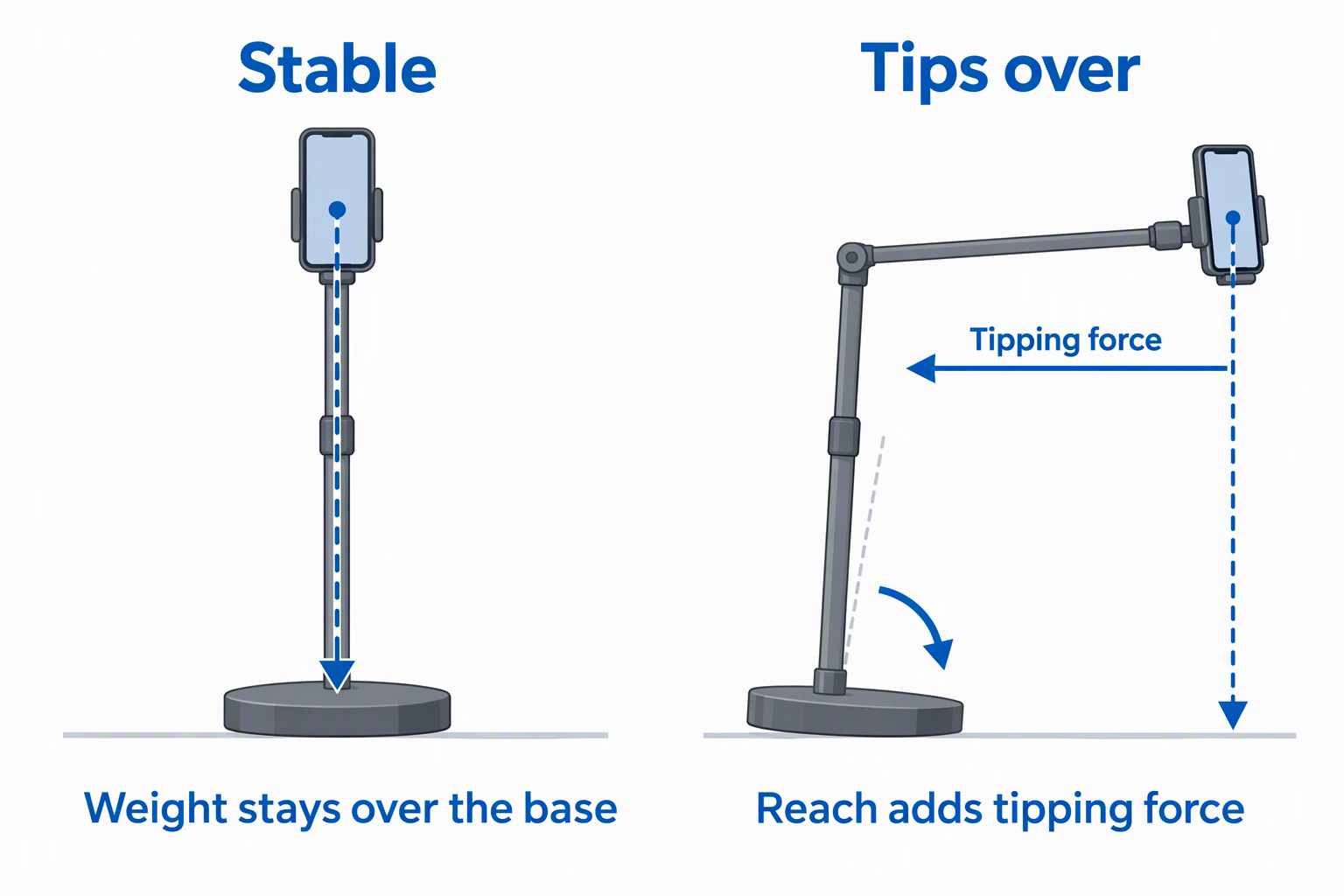
Height and reach increase tipping force on the base. DIMONCOAT, ChatStand, and MagStand use weighted bases, while SIORGDMN combines a solid base with metal arms. Keep the phone’s center of weight over the base whenever the framing allows and avoid placing the stand where a laptop lid or cable can strike it.
Large devices need conservative orientation. Nulaxy recommends horizontal placement for 6-to-8-inch devices, and OCYCLONE’s 13-inch ceiling does not promise equal stability at every joint angle. Store spare clamps and cables in a desk drawer organizer so they do not crowd the base.
Coordinate Audio and Lighting Separately
A second camera does not need to become a second microphone. Select the intended audio input in the call or recording software to avoid echo and timing differences. A USB conference speakerphone can handle room audio, while a USB headset isolates one speaker.
Match light direction across both cameras. A phone placed far to one side may see a darker face or stronger reflection than the laptop webcam. A small LED video light panel or a reflector holder arm can shape the shared light without changing the stand.
Plan Charging and Cable Routes
Keep the charging port and cable bend clear. LISEN provides a charging opening, OCYCLONE reserves cable space, and magnetic MagStand leaves the bottom edge unobstructed. A cable pulled tight can rotate a stand or tip a tall phone support even when the base is weighted.
Route cables away from camera movement. Leave a service loop for vertical-to-horizontal rotation and keep the lead out of keyboard and mouse travel. A wireless headset removes one cable from the desk, though the phone may still need wired power for long sessions.
Frequently Asked Questions
How Tall Should a Phone Stand Be Beside a Laptop?
The lens should sit near the framing height you want, not at one universal number. LISEN rates its stand at 8.5 inches, COOPER lists the ChatStand and MagStand at 13 inches, and DIMONCOAT specifies a 14.96-inch maximum. Measure from the desk to the laptop webcam or desired second angle.
A lower phone can still be useful as a reference display. If the device shows chat, notes, or a preview rather than supplying the final face shot, a folding cradle may be enough. For camera use, lens height and stable rotation count for more.
Is a Magnetic Stand Safer Than a Clamp?
Neither attachment is universally safer. MagStand is convenient when the phone and case are magnetically compatible and aligned. DIMONCOAT’s silicone clamp gives a physical grip and states support for cases up to 0.75 inch thick.
Test the complete phone-and-case combination near the desk first. Accessories, case materials, and ring placement affect magnetic hold. A clamp can also press a side button or sit poorly on an unusual case edge.
Can These Stands Hold a Tablet?
Some listings extend beyond normal phone sizes. Lamicall and Nulaxy list support for 4-to-8-inch devices, while OCYCLONE states 4 to 13 inches. Those size claims do not supply a corresponding weight limit.
Use horizontal orientation and a low position for larger devices. Nulaxy specifically recommends horizontal placement from 6 to 8 inches. Keep the screen centered over the base and avoid maximum hinge extension unless stability is clear.
Which Stand Works for an Overhead Desk Shot?
SIORGDMN is the dedicated overhead option in this group, featuring two 180-degree arms and flexible joints to position the phone over a desk. The other products are primarily upright cradles, clamps, or magnetic stands.
Check the clear area below the phone before recording. The product listing does not state arm length or load capacity, so test extension and joint tightness without fragile objects underneath. A USB document camera is another option when top-down capture matters more than phone portability.
Can I Charge the Phone While It Is Mounted?
Several designs leave wired charging space. LISEN and OCYCLONE identify dedicated openings, while MagStand’s magnetic face leaves the bottom port open. Confirm that the cable plug clears the desk and holder at the chosen angle.
Cable tension can undermine an otherwise stable stand. Use a relaxed service loop and anchor the cable away from the base. Rotate the phone through the full intended range before a live call to make sure the lead does not wrap around the post.
Final Recommendation
DIMONCOAT K100 is the best overall stand for a phone serving as a true webcam companion because its 14.96-inch maximum, 360-degree rotation, 180-degree flip, and 0.75-inch case limit answer the main fit questions. COOPER MagStand is faster for a confirmed magnetic setup, while ChatStand provides a simple universal cradle from 9 to 13 inches. Choose SIORGDMN only when the secondary shot must look down at the desk.
Settle the camera position before you shop. Measure lens height, decide between vertical and horizontal framing, include the case, and map the charging cable. A stand that holds the phone securely at the required angle is more useful than one with extra joints that never place the lens where the shot needs it.