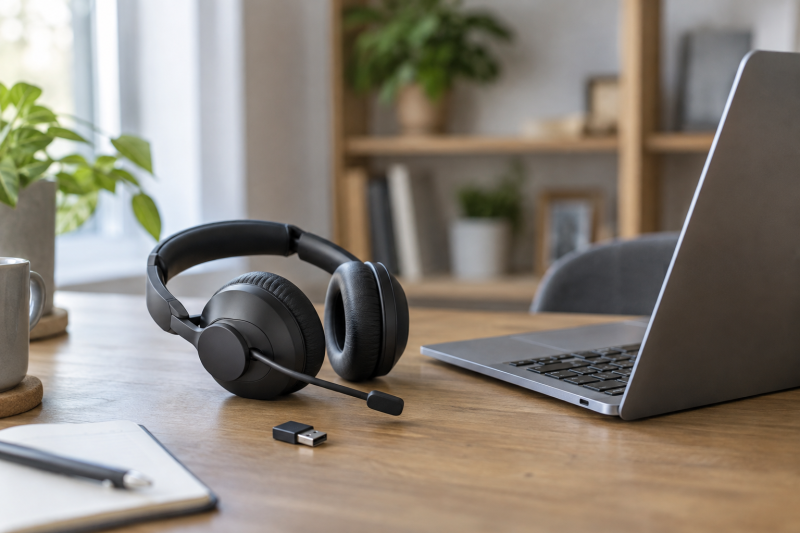
Working from home does not always mean sitting still. A wireless call headset lets you step to a shelf, stretch between meetings, or move to a quieter corner without taking the laptop along. The useful differences are not simply Bluetooth version or the largest battery claim. Connection method, microphone behavior, wearing style, charging routine, and mute support determine whether a headset fits a workday.
The eight headsets here cover two main shapes. Over-head models place one or two padded cups on the ears and suit long desk sessions. Compact Bluetooth earpieces keep one ear open and pack easily. Most include a computer dongle, but the connector type and the controls enabled through that dongle vary. Product claims in this guide are treated as stated specifications, not independent performance tests.
For an all-round laptop setup, the AOC Spark 03 combines Bluetooth 5.3, a USB-A dongle, a flip-to-mute boom, and a claimed 45-hour talk time. The Angteela M112 is the standout when the wearer also wants stated listener-side ANC, while the OTYHVV KH122M is a strong one-ear desk choice with a charging base and a stated 102g weight. Buyers who travel light may prefer the charging-case format of the EKVANBEL A6L or Swiitech M-ONE.
| Image | Product | Details | Check Price |
|---|---|---|---|
 | AOC Spark 03 | Connection: Bluetooth 5.3 and USB-A dongle Microphone: AI noise-cancelling microphone with flip-to-mute boom Battery: Up to 45 hours talk time claimed Charging: 2.5 hours claimed Weight: 5.06 ounces stated | Check Price on Amazon |
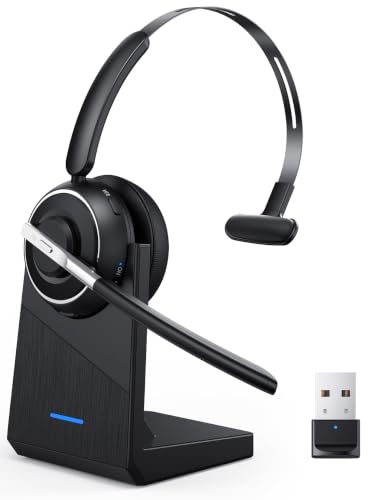 | OTYHVV KH122M | Connection: Bluetooth and USB dongle Wearing style: Single-ear, reversible boom Battery: Up to 40 hours talk time claimed Weight: 102g stated Charging: USB-C or included dock | Check Price on Amazon |
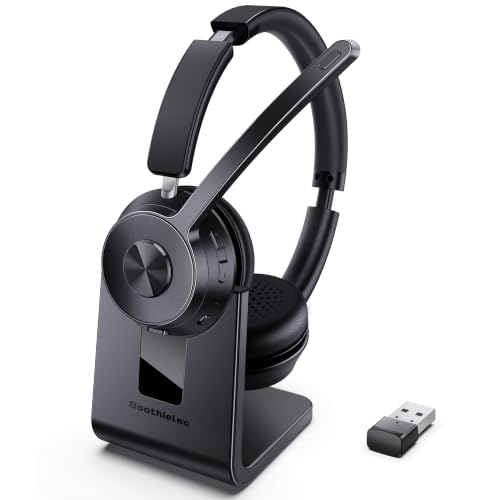 | Soothielec KH53 | Connection: Bluetooth 5.3 and USB-A dongle Pairing: Two devices stated Battery: 40 hours talk time claimed Range: 33 feet claimed Charging: Two-hour charge on included stand | Check Price on Amazon |
 | Angteela M112 | Connection: Bluetooth 5.4 and Qualcomm USB-A dongle Noise control: Hybrid listener ANC and microphone ENC Mute: Flip-to-mute boom Battery: 35 hours talk time claimed Range: 33 feet claimed | Check Price on Amazon |
 | EKVANBEL A6L | Connection: Bluetooth 5.3 and USB dongle Wearing style: Single-ear earpiece Battery: 25 hours per charge at 50% volume claimed Case: 1,000mAh with LED display Fit: Three ear-tip sizes | Check Price on Amazon |
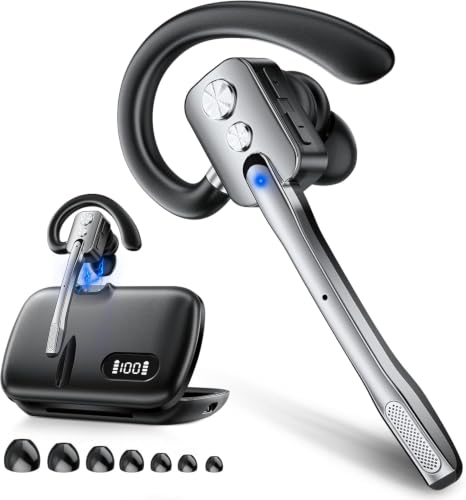 | Swiitech M-ONE | Connection: Bluetooth 5.3, dual-device support Wearing style: Single-ear earpiece Battery: Nine hours at 80% volume claimed Case: 450mAh charging case with stand Fit: Three ear-tip sizes and rotating hook | Check Price on Amazon |
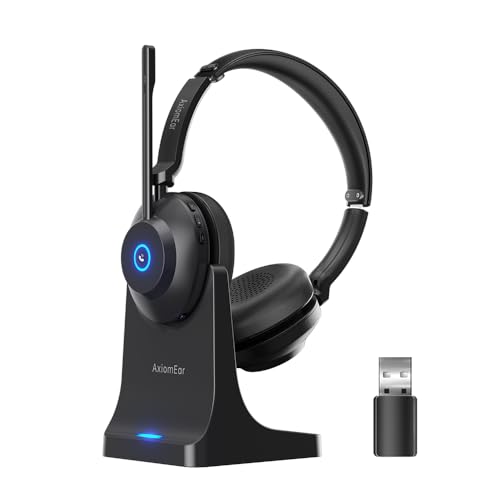 | AxiomEar AE82-L | Connection: Bluetooth 5.3 and USB-C computer adapter Microphone: 270-degree boom with physical mute Battery: Up to 40 hours claimed Charging: USB-C cable or included base Fit: 180-degree earcups and adjustable headband | Check Price on Amazon |
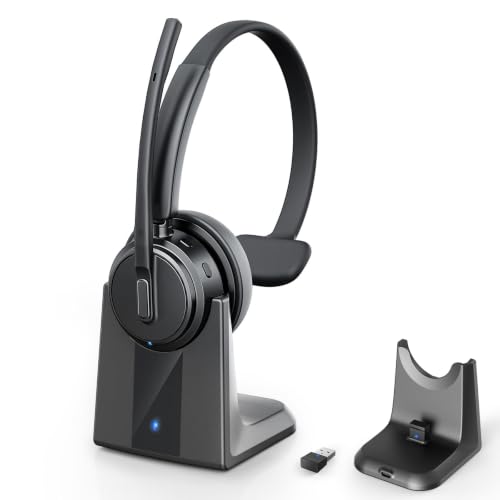 | Angteela DH18B | Connection: Bluetooth 5.3 with dual-device pairing Microphone: ENC microphone with one-key mute Battery: 50 hours talk time at 50% volume claimed Charging: USB-C or included charging base Fit: 270-degree microphone and rotating earmuffs | Check Price on Amazon |
Quick Picks
- Best overall: AOC Spark 03 for Bluetooth 5.3, a USB-A dongle, flip-to-mute, and a claimed 45-hour talk time.
- Best single-ear desk headset: OTYHVV KH122M for its 102g design, dongle, dock, and stated 40-hour talk time.
- Best for listener-side noise control: Angteela M112 because it explicitly combines hybrid ANC with microphone ENC.
- Best compact travel format: EKVANBEL A6L for its earpiece shape and 1,000mAh charging case.
- Best simple dual-device option: Soothielec KH53 for Bluetooth 5.3, USB-A dongle, dual pairing, and a charging stand.
- Best adjustable over-head fit: AxiomEar AE82-L for its rotating boom, swiveling earcups, headband adjustment, and USB-C adapter.
1. AOC Spark 03 — Best Overall
The AOC Spark 03 connects over Bluetooth 5.3 or its included USB-A dongle, so it suits a laptop that needs a dedicated wireless receiver as well as a phone or tablet. Its over-head design, adjustable headband, and stated 5.06-ounce weight make it a more conventional desk headset than the tiny one-ear earpieces in this group.
AOC rates it for up to 45 hours of talk time with a 2.5-hour recharge and up to 500 hours of standby. Those figures offer useful headroom for a workweek, though call use, volume, and wireless conditions affect actual runtime. Raising the boom to its upright position mutes the microphone, which gives the user a physical control rather than an on-screen meeting-app command.
The listing describes an AI noise-cancelling microphone, protein-memory-foam earpads, and dual-device Bluetooth support. Treat its noise-control language as a maker claim about call pickup, not a promise that the earcups silence the room for the wearer. No listener-side ANC is stated, and comfort still depends on clamping force, glasses, and head shape.
Best for: A home-office laptop setup that needs a USB-A dongle, Bluetooth pairing, and a physical boom-mute gesture.
Pros
- Bluetooth 5.3 and a USB-A dongle give the laptop and phone separate connection paths
- Flip-to-mute boom provides a clear physical microphone control during calls
- Claimed 45-hour talk time and 2.5-hour recharge suit regular desk use
Cons
- No listener-side ANC is stated, so it does not solve room noise for the wearer
- The supplied dongle is USB-A, which may need an adapter on USB-C-only laptops
2. OTYHVV KH122M — Best Single-Ear Desk Headset
The OTYHVV KH122M uses a monaural design, leaving one ear open for a doorbell, family member, or office conversation. Its stated 102g weight, memory-foam earpad, padded opposite side, and reversible 270-degree boom are aimed at the usual comfort problems of a single-ear headset. The open ear is helpful for awareness but provides less isolation than a two-ear model.
A USB dongle supplies driver-free laptop connectivity and enables the stated PC mute function. The qualifier is important because OTYHVV says mute is not available through a computer’s ordinary Bluetooth connection, while mobile calls and supported conferencing services can use mute in the specified connection modes. Voice prompts announce mute status, so there is less guesswork during calls.
The included base stores the dongle and charges the headset, while USB-C offers a second charging path. Claimed talk time is 40 hours with a two-hour recharge. A physical power switch should make reconnection more predictable than a long-press control. The product also supports a phone voice assistant, but that does not mean its multifunction button controls every desktop meeting app.
Best for: People who want one ear open, a light stated weight, and a docked headset ready beside the laptop.
Pros
- 102g stated weight and reversible single-ear fit
- Charging dock with dongle storage
- 40-hour claimed talk time and voice mute prompts
Cons
- PC mute depends on the USB dongle
- Open-ear design does not isolate the wearer
3. Soothielec KH53 — Best Simple Dual-Device Option
The Soothielec KH53 can pair with two devices, which suits someone taking laptop meetings and mobile calls during the same day. Bluetooth 5.3 handles compatible devices, and an included USB-A dongle adds a route for a Windows PC without dependable Bluetooth. The dongle is not for desk phones or landlines, so this is a laptop-and-mobile headset rather than a traditional office-phone accessory.
Soothielec states a 33-foot Bluetooth range, 40 hours of talk time, a 600mAh battery, and a two-hour charge on the included stand. Those numbers put it in the multi-day category on paper, while the stand gives the headset a regular place to rest. It can be used while charging, although the listing recommends powering it off for battery longevity and safety.
The microphone uses stated ENC and has a one-touch mute button, but mute activates only during calls. Memory-foam cushions, protein-leather covers, and an adjustable headband are aimed at long wear. The multifunction button supports Siri or Google functions on a smartphone, not computer-app control, another useful boundary for laptop buyers.
Best for: Switching between a Bluetooth phone and a USB-A laptop without repeatedly pairing.
Pros
- Dual-device pairing and included USB-A dongle
- Charging stand and claimed 40-hour talk time
- Call-only physical microphone mute
Cons
- Dongle does not support desk phones or landlines
- Smartphone multifunction control does not extend to PC apps
4. Angteela M112 — Best for Listener-Side Noise Control
The Angteela M112 is the only model here that explicitly states both hybrid active noise cancellation for the wearer and environmental noise cancellation for the microphone. Its three ANC modes make it the most relevant choice for a home office where appliance hum or nearby conversation affects concentration, not merely what remote participants hear.
For computers, the package includes a Qualcomm USB-A dongle intended to provide stable, low-latency operation. The dongle is listed for PC and Mac but not landlines, desk phones, or VoIP phones. Bluetooth 5.4 adds direct wireless pairing, and dual connectivity allows two devices to remain connected. Its stated range is 33 feet, so buyers should plan around room-scale movement rather than whole-house coverage.
Raising the boom physically mutes the microphone, a clear action that is easier to confirm than a small button. The listing claims 35 hours of talk time, 50 hours of music, and a two-hour charge. Breathable leather cushions, an adjustable headband, and a rotating microphone support long sessions, but ANC and fit should still be tested during the return period.
Best for: Callers who need microphone noise reduction and stated ANC for their own listening.
Pros
- Explicit hybrid ANC plus microphone ENC
- Flip-to-mute boom and dual connectivity
- USB-A dongle for PC and Mac
Cons
- Multifunction call control is stated for mobile calls only
- Dongle is not compatible with desk or landline phones
5. EKVANBEL A6L — Best Compact Travel Format
The EKVANBEL A6L is a compact earpiece rather than an over-head headset. It includes three ear-tip sizes with six tips total, a USB dongle, Bluetooth 5.3, and a charging case. This format takes less bag space and leaves one ear uncovered, but all-day comfort depends heavily on choosing the correct tip and keeping the ear hook stable.
Its headset battery is stated at 150mAh and up to 25 hours at 50% volume. The 1,000mAh case provides repeated charging away from a wall outlet, and the case display reports the case battery rather than the earpiece battery. The product title says 96-hour talk time, while the detailed bullet gives 25 hours for one charge. Buyers should read the larger number as case-assisted total use, not continuous headset runtime.
The Qualcomm QCC3040 platform and dual microphones are paired with stated environmental noise cancellation. A separate mute button works during a phone call, and Bluetooth can connect two devices. The headset cannot be used while charging. The charging limit is a bigger drawback with an earpiece than with a docked over-head model, so placing it in the case between calls is the sensible routine.
Best for: Travel and mobile work where a pocketable charging case is more useful than two-ear coverage.
Pros
- Compact earpiece with 1,000mAh charging case
- Three ear-tip sizes and USB dongle
- Dual-device Bluetooth support
Cons
- Cannot be used while charging
- Case display shows case charge, not headset charge
6. Swiitech M-ONE — Best Lightweight Case-and-Stand Earpiece
The Swiitech M-ONE is another one-ear option, but its 450mAh charging case includes a stand for upright desk storage. It can connect to two Bluetooth-capable devices, making it suitable for a laptop and phone when neither requires a dongle. Unlike several other picks, the supplied details do not list a computer USB audio dongle, so confirm that the work laptop permits Bluetooth headsets.
The earpiece claims nine hours of talk and music time at 80% volume and 360 hours of standby. The runtime is shorter between charges than the over-head models, though the case can top it up during breaks. Its LED display reports case battery level only. Three sizes of ear tips, a 45-degree rotating in-ear section, 360-degree ear hook, and 180-degree microphone arm give users several fit adjustments.
The QCC3040 chipset and dual microphones support stated noise reduction, with a claim of up to 99.6% ambient-noise blocking. Treat that figure as a listing claim and test it against the actual keyboard, fan, and room voices in the home office. Buttons handle volume, tracks, calls, and voice assistant activation; the listing also identifies a mute button.
Best for: A Bluetooth-enabled laptop user who wants a small earpiece with a desk-friendly charging case.
Pros
- Charging case doubles as an upright stand
- Extensive ear-tip and hinge adjustment
- Connects to two Bluetooth devices
Cons
- Nine-hour stated runtime is shorter than over-head picks
- No USB audio dongle is stated in the supplied details
7. AxiomEar AE82-L — Best Adjustable Over-Head Fit
AxiomEar lists a 270-degree boom, 180-degree swiveling earcups, and an adjustable headband for this model. That range should help position the microphone and pads for different head shapes. Breathable protein-leather cushions are meant to limit heat and pressure, though any on-ear design deserves a full-call wear test.
Bluetooth 5.3 can pair with a smartphone while the supplied USB-C adapter connects to a computer, with switching between the two stated connections. The USB-C adapter is particularly useful for modern thin laptops where USB-A dongles otherwise require another adapter. The listing calls the computer accessory a USB-C adapter. It does not specify whether every call-control function works identically across both paths.
The claimed battery life is 40 hours, and charging is available by USB-C cable or the included base. A physical earcup button mutes the microphone. Noise reduction is stated for the microphone, not the listener, so this headset should help transmit clearer speech but should not be bought as an ANC model.
Best for: USB-C laptop users who value broad physical adjustment and a charging base.
Pros
- USB-C computer adapter and Bluetooth 5.3
- 270-degree microphone and swiveling earcups
- Claimed 40-hour battery with two charging methods
Cons
- Noise reduction is stated for the microphone only, so skip it if you need listener-side ANC
- Exact cross-platform button support is not specified
8. Angteela DH18B — Best Claimed Talk-Time Headroom
The Angteela DH18B claims 50 hours of talk time at 50% volume, 80 hours of music, and 80 days of standby. USB-C charging and the included wireless charging base give it two ways to recover power, while a storage slot in the base keeps the dongle from disappearing, which is useful at a fixed home-office desk.
Bluetooth 5.3 supports simultaneous pairing to two Bluetooth devices. A physical power switch automatically reconnects after initial setup, and voice alerts report connection, mute, incoming-call, and low-battery states. The multifunction button can answer mobile phone calls, but the listing specifically limits that answering function to mobile, so users should manage laptop meetings through the app unless tested otherwise.
Its microphone uses stated ENC, and a dedicated button mutes without software. Soft breathable earmuffs, an adjustable headband, and 270-degree rotation for both microphone and earmuffs allow left- or right-side wear. There is no explicit listener-side ANC claim, despite the microphone’s noise-cancelling language.
Best for: A fixed desk where a charging base, physical switch, and long claimed talk time take priority.
Pros
- Claimed 50-hour talk time
- USB-C and base charging with dongle storage
- Dual-device pairing and dedicated mute
Cons
- Multifunction answering is limited to mobile calls
- No listener-side ANC stated
Buying Guide: How to Choose a Wireless Headset for Laptop Calls
Choose the wearing style before comparing features
An over-head headset spreads weight across the head and can cover one or both ears, while an earpiece concentrates contact around one ear. For long meetings, test pressure after at least one normal-length call, not just the first five minutes. Glasses, ear shape, and room temperature can change the result.
One-ear designs preserve awareness and help users hear their own speaking volume, but they provide little isolation. Two-ear models can feel more focused. If room noise distracts the wearer, look specifically for listener-side ANC, not only a noise-cancelling microphone.
Match the dongle to the laptop’s ports
A dongle can make pairing more predictable on a managed work computer and may unlock mute or call controls. Most products here state USB-A, while AxiomEar states a USB-C computer adapter. Check whether the laptop has USB-A, USB-C, or both before buying.
Do not assume that a USB-C charging port also carries headset audio. The product needs a stated computer adapter or direct Bluetooth support. If an extra adapter is required, use a data-capable model and keep the rigid connector away from side pressure.
Distinguish microphone ENC from headphone ANC
ENC or microphone noise cancellation aims to reduce background sound sent to other participants. It does not necessarily quiet the room in the earcups. The key distinction is what the remote caller hears versus what the wearer hears.
Among these products, Angteela M112 explicitly claims hybrid ANC for listening as well as microphone ENC. For every other model, assume no listener-side ANC unless the current listing and manual clearly say otherwise. A quiet room can still outperform aggressive microphone processing.
Treat battery numbers as conditional
Runtime claims are usually measured at a stated or unstated volume and may separate talk time from music time. Compare talk time at the listed volume, not the largest number in a title. Standby time and case-assisted totals do not equal continuous call time.
A charging stand encourages daily top-ups, while a case suits travel. Check whether the headset works while charging. The EKVANBEL A6L explicitly does not. For important calls, build a routine around the battery indicator rather than waiting for a low-battery alert.
Verify mute behavior on the actual call path
Mute may work during phone calls but not media playback, or through a dongle but not ordinary computer Bluetooth. OTYHVV explicitly ties PC mute to its USB dongle, while Soothielec says mute activates only during calls. Test hardware mute, its audible prompt or light, and the meeting-app status separately.
Flip-to-mute booms provide a visible physical mute state, but software can still select a different microphone. Before a confidential meeting, confirm the headset is the active input. Disconnect it when privacy cannot depend on an uncertain mute state.
Plan wireless range around walls and interference
The stated 33- to 49-foot ranges are best-case figures, not promises through several rooms. Walls, metal furniture, Wi-Fi traffic, and the body can reduce coverage. Treat one-room movement as the safe planning assumption until the headset is tested at home.
Place a USB dongle where the laptop and desk do not shield it. A short extension can improve placement, though it adds clutter. If walking range is essential, test the farthest normal location while playing back a recording before the return window closes.
Check dual-device priorities
Dual pairing is helpful when a phone and laptop share the workday, but it does not guarantee smooth handoff. An incoming phone call may interrupt laptop audio, and controls may address only the active device. Confirm which connection gets priority and how to return to the meeting afterward.
Company-managed laptops may block Bluetooth pairing, making a permitted USB dongle the more dependable route. Conversely, a phone-focused earpiece without a dongle needs working laptop Bluetooth. Match the connection policy before weighing secondary features.
Test comfort, controls, and speech together
A comfortable headset is not useful if its mute button is hard to find, and a clear microphone is not useful if the boom drifts away. During the return period, run a 30- to 60-minute test call with typing, normal movement, and a battery check.
Record locally as well as calling another person. Listen for clipping, breath noise, and keyboard pickup. Then check headband pressure, ear heat, control reach, reconnection, and the charging routine as one complete workflow.
Related Home-Office Setup Guides
Wireless headsets work best as part of a stable desk setup. A USB-C docking station, laptop stand, or external webcam can improve call posture and framing. For port planning, see the guides to Thunderbolt docks, USB-C hubs, and laptop chargers.
If speech still sounds poor, check the home-office microphones and conference speakerphones guides. A headset remains the better private option, but those categories solve different room and group-call needs.
Frequently Asked Questions
Is a USB dongle better than laptop Bluetooth?
A dedicated dongle can be easier to deploy on computers with weak, old, or restricted Bluetooth. It may also enable hardware mute or call controls that do not work through the laptop’s built-in radio.
Bluetooth avoids occupying a port and works well when the laptop supports it reliably. The better option is the one that preserves required controls on the actual meeting app, so test reconnection, mute, microphone selection, and playback.
Does a noise-cancelling microphone block noise for the wearer?
Usually not. Microphone ENC or noise reduction aims to keep room sound from reaching remote callers. It does not automatically remove room noise from the sound heard through the headset.
For quieter listening, look for an explicit active noise cancellation claim for the earcups. Angteela M112 states that feature; the other products should not be assumed to include it merely because their microphones reduce noise.
Can these headsets connect to a laptop and phone at once?
Several state dual-device support, including OTYHVV, Soothielec, Angteela M112, EKVANBEL, Swiitech, AxiomEar, and Angteela DH18B. The exact pairing can be two Bluetooth devices or a dongle plus Bluetooth, depending on the model.
Dual connection does not guarantee equal controls or automatic handoff. Check whether a phone call interrupts laptop audio and whether the mute and answer buttons work on both connections.
How much battery life is enough for home-office calls?
A headset that safely covers one full workday is enough if it returns to a dock every night. More runtime adds protection against missed charging and helps during travel, but it should not outweigh comfort or dependable controls.
Compare talk time rather than music or standby time. Charging-case totals also include recharges between sessions, so they are not continuous on-ear runtime.
Will the mute button work in Teams, Zoom, or Webex?
It may mute at the headset level without synchronizing the application’s on-screen icon. Some controls work only through the supplied dongle, only during calls, or only with mobile-phone functions.
Run a test meeting and confirm mute with another participant. Check the hardware voice prompt or light and the app indicator, because either one alone can give an incomplete picture.
Final Verdict
The AOC Spark 03 is a broad fit for a typical home office because it combines Bluetooth, a USB-A dongle, a boom-mute gesture, and a long claimed talk-time figure. The Angteela M112 is the clearer choice when listener-side ANC is a requirement rather than microphone cleanup alone.
For an open-ear desk workflow, the OTYHVV KH122M balances a stated 102g weight, USB dongle, charging dock, and 40-hour talk-time claim. Travelers should compare the EKVANBEL A6L and Swiitech M-ONE case formats, paying close attention to their shorter per-charge runtimes and laptop connection needs. Whichever model fits, verify comfort, mute behavior, and connection stability on the actual laptop before the return window ends.