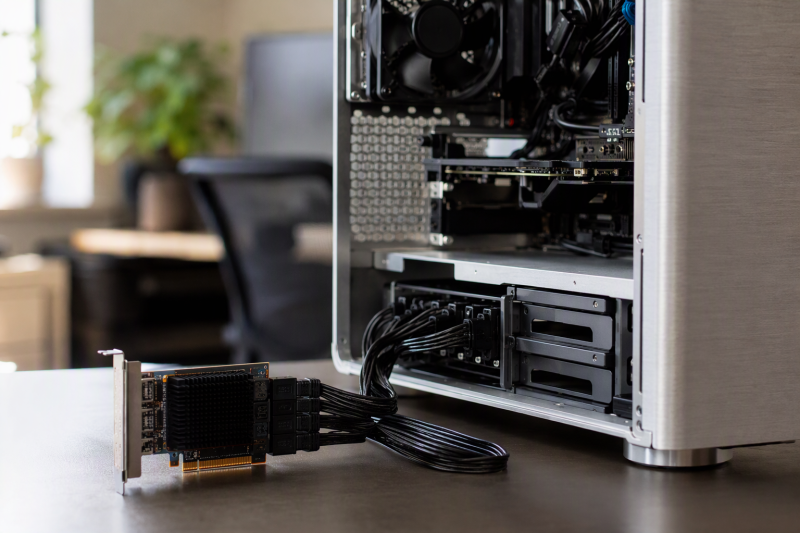
Adding internal archive drives can be cheaper and tidier than replacing a motherboard or stacking external enclosures. A SATA PCIe expansion card turns an available PCIe slot into extra internal data ports for hard drives, SATA SSDs, and in some cases optical drives or external eSATA storage.
The important choices are port count, controller bandwidth, slot width, boot support, operating-system compatibility, case height, and included cabling. Most products here are host bus adapters, not hardware RAID cards. They pass each disk to the operating system, so Unraid, TrueNAS, ZFS, Storage Spaces, mdraid, or other software can manage the disks. Check your complete storage plan before you move important data.
[blueblock]A SATA controller supplies data connections, not drive power. Shut down and unplug the computer before installation, use proper static precautions, and connect every drive to a correctly rated PSU power cable. Back up all valuable data before changing controllers, drive order, firmware settings, or software RAID layouts.[/blueblock]Quick Picks
- Best overall six-port HBA kit: GLOTRENDS SA3026C uses an ASM1166 controller, includes six data cables and a power splitter, supports low-profile cases, and clearly excludes hardware RAID and OS booting.
- Best bootable six-port option: SINEFINE SP1006 pairs six SATA ports with PCIe 3.0 x4, boot support, hot-swap capability, individual activity LEDs, and a large heatsink.
- Best straightforward ASM1166 bundle: YBBOTT ASM1166 includes six SATA cables and a four-drive power splitter for software-managed storage.
- Best NAS-focused non-booting pick: BTBcoin LT-803 targets Unraid, TrueNAS, and Linux passthrough with six cables, both brackets, and a manufacturer-stated 2GB/s upstream path.
- Best four-port x1 card: Moonqkuses 4-Port uses a Marvell 88SE9215 controller, fits PCIe x1 slots, includes four cables, and states boot-disk support.
- Best premium two-port card: StarTech 2P6G offers documented ASM1061, NCQ, port-multiplier, ATA/ATAPI, cross-platform, and low-profile support.
- Best internal-plus-eSATA card: ELFJMZP ASM1061 provides two internal SATA and two external eSATA ports from an x1 card.
- Best six-port x1 fit: ACTIMED 6-Port places six SATA ports on a card that fits x1 and larger slots and includes cables, a bracket, and a power splitter.
SATA PCIe Expansion Card Comparison
| Image | Product | Details | Check Price |
|---|---|---|---|
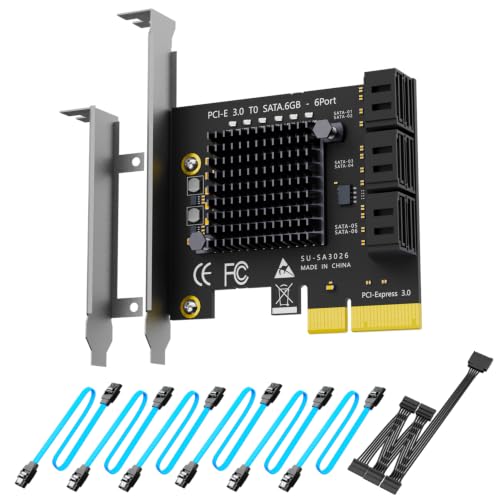 | GLOTRENDS SA3026C | Ports: 6 SATA III Controller: ASM1166 PCIe: PCIe 3.0 x2 electrical; x4 card RAID: No hardware RAID Boot: OS boot not supported | Check Price on Amazon |
 | SINEFINE SP1006 | Ports: 6 SATA III PCIe: PCIe 3.0 x4 Boot: Boot support stated Hot swap: Supported when system permits Cables: Data and power cables not included | Check Price on Amazon |
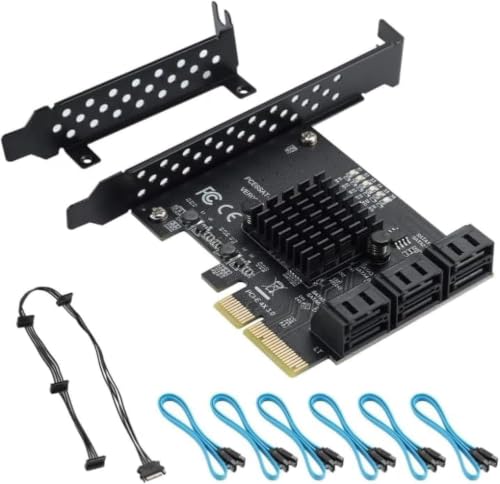 | YBBOTT ASM1166 | Ports: 6 SATA III Controller: ASM1166 PCIe: x4 card; fits x4/x8/x16 RAID: Software RAID only Cables: 6 SATA cables and 1-to-4 power splitter | Check Price on Amazon |
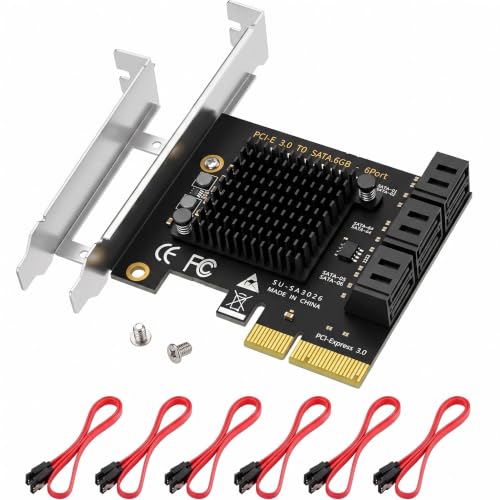 | BTBcoin LT-803 | Ports: 6 SATA III Controller: ASM1166 PCIe: PCIe 3.0 x4; up to 2GB/s stated RAID: JBOD/passthrough; no hardware RAID Boot: OS boot not supported | Check Price on Amazon |
 | Moonqkuses 4-Port SATA Card | Ports: 4 SATA III Controller: Marvell 88SE9215 PCIe: x1; fits x1/x4/x8/x16 RAID: No hardware RAID Boot: Bootable system disk support stated | Check Price on Amazon |
 | StarTech 2P6G-PCIE-SATA-CARD | Ports: 2 SATA III Controller: ASM1061 PCIe: PCIe 2.0 x1; 4Gbps combined stated Features: NCQ, port multiplier, ATA and ATAPI RAID: No built-in hardware RAID | Check Price on Amazon |
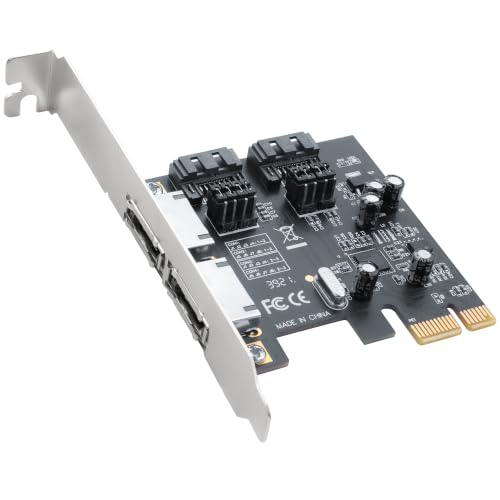 | ELFJMZP ASM1061 SATA/eSATA Card | Ports: 2 internal SATA and 2 external eSATA Controller: ASM1061 PCIe: PCIe 2.0 x1 Features: NCQ and hot-swap support stated Bracket: Full height | Check Price on Amazon |
 | ACTIMED 6-Port SATA Card | Ports: 6 SATA III Controller: ASM1064 and JMB575 PCIe: x1; fits x1/x4/x8/x16 Capacity: Up to 96TB stated Cables: 6 SATA cables and power splitter | Check Price on Amazon |
1. GLOTRENDS SA3026C — Best Overall Six-Port HBA Kit
The GLOTRENDS SA3026C suits a software-managed six-drive build, and it states plainly what it does not do. Its ASM1166 controller sits on a physical PCIe x4 card and uses a PCIe 3.0 x2 upstream link. Six SATA III ports attach independent drives for Unraid, TrueNAS, ZFS, Proxmox, or Windows Storage Spaces. Hardware RAID is explicitly unsupported.
GLOTRENDS states up to 277 MB/s on each port, a sensible target for hard-drive arrays and many SATA SSD workloads when several disks operate together. The controller’s upstream bandwidth is shared, so six SATA SSDs cannot each sustain their full 6Gbps interface rate at the same time. For archive HDDs, parity checks, and media libraries, the shared uplink is a better fit.
Windows other than XP, macOS, Linux, and NAS operating systems are listed as driver-free. Set the system to AHCI mode in BIOS or UEFI before the first installation. The card is described as a data HBA and does not boot an operating system, so keep the system drive on the motherboard or another boot-capable controller.
The box includes six 350mm SATA data cables, a one-to-five SATA power splitter, full-height and low-profile brackets, and six activity LEDs. The card fits x4, x8, or x16 slots, not x1, so a board with only x1 slots free needs a different card. Before you use the bundled splitter with several mechanical drives, check the PSU connector rating and the total spin-up current.
- ASM1166 controller with PCIe 3.0 x2 uplink
- Six SATA cables and both brackets included
- Individual activity LEDs
- Broad OS support stated
- No hardware RAID
- Does not boot an operating system
- Requires an x4-size or larger slot
2. SINEFINE SP1006 — Best Bootable Six-Port Option
SINEFINE’s SP1006 targets desktops and small servers that need six SATA channels plus boot support. It uses a PCIe 3.0 x4 interface and fits x4, x8, or x16 slots. Windows, macOS, and Linux compatibility is stated, and the low-profile bracket covers both compact and standard-height installations.
Each port is described as SATA III 6Gbps. The port rate is the negotiated interface ceiling, not a guarantee that all six drives sustain 6Gbps at once. Mechanical archive disks will generally stay well below that rate, while several SATA SSDs working together are more likely to reveal shared controller and PCIe limits.
Hot-swap support is useful in a server chassis, yet safe removal also depends on AHCI configuration, operating-system support, and a suitable hot-swap bay or backplane. An ordinary internal SATA cable does not make a loose drive safe to pull while powered. Always eject or offline the disk and follow the chassis procedure.
The card adds a large heatsink, six activity LEDs, and a power LED for 24/7 monitoring. Data cables and a drive-power adapter are not included, so budget for six SATA data cables and enough PSU connections. Before you use a disk on this card as the system drive, confirm that the motherboard firmware detects the card’s option ROM, and test your recovery media.
- Boot support stated
- PCIe 3.0 x4 interface
- Hot-swap capability stated
- Low-profile bracket and port LEDs
- No SATA data cables included
- No power adapter cable included
- Hot swapping depends on the full system
3. YBBOTT ASM1166 — Best Straightforward ASM1166 Bundle
The YBBOTT card uses an ASM1166 controller, the same controller family as two other six-port cards on this page. A physical PCIe x4 interface provides six SATA 3.0 connections, and the card fits x4, x8, or x16 slots. It does not fit x1 slots, so check for an open x4 or larger slot on consumer boards with limited accessible connectors.
The package includes six SATA data cables and a one-to-four SATA power distribution cable. The splitter covers only four drives, so a full six-disk installation needs additional properly rated PSU connections. Never power the same drive from two sources or exceed the cable and connector current limits.
Hardware RAID is not supported. The card can participate in software RAID managed by the operating system, so the operating system, not the card, handles parity, mirrors, and pool metadata. Software RAID suits Windows Storage Spaces or supported Linux storage stacks, but the exact migration and recovery behavior depends on the software you choose.
Windows 8 and 10, Windows Server 2008 R2 through 2019, and Linux kernels 2.6 through 4.x are listed. Windows 11, newer kernels, and macOS are not stated in the compatibility details, so confirm driver support before you buy for those systems. The heatsink should get normal case airflow, particularly during long parity checks or simultaneous disk activity.
- ASM1166 controller
- Six SATA cables included
- Software RAID use supported
- Heatsink included
- No hardware RAID
- Power splitter covers four drives
- No PCIe x1 fit
- OS list omits newer releases
4. BTBcoin LT-803 — Best NAS-Focused Non-Booting Pick
BTBcoin positions the LT-803 for Unraid, TrueNAS, and home-lab storage. Its ASM1166 controller sits on a physical PCIe 3.0 x4 card, with total upstream bandwidth stated at up to 2GB/s. The bandwidth is ample for several archive hard drives and leaves headroom during scrubs, resilvering, or multi-disk transfers.
The card operates in JBOD or passthrough mode and contains no hardware RAID engine. Windows 7 through 11 and Linux are described as driver-free. It explicitly does not support OS booting, so use it for data drives only. Keep the boot device on a motherboard port or another supported controller.
The bundle includes six SATA cables, a one-to-five SATA power splitter, full-height and low-profile brackets, and an aluminum heatsink. A low-profile bracket helps in compact server chassis, but the board still needs an accessible x4 or larger slot and airflow around the heatsink.
The claim that all six HDDs run at the full 6Gbps SATA rate does not mean six simultaneous 6Gbps transfers. Actual throughput depends on the drives and the shared upstream link. For an HDD-based pool, the card offers native OS recognition, adequate aggregate bandwidth, cooling, and the included installation hardware.
- NAS-focused ASM1166 design
- Up to 2GB/s upstream bandwidth stated
- Six cables and both brackets included
- Windows and Linux plug-and-play stated
- No OS boot support
- No hardware RAID
- Requires x4-size or larger slot
5. Moonqkuses 4-Port — Best Four-Port x1 Card
The Moonqkuses card is useful when the motherboard has only a PCIe x1 slot available. Its Marvell 88SE9215 controller provides four SATA 3.0 ports and supports port-multiplier FIS-based and command-based switching. The card fits x1, x4, x8, or x16 slots and includes a low-profile bracket.
The package includes four SATA data cables, mounting hardware, a screwdriver, and an antistatic bag. It has no drive-power splitter, so every HDD or SSD needs a PSU power connection of its own. Four mechanical drives can add up to meaningful spin-up demand, so check the power supply and cable layout before installation.
Hardware RAID is explicitly unsupported. The product says software RAID may be possible when the motherboard or operating system provides it, so build any array in your chosen storage software and do not assume the card provides one. A heatsink covers the controller for sustained loads.
Boot support for a system disk is stated, along with compatibility for Windows XP through 10, macOS, NAS, and Linux. Boot behavior varies by motherboard firmware, so test whether the card and the connected system disk appear in UEFI before you migrate your only boot installation. Keep recovery media and a backup of the old boot configuration.
- Fits PCIe x1 and larger slots
- Four cables included
- Low-profile bracket
- Boot support stated
- No hardware RAID
- No drive-power splitter
- Newer OS versions are not listed
6. StarTech 2P6G — Best Premium Two-Port Card
StarTech’s 2P6G card is the best documented option when only two additional drives are needed. It uses an ASM1061 controller on a PCIe 2.0 x1 interface and has two SATA III ports. Combined bandwidth is stated at up to 4Gbps, so it cannot deliver two simultaneous 6Gbps transfers, but it comfortably serves most hard drives and optical devices.
Support includes SATA 3.2, AHCI 1.4, NCQ, port multipliers, ATA hard drives, SSDs, and ATAPI optical drives. Windows 7 and newer, macOS 10.6.8 and newer, and Linux kernel 2.6.32 and newer are listed. You can build software-managed arrays with Storage Spaces, macOS RAID Assistant, or Linux mdraid or mdadm.
Full-height and low-profile brackets are included, and plug-and-play installation is stated. SATA data cables are sold separately, and drive power must come from the PSU. With only two ports, cabling stays simple and the single x1 upstream link carries less load than it would behind a dense six-port controller.
The card has no built-in hardware RAID. The lack of hardware RAID is usually preferable for two archive drives managed as separate disks or an OS mirror, but the card is not a replacement for a dedicated RAID card with cache and battery-backed protection. The TAA designation may also be relevant to some organizational purchasing policies.
- Well-documented ASM1061 controller
- NCQ, port multiplier, and ATAPI support
- Windows, macOS, and Linux compatibility
- Full-height and low-profile brackets
- Only two ports
- 4Gbps combined bandwidth stated
- SATA cables sold separately
7. ELFJMZP ASM1061 — Best Internal-Plus-eSATA Card
ELFJMZP divides its ASM1061 controller between two internal SATA ports and two external eSATA ports. That combination is useful for a desktop that needs a pair of internal archive drives while retaining a connection for an older eSATA dock or enclosure. The x1 card can occupy x1, x4, x8, or x16 PCIe slots.
SATA III rates up to 6Gbps are stated for the ports, with backward compatibility for SATA II and I. All four ports share the ASM1061 controller and the PCIe 2.0 x1 path, so four active high-speed devices will not each sustain 6Gbps. For hard drives and occasional external rotation, that limit is acceptable.
NCQ and hot-swap support are listed. Safe hot swapping requires AHCI support, OS handling, and a proper eSATA enclosure or internal hot-swap bay. Do not disconnect a bare internal drive while powered, and always offline or eject a volume before removal.
Compatibility is stated for Windows XP through 11, Windows Server, and Linux. Only a standard full-height bracket is described, and macOS support is not listed. Scarce new availability was reported. The card suits buyers who need to keep eSATA equipment useful, and it is not the best way to add many internal drives.
- Two SATA and two eSATA ports
- Fits PCIe x1 and larger slots
- NCQ and hot-swap support stated
- Wide Windows support stated
- Only full-height bracket stated
- No macOS support stated
- Scarce new availability was reported
8. ACTIMED 6-Port — Best Six-Port x1 Fit
ACTIMED is the six-port option for a system that has only a PCIe x1 connector free. It combines an ASM1064 controller with a JMB575 port multiplier and fits x1, x4, x8, or x16 slots. That wider compatibility can solve a physical slot problem, but six devices still share the narrower upstream connection.
The package includes the card with its heatsink, six SATA cables, a 15-pin SATA power splitter, a low-profile bracket, and a driver CD. ACTIMED states a storage ceiling of 96TB. Confirm the splitter’s connector count and rating against your exact drives, especially high-capacity HDDs with large startup current.
ACTIMED states compatibility for Windows XP and newer, macOS, and Linux. RAID support is claimed, but the controller design and the wording do not establish a dedicated hardware RAID engine. Treat it as software or host-managed RAID unless the exact mode and firmware are explicitly confirmed.
This design suits hard-drive arrays built for capacity, not six simultaneous SATA SSDs. Port multiplication and a shared x1 link can limit combined speed and error isolation. Make sure the heatsink gets airflow, monitor SMART data, and test long multi-drive transfers before you move the only copy of an archive.
- Six SATA ports from an x1 card
- Six cables and low-profile bracket included
- Windows, macOS, and Linux support stated
- Heatsink and power splitter included
- Shared x1 bandwidth
- RAID implementation is not clearly defined
- Port-multiplier design is less ideal for SSD-heavy loads
Buying Guide: Choosing a SATA PCIe Expansion Card
Count ports and verify the exact PCIe slot
Start with the number of drives the case can physically mount and the number the PSU can power. A six-port card is wasted if the chassis has room for only two additional disks. Leave space for airflow, cables, and future drive replacement.
Then inspect the motherboard. GLOTRENDS, SINEFINE, YBBOTT, and BTBcoin need an x4-size or larger slot, while Moonqkuses, StarTech, ELFJMZP, and ACTIMED can use x1. Check lane-sharing rules because populating an M.2 socket may disable a PCIe connector or motherboard SATA ports.
Separate SATA link rate from aggregate throughput
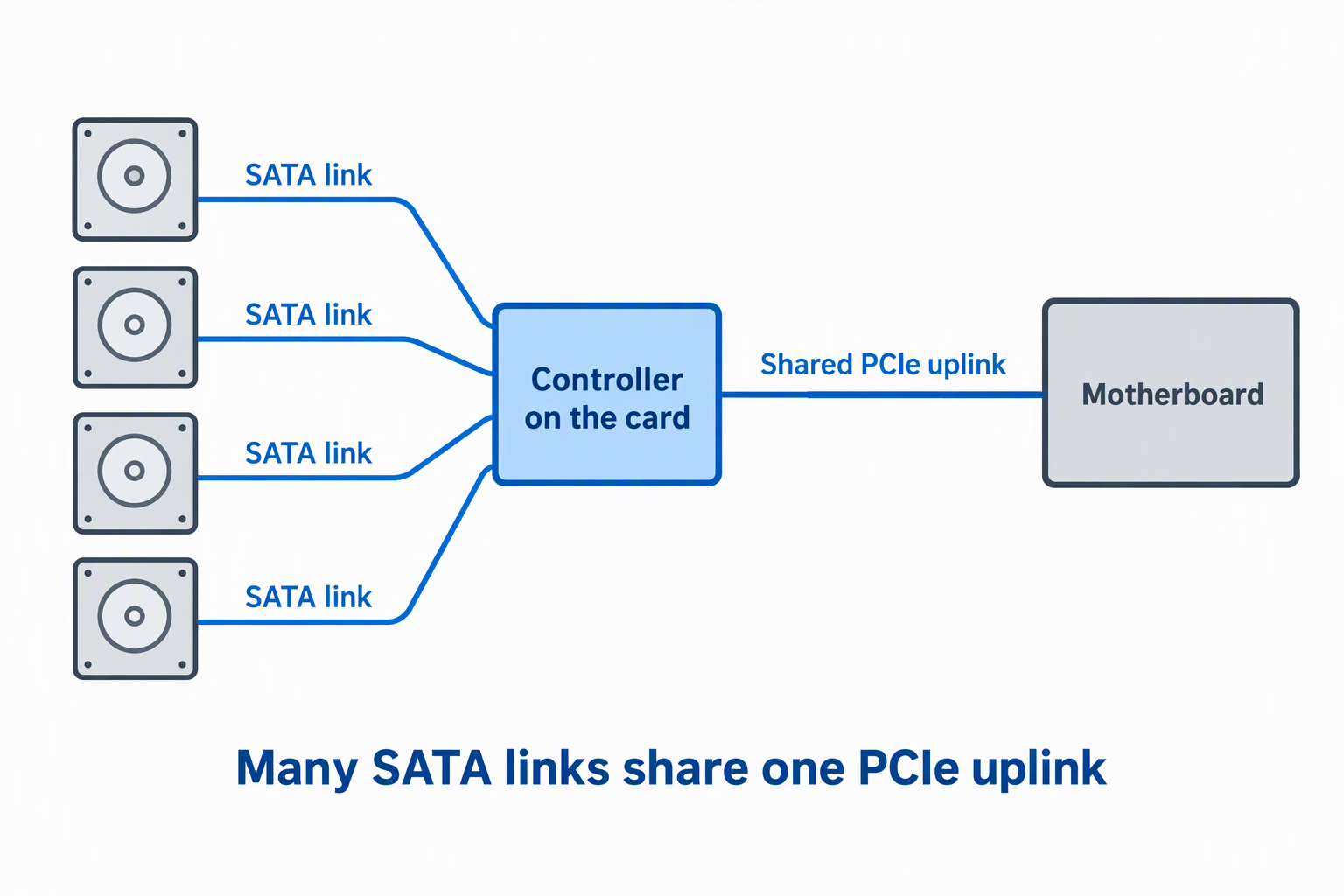
SATA III ports negotiate up to 6Gbps per link, but the controller’s PCIe uplink is shared. A two-port PCIe 2.0 x1 card cannot deliver two independent 6Gbps transfers at the same time, and a six-port x1 design is even more constrained.
Archive HDDs rarely saturate SATA III individually, so shared bandwidth may be acceptable. SSD arrays, concurrent scrubs, and rebuilds reach those limits sooner. Match the PCIe generation and lane count to the expected simultaneous workload rather than multiplying the printed port rate.
Choose HBA passthrough or hardware RAID intentionally
Most cards here are non-RAID HBAs. They show disks individually, so the operating system can manage mirrors, parity, or pools. Passthrough suits Unraid, TrueNAS, ZFS, Storage Spaces, and mdraid when the controller and OS are supported.
Software RAID is not the same as hardware RAID. Do not assume a product title’s “RAID support” provides cache, parity processing, battery backup, or portable array metadata. If hardware RAID is required, choose a controller that documents the exact levels and recovery procedure.
Treat boot support as a motherboard-level compatibility question
SINEFINE and Moonqkuses state boot support, while GLOTRENDS and BTBcoin explicitly reject OS booting. Even a boot-capable card depends on motherboard UEFI recognition, option ROM behavior, boot mode, and the operating system driver.
Test boot detection before migrating a system disk. Keep recovery media, record the original BIOS settings, and preserve a verified system backup. For a storage server, the simpler design is often a small boot drive on a motherboard port plus data disks on the expansion HBA.
Plan drive power separately from SATA data
The controller card does not power attached HDDs or SSDs. Every drive needs a SATA power connection from the PSU. Bundled splitters simplify installation but do not increase the PSU’s capacity or the current rating of the upstream connector.
Mechanical drives draw their highest current during spin-up. Avoid overloading one cable run, and do not use molded adapters of unknown rating. Check PSU rail capacity, connector ratings, drive startup specifications, and case airflow before powering several high-capacity disks together.
Check brackets, cable length, and connector clearance
Low-profile cases need both a short board and a low-profile bracket. GLOTRENDS, SINEFINE, BTBcoin, Moonqkuses, StarTech, and ACTIMED include or state low-profile support. ELFJMZP lists only a full-height bracket.
Plan the cable routing in dense cases. Confirm the manufacturer-supplied 350mm or 400mm cables reach each bay without sharp bends or pressure on the ports. Right-angle connectors may be needed behind drive cages, but their direction must match the case. Keep cables clear of fans.
Verify OS drivers and storage-stack support
The OS lists differ between the ASM1166 and ASM1061 cards. Confirm that the exact Windows release, Linux kernel, macOS version, and storage platform you run appear on the product’s list before you buy. Save any required driver locally before shutting the system down.
For ZFS, Unraid, or TrueNAS, individual disk visibility and stable error reporting are more important than a vague RAID label. After installation, verify every drive serial number, SMART access, link speed, error count, and persistent device identity before adding disks to a pool.
Install, burn in, and document the controller
Power down, unplug the PC, discharge residual power according to the system instructions, and use static precautions. Seat the card evenly, secure the bracket, attach data and power cables, and confirm that no connector can contact a fan. Never install internal hardware while energized.
Before trusting the expansion, run extended SMART tests and simultaneous transfers on noncritical data. Watch for CRC errors, link resets, overheating, or dropped disks. Record which physical bay connects to each controller port, so you can diagnose a future failure without guessing.
Frequently Asked Questions
Does a SATA PCIe card power the connected drives?
No. It provides SATA data connections. HDDs, SSDs, and optical drives still need SATA power from the computer’s PSU.
Some packages include a splitter, but a splitter does not create more power. Check the PSU, cable, connector, and drive spin-up limits before attaching several disks.
Can a six-port SATA card run six drives at 6Gbps each?
Each port may negotiate a 6Gbps SATA III link, but simultaneous transfers share the card’s controller and PCIe uplink. Aggregate throughput is therefore lower than six times 6Gbps on these cards.
Hard drives often remain below the limit, while SATA SSDs reach it sooner. PCIe lane count and generation are key when several drives work at once.
Can these cards create RAID arrays?
Most are non-RAID HBAs and rely on the operating system or storage platform for software RAID. GLOTRENDS, YBBOTT, BTBcoin, Moonqkuses, and StarTech explicitly lack built-in hardware RAID.
ACTIMED’s RAID wording is broad and does not establish a dedicated hardware RAID engine. Treat ambiguous claims as software-managed until the exact controller behavior is confirmed.
Is hot swapping safe with an internal SATA card?
Only when the controller, AHCI mode, operating system, drive bay, power arrangement, and removal procedure all support it. SINEFINE and ELFJMZP state hot-swap capability, but the card alone is not enough.
Never unplug a bare internal drive during activity. Offline or eject it first and use a proper hot-swap bay designed to control data and power connections.
Can the operating system boot from an added SATA card?
Some cards state boot support, while GLOTRENDS and BTBcoin explicitly do not. Motherboard firmware must also recognize the controller early enough to load the operating system.
Test before migrating the only boot drive. Keep recovery media and a complete backup, and consider leaving the boot disk on a motherboard SATA port.
Related Storage and Workstation Guides
- Five-bay DAS enclosures for video archive drives
- 3.5-inch hard drive enclosures for desktop archives
- M.2 SATA enclosures for older laptop SSDs
- PCIe USB-A expansion cards for legacy desk gear
- SFP+ network cards for small 10GbE studios
- Wi-Fi 7 PCIe cards for desktop workstations
- Rack shelves for non-rack studio gear
- Encrypted USB drives for client transfers
Bottom Line
The GLOTRENDS SA3026C is the best complete six-port non-booting HBA package, while the SINEFINE SP1006 is the more suitable choice when boot support and PCIe 3.0 x4 are required. For a smaller, well-documented upgrade, the StarTech 2P6G is the cleanest two-port option.