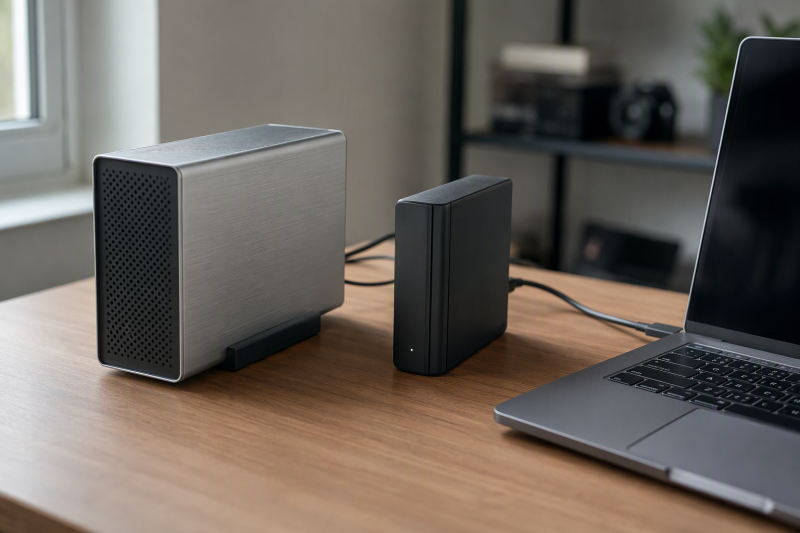
A 3.5-inch enclosure turns a bare desktop SATA hard drive into an external USB archive drive. It can be a practical way to reuse an existing disk, recover files from an old desktop, or keep a large nearline collection beside a workstation. Unlike a multi-bay DAS or cloning dock, each pick here houses one drive and needs its own external power adapter.
The eight verified enclosures differ in stated capacity, host connector, USB link rate, installation method, cooling, sleep behavior, and diagnostic access. None includes a hard drive. Before choosing, identify the drive interface and physical dimensions, the computer’s available ports, the archive’s backup plan, and whether automatic sleep is acceptable for the software that will access it.
An enclosure is not a backup strategy by itself. Important archives need another independent copy, and every drive should be safely ejected and allowed to stop before power or cables are removed.- Best overall: RSHTECH RSH-339STC supports 2.5- and 3.5-inch SATA drives up to 24TB, includes a USB-A/USB-C host cable, aluminum housing, vents, sleep, and an upright stand.
- Best for maximum stated capacity: ACASIS Aluminum Enclosure lists support up to 30TB, a 6Gbps claim, UASP, a 10-minute sleep timer, and a USB-C cable with USB-A support.
- Best 10Gbps host interface: MAIWO USB 3.1 Gen 2 uses a 10Gbps USB-C bridge and notes that the SATA path limits actual transfer to 6Gbps or less.
Hard Drive Enclosure Comparison
| Image | Product | Details | Check Price |
|---|---|---|---|
 | RSHTECH RSH-339STC Hard Drive Enclosure | Drive support: 2.5/3.5 in SATA HDD/SSD Capacity: Up to 24TB Host: USB-A or USB-C, 5Gbps stated Bridge: ASM1153E, UASP Cooling: Aluminum, vents, stand | Check Price on Amazon |
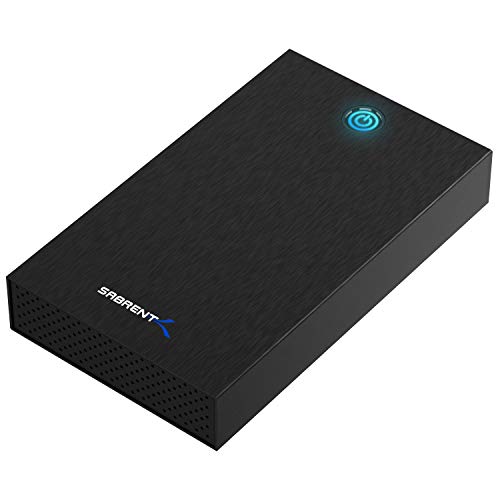 | SABRENT EC-KSL3 USB 3.0 Hard Drive Enclosure | Drive support: 2.5/3.5 in SATA HDD/SSD Capacity: Not stated; verify tall 4TB+ drives Host: USB-A, USB 3.0 with UASP Installation: Tool-free S.M.A.R.T.: Not accessible | Check Price on Amazon |
 | ORICO 3588C3 3.5-Inch Hard Drive Enclosure | Drive support: 3.5 in SATA HDD Capacity: Up to 20TB Host: USB-A to enclosure USB-C, 5Gbps Installation: Tool-free Included: 12V adapter, 2 thermal pads | Check Price on Amazon |
 | ACASIS 2.5/3.5-Inch SATA Hard Drive Enclosure | Drive support: 2.5/3.5 in SATA HDD/SSD Capacity: Up to 30TB Host: USB-C with C/A cable, 6Gbps claim Sleep: 10 minutes Cooling: Aluminum shell, open ABS tray | Check Price on Amazon |
 | ikuai 3.5-Inch Aluminum Hard Drive Enclosure | Drive support: 2.5/3.5 in SATA HDD/SSD Capacity: Up to 20TB Host: USB-A or USB-C, 5Gbps Features: UASP and S.M.A.R.T. Cooling: Aluminum shell, ABS tray, stand | Check Price on Amazon |
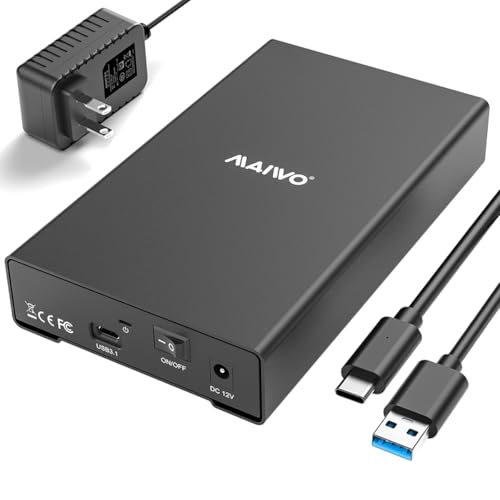 | MAIWO USB 3.1 Gen 2 SATA Enclosure | Drive support: 2.5/3.5 in SATA HDD/SSD Capacity: Up to 24TB Host: USB-C 10Gbps SATA limit: 6Gbps stated Cooling: 2 mm aluminum, honeycomb design | Check Price on Amazon |
 | GODO 3.5-Inch SATA HDD Enclosure | Drive support: 3.5 in SATA I/II/III HDD/SSD Capacity: Up to 18TB Host: USB 3.2 Gen 1, 5Gbps Features: UASP and TRIM Installation: Screw-installed, removable stand | Check Price on Amazon |
 | Vantec NexStar TX 3.5-Inch USB 3.0 Enclosure | Drive support: 3.5 in SATA HDD/SSD Capacity: Not stated Host: USB 3.0, 5Gbps Features: UASP on recent Windows OS: Windows and OS X driver-free stated | Check Price on Amazon |
1. RSHTECH RSH-339STC — Best Overall
The RSHTECH accepts 2.5- or 3.5-inch SATA HDDs and SSDs up to 24TB, so it has room for a high-capacity desktop archive as well as smaller spare drives. The enclosure uses an ASM1153E bridge to connect the SATA drive to USB. A drive that fits in a desktop is not automatically compatible, so do not assume SAS, IDE, or NVMe drives will work.
Its detachable 3.3-foot two-in-one cable supports USB-A and USB-C hosts, including compatible Thunderbolt ports operating as USB. The USB connection is listed up to 5Gbps, while another claim says UASP reaches 6Gbps. A 5Gbps USB link cannot carry 6Gbps of payload, and a mechanical hard drive will normally be slower still. Treat 5Gbps as the host-interface ceiling.
The enclosure has an aluminum body, bottom vents, and a removable vertical stand, so you can place it flat or upright and let heat leave without a fan. RSHTECH specifies that the enclosure sleeps after 10 minutes without data access. Separate red power and blue activity LEDs show power and activity, and its electronic button turns it on with a tap and powers it off after a three-second hold.
[accentbox]Choose RSHTECH for its balance of 24TB capacity, both host connector types, aluminum cooling, and horizontal or vertical placement.[/accentbox]- Up to 24TB stated capacity
- USB-A and USB-C host support
- Aluminum shell, vents, and stand
- Conflicting 5Gbps and 6Gbps claims
- Fixed 10-minute sleep behavior
2. SABRENT EC-KSL3 — Best Tool-Free USB-A Pick
The SABRENT accepts 2.5- and 3.5-inch SATA HDDs or SSDs with a slide-and-click tool-free mechanism. It explicitly excludes SAS, IDE/PATA, M.2 SATA, M.2 NVMe, and PCIe NVMe drives. That clear interface boundary is useful when you reuse an unidentified disk from storage.
Its USB 3.0 connection uses USB-A and supports UASP. SABRENT describes 625 MB/s as the raw theoretical maximum, with typical HDD results of 100-180 MB/s and SSD results up to 400-500 MB/s. Those practical ranges depend on the drive and host. A USB-C-only computer needs a separate USB-C-to-USB-A adapter.
Sabrent includes a 12V, 2A power supply because a 3.5-inch drive cannot run from USB bus power alone. Inside the aluminum shell, an internal ABS tray absorbs shock. Windows 10/11, macOS, and Linux need no driver, but S.M.A.R.T. diagnostics are not accessible through the USB bridge. SABRENT also warns that some 4TB-and-larger drives with unusual PCB height may not seat correctly.
[accentbox]Pick SABRENT when you want tool-free swaps and clear compatibility limits, but verify the physical drive shape and accept the lack of S.M.A.R.T. passthrough.[/accentbox]- Tool-free drive installation
- Clear SATA-only limitations
- Realistic HDD and SSD speed ranges
- No S.M.A.R.T. access
- USB-C adapter not included
- Some tall-PCB drives may not fit
3. ORICO 3588C3 — Best Tool-Free 20TB USB-C-Device Pick
ORICO’s enclosure supports 3.5-inch SATA hard drives up to 20TB and installs without tools. Its enclosure-side connector is USB Type-C, but the included cable is USB-A to USB-C. The C end plugs into the enclosure and the A end plugs into the host. Buyers with only USB-C computer ports need another compatible data cable or adapter.
The interface is listed by ORICO as USB 3.1 to SATA III with a 5Gbps maximum. ORICO claims UASP improves speed by 20 percent over traditional USB 3.0 behavior, though the actual gain depends on the host, drive, queue pattern, and operating system. Windows and Linux are explicitly named, but macOS support is not stated in the listing.
ORICO includes a 12V power adapter to power the desktop drive. Internal sponge or foam material protects the drive from shock, and the manufacturer includes two thermal pads. The enclosure also has an activity LED, and a manual is included. Sleep timing, S.M.A.R.T. passthrough, enclosure material, and a stand are not described in the listing.
[accentbox]ORICO is the uncomplicated tool-free 20TB option for a USB-A host, despite the Type-C connector on the enclosure itself.[/accentbox]- Tool-free 3.5-inch installation
- Up to 20TB stated capacity
- Thermal pads and power supply included
- Included host connector is USB-A
- macOS and S.M.A.R.T. support not stated
4. ACASIS Aluminum Enclosure — Best Maximum-Capacity Pick
ACASIS lists the highest capacity here at 30TB and accepts both 2.5- and 3.5-inch SATA HDDs or SSDs. Its aerospace-grade aluminum shell and open-frame ABS internal tray are intended to move heat away from the drive during long transfers. That design suits a large archive disk used for sustained ingestion or verification.
The bridge claims 6Gbps and UASP, but the listing does not state the USB generation clearly enough to establish the host-side ceiling. A mechanical archive drive will generally remain the limiting component. The included 50 cm cable supports USB-C-to-C or USB-C-to-A connection, so newer and older workstations can connect without a separate adapter.
An independent switch means you do not have to unplug the power lead, and automatic sleep begins after 10 minutes of inactivity. A 12V, 2A adapter and manual are included. The listing gives no operating systems, S.M.A.R.T. passthrough, TRIM, or installation method, so verify those items if they affect the archive workflow.
[accentbox]Choose ACASIS for a drive above the other products’ stated capacity ceilings, but confirm 30TB drive fit, host interface, OS, and diagnostic passthrough before committing critical data.[/accentbox]- Up to 30TB stated
- USB-C and USB-A host cable
- Aluminum shell and independent switch
- USB generation not clearly stated
- S.M.A.R.T. and OS support not stated
5. ikuai Aluminum Enclosure — Best S.M.A.R.T.-Friendly 5Gbps Pick
The ikuai supports 2.5- and 3.5-inch SATA drives up to 20TB. Its two-in-one USB 3.0 cable connects to USB-A, USB-C, or compatible Thunderbolt host ports, with a listed transfer rate up to 5Gbps. The ASM1153E bridge supports UASP, and the listing states S.M.A.R.T. support for archive maintenance.
S.M.A.R.T. passthrough can expose drive health data to compatible software, although its availability should be confirmed with the intended OS and application. That support separates ikuai from SABRENT, which explicitly blocks those diagnostics through its bridge. Health attributes are useful warning signals but never replace a second copy of the data.
The aluminum shell helps dissipate heat, and the ABS tray absorbs shock. A bracket supports flat or vertical placement, while red and blue LEDs show power and disk activity. Automatic sleep begins after 10 minutes without data access. The listing says assembly takes around three minutes rather than claiming a fully tool-free swap.
[accentbox]Choose ikuai when you want S.M.A.R.T. support, both host connector types, and a vertical stand more than capacity above 20TB.[/accentbox]- S.M.A.R.T. and UASP stated
- USB-A and USB-C host support
- Aluminum shell and stand
- 20TB ceiling below higher-capacity picks
- Automatic sleep after 10 minutes
6. MAIWO USB 3.1 Gen 2 Enclosure — Best 10Gbps Host Interface
MAIWO pairs a 10Gbps USB 3.1 Gen 2×1 Type-C interface with an ASM235CM bridge and a 6Gbps SATA 3.0 connection. The listing notes that the SATA device limits actual transfer to no more than 6Gbps before overhead, while mechanical HDD throughput will usually be much lower. The faster host link is most relevant when a SATA SSD is installed.
MAIWO states the enclosure accepts 2.5- and 3.5-inch SATA HDDs and SSDs up to 24TB, while explicitly rejecting IDE, U.2, and SAS drives. According to the manufacturer, UASP acceleration is supported on Windows 8 or newer. The listing does not name macOS or Linux, and it does not specify whether the included cable supports USB-A hosts.
The listing specifies a 12V, 2A adapter and an independent power switch are meant for large drives. MAIWO documents that cooling comes from a 2 mm-thick aluminum-alloy body with anodized finish and honeycomb openings. New disks must be initialized, partitioned, and formatted before use. That step erases or prepares storage, so never do it to a drive that holds needed files.
[accentbox]MAIWO is the right choice for a SATA SSD or the fastest stated bridge path. A mechanical archive HDD will usually be much slower than 10Gbps USB.[/accentbox]- 10Gbps USB-C bridge
- Up to 24TB stated capacity
- Thick aluminum and honeycomb cooling
- SATA limits the 10Gbps interface
- Host cable and OS coverage not fully stated
7. GODO 3.5-Inch SATA Enclosure — Best Protected Screw-Installed Pick
GODO houses 3.5-inch SATA I, II, or III drives up to 18TB in a fully enclosed aluminum body. Installation uses screws rather than a quick-release tray. Screw installation makes drive swaps slower but can suit a disk intended to remain in one protective case for long-term desk use.
The USB 3.2 Gen 1 interface is rated up to 5Gbps and supports UASP and TRIM. The claim of 80 percent faster reads than a traditional port lacks stated test conditions, so it should not guide expectations. A mechanical drive’s sustained speed, file sizes, fragmentation, and host behavior remain more important than the bus maximum.
An independent 12V, 2A supply includes stated protection against overvoltage, leakage current, short circuits, and peak voltage. The aluminum case dissipates heat and resists static, an LED shows activity, and a removable base supports upright placement. Windows XP through 10, macOS, and Linux are listed, though newer Windows support is not expressly named.
[accentbox]Choose GODO when you want a fully enclosed screw-installed case and stated electrical safeguards more than tool-free drive changes or capacity above 18TB.[/accentbox]- UASP and TRIM support
- Power-protection claims
- Aluminum shell and removable stand
- 18TB stated maximum
- Screw installation slows swaps
8. Vantec NexStar TX — Best Simple Legacy USB 3.0 Pick
The Vantec NexStar TX converts one 3.5-inch SATA HDD or SSD into an external USB drive. Its USB 3.0 connection is rated up to 5Gbps and remains backward-compatible with USB 2.0 and 1.1. UASP is supported for recent Windows operating systems, while Windows and OS X are described as driver-free.
The Vantec listing is the least detailed in the group. It does not state maximum drive capacity, connector type at the host, power-adapter rating, enclosure material, sleep behavior, installation method, cable contents, S.M.A.R.T. support, or Linux compatibility. A hard drive is not included.
Backward compatibility can help with an older computer, but connecting at USB 2.0 or 1.1 sharply reduces performance. Before selecting the NexStar TX, confirm that the exact drive capacity and physical format are supported and that the package includes the required power supply and data cable.
[accentbox]Choose Vantec only when simple 3.5-inch SATA-to-USB 3.0 conversion is enough and the missing capacity, cable, power, and diagnostic details have been confirmed.[/accentbox]- 5Gbps USB 3.0 with UASP
- Backward USB compatibility
- No drivers stated for Windows and OS X
- Maximum capacity not stated
- Power, cable, cooling, and S.M.A.R.T. details omitted
Buying Guide: Choosing a 3.5-Inch Drive Enclosure
Confirm SATA, not SAS, IDE, or NVMe
Physical size does not establish the electrical interface. These products target SATA drives. SABRENT explicitly excludes SAS, IDE/PATA, M.2 SATA, M.2 NVMe, and PCIe NVMe, while MAIWO rejects IDE, U.2, and SAS. An enterprise SAS disk will not work merely because it is 3.5 inches wide.
Read the drive label and inspect its connector before ordering. Also check unusual physical features. SABRENT warns that some high-capacity drives with non-standard PCB height may not seat correctly. Never force a connector or close an enclosure against resistance.
Match the stated capacity to the actual drive
Capacity ceilings range from GODO’s 18TB through ORICO and ikuai at 20TB, RSHTECH and MAIWO at 24TB, and ACASIS at 30TB. SABRENT and Vantec do not provide a simple maximum in their listings, although SABRENT discusses fit concerns above 4TB.
A capacity claim covers bridge addressing and stated compatibility, not the health of the disk or its file system. Verify the exact drive model, sector format, and operating-system support. For a new blank drive, initialization and formatting are required. For an existing archive, do not initialize or format it unless the data is already safely copied elsewhere.
Separate USB connector shape from interface speed
USB-C describes the connector, not automatically a 10Gbps link. RSHTECH, ORICO, and ikuai use USB-C somewhere in the cable path but list 5Gbps host interfaces. MAIWO explicitly provides USB 3.1 Gen 2×1 at 10Gbps. ACASIS claims 6Gbps without clearly naming the USB generation.
The slowest part of the path sets the ceiling: hard drive, SATA bridge, USB interface, cable, host controller, and workload. A mechanical HDD often operates far below 5Gbps, so paying for 10Gbps primarily helps fast SATA SSD use or avoids a bridge bottleneck in specific workloads.
Check host cable ends before buying
RSHTECH, ACASIS, and ikuai support both USB-A and USB-C hosts. ORICO’s included cable has USB-C at the enclosure but USB-A at the computer, despite the Type-C product wording. SABRENT also uses USB-A and requires a separate adapter for a USB-C-only host.
MAIWO and Vantec do not provide enough host-cable detail in their listings. Confirm cable length, connector ends, and rated speed. A charge-only or lower-speed replacement cable can prevent the enclosure from reaching its intended data rate.
Decide whether automatic sleep fits the archive workflow
RSHTECH, ACASIS, and ikuai enter sleep after 10 minutes of inactivity. Sleep can reduce power and idle drive time, but it may add wake delay or interfere with backup, indexing, media, or monitoring software that expects immediate access.
The other listings do not establish sleep behavior, which is not the same as confirming that sleep is absent. If the archive serves scheduled jobs, check whether the timer is fixed, configurable, or disabled by background access. Test wake behavior before trusting unattended work.
Prioritize heat management for long transfers
Large archives can keep a drive active for hours during initial copy and verification. Aluminum housings on RSHTECH, SABRENT, ACASIS, ikuai, MAIWO, and GODO aim to spread heat. MAIWO adds 2 mm aluminum and honeycomb openings, while RSHTECH uses bottom vents.
Do not block vents or crowd the enclosure against another hot device. Vertical stands can save desk area and expose more surface, but they should be stable and protected from knocks. Monitor the drive during the first sustained transfer and provide room airflow if temperatures climb.
Treat S.M.A.R.T., UASP, and TRIM as separate features
UASP can improve command handling when the bridge, OS, and host support it. ikuai explicitly states S.M.A.R.T. support, while SABRENT explicitly says diagnostics are unavailable through its bridge. GODO lists both UASP and TRIM, which is more useful when an SSD is installed.
These terms are not interchangeable. UASP does not guarantee health-data passthrough, and S.M.A.R.T. access does not guarantee TRIM. If health monitoring or SSD maintenance is required, select a product that names the exact feature and verify it with the intended operating system.
Build redundancy around the enclosure
A repurposed drive can fail, and an enclosure adds its own bridge, power supply, cable, and connector failure points. Keep at least one independent copy of important archives, ideally on different media or at another location. An archive disk stored beside the primary computer does not protect against theft, fire, or electrical damage.
After copying data, verify files rather than trusting a completed progress bar. Label the drive, enclosure, format, and last verification date. Eject it through the operating system, wait for activity to stop, and then use the power switch or disconnect power.
Frequently Asked Questions
Can a 3.5-inch hard drive run from USB power alone?
Generally, no. The listed products use external power, commonly a 12V, 2A adapter, because desktop drives need power that a normal USB connection does not provide by itself.
Use the supplied or specifically approved adapter. A connector that physically fits is not proof of matching voltage, polarity, or current.
Will a 10Gbps enclosure make a hard drive faster?
It removes a potential host-link bottleneck, but a mechanical hard drive will normally transfer far below 10Gbps. MAIWO also notes that SATA itself limits its 10Gbps USB bridge to 6Gbps or less before overhead.
The faster bridge is more relevant for a SATA SSD. For a desktop archive HDD, cooling, reliability, capacity, and cable compatibility are usually more important.
Can I put a 2.5-inch drive in these enclosures?
RSHTECH, SABRENT, ACASIS, ikuai, and MAIWO explicitly list both 2.5- and 3.5-inch SATA drives. ORICO, GODO, and Vantec are described around 3.5-inch drives in their listings.
Confirm the mounting or tray arrangement before using a smaller drive. Electrical compatibility does not guarantee that a 2.5-inch device will be held securely inside a 3.5-inch-only case.
Should an archive drive stay connected all the time?
Constant connection offers convenience but exposes the archive to accidental deletion, malware, power events, and ongoing wear. A disconnected secondary copy provides better separation from the active workstation.
If a drive stays attached, use safe power, cooling, health checks where supported, and a second independent backup. Automatic sleep does not provide the same protection as disconnection.
Why does a new drive not appear in the file browser?
A new disk may need initialization, partitioning, and formatting before the operating system can mount it. MAIWO explicitly calls out this setup step.
Those operations can erase or overwrite an existing disk. Confirm the drive identity and whether it contains needed data before making any change.
Related Storage and Workstation Guides
- Managed 2.5GbE switches for editing networks
- SFP+ network cards for small 10GbE studios
- Desktop rack stands for small audio interfaces
- Rack shelves for non-rack studio gear
- Ethernet patch panels for creator studios
- Ethernet cable toner kits for office runs
- USB-C hubs for desktop connectivity
- Thunderbolt docks for workstation desks
Bottom Line
The RSHTECH RSH-339STC is the best-balanced choice for a desktop archive thanks to its 24TB ceiling, two host connector types, aluminum cooling, stand, and clear controls. The ACASIS leads on stated 30TB capacity, while the MAIWO provides the fastest clearly specified USB bridge.