ThinkPad names cover many configurations. The memory, storage and port figures below come from each Amazon listing, and each section says where a figure sits in that listing. The comparison covers the E14 Gen 7, T14s Gen 6, E16 Gen 3, T14 Gen 6 and X1 Carbon Gen 13.
ThinkPad Models Compared
| Image | Product | Details | Check Price |
|---|---|---|---|
 | Lenovo ThinkPad E14 Gen 7 | Best fit: 14-inch desk with Ethernet and HDMI 2.1 Processor: Core Ultra 7 258V Screen: 14-inch WUXGA IPS, non-touch, anti-glare Memory and storage: 32GB LPDDR5X and 1TB PCIe Gen4 SSD, Amazon bullets Connections: 2x Thunderbolt 4, 2x USB-A, HDMI 2.1, Ethernet | Check Price on Amazon |
 | Lenovo ThinkPad T14s Gen 6 | Best fit: 32GB, 512GB, and Wi-Fi 7 Processor: Core Ultra 7 258V, 8-core Screen: 14-inch 1920x1200 IPS Memory and storage: 32GB LPDDR5X and 512GB M.2 NVMe SSD, Amazon bullets Connections: Wi-Fi 7 and Bluetooth 5.4; ports not stated in bullets | Check Price on Amazon |
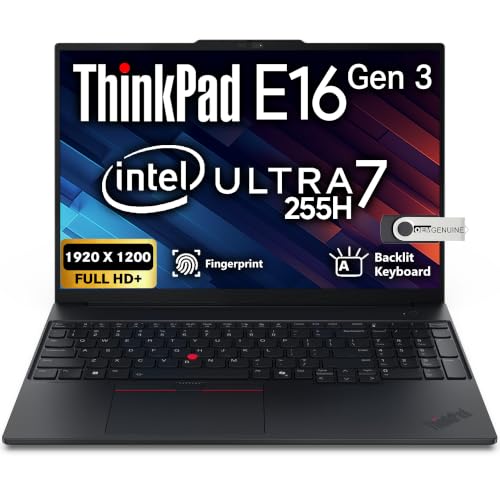 | Lenovo ThinkPad E16 Gen 3 | Best fit: 16-inch 32GB and 1TB configuration Processor: Core Ultra 7 255H Screen: 16-inch WUXGA IPS, non-touch, 300 nits Memory and storage: 32GB DDR5 and 1TB NVMe SSD, Amazon title and bullets Connections: Wi-Fi 6E, Ethernet, USB4 Thunderbolt, USB-C 3.2, HDMI 2.1 | Check Price on Amazon |
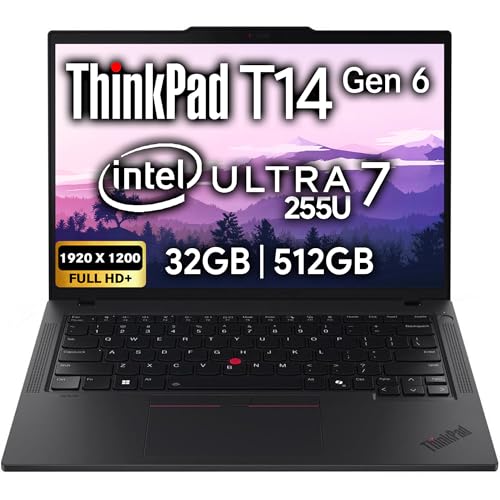 | Lenovo ThinkPad T14 Gen 6 | Best fit: Two Thunderbolt 4 ports and a 5MP webcam Processor: Core Ultra 7 255U Screen: 14-inch FHD+ IPS, non-touch, anti-glare Memory and storage: 32GB DDR5 and 512GB SSD, labeled an upgrade in Amazon bullets Connections: 2x Thunderbolt 4, 2x USB-A, HDMI, Ethernet | Check Price on Amazon |
 | Lenovo ThinkPad X1 Carbon Gen 13 Aura Edition | Best fit: 14-inch touchscreen Processor: Core Ultra 7 255U, Amazon title Screen: 14-inch WUXGA touch, Amazon title Memory and storage: 32GB and 1TB, Amazon title and size field Connections: Not stated in the Amazon bullet | Check Price on Amazon |
1. Lenovo ThinkPad E14 Gen 7 — Best for a 14-Inch Desk With Ethernet and HDMI 2.1
Amazon’s model field for this listing reads 21U200BSUS. Its feature bullets state an Intel Core Ultra 7 258V, 32GB of LPDDR5X memory, a 1TB PCIe Gen4 SSD, and a 14-inch WUXGA IPS panel that is non-touch with an anti-glare coating.
The bullets also state two Thunderbolt 4 ports, two USB-A 5Gbps ports, HDMI 2.1, and an RJ-45 Ethernet port. Ethernet and HDMI 2.1 are ports on the laptop itself. The same bullets name Wi-Fi 6E, Bluetooth 5.3, a fingerprint reader, and an IR camera with a privacy shutter.
Pick this one when: you want 32GB, 1TB, Ethernet and two Thunderbolt 4 ports, and you do not need touch input.Our Take The E14 is the plain 14-inch choice in this group when the stated ports and the non-touch anti-glare panel fit the desk.
- The Amazon listing for the E14 states two Thunderbolt 4 ports and an RJ-45 Ethernet port on the laptop itself.
- The E14 feature bullets state 32GB of LPDDR5X memory and a 1TB PCIe Gen4 SSD.
- The E14 bullets state HDMI 2.1 as a port on the laptop itself, along with two USB-A 5Gbps ports.
- The E14 listing states a non-touch display, so the laptop fits a buyer who does not need touch input.
2. Lenovo ThinkPad T14s Gen 6 — Best for 32GB, 512GB and Wi-Fi 7
Amazon’s model field for this listing reads 21QX000MUS. Its feature bullets state an Intel Core Ultra 7 258V eight-core processor, 32GB of LPDDR5X memory, a 512GB M.2 NVMe SSD, and a 14-inch 1920×1200 IPS display.
The same bullets state integrated Intel Arc graphics, Wi-Fi 7, and Bluetooth 5.4. They do not state ports, a camera, battery capacity, weight, or touch support. Amazon’s New buy-box offer is in stock from Laptop Authority, with limited quantity.
Our Take The T14s is the Wi-Fi 7 option with 32GB and a 512GB SSD stated in its feature bullets.
- Amazon’s T14s listing states an Intel Core Ultra 7 258V eight-core processor with integrated Intel Arc graphics.
- The T14s bullets state 32GB of LPDDR5X memory and a 512GB M.2 NVMe SSD.
- The T14s bullets state Wi-Fi 7 and Bluetooth 5.4.
- The T14s feature bullets do not state its ports, a camera, battery capacity, weight, or touch support.
- Amazon’s T14s listing states a 512GB SSD, while the E14 feature bullets state 1TB.
3. Lenovo ThinkPad E16 Gen 3 — Best for a 16-Inch 32GB and 1TB Configuration
Amazon’s model field reads ThinkPad E16 Gen 3. Its title and feature bullets both state an Intel Core Ultra 7 255H, 32GB DDR5 memory, and a 1TB NVMe SSD. The title does not conflict with the memory or storage figures in the feature bullets.
The bullets state a 16-inch WUXGA 1920×1200 IPS non-touch display at 300 nits, integrated Intel graphics, a spill-resistant backlit keyboard, fingerprint reader, Wi-Fi 6E, RJ-45 Ethernet, USB4 Thunderbolt, USB-C 3.2, HDMI 2.1, and Windows 11 Pro. Amazon’s New buy-box offer is in stock from OEMGENUINE.
Our Take The E16 is the 16-inch option with memory and storage repeated in its title and feature bullets.
- Amazon’s E16 listing states a 16-inch WUXGA IPS non-touch display at 300 nits.
- The E16 title and bullets both state 32GB DDR5 memory and a 1TB NVMe SSD.
- The E16 bullets state Wi-Fi 6E, RJ-45 Ethernet, USB4 Thunderbolt, USB-C 3.2, and HDMI 2.1.
- The E16 listing states a non-touch display, so the laptop does not offer touch input.
4. Lenovo ThinkPad T14 Gen 6 — Best for Two Thunderbolt 4 Ports and a 5MP Webcam
Amazon’s model field for this listing gives only the name ThinkPad T14 Gen 6, with no machine-type number. The bullets state an Intel Core Ultra 7 255U, a 14-inch FHD+ IPS anti-glare non-touch display, two Thunderbolt 4 ports, two USB-A 3.2 Gen 1 ports, HDMI, Ethernet, Wi-Fi 6E, Bluetooth 5.3, a backlit keyboard, a fingerprint reader, and a 5MP webcam with a privacy shutter.
One bullet states 32GB of DDR5 memory and a 512GB SSD, and another labels them a “Memory & Hard Drive Upgrade”. Because of that label, treat the 32GB and 512GB capacities as the seller’s configuration.
Pick this one when: you want two Thunderbolt 4 ports, Ethernet and a 5MP webcam in a 14-inch non-touch laptop.Our Take The T14 is the 14-inch choice with a 5MP webcam, and its stated storage is half the E14’s.
- The Amazon listing for the T14 states two Thunderbolt 4 ports, two USB-A ports, HDMI and Ethernet.
- The T14 bullets state a 5MP webcam with a privacy shutter.
- The T14 bullets state a 14-inch anti-glare non-touch display.
- The T14 listing labels its 32GB memory and 512GB SSD a memory and hard drive upgrade, so treat both capacities as the seller’s configuration.
5. Lenovo ThinkPad X1 Carbon Gen 13 Aura Edition — Best for a 14-Inch Touchscreen
Amazon’s model field for this listing reads 21NX. The title states an Intel Core Ultra 7 255U, 32GB of RAM, a 1TB SSD, a 14-inch touchscreen with a WUXGA 100% sRGB display, an FHD+ IR and RGB camera, and Windows 11 Pro. Amazon’s size field repeats the processor, 32GB and 1TB.
The listing’s one feature bullet says the computer is in unopened retail packaging and sold as configured by Lenovo, but it does not name the configuration. No bullet states ports, memory, storage or display, so every figure here comes from the seller’s title and size field. Treat the 32GB and 1TB capacities as possibly the seller’s configuration.
Our Take The X1 Carbon is the touchscreen option here, and it has the least detail in its feature bullets.
- Amazon’s X1 Carbon title states a 14-inch touchscreen display.
- The X1 Carbon bullet states unopened retail packaging and says the computer is sold as configured by Lenovo.
- The X1 Carbon title states 32GB of RAM and a 1TB SSD, and the size field repeats both.
- The X1 Carbon listing does not state its ports in a feature bullet, so ask the seller about the ports before ordering.
Buying Guide
Choose the screen size before the model name
A 14-inch panel is the size of four of the five listings, while the E16 listing is the 16-inch alternative. The larger display gives more room for two documents or a spreadsheet, and it also changes the bag and the desk. The E14 and T14 bullets state anti-glare screens.
Touch is not stated for every listing. The E14, E16, and T14 bullets say non-touch, the X1 Carbon title says touchscreen, and the T14s feature bullets do not state touch support. If touch or pen input is required, confirm it with the seller.
Treat memory and storage as the seller’s configuration
Four listings state memory and storage in their feature bullets. The E14 states 32GB and 1TB, the T14s states 32GB and 512GB, the E16 states 32GB and 1TB, and the T14 states 32GB and 512GB with a “Memory & Hard Drive Upgrade” label. The X1 Carbon capacities appear only in its title and size field.
The E16 title and feature bullets agree on 32GB and 1TB. The X1 Carbon title and size field state 32GB and 1TB without a matching feature bullet. A seller’s capacity is the seller’s configuration, so ask the seller to confirm the configuration before ordering.
Compare the processors
The E14 and T14s bullets state the same Core Ultra 7 258V. The T14s bullets add Wi-Fi 7 and Bluetooth 5.4 but do not state ports. The two also differ in wireless standard and storage.
The listings name three different processors. The E14 and T14s bullets state a Core Ultra 7 258V, the T14 bullets and the X1 Carbon title state a Core Ultra 7 255U, and the E16 bullets state a Core Ultra 7 255H. The processor is one part of the choice beside the screen, ports, and memory.
Count the connections that stay on the laptop
Two Thunderbolt 4 ports are stated for the E14 and T14 listings. The E16 listing states USB4 Thunderbolt without a count, and the T14s and X1 Carbon feature bullets state no ports. Count the dock, drive, network cable, and display you need to connect at the same time.
Ethernet is stated for the E14, E16, and T14 listings. The T14s and X1 Carbon feature bullets name no connections. The site’s Thunderbolt laptop list and USB4 laptop list give broader port comparisons.
Compare cameras and wireless before you buy
The listings give different camera detail. The E14 bullets state a 1080P IR hybrid camera, the T14 bullets state a 5MP webcam, the E16 title states a Full HD webcam, and the X1 Carbon title states an FHD+ IR and RGB camera. A privacy shutter is stated for the E14 and T14.
Wi-Fi 6E is stated for the E14, E16, and T14, and Wi-Fi 7 for the T14s. The X1 Carbon feature bullet does not state a wireless standard. If an office policy depends on Wi-Fi 7, the T14s listing states it.
Confirm the machine type with the seller
Three model fields carry a code. The E14 field reads 21U200BSUS, the T14s field reads 21QX000MUS, and the X1 Carbon field reads the shorter 21NX. The E16 and T14 fields give the product name rather than a machine-type number, so ask those sellers for the machine type.
A seller’s title can combine a family name with the seller’s own memory and storage. Ask for the machine type to check the base model, and treat the title figures as the seller’s.
FAQ
Is a ThinkPad E series or T series better for office work?
The answer depends on the configuration. The E14 listing states 32GB, 1TB, Ethernet and two Thunderbolt 4 ports. The T14 listing states two Thunderbolt 4 ports, Ethernet and a 5MP webcam, with a memory and hard drive upgrade stated in its bullets.
Compare the whole listing rather than the letter. Touch support, memory, storage and wireless can differ inside either family.
Which model has the larger screen?
The E16 listing states a 16-inch WUXGA IPS non-touch screen. The other four listings are 14-inch models.
Screen size is one part of the desk plan. An external display can add workspace at a desk.
Does every model have Thunderbolt 4?
No. The wording differs by listing. The E14 and T14 bullets state two Thunderbolt 4 ports, the E16 bullets state USB4 Thunderbolt without a count, and the T14s bullets do not state ports.
Read the port list before choosing a dock or drive. The X1 Carbon listing states no ports in its feature bullet, so ask the seller about its ports first.
Are the memory and SSD sizes fixed for every ThinkPad?
No. Several figures are the seller’s configuration. The T14 listing labels its memory and drive an upgrade, while the X1 Carbon capacities appear only in the title and size field. The E16 title and bullets both state 32GB and 1TB.
Use the machine type to confirm the base model. Capacities from one seller’s listing do not carry over to another listing of the same family.
Which model is best for travel?
The page does not rank the five models for travel. Comparable weight and battery figures are not stated for all five listings.
Start with the stated screen and connections. The T14s listing states a 14-inch IPS display and Wi-Fi 7, while the E16 listing states a 16-inch IPS display, Wi-Fi 6E, and Ethernet.
Bottom Line
The E14 is the starting point when 32GB, 1TB, Ethernet, and two Thunderbolt 4 ports match the workday. The E16 is the 16-inch 32GB and 1TB option, the T14s pairs 32GB and Wi-Fi 7 with a 512GB SSD, the T14 has two Thunderbolt 4 ports and a 5MP webcam, and the X1 Carbon is the touchscreen option once the seller confirms its ports.