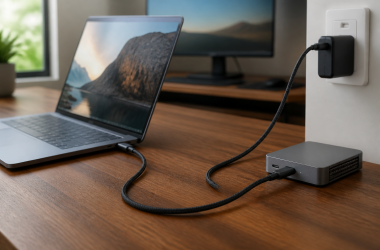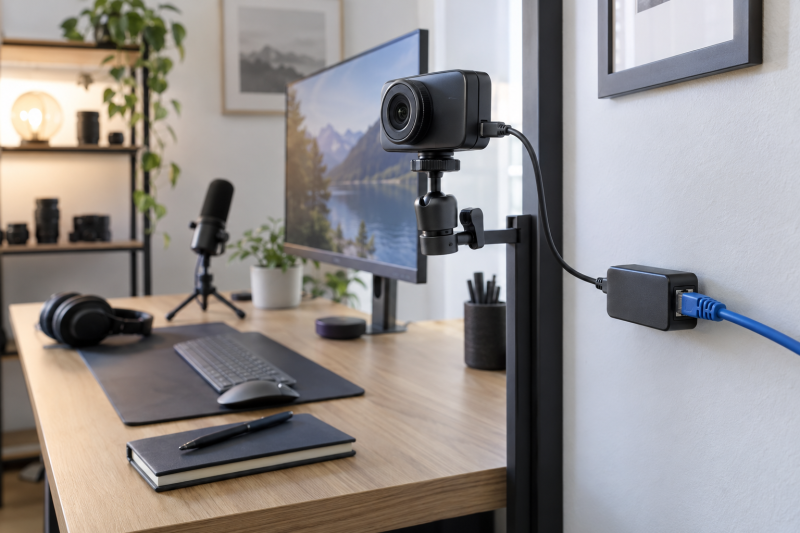
A PoE splitter can use one Ethernet run to bring power, and sometimes network data, to a USB-C camera or small studio device. A single Ethernet run can simplify a fixed camera position, but the voltage, current, PoE standard, and data path must all match the device at the other end.
These six splitters are listed for 5V USB-C output. The right one is the unit whose stated power output and Ethernet behavior fit the exact camera, controller, or USB-C device you plan to connect.
Match the splitter’s stated output power and PoE standard to the camera before routing a cable through the room.PoE Splitters Compared
| Image | Product | Details | Check Price |
|---|---|---|---|
 | UCTRONICS PoE splitter | Best fit: Simple 802.3af USB-C splitter Output: 5V USB-C PoE: IEEE 802.3af Data: See listing | Check Price on Amazon |
| Gigabit 5V 2.4A splitter | Best fit: Basic Gigabit power and data pick Output: 5V 2.4A PoE: See listing Data: Gigabit | Check Price on Amazon | |
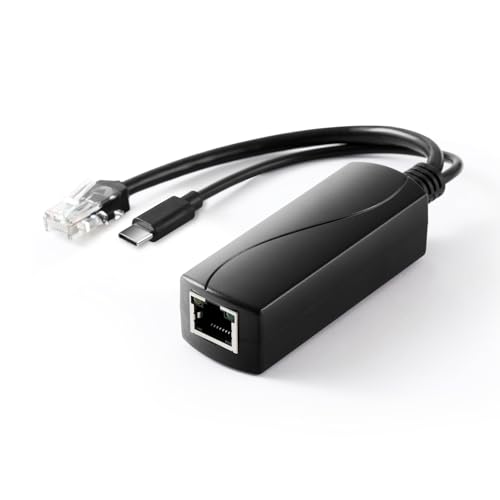 | Gigabit Type-C 5V 2.4A splitter | Best fit: Standard 802.3af Gigabit alternative Output: 5V 2.4A PoE: IEEE 802.3af Data: Gigabit | Check Price on Amazon |
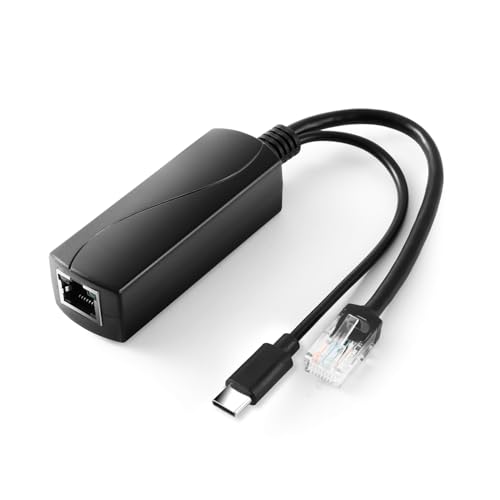 | REVODATA 2.5G splitter | Best fit: Higher listed power and 2.5G networking Output: 5V 4A, 20W PoE: IEEE 802.3af/at Data: 2.5Gbps | Check Price on Amazon |
| Waveshare industrial splitter | Best fit: Highest listed 5V current Output: 5V 5A PoE: See listing Data: Gigabit | Check Price on Amazon | |
 | 5V 2A Type-C and RJ45 splitter | Best fit: Lowest-power basic endpoint Output: 5V 2A PoE: IEEE 802.3af Data: 10/100Mbps | Check Price on Amazon |
1. UCTRONICS PoE Splitter USB-C 5V — Best Simple 802.3af USB-C Splitter
UCTRONICS lists an active PoE to USB-C 5V adapter compliant with IEEE 802.3af, for Raspberry Pi 4, Google WiFi, security cameras, and similar devices. It suits a target device that needs low-voltage USB-C power from a standard PoE cable run.
802.3af compliance is a power-class statement, not a promise that every USB-C camera will work. Check the camera’s required voltage and current, then confirm whether the camera needs Ethernet data, Wi-Fi, or only a powered USB-C connection.
Our Take Buy the UCTRONICS if the camera’s power needs stay clearly inside the adapter’s documented role. It is a straightforward 5V PoE splitter for a modest USB-C device.
- Lists active PoE to 5V USB-C output.
- IEEE 802.3af compliance is stated.
- Confirm current requirement of the target device.
- Not a general USB-C charging solution.
2. Gigabit PoE Splitter USB-C 5V 2.4A — Best Basic Gigabit Power and Data Pick
This listing describes a Gigabit PoE splitter with USB-C 5V 2.4A output and a power-and-Ethernet adapter role. It fits a device that needs a 5V USB-C supply and a wired network path through the same installation cable.
2.4A at 5V is a practical limit. Do not use the adapter for a camera or accessory that needs more power than the listing states, and do not assume a USB-C plug negotiates higher USB Power Delivery profiles.
Our Take Buy the USB-C Gigabit splitter if you have a low-power studio device that needs Gigabit data and an ordinary 5V USB-C feed. It is most useful when the exact current budget is already known.
- Lists Gigabit Ethernet and 5V 2.4A output.
- One cable can carry the installation path.
- 2.4A is not enough for every USB-C device.
- Check whether the camera needs network data.
3. Gigabit Type-C PoE Splitter 5V 2.4A — Best Standard 802.3af Gigabit Alternative
This Type-C splitter lists 5V 2.4A, IEEE 802.3af, and 10/100/1000Mbps Ethernet support for 5V devices. It is a standard Gigabit alternative for a camera, tablet, or small controller with a known low-voltage USB-C requirement.
The device must receive the right sort of input at both ends. PoE comes from a compatible injector or switch, while the USB-C side supplies the listed 5V output. Verify those roles before plugging an expensive camera into the setup.
Our Take Buy the Type-C Gigabit splitter if you want a conventional 5V 2.4A split for a standard PoE installation. It suits a fixed low-power endpoint, not a device that expects USB-C charging at laptop wattage.
- Lists IEEE 802.3af and Gigabit Ethernet.
- States 5V 2.4A Type-C output.
- Power profile is limited to the listed output.
- Needs compatible PoE input equipment.
4. REVODATA 2.5G Type-C PoE Splitter 5V 4A — Best for Higher Listed Power and 2.5G Networking
REVODATA lists a 2.5Gbps Type-C PoE splitter with 48V PoE input, 5V 4A output, 20W output, and IEEE 802.3af/at compliance. Because of the higher listed current and 2.5G data rate, it suits a device with a larger 5V power budget or a faster local network path.
The 48V input and 5V output must not be confused. The splitter is designed to convert a compatible PoE input for the listed USB-C endpoint, not to power arbitrary USB-C equipment or supply a normal laptop charging profile.
Our Take Buy the REVODATA if 5V 4A and 2.5Gbps Ethernet are both requirements of the device. It suits a carefully specified fixed installation, not a casual setup.
- Lists 5V 4A, 20W, and 2.5Gbps Ethernet.
- Lists IEEE 802.3af/at compatibility.
- Power conversion roles need careful matching.
- 2.5G is useful only with compatible network hardware.
5. Waveshare Industrial Gigabit PoE Splitter 5V 5A Type-C Output — Best Highest Listed 5V Current
Waveshare lists an industrial Gigabit PoE splitter with a 5V 5A Type-C output port and onboard MPS control chip. The stated 5A output is the main reason to consider it for a 5V device whose power requirement exceeds the more common 2.4A listings.
Higher stated current does not let a target device draw whatever it wants. Read the camera’s required input specification, the splitter’s power-source requirements, and the full PoE budget of the switch before treating 5A as a blanket compatibility answer.
Our Take Buy the Waveshare if a 5V USB-C endpoint needs more current than the usual listings. It suits a device whose documentation clearly calls for more than a basic 2.4A adapter can provide.
- Lists 5V 5A Type-C output.
- Gigabit PoE splitter layout suits fixed installs.
- Requires exact power-budget verification.
- Not proof of camera compatibility by itself.
6. PoE Splitter with Type-C and RJ45 Port 5V 2A — Best Lowest-Power Basic Endpoint
This listing describes a 48V to 5V 2A IEEE 802.3af PoE splitter with Type-C and RJ45, supporting 10/100Mbps Ethernet. It suits a small endpoint that needs an Ethernet line and a limited 5V supply.
With a listed 2A output and 10/100Mbps data support, it is unsuitable for a device that expects higher power or Gigabit network performance. Use it only when the endpoint specification fits those lower limits.
Our Take Buy the low-power RJ45 splitter if 5V 2A and 100Mbps networking are enough. It does not suit a higher-power USB-C camera or a fast studio network.
- Lists Type-C, RJ45, and 5V 2A output.
- Simple choice for a low-power endpoint.
- Only 10/100Mbps Ethernet is listed.
- Lowest stated power budget in this group.
Buying Guide
Match the 5V current budget before buying
Voltage and current are separate requirements. Every product here lists a 5V USB-C output, but the listed current ranges from 2A to 5A. A device that needs 5V 4A should not be paired with a 5V 2A splitter just because the connector fits.
PoE input class counts too. Read whether the splitter lists 802.3af or 802.3at support and compare that with the PoE switch or injector. The PoE switch or injector needs enough budget for the splitter and endpoint, especially when many cameras share one switch.
Check whether the endpoint needs Ethernet data
Some cameras need only power, while others need a wired network path. A splitter with RJ45 data can be useful for a network camera or USB-C device that has its own Ethernet route. A USB-C camera that only accepts USB data may need a different connection design.
Gigabit and 2.5G claims are network limits, not camera claims. Use a higher data-rate splitter only when the camera, switch, and network path can use it. See our PoE injector guide for the power-source side of a small studio link.
Treat the installation as a fixed system
Test the complete cable run before mounting a camera. Check the PoE switch, cable, splitter, endpoint, and network data path together. A successful short bench test is more useful than assuming a long in-wall run will behave identically.
Do not use a splitter as a generic USB-C charger. Its listed output suits a specific 5V endpoint class, not for laptops or arbitrary Power Delivery devices. For a camera desk with more conventional USB-C accessories, see our USB-C cable guide.
Frequently Asked Questions
Can a PoE splitter power any USB-C camera?
No. The camera must accept the splitter’s stated 5V output and current limit. A USB-C connector does not guarantee that the device operates from a simple 5V supply or needs the same amount of current as another camera.
Read the camera power specification before choosing a splitter. If the camera needs higher voltage, USB Power Delivery, or a proprietary supply, a listed 5V PoE splitter is not the right tool.
Does a splitter give a USB-C camera Ethernet data too?
Not necessarily through the USB-C plug. The exact splitter may provide a separate RJ45 data connection, while its Type-C connector supplies the listed output power. The camera needs its own compatible data path.
Map power and networking separately in the installation. A device can be powered from PoE while using Wi-Fi, Ethernet, USB data, or another route for control and video.
What is the difference between 802.3af and 802.3at?
They are PoE standards with different power capabilities. The splitter listing and the source equipment need a compatible standard and sufficient power budget for the endpoint you are powering.
Do not select a splitter by standard label alone. The listed 5V output current is the practical figure to compare against the camera or controller requirement, after confirming the PoE source supports the splitter.
Bottom Line
The UCTRONICS splitter is the simple 802.3af option for a modest 5V USB-C device. Choose the REVODATA 2.5G splitter when its 5V 4A and 2.5G claims fit the exact installation, or the Waveshare industrial splitter for the highest listed 5V current. In every case, match the camera, splitter, cable, and PoE switch as one power-and-network system.