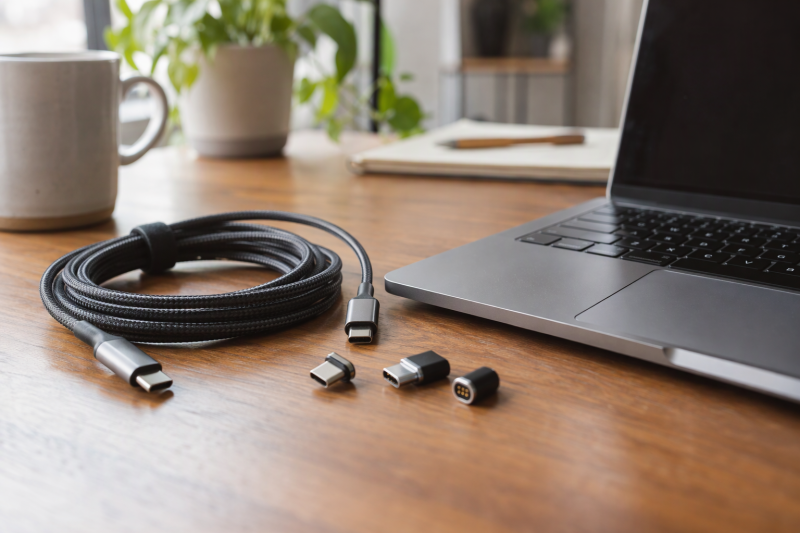
A magnetic USB-C accessory can mean a cable that sticks to itself for storage, a detachable magnetic connection at the laptop, or a charging lead for a MacBook’s MagSafe 3 port. The three jobs differ, even when the product titles sound similar.
Choose the connector type first, then check the power, data and display requirements of the entire setup.| Image | Product | Best fit | Magnetic role | Power | Data/video | Limit | Check Price |
|---|---|---|---|---|---|---|---|
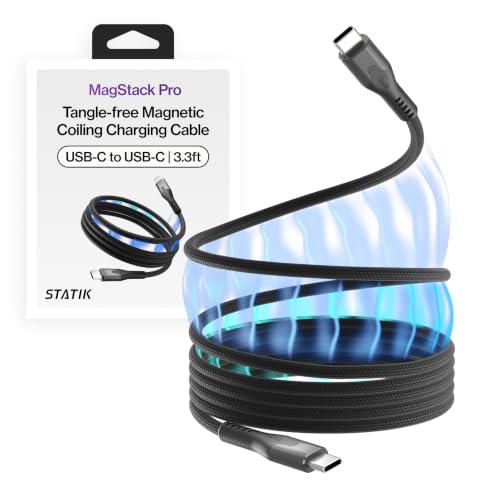 | Statik MagStack Pro | Tidy 100W charging | Cable coils | 100W | 480Mbps; video not stated | 3-foot cable per Amazon | Check Price on Amazon |
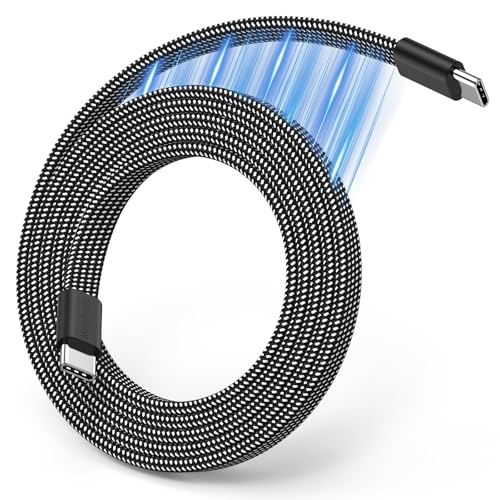 | Magtame 60W Flat Cable | Lower-power flat cable | Cable coils | 60W | 480Mbps; video not stated | 60W maximum | Check Price on Amazon |
 | JSAUX Magnetic Cable | Right-angle charging | Detachable USB-C tip | 100W | 480Mbps; video not stated | 90-degree clearance | Check Price on Amazon |
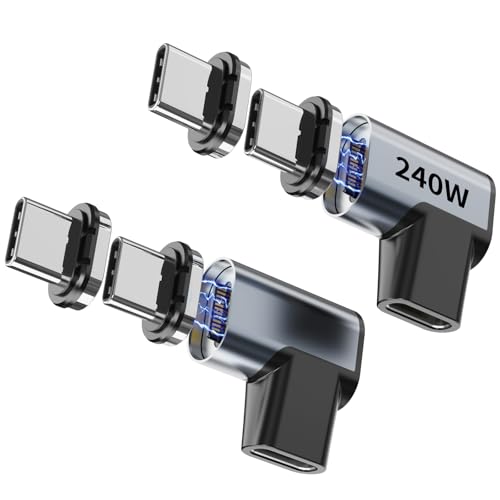 | Tciogrxp Magnetic Adapter 2-Pack | Existing compatible cables | Detachable adapter | Up to 240W claimed | 40Gbps and 8K 60Hz claimed | Separate cable needed | Check Price on Amazon |
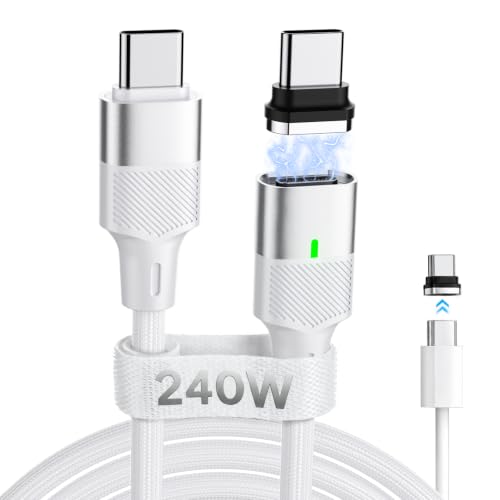 | bossdeng 240W Magnetic Cable | Detachable high-speed cable | Detachable USB-C tip | Up to 240W claimed | 40Gbps and 8K claimed | Compatible equipment required | Check Price on Amazon |
 | AIRSKY USB-C to Magnetic 3 Cable | Listed MagSafe 3 MacBooks | Magnetic 3 laptop connector | 140W | Charging lead; data not stated | Matching MacBook port required | Check Price on Amazon |
1. Statik MagStack Pro — Best 100W Cable for Tidy Storage
The Statik MagStack Pro is a USB-C-to-USB-C cable with a magnetic braid, so the cord holds a coil on its own. The Amazon listing gives its length as 3 feet, while Statik’s page lists 3.3-foot and 6.6-foot versions. Statik describes the braid as reinforced nylon and says MagStack Pro cables magnetize to themselves and to each other. Statik also says the braid was tested to survive over 10,000 bends.
Statik’s page gives a maximum output of 100W (20V/5A) with QC 3.0 and PD 2.0 charging protocols, and USB 2.0 data at 480Mbps. The Amazon listing repeats up to 100W and 480Mbps. Neither source describes video output, and a cable’s rating and USB-C ends do not show display support. Check the laptop’s power requirement and the charger’s output before ordering.
Magnetic role: Statik’s magnets hold the braided cable in a coil. Neither Statik’s page nor the Amazon listing describes a detachable magnetic tip.Our Take Pick the MagStack Pro when compact cable storage and up to 100W charging are more useful than a detachable connector.
- Statik’s page says MagStack Pro cables magnetize to themselves and to each other, so the cord holds a coil on its own.
- Statik’s page gives the cable a maximum output of 100W (20V/5A) with QC 3.0 and PD 2.0 protocols.
- Statik lists USB-C at both ends of the MagStack Pro, so it is a complete USB-C-to-USB-C cable.
- Statik says the reinforced nylon braid was tested to survive over 10,000 bends.
- Neither Statik’s page nor the Amazon listing describes a detachable tip.
- Statik’s page lists data transfer at 480Mbps, the USB 2.0 standard.
2. Magtame 60W Flat Cable — Best Flat Coiling Cable
Magtame’s flat USB-C-to-USB-C lead is listed at 3.3 feet and 60W (20V/3A). The Amazon listing says it coils into a loop for a bag, pocket or backpack, and describes it as flexible and retractable, with 48 strands of nylon braiding. Magtame’s listing also says the cable passed over 20,000 bending tests and 20,000 plugging tests.
The listing says the cable supports QC3.0 charging with 30W, 45W and 60W power adapters and data at up to 480Mbps. Among compatible devices it names smartphones, tablets and some laptops, so compare the laptop’s input requirement with the 60W rating before ordering.
Power limit: The Amazon listing rates this cable at up to 60W and names only some laptops as compatible.Our Take Choose the flat Magtame cable for a lower-power USB-C setup where an easily packed coil takes priority over maximum wattage.
- Magtame’s listing says the flat cable coils into a loop for a bag, pocket or backpack, which makes it easy to pack.
- Magtame’s listing gives the cable up to 60W (20V/3A) charging and up to 480Mbps data.
- Magtame’s listing says the cable has 48 strands of nylon braiding and passed over 20,000 bending tests.
- Magtame’s listing gives a 60W ceiling and names only some laptops as compatible, so the laptop’s input requirement needs a check before ordering.
- Magtame’s listing does not describe a detachable magnetic tip.
- Magtame’s listing gives data at up to 480Mbps.
3. JSAUX Magnetic Cable — Best Right-Angle Charging Cable
The JSAUX cable has a detachable magnetic tip and a 90-degree connector. The Amazon listing says the tip can stay attached to the device and be used with the included JSAUX cable or with a standard USB-C cable, so you can switch between compatible cables without removing it.
The 6.6-foot lead is listed for up to 100W with a compatible charger and device, and USB 2.0 data up to 480Mbps. JSAUX’s listing says the 90-degree connector reduces bending near the USB-C port and saves space in compact setups. It names MacBook, iPad, Steam Deck, ROG Ally X, Switch 2 and Legion Go among compatible devices and says actual charging performance depends on the connected equipment.
Our Take Consider JSAUX for a 6.6-foot charging cable with a right-angle magnetic connection when 480Mbps data is enough.
- JSAUX’s listing says the detachable magnetic tip can stay attached to the device, so you can switch between compatible cables without removing it.
- JSAUX’s listing gives up to 100W charging with a compatible charger and device.
- JSAUX’s listing gives a 6.6-foot lead.
- JSAUX’s listing says the 90-degree connector reduces bending near the USB-C port and saves space in compact setups.
- JSAUX’s listing gives USB 2.0 data at up to 480Mbps, so the cable fits a setup only where that data rate is enough.
- JSAUX’s listing says actual charging performance depends on the connected equipment.
4. Tciogrxp Magnetic Adapter 2-Pack — Best Adapter Set for Existing Cables
The Tciogrxp set is an adapter rather than a complete cable. The Amazon listing says it holds two magnetic USB-C adapters and two extra magnetic connectors, four in total, and describes a detachable 90-degree design. The title names USB4, Thunderbolt 3/4, MacBook Pro/Air and other USB-C devices.
The listing claims up to 240W charging, 40Gbps data and 8K at 60Hz video, with 24-pin gold-plated pins. The figures are listing claims, not measured results, and the listing does not name a cable for those figures. The computer, cable, display and charger must all support the mode you want. Check the space beside the laptop’s port before choosing a right-angle adapter.
Our Take Consider the Tciogrxp set when you already have suitable USB-C cables and want two right-angle adapters and spare connectors.
- Tciogrxp’s listing says the set holds two adapters and two extra connectors, four in total.
- Tciogrxp’s listing claims up to 240W charging and 40Gbps data.
- Tciogrxp’s listing claims 8K at 60Hz video with a compatible display.
- Tciogrxp’s listing describes a detachable 90-degree design.
- The Amazon listing does not name a cable for the 240W, 40Gbps and 8K figures, so the set needs a separate cable rated for the mode you want.
- Tciogrxp’s listing does not say whether its connectors fit tips from other brands.
5. bossdeng 240W Magnetic Cable — Best High-Speed Cable With Spare Tip
The bossdeng package holds a 6-foot cable and two removable magnetic tips, plus a cable organizer strap and a tip removal tool. The listing says the tip can stay in the device’s USB-C port while the included magnetic cable snaps on, or any USB-C cable plugs directly into the tip. It says keeping the tip installed reduces plugging and unplugging at the built-in port and helps keep dust and debris out.
The listing claims up to 240W charging, 40Gbps data and up to 8K video on compatible USB-C displays, and adds that actual performance depends on the connected devices, ports, storage and display support. It also describes a built-in LED that shows charging status.
Our Take Choose this cable when a detachable connector and two tips are useful, and check the listing’s 240W, 40Gbps and 8K claims against the whole setup.
- bossdeng’s listing says the package holds a 6-foot cable and two removable tips.
- bossdeng’s listing claims up to 240W charging and 40Gbps data.
- bossdeng’s listing names a tip removal tool and a cable organizer strap among the parts in the package.
- bossdeng’s listing describes a built-in LED that shows charging status.
- bossdeng’s listing says actual performance depends on the connected devices, ports, storage and display support, so its claims need checking against the whole setup.
- bossdeng’s listing does not say whether its tips work with another brand’s magnetic cable.
6. AIRSKY USB-C to Magnetic 3 Cable — Best for Listed MagSafe 3 MacBooks
The AIRSKY listing is for a 6.6-foot USB-C to Magnetic 3 cable, which its title also calls a Magnetic Safe 3 cable, for the MacBook Air and MacBook Pro models it names. One end is USB-C for a power adapter and the other snaps onto the laptop’s magnetic charging port. It is not a detachable tip for an ordinary USB-C laptop socket.
The listing gives up to 140W power delivery and recommends a 96W or 140W USB-C PD adapter. A yellow LED means charging and green means fully charged. The bullets list MacBook Air 13- and 15-inch models from 2022 to 2025 and MacBook Pro 14- and 16-inch models from 2021 to 2024, while the title adds MacBook Pro M5, M5 Pro and M5 Max. Match the exact computer before ordering.
Our Take Consider AIRSKY as a 6.6-foot third-party charging lead for a listed MacBook with the matching magnetic port and a suitable USB-C power adapter.
- AIRSKY’s listing gives up to 140W power delivery.
- AIRSKY’s listing gives a 6.6-foot braided nylon lead.
- AIRSKY’s listing describes a yellow LED while charging and green when fully charged.
- AIRSKY’s listing names specific MacBook Air and MacBook Pro models, and its title and bullets differ on the newest Pro models, so the exact computer needs matching to the listing.
- AIRSKY’s listing recommends a 96W or 140W USB-C PD adapter.
Buying Guide: Choosing a Magnetic USB-C Accessory
Identify what the magnet does
A cable that holds a coil has ordinary USB-C ends. Statik’s page and the Magtame listing describe magnets that hold the cable in a coil, and neither describes a detachable tip, so the Statik and Magtame cables do not make the laptop connection magnetic.
A detachable USB-C tip, as the JSAUX, Tciogrxp and bossdeng listings describe, places a magnetic joint at the device, while a MagSafe 3-style end connects to a different MacBook port. Look at the plug and the laptop socket before treating these products as substitutes.
Match the charging power
Statik’s page and the Amazon listings on this page give charging figures from 60W for Magtame to 240W for Tciogrxp and bossdeng. A cable rating is one part of charging. The laptop and power adapter must agree on a supported power level, and any adapter in the path must also be suitable for that level.
The Magtame listing names only some laptops as compatible with its 60W cable, so compare it with the charger that came with your laptop. For the 140W AIRSKY cable, AIRSKY’s listing recommends a 96W or 140W USB-C PD adapter. For the 240W claims, confirm that the charger, cable, any adapter and the laptop support the required USB-C power mode.
Separate data speed from video support
Statik’s page and the Magtame and JSAUX listings give up to 480Mbps data transfer. The Tciogrxp and bossdeng listings claim 40Gbps for their data connections.
The Tciogrxp listing claims 8K at 60Hz video, and the bossdeng listing claims up to 8K output on compatible USB-C displays while saying actual performance depends on the connected devices, ports, storage and display support. Statik’s page and the Magtame and JSAUX listings do not state video output, so a power rating alone does not show that video will work.
Allow room for the connector
The JSAUX cable and Tciogrxp adapter use 90-degree connectors. JSAUX’s listing says the angle reduces bending near the USB-C port and saves space in compact setups, and the Tciogrxp listing says its angled design reduces cable strain in tight spaces.
Measure the space around the laptop’s USB-C port and consider which direction the cord will run. A right-angle body may meet a neighboring socket or an obstruction, so check the spacing between ports.
Check the parts included
The Tciogrxp listing includes two adapters and two extra connectors, four in total, and the adapters need separate cables. The bossdeng listing includes one cable, two tips, a strap and a removal tool, while Statik’s page and the Magtame listing describe complete cables with no detachable tips.
Keep the supplied removal tool or spare tips with the product where provided. None of the listings states that magnetic pieces from different brands connect to one another, so do not assume they do. Choose a length that reaches the charger without putting the connector under tension.
Frequently Asked Questions
Will a magnetic USB-C cable charge every laptop?
No. The laptop must accept charging through the relevant port, and the charger and cable need to support a suitable power level. The Magtame listing rates its cable at 60W, which is not the same as a complete 140W charging setup.
AIRSKY’s listing names specific MacBook models for its Magnetic 3 cable, which connects to a MagSafe 3-style port. Check the exact laptop and charger rather than relying on the word magnetic alone.
Is a magnetic coiling cable also a breakaway cable?
Not necessarily. Statik’s page and the Magtame listing describe magnets that hold the lead in a coil, and neither describes a detachable tip, so read the Statik and Magtame entries as storage designs.
The JSAUX and bossdeng listings instead describe removable magnetic tips at the device. Read the connector description closely because the two designs solve different problems.
Can these accessories connect a monitor?
Only choose a product with a stated video capability for that job. The Tciogrxp listing claims up to 8K at 60Hz and the bossdeng listing claims up to 8K output, with the bossdeng listing adding that actual performance depends on the connected devices and display.
The 480Mbps figures that Statik’s page and the Magtame and JSAUX listings give do not establish video capability. The laptop port, cable and monitor must all support the required display signal.
Can I use my existing USB-C cable with a magnetic adapter?
The Tciogrxp product is an adapter set, so it needs a separate compatible cable. Check that cable’s power, data and video ratings against the intended setup.
The JSAUX and bossdeng listings also describe using a standard USB-C cable with their installed tips. None of the listings states that the tips are interchangeable between brands.
Do I need a new charger for a magnetic cable?
Not always. An existing USB-C charger can work when its output and connector match the laptop and the cable or adapter is rated for the intended power.
For the AIRSKY cable, AIRSKY’s listing recommends a 96W or 140W USB-C PD adapter. Review the laptop’s own charging requirements before changing the power supply.
How We Compared
For more conventional options, see our guides to USB-C cables and Thunderbolt 4 cables.