An ultrawide gaming monitor with USB-C can put laptop video, charging, and USB accessories on one cable, but the connector alone does not promise all three. The picks below cover 34-inch 21:9 panels and 44.5- or 49-inch 32:9 screens, with maker-stated refresh rates from 100Hz to 360Hz.
Start with screen shape and the video path your laptop supports. USB-C charging from 15W to 90W can be below the power a gaming laptop needs under load.
A USB-C port needs DisplayPort Alt Mode, USB4 or Thunderbolt for video, and a laptop needs enough graphics and port bandwidth for the resolution and refresh rate you plan to use.Ultrawide Gaming Monitors With USB-C Compared
| Image | Product | Details | Check Price |
|---|---|---|---|
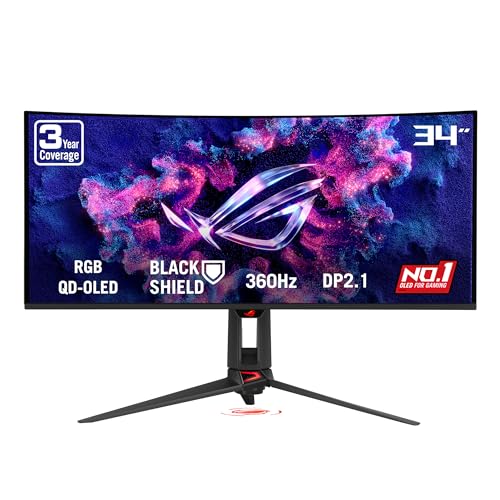 | ASUS ROG Swift OLED PG34WCDN | Best fit: 34-inch QD-OLED gaming and laptop charging Panel and shape: 34-inch 1800R QD-OLED Resolution and refresh: 3440 x 1440 at up to 360Hz USB-C video and power: DisplayPort Alt Mode, 90W PD Key ports: DP 2.1a, 2 x HDMI 2.1, USB hub | Check Price on Amazon |
 | AOC AGON PRO AGP346UCSD | Best fit: 360Hz 34-inch QD-OLED gaming with a USB-C input Panel and shape: 34-inch 1800R QD-OLED, 21:9 Resolution and refresh: 3440 x 1440 at 360Hz USB-C video and power: DisplayPort Alt Mode, 15W PD Key ports: DP 2.1, 2 x HDMI 2.1, USB hub | Check Price on Amazon |
 | Lenovo Legion R45w-30 | Best fit: 44.5-inch 32:9 laptop docking gaming setup Panel and shape: 44.5-inch 1500R VA, 32:9 Resolution and refresh: 5120 x 1440 at 165Hz (170Hz overclock) USB-C video and power: DP 1.4 Alt Mode, up to 75W Key ports: 2 x HDMI 2.1, DP 1.4, RJ45, USB hub | Check Price on Amazon |
 | Dell 34 Plus USB-C Monitor S3425DW | Best fit: 34-inch work-and-play USB-C hub Panel and shape: 34-inch 1800R VA, 21:9 Resolution and refresh: 3440 x 1440 at 120Hz USB-C video and power: DP 1.4 Alt Mode, up to 65W Key ports: 2 x HDMI 2.1, USB-C downstream, USB-A | Check Price on Amazon |
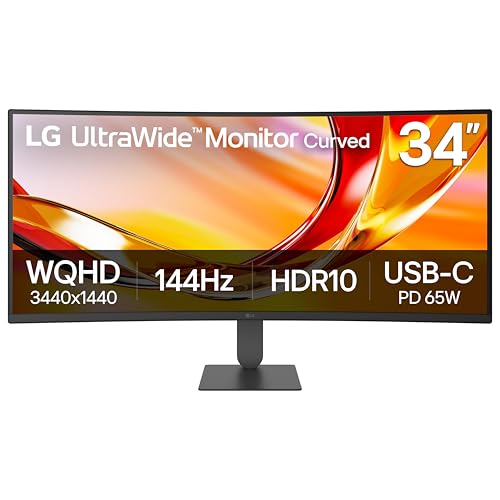 | LG UltraWide 34U640B-B | Best fit: 34-inch all-rounder with 144Hz and USB-C Panel and shape: 34-inch 1800R VA, 21:9 Resolution and refresh: 3440 x 1440 at 144Hz USB-C video and power: USB-C display, data, and up to 65W PD Key ports: DP 1.4, 2 x HDMI, 2 x USB downstream | Check Price on Amazon |
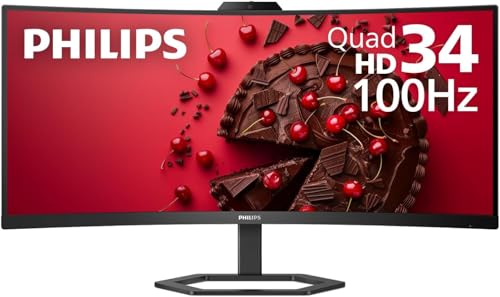 | Philips 346E2CUAE | Best fit: 34-inch gaming entry with 100Hz and USB-C Panel and shape: 34-inch 1500R VA, 21:9 Resolution and refresh: 3440 x 1440 at 100Hz USB-C video and power: DP Alt Mode, up to 65W PD Key ports: DP 1.2, HDMI 2.0, 4 x USB 3.2 downstream | Check Price on Amazon |
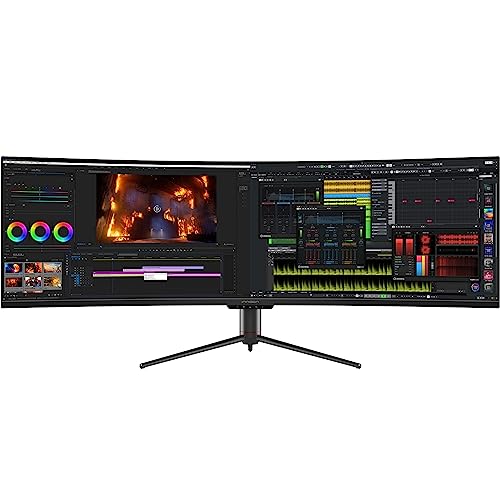 | INNOCN 49C1G | Best fit: 49-inch 32:9 USB-C video input Panel and shape: 49-inch 32:9 curved display Resolution and refresh: 3840 x 1080 at 120Hz USB-C video and power: USB-C video input, 65W PD, up to 60Hz over USB-C Key ports: DP 1.2, HDMI 1.4 and 2.0, USB-C | Check Price on Amazon |
1. ASUS ROG Swift OLED PG34WCDN — Best 34-Inch QD-OLED
The ASUS ROG Swift OLED PG34WCDN is for a laptop desk that wants QD-OLED contrast and a high refresh ceiling. ASUS specifies a 34-inch WQHD 1800R panel with 360Hz maximum refresh and a 0.03ms GtG figure, and the Amazon listing gives 3440 x 1440. Its 34-inch panel needs less desk width than the 44.5-inch Lenovo or the 49-inch INNOCN.
ASUS gives it USB-C with DisplayPort Alt Mode and 90W Power Delivery, and ASUS states up to 360Hz over Type-C. The rear adds DisplayPort 2.1a, two HDMI 2.1 ports, and three USB-A ports. A gaming laptop with a larger power brick can ask for more than 90W while playing.
Our Take Choose the PG34WCDN for a high-refresh 34-inch QD-OLED desk where USB-C laptop charging is part of the plan. Pick the AOC below if you want a second 360Hz QD-OLED option and your laptop has its own charger nearby.
- ASUS specifies a 34-inch WQHD QD-OLED panel with a 360Hz maximum refresh rate, and the Amazon listing gives 3440 x 1440.
- ASUS specifies USB-C DisplayPort Alt Mode with 90W Power Delivery for a laptop connection.
- ASUS provides DisplayPort 2.1a, two HDMI 2.1 ports, and three USB-A hub ports.
- ASUS’s 90W figure can fall short of the power demand from a large gaming-laptop charger.
- ASUS gives the PG34WCDN a 34-inch panel, not the wider 32:9 workspace of the Lenovo or INNOCN.
2. AOC AGON PRO AGP346UCSD — Best 360Hz QD-OLED Alternative
The AOC AGON PRO AGP346UCSD targets 360Hz gaming on a 34-inch 3440 x 1440 QD-OLED. AOC specifies a 34-inch 1800R screen, 360Hz, a 0.03ms GtG figure, DisplayPort 2.1, and two HDMI 2.1 ports. Its resolution and refresh category match the ASUS rather than the wider 32:9 screens.
AOC explicitly identifies USB-C as DisplayPort Alt Mode with 15W Power Delivery, and 15W is not a substitute for a gaming laptop charger. AOC also lists three USB 3.2 Type-A ports, two 8W speakers, and a USB-C to USB-C cable.
The USB-C port carries a DP Alt Mode video signal, but AOC assigns it 15W of power delivery rather than laptop-scale charging.Our Take Choose the AGP346UCSD for a 360Hz QD-OLED panel when single-cable laptop charging is not the goal. Use a laptop’s own charger for a gaming session that needs more than AOC’s 15W figure.
- AOC specifies 3440 x 1440 at 360Hz on a 34-inch 1800R QD-OLED display.
- AOC identifies its USB-C input as DisplayPort Alt Mode rather than a data-only connector.
- AOC provides DisplayPort 2.1 and two HDMI 2.1 ports for non-USB-C sources.
- AOC lists three USB Type-A ports and two 8W speakers with the monitor.
- AOC limits USB-C Power Delivery to 15W, which does not replace a gaming laptop’s larger charger.
- AOC gives the AGP346UCSD a 34-inch 21:9 panel, narrower than the 32:9 Lenovo and INNOCN screens.
- AOC does not give a USB-C refresh figure, and the Amazon listing ties its 360Hz rate to DisplayPort 2.1 or HDMI 2.1, so a buyer who wants 360Hz should plan on one of those inputs.
3. Lenovo Legion R45w-30 — Best 32:9 Laptop Docking Gaming Screen
The Lenovo Legion R45w-30 is for a desk that wants one 32:9 panel for games, a laptop, and peripherals. Lenovo specifies a 44.5-inch 1500R VA panel at 5120 x 1440 with 165Hz and a 170Hz overclock, DisplayHDR 400, AMD FreeSync Premium Pro, and KVM. It is far wider than the 34-inch choices.
Lenovo calls its USB-C connection a full-function port for video, data, and up to 75W charging. Lenovo lists DP 1.4 four-lane Alt Mode without a USB-C refresh figure, and adds two HDMI 2.1 ports, DisplayPort 1.4, three USB-A ports, Ethernet, and audio out. Its RJ45 and KVM fit a dock-like desk, but 75W cannot replace every gaming-laptop adapter.
Lenovo’s USB-C port combines video, data, and up to 75W charging, but laptop charging needs should be compared with the laptop’s own rated adapter.Our Take Choose the R45w-30 for a laptop desk that needs 32:9 width, Ethernet, KVM switching, and a USB-C dock in the monitor.
- Lenovo specifies a 44.5-inch 5120 x 1440 32:9 panel with a refresh rate of up to 170Hz.
- Lenovo specifies USB-C DP 1.4 Alt Mode with video, data, and up to 75W charging.
- Lenovo includes RJ45, KVM, DisplayPort 1.4, two HDMI 2.1 ports, and three USB-A ports.
- Lenovo’s 44.5-inch 32:9 format needs much more horizontal desk space than a 34-inch 21:9 display.
- Lenovo specifies up to 75W from USB-C, which can be below a gaming laptop’s rated AC adapter.
4. Dell 34 Plus USB-C Monitor S3425DW — Best 34-Inch Work-and-Play Hub
Dell’s S3425DW suits a mixed desk for games, laptop work, speakers, and a USB hub. Dell specifies a curved 34-inch VA display at 3440 x 1440 and 120Hz, with AMD FreeSync Premium and two 5W speakers. Its 34-inch 21:9 shape needs less width than the 32:9 choices.
Dell identifies its upstream USB-C port as DisplayPort 1.4 Alt Mode with up to 65W Power Delivery. It also specifies two HDMI 2.1 ports for WQHD 120Hz, two USB-A downstream ports, and a USB-C downstream port with up to 15W charging. Compare LG’s 144Hz panel or the two 360Hz QD-OLED screens for faster motion.
Dell gives the S3425DW a 65W USB-C upstream port with DisplayPort 1.4 Alt Mode, plus separate USB-A and USB-C downstream connections.Our Take Choose the S3425DW for a 34-inch curved hub monitor that can move from laptop work to 120Hz gaming without adding a separate dock. Choose Lenovo instead if 32:9 width, Ethernet, and KVM are part of the desk plan.
- Dell specifies 3440 x 1440 at 120Hz on a curved 34-inch VA panel.
- Dell specifies a USB-C upstream port with DisplayPort 1.4 Alt Mode and up to 65W Power Delivery.
- Dell provides two HDMI 2.1 ports, USB-A downstream ports, and USB-C downstream charging.
- Dell includes two 5W speakers in the monitor.
- Dell caps this monitor at 120Hz, below the LG’s 144Hz rating and the two 360Hz QD-OLED choices.
- Dell specifies 65W USB-C Power Delivery, which can be lower than a gaming laptop’s AC adapter rating.
5. LG UltraWide 34U640B-B — Best 144Hz 34-Inch All-Rounder
The LG UltraWide 34U640B-B adds refresh over Dell’s 120Hz panel while keeping a 34-inch 21:9 footprint. LG specifies a 34-inch 1800R VA display with 3440 x 1440, 144Hz maximum refresh, HDR10, and AMD FreeSync Premium. It is an LCD alternative to the ASUS and AOC QD-OLED screens.
LG states that USB-C handles display connection and data transfer with up to 65W charging. It also lists DisplayPort 1.4, two HDMI inputs, two USB downstream ports, and PBP. LG also lists a KVM switch and does not list an Ethernet port.
Our Take Choose the 34U640B-B for a 34-inch 144Hz display with USB-C when an LCD panel and 65W single-cable connection fit the desk better than QD-OLED. Pick the Dell if a 120Hz hub with built-in speakers is the closer match.
- LG specifies a 34-inch 3440 x 1440 curved panel with a 144Hz maximum refresh rate.
- LG specifies USB-C display connection and data transfer with up to 65W Power Delivery.
- LG lists DisplayPort 1.4, two HDMI inputs, two USB downstream ports, PBP, and a KVM switch.
- LG specifies 65W over USB-C, which can be below the charging requirement of a larger gaming laptop.
- LG does not list an Ethernet port, and the Lenovo R45w-30 is the only monitor here that does.
- LG’s 144Hz ceiling is lower than the ASUS and AOC 360Hz options for buyers chasing the highest refresh figure.
6. Philips 346E2CUAE — Best 100Hz 34-Inch Gaming Entry
The Philips 346E2CUAE is an entry for a 34-inch 21:9 display, USB-C video, and a 100Hz gaming floor. Philips specifies a curved 34-inch VA LCD at 3440 x 1440 and 100Hz, with AMD FreeSync Premium and a 1ms MPRT figure. LG and the QD-OLED screens supply higher refresh figures.
Philips specifies USB-C data and video transfer with DisplayPort Alt Mode and up to 65W Power Delivery. It adds DisplayPort 1.2, HDMI 2.0, four USB 3.2 downstream ports, and two 5W speakers. Philips says the 100Hz maximum resolution works for either an HDMI or a DP input, and it gives no USB-C refresh figure.
Our Take Choose the 346E2CUAE for a 34-inch ultrawide whose USB-C port is explicitly documented for both video and up to 65W charging. Move to LG for 144Hz or Dell for 120Hz and HDMI 2.1 when those figures define the purchase.
- Philips specifies a 34-inch curved 3440 x 1440 VA display at 100Hz with FreeSync Premium.
- Philips specifies USB-C video, data transfer, DisplayPort Alt Mode, and up to 65W Power Delivery.
- Philips provides DisplayPort 1.2, HDMI 2.0, four USB 3.2 downstream ports, and two 5W speakers.
- Philips lists a 1500R curved panel, a tighter curve than the Dell’s 1800R.
- Philips specifies 100Hz, below the 120Hz Dell, 144Hz LG, and 360Hz ASUS and AOC models.
- Philips specifies up to 65W charging, which can be too little for a gaming laptop under load.
7. INNOCN 49C1G — Best 49-Inch USB-C Video Pick
The INNOCN 49C1G is for a 49-inch 32:9 screen with USB-C display input. INNOCN gives it 3840 x 1080, HDR400, Adaptive Sync, DisplayPort, HDMI, and 65W USB-C Power Delivery. Its page header calls it 144Hz, but INNOCN gives 120Hz in its specifications, and this guide uses 120Hz.
INNOCN’s specifications list USB-C as a video input with 65W Power Delivery and a 60Hz maximum. INNOCN places 120Hz under DisplayPort and HDMI 2.0. The 3840 x 1080 screen has fewer pixels than Lenovo’s 5120 x 1440 R45w-30.
Our Take Choose the 49C1G for a 49-inch 32:9 desk where USB-C video input and 65W charging are useful, but verify the cable and input route before expecting the highest refresh figure. Choose the Lenovo for a sharper 5120 x 1440 32:9 panel, higher documented refresh ceiling, Ethernet, and KVM.
- INNOCN specifies a 49-inch 32:9 monitor with 3840 x 1080 resolution, HDR400, and Adaptive Sync.
- INNOCN specifies USB-C video input with 65W Power Delivery for a compatible laptop.
- INNOCN specifies DisplayPort and HDMI inputs alongside the USB-C connection.
- INNOCN’s specifications cap USB-C video input at 60Hz, below its 120Hz DisplayPort figure.
- INNOCN’s page header says 144Hz while its specifications say 120Hz, so buyers need to confirm the mode they plan to use.
Buying Guide
Start with 21:9 or 32:9 screen shape
A 34-inch 21:9 panel is easier to place on a standard desk. AOC, Dell, LG, and Philips specify 3440 x 1440 across 34 inches, and the ASUS listing on Amazon gives the same resolution, with extra horizontal game view without super-ultrawide width. ASUS and AOC target 360Hz, while Dell, LG, and Philips give 120Hz, 144Hz, and 100Hz.
A 32:9 panel changes the desk and game view together. Lenovo’s 44.5-inch 5120 x 1440 R45w-30 gives an up-to-170Hz figure, while INNOCN’s 49C1G uses 3840 x 1080 and a 120Hz figure from its specifications. Measure desk width and viewing distance, then check game aspect-ratio support.
Confirm USB-C video before you count on one cable
USB-C video needs a laptop port with DisplayPort Alt Mode, USB4 or Thunderbolt. ASUS, AOC, Lenovo, Dell, and Philips name DisplayPort Alt Mode, and LG documents USB-C display connection. The connector shape alone does not establish laptop video output, so read the laptop manual before treating a USB-C cable as a display cable.
The cable must support the display path as well as charging. ASUS documents up to 360Hz over Type-C for the PG34WCDN and Lenovo documents four-lane DP 1.4 Alt Mode for the R45w-30, but GPU and port bandwidth can cap the refresh rate. A charging cable can lack the required data capability, so use the supplied cable or choose one with the necessary video specification. Our guide to USB-C cables separates charging-only and full-featured choices.
Treat refresh rate as a host-system requirement
The monitor’s top refresh figure is a ceiling, not a laptop promise. ASUS and AOC specify 360Hz, Lenovo specifies up to 170Hz, and LG specifies 144Hz. The GPU and output path must support the mode you choose.
The input route can change the available mode. INNOCN’s specifications name 120Hz for DisplayPort but 60Hz for its USB-C video input, which is the clearest example in this group. Dell’s HDMI ports, the DisplayPort 2.1 or HDMI 2.1 inputs that AOC’s Amazon listing ties to 360Hz, and ASUS’s Type-C rating give different routes to compare. For a laptop that needs more connections than the monitor provides, see our guide to USB-C docking stations before adding a dock between the computer and panel.
Compare charging watts with the laptop’s own adapter
A monitor’s USB-C wattage is a charging limit, not a gaming-laptop rating. AOC supplies 15W, Dell, LG, Philips, and INNOCN supply up to 65W, Lenovo supplies up to 75W, and ASUS supplies 90W. Monitor wattages can charge many laptops during light work, but a laptop with a larger adapter can draw down its battery or reduce performance when the monitor is its only power source.
Use the laptop’s adapter rating as the reference point. A 90W ASUS connection can be the closest fit here for a compact gaming laptop, while Lenovo’s 75W and the 65W options can fit lower-power machines. AOC’s 15W connection is best treated as a video path with modest charging. Our guide to USB-C laptop chargers covers chargers for desks that need more power than the monitor provides.
Check ports and desk-dock features after the panel
A monitor hub can replace part of a dock, but each model has a different port mix. Lenovo adds Ethernet, KVM, two HDMI ports, DisplayPort, and three USB-A ports, making it the most dock-like monitor in this guide. Dell offers USB-C upstream, USB-C downstream, USB-A ports, and two HDMI ports. ASUS and AOC put a USB hub beside their faster gaming inputs, while Philips gives four USB 3.2 downstream ports.
KVM and Ethernet can simplify a two-computer desk. Lenovo explicitly documents both, which helps a laptop and desktop share the display’s keyboard and mouse. LG documents PBP for two sources, and LG and AOC also list a KVM switch, but only Lenovo lists Ethernet. Pick the panel first, then count the ports you need for storage, input devices, speakers, and a second computer rather than assuming every USB-C display is a full dock.
FAQ
Can a USB-C laptop run an ultrawide gaming monitor?
Yes, when the laptop’s USB-C or Thunderbolt port supports DisplayPort Alt Mode and the monitor accepts that signal. ASUS, AOC, Lenovo, Dell, and Philips explicitly document DisplayPort Alt Mode, while LG documents a USB-C display connection. A USB-C port used only for data or charging does not send video to the monitor.
The laptop GPU, port bandwidth, and cable set the available resolution and refresh rate. ASUS and AOC list 360Hz, but that does not make 360Hz available from every laptop. Check the laptop and monitor signal tables before buying around one mode.
Is 65W USB-C charging enough for a gaming laptop?
It can be enough for light work on some smaller laptops, but 65W is not a blanket gaming-laptop power figure. Dell, LG, Philips, and INNOCN document up to 65W, while Lenovo documents up to 75W and ASUS documents 90W. AOC’s USB-C port provides 15W, which is much closer to accessory charging.
Compare the monitor figure with the wattage on the laptop’s AC adapter. If the adapter is rated well above it, keep the original charger for demanding games or use a dedicated USB-C charger.
Can I get the highest refresh rate through USB-C?
Sometimes, but it depends on the monitor and laptop. ASUS lists Type-C signal support up to 360Hz on the PG34WCDN, while Lenovo documents four-lane DP 1.4 Alt Mode for the R45w-30 without a USB-C refresh figure. The GPU and cable must support the requested mode.
INNOCN’s 49C1G shows why the specifications need careful reading, because USB-C video input is listed at 60Hz while DisplayPort is listed at 120Hz. Treat panel and port maxima as separate checks.
Is a 49-inch 32:9 screen better than a 34-inch ultrawide for gaming?
Neither shape wins for every desk or game. A 49-inch 32:9 screen gives more horizontal space, while a 34-inch 21:9 screen needs less desk width. Lenovo’s R45w-30 and INNOCN’s 49C1G are the wide choices here.
Resolution changes the comparison too, because Lenovo specifies 5120 x 1440 while INNOCN specifies 3840 x 1080. Measure the desk and consider the games before choosing the biggest diagonal.
Do I need a dock with a USB-C ultrawide monitor?
Not always, because a laptop that only needs one display and a mouse may plug straight in. Lenovo is the only monitor here with Ethernet, and it adds KVM, USB-A, HDMI, and DisplayPort. LG and AOC also list KVM, and Dell, ASUS, AOC, LG, and Philips include a USB hub or downstream USB.
A separate dock can help when the monitor lacks required ports or when storage and wired networking need their own connections. Check its display limits too, because a dock can set a different ceiling.
Bottom Line
The ASUS ROG Swift OLED PG34WCDN is the strongest 34-inch QD-OLED choice here because ASUS pairs 360Hz with USB-C DisplayPort Alt Mode and 90W Power Delivery. Choose the AOC AGON PRO AGP346UCSD for another 360Hz QD-OLED panel when 15W USB-C charging is enough, or choose Lenovo’s Legion R45w-30 for a 32:9 desk that needs Ethernet, KVM, and 75W USB-C charging.