Six Anker products below can charge a laptop: two power banks, three wall chargers and one six-port desktop station. Anker’s headline wattage is a total across ports, so a 300W battery and a 250W station can each deliver far less than that to one laptop. Each section gives the total, the figure for a single USB-C port, and what Anker says happens when more ports are in use.
The list runs from the highest total output to the lowest. Products with the same total are ordered by port count, fewest first. Anker’s phone-only chargers are left out, because each product here is described on Amazon as charging a MacBook, a notebook or a laptop.
Check the single-port wattage your laptop’s own adapter is rated for first, then read what that port delivers once a phone or second device joins it.Anker Laptop Chargers and Power Banks Compared
| Image | Product | Details | Check Price |
|---|---|---|---|
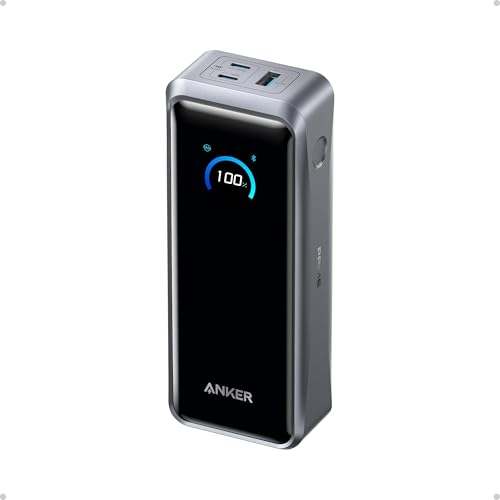 | Anker Prime 26K 300W Power Bank | Best fit: High-output travel power Type and ports: Power bank; 2 USB-C, 1 USB-A Maximum output: 300W total; up to 140W from one USB-C port Laptop condition: 140W needs a 5A cable Carry or desk role: 26,250mAh pack with travel pouch | Check Price on Amazon |
 | Anker Prime 250W 6-Port Charging Station | Best fit: Six-port desk power Type and ports: Desktop charger; 4 USB-C, 2 USB-A Maximum output: 250W total; USB-C1 up to 140W, C2 to C4 up to 100W Laptop condition: Only USB-C1 reaches 140W Carry or desk role: Desktop use; 22.58 oz | Check Price on Amazon |
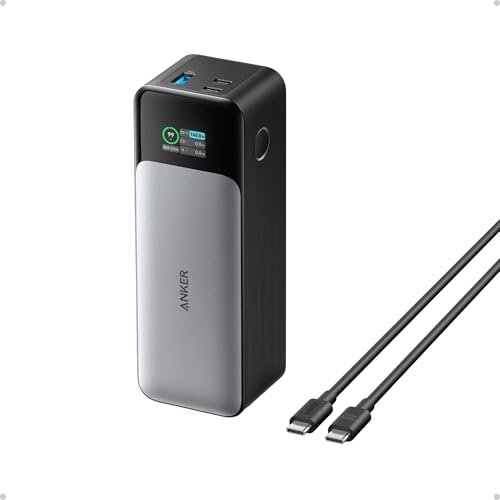 | Anker 737 Power Bank | Best fit: 140W laptop battery Type and ports: Power bank; 2 USB-C, 1 USB-A Maximum output: 140W total Laptop condition: 140W path needs a 5A cable and a 140W charger Carry or desk role: 24,000mAh pack with travel pouch | Check Price on Amazon |
 | Anker 140W 4-Port GaN Charger | Best fit: Light 140W wall charger Type and ports: Wall charger; 3 USB-C, 1 USB-A Maximum output: 140W total; 70W plus 70W with two laptops Laptop condition: E-marker cable needed above 100W Carry or desk role: 9.7 oz with 5 ft 240W cable | Check Price on Amazon |
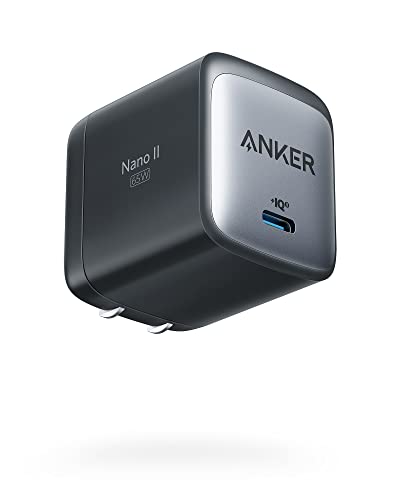 | Anker Nano II 65W Charger | Best fit: Compact 65W wall charger Type and ports: Wall charger; 1 USB-C Maximum output: 65W from one port Laptop condition: No second device shares the output Carry or desk role: Foldable plug; cable not included | Check Price on Amazon |
 | Anker 735 65W 3-Port Charger | Best fit: Small three-port 65W charger Type and ports: Wall charger; 2 USB-C, 1 USB-A Maximum output: 65W; USB-C1 drops to 40W with three devices Laptop condition: USB-C2 and USB-A get 12W each with three devices Carry or desk role: Roughly AirPods Pro case size | Check Price on Amazon |
1. Anker Prime 26K 300W Power Bank — Best High-Output Travel Power Bank
Anker states 300W max total output across two USB-C ports and one USB-A port, and 140W max from a single USB-C port. The USB-A port tops out at 22.5W. The Amazon listing says the 140W figure needs a 5A cable and that the pack can run two MacBook Pros at full speed.
For travel, Anker’s page lists 26,250mAh (99.75Wh) and calls the capacity TSA-approved. Check your airline’s own rules before you fly. Anker lists 250W max dual-port input, which takes both USB-C ports, 5A cables and 140W chargers, and the Amazon listing gives a 50% recharge in 13 minutes or 40% in 10 minutes. The Amazon listing adds that the pack charges a MacBook Pro (M4 Pro) to 50% in 27 minutes and a MacBook Pro (M4) up to 0.8 times, also from Anker’s testing.
The box includes a 3.3 ft 240W USB-C cable and a travel pouch, and the Amazon title says the charging base is not included.
Anker’s 300W covers all three ports together, so a single laptop is held to the 140W single-port figure.Our Take Pick the Prime 26K when one pack has to power a laptop and a second device away from an outlet. A laptop that wants more than 140W is beyond the single-port figure Anker lists.
- Anker lists 300W total output across two USB-C ports and one USB-A port, enough for a laptop and a second device.
- Anker lists 140W max from a single USB-C port, the ceiling for one laptop, and 250W max dual-port input for recharging the pack.
- Anker’s page calls the 26,250mAh (99.75Wh) capacity TSA-approved.
- The Amazon listing puts a 3.3 ft 240W USB-C cable and a travel pouch in the box.
- Anker’s 300W is a total across three ports, and a laptop on a single USB-C port is held to the 140W max.
- Check the cable first, because the Amazon listing says the 140W output needs a 5A cable.
- Anker says the 250W input takes both USB-C ports, 5A cables and 140W chargers.
2. Anker Prime 250W 6-Port Charging Station — Best Six-Port Desk Power
The six ports on this station are not equal. Anker’s page lists 250W total output, but port C1 delivers up to 140W, ports C2, C3 and C4 up to 100W each, and each of the two USB-A ports up to 22.5W. Anker adds that only C1 supports 140W, and that the cable must be rated 140W or higher to reach it.
The total also depends on how many ports are in use. Anker lists up to 240W with two ports in use and up to 250W with three to six. Its page says a MacBook Pro 16-inch with an M1 or M2 chip needs a USB-C to MagSafe cable to reach 140W, while an M3 model can use USB-C to USB-C. The Amazon listing says C1 charges a 16-inch MacBook Pro to 50% in 25 minutes.
The Amazon listing calls it a desktop charger and says it is not recommended for travel. It measures 4.18 by 1.58 by 3.64 inches, weighs 22.58 oz, and has a 2.26-inch LCD and a control dial. The listed contents name no cable, and Anker’s Wi-Fi support covers 2.4GHz networks only.
One of the six ports reaches 140W, so a laptop that needs more than 100W has to use C1.Our Take Buy the Prime 250W when one desk holds a laptop plus several phones, tablets or accessories, and the laptop can take C1. Skip it for a bag, since the listing advises against travel and the unit weighs 22.58 oz.
- Anker lists 140W from USB-C1 and 100W from each of the other three USB-C ports, and a laptop with a higher draw uses C1.
- A desk with a laptop plus several phones, tablets or accessories fits Anker’s listed 250W total with three to six ports in use.
- The Amazon listing describes a 2.26-inch LCD and a control dial.
- Anker says only the C1 port supports 140W, and the cable must meet that rating to reach it.
- The Amazon listing calls it a desktop charger and says it is not recommended for travel.
- Anker’s Wi-Fi support covers 2.4GHz networks only.
3. Anker 737 Power Bank — Best 140W Three-Port Laptop Battery
Anker lists 140W max total output for the 737, shared across two USB-C ports and one USB-A port, with 24,000mAh of capacity. The Amazon title calls it a 140W three-port laptop charger, and the bullets name Power Delivery 3.1 for 140W two-way charging. Anker’s page gives no per-port split, so 140W is the only output figure to plan around.
The listing says a smart display shows input and output power and estimates the recharge time, and that the pack meets airline carry-on requirements at 6.1 by 2.1 by 1.9 inches and about 22 oz. A 140W USB-C to USB-C cable and a travel pouch are in the box. Anker’s page says reaching 140W takes a PD 3.1 cable and a PD 3.1 device, and gives the MacBook Pro 16 as an example.
Our Take Choose the 737 when a laptop at up to 140W total output is the whole job. The Prime 26K lists more total output and capacity for jobs that add a second device.
- Anker lists 140W max total output and 24,000mAh capacity, enough when one laptop is the whole job.
- The Amazon listing names Power Delivery 3.1 and a smart display that shows input and output power.
- The Amazon listing puts a 140W USB-C to USB-C cable and a travel pouch in the box.
- Anker lists 140W as the total across three ports and gives no per-port split, so the total is the only output figure to plan around.
- The Amazon listing says the 140W path needs a 5A cable and a 140W charger.
- Anker lists less total output and capacity than the Prime 26K’s 300W and 26,250mAh, and the larger pack suits jobs that add a second device.
4. Anker 140W 4-Port GaN Charger — Best Four-Port 140W Wall Charger
Two laptops on this charger split its output. Anker lists 140W max total output across three USB-C ports and one USB-A port, and the Amazon listing says either of the two high-speed USB-C ports offers up to 140W. With both high-speed ports in use, Anker lists 70W plus 70W. Pairing one of them with USB-C3 gives 100W plus 40W, and three ports in use give 65W plus 45W plus 30W.
Anker’s page limits USB-C3 to 40W and the USB-A port to 33W, and says maximum output falls to 134W with four devices connected. It also says a cable with an E-marker is required above 100W, and that the Dell XPS 15 (9500 and 9510), Alienware X14 and Precision 5570 may not charge at full speed because of Dell’s own charging protocol. The Amazon listing says either high-speed port charges a 15-inch MacBook Air to 50% in 30 minutes.
Anker’s listing gives 9.7 oz and 2.72 by 2.72 by 1.42 inches, and the box includes a 5 ft 240W USB-C to USB-C cable. A color display shows charging status, temperature and port details, and Anker’s page describes a foldable plug.
Two laptops on this charger get 70W each, per Anker’s page.Our Take Choose this charger when one laptop at up to 140W is the main load and a phone shares the outlet. A second laptop drops each to 70W. The Amazon title says it is not a power bank.
- Anker lists 140W max total output and up to 140W from either of two USB-C ports, enough for one laptop as the main load.
- Anker lists 100W plus 40W when a high-speed port is paired with USB-C3, and the laptop on the high-speed port gets the larger share.
- The Amazon listing includes a 5 ft 240W USB-C to USB-C cable and a color display.
- Anker lists 70W plus 70W when both high-speed USB-C ports are in use, and a second laptop lowers the first laptop’s wattage.
- Anker lists maximum output falling to 134W with four devices connected.
- Anker says a cable with an E-marker is required above 100W.
5. Anker Nano II 65W Charger — Best Compact Single-Port 65W Charger
Anker’s page lists 65W max from one USB-C port and no USB-A port, so there is no total to split. The page carries the A2663 model number under the name Anker 715 Charger (Nano II 65W), and lists the MacBook Air, MacBook Pro 13-inch, Dell XPS 13, ThinkPad E490 and X390, HP Spectre Folio, Google Pixelbook and Microsoft Surface Book 2 as notebooks it charges at high speed. The Amazon listing says it charges a 2020 MacBook Air in under two hours and a MacBook Pro 13-inch at full speed.
Anker lists 1.65 by 1.42 by 1.74 inches, 3.96 oz and a foldable plug, and the Amazon listing says the body is 58% smaller than an original 61W USB-C charger. The listing says a cable is not included. Anker lists no figure above 65W.
Anker lists one USB-C port at 65W, so no second device shares its output.Our Take Choose the Nano II when a laptop adapter rated 65W or less is the one thing to replace and bag space is tight. Pick the 735 when a phone has to charge at the same time, since it adds two ports.
- Anker lists 65W max from its one USB-C port, and no second device shares that output.
- Anker’s page lists the MacBook Pro 13-inch, Dell XPS 13 and ThinkPad X390 among the notebooks it charges at high speed.
- Anker lists a foldable plug and a weight of 3.96 oz.
- Anker lists one USB-C port and no USB-A port, so a phone cannot charge on it at the same time.
- The Amazon listing says a cable is not included in the box.
6. Anker 735 65W 3-Port Charger — Best Compact Three-Port 65W Option
With one device connected, Anker lists 65W max from either of two USB-C ports and 22.5W from the USB-A port. The Amazon listing says that is enough to power a MacBook Pro 13-inch at full speed and that the charger is roughly the size of an AirPods Pro case. Anker’s page gives 1.5 by 1.15 by 2.6 inches and lists the MacBook Air, Dell XPS 13 and ThinkPad X390 among the notebooks it charges.
The split changes as ports fill. With two ports in use, Anker lists 45W plus 20W on the two USB-C ports, or 40W plus 22.5W on USB-C1 and USB-A. With all three in use, USB-C1 gets 40W while USB-C2 and USB-A get 12W each.
Our Take Choose the 735 when a laptop at up to 65W and one or two small devices share an outlet. Move up to a 140W charger when the laptop’s own adapter is rated higher than 65W.
- Anker lists 65W max from either USB-C port with one device connected.
- Anker lists 45W plus 20W on the two USB-C ports with two devices connected.
- The Amazon listing says it is roughly the size of an AirPods Pro case.
- Anker lists USB-C1 falling to 40W with three devices connected, and a laptop on that port receives less than it does alone.
- Anker lists USB-C2 and USB-A at 12W each when all three ports are in use.
Buying Guide
1. Start with the laptop’s required single-port input
A total wattage is not the wattage one laptop receives. Anker lists the Prime 26K at 300W total but 140W from a single USB-C port, and the Prime 250W at 250W total with 140W only on USB-C1. The 737 and the 140W 4-Port charger are 140W totals, and the Nano II and 735 top out at 65W.
Compare the single-port figure with the laptop’s own adapter rating. Anker’s pages say what each product supplies. They do not say that every laptop accepts it, so check the laptop maker’s USB-C charging requirements before relying on a stated ceiling.
2. Separate a power bank from a wall charger
Power banks add capacity and a recharge step. The Prime 26K lists 26,250mAh (99.75Wh) and 250W max dual-port input, and the 737 lists 24,000mAh. Both can charge a laptop away from an outlet, and both need recharging afterward.
Wall chargers need an outlet and store nothing. The 140W 4-Port, Prime 250W, Nano II and 735 have no battery. Pick by where the laptop will charge, a flight or field site for a power bank, or a desk or hotel room for a wall charger.
3. Read the multi-port split before adding a phone
Single-device output and shared output differ. The 735 drops USB-C1 from 65W to 40W with three devices connected, and the 140W 4-Port charger lists 70W plus 70W for two laptops. The Prime 250W lists up to 240W with two ports in use and up to 250W with three to six, with C2 to C4 at 100W each.
Use the setup you will run. When the laptop shares a charger with a phone or tablet, read that product’s multi-port figures, not its single-port number. The 737 lists only its 140W total. For other brands, see best USB-C chargers, best 140W USB-C chargers and ultra-slim 65W to 100W GaN chargers.
4. Match the form factor to travel or desk work
Weight and size separate the travel products. Anker’s pages and Amazon give 9.7 oz for the 140W 4-Port, 3.96 oz for the Nano II and about 22 oz for the 737. The Prime 26K lists 1.32 lb (600 g), and the 735 is roughly the size of an AirPods Pro case.
The Prime 250W is the desk product. Its listing calls it a desktop charger, gives 22.58 oz, and advises against travel. Six ports and a display suit one desk, while a bag is better served by the 140W 4-Port or a 65W charger.
5. Treat displays and apps as secondary to the power path
Several Anker products have a display for charging data. The Prime 26K has a display and app control, the 737 a smart display, the 140W 4-Port a color display, and the Prime 250W an LCD with a control dial. Anker lists the Prime 250W’s Wi-Fi setup as 2.4GHz only.
Settle wattage and port count first. The displays report input, output or port status, and the Prime 26K listing says its app can adjust output power. Use those controls after the single-port figure fits the laptop.
FAQ
Can an Anker power bank charge a laptop?
Yes, when the laptop, cable and power bank support a matching USB-C charging path. The Prime 26K lists up to 140W from a single USB-C port and 300W total, and the 737 lists 140W total with Power Delivery 3.1.
The result depends on the cables and chargers. The Amazon listing says the Prime 26K’s 140W output needs a 5A cable, and the 737 listing says its 140W path needs a 5A cable and a 140W charger. Check the laptop maker’s charging requirements as well.
Is a 250W charger a 250W laptop charger?
No. The Prime 250W’s 250W is a total across six ports, and Anker says only USB-C1 reaches 140W, with C2 to C4 at 100W each.
A laptop that needs more than 100W has to use C1 with a cable rated 140W or higher, per Anker’s page. Anker lists up to 240W when two ports are in use and up to 250W when three to six are.
Which Anker charger suits a one-laptop bag?
The Nano II lists 65W from one USB-C port, a foldable plug and 3.96 oz. For a laptop that needs more, the 140W 4-Port weighs 9.7 oz against the Prime 250W’s 22.58 oz.
A bag that has to charge away from an outlet needs a power bank, the Prime 26K or the 737, and the 737 lists about 22 oz.
What changes when I charge a phone and laptop together?
The total is shared among the connected devices. The 735 lists USB-C1 at 65W alone and 40W with three devices, and the 140W 4-Port lists 70W plus 70W when both high-speed USB-C ports are in use.
The Prime 26K lists 300W across three ports and 22.5W from USB-A, and the Prime 250W lists up to 250W. The 737 lists only its 140W total, so no split is stated for it.
Does 65W work for every USB-C laptop?
No. Anker’s Nano II page lists the MacBook Pro 13-inch, Dell XPS 13 and ThinkPad X390 among the notebooks it charges at high speed, and the 735 page lists the same examples. The lists name examples, not every laptop.
Compare the laptop’s own adapter rating with 65W. A laptop rated higher is outside what the Nano II and 735 list, and the 140W 4-Port, the Prime 250W’s C1 port and the Prime 26K are the listed alternatives.