The five ASUS ExpertBook laptops below split on three points: screen size, Thunderbolt 4 versus USB-C with display and Power Delivery, and built-in Ethernet. ASUS’s spec pages list Thunderbolt 4 on the Ultra, B5 and B9, and RJ45 Gigabit Ethernet on the P3, B1 and B5. Memory and storage come from each Amazon offer, and each section says where those figures appear.
ASUS ExpertBook Business Laptops Compared
| Image | Product | Best fit | Screen | Processor | Ports | Memory and storage | Check Price |
|---|---|---|---|---|---|---|---|
 | ASUS ExpertBook Ultra B9406CAA-XSP76T | 14-inch OLED touchscreen with two Thunderbolt 4 ports | 14-inch 2880 x 1800 tandem OLED touch screen | Core Ultra X7 358H; 50 TOPS NPU | Two Thunderbolt 4, two USB-A, HDMI 2.1; no RJ45 listed | 32GB and 1TB stated in the listing bullets | Check Price on Amazon |
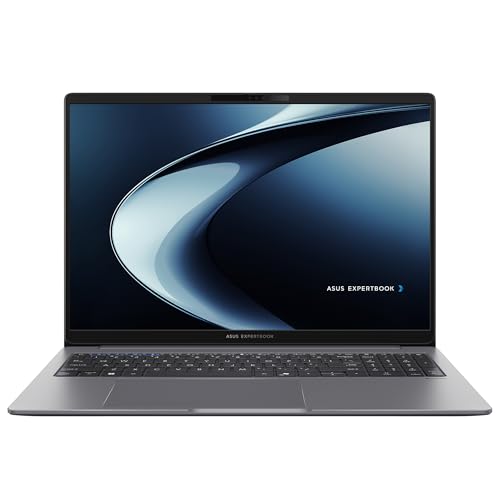 | ASUS ExpertBook P3 PM3606CKA-XS54 | 16-inch screen with built-in Ethernet | 16-inch 1920 x 1200 anti-glare display | Ryzen AI 5 330; 50 TOPS NPU | Two USB-C with display and PD, two USB-A, RJ45, HDMI 2.1 | 16GB and 512GB stated in the listing bullets | Check Price on Amazon |
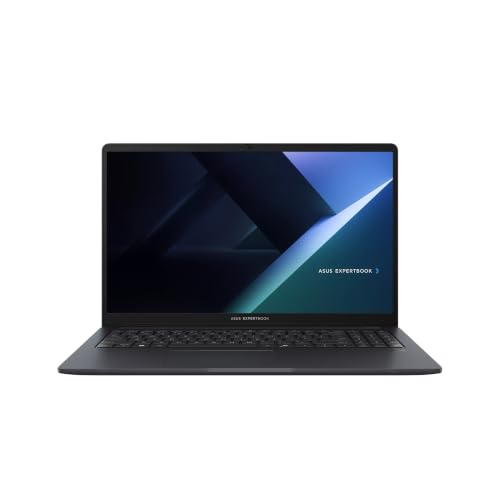 | ASUS ExpertBook B1 B1503CVA | 15.6-inch screen with numeric keypad and Ethernet | 15.6-inch 1920 x 1080 IPS anti-glare display | Core 7 150U | Two USB-C with display and PD, two USB-A, RJ45, HDMI 1.4 | 16GB and 512GB stated in the listing bullets | Check Price on Amazon |
 | ASUS ExpertBook B5 B5404CMA-XS74T | 14-inch touchscreen with Thunderbolt 4 and Ethernet | 14-inch 2560 x 1600 touchscreen | Core Ultra 7 155H | Two Thunderbolt 4, two USB-A, RJ45, HDMI 2.1 | 16GB and 512GB named only in the title | Check Price on Amazon |
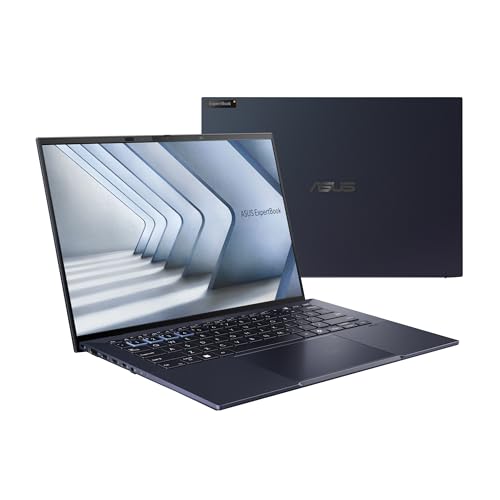 | ASUS ExpertBook B9 OLED B9403CVA-XVE74 | 14-inch OLED at a listed 2.18 pounds | 14-inch 2880 x 1800 display on ASUS's B9403 page | Core 7 (Series 1) with vPro Essentials | Two Thunderbolt 4, one USB-A, HDMI 2.1, micro HDMI for RJ45 | 16GB and 512GB named only in the title | Check Price on Amazon |
1. ExpertBook Ultra B9406CAA-XSP76T — Best for a 14-Inch OLED Touchscreen with Thunderbolt 4
The Amazon listing for the B9406CAA-XSP76T states a 14-inch 3K (2880 x 1800) tandem OLED touch screen, an Intel Core Ultra X7 358H with a 50 TOPS NPU, 32GB of LPDDR5X memory, and a 1TB PCIe 4.0 SSD. ASUS’s B9406 spec page lists the same 14-inch tandem OLED panel at 600 nits, with a 1400-nit HDR peak, and a 90W USB-C adapter.
ASUS lists two Thunderbolt 4 ports (compliant with USB4, with display and power delivery), two USB-A ports, a 3.5mm audio jack, and HDMI 2.1. The ASUS port list has no RJ45 Ethernet port, and ASUS lists a 1080p camera with a privacy shutter. The listing adds a six-speaker system, a fingerprint sensor, and a webcam privacy shield. It also states up to 26 hours of battery life and a 3-year warranty that includes 1 year of ASUS Accidental Damage Protection.
Our Take Pick the Ultra if you want an OLED touch screen and two Thunderbolt 4 ports in a 14-inch body. It is the only one of the five whose listing states 32GB of memory and a 1TB SSD.
- The Amazon listing for the Ultra states a 14-inch 3K tandem OLED touch screen, and ASUS’s spec page lists the same tandem OLED panel.
- A buyer who wants Thunderbolt 4 and USB-A together gets both on the Ultra, where ASUS lists two of each plus HDMI 2.1.
- The Ultra listing is the only one of the five to state 32GB of LPDDR5X memory and a 1TB PCIe 4.0 SSD.
- The Ultra listing states a 3-year warranty that includes 1 year of ASUS Accidental Damage Protection.
- Ethernet is not built in on the Ultra, because ASUS’s port list for the B9406 has no RJ45 Ethernet port.
- The Ultra’s 14-inch screen is smaller than the 15.6-inch B1 screen and the 16-inch P3 screen.
2. ExpertBook P3 PM3606CKA-XS54 — Best for a 16-Inch Screen with Built-In Ethernet
The PM3606CKA-XS54 listing states a 16-inch WUXGA (1920 x 1200) anti-glare display, an AMD Ryzen AI 5 330 with a 50 TOPS NPU, 16GB of RAM, and a 512GB M.2 NVMe PCIe 4.0 SSD. It also names a 1080p webcam with a privacy shutter, fingerprint login, a Kensington Nano Security Slot, and a TPM 2.0 chip.
ASUS’s PM3606 spec page lists two USB 3.2 Gen 2 Type-C ports with display and Power Delivery, two USB-A ports, RJ45 Gigabit Ethernet, HDMI 2.1, and a 3.5mm audio jack. It does not list Thunderbolt. ASUS shows this model with other memory and screen options, including a 2560 x 1600 panel. It gives a starting weight of 3.84 pounds.
Larger screen with Ethernet: The listing states a 16-inch screen, and ASUS lists RJ45 Gigabit Ethernet on the PM3606.Our Take Pick the P3 if you want the largest screen of the five and a wired network port, and can work without Thunderbolt 4. ASUS’s page also lists a keyboard with a numeric keypad.
- The PM3606CKA-XS54 listing states a 16-inch 1920 x 1200 anti-glare display, the largest screen of the five.
- On the PM3606, ASUS lists RJ45 Gigabit Ethernet alongside two USB-C ports with display and Power Delivery, two USB-A ports, and HDMI 2.1.
- The PM3606CKA-XS54 listing states 16GB of RAM and a 512GB PCIe 4.0 SSD in its bullets.
- A fingerprint login and a 1080p webcam with a privacy shutter are both named in the PM3606CKA-XS54 listing.
- ASUS lists the P3’s two USB-C ports as display and Power Delivery ports, and its PM3606 page does not list Thunderbolt.
- ASUS gives the P3 a 3.84-pound starting weight, the highest of the five ASUS spec pages.
3. ExpertBook B1 B1503CVA — Best for a 15.6-Inch Screen with Numeric Keypad and Ethernet
The listing for model B1503CVA states a 15.6-inch Full HD (1920 x 1080) IPS anti-glare screen at 300 nits, an Intel Core 7 150U, 16GB of DDR5 memory, a 512GB NVMe SSD, and Windows 11 Pro. Its bullets also name a numeric keypad, a 720p camera, Wi-Fi 6, a 50Wh battery rated at up to 6 hours, and a free 32GB USB flash drive.
ASUS’s B1503 spec page lists two USB 3.2 Gen 2 Type-C ports with display and Power Delivery, two USB-A ports, RJ45 Gigabit Ethernet, a 3.5mm audio jack, and HDMI 1.4 at up to 3840 x 2160 and 30Hz. It gives a starting weight of 3.62 pounds. The listing adds DisplayPort and 10Gbps for the USB-C ports.
Our Take Pick the B1 if you want a 15.6-inch screen with a numeric keypad and a wired network port at a lower starting weight than the P3. ASUS lists HDMI 1.4 here and HDMI 2.1 on the other four models.
- The B1503CVA listing states a 15.6-inch Full HD IPS anti-glare screen at 300 nits.
- Both the listing and ASUS list RJ45 Gigabit Ethernet on the B1503CVA, alongside two USB-C ports with display and Power Delivery and two USB-A ports.
- The B1503CVA listing states 16GB of DDR5 memory and a 512GB SSD in its bullets, and it adds a free 32GB USB flash drive.
- ASUS gives the B1503 a starting weight of 3.62 pounds, lower than the 3.84 pounds it gives for the P3.
- ASUS lists HDMI 1.4 for the B1503CVA at up to 3840 x 2160 and 30Hz, the only one of the five with that HDMI version.
- The B1503CVA listing states a 720p camera, while ASUS lists 1080p cameras on the Ultra, P3, B5 and B9 pages.
4. ExpertBook B5 B5404CMA-XS74T — Best for a 14-Inch Touchscreen with Thunderbolt 4 and Ethernet
The B5404CMA-XS74T listing title states a 14-inch WQXGA (2560 x 1600) touchscreen, an Intel Core Ultra 7 155H, 16GB of memory, and a 512GB SSD. The bullets name the processor but not the memory or storage, and ASUS lists this model with 512GB or 1TB of storage, so treat the 16GB and 512GB as possibly a seller configuration.
ASUS’s B5404 spec page lists the B5404CMA with two Thunderbolt 4 ports (compliant with USB4, with display and power delivery), two USB-A ports, RJ45 Gigabit Ethernet, HDMI 2.1, and a smart card reader. It also lists a 500-nit 14-inch touch screen option, a 1080p camera with IR for Windows Hello, a 63Wh battery, a 65W USB-C adapter, and a starting weight of 2.84 pounds.
Our Take Pick the B5 if you want Thunderbolt 4 and a built-in Ethernet port on the same 14-inch laptop, with a smart card reader. Check the memory and storage with the seller before you order.
- ASUS’s B5404 page lists two Thunderbolt 4 ports, two USB-A ports, RJ45 Gigabit Ethernet, and HDMI 2.1 for the B5404CMA, so the B5 offers both Thunderbolt and wired Ethernet.
- The B5404CMA-XS74T listing title states a 14-inch 2560 x 1600 touchscreen.
- ASUS’s B5404 page lists a smart card reader for the B5404CMA.
- ASUS gives the B5404CMA a starting weight of 2.84 pounds, lower than the 3.62 pounds for the B1 and the 3.84 pounds for the P3.
- The B5404CMA-XS74T listing names 16GB and 512GB only in its title, so they may be a seller configuration.
- The B5’s 14-inch screen is smaller than the 15.6-inch B1 screen and the 16-inch P3 screen.
5. ExpertBook B9 OLED B9403CVA-XVE74 — Best for a 14-Inch OLED at a Listed 2.18 Pounds
The B9403CVA-XVE74 listing is titled as an ExpertBook B9 OLED with an Intel vPro Essentials Core 7 processor (Series 1) and Windows 11 Pro. Its bullets call it the world’s lightest 14-inch OLED business laptop at 2.18 pounds and name a dedicated Copilot key. The title also names 16GB of LPDDR5X memory, a 512GB PCIe 4.0 SSD, and Wi-Fi 6E, and no bullet repeats them, so treat those figures as possibly a seller configuration.
ASUS’s B9403 Series 1 page lists two Thunderbolt 4 ports (compliant with USB4, with display and power delivery), one USB-A port, a 3.5mm audio jack, HDMI 2.1, and a micro HDMI port for RJ45 Ethernet. It lists a micro HDMI to RJ45 adapter as an optional in-box item, a 1080p camera with a privacy shutter, a 14-inch 2880 x 1800 display, and a starting weight of 2.18 pounds. The page is headed B9403CVAR, one letter from the listing’s model B9403CVA-XVE74, so confirm the ports with the seller.
Weight: The listing and ASUS’s B9403 page both state 2.18 pounds.Our Take Pick the B9 if you want a 2.18-pound 14-inch OLED laptop with Thunderbolt 4 and can accept one USB-A port and Ethernet through an adapter.
- The B9403CVA-XVE74 listing bullets state a weight of 2.18 pounds, and ASUS gives the same starting weight.
- ASUS lists two Thunderbolt 4 ports and HDMI 2.1 for the B9 on its B9403 page.
- ASUS lists a micro HDMI port for the B9, with an optional micro HDMI to RJ45 adapter in the box.
- The B9403CVA-XVE74 listing bullets name a dedicated Copilot key.
- ASUS lists one USB-A port on the B9403 page, while the Ultra, P3, B1 and B5 pages list two.
- The B9403CVA-XVE74 listing title is the only place that names 16GB, 512GB, and Wi-Fi 6E, so they may be a seller configuration.
Buying Guide
Pick Thunderbolt 4 or USB-C with display and Power Delivery
ASUS lists two Thunderbolt 4 ports on the Ultra B9406CAA, the B5 B5404CMA, and the B9 B9403 page. ASUS describes them as compliant with USB4, with display and power delivery. The Thunderbolt laptop list covers other models if you want to compare outside this brand.
The P3 PM3606 and B1 B1503 pages list USB 3.2 Gen 2 Type-C ports with display and Power Delivery. ASUS does not list Thunderbolt for either one, so check any Thunderbolt dock or drive against the port label before you buy.
Choose the screen size and panel
The P3 has a 16-inch 1920 x 1200 anti-glare display, and the B1 has a 15.6-inch 1920 x 1080 IPS anti-glare display. Both listings state the panel, and both are larger than the three 14-inch models.
The Ultra‘s listing states a 2880 x 1800 tandem OLED touch screen, and the B5‘s title states a 2560 x 1600 touchscreen. ASUS’s B9 page lists a 2880 x 1800 display, and the B9 listing title adds OLED.
Look at Ethernet, USB-A and HDMI together
ASUS lists RJ45 Gigabit Ethernet on the P3, B1, and B5 pages. The Ultra page lists no Ethernet port, and the B9 page lists a micro HDMI port that connects to RJ45 through an optional adapter.
ASUS lists two USB-A ports on the Ultra, P3, B1, and B5, and one on the B9. It lists HDMI 2.1 on every model except the B1, where the page gives HDMI 1.4 at up to 3840 x 2160 and 30Hz. Read the business laptop guide for models from other brands with these port mixes.
Compare the weights ASUS lists
ASUS gives a starting weight of 2.18 pounds for the B9, 2.84 pounds for the B5, 3.62 pounds for the B1, and 3.84 pounds for the P3. The Ultra‘s ASUS page lists 2.18 pounds, while its Amazon listing states a starting weight of 2.4 pounds.
ASUS calls each of these figures a starting weight. Compare the figure on the listing with the figure on ASUS’s page before you rely on either.
Match the memory and storage on the offer
The Ultra, P3, and B1 listings state their memory and storage in bullets, while the B5 and B9 listings name them only in the title. The title-only figures may be a seller configuration, so ask the seller or check the order page.
ASUS lists other memory or storage options on every model’s page. Confirm the figures on the offer against what you need.
FAQ
Which ExpertBook here lists Thunderbolt 4?
ASUS lists two Thunderbolt 4 ports on the Ultra B9406CAA, the B5 B5404CMA, and the B9 B9403 page. Each is described as compliant with USB4, with display and power delivery.
The P3 PM3606 and B1 B1503 pages list USB 3.2 Gen 2 Type-C ports with display and Power Delivery and do not list Thunderbolt.
Are the memory and storage figures the same on every listing?
No. The Ultra‘s listing states 32GB and 1TB, and the P3 and B1 listings state 16GB and 512GB. The B5 and B9 listings name 16GB and 512GB only in their titles.
ASUS lists other memory or storage options on each model’s spec page. Use the offer’s own figures when you compare.
Which one has the largest built-in screen?
The P3 has the largest at 16 inches, followed by the B1 at 15.6 inches. The P3 listing states 1920 x 1200 and the B1 listing states 1920 x 1080, and both are anti-glare.
The Ultra, B5, and B9 are 14-inch laptops. The Ultra‘s listing states 2880 x 1800 tandem OLED touch, and the B5‘s title states 2560 x 1600 touchscreen.
Which laptops have an Ethernet port?
ASUS lists RJ45 Gigabit Ethernet on the P3, B1, and B5 pages. The Ultra page lists none, and the B9 page lists a micro HDMI port with an optional RJ45 adapter.
The P3 and B1 both list a keyboard with a numeric keypad. The P3 has a 16-inch 1920 x 1200 screen, the B1 has a 15.6-inch 1920 x 1080 screen, and the B5 adds Thunderbolt 4 on a 14-inch touchscreen.
What should I confirm with the seller before buying the B9?
ASUS’s B9403 page is headed B9403CVAR, while the Amazon model is B9403CVA-XVE74. Ask the seller to confirm the two Thunderbolt 4 ports and the single USB-A port.
The listing title names 16GB of memory, a 512GB SSD, and Wi-Fi 6E, and no bullet repeats them. Ask whether those figures are the seller’s configuration.
Bottom Line
Choose ExpertBook Ultra for a 14-inch OLED touchscreen with two Thunderbolt 4 ports and a listing that states 32GB and 1TB, ExpertBook P3 for a 16-inch screen with RJ45 Ethernet, or ExpertBook B5 for Thunderbolt 4 and RJ45 Ethernet on a 14-inch touchscreen.