Plugable sells Thunderbolt 5, Thunderbolt 4, USB4, USB-C, and DisplayLink products, and the display count each one reaches depends on the host and the software it needs. The sections below run from two displays to five. Inside the same count, Thunderbolt 4 and USB4 models come before the Thunderbolt 5 dock, and the two DisplayLink docks come last because they need a driver.
Plugable Docks and Hubs Compared
| Image | Product | Best fit | Displays | Connection | Ports | Power and limit | Check Price |
|---|---|---|---|---|---|---|---|
 | Plugable TBT4-HUB3C | Thunderbolt hub with three downstream TB4 ports | Two 4K 60Hz, one 8K 30Hz, or one 6K on Apple silicon, by host | Thunderbolt 4 or USB4 host; limited on USB-C only | Three 40Gbps TB4 downstream ports and included USB-C-to-HDMI adapter | 60W host charging; power adapter required; no Ethernet or card reader | Check Price on Amazon |
 | Plugable TBT-UDM | M4 or M5 MacBook dual-HDMI desk | Two 4K 60Hz HDMI, or one 6K from the downstream TB4 port | Thunderbolt 4 or USB4 on Windows; Mac chip rules apply | Two HDMI, downstream TB4, USB-C, four USB-A, SD/microSD, Gigabit Ethernet | 100W host charging (96W certified); base M1/M2 get one display | Check Price on Amazon |
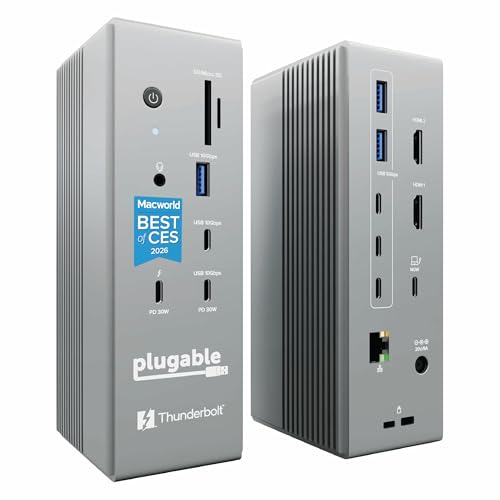 | Plugable TBT-UDH2 | Thunderbolt 5 desk with two native HDMI 2.1 displays | Two 8K 60Hz or 4K 144Hz on TB5 Windows hosts; two 6K on M4/M5 Macs | Thunderbolt 5, Thunderbolt 4, or USB4 | Six USB-C, two HDMI 2.1, 2.5Gb Ethernet, UHS-II readers | 140W host charging; not TB3, USB-C, Windows ARM, or DP-MUX gaming hosts | Check Price on Amazon |
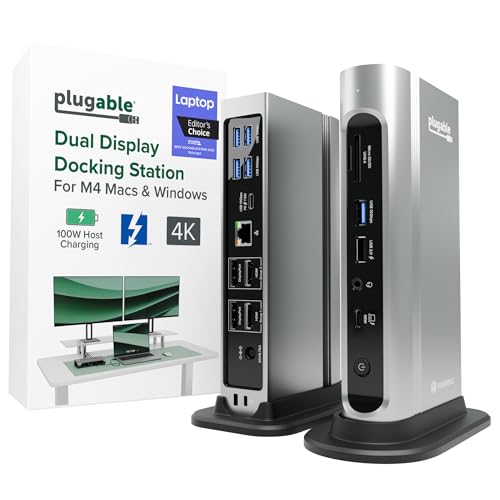 | Plugable TBT4-UDZ | Driverless dock with HDMI and DisplayPort for mixed monitors | Four 4K 60Hz on Windows TB4/USB4; two on Mac | Thunderbolt 4, USB4, or USB-C; Windows USB-C gets two | Two HDMI, two DisplayPort, seven USB, 2.5Gb Ethernet, SD/microSD | 100W host charging (98W certified); Windows may need a setting change for four | Check Price on Amazon |
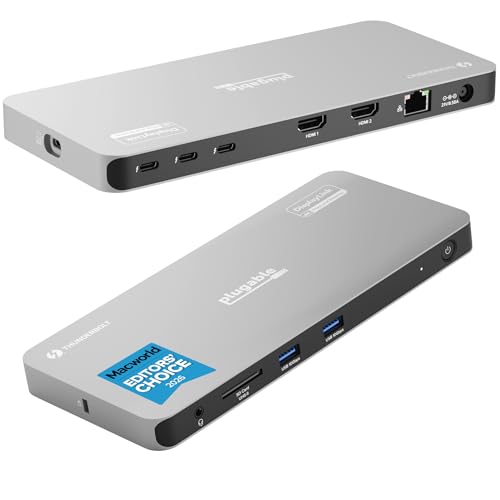 | Plugable TBT-6950PD | Four displays on Mac and Windows | Up to four 4K or one 8K; three on ChromeOS and base M1/M2 | Thunderbolt, USB4, or full-featured USB-C | Two HDMI, three downstream TB4, Gigabit Ethernet, SD, USB-A | 100W host charging (96W certified); HDMI outputs need DisplayLink | Check Price on Amazon |
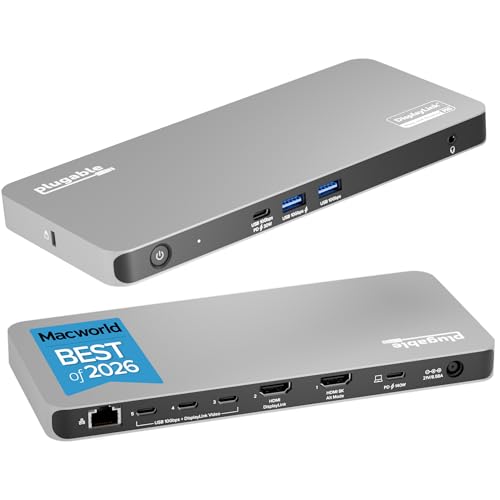 | Plugable UD-7400PD | Five-display DisplayLink desk | Five 4K 60Hz or three 8K 30Hz | Video-enabled USB-C or Thunderbolt, 10Gbps host link | Two HDMI, three USB-C video outputs, 2.5Gb Ethernet | 140W host charging; DisplayLink software required; protected video unsupported | Check Price on Amazon |
1. Plugable TBT4-HUB3C — Best Thunderbolt 4 Hub With Three Downstream Ports
The TBT4-HUB3C is a Thunderbolt 4 and USB4 hub, and Plugable’s port list shows a host port plus three downstream Thunderbolt ports with no Ethernet jack, card reader, or video port. Each downstream port is rated at 40Gbps data and 15W device charging, and Plugable says up to six more Thunderbolt peripherals can be daisy-chained from it. The box holds an 80cm Thunderbolt 4 cable, a 110W power adapter, and a USB-C-to-HDMI 2.0 adapter.
Video comes from that adapter or from a Thunderbolt display. Plugable lists up to two 4K 60Hz displays, one 8K 30Hz display, or one 6K display on an Apple silicon Mac, depending on the host. On a Mac, base M4, M5, Pro, and Max chips get two displays with the lid open, base M3 gets two only in clamshell mode, and base M1 and M2 get one. Plugable states that the included power adapter is required for operation, and it lists 60W host charging.
Plugable says a Thunderbolt 4 or USB4 host is required for maximum performance and that function is limited on a USB-C-only host. It does not recommend Thunderbolt 3 Windows systems, and it lists the hub as incompatible with MacBook Neo.
Hub role: Three 40Gbps downstream Thunderbolt 4 ports, an HDMI adapter in the box, and a power adapter that must be plugged in.Our Take Choose the TBT4-HUB3C when the laptop already has Thunderbolt 4 or USB4 and the goal is more Thunderbolt ports with a two-display ceiling. A desk that also needs Ethernet or an SD slot needs one of the docks below.
- Plugable lists three downstream Thunderbolt 4 ports, each at 40Gbps data and 15W device charging, for a laptop that needs more Thunderbolt ports.
- Plugable lists up to two 4K 60Hz displays, one 8K 30Hz display, or one 6K display on Apple silicon, depending on the host.
- Plugable includes a USB-C-to-HDMI 2.0 adapter and the 110W power adapter that the hub requires for operation.
- Plugable says up to six additional Thunderbolt peripherals can be daisy-chained.
- Plugable lists 60W host charging, below the 100W to 140W it lists for the docks on this page.
- Plugable says function is limited on a USB-C-only host and does not recommend Thunderbolt 3 Windows systems.
- Plugable’s port list shows no built-in Ethernet, card reader, or video port, so a first display needs the included adapter or a Thunderbolt display.
2. Plugable TBT-UDM — Best MacBook Dual HDMI Dock
Plugable built the TBT-UDM as a 13-in-1 Thunderbolt 4 dock for M4 and M5 MacBooks. Its two rear HDMI 2.0 outputs run at up to 4K 60Hz, and it adds a downstream Thunderbolt 4 port at 40Gbps, a 10Gbps USB-C port, four USB-A ports (two at 10Gbps and two at 5Gbps), UHS-II SD and microSD slots, an audio jack, and Gigabit Ethernet. Plugable says Ethernet speed depends on the operating system and host, and it includes a 1m Thunderbolt 4 cable.
Plugable lists two 4K 60Hz HDMI displays on M4 and M5 Macs, on M1, M2, and M3 Macs with a Pro or Max chip, and on base M3 Macs in clamshell mode. Base M1 and M2 Macs get one external display. The downstream Thunderbolt 4 port can drive a single 6K display instead, or 8K on Windows, and Plugable says two displays is the most it runs at once. Windows Thunderbolt 4 and USB4 systems are listed for two displays with no driver, and Plugable rates host charging at 100W, 96W certified.
Our Take Choose the TBT-UDM when the Mac is an M4 or M5 model, or a Pro or Max chip, and two HDMI monitors are the plan. The Gigabit Ethernet port is the main concession against the other docks here that list 2.5Gbps.
- Plugable lists two HDMI 2.0 outputs at up to 4K 60Hz with no driver on the listed Mac and Windows hosts.
- Plugable lists a downstream Thunderbolt 4 port that can drive a single 6K display, or 8K on Windows, instead of the two HDMI displays.
- Plugable lists four USB-A ports, split between 10Gbps and 5Gbps, and UHS-II SD and microSD slots.
- Plugable lists one external display for base M1 and M2 Macs, and two for base M3 only in clamshell mode.
- Plugable lists Gigabit Ethernet for the TBT-UDM, where the TBT-UDH2, TBT4-UDZ, and UD-7400PD list 2.5Gbps.
3. Plugable TBT-UDH2 — Best Thunderbolt 5 Dual HDMI Dock
The TBT-UDH2 is Plugable’s 16-in-1 Thunderbolt 5 dock with two native HDMI 2.1 outputs. It lists six USB-C connections, including two front ports rated at 30W for devices, 2.5Gbps Ethernet, and UHS-II SD and microSD slots. Plugable rates the downstream Thunderbolt port at up to 120Gbps with Bandwidth Boost and states 140W host charging through the Thunderbolt 5 host port, and the box holds an 80Gbps cable.
On a Windows Thunderbolt 5 host, Plugable lists two 8K 60Hz or two 4K 144Hz displays. On Macs with an M4 or M5 chip, or any Pro or Max chip, it lists two 6K 60Hz displays, and base M1 and M2 Macs get one 6K display. The sources disagree in two places. For a Thunderbolt 4 host, Plugable’s page says two 4K 60Hz and the Amazon listing says dual 4K 120Hz. For base M3, the page says one 6K plus one 5K display in clamshell mode and the listing says a single display.
Plugable says the dock runs two displays at a time and does not support Thunderbolt 3, ordinary USB-C, Windows ARM hosts, or gaming laptops with a DisplayPort MUX.
Our Take Choose the TBT-UDH2 for a Thunderbolt 5 laptop that drives two high-resolution or high-refresh HDMI screens. A Thunderbolt 4 buyer should confirm the display figure with Plugable first, since its page and the listing give different numbers.
- Plugable lists two native HDMI 2.1 outputs for up to two 8K 60Hz or two 4K 144Hz displays on Thunderbolt 5 Windows hosts.
- Plugable lists two 6K 60Hz displays on Macs with an M4 or M5 chip, or any Pro or Max chip.
- Plugable states 140W host charging and rates the downstream Thunderbolt port at up to 120Gbps with Bandwidth Boost.
- Plugable lists Thunderbolt 3, ordinary USB-C, Windows ARM hosts, and gaming laptops with a DisplayPort MUX as unsupported.
- Plugable says the dock runs only two displays at a time, either two HDMI or one HDMI and the downstream port.
4. Plugable TBT4-UDZ — Best Driverless Dock With HDMI and DisplayPort
The TBT4-UDZ lets each screen use the connector it already has, with two HDMI 2.0 and two DisplayPort 1.2 outputs on a 16-in-1 Thunderbolt 4 dock. Plugable lists seven USB ports, SD and microSD slots, audio in and out, and Ethernet rated at 2.5Gbps, which needs a 2.5Gbps switch or router to reach that speed. The box holds a vertical stand and a 1m Thunderbolt 4 cable.
Plugable’s comparison table gives it two displays on a Mac and four on Windows. Its page says Windows Thunderbolt 4 and USB4 computers can run up to four 4K 60Hz screens across the four video outputs with no driver, while Windows Thunderbolt 3 and USB-C laptops reach two. Macs with M4 or M5 chips, Pro or Max chips, or base M3 with the lid closed get two displays, and base M1 and M2 Macs get one.
Plugable adds that some Windows laptops need a settings change to switch off the internal screen before four displays work, and that extra displays on a Mac may mirror instead of extend. It rates host charging at up to 100W, 98W certified, and its comparison table marks protected content as supported.
Four screens without a driver: Plugable lists four 4K 60Hz displays on Windows Thunderbolt 4 or USB4 hosts, and two on a Mac.Our Take Choose the TBT4-UDZ for a Windows Thunderbolt 4 or USB4 laptop that needs up to four screens without DisplayLink software, or for a Mac with two monitors of mixed connector types. Mac buyers who want four screens need the DisplayLink dock next.
- Plugable lists two HDMI and two DisplayPort outputs, so each monitor can use its own connector.
- Plugable lists up to four 4K 60Hz displays on Windows Thunderbolt 4 and USB4 computers with no driver.
- Plugable lists 2.5Gbps Ethernet and a vertical stand in the box.
- Plugable’s comparison table marks protected content as supported, and lists it as unsupported for the TBT-6950PD and UD-7400PD.
- Plugable lists two displays on a Mac and one on base M1 and M2 chips, so four screens are a Windows feature.
- Plugable says some Windows laptops need a settings change that switches off the internal screen for four displays.
- Plugable says the Ethernet port reaches 2.5Gbps only with a 2.5Gbps switch or router.
5. Plugable TBT-6950PD — Best Four-Display Dock for Mac and Windows
The TBT-6950PD mixes two video methods. Plugable lists two HDMI 2.0 outputs that run on DisplayLink and downstream Thunderbolt 4 ports whose displays use native video, for up to four 4K displays or a single 8K display, depending on the host. Three downstream Thunderbolt 4 ports are rated at 40Gbps data and 15W device charging, and Plugable adds two 10Gbps USB-A ports, Gigabit Ethernet, an SD slot, and a 1m Thunderbolt 4 cable.
Plugable says its DisplayLink software usually installs automatically on Windows and needs a one-time manual install on macOS. It lists Windows 10 or newer, macOS 14 or newer, and ChromeOS 100 or newer, with a Thunderbolt, USB4, or full-featured USB-C port. Most Thunderbolt 4 Windows and Mac computers get four displays, base M3 Macs need clamshell mode for four, and ChromeOS and base M1 and M2 Macs get three.
Plugable rates host charging at 100W, 96W certified, and its comparison table lists protected content as unsupported.
Our Take Choose the TBT-6950PD for four displays on Mac and Windows with the same dock. A Windows buyer who wants four screens without any software should compare the TBT4-UDZ.
- Plugable lists up to four 4K displays on PC and Mac, or a single 8K display, depending on the host.
- Plugable says displays on the Thunderbolt ports use native video with no DisplayLink software.
- Plugable lists three downstream Thunderbolt 4 ports at 40Gbps and 15W each, plus an SD slot.
- Plugable says the two HDMI outputs need DisplayLink software, with a manual install on macOS.
- Plugable lists three displays on ChromeOS and base M1 and M2 Macs, and clamshell mode for four on base M3.
- Plugable’s comparison table lists protected content as unsupported.
6. Plugable UD-7400PD — Best Five-Display DisplayLink Dock
The UD-7400PD joins the host with one USB-C cable and lists a 10Gbps host connection, where Plugable’s comparison table lists 40Gbps for the TBT-6950PD and TBT4-UDZ. It has one HDMI 2.1 output rated at 8K 30Hz, one HDMI 2.0 output at 4K 60Hz, and three USB-C outputs that carry DisplayLink video at 4K 60Hz each, for five 4K 60Hz displays or three 8K 30Hz displays. Plugable also lists 2.5Gbps Ethernet and 140W host charging.
Plugable states that DisplayLink software must be installed for the second HDMI port, the three USB-C video outputs, Ethernet, and audio to work. It lists Windows 10 or newer and macOS 14 or newer, and says even base M1, M2, M3, and M4 Macs can connect five 4K displays. On macOS the driver needs Screen Recording permission to send display data over USB.
Plugable lists protected video such as Netflix and Hulu as unsupported.
Our Take Choose the UD-7400PD for a work desk that needs five independent screens and can live with a driver and no protected video. Two or three monitors do not need it.
- Plugable lists up to five 4K 60Hz displays or three 8K 30Hz displays across two HDMI and three USB-C outputs.
- Plugable says even base M1, M2, M3, and M4 Macs can connect five 4K displays.
- Plugable lists 140W host charging and 2.5Gbps Ethernet.
- Plugable states DisplayLink software is required for the second HDMI port and the three USB-C video outputs.
- Plugable lists protected video such as Netflix and Hulu as unsupported.
- Plugable lists a 10Gbps host connection, below the 40Gbps listed for the TBT-6950PD and TBT4-UDZ.
Buying Guide
Decide whether native video or DisplayLink belongs on the desk
Plugable calls the TBT-UDM, TBT-UDH2, and TBT4-UDZ driverless, and its TBT4-HUB3C listing names no DisplayLink software. Each one carries a host condition, so the laptop’s own port and graphics set the result.
The TBT-6950PD and UD-7400PD use DisplayLink for part of their video. The TBT-6950PD uses it on its two HDMI outputs, and the UD-7400PD uses it on its second HDMI port and three USB-C outputs. See the site’s DisplayLink docks for four monitors guide before choosing a count that needs a driver.
Match Thunderbolt 5 claims to the host
The TBT-UDH2’s two 8K 60Hz and two 4K 144Hz figures are for Thunderbolt 5 Windows hosts. Plugable’s page and the Amazon listing give different Thunderbolt 4 figures, so a Thunderbolt 4 laptop needs that number confirmed.
Plugable lists Thunderbolt 3 and ordinary USB-C as unsupported on the TBT-UDH2. A newer dock does not upgrade an older host, so start with the computer’s port protocol. The Thunderbolt 5 docks for dual 6K monitors guide covers that connection class separately.
Read Mac display conditions by chip
The TBT-UDM and TBT-UDH2 both split Macs by chip. Plugable lists two displays on M4, M5, Pro, and Max chips and one on base M1 and M2 for both, and the sources disagree on base M3. The page for the TBT-UDM lists two in clamshell mode, and the TBT-UDH2 listing says one.
The TBT4-UDZ lists two displays on a Mac, and the TBT-6950PD lists four on most Macs. A Mac buyer who wants more than two screens is choosing the DisplayLink dock, and base M1 and M2 chips get three on the TBT-6950PD. The site’s dual-monitor docks for MacBook Pro guide covers the two-display case.
Compare host charging with the whole desk load
Plugable lists up to 140W for the TBT-UDH2 and UD-7400PD, 100W for the TBT-UDM (96W certified), TBT4-UDZ (98W certified), and TBT-6950PD (96W certified), and 60W for the TBT4-HUB3C. All of these are rated host-charging ceilings.
A dock’s figure is a limit on what reaches the laptop, not a promise about every port. Start with the laptop’s charger rating, then compare the dock’s figure and the accessories on its other ports.
Check the host link and protected video before buying for count
The UD-7400PD connects at a listed 10Gbps and the TBT-6950PD and TBT4-UDZ at 40Gbps. A desk with fast storage on the dock’s ports should weigh that link against the extra screens.
Plugable lists protected video as unsupported on the UD-7400PD and TBT-6950PD and as supported on the TBT4-UDZ. A desk used for streaming video on a second screen should check that line first.
FAQ
Which Plugable dock has the largest stated monitor count?
The UD-7400PD has the largest stated count, with up to five 4K 60Hz displays or three 8K 30Hz displays. Plugable says it needs DisplayLink software and lists protected video as unsupported.
The TBT-6950PD lists four on Mac and Windows, and the TBT4-UDZ lists four on Windows Thunderbolt 4 and USB4 hosts only. The other three products list two.
Does every Plugable dock work with a USB-C laptop?
No. Plugable lists ordinary USB-C as unsupported on the TBT-UDH2, and it lists the TBT4-HUB3C as limited on a USB-C-only host. The TBT-UDM lists Windows Thunderbolt 4 and USB4 systems.
The TBT4-UDZ and TBT-6950PD list USB-C hosts, and the UD-7400PD lists video-enabled USB-C. The TBT4-UDZ lists two displays on Windows USB-C laptops, and the laptop’s own USB-C port must carry video.
Which model is clearest for two MacBook displays?
The TBT-UDM has the clearest Mac conditions. Plugable lists two 4K 60Hz HDMI displays on M4 and M5 Macs and on Pro and Max chips, and one display on base M1 and M2.
The TBT-UDH2 lists two 6K displays on the same chips, and the TBT4-UDZ lists two displays on a Mac. Confirm the chip before assuming either dock gives two screens.
Which dock gives four displays without DisplayLink?
The TBT4-UDZ, and only on Windows. Plugable lists up to four 4K 60Hz displays on Thunderbolt 4 and USB4 computers using its two HDMI and two DisplayPort outputs.
A Mac gets two displays from it, and a Windows laptop may need a settings change that switches off its internal screen. A Mac buyer who wants four screens needs the TBT-6950PD and its DisplayLink software.
Is the TBT4-HUB3C a substitute for a full dock?
No. It lists three downstream Thunderbolt 4 ports and 60W host charging, plus an HDMI adapter in the box, and Plugable’s port list shows no Ethernet or card reader.
The TBT-UDM, TBT4-UDZ, and TBT-UDH2 list Ethernet and card slots with direct video outputs. Choose the hub when the need is more Thunderbolt ports.
Bottom Line
Choose Plugable TBT-UDH2 for two displays on a Thunderbolt 5 host, Plugable TBT-6950PD for four displays on Mac or Windows, or Plugable UD-7400PD for five displays.