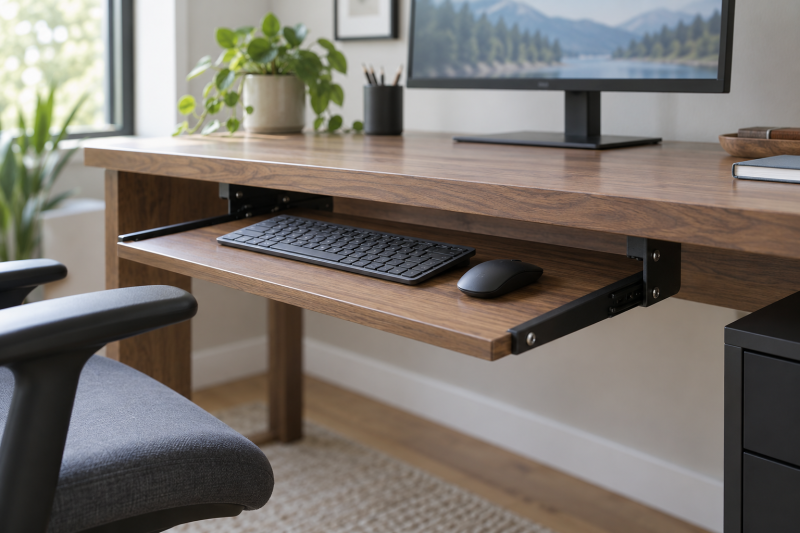
A permanent under-desk keyboard tray clears the desktop only when the desk has room for its rails, brackets, and full travel path. Measure the underside before shopping. A tray that fits the keyboard can still collide with a crossbar, drawer, cable raceway, or desk leg.
These six screw-mounted trays are for fixed desks, not the clamp-on trays that work without drilling. Their differences are practical: tray width, mouse space, height adjustment, slide travel, and the clear space the hardware needs below the desktop.
The installation also changes where cables and small desk accessories live. Before drilling, move any cable tray below the mounting area and check the keyboard route beside a rolling computer tower stand if one shares the same desk bay. A permanent drawer works best when it can slide fully out without catching a chair arm, storage unit, or cable bundle, then retract fully without pinching a cable against the desk underside.
Measure the desk underside, keyboard, mouse space, and crossbars before choosing a permanent slide-out tray.Under-Desk Keyboard Trays Compared


1. Fellowes Office Suites Keyboard Drawer — Best Three Mounting Heights
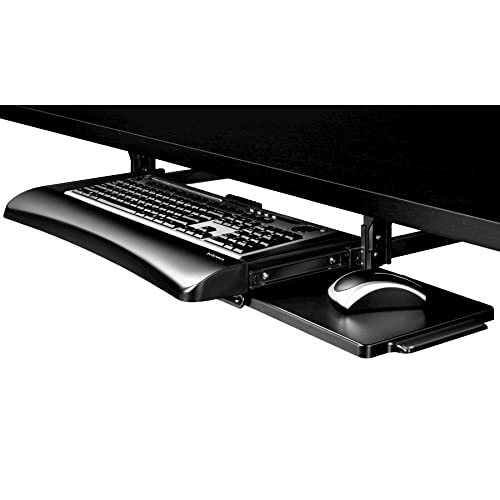
If you want to know the clearance before you drill, Fellowes is the tray to start with, because its listing specifies the installation space as 23.5 inches of width and 14.5 inches of depth under the desk. Fellowes states the main platform accepts keyboards up to 20 by 7 5/8 inches, while a pre-installed 7.25-by-7.5-inch mouse tray sits on the right.
Three bracket heights, rated by the manufacturer at 3.31, 2.87, and 2.48 inches, give a simple way to set the drawer below the desktop. Fellowes is a straightforward tray for a standard keyboard, but its small right-side mouse platform is less suitable if you use a wide mousepad or prefer the mouse on the left.
Our Take Buy Fellowes when you need its clearly stated 23.5-by-14.5-inch installation space and three bracket heights. Choose VIVO or HUANUO when the keyboard and mouse need to share one wider main platform.
- The 23.5-by-14.5-inch clearance requirement gives a concrete measurement before drilling into the desk.
- Three bracket heights, from 2.48 to 3.31 inches, offer simple vertical placement choices.
- A separate 7.25-by-7.5-inch mouse tray extends only when the keyboard drawer is in use.
- The 20-by-7 5/8-inch keyboard area excludes wider keyboards or combined keyboard-and-mouse layouts.
- The pre-installed mouse platform sits on the right, limiting flexibility for a left-handed permanent setup.
- It requires screw mounting and obstruction-free space below the desktop, unlike a temporary clamp-on tray.
2. VIVO Adjustable Keyboard Tray — Best 27-Inch Steel Tray
If the keyboard and mouse should share one wide surface, VIVO provides a 26.8-by-11-inch tray for both, plus small accessories, on one steel platform. Its brackets adjust through five set points that place the tray 2.5 to 5 inches below the desk surface.
The listing calls for 12 inches of clear desk underside including the track and says the tray extends up to 7.8 inches from the desk edge. With an 11-pound stated support limit, it is a practical full-width choice for a fixed wood desk with enough clear rail space.
Our Take Buy VIVO when a 26.8-by-11-inch shared keyboard-and-mouse surface is the priority. HUANUO offers more published adjustment, while Mount-It! extends farther from the desk edge.
- The 26.8-by-11-inch steel tray gives keyboard and mouse a stated shared working surface.
- Five mounting points place the tray 2.5 to 5 inches below the desktop surface.
- An 11-pound capacity and included steel brackets suit a permanent screw-mounted workstation installation.
- The track requires 12 inches of clear underside space, so crossbars can block installation.
- Its 7.8-inch maximum extension is shorter than Mount-It!’s stated 10-inch ball-bearing travel.
- The fixed 26.8-inch width needs a desk underside wide enough for both rails and brackets.
3. HUANUO Adjustable Keyboard Tray — Best Swivel Mouse Platform
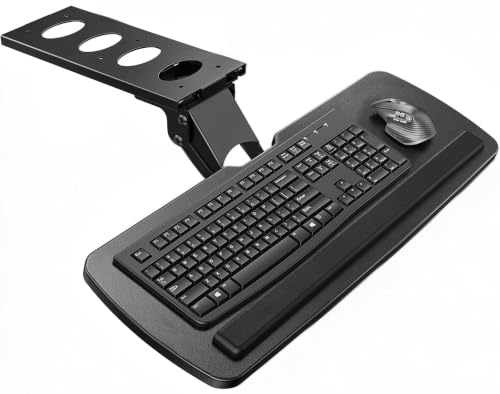
If the keyboard has to sit at a different angle or height than the desk allows, HUANUO has the most adjustment on this page. HUANUO specifies a 25-by-9.84-inch platform with 6.3 inches of height adjustment, plus 180-degree swivel to the left and right and 6 degrees up or 22 degrees down of tilt. The manufacturer states the tray is intended for keyboards about 17.3 by 5.5 inches or smaller, with the rest of the platform for a mouse.
The rotation needs room. The listing asks for 25 inches of side clearance, or 35.4 inches if the tray requires rotation. It also calls for at least 14.17 inches between the desk edge and crossbar, so desk geometry is the main question before you choose this flexible tray.
Our Take Buy HUANUO when tilt, 6.3 inches of adjustment, and left-right movement solve a problem with your typing position. Buy VIVO for a simpler straight tray when the desk has limited side clearance.
- The 6.3-inch height adjustment gives the largest published vertical range in this comparison.
- A 180-degree swivel and 22-degree downward tilt provide listed angle changes for the tray.
- The 25-by-9.84-inch platform includes a wrist rest and room for a keyboard plus mouse.
- Rotation needs up to 35.4 inches of side clearance, which many permanent desks cannot provide.
- A 9.84-inch depth is narrower than VIVO’s 11-inch surface for a wide keyboard-and-mouse layout.
- The listing requires careful crossbar and desk-thickness checks before the tray can mount safely.
4. Mount-It! Keyboard Drawer — Best Ball-Bearing Slide and Wrist Rest
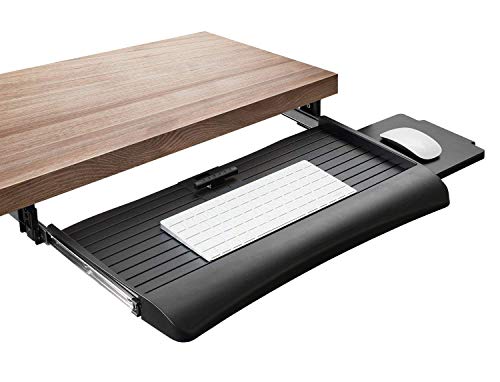
If you want long slide travel and a wrist rest, Mount-It! uses screw-mounted steel brackets and ball-bearing slides. Mount-It! states the slides extend up to 10 inches from the desk edge. Its integrated wrist rest and locking keyboard clamp keep the keyboard on the slide-out platform, while Mount-It! includes an 8-by-7.5-inch mouse platform that can mount on either side.
The tray provides three height settings within a 1.25-inch range according to the manufacturer and is listed for wood or MDF desktops, not glass or metal. The lifetime manufacturer warranty is the standout detail beyond dimensions, but its small height range will not replace the broad adjustment HUANUO publishes.
Our Take Buy Mount-It! for long 10-inch ball-bearing travel, an integrated wrist rest, and a mouse platform that can switch sides. Choose HUANUO when the tray position needs more than 1.25 inches of height adjustment.
- The 10-inch ball-bearing slide brings the keyboard farther from the desk edge than VIVO’s 7.8 inches.
- An 8-by-7.5-inch mouse platform mounts on either side for left- or right-handed positioning.
- The integrated wrist rest, locking clamp, and lifetime warranty give three listed features for long-term use.
- Three height settings span only 1.25 inches, far less than HUANUO’s stated 6.3-inch adjustment.
- The steel brackets are listed only for wood or MDF desktops, not glass or metal surfaces.
- The smaller mouse platform is separate rather than part of one broad shared tray surface.
5. TOOCUST Under-Desk Keyboard Tray — Best Compact 20-Inch Tray
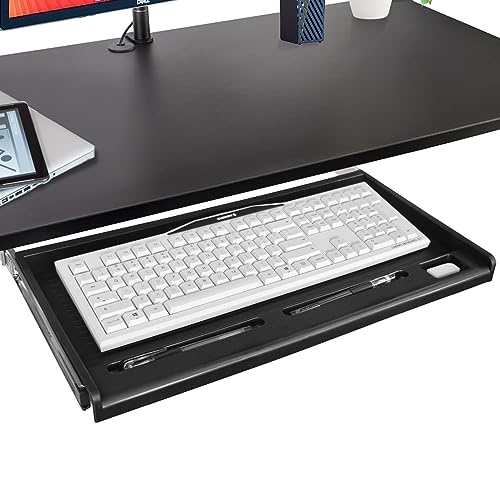
If the keyboard is compact and the desk needs pen storage, TOOCUST provides a small option, featuring a 20-by-11-inch slide-out tray, enclosed keyboard compartment, and three holders for pens or small stationery, according to the manufacturer. The manufacturer specifies it is intended for keyboards smaller than 19 by 8 inches and a flat desktop at least 24 by 16 inches.
With a stainless-steel rail and included mounting accessories listed by the brand, it is a straightforward pick for a permanent desk. Its narrow keyboard limit means it is best for a compact board and light mouse use, not a full-size board with a large mousepad.
Our Take Buy TOOCUST for a compact keyboard below 19 by 8 inches and a desk that needs simple pen storage. VIVO or JINGCHENGMEI gives a wider working surface for larger setups.
- The 20-by-11-inch tray fits a compact keyboard while preserving more underside room for desk hardware.
- Three small holders keep pens and accessories beside the keyboard instead of consuming desktop space.
- The enclosed compartment is listed to prevent a keyboard from sliding off the tray during use.
- Keyboards must stay below 19 by 8 inches, excluding many full-size or wide layouts.
- The 20-inch tray is much narrower than VIVO’s 26.8-inch and JINGCHENGMEI’s 23-to-27-inch designs.
- The listing gives no height-adjustment figure for matching the keyboard to a permanent desk surface.
6. JINGCHENGMEI Slide-Out Keyboard Tray — Best Adjustable 23-27-Inch Width
If you want to match the tray to the width of the desk underside, JINGCHENGMEI states the tray adjusts from 23 to 27 inches wide, extends 9.8 inches from the desk edge, and uses ball-bearing slides. According to the manufacturer, the cold-rolled steel tray supports up to 11 pounds and needs a desk or table at least 0.78 inches thick for its included screw-mounted brackets.
The listing calls out locking stops that keep the tray from retracting while typing, which is useful on a fixed workstation. Its 9.8-inch depth is the key limit. Measure keyboard depth and mouse space before assuming a wide tray automatically accommodates both.
Our Take Buy JINGCHENGMEI when an adjustable 23-to-27-inch width and 9.8-inch slide-out travel suit the desk. Pick VIVO for a deeper 11-inch tray if the mouse needs more space beside the keyboard.
- The 23-to-27-inch width adjustment helps match the tray to different permanent desk underside widths.
- A 9.8-inch extension and ball-bearing slides provide a stated smooth pull-out keyboard position.
- The cold-rolled steel platform supports up to 11 pounds for a keyboard and light accessories.
- The 9.8-inch depth is tighter than VIVO’s 11-inch tray for a keyboard-and-mouse combination.
- Its desk must be at least 0.78 inches thick for the included screw-mounted bracket hardware.
- The tray locks open for typing but does not list a height or tilt adjustment range.
Buying Guide
Measure the unobstructed underside, not only desktop width
The rails and brackets need a clear path beneath the desk. Fellowes asks for 23.5 inches of width and 14.5 inches of depth, VIVO needs 12 inches of clearance including its track, and HUANUO names 14.17 inches between the desk edge and a crossbar. Those measurements settle whether a screw-mounted tray can fit before features count.
Crossbars, drawers, cable trays, and desk legs can block a tray that looks compatible from above. Fellowes explicitly requires an obstruction-free installation area, while HUANUO calls for a minimum 0.6-inch desk thickness. Inspect the underside along the entire slide route, rather than only the open area at the front edge.
Size the tray around keyboard and mouse together
A listed width is useful only after both input devices are measured. VIVO provides a 26.8-by-11-inch shared tray, HUANUO measures 25 by 9.84 inches, and TOOCUST is 20 by 11 inches. A wide keyboard can leave little mouse space on a tray that appears large enough in a product title.
Separate mouse platforms make a different trade-off. Fellowes includes a 7.25-by-7.5-inch right-side tray, while Mount-It! uses an 8-by-7.5-inch platform that can mount either side. Separate platforms preserve main-tray room for the keyboard but do not provide VIVO’s continuous wide surface.
Choose adjustment only when it solves a measured problem
Vertical placement counts when the keyboard must sit below a fixed desk top. VIVO sets the tray 2.5 to 5 inches below the desktop, HUANUO lists 6.3 inches of adjustment, and Fellowes has three positions from 2.48 to 3.31 inches. Compare those figures with the chair and desk height you actually use.
Tilt and swivel add clearance requirements as well as movement. HUANUO can tilt 6 degrees up or 22 degrees down and rotate 180 degrees, but rotation may need 35.4 inches of side clearance. A straight tray such as VIVO may be the better permanent installation when side space is limited.
Check slide travel against the desk edge
Extension is the distance the keyboard travels once the tray clears the desktop. Mount-It! lists 10 inches of ball-bearing travel, JINGCHENGMEI lists 9.8 inches, and VIVO lists 7.8 inches. More travel can help at a deep desk, but it also needs room in front of the desk for your chair and knees.
A stable typing position is separate from extension length. Mount-It! lists a locking keyboard clamp, and JINGCHENGMEI lists stops that prevent retraction while typing. Choose the travel length first, then the listed feature that keeps the tray stable at that position.
Leave room for the chair at the extended position. Mount-It!’s 10-inch travel and JINGCHENGMEI’s 9.8-inch travel bring the keyboard toward the seated user. Mark that position with a tape measure before installation, especially when the chair has arms or the desk sits close to a wall.
Match the mounting method to the desk material
The six trays are permanent and screw-mounted, so desktop material is a compatibility check. Mount-It! limits its steel brackets to wood or MDF, JINGCHENGMEI requires a desk at least 0.78 inches thick, and Fellowes specifies #7, 3/4-inch rounded-head screws. A permanent slide-out tray cannot be treated as a temporary desk accessory.
A clamp-on tray is a different category with a different compromise. Screw mounting can leave the desktop edge clear after installation, but it commits the tray to one desk. If the setup changes often, compare a no-drill keyboard tray instead.
FAQ
How much clear space does an under-desk keyboard tray need?
Fellowes calls for 23.5 inches of width and 14.5 inches of depth, VIVO needs 12 inches of clear space including its track, and HUANUO asks for 14.17 inches between the desk edge and a crossbar. Measure the installation dimensions, not only the desktop surface.
Check every obstruction along the slide path. A cable trough, drawer, center support, or desk leg can interfere after the front brackets appear to fit. Fellowes’ obstruction-free rule is useful for any rail-mounted tray.
Can a full-size keyboard and mouse share one tray?
They can when the published platform is wide and deep enough. VIVO is 26.8 by 11 inches, HUANUO is 25 by 9.84 inches, and JINGCHENGMEI adjusts from 23 to 27 inches wide with a 9.8-inch depth. Compare those figures against both devices.
A separate mouse shelf changes the calculation. Fellowes adds a 7.25-by-7.5-inch right-side platform, and Mount-It! offers an 8-by-7.5-inch platform that moves to either side. They are useful when the main surface is reserved for the keyboard.
Which tray gives the most height adjustment?
HUANUO lists 6.3 inches of height adjustment, the largest published range in this group. VIVO gives five set points from 2.5 to 5 inches below the desk, while Fellowes provides three bracket positions between 2.48 and 3.31 inches.
Adjustment should follow a desk measurement, not replace it. The right height is the one that positions the keyboard for your fixed desk and chair. A broad range helps only when the desk underside and knee space allow the tray there.
Are ball-bearing slides worth choosing?
Mount-It! and JINGCHENGMEI both list ball-bearing slides. Mount-It! extends 10 inches, while JINGCHENGMEI extends 9.8 inches, so both give a travel figure as well as the stated slide type. The better choice depends on desk depth and mouse space.
Look for stability at the extended position too. Mount-It! lists a locking clamp for the keyboard, and JINGCHENGMEI lists stops that keep the tray from retracting while typing. Those features answer a different question from how smoothly the drawer moves.
Will a permanent tray work on every desk material?
No. Mount-It! says its screw-mounted steel brackets are for wood or MDF rather than glass or metal. JINGCHENGMEI requires a desk at least 0.78 inches thick, and Fellowes specifies its mounting screws, so the desk material and thickness must be checked first.
A permanent tray is a modification, not a temporary accessory. If the desk cannot take screws or the setup moves often, a no-drill alternative may suit better. For a fixed wood workstation, screw-mounted rails can keep the desktop clear once installed.
Bottom Line
VIVO is the balanced full-width choice for a fixed desk with 12 inches of clear underside space. HUANUO is best when its 6.3-inch adjustment and swivel solve a proven fit problem, while Mount-It! gives the longest listed ball-bearing travel. Fellowes suits a desk where clearance is the first question, TOOCUST suits a compact keyboard, and JINGCHENGMEI suits a desk that needs an adjustable width. Choose only after measuring the underside, keyboard, mouse area, and slide path.