The Kensington SD5000T5 EQ is worth considering only after you verify the host, the display chain, and the exact product identity. Kensington documents an unusually capable Windows Thunderbolt 5 ceiling, including up to three 4K displays at 144Hz or two 8K displays at 60Hz. Those numbers are not a promise for every laptop. The computer still has to provide the right display streams, operating system, DisplayPort path, DSC support, and GPU capability, while the monitors, cables, and adapters have to complete that path.
There is also a lifecycle issue to understand before buying. This review covers only model K35201NA, which Kensington identifies as the SD5000T5 EQ for Windows and macOS. Kensington currently marks that product page discontinued, even though our July 28, 2026 check of the Amazon listing found an active offer for the exact K35201NA ASIN B0DGTCXHZX. Treat those as two separate facts. Confirm the seller, return terms, and warranty eligibility when you shop.
The short verdict is simple. Buy the K35201NA only if its three downstream Thunderbolt 5 ports, three USB-A 10Gbps ports, two card readers, 2.5GbE, audio, and up to 140W host charging suit your desk, and you can verify the display path before ordering. Skip it if you need built-in HDMI or DisplayPort, expect triple displays from an unspecified Mac, or prefer a dock Kensington still lists as active.
Kensington SD5000T5 EQ verdict at a glance
| Decision point | What Kensington documents | What you should verify |
|---|---|---|
| Exact product | SD5000T5 EQ, model K35201NA | The offer must say K35201NA and ASIN B0DGTCXHZX |
| Lifecycle | Kensington marks K35201NA discontinued | Current seller, returns, and warranty eligibility |
| Highest Windows display ceiling | Up to triple 4K 144Hz or dual 8K 60Hz on a qualified Thunderbolt 5 path | Host/GPU streams, Windows 11 23H2+, DP 2.1, DSC, monitors, adapters, and cables |
| Thunderbolt 4 or USB4 fallback | Up to 40Gbps and qualified dual 4K 60Hz operation | The host cannot inherit the Thunderbolt 5 triple-display ceiling |
| USB-C DP Alt Mode fallback | One 4K 60Hz display | The USB-C port must expose DP Alt Mode |
| Mac displays | Chip-specific, with stable guidance topping out at two through the dock | Exact Mac chip and current Kensington matrix; do not assume triple support |
| Native video sockets | None | Use compatible USB-C/Thunderbolt display cables or active adapters |
| Host charging | Up to 140W with USB PD 3.1 EPR support | The laptop’s port and charging profile |
| Best fit | A qualified Windows Thunderbolt 5 desk with Thunderbolt and USB-A peripherals | Your actual device list and display topology |
The display decision starts with the computer
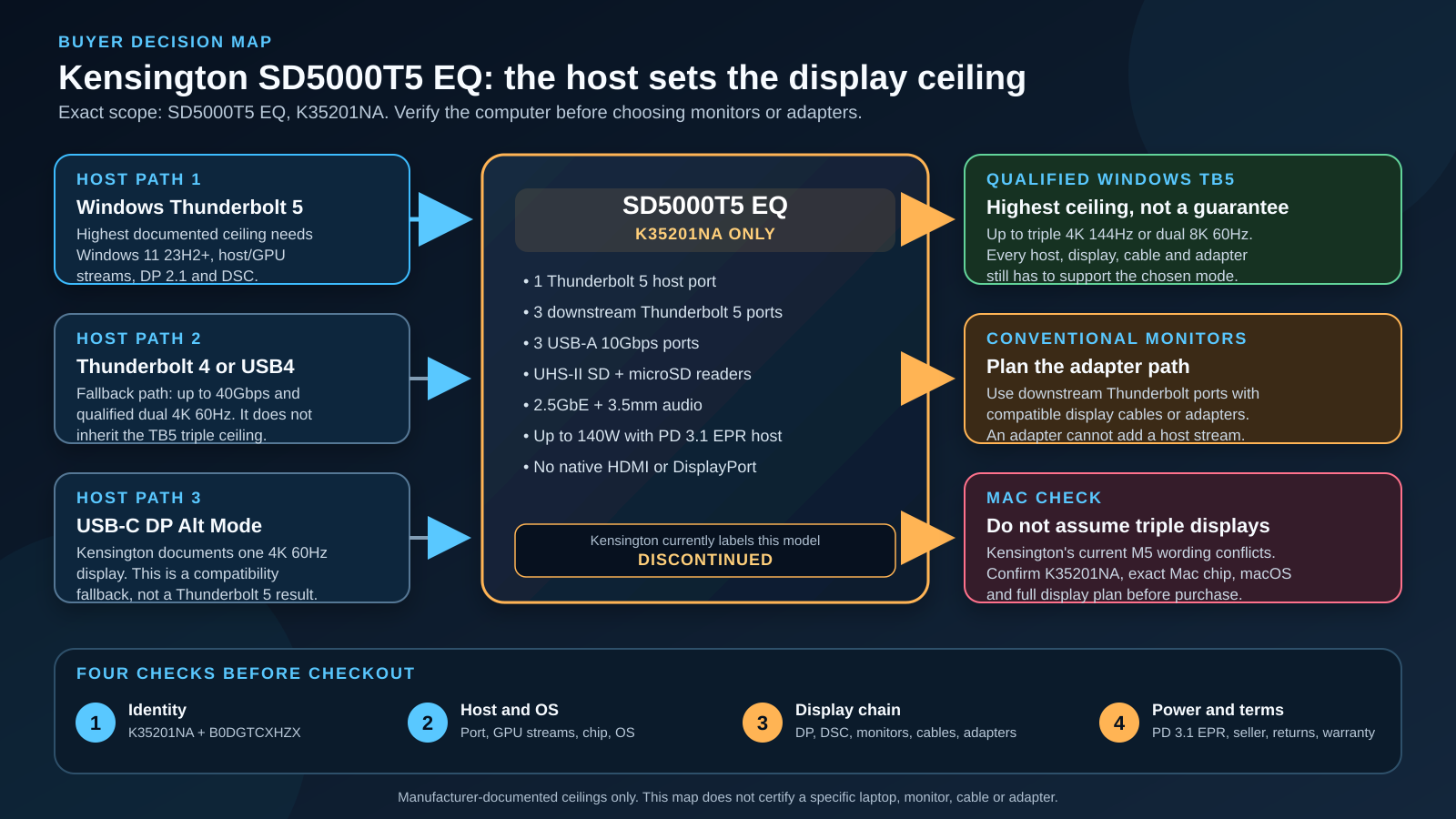
The main reason to buy this dock is its combination of three downstream Thunderbolt ports and Kensington’s high display ceiling, not simply that it says Thunderbolt 5. The main reason to pause is that the dock cannot manufacture display streams the host does not provide.
Kensington says the dock can expose as many as three display streams. The usable count and format remain controlled by the computer, GPU, operating system, DisplayPort transport, DSC support, and the rest of the display chain. That distinction is more important here than a generic port count. A laptop with a USB-C connector may give you one display, a suitable Thunderbolt 4 or USB4 computer may give you two, and a properly qualified Windows Thunderbolt 5 system can reach the advertised higher ceiling.
If the terminology is unfamiliar, our guide to Thunderbolt 5 specifications explains the bandwidth and display concepts. The practical lesson for this review is narrower. The SD5000T5 EQ is a display-routing device, not an override for the laptop’s hardware limits.
Qualified Windows Thunderbolt 5 path
Kensington’s product sheet documents up to three 4K displays at 144Hz or two 8K displays at 60Hz on the top Windows Thunderbolt 5 path. It also lists other single and multi-display combinations. Every one of those high-end configurations needs qualification.
Start with the laptop. Kensington’s current guidance calls for Windows 11 23H2 or later for the supported full path. The computer needs a suitable Thunderbolt 5 implementation and enough GPU display capability. The highest modes also depend on DisplayPort 2.1 transport and DSC. Then check each monitor, cable, and adapter. A single older link can reduce the negotiated result.
“Supports triple displays” is therefore an incomplete shopping statement. The better question is whether your exact laptop provides three compatible streams through this Thunderbolt 5 port, and whether your three display paths can carry the requested resolution and refresh rate. If the laptop maker does not document that answer, ask the laptop maker and Kensington before buying.
The dock has no native HDMI or DisplayPort socket. You connect monitors through its downstream Thunderbolt ports. Depending on the monitor inputs, that can mean a direct USB-C display cable or an appropriate active adapter. Our guide to USB-C to DisplayPort cables and adapters can help with that separate link, but an adapter cannot add a display stream the host lacks.
Thunderbolt 4 and USB4 are fallback paths
Kensington documents backward-compatible use with suitable Thunderbolt 4 and USB4 systems. On that path, the link operates at up to 40Gbps rather than the full Thunderbolt 5 transport, and Kensington’s guidance includes dual 4K at 60Hz rather than the Windows Thunderbolt 5 triple-4K ceiling.
That can still be a useful dual-monitor dock. It is not a reason to pay for the SD5000T5 EQ if your computer will never use its Thunderbolt 5 strengths. Compare the intended laptop against our USB4 versus Thunderbolt 4 guide and the manufacturer’s exact port specifications. A USB4 logo alone does not tell you how many display streams the laptop exposes.
Kensington also lists other qualified higher-resolution and high-refresh combinations in its product sheet. Treat those as a matrix, not as interchangeable totals. Moving from one display to two changes how the host allocates display transport. A monitor that supports a resolution at one refresh rate does not automatically support the advertised maximum at another.
Plain USB-C can mean one display
The SD5000T5 EQ can connect through a compatible USB-C DisplayPort Alt Mode path, but Kensington documents that fallback at one 4K display at 60Hz. This is not a Thunderbolt 5 result. It is a compatibility mode for a computer that provides DisplayPort Alt Mode over USB-C.
Kensington’s current FAQ also says Windows 10 is not recommended for the complete Thunderbolt 5 path and can revert to multifunction DisplayPort behavior. If the computer is tied to Windows 10, this dock is a poor way to chase its headline display capability.
For a USB-C-only computer, compare the cost and ports against our best USB-C docking stations rather than assuming the newest dock standard creates a faster host. A less expensive dock designed for the computer’s real connection may be the better purchase.
Mac buyers need a chip-specific answer
Mac display support is the easiest place to make an expensive assumption. Kensington’s current support material is chip-specific, and its current product page contains wording that does not form one clean matrix.
The stable parts are clear:
- Kensington documents one external display through the dock for base M1 and M2 systems.
- It documents two for a base M3 system only with the laptop lid closed.
- Its current FAQ documents up to two through the dock for the M4 Base and M1 through M4 Pro/Max paths it covers.
- Its product sheet gives resolution-specific two-display combinations for supported Pro/Max and M4 configurations.
The conflict appears in newer product-page copy. One section still says MacBooks support up to two external displays through the dock, while another general line says a Thunderbolt 5 dock can support up to three external displays with M5 Pro and M5 Max chips. Those statements do not safely prove that every K35201NA, firmware state, macOS version, and M5 Pro/Max system will deliver a specific triple-display arrangement.
For that reason, this review does not recommend the SD5000T5 EQ on the promise of three Mac displays. If that is your deciding requirement, ask Kensington to confirm the current matrix for K35201NA, your exact Mac chip, macOS version, monitor resolutions, refresh rates, and connection plan. Keep the response with the purchase record.
Our MacBook Pro docking station guide covers alternatives by Mac use case. The important point here is that “Thunderbolt 5 Mac” is still not specific enough. The chip remains part of the display specification.
No HDMI or DisplayPort is a design choice with consequences
Kensington gives the dock three downstream Thunderbolt 5 ports instead of dedicating chassis space to HDMI or DisplayPort. That can be a good trade for a desk built around USB-C displays, Thunderbolt monitors, fast storage, capture devices, or a downstream Thunderbolt chain. It is less convenient for three conventional monitors already connected by HDMI or DisplayPort.
Adapters add cost and another compatibility checkpoint. For high resolution or refresh rates, verify the adapter’s supported DisplayPort version, DSC behavior, and direction. USB-C-to-HDMI and USB-C-to-DisplayPort products are not all equivalent, and passive versus active behavior can matter. Kensington’s display ceiling does not certify a third-party adapter.
If you are building the display setup at the same time as the dock, our lists of Thunderbolt monitors and dual-monitor docking stations provide a broader shopping context. If you already own the monitors, inventory every input and cable before selecting the dock.
This design also explains why the SD5000T5 EQ is not automatically better than a dock with a lower headline stream count. A native video socket may remove an adapter and simplify a one-monitor desk. The Kensington makes more sense when flexible downstream Thunderbolt connectivity is the priority.
The 11-in-1 layout is focused, not exhaustive
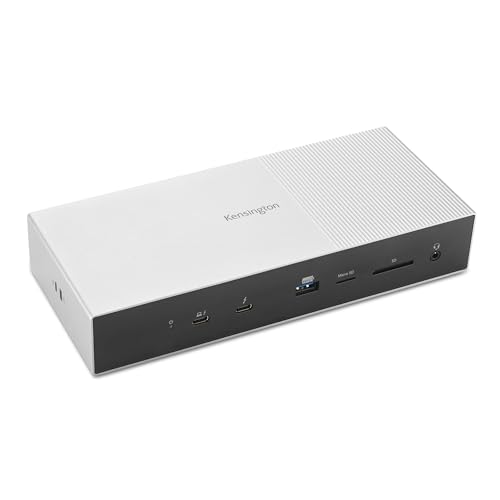
Kensington calls the K35201NA an 11-in-1 dock. Its functional connections are:
- One Thunderbolt 5 host port
- Three downstream Thunderbolt 5 ports
- Three USB-A 10Gbps ports
- One UHS-II SD card reader
- One UHS-II microSD card reader
- One 2.5GbE port
- One 3.5mm combination audio jack
The separate DC input powers the dock and is not a user data port. There is no ordinary USB-C data port separate from the Thunderbolt ports, and there is no built-in HDMI or DisplayPort socket.
This layout favors a buyer with older USB-A peripherals plus newer Thunderbolt devices. Three USB-A 10Gbps ports can cover a keyboard receiver, external SSD, audio interface, or other desk hardware, subject to each device’s own requirements. Three downstream Thunderbolt ports reduce the need to sacrifice one connection immediately to a display or storage device.
Kensington documents both card readers as UHS-II / SD 4.0 and says they can be used simultaneously. That is useful for a photo or video workflow using both card formats, but it is not a measured transfer-speed claim. Actual speed still depends on the card, reader path, host, workload, and shared activity.
The 2.5GbE port is a useful step above Gigabit Ethernet when the rest of the network supports it. You need a compatible router or switch, cabling, and destination to benefit. We did not measure throughput, latency, driver behavior, or sustained transfer speed. Kensington also documents its DockWorks software for Windows, not macOS, so do not include that utility in a Mac buying decision.
For a ThinkPad desk, check the exact laptop’s charging and display implementation against our ThinkPad docking station guide. Business-laptop model families often contain several port and GPU configurations under similar names.
Charging can reach 140W only on the right power path
Kensington advertises up to 140W host charging, but its FAQ ties that maximum to USB Power Delivery 3.1 Extended Power Range support. A laptop that accepts less power will negotiate a supported lower level. A laptop that uses a proprietary high-wattage adapter may still need its original charger for full performance.
The peripheral power limits are also port-specific. Kensington documents the front downstream Thunderbolt port at up to 60W, the two rear downstream Thunderbolt ports at up to 15W each, and the front USB-A port at up to 7.5W. These are individual ceilings, not proof that every maximum can be sustained simultaneously. The dock’s internal power allocation and connected devices still matter.
Kensington says the dock can charge certain connected devices while the host is absent. That can be convenient for a phone or accessory, but verify which port supplies the required profile. Do not assume every port provides the same off-host behavior.
Before buying, check the laptop maker’s required wattage and whether the Thunderbolt or USB-C port accepts 140W EPR. A dock can advertise 140W and still charge a particular laptop at 100W, 90W, or another negotiated level. This is normal USB Power Delivery behavior, not evidence that the dock is faulty.
Who should buy the SD5000T5 EQ?
The best candidate is a Windows 11 buyer with a documented Thunderbolt 5 host who needs a dense combination of displays and high-speed peripherals. The dock becomes more compelling when all of these are true:
- You have verified the exact laptop’s display-stream and DSC capability.
- Your monitors and adapters support the target formats.
- You need three downstream Thunderbolt ports.
- Three USB-A 10Gbps ports match your current peripherals.
- You will use both SD and microSD readers, 2.5GbE, or the audio jack.
- The laptop can accept enough USB PD power for one-cable charging.
- You are comfortable buying a model Kensington now labels discontinued after checking the current seller and terms.
It can also make sense for a Thunderbolt 4 or USB4 system when the port layout is unusually well matched and you plan to move the dock to a Thunderbolt 5 computer later. That is a future-use judgment, not a performance claim. Buy it for what your current computer can do today.
The broader Thunderbolt 5 dock roundup is the better starting point if you have not decided which port tradeoff matters. This review is deliberately narrower: it answers whether K35201NA is the right implementation.
Who should skip it?
Skip this dock when any of these points describes your desk:
- You need native HDMI or DisplayPort and do not want adapters.
- Your computer has only ordinary USB-C and you are paying mainly for the triple-display headline.
- You need a guaranteed three-display Mac configuration.
- You need several ordinary USB-C data ports rather than Thunderbolt ports.
- You require a manufacturer model that is still listed as active.
- You cannot confirm the offer is K35201NA / B0DGTCXHZX.
- Your laptop requires proprietary charging or more power than it accepts over USB PD.
- You need independent proof of noise, thermals, network throughput, storage speed, or long-term reliability.
There is nothing inherently wrong with using a Thunderbolt 5 dock below its maximum capability. The commercial problem is paying for capabilities that the host cannot reach. Buyers who only need one display and a few USB peripherals have many simpler options, and our explanation of what USB4 is can help distinguish a port label from the features implemented by a specific laptop.
K35201NA is not K35202NA
The model warning deserves its own section because the current marketplace evidence is confusing.
Kensington identifies K35201NA as the SD5000T5 EQ covered by this review. It is the Windows and macOS product associated with ASIN B0DGTCXHZX in our Amazon listing check.
Kensington identifies K35202NA as the SD5005T5 EQ Thunderbolt 5 Docking Station (DFS). Its first-party page says it was designed exclusively for Surface and built with Microsoft, and its documentation is Windows-focused. It is not merely another color of K35201NA.
A current Amazon page for a different ASIN, B0GPYBZMLJ, mixes an SD5000T5/K35202NA title with SD5005T5 text. We excluded that offer rather than guessing which identity a buyer would receive. Do the same when shopping: match the product name, K-number, and ASIN, and return a listing that does not agree with itself.
This review’s display, compatibility, port, and charging analysis must not be carried over to K35202NA. The two products may share parts of a platform, but similarity is not evidence of an identical specification or compatibility contract.
Three alternatives with clearer tradeoffs
Each alternative below had an active offer for the exact product when we checked its Amazon listing on July 28, 2026. That check is not a promise that the offer will remain active. The comparisons use current manufacturer documentation and focus on the reason to choose each product, not on unsupported performance rankings.
CalDigit TS5: choose it for more ordinary USB-C expansion
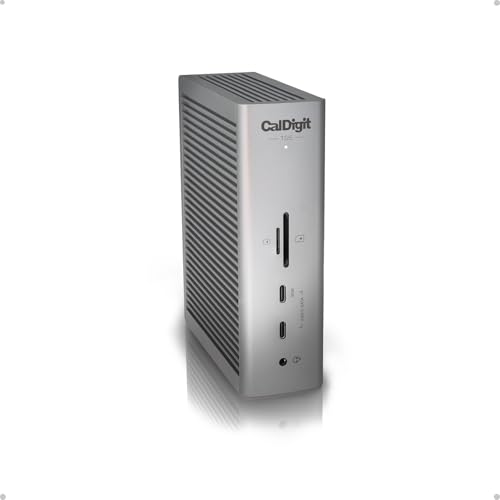
CalDigit documents 15 functional ports on the TS5, including its host port, with the DC input treated separately. Its layout includes three downstream Thunderbolt 5 ports and three ordinary USB-C 10Gbps ports, plus 2.5GbE and simultaneous UHS-II SD and microSD use. Like the Kensington, it has no native HDMI or DisplayPort.
Choose the TS5 when your desk needs both downstream Thunderbolt and several ordinary USB-C connections. Choose the Kensington when its three USB-A ports and exact display/support matrix fit better, and you accept the discontinued status. Neither dock removes the need to qualify the host or adapters.
Anker Prime Thunderbolt 5 Dock: choose one native video socket
Anker documents both HDMI 2.1 and DisplayPort 2.1 on its 14-in-1 dock, but it says those two sockets cannot be used together. The dock also provides two downstream Thunderbolt 5 ports, two ordinary USB-C 10Gbps ports with a shared manufacturer-listed power budget, three USB-A 10Gbps ports, 2.5GbE, card readers, audio, and up to 140W host charging.
Choose Anker when one native HDMI or DisplayPort connection removes the adapter you would need with Kensington. Do not choose it on the assumption that the HDMI and DisplayPort sockets create two simultaneous native outputs. Its host and OS compatibility limits also need their own check.

OWC Thunderbolt 5 Dock: choose it for fanless construction and USB-A
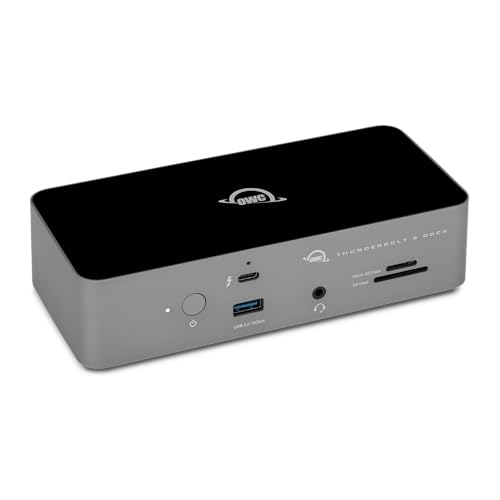
OWC documents a fanless aluminum enclosure, three downstream Thunderbolt 5 ports, three USB-A ports, SD and microSD readers, 2.5GbE, and up to 140W host charging. Two USB-A ports are listed at 10Gbps and one at 5Gbps.
Choose OWC when a manufacturer-documented fanless design and a USB-A-heavy peripheral set matter more than the Kensington’s exact display matrix. Fanless is a construction fact, not an independent promise about acoustic performance or temperature. OWC also omits native HDMI and DisplayPort, so conventional monitors still need compatible cables or adapters.
Frequently asked questions
Can the Kensington SD5000T5 EQ run three 4K monitors?
Kensington documents up to three 4K displays at 144Hz on a qualified Windows Thunderbolt 5 path. It is a ceiling, not a universal result. Confirm the laptop’s stream count, GPU, Windows version, DP 2.1 and DSC support, plus every monitor, cable, and adapter.
Can it run three external displays from a Mac?
Do not buy it on that assumption. Kensington’s stable chip-specific guidance documents one or two through-dock displays for the covered Mac paths, while newer product-page copy adds a general M5 Pro/Max triple-display line that conflicts with nearby up-to-two wording. Ask Kensington to confirm K35201NA with your exact Mac chip and display plan.
Does K35201NA have HDMI or DisplayPort?
No native HDMI or DisplayPort socket appears in Kensington’s K35201NA port map. Displays connect through the downstream Thunderbolt ports using compatible direct cables or adapters.
Will it charge every laptop at 140W?
No. Kensington says up to 140W requires a USB PD 3.1 EPR host. The laptop negotiates a supported power level, and some high-performance systems still need a proprietary charger.
Is the SD5000T5 EQ still available?
Kensington currently marks the K35201NA product page discontinued. A July 28, 2026 check of the Amazon listing found an active offer for the exact ASIN B0DGTCXHZX. Offer status can change, so verify the exact model, seller, returns, and warranty terms at purchase time.
Is K35202NA the same dock?
No. Kensington identifies K35202NA as the distinct SD5005T5 EQ DFS product designed for Surface. This review and its recommendation apply only to K35201NA / B0DGTCXHZX.
Does the dock work with Thunderbolt 4 or USB4 computers?
Kensington documents compatible fallback paths, including up to 40Gbps and qualified dual 4K 60Hz operation for suitable Thunderbolt 4 or USB4 hosts. Those computers do not inherit the highest Windows Thunderbolt 5 display ceiling.
Can both card readers work at the same time?
Kensington says the UHS-II SD and microSD readers can be used simultaneously. Actual transfer speed depends on the cards, host, workload, and other activity, and no speed was measured for this review.
Final recommendation
The Kensington SD5000T5 EQ K35201NA is a narrowly attractive dock, not a default recommendation for every Thunderbolt computer. Its combination of three downstream Thunderbolt 5 ports, three USB-A 10Gbps ports, dual card readers, 2.5GbE, audio, and up to 140W charging is well suited to a demanding Windows desk. Its documented Windows Thunderbolt 5 display ceiling is also strong when the entire chain qualifies.
The purchase falls apart when the headline replaces the host check. Ordinary USB-C can reduce the display path to one 4K 60Hz screen. Thunderbolt 4 and USB4 use a lower fallback matrix. Mac support depends on the exact chip, and Kensington’s current M5 wording is not coherent enough to support a triple-display promise. Conventional monitors also need adapters because the dock has no native HDMI or DisplayPort.
Finally, Kensington’s discontinued label changes the risk calculation. The exact Amazon offer was active when checked, but the buyer should verify K35201NA, seller terms, returns, and warranty eligibility at checkout. If those conditions are acceptable and the host matrix is confirmed, the SD5000T5 EQ can be the right tool. If any identity or display detail remains uncertain, choose a dock whose ports and current support contract are easier to prove before spending.