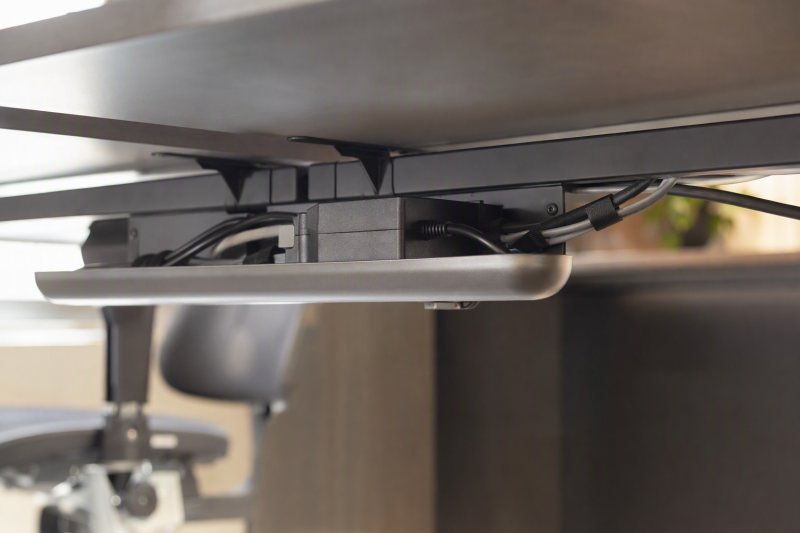
A docked laptop can leave a surprising number of leads under the desk: monitor signal and power, a dock supply, laptop charging, speakers, network, and a power strip. A tray can keep the loose bundle off the floor, but it must hold the actual bricks and cables without blocking the desk frame or pulling connectors taut. A tray is storage hardware, not a cure for unsafe wiring.
This guide covers six exact Amazon US trays with active New offers. They mount with clamps, adhesive, or screws. Listing claims do not establish installed strength or load-test results. If the desk rises and lowers, check the full cable route with power disconnected before normal use. The connection box itself is covered in our USB-C docking guide, and this guide covers how the cords and adapters beneath it are supported.
Weigh the power strip and adapter bricks, measure the underside frame clearance, and plan cable slack through the full desk travel before choosing a tray.Under-Desk Cable Trays Compared
| Image | Product | Details | Check Price |
|---|---|---|---|
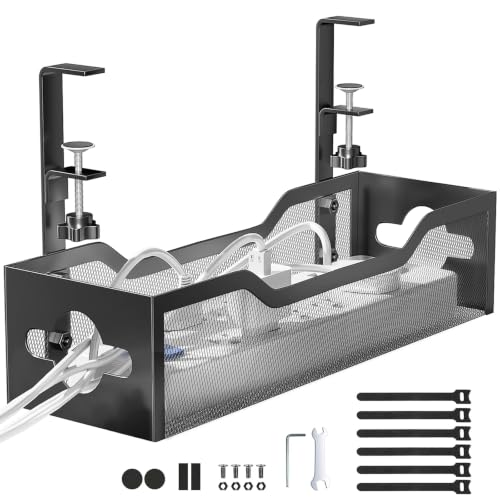 | Mesh clamp tray | Mount: C-clamp; 0.4-2.4-in flat edge Length: 13.38 in in Amazon dimensions Load claim: About 15 lb Best fit: No-drill power brick basket | Check Price on Amazon |
 | Mzmaxy 25-inch | Mount: C-clamp; 0.4-2-in edge Length: 25 in, two joined sections Load claim: About 15 lb Best fit: Long no-drill cable run | Check Price on Amazon |
 | Cinati 13.4-inch | Mount: C-clamp; 0.4-2.4-in edge Length: 13.4 x 4.6 x 3.1 in Load claim: Up to 10 lb Best fit: Compact dock and strip | Check Price on Amazon |
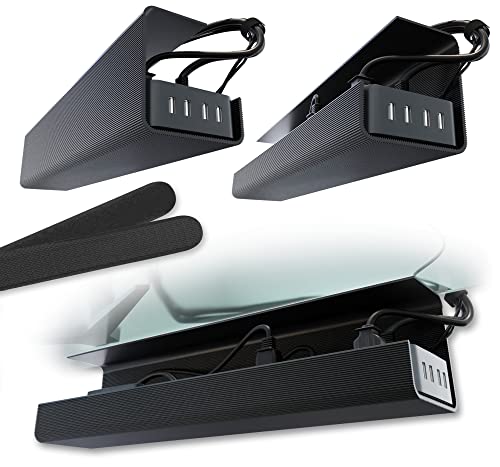 | Scanfield 17-inch two-pack | Mount: Adhesive; verify current spec Length: 17 in each in title Load claim: Not stated in checked bullets Best fit: No-clamp desk underside | Check Price on Amazon |
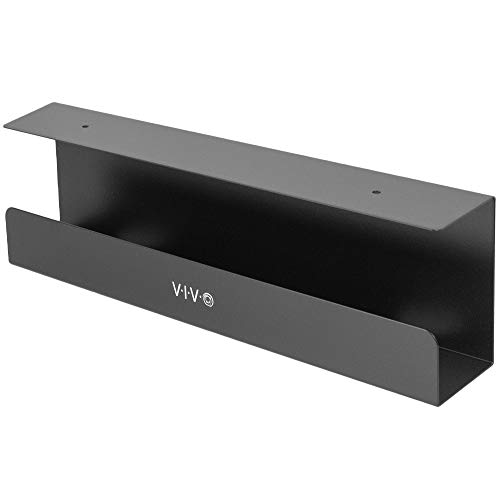 | VIVO DESK-AC06-1C | Mount: Underside screws, 11-in hole span Length: 16.5 x 3 in Load claim: Up to 11 lb Best fit: Concealed single tray | Check Price on Amazon |
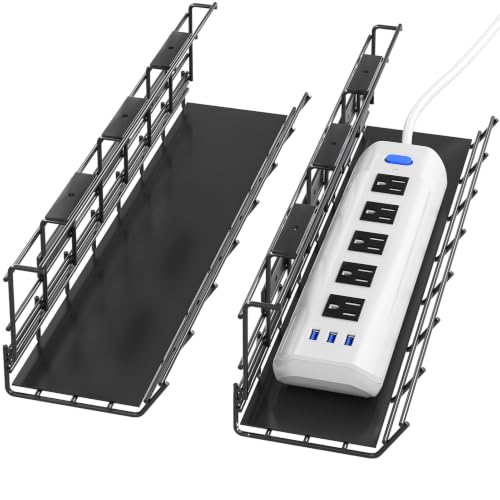 | DELAMU 17-inch two-pack | Mount: Underside screws Length: 17 x 3.5 x 4.1 in each Load claim: 10 lb seller claim Best fit: Separated cable zones | Check Price on Amazon |
1. Mesh Clamp Tray — Best General No-Drill Basket
This metal-mesh basket uses side C-clamps for flat desk edges from 0.4 to 2.4 inches thick. The listing claims about 15 pounds of support and describes side openings for cords. It can face inward or outward, which helps if a monitor arm or wall blocks one side. A no-drill mount can be moved when the cable layout changes, although the desk edge still needs a broad, solid clamp contact.
Amazon’s product dimensions give a 13.38-inch length, so measure the current listing against your power strip before ordering. The seller says rubber pads prevent scratches and mesh reduces overheating; those outcomes are not established by the listed dimensions. Do not place a hot power brick beneath a pile of cables merely because the tray has holes. Keep AC and data leads routed so a moving desk cannot snag either, and check the clamp after the first several height cycles.
Our Take The mesh clamp tray is the straightforward no-drill starting point if the desk edge is flat. Its missing checked length makes a fit check of your strip and bricks essential.
- 0.4-2.4-inch edge range is stated.
- Inward/outward mounting and side openings are described.
- Confirm the listed length fits the power strip and plugs.
- Scratch and cooling claims lack independent verification.
2. Mzmaxy 25-Inch Clamp Tray — Best Long No-Drill Run
Mzmaxy lists a 25-inch metal-mesh tray with an approximate 15-pound capacity. The length can make room to spread a dock supply, monitor adapters, and a power strip rather than piling everything at one point. Its clamps are described for desk edges from 0.4 to 2 inches thick and can mount the basket inward or outward. The two tray halves join with screws before the assembled unit clamps to the desk. “No drill” does not mean no assembly.
Check the joined basket against the desk’s underside crossbars and lifting columns. A 25-inch run may be long enough to cross a frame member even if each end clears the edge. The seller says mesh ventilation prevents overheating, but we did not measure temperatures. Keep each power supply’s required airflow clear and follow its manual. The 15-pound figure is not a certification of the desk edge or clamp grip.
A long tray needs a clear 25-inch route past support bars, not merely a wide desktop above it.Our Take Mzmaxy is the roomy no-drill option when the desk edge and frame leave a long unobstructed span. Count the weight of every power brick before loading it.
- 25-inch length and approximate 15-pound claim are listed.
- Clamp range and two mounting directions are described.
- Two sections require assembly.
- Long run can collide with desk-frame hardware.
3. Cinati 13.4-Inch Clamp Tray — Best Small Clamp Basket
Cinati gives unusually clear dimensions: 13.4 inches long, 4.6 inches wide, and 3.1 inches high. It lists a 10-pound capacity and clamps to a desk edge between 0.4 and 2.4 inches thick. The tray may be enough for a compact dock, one power strip, and a manageable cable loop, depending on their sizes. The basket can face inward or outward. The kit also includes cable clips and ties.
The seller describes a fully welded powder-coated tray with anti-scratch clamp mats but provides no specific long-term finish-wear or rust-resistance data. On a glass desktop, do not assume generic “wood, glass, or any material” copy overrides the desk maker’s clamping restrictions. Ten pounds is a tray claim, not a glass-edge rating. Place it where knees, chair arms, and the frame clear the basket during movement.
Our Take Cinati is easiest to measure into a compact setup. It may be too short for a long surge strip, but its exact footprint and 10-pound claim help prevent wishful fitting.
- Length, width, height, and load claim are stated.
- Clips and ties are included.
- 13.4-inch length may not hold a long strip.
- Glass or fragile desk edges need maker approval.
4. Scanfield 17-Inch Two-Pack — Best Adhesive Mounting Option
The Scanfield listing title specifies two 17-inch trays that attach without screws. Its checked feature bullets, however, begin with a seller’s AI-generated summary of customer reviews. A review summary is not a reliable source for detailed capacity or long-term adhesion. The seller describes adhesive backing, but we would verify the exact included mounts, the load rating, and the requirements for the underside surface on current packaging before trusting heavy power bricks to it.
Adhesive can be useful when a desk edge cannot take clamps and the owner does not want screw holes. It needs a clean, compatible flat underside and the full cure time specified by the product. Desk heat, textured laminate, or a moving top may change bond strength. We did not test retention or residue. Route cords so a failed bond would not yank live connectors or drop a power strip onto a person’s feet.
Our Take Scanfield is an adhesive alternative only for a confirmed compatible underside and modest contents. Do not let a seller’s review summary substitute for installation specifications.
- Two 17-inch trays are named in the title.
- Adhesive route avoids drilling or edge clamps.
- Checked bullets do not provide original load specs.
- Adhesive behavior was not tested.
5. VIVO DESK-AC06-1C — Best Concealed Short Tray
VIVO lists a 16.5-by-3-inch partially enclosed metal rack that mounts under a wood or particle-board desk with screws. Its mounting holes are 11 inches apart, and it claims up to 11 pounds of supported contents. The front remains open for adding or removing cables while the rest of the tray hides a strip from casual view. The open front helps a fixed desk look tidy without making the wiring inaccessible.
Drilling is required. Check the desk’s underside thickness, frame layout, and screw depth before mounting. A hole that passes through the desktop is an avoidable failure. The listing’s “safe and hidden” wording is not electrical certification. Keep heat-generating adapters within their ventilation guidance and do not conceal a damaged cord where it cannot be noticed. The manufacturer does not specify rail rigidity or whether the tray’s three-inch depth fits a bulky power supply.
Our Take VIVO is the neat screw-mounted choice for a suitable wood desk and a modest load. Its 11-inch mounting-hole span is the measurement to check before you pick up a drill.
- Tray size, screw spacing, and 11-pound claim are stated.
- Partially enclosed design keeps cables accessible at front.
- Requires screw-safe wood or particle board.
- Three-inch depth may reject bulky bricks.
6. DELAMU 17-Inch Two-Pack — Best Separated Screw-Mounted Zones
DELAMU supplies two 17-by-3.5-by-4.1-inch metal trays, for a total of 34 inches when placed end to end. The mounting kit includes screws and anchors. The seller states a 10-pound load claim and says the desk should be thicker than 0.5 inch for its 0.6-inch screws. Do not assume the seller’s minimum applies safely to every hollow or layered desk top. Check both desk and fastener guidance.
Separate baskets can put a power strip near the wall feed and a dock supply nearer the laptop, with slack between them. They can also be positioned around a central desk support. Verify whether the 10-pound figure applies to each tray or the pair, because the checked bullets do not make the answer unambiguous. The seller does not provide specific data on liner durability, screw pull-out strength, or airflow. Open sides help inspection but do not guarantee power-brick cooling.
Two trays can route around a frame member, but their combined length does not make one uninterrupted 34-inch basket.Our Take DELAMU suits a desk with two useful mounting zones and an underside that safely takes screws. Keep the ambiguous load figure conservative until the exact manual clarifies it.
- Two separate 17-inch baskets provide layout flexibility.
- Basket size and included screw length are stated.
- Requires drilling and suitable desk material.
- 10-pound claim is unclear for pair versus each tray.
Buying Guide
1. Choose Clamp, Adhesive, or Screws
A clamp tray can move without drilling but needs a flat edge with enough top and underside contact. The mesh model and Cinati list edge ranges of 0.4 to 2.4 inches. Mzmaxy specifies a 2-inch maximum. A frame rail behind the edge can still block a clamp. Do not assume rubber pads guarantee no finish marks.
An adhesive tray needs compatible clean material and cure time. Scanfield belongs to this group. A screw-mounted tray needs a suitable wood or particle-board underside and safe screw depth. VIVO and DELAMU are in that group. UPLIFT’s own wire-tray instructions recommend combining adhesive and screws for its model, which is one reason mounting method and load cannot be generalized between products. Follow the exact tray and desk instructions.
2. Size the Basket for Bricks and Clearance
Measure the power strip and adapters in their plugged-in state. A bulky AC brick can be taller than the tray’s nominal depth. Cinati lists dimensions of 13.4 by 4.6 by 3.1 inches, VIVO specifies a three-inch depth, and DELAMU lists its pair at 4.1 inches deep. Mzmaxy’s listed 25-inch length suits longer runs only if the frame leaves a clear 25-inch path.
Add up the weight of every item and the tray itself, then compare the total with the desk’s permitted load. A 15-pound basket claim does not prove the clamp or adhesive holds that amount on every surface. Leave room for knees, chair arms, and a standing desk’s lift columns. An open basket is easier to inspect than a concealed bundle of hot adapters.
3. Route the Moving Cable Path
On a standing desk, secure a power strip and dock supplies near the moving top, then leave enough cord length to reach the wall at the highest setting. Test the empty desk slowly from bottom to top while watching every cable. No tray can compensate for a lead pulled taut across the frame or a plug pinched in a hinge.
Keep power and signal cables identifiable so a failed connection can be traced without tugging an entire bundle. Reusable ties are easier to adjust than a tight permanent knot. A USB-C hub may reduce some peripheral leads, but its power and display cables still need safe routing. Check maker instructions for heat clearance around every charger.
FAQ
Can a mesh tray prevent power bricks from overheating?
No, a mesh tray does not guarantee that a power brick avoids overheating. Mesh openings may permit air movement, but temperature depends on the adapter, its load, nearby cables, and required clearance. Several listings use cooling language without providing measured temperatures for a dock or monitor supply in these exact trays.
Follow each power supply’s instructions and avoid covering vents. If a brick runs unusually hot, relocate it to an appropriate open spot rather than relying on the basket material.
Are no-drill trays safe on a glass desk?
No-drill trays are not automatically safe on glass. The desk maker’s restrictions decide whether edge clamping is allowed. Cinati’s seller copy mentions glass, but a generic listing cannot assess a particular glass top, edge treatment, or concentrated clamp force.
Adhesive may have separate compatibility and residue limits. If neither mounting method is explicitly permitted for your desk, use a floor or freestanding cable solution instead of testing the edge with expensive electronics.
Can I put a power strip in an under-desk tray?
Often the answer is yes, if the strip physically fits, remains accessible, and is used within its electrical rating. The tray does not change the strip’s allowed load or make daisy-chaining safe. Check the strip and tray makers’ instructions and keep switches and warning indicators visible where required.
Give the strip’s wall cord slack through the full desk travel and keep plugs away from moving metal. Inspect the setup after adjusting the desk. A clean appearance is not evidence that the wiring is safe.
Bottom Line
Mzmaxy provides a listed 25-inch span for a long no-drill run if the desk frame has clearance. Cinati is the measured compact clamp option. VIVO hides a shorter screw-mounted run, while DELAMU offers two separate zones. Choose by the desk’s permitted mounting method, actual brick dimensions, and full moving cord path.