Razer sells the Blade 16 and Blade 18 in several graphics, memory and storage builds, and five of them are on Amazon. Pick the chassis first. Amazon’s listings put the 16-inch Blade on a QHD+ OLED at 240Hz, and the 18-inch Blade on a dual-mode screen that runs UHD+ at 240Hz or FHD+ at 440Hz. After that, pick a build by its GPU power limit, memory and SSD.
Use the page to choose one configuration. The five builds share two bodies, so they differ in the GPU (RTX 5070 Ti, RTX 5080 or RTX 5090), in whether the memory can be upgraded, and in how much memory and storage come installed. To compare a Blade with other brands, read the RTX 5080 laptops comparison or the RTX 5090 laptops comparison.
Amazon calls the Blade 16’s memory non-upgradeable and says the Blade 18’s memory upgrades to 128GB, so the memory you buy in a 16-inch Blade is the memory you keep.Razer Blade 16 and 18 Compared
| Image | Product | Details | Check Price |
|---|---|---|---|
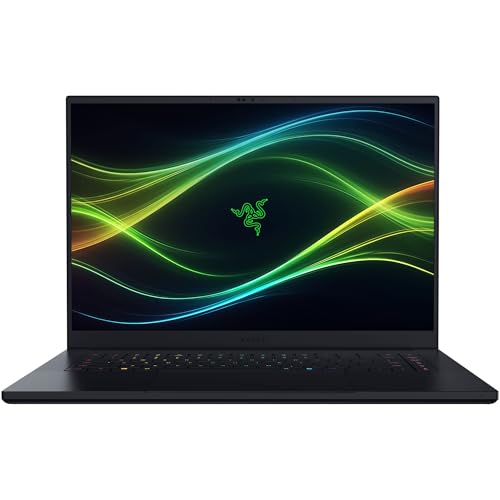 | Razer Blade 16 RTX 5070 Ti | Best fit: RTX 5070 Ti in the 16-inch body GPU: RTX 5070 Ti, 12GB, up to 140W Memory and SSD: 32GB, non-upgradeable, 1TB Display: 16-inch QHD+ OLED, 240Hz Ports: Thunderbolt 5, HDMI 2.1, Wi-Fi 7 | Check Price on Amazon |
| Razer Blade 16 RTX 5080 | Best fit: 64GB of memory in the 16-inch body GPU: RTX 5080, 16GB, up to 165W Memory and SSD: 64GB, non-upgradeable, 1TB Display: 16-inch QHD+ OLED, 240Hz Ports: Thunderbolt 5, HDMI 2.1, Wi-Fi 7 | Check Price on Amazon |
| Razer Blade 16 RTX 5090 | Best fit: 24GB of GPU memory and 2TB at 16 inches GPU: RTX 5090, 24GB, up to 165W Memory and SSD: 32GB, non-upgradeable, 2TB Display: 16-inch QHD+ OLED, 240Hz Ports: Thunderbolt 5, HDMI 2.1, Wi-Fi 7 | Check Price on Amazon |
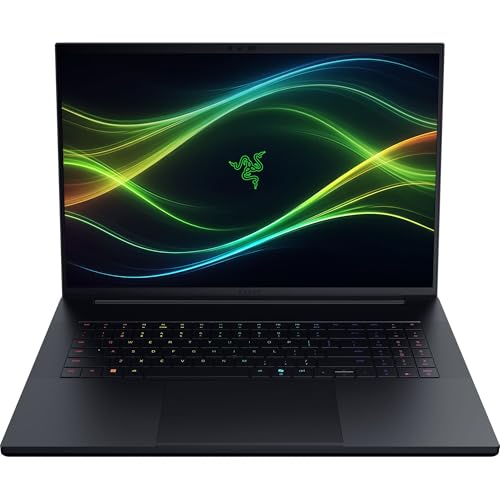 | Razer Blade 18 RTX 5080 | Best fit: Upgradeable memory with the RTX 5080 GPU: RTX 5080, 16GB, 175W plus 25W Dynamic Boost Memory and SSD: 32GB, upgradeable to 128GB, 1TB Display: 18-inch UHD+ 240Hz or FHD+ 440Hz Ports: Thunderbolt 5 and 4, HDMI 2.1, 2.5Gb Ethernet | Check Price on Amazon |
| Razer Blade 18 RTX 5090 | Best fit: 64GB, 2TB and the RTX 5090 at 18 inches GPU: RTX 5090, 24GB, 175W plus 25W Dynamic Boost Memory and SSD: 64GB, upgradeable to 128GB, 2TB Display: 18-inch UHD+ 240Hz or FHD+ 440Hz Ports: Thunderbolt 5 and 4, HDMI 2.1, 2.5Gb Ethernet | Check Price on Amazon |
1. Razer Blade 16 RTX 5070 Ti — Best for the RTX 5070 Ti at 16 inches
Choose this build when you want the lighter body and the RTX 5070 Ti is the GPU you need. Amazon lists it as model RZ09-05817EN3-R3U1, and Razer’s Blade 16 page shows the same build: Core Ultra 9 386H, RTX 5070 Ti, 32GB of 9600MHz memory and a 1TB SSD. Of the five, it is the only build that matches the default build Razer shows on its own pages.
Amazon lists the GPU with 12GB of GDDR7 and a limit of up to 140W, the lowest of the five. The other two Blade 16 builds list up to 165W, and both Blade 18 builds list 175W plus 25W of Dynamic Boost. The listing gives the screen as a 16-inch 2560 by 1600 OLED at 240Hz with a 0.2ms response time, and it names Thunderbolt 5, HDMI 2.1 and Wi-Fi 7. Amazon’s dimensions are 13.98 by 9.69 by 0.59 inches at 4.72 pounds.
Amazon lists a 1TB PCIe 4.0 SSD with two M.2 slots that it says expand to 8TB in total. Settle the 32GB of memory before ordering, because Amazon calls it non-upgradeable.
Razer’s three Blade 16 builds here carry the codes RZ09-05817, RZ09-05818 and RZ09-05819. Match the Model field on the Amazon page to the one you meant to buy.Our Take Buy this one if a 16-inch Blade with an RTX 5070 Ti and a fixed 32GB of memory fits your work. Go to the RTX 5080 build if you need 64GB.
- Razer’s Blade 16 page shows this build, so its processor, GPU, memory and SSD are confirmed by the maker.
- Amazon lists the screen as a 16-inch QHD+ OLED at 240Hz with a 0.2ms response time.
- Amazon lists Thunderbolt 5, HDMI 2.1 and Wi-Fi 7 for this Blade.
- Amazon calls the 32GB of memory non-upgradeable, so it cannot be expanded later.
- The RTX 5070 Ti has the lowest GPU power limit of the five, up to 140W.
2. Razer Blade 16 RTX 5080 — Best for 64GB of memory at 16 inches
A buyer who wants more than 32GB of memory in a 16-inch Blade has one choice among these five, and this is it. Amazon lists model RZ09-05818EN4-R3U1 with 64GB of 9600MHz LPDDR5X memory next to an RTX 5080 with 16GB of GDDR7 and a limit of up to 165W. Amazon lists the same Core Ultra 9 386H processor as the other Blade 16 builds, and a 1TB SSD.
Razer’s Blade 16 page lists the RTX 5080 and 64GB as options, but the build on that page is the RTX 5070 Ti, so this pairing rests on Amazon’s listing. Amazon lists the same screen, ports and 4.72-pound weight as the other Blade 16 builds.
The RTX 5090 Blade 16 lists the same up-to-165W limit. Amazon’s 5090 build has 32GB of system memory against 64GB here, plus 8GB more GPU memory and a second terabyte of storage.
Amazon calls the memory non-upgradeable, so 64GB has to be bought now. It cannot be added to a 32GB build later.Our Take Buy this one if 64GB of memory in the 16-inch body is a bigger priority than the extra GPU memory and 2TB SSD of the RTX 5090 build.
- Amazon lists 64GB of memory, the most of any Blade 16 build here.
- Amazon lists the RTX 5080 with 16GB of GDDR7, 4GB more than the RTX 5070 Ti build.
- Razer’s Blade 16 page lists the RTX 5080 and 64GB among its options.
- Amazon lists the same up-to-165W limit as the RTX 5090 build, with 8GB less GPU memory.
- Amazon lists a 1TB SSD, half the size of the 2TB SSD on the RTX 5090 build.
3. Razer Blade 16 RTX 5090 — Best for 24GB of GPU memory and a 2TB SSD at 16 inches
The choice between this build and the RTX 5080 Blade 16 is 24GB of GPU memory and a 2TB SSD on one side, and 64GB of system memory on the other. Amazon lists model RZ09-05819EN4-R3U1 with an RTX 5090 that has 24GB of GDDR7, 32GB of 9600MHz LPDDR5X memory that it calls non-upgradeable, and a 2TB PCIe 4.0 SSD.
Amazon lists the same Blade 16 body as in the other two builds, with a 0.59-inch thickness, the 240Hz OLED and Thunderbolt 5. The Blade 18 builds list 175W plus 25W of Dynamic Boost, more than this build’s 165W. Razer’s Blade 16 page lists an RTX 5090 option and a 2TB option, but the build on that page is the RTX 5070 Ti, so this combination rests on Amazon’s listing.
Our Take Buy this one if you want the largest GPU memory and SSD in a 16-inch Blade and 32GB of fixed system memory is enough. Take the Blade 18 if you want the 5090 with room to add memory.
- Amazon lists 24GB of GDDR7 on the RTX 5090, the most GPU memory of any Blade 16 build here.
- Amazon lists a 2TB SSD, double the storage of the other two Blade 16 builds.
- Razer’s Blade 16 page lists both an RTX 5090 option and a 2TB option.
- Amazon calls the 32GB of memory non-upgradeable, half the 64GB on the RTX 5080 build.
- Amazon lists the RTX 5090 here at up to 165W, below the 175W plus 25W listed for the Blade 18 builds.
4. Razer Blade 18 RTX 5080 — Best for upgradeable memory with the RTX 5080
The Blade 18 is the larger body. Amazon’s dimensions are 15.74 by 10.84 by 0.86 inches and Amazon’s bullets give 7.06 pounds, about 2.3 pounds more than any Blade 16 build here. In return you get an 18-inch dual-mode screen, more named ports and memory you can upgrade.
Amazon’s Model field reads K12-18, a part number that does not follow Razer’s RZ09 format. Razer’s Blade 18 page shows RZ09-05829ER4-R3U1, an RTX 5090 build with 32GB and 2TB, so this RTX 5080 build with a 1TB SSD rests on Amazon’s listing. Razer’s page lists the RTX 5080 and a 1TB SSD as options. Razer’s page also names the processor Core Ultra 9 290HX Plus, where Amazon’s title and bullets say Core Ultra 9 290HX.
Amazon lists an RTX 5080 with 16GB of GDDR7 at 175W plus 25W of Dynamic Boost. The screen has two modes, UHD+ (3840 by 2400) at 240Hz and FHD+ at 440Hz, with a 3ms response time and 600 nits, and Amazon does not name its panel type. Amazon lists Thunderbolt 5 and Thunderbolt 4, HDMI 2.1, SD UHS-II, 2.5Gb Ethernet and USB-A ports, plus THX Spatial Audio with six speakers and a 5MP infrared webcam with Windows Hello.
Our Take Buy this one if you want an 18-inch screen and memory that can grow, and an RTX 5080 meets your needs. Skip it if the 7.06-pound body is more than you want to carry.
- Amazon lists the memory as upgradeable to 128GB, which no Blade 16 build here offers.
- Amazon lists Thunderbolt 5 plus Thunderbolt 4 and 2.5Gb Ethernet, and the Blade 16 listings name no Ethernet port.
- Amazon lists a dual-mode screen that runs UHD+ at 240Hz or FHD+ at 440Hz.
- Amazon lists 7.06 pounds, about 2.3 pounds more than a Blade 16.
- Amazon does not name the dual-mode screen’s panel type, while it calls the Blade 16 screen an OLED.
5. Razer Blade 18 RTX 5090 — Best for 64GB, 2TB and the RTX 5090 at 18 inches
Amazon lists the same Blade 18 body as the RTX 5080 build with three changes: an RTX 5090 with 24GB of GDDR7, 64GB of DDR5-6400 memory and a 2TB SSD. The screen, the ports and the 7.06-pound weight are the same, and so is the 175W plus 25W Dynamic Boost GPU limit. Amazon lists the 64GB as upgradeable to 128GB.
Razer’s Blade 18 page shows an RTX 5090 build, and its default memory is 32GB with 64GB as an option. The 64GB pairing here therefore comes from Amazon’s listing. The 2TB SSD is stated in Amazon’s title and is also the default on Razer’s page.
Our Take Buy this one if you want 64GB, 2TB and an RTX 5090 together, which no other build here offers, and can carry 7.06 pounds. Choose the Blade 16 RTX 5090 if a lighter body ranks above 64GB for you.
- Amazon lists 64GB of DDR5-6400 memory, upgradeable to 128GB.
- Amazon lists the RTX 5090 with 24GB of GDDR7 at 175W plus 25W of Dynamic Boost.
- Amazon’s title lists a 2TB SSD, the same size as Razer’s default Blade 18 RTX 5090 build.
- Razer’s Blade 18 page lists 32GB as the default memory, so this build’s 64GB depends on Amazon’s listing.
- Amazon lists 7.06 pounds and 0.86 inches thick, against 4.72 pounds and 0.59 inches for the Blade 16.
Buying Guide
1. Pick the chassis before the GPU
The two bodies differ in size, weight and screen. Amazon’s dimensions put the Blade 16 at 4.72 pounds and 0.59 inches thick and the Blade 18 at 7.06 pounds and 0.86 inches. Carrying the larger laptop daily is the cost of the larger screen.
The screens differ in size and in the figures Amazon lists. Amazon lists the Blade 16 with a 2560 by 1600 OLED at 240Hz, DisplayHDR TrueBlack 1000 and up to 1100 nits, and the Blade 18 with a UHD+ 240Hz and FHD+ 440Hz dual-mode screen at 600 nits. Amazon does not name the Blade 18 panel type, so look at the full specifications on Razer’s page before assuming it matches the Blade 16’s OLED. For more laptops that pair OLED with a dedicated GPU, see the OLED gaming laptops comparison.
2. Read the GPU as a memory size and a power limit
Amazon gives each GPU’s memory and power limit. It lists the RTX 5070 Ti at 12GB and up to 140W, the RTX 5080 at 16GB and the RTX 5090 at 24GB. In the Blade 16, the RTX 5080 and RTX 5090 both list up to 165W, and in the Blade 18 both list 175W plus 25W of Dynamic Boost.
In the Blade 16, moving from the RTX 5080 to the RTX 5090 adds GPU memory but not a higher listed limit. Both Blade 18 builds list a higher limit than any Blade 16 build. The power limits and memory sizes are specification figures, and none of the five listings gives a frame-rate figure or a benchmark. The Thunderbolt 5 gaming laptops guide covers other brands that pair a Thunderbolt 5 port with a strong GPU.
3. Decide on memory now or later
Amazon lists the Blade 16 builds with non-upgradeable LPDDR5X at 9600MHz, in 32GB or 64GB. Amazon’s titles for the Blade 16 builds say DDR5, but the bullets say LPDDR5X, and this page uses the bullets because they match the 9600MHz figure on Razer’s page.
Amazon lists the Blade 18 builds with DDR5-6400 memory that it says upgrades to 128GB, and two M.2 slots (Gen 5 and Gen 4) that take up to 8TB per slot. Amazon lists the Blade 16 with two M.2 slots that expand to 8TB in total. Razer’s own pages list memory options of 16GB, 32GB and 64GB for the Blade 16 and 32GB, 64GB and 128GB for the Blade 18, so Razer sells builds that these five do not cover.
4. Plan the desk around the ports
Every Amazon title names Thunderbolt 5, and no listing gives a port count for it. Amazon lists Thunderbolt 4 for the Blade 18 as well, along with HDMI 2.1, SD UHS-II, 2.5Gb Ethernet and USB-A. For the Blade 16 it lists HDMI 2.1, USB and an SD card slot, and it names no Ethernet port.
Check the port count on Razer’s full specifications before you plan a dock and two monitors around one cable. The Thunderbolt 5 docks guide lists the docks to pair with it, and the gaming laptops with Thunderbolt guide covers other gaming models.
5. Match the model code before you order
Amazon’s Model field gives the Blade 16 builds the codes RZ09-05817EN3-R3U1, RZ09-05818EN4-R3U1 and RZ09-05819EN4-R3U1. For the Blade 18 RTX 5080 it reads K12-18, and for the Blade 18 RTX 5090 it reads only Blade 18, so for those two, compare the memory, storage and GPU in the title with the build you want.
Amazon’s warranty field reads 1 Year Manufacturer for all five. Read the memory, storage and GPU in the title of the page you are on, because the same Blade name covers several builds.
FAQ
Can I upgrade the memory in a Blade 16?
No. Amazon calls the memory on all three Blade 16 builds non-upgradeable, at 32GB on two of them and 64GB on the RTX 5080 build.
The Blade 18 is different. Amazon lists its DDR5-6400 memory as upgradeable to 128GB, and both Blade 18 builds say so.
Do the Blade 16 RTX 5080 and RTX 5090 have the same power limit?
Yes, on the listed figures. Amazon lists up to 165W for both Blade 16 builds.
What differs is the GPU memory (16GB against 24GB), the SSD (1TB against 2TB) and the system memory (64GB against 32GB). The listings give no performance comparison between the two.
Which Blade has 64GB of memory?
Two of the five do, the Blade 16 RTX 5080 and the Blade 18 RTX 5090. Amazon calls the Blade 16’s memory non-upgradeable and the Blade 18’s upgradeable to 128GB.
Razer’s pages for both models list 64GB as an option, but neither page shows a build with 64GB, so both pairings come from Amazon’s listings.
Does the Blade 18 have an OLED screen?
Amazon does not say. Its listings name a dual-mode 18-inch screen that runs UHD+ at 240Hz or FHD+ at 440Hz, with a 3ms response time and 600 nits, and no panel type.
The Blade 16 listings call their screen an OLED. Check Razer’s full specifications if panel type decides your purchase.
Does the Blade 16 have Ethernet?
Amazon does not name an Ethernet port for the Blade 16. The Blade 18 listings name 2.5Gb Ethernet.
Check Razer’s full specifications before assuming the Blade 16 has none.
Bottom Line
Choose the Blade 16 for the 16-inch OLED and the lighter body, and pick its build by what you cannot add later: the RTX 5070 Ti with 32GB, the RTX 5080 with 64GB, or the RTX 5090 with 2TB and 32GB. Choose the Blade 18 for the dual-mode screen, 2.5Gb Ethernet and memory that upgrades, and pick the RTX 5080 with 32GB or the RTX 5090 with 64GB and 2TB.