A college laptop accessory earns its place by fixing one specific problem, such as getting a presentation onto a classroom screen. Which one fits depends on the laptop’s ports, the devices already in the backpack, and whether the accessory stays on a desk or travels every day.
Five picks cover five different jobs. Use Plugable’s hub for one HDMI screen, Ethernet and card slots. Use Lenovo’s charger as a spare for Lenovo laptops that charge over USB-C. SanDisk’s drive is pocket-sized storage for files. Anker’s hub connects two HDMI screens, and Anker’s power bank charges a laptop away from an outlet.
Laptop Accessories for College Students Compared
| Image | Product | Details | Check Price |
|---|---|---|---|
 | Plugable USBC-7IN1E Hub | Best fit: One 4K HDMI screen plus wired network Key figure: One HDMI screen up to 4K 60Hz on a DP 1.4 host Connection: HDMI, Gigabit Ethernet, 2x USB 3.0, SD, microSD, 100W pass-through Warranty: 2 years Limit: HDMI needs DP Alt Mode; many DP 1.2 hosts stop at 4K 30Hz | Check Price on Amazon |
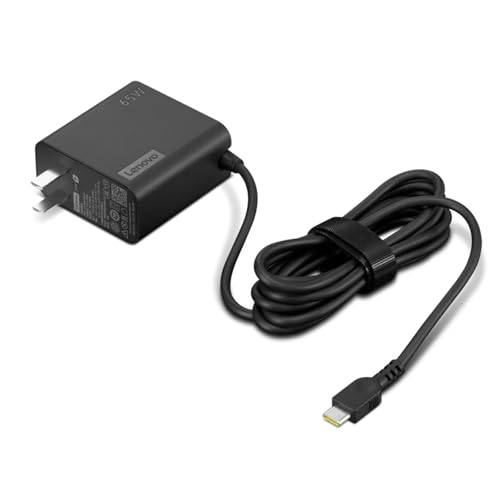 | Lenovo USB-C 65W Wall Charger | Best fit: Spare for Lenovo USB-C laptops Key figure: Up to 65W USB-C PD 3.0 Connection: USB-C output, 5.9-foot cable Warranty: 1 year manufacturer Limit: Laptop must charge via USB-C | Check Price on Amazon |
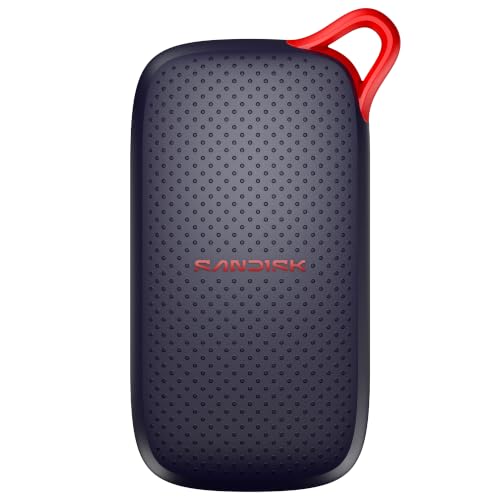 | SanDisk Portable SSD 1TB | Best fit: Pocket-sized file storage Key figure: 1TB, up to 1000MB/s read Connection: USB-C Warranty: 3-year limited Limit: No write speed listed | Check Price on Amazon |
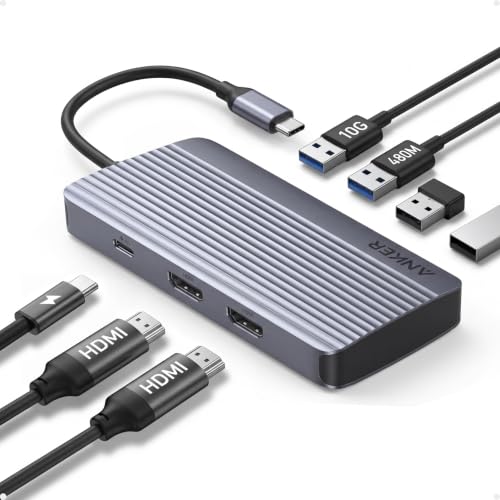 | Anker 7-in-1 Dual HDMI Hub | Best fit: Two HDMI screens Key figure: Dual HDMI at 1080p 60Hz Connection: 7-in-1 USB-C hub with one 10Gbps port, no Ethernet Warranty: 18 months Limit: Not compatible with Linux; wall charger not included | Check Price on Amazon |
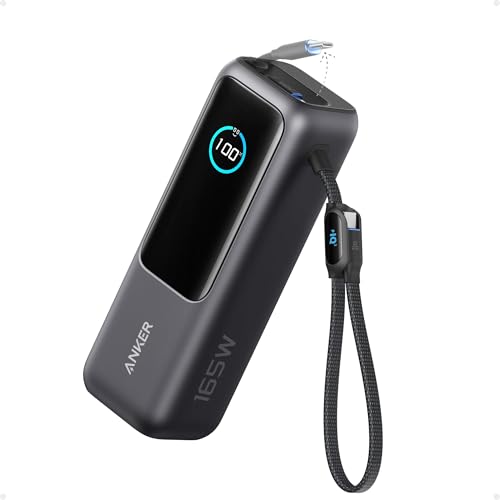 | Anker Laptop Power Bank 25,000mAh | Best fit: Charging a laptop away from an outlet Key figure: 25,000mAh, 165W total output Connection: Three USB-C ports at up to 100W each, two built-in cables Warranty: 18 months Limit: 165W total is below three ports at 100W | Check Price on Amazon |
1. Plugable USBC-7IN1E Hub — Best for one 4K HDMI screen and Ethernet
From one compatible USB-C, USB4, or Thunderbolt port, the Plugable USBC-7IN1E provides HDMI, Gigabit Ethernet, two USB 3.0 ports at 5Gbps, SD and microSD slots, and USB-C power pass-through up to 100W. Plugable lists one HDMI display at up to 4K 60Hz, which suits a monitor, a TV or a projector for presentations.
The laptop sets the limits. Plugable says HDMI output needs a port with DisplayPort Alt Mode. DP 1.4 hosts can support up to 4K 60Hz, and many DP 1.2 hosts are limited to 4K 30Hz. Plugable also says not all laptops support USB-C PD, so the 100W pass-through helps only a laptop that accepts it. Plugable covers the hub for 2 years and offers lifetime support.
Check two things before buying: whether the laptop has a video-capable USB-C port, and whether one HDMI screen, a wired network, card slots and two USB ports cover the daily setup.Our Take Choose the Plugable hub when a student needs one external screen and several common ports from a single compatible laptop connection. Choose Anker’s dual-HDMI hub instead when the desk needs two 1080p screens.
- Plugable lists one HDMI display at up to 4K 60Hz for a monitor, a TV or a projector, with Gigabit Ethernet and SD and microSD slots on the same hub.
- Plugable lists two USB 3.0 ports at 5Gbps on the same hub as HDMI, Ethernet and the card slots.
- The hub lists USB-C power pass-through up to 100W for a laptop that accepts USB-C PD.
- Plugable offers lifetime support on top of a 2-year warranty.
- Plugable says 4K 60Hz needs a DP 1.4 host, and many DP 1.2 hosts are limited to 4K 30Hz.
- A desk with two screens needs a different hub, because Plugable lists a single HDMI output.
2. Lenovo USB-C 65W Wall Charger — Best spare for Lenovo USB-C laptops
Lenovo’s 65W charger does one job and is simpler than a hub. Lenovo lists up to 65W USB-C Power Delivery 3.0 with 5V, 9V, 15V and 20V output profiles and a 5.9-foot cable. Lenovo describes it as made for ThinkPad, Yoga, IdeaPad and ThinkBook laptops that charge via USB-C, and as a replacement or spare charger for home, office or travel.
Lenovo’s own wording sets the limit. The laptop must charge over USB-C, and Lenovo says actual charging speed depends on the connected device and its supported charging profile. Lenovo also says compatible USB-C tablets and phones can draw the power level they support from the same charger. The Amazon listing shows a 1-year manufacturer warranty.
Lenovo made this spare for its USB-C laptops and says charging speed depends on the connected device.Our Take Pick this charger when a ThinkPad, Yoga, IdeaPad or ThinkBook that charges over USB-C needs a second charging spot. Check the laptop’s own charging input before buying, since Lenovo’s wording covers models that charge via USB-C.
- Lenovo lists up to 65W USB-C PD 3.0 for laptops that accept up to 65W.
- Lenovo lists a 5.9-foot cable and calls the charger a replacement or spare for home, office or travel.
- ThinkPad, Yoga, IdeaPad and ThinkBook laptops that charge via USB-C are the models Lenovo names for this charger.
- Lenovo lists 5V, 9V, 15V and 20V output profiles for the charger.
- Lenovo names laptops that charge via USB-C and says nothing about laptops with a different charger connector.
- Actual charging speed depends on the connected device and its supported charging profile, according to Lenovo.
3. SanDisk Portable SSD 1TB — Best for pocket-sized storage with drop protection
The SanDisk Portable SSD is a separate place for course folders, media and project copies. SanDisk’s listing for this model states up to 1000MB/s read speed, up to 5x faster than old-school portable hard drives, and says the drive is USB-C ready with no drivers or setup. The listing also names no moving parts, drop protection up to 2 meters, and a size that fits in a pocket or bag.
The listing also shows a 3-year limited manufacturer warranty. A portable drive holds a second copy of work but does not replace a backup plan. Organize the folder and remove the drive safely from the laptop before packing it. The 500GB and 2TB sizes are separate listings of the same 1000MB/s model, so the buyer picks the capacity that fits the file library.
Our Take Choose this SanDisk drive when portable storage and a listed 1000MB/s read figure come before added ports. Buy the capacity that matches the actual file library.
- SanDisk lists 1TB of capacity and up to 1000MB/s read speed, a pairing for moving course folders and project copies.
- SanDisk lists drop protection up to 2 meters and no moving parts in a size that fits in a pocket or bag.
- SanDisk says the drive is USB-C ready and needs no drivers or setup.
- SanDisk’s listing shows a 3-year limited manufacturer warranty.
- SanDisk’s listing gives a read speed but lists neither a write speed nor a USB generation.
4. Anker 7-in-1 Dual HDMI Hub — Best for two HDMI screens
Anker’s 7-in-1 hub is built for two external screens. Anker lists dual HDMI at 1080p and 60Hz, one 10Gbps data port, and 100W input with 85W maximum output. Anker says no Ethernet port is included, so the Plugable hub is the choice when the desk needs a wired network.
Anker lists compatibility with USB-C, USB4 and Thunderbolt connections and with laptops that have DP Alt Mode and Power Delivery. The listed operating systems are macOS 12 and newer on MacBooks, Windows 10 and 11, and ChromeOS. Anker says the hub is not compatible with Linux and that a wall charger is not included. Anker covers the hub for 18 months.
Our Take Pick this hub for a laptop with DP Alt Mode and Power Delivery that needs two 1080p 60Hz screens at a desk. Pick Plugable instead when Ethernet and a single 4K 60Hz screen come before two HDMI connections.
- Anker lists dual HDMI output at 1080p and 60Hz for two screens.
- Anker lists one 10Gbps data port in addition to the dual HDMI output.
- Anker lists 100W input and 85W maximum output for a laptop that connects through the hub.
- A wired network needs a different hub, because Anker says no Ethernet port is included.
- The hub is not compatible with Linux, according to Anker.
- Anker gives 1080p at 60Hz for the two screens and lists no 4K figure.
- Anker says a wall charger is not included.
5. Anker Laptop Power Bank 25,000mAh — Best for charging away from an outlet
The Anker Laptop Power Bank is the pick for power away from an outlet. Anker lists 25,000mAh capacity, 165W total output, three USB-C ports with up to 100W each, and two built-in USB-C cables. One cable extends to 2.3 feet with 20,000 retractions. The 0.98-foot cable doubles as a carrying strap. Anker says the power bank charges four devices at once through the two cables, a USB-A port and a USB-C port, and that it complies with 100Wh airline restrictions and is carry-on friendly.
The port figures do not add up to the total. Three ports at 100W each come to 300W, and Anker lists 165W as the total output, so the ports cannot all run at 100W together. Anker also says fast recharging of the power bank needs a 100W or higher charger and that the charger is not included. Anker covers the power bank for 18 months.
Our Take Choose this Anker power bank when USB-C laptop charging away from a wall outlet comes first. Choose Lenovo’s wall charger instead for a permanent second charging spot.
- Anker lists 25,000mAh of capacity and says the power bank complies with 100Wh airline restrictions and is carry-on friendly.
- Three USB-C ports at up to 100W each are listed by Anker, with 165W total output.
- Two built-in USB-C cables come with the power bank, and Anker lists one that extends to 2.3 feet and a 0.98-foot cable that doubles as a carrying strap.
- The ports cannot all run at 100W together, because Anker lists 165W total output.
- Anker says a charger is not included and that fast recharging needs a 100W or higher charger.
Buying Guide
Start with the laptop port and its video mode
The accessory choice starts with the laptop, not the socket count on the box. Plugable says its HDMI output needs a USB-C, USB4 or Thunderbolt port with DisplayPort Alt Mode, and that DP 1.4 hosts can support up to 4K 60Hz while many DP 1.2 hosts are limited to 4K 30Hz. Not every USB-C port supports DisplayPort Alt Mode or Power Delivery, so check the laptop manual before planning a monitor connection.
For two screens, Anker lists dual 1080p 60Hz output for laptops with DP Alt Mode and Power Delivery, so whether that layout works depends on the laptop. The USB-C hubs guide compares hub types, and the Thunderbolt port guide shows how to identify the port on a laptop.
Match a charger to the laptop’s accepted input
Lenovo names ThinkPad, Yoga, IdeaPad and ThinkBook laptops that charge via USB-C for its charger and lists up to 65W with 5V, 9V, 15V and 20V profiles. Lenovo says actual charging speed depends on the connected device and its supported charging profile, so confirm the laptop’s charging input before treating the charger as a spare.
Anker lists 165W total and up to 100W per USB-C port on the power bank, which describes the power bank’s output and not what a given laptop needs. Check the laptop’s input and the cable’s USB-C power rating together. The laptop power-bank guide compares more capacities and outputs.
Choose one-screen and two-screen hubs differently
The Plugable USBC-7IN1E lists one HDMI display, Gigabit Ethernet, SD, microSD and two USB 3.0 ports, so it fits a desk with one monitor, a wired network and card transfers. Plugable names one screen only.
The Anker dual HDMI hub lists dual 1080p 60Hz HDMI and one 10Gbps data port and no Ethernet, so it is not an upgrade on every count. Decide whether the second screen or the wired network comes first on the actual desk.
Treat portable storage as a separate copy of work
The SanDisk Portable SSD lists 1TB and up to 1000MB/s read speed, which suits moving files rather than expanding the laptop’s internal storage. A second copy on its own drive helps with project work, but an important assignment should not exist only there.
SanDisk lists no moving parts and drop protection up to 2 meters, details that count when a drive rides in a backpack. Drop protection does not replace safe removal from the laptop or organized folders. The 500GB and 2TB sizes are separate listings, so choose the capacity that fits the file library.
Pack only the accessory that removes a recurring problem
A student who uses a classroom display now and then may need just the Plugable hub, while a desk with two monitors points to Anker’s dual-HDMI hub. A 65W wall charger gives the laptop a second charging spot, and the 25,000mAh power bank gives time away from an outlet. Carry both only when both problems come up often.
The Lenovo charger and the Anker power bank have different limits. Lenovo’s charger needs a laptop that charges via USB-C, and Anker’s power bank lists 165W total across its three ports. Pick the accessory whose limit fits the routine, not the one with the longest feature list.
FAQ
Does every USB-C port support an external monitor?
No. Plugable says its HDMI output needs a USB-C, USB4 or Thunderbolt port that supports DisplayPort Alt Mode, and Anker lists compatibility with laptops that have DP Alt Mode and Power Delivery. The laptop’s port specification decides video support before any hub is added.
Read the laptop manual or the maker’s specification for DisplayPort Alt Mode, USB4 or Thunderbolt. The HDMI socket on a hub cannot create a video mode the laptop port lacks. Check the laptop and the display together before packing cables.
Can the Lenovo 65W charger power any Lenovo laptop?
No. Lenovo names ThinkPad, Yoga, IdeaPad and ThinkBook laptops that charge via USB-C, so USB-C charging support comes first. A Lenovo name alone does not say which connector a model uses.
Use the model’s own documentation for its charging input. Lenovo lists up to 65W and says actual charging speed depends on the connected device and its supported charging profile.
Is a portable SSD the same as extra laptop storage?
No. SanDisk lists its drive as an external USB-C drive with 1TB capacity and up to 1000MB/s read speed. It carries files and project copies, but it does not become the laptop’s internal drive or change the capacity installed in the laptop.
Use it for material that benefits from portability, such as media, archives or a second project copy. Keep a backup routine and remove the drive safely before packing it, since drop protection is not a second copy of the work.
Can the Anker power bank supply 100W to three laptops at once?
No. Anker lists three USB-C ports with up to 100W each and 165W total output. Three ports at 100W would need 300W, so the ports cannot all run at 100W together.
Plan around the laptop’s own input, the other connected devices and the cable. One laptop is the simple case, and adding a tablet or phone draws on the same 165W total. Anker also says a charger is not included and that fast recharging needs a 100W or higher charger.
Which hub is better for a dorm monitor?
Choose Plugable when one monitor, Ethernet, card readers and two USB 3.0 ports are the mix. Plugable lists one HDMI screen up to 4K 60Hz on a DP 1.4 host, which suits a single-monitor desk.
Choose Anker when the desk needs two 1080p 60Hz screens and no Ethernet. Anker says there is no Ethernet port, so the better hub follows the screen count and the network need.
Bottom Line
The Plugable USBC-7IN1E is the pick for one HDMI screen with Ethernet, card slots and 100W pass-through. The Lenovo USB-C 65W Wall Charger is the second charger for Lenovo laptops that charge via USB-C, the SanDisk Portable SSD 1TB carries project copies, the Anker 7-in-1 Dual HDMI Hub drives two 1080p screens, and the Anker Laptop Power Bank charges USB-C devices away from an outlet.