Gigabyte sells gaming laptops under the AORUS, AERO and G names, and the name does not tell you which ports a model has. Gigabyte’s own pages list Thunderbolt 5 on the Core Ultra 9 AORUS Master 16 and the AORUS Elite 16, and USB4 on the Ryzen 9 Master 16 and the AERO X16. Amazon’s bullets for the G6 list two USB 3.2 Gen 2 Type-C ports and no USB4 or Thunderbolt.
The six laptops below run from an RTX 4050 G6 to RTX 5090 Masters. Pick by ports and screen first, then check who sells the configuration, because two of the six are sold by third-party sellers rather than Amazon.com.
Gigabyte’s pages list Thunderbolt on only two of these six laptops, the Core Ultra 9 Master 16 and the Elite 16.Gigabyte Laptops Compared
| Image | Product | Details | Check Price |
|---|---|---|---|
 | Gigabyte AORUS Master 16 Gen 2 RTX 5080 | Best fit: RTX 5080 with a 240Hz OLED Display: 16-inch 2560 x 1600 OLED, 240Hz Graphics: RTX 5080, up to 175W Max TGP Ports: USB4, USB-C, HDMI 2.1, microSD Limit: Amazon and Gigabyte differ on the USB4 DisplayPort version | Check Price on Amazon |
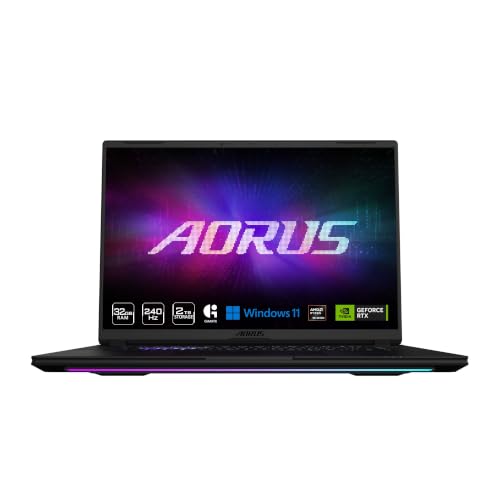 | Gigabyte AORUS Master 16 Gen 2 RTX 5090 | Best fit: AMD processor with an RTX 5090 Display: 16-inch 2560 x 1600, 240Hz Graphics: RTX 5090, up to 175W Max TGP Ports: USB4, USB-C, 2x Type-A, HDMI 2.1, RJ-45 per Gigabyte Limit: Amazon's bullets name no ports | Check Price on Amazon |
 | Gigabyte AORUS Master 16 RTX 5090 | Best fit: Thunderbolt 5 with an RTX 5090 Display: 16-inch 2560 x 1600 OLED, 240Hz Graphics: RTX 5090, 175W maximum graphics power Ports: Thunderbolt 5, Thunderbolt 4, HDMI 2.1, RJ-45 Limit: About 2.5kg, sold by M-X-C Tech | Check Price on Amazon |
 | Gigabyte AORUS Elite 16 | Best fit: Thunderbolt 5 and 4 with an RTX 5070 Display: 16-inch 2560 x 1600 IPS, 165Hz Graphics: RTX 5070, 115W maximum graphics power Ports: Thunderbolt 5, Thunderbolt 4, HDMI 2.1, RJ-45 Limit: IPS at 165Hz, not OLED | Check Price on Amazon |
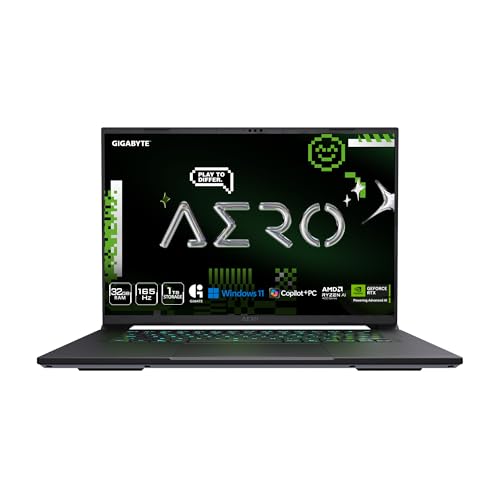 | Gigabyte AERO X16 | Best fit: Carrying a 16-inch laptop Display: 16-inch 2560 x 1600 IPS, 165Hz Graphics: RTX 5070 12GB, up to 85W Max TGP Ports: USB4 at up to 40Gbps Limit: Other ports not listed | Check Price on Amazon |
 | Gigabyte G6 MF-H2US854KH | Best fit: RTX 4050 Gigabyte laptop Display: 16-inch 1920 x 1200, 165Hz Graphics: RTX 4050 8GB GDDR6 Ports: 2x USB-C, USB-A, HDMI 2.1, RJ-45 Limit: No USB4 or Thunderbolt listed | Check Price on Amazon |
1. Gigabyte AORUS Master 16 Gen 2 RTX 5080 — Best for an RTX 5080 With a 240Hz OLED
Amazon’s title lists a 16-inch 2560 x 1600 OLED at 240Hz, a Ryzen 9 9955HX3D, an RTX 5080, 32GB of DDR5 and a 1TB SSD. The bullets add that the RTX 5080 is rated up to 175W Max TGP inside a 230W total system power capacity, that the OLED panel covers 100% DCI-P3, and that the chassis is 19mm thick and weighs 2.3kg. It is the only RTX 5080 in this comparison.
For ports, Amazon names a Type-C port with USB4, DisplayPort 2.1 and Power Delivery 3.0, plus HDMI 2.1 and a microSD slot. Gigabyte’s Gen 2 Master page adds a second Type-C port (USB 3.2 Gen 2, DisplayPort 2.0, Power Delivery 3.0), two Type-A ports, RJ-45 and an audio jack. Gigabyte’s page lists DisplayPort 1.4 on the USB4 port instead of Amazon’s 2.1, and it lists the RTX 5090 version, not this RTX 5080 model.
Check the monitor port: Amazon lists DisplayPort 2.1 on the USB4 port and Gigabyte’s Gen 2 Master page lists DisplayPort 1.4.Our Take Choose this Master if you want an RTX 5080 with a 240Hz OLED and the HDMI, Ethernet and Type-A ports its listings name. Confirm the USB4 port’s DisplayPort version before buying a high-resolution monitor around it.
- Amazon lists the Master’s RTX 5080 at up to 175W Max TGP within a 230W total system power capacity.
- Amazon states a 240Hz OLED panel with 100% DCI-P3 coverage for the Master.
- Amazon names USB4 with Power Delivery 3.0, HDMI 2.1 and microSD for the Master, and Gigabyte’s page adds RJ-45 and a second USB-C port.
- Amazon lists DisplayPort 2.1 on the Master’s USB4 port while Gigabyte’s Gen 2 Master page lists DisplayPort 1.4, so confirm the version before buying a high-resolution monitor.
- Amazon’s bullets give the Master 2.3kg, more than the 1.9kg that both Gigabyte’s AERO X16 page and Amazon’s bullets list for the AERO X16.
2. Gigabyte AORUS Master 16 Gen 2 RTX 5090 — Best for an AMD Processor With an RTX 5090
The second Gen 2 Master pairs the same Ryzen 9 9955HX3D with an RTX 5090 Laptop GPU, 32GB of DDR5 and a 2TB SSD. Amazon’s title gives a 2560 x 1600 panel at 240Hz and calls it WQXGA. The bullets list 16 cores, 32 threads and up to 5.4GHz for the processor, and up to 175W Max TGP within a 230W system power capacity for the GPU.
Gigabyte’s AORUS Master 16 Gen 2 page lists this processor and GPU pairing. It states an OLED panel at 240Hz, an RTX 5090 with 24GB of GDDR7, a 99Wh battery and a 330W adapter. It also gives the port list: USB4, a second USB-C port, two Type-A ports, HDMI 2.1, RJ-45 and microSD. Amazon’s bullets name none of those ports.
Check the panel type: Amazon’s title says WQXGA without naming OLED, while Gigabyte’s page lists OLED for this Master.Our Take Choose this Master if you want an AMD processor with an RTX 5090 and 2TB of storage. The storage and memory figures come from Amazon’s title, and the port list comes from Gigabyte’s page.
- Gigabyte’s page lists this Master’s RTX 5090 with 24GB of GDDR7 at 175W maximum graphics power.
- Amazon’s title states 2TB of storage and 32GB of DDR5 for this Master.
- Gigabyte lists a 99Wh battery with a 330W adapter for this Master.
- Amazon’s bullets for this Master name no ports, so the USB4 and HDMI details rest on Gigabyte’s page alone.
3. Gigabyte AORUS Master 16 RTX 5090 — Best for Thunderbolt 5 With an RTX 5090
Gigabyte’s AORUS Master 16 AM6H page covers the Core Ultra 9 275HX version, and Amazon’s title agrees: Core Ultra 9 275HX, RTX 5090, a 2560 x 1600 OLED at 240Hz, 32GB of DDR5 and a 2TB SSD. Gigabyte lists the RTX 5090 with 24GB of GDDR7 at 175W maximum graphics power, a 99Wh battery and a 330W adapter.
The Core Ultra 9 Master is the one with Thunderbolt. Gigabyte lists one Type-C port with Thunderbolt 5 (USB4, DisplayPort 2.1, Power Delivery 3.0) and a second with Thunderbolt 4 (USB4, DisplayPort 1.4, Power Delivery 3.0), plus HDMI 2.1, RJ-45, two Type-A ports and microSD. Gigabyte lists about 2.5kg, 0.2kg more than the Ryzen 9 Masters. Amazon’s offer names M-X-C Tech as the seller.
Our Take Choose this Master if your dock or display needs Thunderbolt and you want an RTX 5090. Amazon’s offer names M-X-C Tech, not Amazon.com, as the seller, so confirm the seller name on the product page.
- Gigabyte lists Thunderbolt 5 and Thunderbolt 4 Type-C ports on this Master 16.
- Amazon’s title and Gigabyte’s page agree on the Core Ultra 9 275HX, RTX 5090 and 240Hz OLED for this Master.
- Gigabyte lists a 99Wh battery and a 330W adapter for this Master.
- Gigabyte lists this Master at about 2.5kg, against 2.3kg for the Ryzen 9 Masters and the Elite.
4. Gigabyte AORUS Elite 16 — Best for Thunderbolt 5 and Thunderbolt 4 With an RTX 5070
Amazon’s title lists a Core Ultra 9 275HX, an RTX 5070, a 165Hz 2560 x 1600 WQXGA panel, 32GB of DDR5 and a 2TB SSD, and its part number matches the Elite 16 BWH on Gigabyte’s page. Gigabyte lists the RTX 5070 with 8GB of GDDR7 at 115W maximum graphics power, and an IPS panel with 100% sRGB, G-SYNC and Advanced Optimus.
Gigabyte’s port list gives the Elite two Thunderbolt ports: a Type-C with Thunderbolt 5 and DisplayPort 2.1 on the left, and a Type-C with Thunderbolt 4 and DisplayPort 1.4 on the right. HDMI 2.1, RJ-45, two Type-A ports and microSD complete the list. Gigabyte also lists a 99Wh battery, a 240W adapter and about 2.3kg.
Two Thunderbolt ports: Gigabyte lists the same Thunderbolt 5 and Thunderbolt 4 pair here that it lists on the Core Ultra 9 Master.Our Take Choose the Elite if you want Thunderbolt 5 and Thunderbolt 4 on an RTX 5070 laptop sold by Amazon.com. Its panel is IPS at 165Hz, where the Masters list OLED at 240Hz.
- Gigabyte lists Thunderbolt 5 and Thunderbolt 4 Type-C ports on the Elite 16, the pair that makes it one of two Thunderbolt laptops here.
- Gigabyte lists G-SYNC and Advanced Optimus for the Elite’s IPS panel.
- Amazon’s title states 2TB of storage and 32GB of DDR5 for the Elite.
- Gigabyte lists the Elite’s panel as IPS at 165Hz, where it lists the Masters at OLED and 240Hz.
5. Gigabyte AERO X16 — Best for Carrying a 16-Inch Laptop
Amazon’s title lists a Ryzen AI 9 465, an RTX 5070 V12G, a 165Hz 2560 x 1600 WQXGA panel, 32GB of DDR5 and a 1TB SSD. Gigabyte’s AERO X16 page lists the RTX 5070 with up to 12GB of GDDR7 and up to 85W Max TGP, and an IPS panel with 100% sRGB.
Weight is the reason to look at the AERO X16. Gigabyte’s AERO X16 page and Amazon’s bullets give 16.75mm and 1.9kg, against about 2.3kg for the Elite and the Ryzen 9 Masters. It also lists a 76Wh battery with up to 14 hours of battery life, and a USB4 Type-C port at up to 40Gbps with Power Delivery 3.0. Neither Gigabyte’s page nor Amazon’s bullets name the other ports.
Our Take Choose the AERO X16 if you carry the laptop daily and one USB4 port covers your accessories. Check the product page for HDMI and Ethernet before ordering.
- Gigabyte lists the AERO X16 at 16.75mm thick and 1.9kg, lighter than the Elite and the AMD Masters.
- Gigabyte lists a USB4 Type-C port on the AERO X16 at up to 40Gbps with Power Delivery 3.0.
- Gigabyte lists a 76Wh battery with up to 14 hours of battery life for the AERO X16.
- Neither Gigabyte’s page nor Amazon’s bullets name an HDMI, Ethernet or Type-A port for the AERO X16, so check the product page for them.
6. Gigabyte G6 — Best for a Gigabyte Laptop With an RTX 4050
Amazon lists the G6 MF-H2US854KH with an i7-13620H at 4.9GHz, an RTX 4050 with 8GB of GDDR6, 16GB of DDR5-4800 as two 8GB modules, a 1TB Gen4 M.2 SSD and a 16-inch 16:10 panel at 1920 x 1200 and 165Hz. Gigabyte’s G6 page lists the same 165Hz 16:10 panel, an i7 at up to 4.9GHz and about 2.3kg.
Amazon’s bullets list two USB 3.2 Gen 2 Type-C ports, one USB 3.2 Gen 1 Type-A port, HDMI 2.1, RJ-45, an audio combo jack and DC-in, and name no USB4 or Thunderbolt. They also list Wi-Fi 6E and Bluetooth 5.2. Amazon’s offer names Citimall llc as the seller.
Our Take Choose the G6 if you want a Gigabyte laptop with an RTX 4050 and two USB-C ports. Confirm the seller name on the product page before ordering.
- Amazon’s bullets list two USB 3.2 Gen 2 Type-C ports, HDMI 2.1 and RJ-45 for the G6.
- Gigabyte lists a 165Hz 16:10 panel on the G6.
- Amazon lists a 1TB Gen4 M.2 SSD and 16GB of DDR5-4800 as two 8GB modules for the G6.
- Amazon’s bullets for the G6 name no USB4 or Thunderbolt port.
Buying Guide
1. Match the ports to your dock and monitor
Thunderbolt 5 and Thunderbolt 4 are the ports to look for if you plan to use a Thunderbolt dock. Gigabyte lists them on the Core Ultra 9 Master 16 and the Elite 16, and lists no Thunderbolt port on the other four laptops here.
The Ryzen 9 Masters list USB4 and a USB 3.2 Gen 2 Type-C port, the AERO X16 lists USB4 at up to 40Gbps, and Amazon’s G6 bullets list two USB 3.2 Gen 2 Type-C ports. For more models with these ports, see the 16-inch laptops with Thunderbolt 4 or USB4.
2. Read the GPU name with its power limit
The same GPU name has different power limits. Gigabyte lists the RTX 5070 at 115W maximum graphics power on the Elite and up to 85W Max TGP on the AERO X16. The RTX 5080 and RTX 5090 Masters are listed at 175W.
Amazon’s G6 bullets give no power limit for the RTX 4050. For more models with the other three GPUs, see the RTX 5070 laptops, the RTX 5080 laptops and the RTX 5090 laptops.
3. Check the screen on the product page
Gigabyte lists OLED at 240Hz on the three Masters and IPS at 165Hz on the Elite and the AERO X16. The G6 is listed at 165Hz and 1920 x 1200.
Amazon’s title for the Ryzen 9 RTX 5090 Master says WQXGA without naming OLED, though Gigabyte’s page lists OLED. For more OLED models, see the OLED gaming laptops.
4. Confirm the seller, memory and storage
Amazon.com is the seller on four of the six: the RTX 5080 Master, the Ryzen 9 RTX 5090 Master, the Elite and the AERO X16. M-X-C Tech sells the Core Ultra 9 Master and Citimall llc sells the G6. Amazon’s product details list a 1-year manufacturer warranty for all six.
Gigabyte lists up to 64GB of DDR5 on the Master, Elite and AERO pages, and installed memory differs between offers. Take the memory and storage from the title of the offer you are buying, and confirm both on the product page when the bullets do not repeat them.
FAQ
Which of these Gigabyte laptops has Thunderbolt 5?
The Core Ultra 9 AORUS Master 16 and the AORUS Elite 16. Gigabyte lists one Thunderbolt 5 Type-C port and one Thunderbolt 4 Type-C port on each.
The Ryzen 9 Masters, the AERO X16 and the G6 do not list Thunderbolt. Gigabyte lists USB4 on the Ryzen 9 Masters and the AERO X16.
Do all the AORUS Master laptops have the same ports?
No. Gigabyte lists USB4 and a USB 3.2 Gen 2 Type-C port on the Gen 2 Master with the Ryzen 9 9955HX3D, and Thunderbolt 5 and Thunderbolt 4 on the Master with the Core Ultra 9 275HX.
Both Gigabyte pages list HDMI 2.1, RJ-45, two Type-A ports and microSD. The ports that differ are the two Type-C ports.
Does the G6 have USB4 or Thunderbolt?
No. Amazon’s bullets for the G6 list two USB 3.2 Gen 2 Type-C ports, one USB 3.2 Gen 1 Type-A port, HDMI 2.1, RJ-45 and an audio combo jack.
Gigabyte’s G6 page lists no ports. Check the product page if a dock or monitor needs a particular connector.
Which Gigabyte laptop here is the lightest?
The AERO X16, at 1.9kg. Gigabyte lists about 2.3kg for the Ryzen 9 Masters, the Elite and the G6, and about 2.5kg for the Core Ultra 9 Master.
The Core Ultra 9 Master is the heaviest. Gigabyte lists it at about 2.5kg, 0.6kg more than the AERO X16.
Bottom Line
Start with the Elite 16 or the Core Ultra 9 Master 16 if you need Thunderbolt, the AERO X16 if weight decides, and the Ryzen 9 Masters for the RTX 5080 or an AMD RTX 5090. The G6 is the RTX 4050 option.