Sixteen gigabytes of memory says nothing about the chip, the screen or the ports. The five laptops below are all sold with 16GB, and they differ on all three: a 13.6-inch MacBook Air with an Apple M5, a 15.6-inch Acer with a Ryzen 7, a 15.6-inch Dell touchscreen with a Core i7, a 14-inch HP OLED with a Snapdragon X and a 16-inch ASUS gaming laptop with an RTX 5060.
Start with the screen size and the chip, then use the 16GB label as a filter. Each pick says where its 16GB figure appears, and the Buying Guide explains how the memory types differ.
16GB RAM Laptops Compared
| Image | Product | Details | Check Price |
|---|---|---|---|
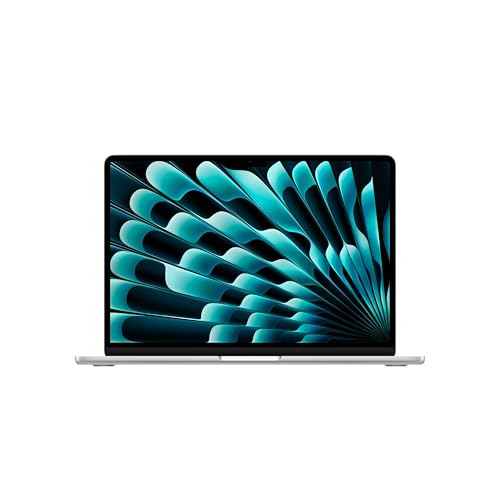 | Apple MacBook Air 13-inch M5 | Best fit: macOS with Thunderbolt 4 Memory: 16GB unified Display: 13.6-inch Liquid Retina Storage: 512GB SSD Chip: Apple M5 | Check Price on Amazon |
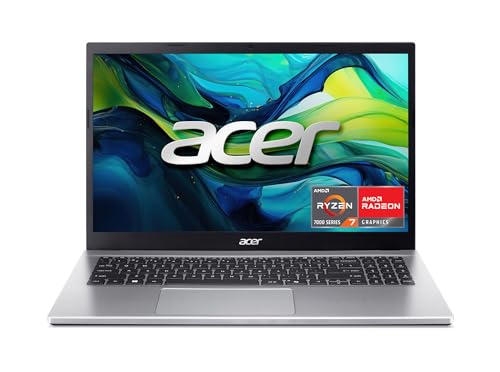 | Acer Aspire Go 15 | Best fit: 15.6-inch IPS display Memory: 16GB DDR4 Display: 15.6-inch 1920 x 1080 IPS Storage: 512GB PCIe Gen4 Chip: Ryzen 7 7730U | Check Price on Amazon |
 | Dell Inspiron 15 3530 | Best fit: 15.6-inch touchscreen Memory: 16GB RAM Display: 15.6-inch 1920 x 1080 touch Storage: 1TB PCIe NVMe Chip: Core i7-1355U | Check Price on Amazon |
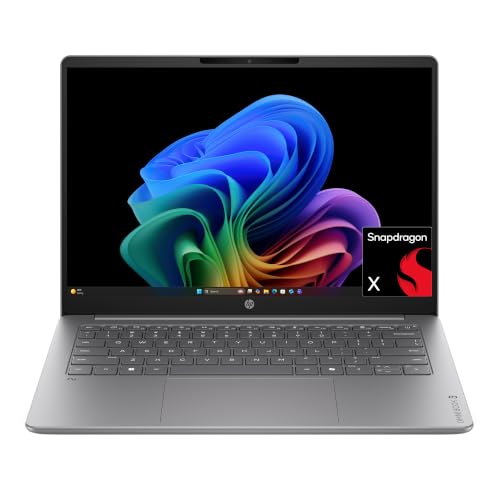 | HP OmniBook 3 14 | Best fit: 14-inch OLED display Memory: 16GB LPDDR5x Display: 14-inch 1920 x 1200 OLED Storage: 512GB PCIe Gen4 Chip: Snapdragon X X1-26-100 | Check Price on Amazon |
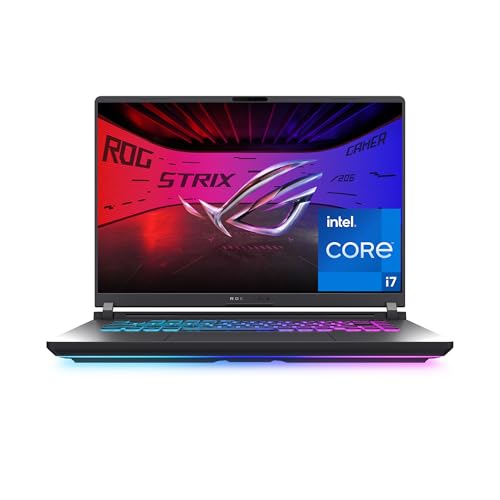 | ASUS ROG Strix G16 | Best fit: 16-inch 165Hz with RTX 5060 Memory: 16GB DDR5-5600 Display: 16-inch 1920 x 1200, 165Hz Storage: 1TB PCIe Gen 4 Chip: Core i7-14650HX | Check Price on Amazon |
1. Apple MacBook Air 13-inch M5 — Best 16GB macOS Pick
Apple’s MacBook Air specification page lists the M5 with 16GB unified memory and a 512GB SSD as one configuration, and the Amazon title and size field give the same 16GB and 512GB for this listing. The Amazon bullets do not repeat the memory figure, so confirm 16GB on the product page before you order. The listing describes a 13.6-inch Liquid Retina display, and Apple’s page gives 2560 x 1664 pixels. At 13.6 inches it has the smallest screen of the five.
The listing names two Thunderbolt 4 ports, a MagSafe charging port and a headphone jack, along with Wi-Fi 7 and support for up to two external displays. It also lists up to 18 hours of battery life, a 12MP Center Stage camera and Touch ID. The MacBook Air is the only laptop here that runs macOS, so the operating system comes before any comparison of chips.
Our Take Choose the MacBook Air when macOS and Thunderbolt 4 ports decide the purchase. Choose one of the Windows laptops below when you need a touch screen, a screen larger than 13.6 inches or an NVIDIA GPU.
- Apple’s specification page backs the 16GB unified memory and 512GB SSD that the Amazon title and size field give for this MacBook Air.
- The MacBook Air is the only laptop of the five whose Amazon listing states Thunderbolt 4, with two ports plus MagSafe and a headphone jack.
- The Amazon listing states up to 18 hours of battery life and Wi-Fi 7 for the MacBook Air, both figures you can weigh against the other laptops.
- The MacBook Air’s Amazon bullets do not state the 16GB figure, which appears only in the title and size field, so confirm it on the product page before ordering.
- The MacBook Air’s 13.6-inch screen is the smallest of the five laptops here, so choose another model if you need a larger display.
2. Acer Aspire Go 15 — Best 15.6-Inch IPS Pick
The Amazon bullets for model AG15-42P-R9FW state an AMD Ryzen 7 7730U, 16GB of memory and a 512GB SSD, and the title adds DDR4 memory, a PCIe Gen4 SSD and AMD Radeon graphics. The screen is a 15.6-inch 1920 x 1080 IPS panel that Acer describes as suited to casual browsing and streaming, with BluelightShield to lower blue light. It is larger than the 14-inch screen on the OmniBook 3 14.
Acer lists a full-function USB Type-C port for connecting or charging, HDMI 2.1, Wi-Fi 6 and a Copilot key. The listing does not state Thunderbolt, and its bullets give no count of USB-A ports or Ethernet, so check the port list before buying a dock or monitor.
The Aspire Go 15 pairs a Ryzen 7 7730U with 16GB of memory and a 15.6-inch 1920 x 1080 IPS display.Our Take Choose the Aspire Go 15 for a 15.6-inch Full HD IPS panel with a Ryzen 7 chip. Choose the Inspiron 15 3530 for a touchscreen or the ROG Strix G16 for an NVIDIA GPU.
- The Amazon bullets for model AG15-42P-R9FW state both 16GB of memory and a 512GB SSD in the listing text.
- Acer lists a 15.6-inch 1920 x 1080 IPS display with BluelightShield, larger than the 14-inch screen on the OmniBook 3 14.
- Acer lists a full-function USB Type-C port for connecting or charging, plus HDMI 2.1 and Wi-Fi 6.
- Acer lists Radeon graphics for the Aspire Go 15, so a buyer who wants an NVIDIA GPU needs the ROG Strix G16 with its RTX 5060.
- The Acer listing does not state a Thunderbolt port, and its bullets give no count of USB-A ports or Ethernet.
3. Dell Inspiron 15 3530 — Best 15.6-Inch Touchscreen Pick
The Amazon bullets for model Inspiron 15 3530 state 16GB of RAM and a 1TB PCIe NVMe M.2 SSD, and the title and size field give the same two figures. The processor is a 13th Generation Intel Core i7-1355U with 10 cores and 12 threads. The display is a 15.6-inch 1920 x 1080 anti-glare touchscreen with a WVA panel, the same size as the Aspire Go 15 screen, with touch stated.
The bullets list one USB-A 2.0 port, one USB-A 3.2 Gen 1 port, one USB 3.2 Gen 1 Type-C port, HDMI 1.4, a headphone and microphone jack and an SD card reader, plus Wi-Fi 6, a 1080p webcam and stereo speakers. They do not state Thunderbolt. Windows 11 Pro is preinstalled, and the bullets name business features such as Group Policy and Active Directory support. Amazon’s product data lists the laptop at about 3.6 pounds, heavier than the MacBook Air and the OmniBook 3 14.
Our Take Pick the Inspiron 15 3530 for a 15.6-inch touchscreen, a 1TB SSD and an SD card reader. Pick the Aspire Go 15 when you do not need touch and want an IPS panel with a Ryzen 7 chip.
- Dell’s Inspiron 15 3530 has 16GB of RAM and a 1TB PCIe NVMe SSD in its Amazon bullets, matching the title and size field.
- The Amazon bullets state a 15.6-inch 1920 x 1080 anti-glare touchscreen, the only touch display among the five listings.
- The Amazon bullets list USB-A, USB-C, HDMI 1.4 and an SD card reader, while the OmniBook and ROG Strix listings give no port list.
- The Amazon bullets do not state Thunderbolt, and they list the USB-C port as USB 3.2 Gen 1.
- Amazon’s product data lists the Inspiron 15 3530 at about 3.6 pounds, heavier than the MacBook Air and the OmniBook 3 14.
4. HP OmniBook 3 14 — Best Snapdragon OLED Pick
The Amazon title for HP model 14-hz0388nr names a Snapdragon X X1-26-100, 16GB of RAM and a 512GB SSD. The bullets state 16GB LPDDR5x memory and a 512GB PCIe Gen4 NVMe SSD, with a Qualcomm Adreno GPU. The 512GB drive is half the 1TB stated for the Inspiron 15 3530 and ROG Strix G16.
The display is a 14-inch 1920 x 1200 OLED panel that the listing rates at up to 300 nits. The listing also states up to 41 hours and 45 minutes of battery life, a charge from 0 to 50 percent in about 45 minutes with HP Fast Charge, Wi-Fi 6E, a Copilot key and an FHD IR camera. It gives no port list.
The listing states 16GB LPDDR5x, a 512GB Gen4 SSD and a 14-inch 1920 x 1200 OLED display on a Snapdragon X chip.Our Take Choose the OmniBook 3 14 for an OLED display on a Snapdragon X chip. Choose the Inspiron 15 3530 when you want a touchscreen, an Intel Core i7 chip and a 1TB SSD.
- The HP bullets for 14-hz0388nr state 16GB LPDDR5x memory and a 512GB PCIe Gen4 SSD, not only the title.
- The HP listing states a 14-inch 1920 x 1200 OLED display rated up to 300 nits, the only display of the five whose listing states OLED.
- The HP listing states up to 41 hours and 45 minutes of battery life, plus a 0 to 50 percent charge in about 45 minutes with HP Fast Charge.
- The HP listing gives no port list, so USB, HDMI and Thunderbolt support are not stated for the OmniBook.
- The OmniBook’s 512GB SSD is smaller than the 1TB drives stated for the Inspiron 15 3530 and ROG Strix G16.
5. ASUS ROG Strix G16 — Best 16-Inch Gaming Pick
The Amazon bullets for model G615JMR-AS74 state 16GB of DDR5-5600 memory, a 1TB PCIe Gen 4 SSD, an Intel Core i7 14650HX and an NVIDIA GeForce RTX 5060 Laptop GPU. ASUS’s product list names the same model with a 16-inch 1920 x 1200 display at 165Hz, a Core i7-14650HX, an RTX 5060 and a 1TB SSD, and the Amazon title adds a 3ms response time. It has the largest screen of the five and is the only one with an NVIDIA GPU.
The bullets also describe ROG Intelligent Cooling with a vapor chamber, three fans and liquid metal on the chipset, plus a 360-degree RGB light bar with a Stealth Mode that turns the lighting off. The title lists Wi-Fi 7 and Windows 11 Home, and the listing gives no port list. Amazon’s product data lists it at about 5.8 pounds, against about 2.7 pounds for the MacBook Air.
Our Take Pick the Strix G16 when an RTX 5060 and a 165Hz screen are the goal. Pick one of the other four when you want a screen under 16 inches.
- The Amazon bullets for G615JMR-AS74 state 16GB DDR5-5600 memory and a 1TB PCIe Gen 4 SSD, and ASUS’s product list confirms the SSD but not the memory.
- ASUS’s product list names a 16-inch 1920 x 1200 165Hz display, a Core i7-14650HX and an RTX 5060 Laptop GPU for this model.
- The Amazon bullets describe ROG Intelligent Cooling with a vapor chamber, three fans and liquid metal on the chipset.
- Amazon’s product data lists the ROG Strix G16 at about 5.8 pounds, the heaviest of the five.
- The Amazon listing gives no port list, so Thunderbolt and USB support are not stated.
Buying Guide
1. Check which memory type each 16GB laptop lists
The MacBook Air lists 16GB unified memory, the Aspire Go 15 title gives DDR4, the OmniBook 3 14 bullets state LPDDR5x and the ROG Strix G16 bullets state DDR5-5600. The Inspiron 15 3530 bullets state 16GB of RAM without naming a type. All five carry the same 16GB figure, and the memory type changes with the chip where it is named.
Memory type is a spec to compare, not a ranking. None of the five listings states whether the memory can be upgraded, so look for that on the maker page before you rely on it. Read the memory line next to the chip before you decide.
2. Choose the screen size and panel before the memory
Screens run from 13.6 inches on the MacBook Air through the 14-inch OmniBook 3 14 and the two 15.6-inch laptops, the Aspire Go 15 and Inspiron 15 3530, to the 16-inch Strix G16. The Inspiron 15 3530 states a touchscreen, the OmniBook 3 14 states OLED and the Strix G16 states 165Hz.
The MacBook Air, Aspire Go 15, OmniBook 3 14 and Strix G16 listings do not state touch. Touch, OLED and refresh rate are the screen features that split these five, so decide which one you need first.
3. Compare storage next to memory
Three laptops list a 512GB SSD: the MacBook Air, Aspire Go 15 and OmniBook 3 14. The Inspiron 15 3530 and Strix G16 state a 1TB SSD.
Three of the five name a Gen 4 SSD: the Aspire Go 15, OmniBook 3 14 and Strix G16. The Inspiron 15 3530 lists a PCIe NVMe M.2 drive without a generation, and the MacBook Air listing names no drive interface. Check the storage line of each listing before you compare drives.
4. Pick the chip and operating system together
The five chips are the Apple M5, AMD Ryzen 7 7730U, Intel Core i7-1355U, Snapdragon X X1-26-100 and Intel Core i7-14650HX. The MacBook Air runs macOS, and the Aspire Go 15, Inspiron 15 3530, OmniBook 3 14 and Strix G16 list Windows 11.
Graphics differ as well. The Strix G16 pairs its chip with an RTX 5060 Laptop GPU, the Aspire Go 15 lists Radeon graphics, the OmniBook 3 14 lists a Qualcomm Adreno GPU and the Inspiron 15 3530 listing names no graphics chip. Decide whether you need NVIDIA graphics before comparing the others.
5. Read the port list before buying a dock or monitor
Only the MacBook Air listing states Thunderbolt 4, with two ports plus MagSafe and a headphone jack. The Aspire Go 15 lists a full-function USB Type-C port and HDMI 2.1, and the Inspiron 15 3530 lists USB-A, a USB 3.2 Gen 1 Type-C port, HDMI 1.4 and an SD card reader. The OmniBook 3 14 and Strix G16 listings give no port list.
A 16GB memory figure says nothing about ports, so match the port list of a specific model to your dock, monitor or drive. The 32GB laptop guide covers a larger memory tier, and the touchscreen laptop guide lists touch models with Thunderbolt or USB4 ports.
FAQ
Does 16GB mean the same thing on every one of these laptops?
No. The MacBook Air lists unified memory, the Aspire Go 15 DDR4, the OmniBook 3 14 LPDDR5x and the Strix G16 DDR5-5600, while the Inspiron 15 3530 names no type. Each is paired with a different chip.
Read the memory type next to the chip, because none of the five listings states whether the memory can be upgraded.
Which of these laptops has the largest screen?
The ROG Strix G16 does, at 16 inches with a 1920 x 1200 165Hz panel in ASUS’s product list. The Aspire Go 15 and Inspiron 15 3530 follow at 15.6 inches, then the 14-inch OmniBook 3 14 and the 13.6-inch MacBook Air.
The Strix G16 is also the only laptop of the five with an NVIDIA GPU. Choose it for the RTX 5060, not for screen size alone.
Which 16GB laptop has an OLED screen?
The OmniBook 3 14 does. Its listing states a 14-inch 1920 x 1200 OLED display rated up to 300 nits, and none of the other four listings states OLED.
The Inspiron 15 3530 is the touch option instead. Its listing states a touchscreen, and the OmniBook listing does not.
Which of these laptops has a 1TB SSD?
The Inspiron 15 3530 bullets state a 1TB PCIe NVMe SSD, and the Strix G16 bullets state a 1TB PCIe Gen 4 SSD. The MacBook Air, Aspire Go 15 and OmniBook 3 14 list 512GB.
Storage size is not tied to screen size here. The 15.6-inch Aspire Go 15 lists 512GB while the 15.6-inch Inspiron 15 3530 lists 1TB. Compare the storage line of each listing.
Does a 16GB laptop come with Thunderbolt?
Not by default. Only the MacBook Air listing states Thunderbolt 4, with two ports. The Aspire Go 15 lists a full-function USB Type-C port, the Inspiron 15 3530 lists a USB 3.2 Gen 1 Type-C port, and the other two listings give no port list.
Check the port list against your dock, monitor or drive. USB-C and Thunderbolt are separate labels.
Bottom Line
The MacBook Air 13-inch M5 is the pick for macOS and Thunderbolt 4. Choose the Aspire Go 15 for a 15.6-inch IPS screen with a Ryzen 7, the Inspiron 15 3530 for a 15.6-inch touchscreen with a Core i7 and a 1TB SSD, the OmniBook 3 14 for OLED on a Snapdragon X chip or the ROG Strix G16 for an RTX 5060 and a 165Hz screen.