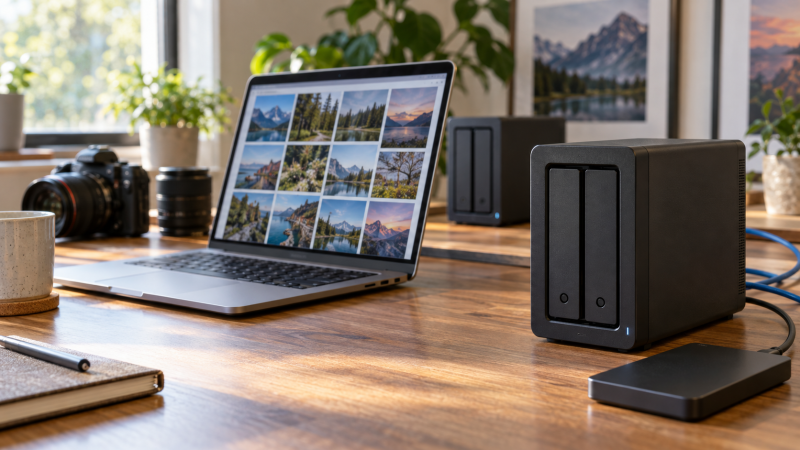
A two-bay NAS can collect photos from several laptops and phones in one place, then make them available over a home or studio network. Two drives can be set up as a mirror, so one failed disk need not take the library offline. Mirroring is useful, but a mirror is not a backup. Accidental deletion, ransomware, theft or a failed enclosure can affect both copies. Plan another copy outside the NAS before deciding which box to buy.
The six active New enclosures here are sold without storage drives. They differ in network speed, memory, software headroom and drive-compatibility rules. The seller and maker figures describe hardware and software features, not measured RAW-photo import speeds on your network. A 2.5GbE NAS still needs a compatible switch, cable path and client to realize a faster transfer than a 1GbE setup.
Budget for two compatible drives and a separate backup destination. A two-drive mirror keeps work available after one drive fails; it does not preserve deleted or corrupted photos by itself.Two-Bay NAS Enclosures Compared
| Image | Product | Details | Check Price |
|---|---|---|---|
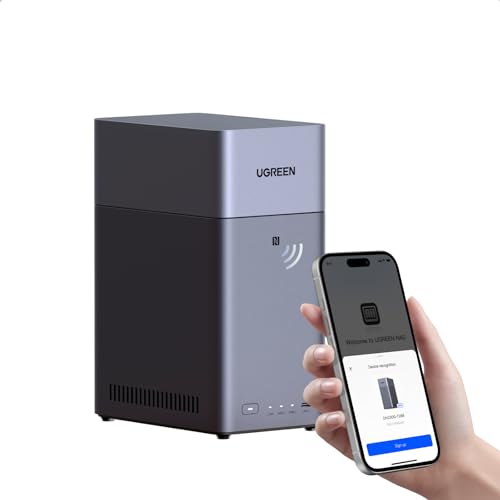 | UGREEN DH2300 | Best fit: Basic photo hub Drive bays: Two SATA, diskless Network: 1GbE Memory: 4 GB Apps: No Docker or VMs | Check Price on Amazon |
 | Synology DS223j | Best fit: Basic Synology library Drive bays: Two SATA, diskless Network: 1GbE Memory: 1 GB DDR4 2.5-in drives: Optional holder | Check Price on Amazon |
 | Synology DS223 | Best fit: Synology memory step-up Drive bays: Two SATA, diskless Network: 1GbE Memory: 2 GB DDR4 Software: Synology backup apps | Check Price on Amazon |
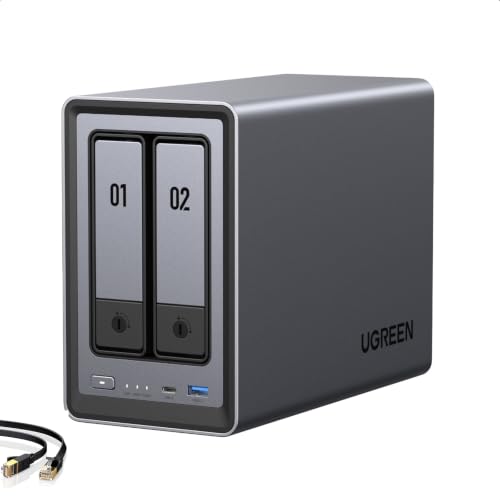 | UGREEN DXP2800 | Best fit: Apps and NVMe headroom Drive bays: Two SATA plus two M.2 Network: One 2.5GbE Memory: 8 GB DDR5 CPU: Intel N100 | Check Price on Amazon |
 | Synology DS225+ | Best fit: Synology multi-gig Drive bays: Two SATA, diskless Network: Two 2.5GbE Memory: 4 GB Drives: Check compatibility list | Check Price on Amazon |
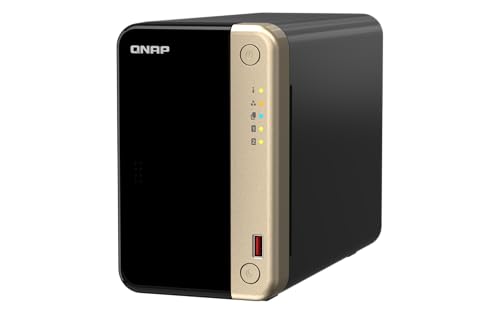 | QNAP TS-264-8G | Best fit: Dual-port network Drive bays: Two SATA plus two M.2 Network: Two 2.5GbE Memory: 8 GB DDR4 CPU: Intel Celeron N5095 | Check Price on Amazon |
1. UGREEN DH2300 — Best Basic Photo Hub
The DH2300 is UGREEN’s two-bay, 1GbE entry model with 4 GB RAM. Its listing targets photo and phone backup and says the enclosure can organize images, including face and object tagging. UGREEN lists RAID 1 among its available storage modes. For a household or solo creator who mainly wants a central photo library and automated copies from devices, the DH2300 is a more direct fit than paying for unused server features.
UGREEN explicitly says the DH2300 does not support Docker or virtual machines. The listing’s high maximum capacity figure is based on two drives in a non-mirrored arrangement, so it is not the protected space you get from a two-drive mirror. Drives are not included. Its wired Ethernet port is 1GbE, and the listing says there is no built-in Wi-Fi. If the NAS will sit away from the router, plan the wired network connection before ordering.
The advertised raw capacity and a two-drive mirror’s usable capacity are different numbers.Our Take Buy the DH2300 if you want a simple central photo store and 1GbE and basic apps are enough. It is not the UGREEN model for a Docker-heavy studio workflow.
- Photo and phone backup are explicit use cases.
- 4 GB RAM and RAID 1 mode listed.
- Simple 1GbE wired setup.
- No drives in the box.
- No Docker or virtual-machine support.
- 1GbE can limit large local transfers.
2. Synology DS223j — Best Basic Synology Library
The DS223j is a two-bay diskless Synology with 1 GB DDR4 RAM and one 1GbE port in Synology’s specification. Its listing describes file sync, sharing and automated backup for Mac, PC and mobile devices. If the buyer mainly wants a managed photo archive with familiar Synology software rather than a container server, the DS223j can cover the core job without paying for unused CPU or network headroom.
The 1 GB memory is the key hardware limit versus the DS223 and DS225+ below. Synology’s specifications also say an optional holder is needed to install 2.5-inch drives, so a buyer planning SATA SSDs should check that accessory and the drive compatibility list. A diskless listing still needs two compatible drives for a mirror. Use a separate USB or cloud copy for the actual backup, not only Synology’s internal redundancy setting.
Our Take Buy the DS223j if you want basic Synology file and photo storage and 1 GB RAM and 1GbE match the workload. Step up if several users or heavier apps will share it.
- Synology backup and sharing ecosystem.
- Clear two-bay, 1GbE hardware specification.
- 1 GB RAM gives less app headroom.
- Optional holder needed for 2.5-inch drives.
- Diskless package requires separate drives.
3. Synology DS223 — Best Simple Synology Step-Up
Synology’s DS223 keeps the two SATA drive bays and 1GbE port but doubles the listed system memory to 2 GB DDR4 compared with the DS223j. The exact seller listing focuses on backing up computers and phones, sharing files and keeping a central hub for collaborators. For a photographer who wants Synology’s device-backup and photo-library apps without moving to a faster network, the memory difference is the most concrete hardware reason to pick DS223 over DS223j.
Do not expect the extra memory to make a single 1GbE transfer faster than the network allows. A second person browsing thumbnails while a large upload runs may make app headroom relevant, but the difference is one of workload, not a measured result here. The DS223 is still a diskless enclosure. Confirm two compatible drives and set up a separate versioned or off-site copy so a sync mistake cannot erase the only recoverable image set.
Our Take Buy the DS223 if the Synology workflow fits, you want more RAM than the DS223j and you do not need a multi-gigabit network port.
- 2 GB RAM versus DS223j’s 1 GB.
- Two drive bays and Synology backup tools.
- Still limited to 1GbE networking.
- Drives and external backup are extra.
4. UGREEN DXP2800 — Best App and NVMe Headroom
UGREEN specifies that the DXP2800 moves to an Intel N100, 8 GB DDR5 RAM, one 2.5GbE port and two M.2 NVMe slots in addition to the two SATA bays. UGREEN says it can run Docker, virtual machines and compatible media-server apps. The app support and the faster port make it a better fit for a creator who wants a photo library alongside other local services or a faster desk network. The two NVMe slots are separate expansion options. The two-bay count refers to the main SATA drive bays.
The listing says HDDs and SSDs are not included. Do not add the raw maximum capacities of the SATA and NVMe slots and call the sum a mirrored photo-backup size. Decide the storage layout first, confirm UGREEN’s drive support and reserve another destination for backup. A 2.5GbE link is useful only when the switch and editing laptop can participate at suitable speeds. Otherwise the extra hardware may sit idle while the 1GbE DH2300 does the same basic job.
The DXP2800’s extra compute and NVMe options matter for broader apps; they are not substitutes for a second backup copy.Our Take Buy the DXP2800 if photo backup shares the box with heavier apps or a 2.5GbE editing network. The simpler DH2300 is enough for a basic archive.
- Intel N100, 8 GB RAM and 2.5GbE listed.
- Two additional M.2 NVMe slots.
- Docker and VM support documented.
- Drives sold separately.
- Multi-gig hardware helps only with a compatible network.
5. Synology DS225+ — Best Synology Multi-Gigabit Option
Synology’s DS225+ adds two 2.5GbE ports, an Intel CPU and 4 GB installed RAM to its two-bay desktop line. Synology lists Btrfs and snapshot-related software support, which can give a photographer a recovery path for mistakes when configured properly. The seller highlights automated backups to another destination. The DS225+ is the Synology pick for a photo studio that wants faster network connectivity and a more involved protection workflow than a basic file share.
The exact package remains diskless. Synology’s product specification says it guarantees full functionality with compatible drives and directs buyers to its model-specific compatibility list. Check both intended disks before purchasing; do not treat any SATA drive as automatically supported. A snapshot lives on the same NAS unless it is copied elsewhere, and a mirrored volume cannot by itself recover from theft or a catastrophic box failure. The seller’s “protect against any cause” language should not be read literally.
Our Take Buy the DS225+ if you want the Synology apps, snapshot path and two 2.5GbE ports and accept the drive-compatibility check. It is not a complete backup plan on its own.
- Two 2.5GbE ports.
- Synology software supports snapshot workflows.
- Compatible-drive list needs checking.
- Diskless and still needs separate backup.
6. QNAP TS-264 — Best Dual Network Port Option
QNAP’s TS-264-8G has two 2.5GbE ports, 8 GB DDR4 RAM, two SATA bays and two M.2 NVMe slots in its hardware specification. QNAP lists an Intel Celeron N5095 processor and USB 3.2 Gen 2 ports for attaching compatible external storage. The dual network ports set it apart from the one-port multi-gigabit boxes here. They may suit a desk with separate network segments or a carefully planned team setup, rather than a simple home router connection.
Two 2.5GbE ports do not automatically give one editing laptop a 5GbE transfer. Client paths, switching and software configuration determine whether both links are used. The unit ships without HDDs, so price the two drives and a backup disk or service separately. The NVMe slots can serve supported cache or storage-pool roles, but they do not turn the NAS into four mirrored SATA bays. For a single creator with one 1GbE switch, the extra connectivity can be wasted.
Two network ports are topology options, not a doubled single-client speed guarantee.Our Take Buy the TS-264 if your network plan uses its second 2.5GbE port and added expansion. For a basic two-drive photo library, start with a simpler box.
- Two 2.5GbE ports and 8 GB RAM.
- Two NVMe slots and fast USB ports.
- QNAP publishes detailed hardware specs.
- Network complexity may exceed a solo archive’s needs.
- No drives in the exact package.
Buying Guide
Size mirrored space and a real backup separately
With two equal-size drives in a mirror, usable capacity is roughly the size of one drive, less formatting and filesystem overhead. A pair of 12 TB drives does not make a protected 24 TB photo volume. Vendor maximum capacity headlines commonly count raw bays or non-mirrored modes. Choose the target storage mode first, then calculate space for original RAW files, previews, catalogs and future projects. Confirm drive size and model against the NAS maker’s compatibility information.
A separate backup copy is essential. Use an external drive detached between runs, a second NAS in another place or a cloud destination that preserves versions. Test restoring a folder, not merely whether a scheduled task displays “success.” A mirror handles a drive failure. A versioned copy can help after accidental deletion or corruption. For power continuity at an editing desk, our UPS guide covers another part of the protection chain.
Match the Ethernet path to the editing workflow
A 1GbE NAS can be enough for scheduled overnight backup and casual retrieval. Large daily photo ingest or several editors browsing RAW previews can make 2.5GbE attractive, but the laptop adapter, switch and cabling must support it. The DH2300, DS223j and DS223 list 1GbE; DXP2800 and DS225+ add 2.5GbE; TS-264 has two 2.5GbE ports. The port counts are specifications, not measured application speeds.
Card ingest is a separate step if photos first arrive on SD or CFexpress media. A USB-C SD card reader guide helps with that earlier link. Keep the original card until a verified NAS copy and another backup exist. A fast card reader cannot compensate for an overloaded Wi-Fi or 1GbE segment once the file transfer moves onto the network.
Choose the software and drive policy you can maintain
Backup scheduling, versioning, remote access and user permissions depend on the NAS software as well as the enclosure. Synology, UGREEN and QNAP offer different app ecosystems. List the exact devices that will back up, then confirm supported client software and the restore path for one RAW folder. Do not assume a “photo AI” label will replace cataloging, duplicate review or a tested restore.
Check drive compatibility before buying disks, particularly on DS225+, whose maker explicitly points to a compatibility list. Check memory and expansion support before choosing a box for extra apps. The DH2300 does not support Docker or VMs, while DXP2800 advertises them. If the NAS will only receive photos and serve occasional files, paying for server headroom or multiple network ports may not help the buyer’s actual task.
Frequently Asked Questions
If I use RAID 1, are my photos backed up?
No. RAID 1 mirrors the data between two local drives, so one failed disk can often be replaced without losing the volume. It also mirrors many unwanted changes, including deletions or corrupt files. The enclosure, power supply and site remain shared failure points.
Make a separate versioned copy and periodically restore a sample folder. Keep at least one copy off the NAS or away from the same location. A NAS that reports “healthy” is not the goal. The goal is that the images can be recovered after a mistake or failure.
Does a diskless NAS include the storage I need?
No. Every exact listing in this guide is a diskless enclosure. Budget for compatible SATA drives and any optional SSD holders or NVMe modules. For a mirrored two-bay photo library, buy two drives sized for the desired usable space, then keep another backup destination outside that mirror.
Check whether the proposed drive model is on the maker’s current support or compatibility list. A bay count, maximum raw capacity and a seller’s example drive size do not prove that a particular disk, firmware or storage mode is supported on your chosen NAS.
Will 2.5GbE make Lightroom or another editor instantly faster?
Not by itself. Every link between client and NAS must allow the faster path, and the workflow may be limited by drives, thumbnails, CPU or the editing application’s access pattern. A 2.5GbE port helps move large files on a matching wired network. It does not guarantee that every catalog task accelerates.
Start with the current bottleneck. If overnight backup finishes well within the available window, 1GbE may be enough. If several creators routinely move large projects across a verified multi-gigabit network, a faster NAS port has a clearer purpose.
Bottom Line
Choose UGREEN DH2300 or Synology DS223j for a basic network photo library. DS223 adds Synology memory headroom. UGREEN DXP2800 suits heavier apps and a 2.5GbE desk, while Synology DS225+ adds a faster port and its own compatibility requirements. QNAP TS-264 offers two 2.5GbE ports for a planned multi-port network. Whatever the enclosure, buy compatible drives and maintain a separate, tested photo backup.