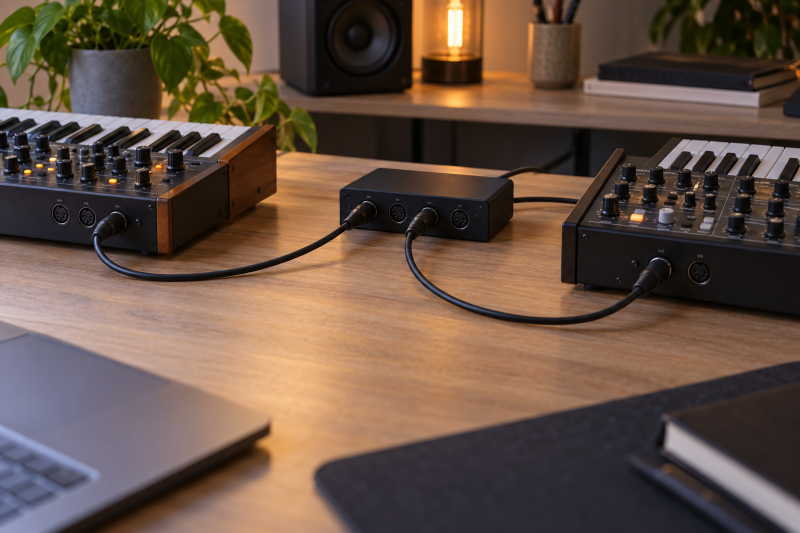
A 5-pin DIN MIDI cable carries control data between a hardware synth, controller, sequencer, or MIDI interface. It does not carry the instrument’s audio. For a compact hardware desk, the useful choices are length, connector angle, and pack count, plus how the cable runs between rear panels without cluttering the desk.
Every cable here has the standard 5-pin DIN connection, but the lengths run from 1.5 to 10 feet and one option uses dual right-angle plugs. Choose the shortest cable that reaches the actual MIDI IN, OUT, or THRU ports with enough slack for normal movement, then buy a second cable only when the MIDI path genuinely needs another run.
A MIDI cable connects MIDI ports, not audio outputs. Keep the instrument’s audio cables and its 5-pin MIDI control connections as separate decisions.MIDI Cables Compared



1. Cable Matters 6-Foot 2-Pack — Best for Separate MIDI IN and OUT Runs
Cable Matters suits a hardware desk that needs two ordinary MIDI runs without buying separate cables. The set provides two 6-foot 5-pin DIN cables with straight-through male-to-male wiring and a 180-degree keyed connector, which matches the conventional MIDI connection found on keyboards, controllers, synths, sequencers, interfaces, and drum machines.
The second cable is useful when a device needs a path in each direction, or when the desk connects two different pieces of hardware to an interface. Cable Matters describes easy-grip treads, molded strain relief, and a flexible cord, so the practical appeal is the pair of matching routes rather than an exotic connector treatment.
Our Take Buy Cable Matters when the rig needs two standard 6-foot MIDI runs and both cables will be used. Hosa is neater for one short link, while Monoprice or SOUNDFAM makes more sense when one 10-foot route has to reach across the desk.
- Two 6-foot cables suit separate MIDI IN and MIDI OUT routes on a small hardware desk.
- Straight-through 5-pin DIN wiring and keyed 180-degree connectors match standard MIDI equipment ports.
- Molded strain relief and easy-grip treads are listed details for repeated cable routing and unplugging.
- The two-pack is unnecessary when the desk needs only one short keyboard-to-interface MIDI connection.
- Six feet may leave extra cable on an adjacent-device setup better served by EMK or Hosa.
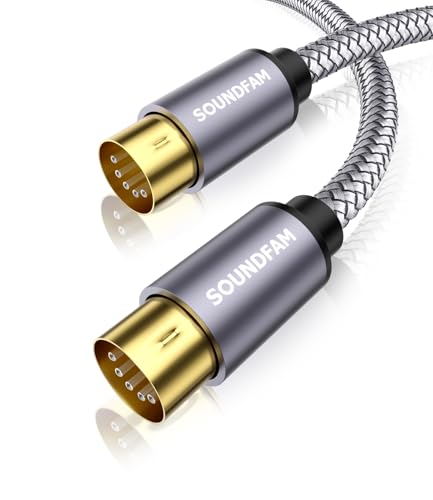
2. SOUNDFAM Shielded MIDI Cable — Best for Longer 10-Foot Desk Runs
SOUNDFAM is for a controller, keyboard, or synth that sits farther from the interface than a short desktop lead can reach. Its listing gives the cable a 10-foot or 3-meter length, 5-pin DIN plugs, a braided nylon jacket, and dual-layer EMI/RF shielding for its longer route across a music desk or rack.
The cable’s keyed ergonomic connectors and molded strain relief are meant to make a longer run easier to plug and route. Buy this length when the devices are separated by a stand, shelf, or side table. An unnecessarily long cable has to be coiled and managed like any other cable in a compact studio.
Our Take Buy SOUNDFAM when a 10-foot route is needed and its braided jacket suits the desk. Monoprice gives another 10-foot standard cable option, while Cable Matters is more practical if two medium-length runs solve the routing instead.
- The 10-foot or 3-meter length reaches a synth or controller placed away from the interface.
- Dual-layer EMI/RF shielding and a braided nylon jacket are listed features for the long route.
- Keyed connectors and molded strain relief support routing and plugging on a crowded studio desk.
- Ten feet leaves more cable to manage when the keyboard and MIDI interface sit side by side.
- The listing’s broad compatibility language still requires matching the device’s actual 5-pin MIDI ports.
3. GLHONG Right-Angle MIDI Cable — Best for Tight Rear-Panel Corners
GLHONG is the cable to consider when the MIDI ports sit behind a synth against a wall, under a shelf, or next to other plugs. Its listing describes dual 90-degree 5-pin DIN connectors, a feature that changes the cable exit direction and can make a tight rear-panel layout easier to route without pushing a straight plug farther into the wall.
The listing also names oxygen-free copper conductors and spiral shielding, along with standard MIDI IN, OUT, and THRU connections. The right-angle shape is the reason to choose it. Check the direction of both ports before ordering, because a ninety-degree plug that turns the wrong way can be less useful than a normal straight connector.
Our Take Buy GLHONG when both ends of the cable need to leave tight rear-panel corners at a right angle. Cable Matters, Hosa, and Monoprice are cleaner choices for ordinary open-back connections where straight keyed plugs have room to route.
- Dual 90-degree 5-pin DIN connectors can route more cleanly from tightly spaced rear-panel MIDI ports.
- The listing names standard MIDI IN, OUT, and THRU connections for common hardware routing paths.
- Oxygen-free copper conductors and spiral shielding are listed construction details for the cable run.
- The plug direction must suit both device panels, or the right-angle shape becomes less convenient than straight plugs.
- The frozen listing does not state a cable length, so confirm the required path before choosing it.
4. EMK 1.5-Foot Braided MIDI Cable — Best for Short Adjacent-Device Links
EMK is for the shortest connection here, a link to a keyboard, pedal, synth, or interface that sits directly beside the device receiving MIDI. The cable measures 1.5 feet or 0.5 meters, with a nylon-braided jacket and 5-pin DIN connectors, so it avoids leaving a large coil between two adjacent pieces of hardware.
Its listing also names a 180-degree pin configuration, locking connectors, strain relief, and double-shielded wiring. The short length is the buying decision, because a 1.5-foot cable only works when the ports are near each other and the route does not need to go around a stand, rack, or monitor arm.
Our Take Buy EMK when two compatible devices sit next to each other and a 1.5-foot link keeps the desk tidy. Hosa gives more reach at 3 feet, while Cable Matters and the 10-foot options solve connections that cross a larger part of the studio.
- The 1.5-foot length keeps an adjacent synth, pedal, or MIDI interface connection from leaving a large coil.
- Nylon braiding, locking connectors, and strain relief are listed features for a compact routed link.
- Standard 5-pin DIN connectors and a 180-degree pin layout match the conventional MIDI hardware connection.
- A 1.5-foot route cannot reach around a stand, rack, or distant controller without stretching the cable.
- It is one cable rather than the two matching runs included with the Cable Matters pack.
5. Monoprice 10-Foot MIDI Cable — Best Straightforward Long Run
Monoprice is the straightforward long-run pick when a simple 10-foot cable is more useful than a braided jacket or a multi-pack. Monoprice specifies 10 feet of 28 AWG cable, shielded construction, molded connector shells, and a standard keyed 5-pin DIN connector at each end.
The soft but durable jacket described on the listing helps when the route needs to bend around a desk or stand. Monoprice is the cable for a single long connection between hardware and an interface, provided the excess length can be routed cleanly rather than left to collect behind the keyboard.
Our Take Buy Monoprice for one standard 10-foot 5-pin DIN run with a stated 28 AWG construction. SOUNDFAM is the 10-foot option with more extras, while the shorter Hosa, EMK, and Cable Matters choices reduce cable management on a tighter desk.
- The 10-foot length reaches across a larger hardware desk or from a stand to an interface.li>
- Shielded 28 AWG construction and molded connector shells are listed details for a standard long MIDI run.
- Keyed 5-pin DIN connectors match conventional MIDI ports on keyboards, controllers, and interfaces.
- A long 10-foot cable needs deliberate routing when the devices sit close together on one surface.
- It is one cable, so separate MIDI IN and OUT paths may require a second purchase.
6. Hosa MID-303BK 3-Foot MIDI Cable — Best for Short Keyboard-to-Interface Link
Hosa is a practical middle length for a keyboard or controller that sits near, but not directly beside, the MIDI interface. The MID-303BK listing gives it a 3-foot length with 5-pin DIN connectors, intended for keyboards, controllers, and interfaces in studio or live settings.
Three feet leaves a little placement freedom and avoids the large loop that a 6- or 10-foot cable can create on a compact desk. The listing emphasizes reliable MIDI data transfer and durable construction, so Hosa is a simple choice when an ordinary short connection is all the hardware path needs.
Our Take Buy Hosa when a 3-foot 5-pin DIN connection reaches from a keyboard or controller to its MIDI interface without excess cable. EMK is the shortest adjacent-device option, while Cable Matters is more useful when the setup needs two separate 6-foot paths.
- The 3-foot length gives a nearby keyboard or controller room to reach a MIDI interface cleanly.
- Standard 5-pin DIN connectors match the MIDI port format used by keyboards, controllers, and interfaces.
- The listing names durable construction and reliable data transfer for an ordinary studio MIDI connection.
- Three feet may not reach a hardware device placed on a separate stand or shelf across the desk.
- The single cable does not supply a matching return path when the MIDI setup needs two runs.
Buying Guide: Choosing a MIDI Cable for a Hardware Desk
Measure the real route before choosing a length
EMK lists a 1.5-foot length, Hosa provides a 3-foot option, Cable Matters includes 6-foot cables, and SOUNDFAM and Monoprice offer 10-foot runs. Pick by the hardware layout, not by the brand. Measure from port to port along the route the cable will take, rather than across open air above the desk.
A short cable keeps an adjacent synth and interface tidy, but it must still reach without tension when the equipment is adjusted. A long cable can serve a device on a stand or side shelf, but it needs a deliberate place to coil. Choose the shortest listed length that reaches the complete route with normal slack.
Confirm the devices use standard 5-pin DIN MIDI
All six cables here use a 5-pin DIN connection, yet a hardware desk can also include USB MIDI and audio-only connections that do not use this plug. Cable Matters lists straight-through 5-pin DIN wiring, and Hosa lists the same connector type for keyboards, controllers, and interfaces.
MIDI IN, MIDI OUT, and MIDI THRU labels tell you where the data route should go. Do not treat a 5-pin MIDI cable as an audio lead, and do not buy one for a device that only exposes USB MIDI. Read the actual port labels on the synth and interface before adding any cable.
Use a two-pack only when the system has two routes
Cable Matters includes two matching 6-foot cables and explicitly describes using one for MIDI IN and one for MIDI OUT. A pair can be useful when the studio setup needs data to travel in both directions, or when two different pieces of hardware each need their own connection to the interface.
A two-pack does not create a second MIDI path by itself. Count the connections the sequencer, synth, controller, and interface actually use, then keep the second cable only if it has a defined role. One clean cable is better than an unused extra permanently coiled behind the desk.
Choose right-angle connectors around tight rear panels
GLHONG uses dual 90-degree 5-pin DIN plugs, unlike the straight keyed connectors described for Cable Matters and Monoprice. A right-angle plug can be the cleanest choice when a synth sits close to a wall or other plugs crowd the rear panel. It changes the cable’s exit direction without relying on a tight bend at the connector.
Check the direction at both ends before buying. A dual right-angle cable can be ideal for two devices with matching panel geometry, but it can point into an obstruction on a different synth. In an open-back layout, a straight keyed connector is usually the simpler and more universal routing choice.
Keep MIDI data routing separate from audio routing
MIDI tells compatible equipment which notes, controls, clock, or program messages to exchange. The cable does not carry the sound of the synth. Use the 5-pin DIN cable for control data and separate audio cables for the instrument’s sound. Keeping those systems distinct makes it easier to diagnose which connection needs attention.
A laptop studio also needs a MIDI interface or a keyboard with its own computer connection before hardware data reaches the computer. Our guide to USB-C audio interfaces for podcasting addresses a different audio connection category, while a USB-C guitar interface is another separate instrument-audio choice. Match each cable to the actual port and destination rather than to the broad word studio.
Frequently Asked Questions
Do I need one or two MIDI cables for a synth?
It depends on the data routes the setup uses. Cable Matters includes two 6-foot cables and names MIDI IN and MIDI OUT as an example of why a pair can be useful. A controller sending one direction to an interface may need only one cable.
If the synth and sequencer exchange data in both directions, two physical routes may be appropriate. Check the specific device port labels and the intended flow before buying a two-pack, because a second cable has value only when the hardware has a second connection to make.
What length MIDI cable should I use on a desk?
Use the shortest length that reaches the entire route comfortably. EMK provides 1.5 feet for adjacent equipment, Hosa lists 3 feet for a nearby interface, Cable Matters offers 6 feet, and SOUNDFAM and Monoprice specify 10 feet for a longer desk or stand route.
Measure from port to port along the back of the gear, not across the front of the desk. The right length means neither cable tension nor a large coil that has no place to live. If the route has to turn around a shelf, include that path in the measurement.
Are right-angle MIDI plugs useful?
They can be useful around tight rear panels. GLHONG lists dual 90-degree connectors, which can route a cable out from a synth placed against a wall or beside several other plugged-in cables. The benefit comes from the direction of the connector, not from a different MIDI format.
Check the exact direction at both devices before choosing one. A right-angle connector has to turn away from the obstruction at each end. For a device with plenty of space behind it, a standard straight 5-pin DIN cable is the less specialized choice.
Can a MIDI cable carry my synth’s audio?
No. A MIDI cable sends control data between compatible ports. It does not carry the sound from the synth. The audio output of the instrument needs its own appropriate audio cable and destination, such as a mixer, interface, or speaker system.
Keep the two apart on a laptop studio desk, because one hardware synth may have both a 5-pin MIDI connection and an audio output. Connect each path to the correct destination, then troubleshoot control and sound as separate parts of the setup.
Will every 5-pin DIN cable fit my hardware MIDI ports?
The cables here use standard 5-pin DIN connectors, and their listings name common equipment such as keyboards, controllers, synths, samplers, and interfaces. The standard DIN port is the usual connection for traditional DIN MIDI hardware, but a device may use USB MIDI instead or have a different port arrangement.
Read the port label and inspect the physical connector before buying. Cable Matters, Hosa, Monoprice, EMK, SOUNDFAM, and GLHONG all target the standard 5-pin DIN connection, so the actual hardware port is the final fit check.
Bottom Line
For most small hardware desks, Cable Matters is the flexible two-cable option, Hosa is the practical short single run, and GLHONG solves the specific rear-panel problem that straight plugs cannot. Choose SOUNDFAM or Monoprice only when a 10-foot route is truly necessary, and use EMK when adjacent devices need a compact 1.5-foot link.