Five monitors from Dell and its Alienware gaming brand cover different jobs. Dell describes the Dell S2725DS as a 27-inch QHD monitor with 5W built-in speakers, while the Alienware AW2725DF is a 360Hz QD-OLED gaming monitor. The Dell SE2426HG and SE2726HG are 240Hz Full HD gaming monitors, and the AW3426DW is a curved ultrawide.
Check which video port gives each monitor its top refresh rate before you choose one.| Image | Product | Best fit | Display | Refresh | Connections | Limit | Check Price |
|---|---|---|---|---|---|---|---|
 | Dell S2725DS | QHD work and sound | 27 in QHD | 100Hz | 2 HDMI, DP 1.2; 2 x 5W speakers | 100Hz, lowest of these five | Check Price on Amazon |
 | Alienware AW2725DF | QHD 360Hz OLED | 26.7 in QD-OLED, QHD | 360Hz DP; 144Hz HDMI | 2 DP, HDMI, downstream USB-C | 360Hz QHD needs DisplayPort | Check Price on Amazon |
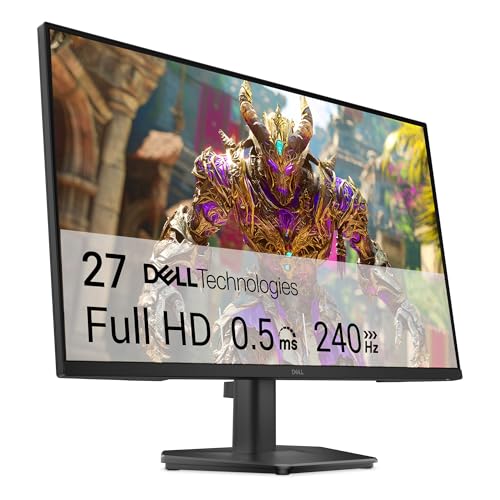 | Dell SE2426HG | Compact Full HD gaming | 23.8 in IPS, Full HD | 240Hz | 2 HDMI, DisplayPort | Tilt-only stand; Full HD | Check Price on Amazon |
| Dell SE2726HG | Larger Full HD gaming | 27 in IPS, Full HD | 240Hz | 2 HDMI, DisplayPort | Tilt-only stand; Full HD | Check Price on Amazon |
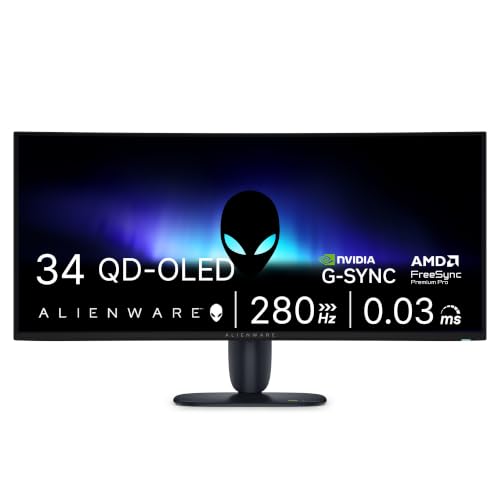 | Alienware AW3426DW | Curved ultrawide OLED | 34 in, 3440 x 1440 QD-OLED | 280Hz | 2 HDMI, DP, 15W downstream USB-C | USB-C is downstream only | Check Price on Amazon |
1. Dell S2725DS — Best QHD Monitor for Work and Everyday Use
Dell lists the S2725DS as a 27-inch QHD monitor at 2560 x 1440 with a 100Hz refresh rate and two integrated 5W speakers. The Amazon listing says the QHD resolution gives 1.77 times more detail than Full HD, and its title names TÜV Rheinland 4-star eye comfort.
Dell lists two HDMI inputs and one DisplayPort 1.2 input, each supporting QHD at up to 100Hz, and a height-adjustable stand with tilt, swivel and pivot. Dell’s headline refresh rates for the other four monitors here run from 240Hz to 360Hz. The S2725DS suits documents, video and calls more than a high-refresh gaming mode.
Refresh rate: Dell gives the S2725DS 100Hz, against headline rates of 240Hz to 360Hz on Dell’s pages for the other four monitors here.Our Take Choose the S2725DS for QHD documents and video when built-in speakers and a height-adjustable stand take priority over a 240Hz mode.
- Dell lists the S2725DS as a 27-inch screen at 2560 x 1440, QHD resolution for documents and video.
- Dell states that the S2725DS has two integrated 5W speakers, built-in sound for documents, video and calls.
- Dell gives the S2725DS stand height, tilt, swivel and pivot adjustment.
- Dell specifies two HDMI inputs and one DisplayPort 1.2 input on the S2725DS, each supporting QHD at up to 100Hz.
- Dell’s 100Hz refresh rate for the S2725DS is the lowest of the five monitors here, and the other four run from 240Hz to 360Hz on Dell’s pages.
- Dell’s port list for the S2725DS names HDMI and DisplayPort and does not name a USB-C video input.
2. Alienware AW2725DF — Best 360Hz QHD OLED
Dell gives the AW2725DF a 26.7-inch QD-OLED panel at QHD, 2560 x 1440, with 0.03ms gray-to-gray response. The Amazon listing adds VESA DisplayHDR True Black 400, 99.3% DCI-P3 coverage, AMD FreeSync Premium Pro and VESA AdaptiveSync. Dell lists a stand with 110mm of height travel plus tilt, swivel and pivot, and answers No for both a built-in speaker and an audio line out.
The 360Hz mode depends on the input. Dell lists QHD at 360Hz on each of two DisplayPort 1.4 inputs and QHD at 144Hz on the one HDMI 2.1 input. Dell describes the USB-C port as a 5Gbps downstream port with BC1.2 charging. Dell also lists a 1.8-meter DisplayPort cable and a 1-meter USB-C to DisplayPort cable among the box contents.
Our Take Pick the AW2725DF for QHD OLED gaming when the computer can send video over DisplayPort.
- Dell lists QHD at 360Hz on each of the AW2725DF’s two DisplayPort 1.4 inputs, so DisplayPort gives the top mode.
- Dell gives the AW2725DF’s 26.7-inch QD-OLED panel 0.03ms gray-to-gray response.
- Dell states that the AW2725DF stand has 110mm of height travel, plus tilt, swivel and pivot.
- The Amazon listing for the AW2725DF names FreeSync Premium Pro, VESA AdaptiveSync and DisplayHDR True Black 400.
- A computer connected over HDMI is limited to the QHD 144Hz mode Dell lists for the AW2725DF’s HDMI input, against 360Hz on DisplayPort.
- Dell answers No for both a built-in speaker and an audio line out on the AW2725DF.
- Dell describes the AW2725DF’s USB-C port as a downstream port, not a video input.
3. Dell SE2426HG — Best Smaller Full HD Gaming Screen
Dell describes the SE2426HG as a 23.8-inch IPS monitor at 1920 x 1080 and 240Hz, with 99% sRGB coverage and 0.5ms GTG response in Extreme Mode. The Amazon listing names AMD FreeSync Premium, HDMI variable refresh rate and TÜV Rheinland 3-star eye comfort.
Dell lists two HDMI ports with Full HD at up to 240Hz and one DisplayPort 1.4. Dell gives tilt from -5 to 21 degrees as the stand’s only adjustment, and answers No for a height-adjustable stand and for pivot. The SE2426HG’s 1920 x 1080 resolution has fewer pixels than the 2560 x 1440 Dell lists for the S2725DS and AW2725DF.
Size: At 23.8 inches on Dell’s page, the SE2426HG is the smallest of the five monitors here.Our Take Pick the SE2426HG for a compact 240Hz Full HD gaming desk where tilt adjustment is enough.
- Dell lists Full HD at up to 240Hz on both of the SE2426HG’s HDMI ports.
- Dell specifies one DisplayPort 1.4 input on the SE2426HG in addition to the two HDMI ports.
- Dell gives the SE2426HG 99% sRGB coverage and 0.5ms GTG response in Extreme Mode.
- The Amazon listing for the SE2426HG names FreeSync Premium and HDMI variable refresh rate.
- Dell lists tilt as the only stand adjustment on the SE2426HG, and answers No for height adjustment and pivot.
- Dell lists the SE2426HG at 1920 x 1080, fewer pixels than the 2560 x 1440 Dell lists for the S2725DS and AW2725DF.
4. Dell SE2726HG — Best 27-Inch Full HD Gaming Screen
Dell pairs the SE2726HG’s 27-inch IPS panel with 1920 x 1080 at 240Hz and 99% sRGB coverage. The Amazon listing gives 0.5ms response, AMD FreeSync Premium, HDMI variable refresh rate and TÜV Rheinland 3-star eye comfort.
Dell lists two HDMI ports with Full HD at up to 240Hz and one DisplayPort 1.4. Tilt from -5 to 21 degrees is the only stand adjustment on Dell’s page. Dell lists the same 1920 x 1080 for the 23.8-inch SE2426HG.
Our Take Choose the SE2726HG for a 27-inch 240Hz screen when Full HD resolution is acceptable at that size.
- Dell lists the SE2726HG with a 27-inch IPS panel at 1920 x 1080 and 240Hz.
- Dell states Full HD at up to 240Hz on both of the SE2726HG’s HDMI ports.
- Dell specifies a DisplayPort 1.4 input on the SE2726HG as well as the two HDMI ports.
- The Amazon listing for the SE2726HG names FreeSync Premium and HDMI variable refresh rate.
- Dell lists 1920 x 1080 for the 27-inch SE2726HG, the same pixel count as the 23.8-inch SE2426HG, so Full HD has to be acceptable at the larger size.
- Dell lists tilt as the only stand adjustment on the SE2726HG.
5. Alienware AW3426DW — Best Curved Ultrawide OLED
Dell lists the AW3426DW as a 34-inch curved QD-OLED ultrawide at 3440 x 1440 and 280Hz, with an 1800R curve, 1300 nits peak brightness and 0.03ms GTG response in Extreme Mode. The Amazon listing describes a 21:9 format, DisplayHDR True Black 500, G-SYNC Compatible and FreeSync Premium Pro support, and an anti-burn-in algorithm with a graphite sheet.
Dell lists two HDMI 2.1 ports accepting up to 3440 x 1440 at 280Hz, one DisplayPort 1.4, and a 5Gbps USB-C downstream port with charging up to 15W. Dell answers No for USB-C power delivery upstream. A 34-inch ultrawide takes more desk width than the 27-inch monitors here.
Our Take Choose the AW3426DW for curved ultrawide OLED gaming when the computer can send HDMI or DisplayPort video.
- Dell lists the AW3426DW as a curved 34-inch QD-OLED panel at 3440 x 1440 and 280Hz.
- Dell gives the AW3426DW 0.03ms gray-to-gray response in Extreme Mode.
- Dell specifies two HDMI 2.1 ports and one DisplayPort 1.4 on the AW3426DW, so a computer can send either HDMI or DisplayPort video.
- Dell lists a downstream USB-C port on the AW3426DW with charging up to 15W.
- Dell answers No for USB-C upstream support on the AW3426DW.
- The 34-inch ultrawide format takes more desk width than the 27-inch monitors here.
- The Amazon listing describes anti-burn-in features and does not say burn-in cannot happen.
Buying Guide: Choosing a Dell or Alienware Monitor
Decide between everyday work and high-refresh gaming
Dell lists the S2725DS at QHD and 100Hz with two 5W speakers and a height-adjustable stand. The speakers and stand suit a desk where documents and video get as much use as games, and Dell does not list a higher refresh mode on any input.
Dell lists Full HD at 240Hz for the SE2426HG and SE2726HG, and QHD at 360Hz for the AW2725DF. Each published rate applies only when the source and the input can deliver that mode.
Compare screen size and pixel count
Dell lists the SE2426HG at 23.8 inches and 1920 x 1080, and the SE2726HG at 27 inches with the same 1920 x 1080. Dell lists 2560 x 1440 for both the S2725DS and the AW2725DF, and sizes them at 27 inches and 26.7 inches.
Dell lists the AW3426DW at 34 inches and 3440 x 1440. Measure the desk before choosing the ultrawide, and compare it with a 16:9 screen if the work does not need the extra width.
Read the HDMI and DisplayPort modes separately
Dell lists the AW2725DF at QHD 360Hz on DisplayPort and QHD 144Hz on HDMI. Dell’s input list names DisplayPort for the 360Hz mode.
Dell lists Full HD at up to 240Hz on the HDMI ports of the SE2426HG and SE2726HG, and 3440 x 1440 at up to 280Hz on the HDMI ports of the AW3426DW. Dell lists QHD at up to 100Hz on each input of the S2725DS. Check the input, the cable and the source before treating the largest number as available everywhere.
Identify what USB-C does on these monitors
Dell lists the AW3426DW‘s USB-C port as downstream with charging up to 15W, and lists HDMI and DisplayPort for video. Dell also describes the AW2725DF‘s USB-C port as a downstream port with BC1.2 charging.
Dell’s port list for the S2725DS names HDMI and DisplayPort and does not name a USB-C video input. A laptop with only USB-C video output may need an adapter or a USB-C to DisplayPort cable, and Dell lists one of those cables in the AW2725DF box contents. Keep the laptop’s own charger available.
Check the stand and integrated sound
Dell lists height, tilt, swivel and pivot adjustment for the S2725DS and states two 5W speakers. Dell lists the AW2725DF with a 110mm height range, tilt, swivel and pivot, and answers No for a built-in speaker.
Dell lists tilt as the only stand adjustment for the SE2426HG and SE2726HG, and answers No for built-in speakers on both. Check the desk height and any separate mount before ordering either one.
FAQ
Is the S2725DS a gaming monitor?
Dell lists the S2725DS as a 27-inch QHD monitor at 100Hz with integrated speakers and a height-adjustable stand. A computer can send games to it, but Dell lists a lower refresh rate for it than for the gaming monitors here.
Dell lists 240Hz at Full HD for the SE2426HG and SE2726HG, and 360Hz at QHD over DisplayPort for the AW2725DF. Weigh the games against the everyday desk work before choosing.
Which monitor has the highest stated QHD refresh rate?
Dell lists the AW2725DF at QHD 360Hz on DisplayPort and QHD 144Hz on HDMI.
Dell lists the AW3426DW at 3440 x 1440 and 280Hz, a wider resolution on a 34-inch ultrawide screen. The pixel counts differ, so the refresh figure alone does not settle which suits a desk.
Which monitors reach their top refresh rate over HDMI?
Dell lists Full HD at up to 240Hz on HDMI for the SE2426HG and SE2726HG, and 3440 x 1440 at up to 280Hz on HDMI for the AW3426DW.
Dell lists the S2725DS at QHD and 100Hz on every input, and the AW2725DF at 144Hz on HDMI against 360Hz on DisplayPort.
Which monitor has built-in speakers?
Dell states two integrated 5W speakers for the S2725DS. Dell answers No for a built-in speaker on the AW2725DF, SE2426HG and SE2726HG.
Dell’s page for the AW3426DW does not name built-in speakers. Check the audio specification of the exact monitor when sound is a requirement.
Does the AW3426DW charge a laptop over USB-C?
Dell lists the AW3426DW‘s USB-C port as downstream with charging up to 15W, and answers No for USB-C power delivery upstream.
Dell lists HDMI and DisplayPort as the video inputs. Use the laptop’s compatible video output and its own power supply.
Bottom Line
Dell lists the S2725DS as a QHD work screen with speakers, the AW2725DF as QHD OLED at up to 360Hz on DisplayPort, and the SE2426HG and SE2726HG as 240Hz Full HD screens in two sizes. Dell lists the AW3426DW as a curved 34-inch OLED ultrawide at 280Hz.
For a deeper look at one brand’s gaming range, see the Alienware monitor comparison. The Dell monitor comparison covers additional work-focused models.