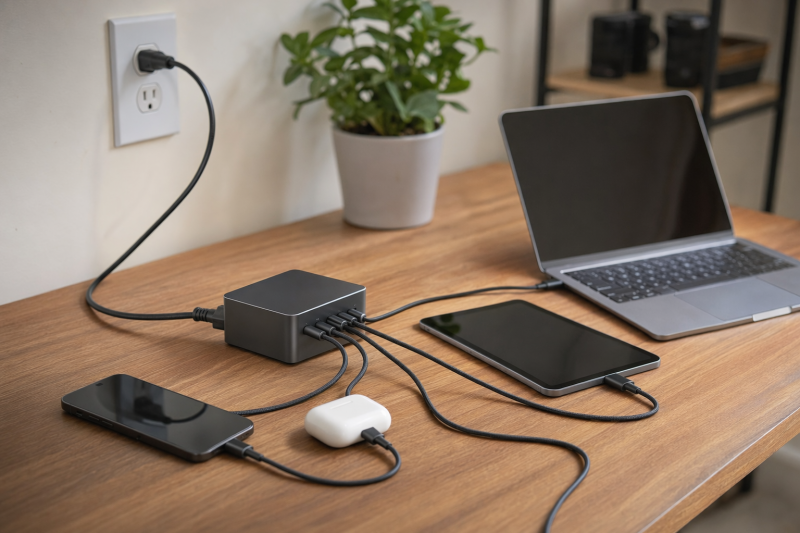
The Anker Prime Charger (250W, 6 Ports, GaNPrime) is the best USB-C desktop charging station for most multi-device desks because it combines four USB-C ports, two USB-A ports, a 250W station ceiling, and an official power table that states how much total output remains available as two through six ports are used. Its screen and control dial also make the shared power budget easier to follow. The catch is that Anker does not publish one fixed per-port split for every combination. The station allocates power dynamically, and Anker says firmware changes can alter distribution.
Choose a different station when your priority is more specific. UGREEN documents a 140W/100W/60W three-laptop layout. Satechi publishes the clearest complete one-to-four-device schedule. j5create includes a high-power USB-C output cable and keeps USB-A for an older accessory. Turonic offers a compact upright six-port layout with an exact full-load row. These roles are based on manufacturer-documented ports, totals, and allocation behavior, not on personal charging tests.
This post includes affiliate links, for which we may earn a commission at no extra cost to you should you make a purchase using our links. As an Amazon Associate, we can earn from qualifying purchases. Learn more.Updated July 17, 2026
This guide covers corded desktop charging stations, not plug-in wall blocks. Each pick has at least three charging outputs, at least two USB-C outputs, a separate or captive AC cord, a current exact manufacturer identity, documented simultaneous allocation behavior, and an exact US Amazon listing with a New offer during our July 17 check. If you want a compact block that hangs directly from the outlet, use the separate USB-C charger guide instead.
Quick Picks
- Best overall: Anker Prime Charger (250W, 6 Ports, GaNPrime) for four USB-C ports, two USB-A ports, a 250W total ceiling, and documented aggregate output for two through six connected ports.
- Best documented three-laptop layout: UGREEN Nexode 300W Desktop Charger for its exact 140W/100W/60W C1/C2/C3 example.
- Best predictable four-USB-C station: Satechi 165W USB-C 4-Port PD GaN Charger for a complete 100W solo, 100W/60W dual, two possible triple, and 60W/45W/30W/30W full-load schedule.
- Best with an integrated high-power lead: j5create 108W PD USB-C Super Charger for an attached USB-C output cable plus one USB-C and one USB-A port.
- Best vertical accessory station: Turonic Charging Station 200W (YMS-248) for four USB-C and two USB-A ports in an upright stand, with an exact all-six allocation row.
USB-C Desktop Charging Station Comparison
| Image | Product | Details | Check Price |
|---|---|---|---|
 | Anker Prime Charger (250W, 6 Ports, GaNPrime) | Best for: Six-port desks needing visible aggregate power feedback Model / part: A2345 Input / outputs: 100-240V, 3.5A, 50-60Hz; 4 USB-C + 2 USB-A Station total: Up to 250W Solo port maximums: C1 140W; C2/C3/C4 100W; A1/A2 22.5W Two-device allocation: Up to 240W total; per-port split is dynamic Three-device allocation: Up to 250W total; per-port split is dynamic Four-device allocation: Up to 250W total; per-port split is dynamic Full-load example: Six ports up to 250W total; firmware can change distribution PD / PPS / EPR: C1 includes a documented 28V/5A 140W profile; do not generalize protocol support beyond official profiles Included cords / cables: Provided AC cord documented; USB charging cable not documented Dimensions / weight: 4.18 x 1.58 x 3.64in; 22.58oz / 640g Strongest limitation: No fixed per-port simultaneous split; allocation can vary by mode and firmware Evidence gate: Exact official solo table plus official multi-port aggregate schedule | Check Price on Amazon |
 | UGREEN Nexode 300W Desktop Charger | Best for: Three documented higher-power USB-C laptop positions Model / part: CD333 / official SKU 55474 Input / outputs: Official exact-SKU page lists 240V input; 4 USB-C + 1 USB-A Station total: 300W Solo port maximums: C1 140W; C2/C3 100W; C4 45W; USB-A 22.5W Two-device allocation: No fixed exact two-device row published Three-device allocation: C1/C2/C3: 140W / 100W / 60W Four-device allocation: No fixed exact four-device row published Full-load example: No fixed exact five-device row published PD / PPS / EPR: PD 3.1 and 140W C1 path documented; other protocol details not generalized Included cords / cables: Power cable, 5ft 240W USB-C cable, manual Dimensions / weight: 3.6 x 2 x 4.3in; exact current official weight not published Strongest limitation: Only the three-laptop split is exact; other simultaneous layouts remain unspecified Evidence gate: Exact SKU 55474 identity and official C1/C2/C3 simultaneous example | Check Price on Amazon |
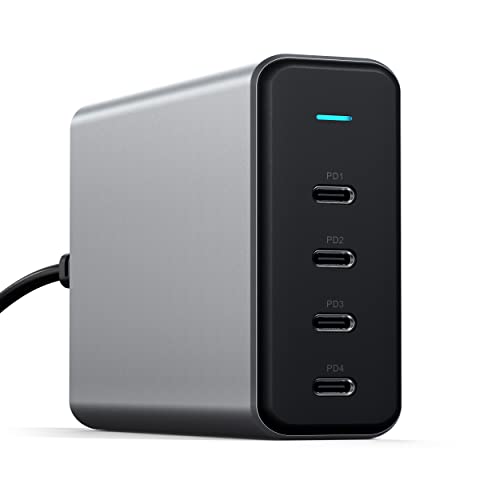 | Satechi 165W USB-C 4-Port PD GaN Charger | Best for: Predictable four-device all-USB-C charging Model / part: ST-UC165GM (US) Input / outputs: 100-240V; 4 USB-C PD Station total: Up to 165W Solo port maximums: One connected USB-C port up to 100W Two-device allocation: 100W / 60W Three-device allocation: 60W / 60W / 45W or 100W / 30W / 30W, depending on ports Four-device allocation: 60W / 45W / 30W / 30W Full-load example: All four ports: 60W / 45W / 30W / 30W PD / PPS / EPR: USB-C PD documented; revision, PPS, and EPR not stated on the current exact page Included cords / cables: Detachable approximately 46in AC cord and base; no USB charging cables Dimensions / weight: 3.94 x 1.2 x 2.8in; 12oz Strongest limitation: 100W solo ceiling and no included USB charging cables Evidence gate: Complete official one-, two-, three-, and four-device schedule | Check Price on Amazon |
 | j5create 108W PD USB-C Super Charger | Best for: A mixed USB-C and USB-A desk with an integrated high-power USB-C lead Model / part: Amazon model 110987 / part JUP34108 Input / outputs: 100-240V, 1.5A; integrated USB-C cable + USB-C + USB-A Station total: 108W Solo port maximums: Integrated USB-C 100W; USB-C port 20W; USB-A 12W Two-device allocation: Integrated USB-C up to 87W with one other output; official USB-C example is 87W + 20W Three-device allocation: 76W + 20W + 12W Four-device allocation: Not applicable; station has three outputs Full-load example: All three outputs: 76W + 20W + 12W PD / PPS / EPR: USB Power Delivery 3.0 documented Included cords / cables: Detachable 120cm US AC cord and 120cm USB-C output cable Dimensions / weight: 5.42 x 2.59 x 1.3in; 15oz / 425g Strongest limitation: Only three outputs, with the main cable's ceiling reduced as secondary ports connect Evidence gate: Exact official solo, two-output, and full three-output schedule | Check Price on Amazon |
 | Turonic Charging Station 200W (YMS-248) | Best for: Vertical six-port charging with one higher-power USB-C device and small accessories Model / part: YMS-248 Input / outputs: 110-220V AC, 1.4A; 4 USB-C + 2 USB-A Station total: 200W label Solo port maximums: C1 100W; C2/C3/C4 20W; A1/A2 18W Two-device allocation: No fixed exact two-device row published Three-device allocation: No fixed exact three-device row published Four-device allocation: No fixed exact four-device row published Full-load example: 65W + 20W + 3.5W + 3.5W + 3.5W + 3.5W PD / PPS / EPR: USB PD documented for C1; revision, PPS, and EPR not stated Included cords / cables: 1.5m AC power cable, stand, 1m USB-C to USB-C cable Dimensions / weight: 3.6 x 2.6 x 1.2in; 5.71oz / 162g Strongest limitation: Only the all-six simultaneous row is fixed; accessory ports fall well below solo labels at full load Evidence gate: Official solo table plus exact all-six allocation row | Check Price on Amazon |
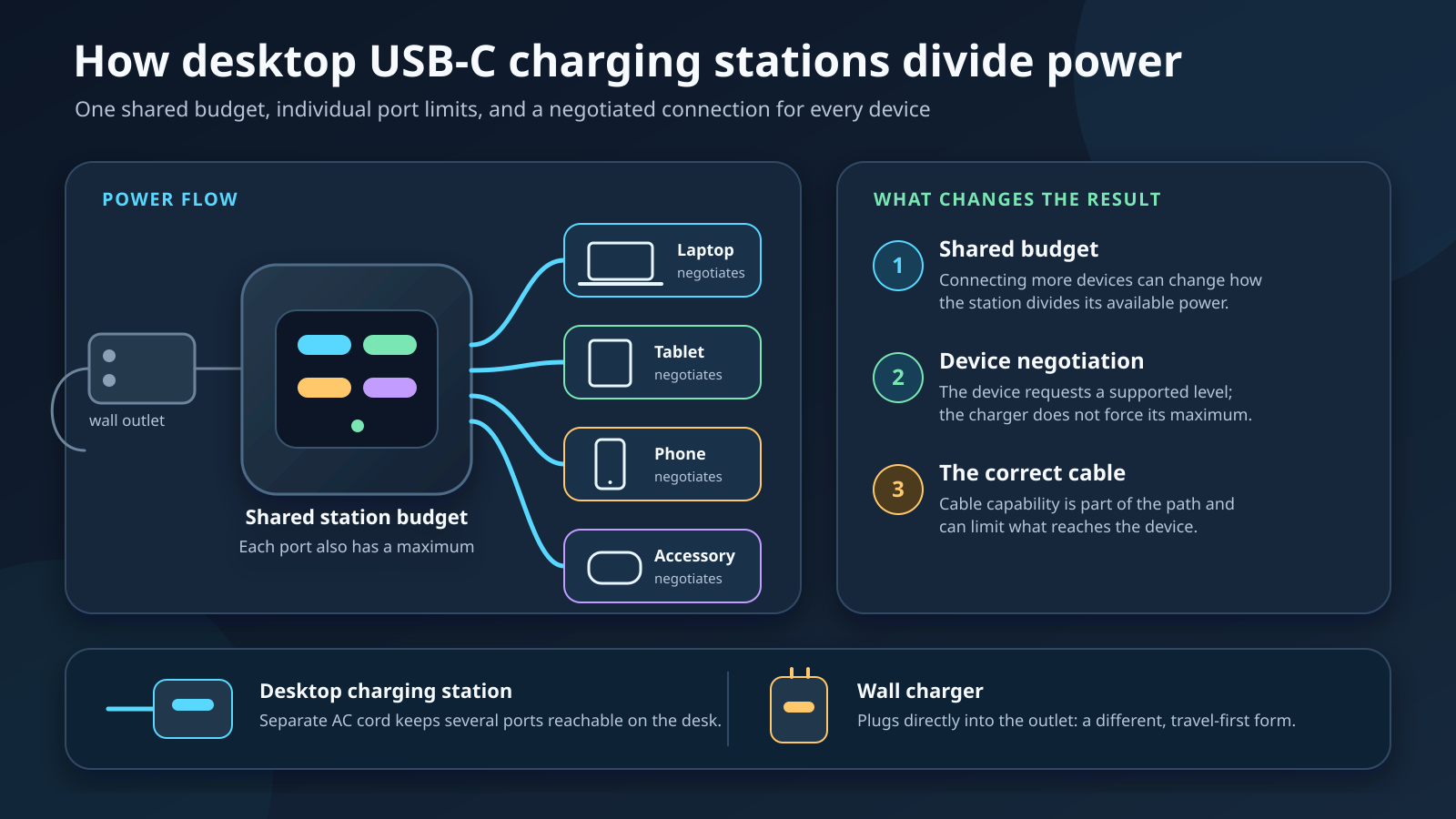
The table keeps three different numbers separate. The station total is the highest combined ceiling. A solo port maximum is what one port can advertise when used alone under the manufacturer’s stated conditions. A simultaneous allocation is the lower or redistributed schedule that applies when more devices connect. Those numbers are related, but they are not interchangeable.
1. Anker Prime Charger (250W, 6 Ports, GaNPrime) – Best Overall
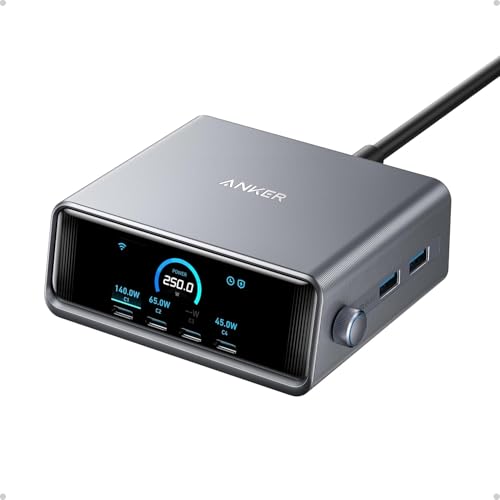
The Anker A2345 earns the top position because its six-port layout covers the broadest desk without hiding the distinction between station capacity and a single port’s ceiling. The front provides four USB-C ports and two USB-A ports. Anker rates the station at up to 250W total. Used alone, USB-C1 is rated up to 140W, USB-C2 through USB-C4 up to 100W each, and each USB-A port up to 22.5W.
Those solo labels cannot all apply at once. Anker’s official multiple-port schedule states that two connected ports can use up to 240W total. With three, four, five, or six connected ports, the combined ceiling is up to 250W. That is useful allocation evidence, but it is an aggregate schedule rather than a fixed promise for each connector. Anker says AI Power Mode identifies connected-device requirements and adjusts distribution. It also warns that the illustrated distribution can change with firmware updates.
That condition shapes the verdict. A desk with several devices of changing demand can benefit from the high shared ceiling and the display’s live feedback. A desk that needs one repeatable 60W/45W/30W/30W arrangement should choose the Satechi instead. The Anker’s display tells you what the station is doing; it does not turn an adaptive split into a fixed one.
The station uses a separate AC lead. Anker recommends the provided cord or a standard C7 2-pin AC cord rated above 4A. Input is 100-240V, 3.5A, 50-60Hz. The body measures 4.18 by 1.58 by 3.64 inches and weighs 22.58 ounces, or 640 grams. Anker documents the AC cord but does not support a claim that a USB charging cable comes in the box. Plan cable purchases separately, especially for the 140W path. The USB-C cable guide explains why connector shape alone does not establish a cable’s power rating.
The strongest reason to buy the A2345 is its combination of six reachable ports, a high shared ceiling, and explicit aggregate totals by connected-port count. The strongest reason to skip it is the absence of a fixed port-by-port schedule for each multi-device layout.
Our Take
Choose the Anker A2345 when the device mix changes through the day and you want to see the station’s current decisions. Do not buy it on the assumption that C1, C2, C3, and C4 can all hold their printed solo maximums together.
- Four USB-C and two USB-A outputs
- Up to 250W shared station ceiling
- Official aggregate schedule for two through six connected ports
- Display and dial expose current power information
- No fixed per-port split for every multi-device combination
- Distribution can change with mode and firmware
- USB charging cable inclusion is not documented
2. UGREEN Nexode 300W Desktop Charger – Best for Three Higher-Power USB-C Positions
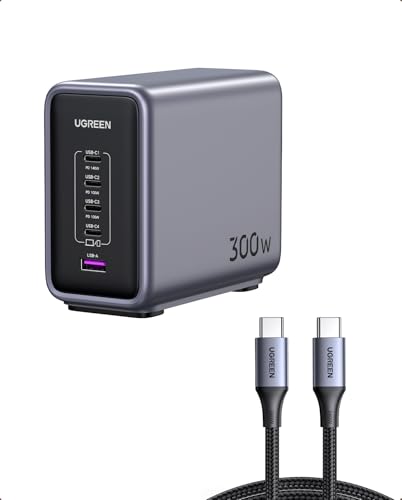
UGREEN’s five-port station is the clearest pick when the intended desk has three higher-power USB-C positions. The exact official SKU 55474 page states a 300W station total and gives a simultaneous three-laptop example: USB-C1 at 140W, USB-C2 at 100W, and USB-C3 at 60W. That row, rather than the 300W headline alone, is why the UGREEN has a distinct role.
The port layout is four USB-C plus one USB-A. Official product imagery lists the solo ceilings as 140W for C1, 100W for C2 and C3, 45W for C4, and 22.5W for USB-A. The 140W/100W/60W example adds exactly to the 300W station total, but that does not authorize other combinations. UGREEN does not publish a fixed exact two-device, four-device, or all-five split on the current exact-SKU page. Treat those layouts as unspecified rather than filling the blanks by subtraction.
The box contents are better documented than on many stations. UGREEN lists the charger, a power cable, a 5-foot 240W USB-C to USB-C cable, and a manual. The current US page lists the body at 3.6 by 2 by 4.3 inches. A current exact official weight was not published in the material used for this guide, so the comparison does not borrow one from a marketplace listing.
UGREEN identifies PD 3.1 and the 140W C1 path. Getting that profile still depends on what the connected device accepts and on the cable between the port and device. A high-rated cable is a ceiling, not a command to the device. If your desk already uses a data-capable Thunderbolt 4 cable, verify its marked charging rating instead of assuming the Thunderbolt name guarantees the station’s highest power profile.
This station makes the most sense for a repeatable C1/C2/C3 layout. Put the highest-demand compatible device on C1, the next on C2, and the third on C3. Use C4 and USB-A for other devices only after accepting that the manufacturer has not published a fixed five-device schedule. The honest limitation is not the number of ports; it is the smaller set of exact simultaneous rows.
Our Take
Choose the UGREEN when the official 140W/100W/60W three-USB-C arrangement matches your desk. Choose the Anker for a changing six-port mix or the Satechi for a complete fixed four-device schedule.
- Exact 140W/100W/60W three-laptop example
- Four USB-C ports plus one USB-A port
- 300W shared station ceiling
- Power cable and 5-foot 240W USB-C cable documented in the box
- No fixed two-, four-, or five-device schedule published
- Exact current official weight is not stated
- Three-laptop result depends on accepted device profiles and cables
3. Satechi 165W USB-C 4-Port PD GaN Charger – Best Predictable Four-USB-C Schedule

The Satechi ST-UC165GM is the best pick when allocation clarity matters more than the highest station number. Its four outputs are all USB-C, and Satechi publishes the complete schedule from one through four connected devices. With one connection, a port can supply up to 100W. Two devices get 100W and 60W. Three devices receive either 60W/60W/45W or 100W/30W/30W, depending on which ports are occupied. All four receive 60W/45W/30W/30W.
That table answers a practical question before purchase: what must the highest-demand device give up as the third and fourth cables connect? The answer is explicit. The top device can retain a 100W path in one three-port arrangement, or the station can use a more even 60W/60W/45W arrangement. At full load, the highest position falls to 60W. Port choice matters, so retain the official quick guide and label cables if the desk is rearranged often.
The charger is a corded desktop unit despite Satechi’s store taxonomy also using wall-charger wording. The exact product description says it has a detachable power cord and a stand for desk placement. The included US AC cable is about 46 inches. Input is 100-240V. The body measures 3.94 by 1.2 by 2.8 inches and weighs 12 ounces.
Satechi’s box-content block uses a broad Charge Cable label, while its specific FAQ says USB charging cables are not included and must be bought separately. The article follows the more specific answer: the AC lead and base are included; device-charging cables are not. If you plan to reuse a Thunderbolt 5 cable, check its length, marked current support, and fit for the exact charging route. Data certification and power negotiation are related cable properties, but they are not the same claim.
This is also why the selected 165W Satechi is not interchangeable with the excluded 200W six-port model. The 165W unit has fewer ports and a lower solo ceiling, but it supplies a complete schedule. A bigger number with missing intermediate rows would be a weaker recommendation for a buyer who values predictability.
Our Take
Choose the Satechi ST-UC165GM for an all-USB-C desk where you can map devices to a published four-port schedule. Skip it if you need USB-A or a solo profile above 100W.
- Complete one-, two-, three-, and four-device schedule
- Four USB-C outputs with no USB-A position
- Detachable AC cord and desk stand
- Compact official dimensions
- 100W solo ceiling
- No USB-A port for older accessories
- USB device-charging cables are not included
4. j5create 108W PD USB-C Super Charger – Best Integrated High-Power Lead

The j5create JUP34108 takes a different approach from the four- and six-port blocks. One USB-C output is an integrated cable, then the front adds one USB-C port and one USB-A port. That produces three charging outputs, including two USB-C paths, while removing one detachable high-power cable from the desk.
The integrated USB-C cable is rated up to 100W when used by itself. When one secondary output is active, the main cable falls to up to 87W. j5create’s official allocation image shows the two-USB-C case as 87W on the integrated cable plus 20W on the front USB-C port. With all three outputs active, the published row is 76W on the integrated cable, 20W on the USB-C port, and 12W on USB-A, for the station’s full 108W label.
This is a useful example of why solo ratings are not a shopping total. The main cable’s 100W solo ceiling drops before the USB-C and USB-A secondary labels are added. The device on that cable must be comfortable with 87W in a two-output layout or 76W at full load. A device can still negotiate less. The table establishes charger availability, not a promised draw from every laptop.
j5create documents USB Power Delivery 3.0. Input is 100-240V at up to 1.5A. The package includes a detachable 120cm US power cord and a 120cm USB-C output cable. The product measures 5.42 by 2.59 by 1.3 inches and weighs 15 ounces, or 425 grams. Its flat body is longer than the Satechi’s, so measure the intended desk or shelf rather than comparing wattage alone.
The USB-A port is the reason to choose this over an all-USB-C four-port station when one older accessory still matters. It is still a charger, not a data hub. If the real need is several data peripherals with power input, the powered USB hub guide covers that different category.
Our Take
Choose the JUP34108 when three outputs are enough and a built-in high-power USB-C lead reduces cable clutter. Its main limitation is equally clear: the lead drops from 100W solo to 76W when all three outputs are active.
- Integrated USB-C output cable
- Exact two-output and three-output rows
- Front USB-C and USB-A ports
- Detachable AC cord documented
- Only three charging outputs
- Main USB-C cable falls to 76W at full load
- Integrated output cable cannot be swapped like a normal port cable
5. Turonic Charging Station 200W (YMS-248) – Best Vertical Accessory Layout
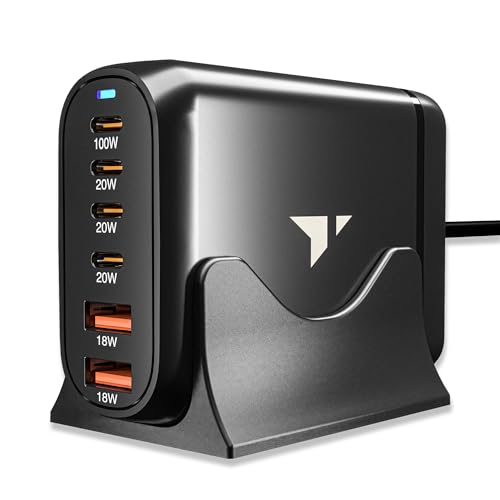
The Turonic YMS-248 is the pick for a vertical six-port layout built around one higher-power USB-C position and several lighter accessory positions. It has four USB-C ports and two USB-A ports. The station label is 200W. Used alone, USB-C1 is rated up to 100W, USB-C2 through USB-C4 up to 20W each, and each USB-A port up to 18W.
The key evidence is the all-six row. When every output is occupied, Turonic publishes 65W/20W/3.5W/3.5W/3.5W/3.5W. That split is far below the sum of the printed solo labels. It shows exactly why a port face cannot be read as a simultaneous table. C1 gives up 35W from its solo ceiling, one secondary port holds 20W, and the remaining four positions fall to 3.5W each.
Turonic does not publish fixed two-, three-, or four-device allocations on the current product page. The article does not infer them. Buy this model only if its documented full-load shape makes sense: one device on the 65W position, one on the 20W position, and four small accessories whose accepted power can fit the lower positions. If several connected devices need midrange laptop-class profiles at the same time, choose the UGREEN’s exact three-laptop row or the Satechi’s complete four-USB-C table.
The station includes a vertical stand, a 1.5m AC power cable, and a 1m USB-C to USB-C cable. Input is 110-220V AC at 1.4A. The body measures 3.6 by 2.6 by 1.2 inches and weighs 5.71 ounces, or 162 grams. Those manufacturer figures support its space-saving role without implying that the stand cannot move when heavy or stiff cables pull on it. Cable routing remains part of setup.
The vertical face keeps all six charging connectors reachable. It does not provide USB data, video, Ethernet, or storage. A USB-C hub serves those peripheral functions and may accept power, but that does not make it a substitute for a six-output desktop charger.
Our Take
Choose the YMS-248 when one 65W full-load position and several small accessory positions match the desk. Do not choose it by adding 100W, three 20W labels, and two 18W labels as if all could apply together.
- Four USB-C and two USB-A outputs
- Vertical stand and 1.5m AC cable included
- Exact all-six allocation row
- USB-C to USB-C cable included
- No fixed two-, three-, or four-device rows published
- Four positions fall to 3.5W each at full load
- 200W label does not describe the published all-six sum
How to Choose a USB-C Desktop Charging Station
Start with the devices that must charge at the same time, not the total number you own. Write down the input profile each device accepts from its own manual or support page. Then assign those devices to specific station ports using the manufacturer’s simultaneous schedule. If the schedule does not cover your intended combination, treat the result as unknown.
Separate the station total from solo port limits
A 300W station can have one 140W port without offering 140W on every port. A 200W station can print 100W, 20W, 20W, 20W, 18W, and 18W solo labels while publishing a much lower all-six split. The shared power electronics, port grouping, negotiated profiles, and active-device count decide what remains available.
Use three columns in your plan:
- Station ceiling: the highest combined output the manufacturer names.
- Solo port ceiling: the highest profile one connector can offer under solo conditions.
- Simultaneous allocation: the exact split or aggregate limit for the number and position of connected devices.
Never replace the third column by adding the second. That arithmetic is valid only when the manufacturer publishes the same combination.
Match the exact schedule to the desk
The Satechi is easiest to plan because every device count has a published row. The j5create also covers all possible counts because it has only three outputs. UGREEN provides one strong three-port example, but other layouts remain unspecified. Turonic gives the all-six endpoint, not the intermediate steps. Anker publishes aggregate totals for every connected-port count, but its per-port distribution remains dynamic.
This difference matters more than a small gap in the headline total. A lower-capacity station with a complete table may be a better buy for a fixed desk than a higher-capacity model whose exact intended layout is undocumented.
Count USB-C outputs, not just total ports
USB-A still helps with older cables and small accessories, but it cannot replace a required USB-C profile. The j5create has three outputs, yet only two are USB-C. Turonic and Anker have six outputs, but two are USB-A. UGREEN has five outputs, with four USB-C. Satechi is the only selected all-USB-C station.
If your actual need is data expansion, read the dock and hub comparison. Charging stations do not gain display or storage functions simply because they use USB-C connectors.
Check the AC cord and desk placement
A separate AC cord lets the charging face sit within reach while the wall outlet remains behind the desk. Confirm cord length, connector type, stand orientation, and cable exit direction. Leave room for USB-C cable bends and for the largest connector shells. A light vertical station may need careful routing so stiff cables do not tug it out of position.
Do not confuse a station’s detachable AC lead with a detachable USB charging cable. Anker documents the AC cord but no included USB device cable. Satechi includes the AC cord and base but says device-charging cables are sold separately. UGREEN and Turonic each document one included USB-C cable. j5create’s primary USB-C output is integrated.
Keep charging and docking decisions separate
A USB-C docking station may power one host while adding data and displays, but it is not a multi-device charging station. A Thunderbolt docking station has the same category boundary. Buy a dock for host expansion and a charging station for several independent charging outputs unless one exact product manual proves both roles.
Setup and Power-Budget Planning
Step 1: Identify the highest-demand device
Find the charging input your device accepts. The station’s output is only one side of negotiation. A port that can offer 140W may supply less when the device requests less, the cable supports a lower current, or the multi-port schedule assigns a smaller ceiling. Do not assume every USB-C laptop accepts every USB Power Delivery profile.
Step 2: Pick the correct port before connecting everything
Use the manufacturer’s labeled order. On UGREEN, the documented three-laptop example uses C1, C2, and C3. On Turonic, the 100W solo label belongs to C1, and the full-load high position becomes 65W. On j5create, the integrated cable is the primary output. On Satechi, the selected port combination decides which of the two three-device rows applies.
Step 3: Check cable capability
The cable must support the required current and voltage profile, and the device must accept it. A cable marketed for data may also carry high power, but verify the actual marking and manufacturer specification. The Thunderbolt generation guide explains data-generation differences; it should not be used as a substitute for the cable’s charging specification.
Step 4: Connect devices in priority order
Start with the highest-demand device on the intended high-power port, then add the next device and watch for the schedule change. With Anker, use the display as information about the current negotiated result. With fixed-table stations, compare the new device count and occupied ports to the official row. Disconnecting or reconnecting a device can trigger renegotiation, so a momentary change in displayed power does not establish a charging-time claim.
Step 5: Recheck the full-load case
Ask whether the lowest allocated ports still suit the attached accessories. Turonic’s four 3.5W full-load positions are a clear example. They may suit some small devices, but compatibility and behavior depend on what each device accepts. The article does not promise that a named phone, tablet, watch, or laptop will charge at a particular rate.
Keep a short port map near the station if several people use the same desk. Record the connector label, the device normally attached there, the solo ceiling, and the applicable multi-device row. For a dynamic station, record only the manufacturer’s aggregate ceiling and mark the port split as dynamic. For a fixed-table station, copy the exact row and port order. This prevents a later cable swap from turning a documented layout into an assumed one.
Revisit that map whenever a device, cable, or firmware version changes. A replacement laptop may accept a different profile. A longer cable may carry a different marked power rating. A firmware update may change an adaptive station’s distribution. These checks do not require predicting charge time. They simply keep the planned layout tied to the same conditions that support the manufacturer’s numbers.
The USB-C connector also does not tell you whether a port carries USB4 data. The USB4 explainer covers that transport standard. These five station ports are evaluated as charging outputs only.
Frequently Asked Questions
What is the difference between a desktop charging station and a wall charger?
A desktop station uses a separate or captive AC cord so the charging body and ports can sit on the desk. A wall charger plugs its body directly into the outlet. The corded form improves reach and can support more front-facing ports, but it also takes desk space. This guide excludes direct wall-plug blocks.
Does a 300W station send 300W to one USB-C port?
No. The station total is a combined ceiling. UGREEN’s 300W model documents up to 140W on C1 alone and a 140W/100W/60W three-port example. A device connected to one port cannot claim the entire station label unless the manufacturer explicitly publishes that single-port profile.
Can I add every port’s printed maximum to find total output?
Usually not. Solo port labels describe separate conditions. Turonic’s printed solo ceilings add to more than its station label, while its published all-six allocation adds to much less. Use the exact simultaneous table or example for the intended configuration.
Why does charging power change when another device connects?
The station has a shared budget and may renegotiate profiles when the active-port count changes. Some products use fixed tables, while others allocate power dynamically. The change is not proof of a fault, charging time, or temperature behavior. Compare it with the manufacturer’s schedule and the connected devices’ accepted profiles.
Is 140W enough for every USB-C laptop?
There is no universal laptop promise. A laptop may accept a lower or different profile, require a particular cable, or use a proprietary input for its highest adapter rating. Match the exact laptop’s official charging specification to the station port and cable.
Do I need a special USB-C cable for 100W or 140W?
You need a cable documented for the intended power profile and current. Higher-power paths often require an electronically marked cable. The connector shape alone is not proof. Use the station and device manuals together, and check the cable’s own specification.
Are these charging stations also USB-C hubs or docks?
No. They are selected for charging outputs. They do not earn data, video, networking, or storage claims from the USB-C connector. Choose a hub or dock when the goal is peripheral expansion.
Which pick has the most predictable allocation?
The Satechi ST-UC165GM. It publishes a complete schedule for one, two, three, and four connected devices. j5create also covers every possible device count on its three-output design. Anker covers aggregate totals by port count but keeps the per-port split dynamic.
Which pick is best for three higher-power USB-C devices?
UGREEN is the clearest match because its exact official example gives C1/C2/C3 as 140W/100W/60W. That does not mean every connected device will draw those amounts. It means the station documents those port ceilings for that layout.
Which pick includes a USB-C charging cable?
UGREEN lists a 5-foot 240W USB-C to USB-C cable. Turonic lists a 1m USB-C to USB-C cable. j5create includes its 120cm USB-C output lead. Satechi says device-charging cables are not included. Anker documents the AC cord but does not support a USB charging cable inclusion claim in the evidence used here.
How We Research and Select
We began with the accepted July 16 intent and inventory record and did not repeat the Bing search. The market observation was kept separate from the Keywords Everywhere Google Ads / Google Keyword Planner demand proxy.
The product gate required at least three charging outputs, at least two USB-C outputs, a separate or captive AC cord, corded desktop form, a current exact manufacturer identity, total output, solo ceilings, simultaneous allocation evidence, supported box contents, and a distinct buyer role. Direct wall chargers, power strips with incidental USB, docks, hubs, wireless-only pads, power banks, bundles, used/renewed items, regional-only identities, and near-duplicate count fillers were removed.
Technical claims came from current official product pages and manuals. Amazon was used for exact US listing identity and dated New-offer state. The final five ASINs were requested once in the same order shown in this article and table. All five returned in that order with one New listing each on July 17, 2026. No price was used.
Several plausible products were left out. Satechi’s 200W six-port model had solo ceilings and one all-six row, but its current quick guide deferred intermediate layouts to a missing power schematic. Belkin documented solo ceilings but no simultaneous schedule. StarTech had an excellent official allocation table, but the preserved Amazon discovery returned only a prohibited cable bundle, not the standalone listing. UGREEN X766 had incomplete allocation coverage and would have added a second UGREEN role without enough evidence.
Verdicts follow the documented facts. The Anker verdict rests on six ports, aggregate schedules, and feedback. UGREEN rests on the exact three-laptop row. Satechi rests on a complete four-device table. j5create rests on an integrated lead and exact three-output behavior. Turonic rests on vertical form and its exact all-six row. No verdict depends on personal testing, hardcoded price, charging-time prediction, temperature behavior, or universal compatibility.
Conclusion
The Anker Prime Charger A2345 is the best overall USB-C desktop charging station for a changing six-device desk, as long as you accept dynamic per-port allocation. UGREEN is the better fit for its exact 140W/100W/60W three-USB-C example. Satechi is the choice for the clearest fixed four-device schedule. j5create suits a three-output desk that benefits from an integrated cable, while Turonic suits a vertical one-plus-accessories layout.
Before buying, map each device to an exact port and simultaneous row. The station total, a solo port maximum, and a full-load allocation answer different questions. Keeping them separate is the simplest way to avoid buying a high-number charger that cannot support the layout you actually plan to use.