For most Windows workstation desks, Dell UltraSharp U2725QE is the best Thunderbolt monitor in this frozen slate. It combines a 27-inch 4K panel with a Thunderbolt 4 hub, KVM, 2.5GbE, downstream display routes, and a Dell-stated charging ceiling up to 140W EPR. Each alternative answers one different need: Dell U3225QE gives the same resolution on a larger panel, ASUS PA32QCV targets true 6K, Dell U4025QW favors a wide 5K2K workspace, and BenQ PD3225U is the Thunderbolt 3 creator branch.
None of these monitors guarantees its maximum panel mode, charging ceiling, or downstream display topology on every PC. The workstation GPU, DSC support, driver, operating system, Thunderbolt implementation, cable, active inputs, internal screen, and other displays all remain part of the purchase decision. Manufacturer color and calibration statements are not measurements of the unit you receive. Start with our broader Thunderbolt monitor guide if workstation-specific hub functions are not the main filter.
Quick picks
- Dell U2725QE: Best 27-inch 4K Windows workstation hub.
- Dell U3225QE: Best larger 31.5-inch 4K choice.
- ASUS PA32QCV: Best true-6K option for a qualifying Windows GPU path.
- Dell U4025QW: Best wide 5K2K workspace.
- BenQ PD3225U: Best Thunderbolt 3 creator alternative.
Compare Thunderbolt workstation monitors
| Image | Product | Details | Check Price |
|---|---|---|---|
 | Dell UltraSharp U2725QE | Panel: 27-inch 4K Windows role: TB4 workstation hub Laptop power: Up to 140W EPR ceiling Hub functions: KVM, 2.5GbE, downstream display paths Buyer check: Exact GPU, DSC, cable, and topology | Check Price on Amazon |
 | Dell UltraSharp U3225QE | Panel: 31.5-inch 4K Windows role: Larger TB4 workstation hub Laptop power: Up to 140W EPR ceiling Hub functions: KVM and 2.5GbE Buyer check: Larger panel is not higher resolution | Check Price on Amazon |
 | ASUS ProArt PA32QCV | Panel: True 6K Windows role: Resolution-first creator display Laptop power: Up to 96W ceiling Hub functions: USB hub and KVM Buyer check: GPU, DSC, driver, cable, scaling, and app | Check Price on Amazon |
 | Dell UltraSharp U4025QW | Panel: 5120 x 2160 5K2K ultrawide Windows role: Wide TB4 workspace Display ceiling: 120Hz-class under exact conditions Hub functions: KVM and 2.5GbE Buyer check: Not standard 5120 x 2880 5K | Check Price on Amazon |
 | BenQ PD3225U | Panel: 31.5-inch 4K Windows role: Creator-focused TB3 alternative Laptop power: Up to 85W ceiling Hub functions: KVM and downstream Thunderbolt Buyer check: Thunderbolt 3, exact-system dependent | Check Price on Amazon |
1. Dell UltraSharp U2725QE — best overall

Dell U2725QE is the clearest first pick when a Windows workstation needs a compact 4K screen and one-cable desk hub. Dell documents a 27-inch 4K Thunderbolt 4 monitor with charging up to 140W EPR, 2.5GbE, KVM functions, and downstream display routes.
Those features solve separate jobs. The panel handles the primary desktop, Ethernet and USB devices attach through the monitor hub, and the KVM can route peripherals between correctly connected computers. The downstream display path can support another screen only when the complete GPU, DSC, operating-system, cable, and monitor chain qualifies.
Treat 140W as offered power, not a constant draw. The workstation must support and accept the required USB Power Delivery mode, and cable rating, monitor power settings, active hub load, battery state, and system policy can each lower the negotiated result. A mobile workstation that expects a proprietary adapter may still need that adapter under heavy load.
Our Take
Choose U2725QE when 27-inch 4K density, Ethernet, KVM, and a high USB PD ceiling matter more than screen size. Verify EPR and the exact downstream display matrix before ordering.
- 27-inch 4K Thunderbolt 4 workstation format
- Up-to-140W EPR manufacturer ceiling
- KVM, 2.5GbE, and downstream display paths
- EPR acceptance depends on the exact host and cable
- Downstream display results are not universal
2. Dell UltraSharp U3225QE — best larger 4K choice
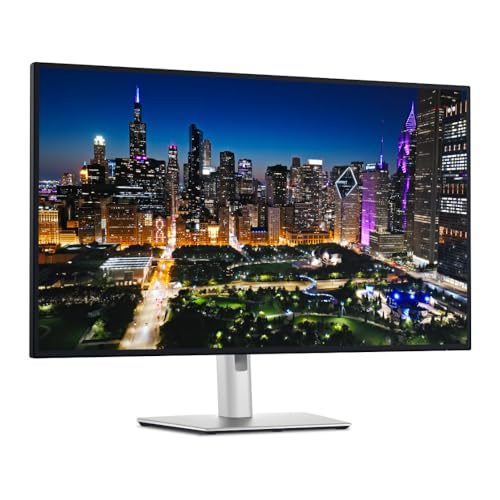
Dell U3225QE moves the workstation-hub idea onto a 31.5-inch 4K panel. Dell states an up-to-140W EPR ceiling and documents KVM and 2.5GbE functions. It is the stronger size choice when you want a physically larger desktop without moving to an ultrawide format.
The panel remains 4K. A larger screen does not add pixels over the 27-inch U2725QE, so compare viewing distance, scaling, desk depth, and preferred interface size rather than treating U3225QE as a resolution upgrade. Its maximum display mode also remains conditional on the complete Windows graphics path.
KVM operation needs both video and USB routing for the computers you intend to switch, and charging remains separate from that routing. A workstation that accepts a lower USB PD mode will not draw Dell’s ceiling, and the monitor cannot override laptop power policy.
Our Take
Choose U3225QE for a larger 4K Windows desk with KVM, Ethernet, and a high offered-power ceiling. Choose U2725QE when pixel density and a smaller footprint matter more.
- 31.5-inch 4K panel
- Up-to-140W EPR charging ceiling
- KVM and 2.5GbE workstation hub functions
- Larger screen is not higher resolution
- KVM, charging, and display paths need separate qualification
3. ASUS ProArt PA32QCV — best true-6K option
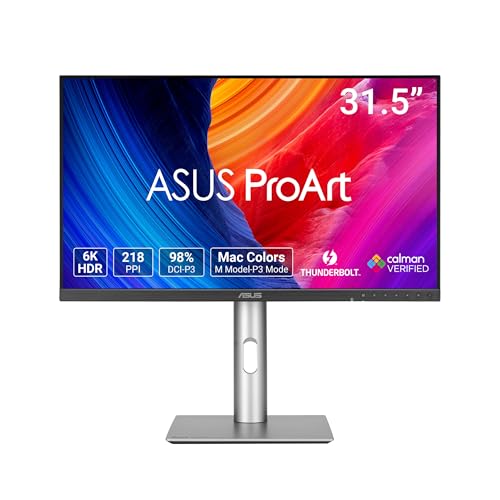
ASUS PA32QCV is the resolution-first choice. ASUS documents a true 6K Thunderbolt 4 creator display with DisplayPort and HDMI alternatives, USB hub functions, KVM, and charging up to 96W. That mix suits a workstation used for large canvases, dense tool panels, or high-resolution source material.
The 6K panel specification is not a promise that every Windows computer can drive the native mode. GPU capability, DSC, graphics driver, input choice, cable, Windows scaling, application support, and other active displays each matter. Check the exact GPU output matrix and ASUS input requirements together.
ASUS’s creator and color statements are manufacturer claims. They do not establish measured accuracy for a retail unit or a validated application workflow. The 96W charging number is likewise an offered ceiling; weigh it against the workstation’s documented USB-C input and supplied adapter.
Our Take
Choose PA32QCV when true 6K is the main buying reason and the Windows GPU path is documented to support it. Do not buy it on panel resolution alone.
- True 6K Thunderbolt 4 creator panel
- Alternative DP and HDMI inputs
- USB hub, KVM, and up-to-96W charging
- 6K depends on GPU, DSC, driver, cable, and software
- Manufacturer color claims are not unit measurements
4. Dell UltraSharp U4025QW — best 5K2K ultrawide

Dell U4025QW is the wide-workspace branch. Dell documents a 5120 x 2160 5K2K Thunderbolt 4 ultrawide with a 120Hz-class path, hub functions, KVM, and 2.5GbE. It fits a desk that values a long timeline or several side-by-side windows over standard-5K density.
This is not 5120 x 2880 standard 5K. The 2160-pixel vertical dimension changes both workspace shape and density, so compare that geometry with your applications before using the 5K label as a shortcut.
The maximum native-resolution and refresh combination is conditional. The GPU, DSC, driver, Thunderbolt or alternative input, cable, and active display topology must all support the requested mode. KVM and network features do not prove that maximum panel mode.
Our Take
Choose U4025QW for a broad 5K2K Windows workspace with integrated hub functions. Choose a standard-format 4K or true-6K monitor when density or vertical pixels matter more.
- Wide 5120 x 2160 workspace
- Thunderbolt 4 hub with KVM and 2.5GbE
- 120Hz-class manufacturer path under exact conditions
- 5K2K is not standard 5120 x 2880 5K
- Maximum mode depends on the complete Windows path
5. BenQ PD3225U — best Thunderbolt 3 creator alternative

BenQ PD3225U is the creator-workflow alternative for a workstation that does not need Thunderbolt 4. BenQ documents a 31.5-inch 4K Thunderbolt 3 monitor with 85W upstream charging, downstream Thunderbolt, KVM, and creator color-mode evidence.
Thunderbolt 3 is not Thunderbolt 4. Rather than grouping the standards by connector shape, confirm the exact workstation port, cable, downstream-device needs, display path, and security or fleet requirements. Windows behavior remains exact-system dependent.
BenQ’s color modes, validation language, and other creator statements remain manufacturer claims. They do not prove the delivered unit’s accuracy or application behavior. The 85W charging ceiling may suit one mobile workstation and be insufficient for another.
Our Take
Choose PD3225U when a 31.5-inch 4K creator display, KVM, and downstream Thunderbolt fit the job and TB3 is acceptable. Skip it when TB4 itself is required.
- 31.5-inch 4K creator format
- KVM and downstream Thunderbolt
- Up-to-85W upstream charging
- Thunderbolt 3 rather than Thunderbolt 4
- Color and compatibility claims remain source- and system-bound
How to choose a Thunderbolt monitor for a Windows workstation
Start with the GPU and requested mode
Write down the native resolution and refresh you need, then verify that exact combination through the intended GPU output, monitor input, cable, driver, and operating system. A panel ceiling and a Thunderbolt logo do not establish the completed path. DSC can be part of the route, but its presence has to be documented at both ends.
Separate one screen from a display chain
A downstream Thunderbolt or DisplayPort connection is only one part of a chain. GPU stream capacity, MST or Thunderbolt topology, internal-panel use, resolution, refresh, cable, and second-monitor input all control the result. Physical connectors do not prove simultaneous displays. Our guide to monitors with built-in docking covers the hub decision, but the host matrix still wins.
Compare offered power with accepted power
The monitor advertises a ceiling; the workstation decides what it accepts. EPR support, cable rating, monitor settings, attached hub load, battery state, and system policy all affect negotiation. Keep the supplied workstation adapter if the manufacturer requires it for sustained CPU or GPU loads.
Treat creator claims as claims
Gamut, calibration, validation, HDR, brightness, and contrast language must all stay attributed to the manufacturer unless an independent measurement is cited. None of the frozen evidence measures the unit that arrives at your desk or proves application performance.
Frequently asked questions
Does Thunderbolt guarantee a monitor’s maximum resolution?
No. GPU capability, DSC, driver, cable, input, operating system, and other active displays together control the usable mode.
Can a Thunderbolt monitor run two Windows workstations through its KVM?
Only when both computers have the required video and USB upstream routing. KVM presence alone does not complete the connection plan.
Is BenQ PD3225U a Thunderbolt 4 monitor?
No. The retained manufacturer evidence identifies it as Thunderbolt 3.
Final recommendation
Dell U2725QE is the best overall pick for a 27-inch 4K Windows workstation desk with KVM, 2.5GbE, downstream display routes, and a high offered-power ceiling. After that, one requirement picks each alternative: U3225QE for a larger 4K panel, PA32QCV for a qualified true-6K path, U4025QW for 5K2K width, PD3225U when its Thunderbolt 3 creator route matches the system.