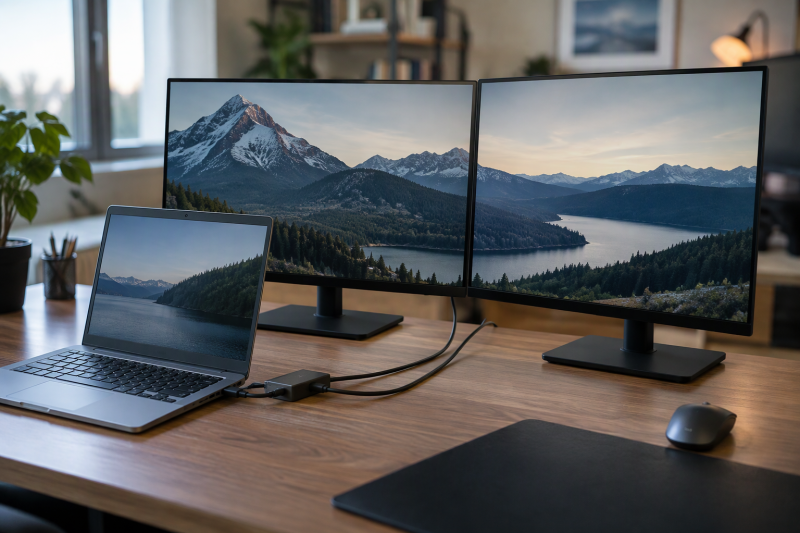
A laptop whose USB-A ports carry no video signal needs a USB-A to HDMI adapter to reach an HDMI screen, and the adapter works as a small external graphics device. A driver on the laptop draws the picture and sends it over USB, so every adapter below needs software installed before the screen lights up. The driver chip, the operating systems the maker lists, and the resolution each output can reach decide which one fits.
USB-A to HDMI Adapters Compared
| Image | Product | Details | Check Price |
|---|---|---|---|
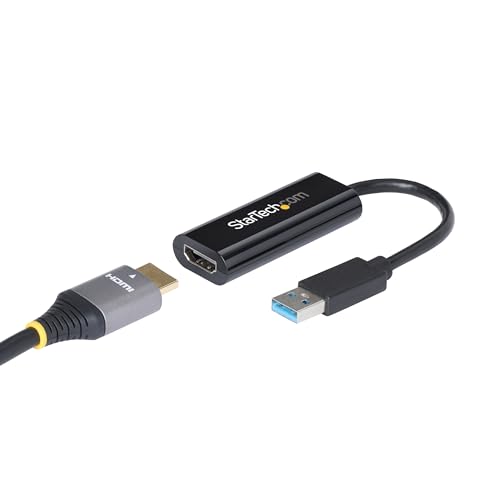 | StarTech USB32HDES | Best fit: One Windows 1080p 60Hz display Outputs: One HDMI Maximum video: 1920 x 1200 at 60Hz Host: USB-A 5Gbps Systems and driver: Windows only; driver needs administrator rights | Check Price on Amazon |
 | StarTech USB32HD2 | Best fit: One 4K 30Hz plus one 1080p 60Hz screen Outputs: Two HDMI Maximum video: One 4K 30Hz and one 1080p 60Hz Host: USB-A 5Gbps Systems and driver: Windows only; driver needs administrator rights | Check Price on Amazon |
 | StarTech 107B-USB-HDMI | Best fit: Two screens on macOS, Chrome OS or Windows Outputs: Two HDMI Maximum video: One 4K 30Hz and one 1080p Host: USB-A 5Gbps with USB-C dongle Systems and driver: Windows, macOS and Chrome OS; macOS driver is a manual download | Check Price on Amazon |
 | Cable Matters 103046 | Best fit: One Windows display up to 1440p Outputs: One HDMI plus HDMI-to-DVI adapter Maximum video: Up to 2560 x 1440 over HDMI Host: USB-A 3.0 Systems and driver: Windows with DisplayLink drivers; macOS not officially supported | Check Price on Amazon |
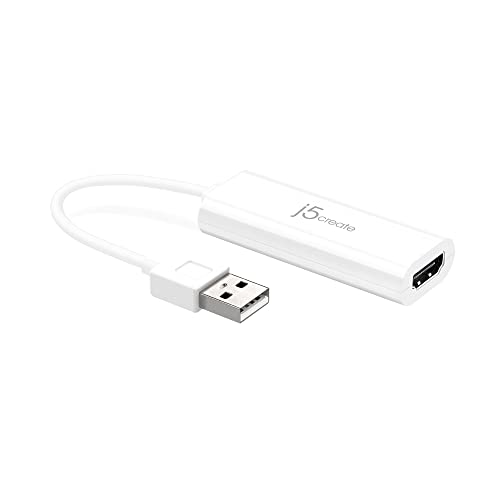 | j5create JUA195 | Best fit: One basic 1080p screen on Windows or macOS Outputs: One HDMI Maximum video: Up to 1920 x 1080 or 1920 x 1200 Host: USB 2.0 Type-A Systems and driver: Windows 10 or later and macOS 10.9 or later; driver required | Check Price on Amazon |
 | StarTech USB32HD4 | Best fit: Four Windows 1080p 60Hz displays Outputs: Four HDMI Maximum video: Four 1080p 60Hz displays Host: USB-A 3.0 Systems and driver: Windows only; driver needs administrator rights | Check Price on Amazon |
1. StarTech USB32HDES — Best for one Windows 1080p 60Hz display
StarTech lists the USB32HDES as a single-output adapter with one HDMI socket at 1920 x 1200 and 60Hz. StarTech also lists two-channel audio over HDMI, a USB 5Gbps plug, and bus power with no separate supply. Amazon’s listing gives the attached cable as 2.4 inches (6cm).
StarTech says the adapter works with Windows on x86, x64 and ARM computers, including Snapdragon X Copilot+ PCs, and excludes macOS, Chrome OS and Linux. Installing the driver takes administrator rights, which a locked-down work laptop may not allow. The StarTech page also says the adapter is not intended for graphics-heavy use such as gaming, and that copy-protected streaming video may show a black screen or fail to play.
One Windows laptop and one office screen at 1080p class is the whole job this adapter is listed for.Our Take Choose it for a single Windows work screen. If you need a second output or use a Mac, choose one of the models below.
- StarTech lists one HDMI socket at 1920 x 1200 and 60Hz, which covers the one office screen this adapter is listed for.
- StarTech lists the adapter as bus powered, with no separate power supply.
- StarTech lists Windows on x86, x64 and ARM computers, and the list includes Snapdragon X Copilot+ PCs.
- StarTech excludes macOS, Chrome OS and Linux, so a Mac needs one of the other adapters.
- StarTech requires administrator rights to install the driver, so whoever sets up the laptop needs those rights.
- StarTech says copy-protected streaming video may show a black screen or fail to play on this adapter.
2. StarTech USB32HD2 — Best for one 4K 30Hz plus one 1080p 60Hz screen
The USB32HD2 puts two HDMI sockets on one USB-A 5Gbps plug, and the two outputs have different ceilings. StarTech lists one output at 4K 30Hz and the other at 1080p 60Hz, with two-channel HDMI audio. Amazon’s listing gives the cable as 9.8 inches (25cm).
It does not drive two 4K 60Hz screens. Plan the desk around one 4K 30Hz display and one 1080p 60Hz display. StarTech lists Windows only, again including ARM and Snapdragon X PCs, and requires administrator rights for the driver. StarTech’s page gives the same warning about copy-protected streaming video that it gives for the USB32HDES.
A Windows laptop with one free USB-A port gets two screens here, one at 4K 30Hz and one at 1080p 60Hz.Our Take Pick it when a Windows laptop needs exactly that mixed pair. When a Mac or Chromebook is involved, the 107B-USB-HDMI lists the same 4K 30Hz plus 1080p split with macOS and Chrome OS support.
- StarTech lists two HDMI outputs from one USB-A 5Gbps plug, so one free USB-A port feeds two screens.
- StarTech lists one output at 4K 30Hz and the other at 1080p 60Hz, the mixed pair this adapter is picked for.
- Amazon’s listing gives the USB32HD2 an attached cable of 9.8 inches (25cm).
- StarTech lists the 4K output at 30Hz, not 60Hz, which is half the refresh rate of the other output.
- A Mac or Chromebook needs a different adapter, because StarTech excludes macOS, Chrome OS and Linux on the USB32HD2.
- StarTech requires administrator rights to install the driver, so a laptop where the user lacks them cannot set the adapter up.
3. StarTech 107B-USB-HDMI — Best for two screens on macOS, Chrome OS or Windows
StarTech lists the 107B-USB-HDMI with two HDMI outputs, one at 4K 30Hz and one at 1080p, from a single USB 3.2 Gen 1 (5Gbps) USB-A connection. An integrated USB-A to USB-C dongle comes with the 4.3-inch (11cm) attached cable, and StarTech says the adapter works with USB-C hosts too. StarTech says the adapter is built with Silicon Motion technology and runs on bus power. StarTech also lists a 3-year warranty.
It is the one model here with a maker-listed answer for both Macs and Chromebooks. StarTech’s compatibility list names Windows 11, 10, 8.1 and 7, macOS from Mojave (10.14) onward, and Chrome OS. Windows and Chrome OS install the driver automatically, while macOS needs a manual driver download. StarTech also says the adapter can run two external displays on a base Apple M-series MacBook, which supports one natively, and that on Linux it handles two 1080p 60Hz displays. StarTech says the adapter will not play copy-protected content.
Our Take Choose it when the laptop runs macOS or Chrome OS, or when one adapter has to move between a Mac and a PC. The Windows-only USB32HD2 lists the same output split.
- StarTech lists Windows, macOS and Chrome OS support, so one adapter covers a Mac, a Chromebook and a Windows laptop.
- StarTech lists one 4K 30Hz output and one 1080p output from a single USB-A connection.
- StarTech lists an integrated USB-A to USB-C dongle and says the adapter works with USB-C hosts too.
- StarTech backs the adapter with a 3-year warranty.
- StarTech requires a manual driver download on macOS, a step Windows and Chrome OS skip.
- StarTech lists the 4K output at 30Hz, so the high-resolution screen runs at that refresh rate.
- StarTech says the adapter will not play copy-protected content.
4. Cable Matters 103046 — Best for one Windows display up to 1440p
Cable Matters sells the 103046 for one screen, with video up to 2560 x 1440 over HDMI and audio listed at two and 5.1 channels. Cable Matters says the adapter needs a USB 3.0 port for that maximum resolution. An HDMI-to-DVI adapter is in the box. It carries up to 1920 x 1200 as video only, so a DVI monitor gets no sound.
Cable Matters names DisplayLink as the driver software and says the software must be installed on a Windows PC. Its page lists Windows 10, 8.1, 8 and 7, plus XP SP2, and says Mac OS is not officially supported and may have limited or no functionality. Cable Matters lists the housing at 3.3 by 1.7 by 0.5 inches, with a 4-inch cable tail. Cable Matters says Blu-ray and iTunes playback is not supported.
Our Take Choose it when one Windows screen runs above 1080p or a DVI monitor needs a connection. Skip it for a Mac, since Cable Matters does not officially support macOS.
- Cable Matters lists video up to 2560 x 1440 over HDMI, the reason to choose it for a Windows screen above full HD.
- Cable Matters includes an HDMI-to-DVI adapter that carries up to 1920 x 1200 video, so a DVI monitor gets a connection.
- Cable Matters lists audio at two and 5.1 channels over HDMI, so an HDMI screen gets sound as well as video.
- Cable Matters says Mac OS is not officially supported, so a Mac needs a different adapter.
- Cable Matters says the adapter needs a USB 3.0 port to reach its maximum resolution.
- Cable Matters says Blu-ray and iTunes playback is not supported on this adapter.
5. j5create JUA195 — Best for one basic 1080p screen on Windows or macOS
j5create’s page lists the JUA195 as a USB 2.0 Type-A adapter with one HDMI socket and an 8cm cable, at up to 1920 x 1080 or 1920 x 1200. j5create lists an available USB 2.0 or 3.0 port as the requirement. j5create calls it an adapter for office applications and says it is not for home entertainment or video playback. j5create describes primary, extended and mirror display modes.
j5create lists Windows 10 or later and macOS 10.9 or later, with driver installation required on both. j5create says Windows can install the driver on its own when the computer is online and the user has administrator rights. Amazon’s title says the adapter is for Windows, and one Amazon bullet calls it a USB-C adapter, while j5create’s page lists the USB 2.0 Type-A plug, so check the connector in the listing photos. j5create does not name the driver chip and does not list Chrome OS.
Our Take Pick it for a plain extra office screen on a Windows or Mac laptop. The Cable Matters 103046 lists the higher ceiling for a 1440p screen.
- j5create lists Windows 10 or later and macOS 10.9 or later, so one adapter suits either a Windows or a Mac laptop.
- j5create lists a USB 2.0 Type-A connector that works in a USB 2.0 or 3.0 port.
- j5create describes primary, extended and mirror display modes for the screen.
- j5create requires driver installation on both Windows and macOS, a step on every laptop it supports.
- j5create describes it as an adapter for office applications and says it is not for home entertainment or video playback.
- A Chrome OS laptop has no maker-listed support, because j5create does not list Chrome OS.
6. StarTech USB32HD4 — Best for four Windows 1080p 60Hz displays
StarTech lists four HDMI outputs on the USB32HD4, each at 1080p and 60Hz, from one USB-A 3.0 plug with bus power and a 3.3-foot (1m) attached cable. StarTech lists support for five displays in extended mode when the laptop screen counts as one. Audio is two-channel, with one source sent to every screen.
Windows is the only system StarTech lists, and the driver needs administrator rights, while macOS, Chrome OS and Linux are excluded. StarTech includes multi-monitor software that lets you drag windows to a chosen screen and zoom, split or scale them. StarTech describes the adapter for workstation and boardroom setups, and it lists no 4K output.
Our Take Choose it only for a Windows desk that needs four 1080p screens. One or two screens are simpler with the USB32HDES or the USB32HD2.
- StarTech lists four HDMI outputs at 1080p and 60Hz, enough for four matching screens from one USB-A plug.
- StarTech lists five displays in extended mode when the laptop screen counts as one, the four adapter screens plus the laptop’s own.
- StarTech lists a 3.3-foot attached cable on the USB32HD4.
- StarTech includes multi-monitor software that lets you drag windows to a chosen screen and zoom, split or scale them.
- The USB32HD4 is a Windows-only choice, because StarTech excludes macOS, Chrome OS and Linux.
- StarTech lists no 4K output on any of the four ports.
- StarTech says one audio source is sent to all four screens, so the screens cannot play different audio.
Buying Guide
Start with the operating system and the driver chip
A USB-A port carries data, not a video signal, so every adapter here depends on a driver. Cable Matters names DisplayLink for the 103046, and StarTech names Silicon Motion for the 107B-USB-HDMI. The product text for the three Windows-only StarTech models and for the JUA195 names no chip.
If the laptop is a Mac or Chromebook, the choice narrows fast. Of these six, only the 107B-USB-HDMI lists Chrome OS, and it is one of two that list macOS, alongside the JUA195. The three Windows-only StarTech models exclude macOS, and Cable Matters says macOS is not officially supported on the 103046.
Read the resolution and refresh rate for each output
No adapter here lists a 4K 60Hz output. The two 4K figures are 30Hz, on the USB32HD2 and the 107B-USB-HDMI, and each pairs that output with a 1080p one. For one screen above 1080p, Cable Matters lists up to 2560 x 1440 over HDMI.
The four-output USB32HD4 lists 1080p at 60Hz on every output, and the JUA195 tops out at 1920 x 1080 or 1920 x 1200 over USB 2.0. Pick the adapter by the screen that needs the most, then check the other screens against the same listing.
Treat these adapters as office tools
StarTech’s USB32HDES and USB32HD2 pages say copy-protected streaming video from services such as Netflix, Prime Video, Disney+, iTunes and Hulu may show a black screen or fail to play. StarTech says the 107B-USB-HDMI will not play copy-protected content, Cable Matters says encrypted Blu-ray and iTunes playback is not supported, and j5create says the JUA195 is for office applications, not video playback.
On gaming, StarTech says the USB32HDES is not intended for graphics-heavy use such as gaming, and calls the 107B-USB-HDMI ideal for business productivity apps and not ideal for gaming. Office and business productivity work is the use these listings describe.
Check for a native USB-C video port first
A laptop with a USB-C or Thunderbolt port that carries video can skip the USB graphics driver. The USB-C to HDMI adapter guide and the Thunderbolt to HDMI guide cover that path, and a USB-A adapter is the fallback when no port on the laptop carries video.
Two screens from a USB-C or Thunderbolt laptop are covered by the USB-C to dual HDMI guide and the dual-monitor dock guide. The 107B-USB-HDMI plugs into USB-C through its dongle and also needs a driver, a manual download on macOS.
FAQ
Do USB-A to HDMI adapters need a driver?
Yes. StarTech requires administrator rights to install the driver on the USB32HDES, USB32HD2 and USB32HD4, Cable Matters names DisplayLink drivers for the 103046, and j5create requires driver installation on Windows and macOS. StarTech’s 107B-USB-HDMI installs automatically on Windows and Chrome OS and needs a manual download on macOS.
None of these adapters works as a plain cable. On a managed school or work laptop, confirm the installation permission before ordering.
Which adapter works with a Mac?
StarTech lists macOS from Mojave (10.14) onward for the 107B-USB-HDMI, and j5create lists macOS 10.9 or later for the JUA195. Both need a driver installed on the Mac. Cable Matters says macOS is not officially supported on the 103046, and StarTech excludes macOS on the USB32HDES, USB32HD2 and USB32HD4.
For two screens from a Mac, the 107B-USB-HDMI is the model that lists two outputs. StarTech says it can run two external displays on a base Apple M-series MacBook.
Which adapter works with a Chromebook?
StarTech lists Chrome OS for the 107B-USB-HDMI, and Amazon’s listing text gives Chrome OS version 98 or later on the stable channel. The driver installs automatically on Chrome OS.
The three Windows-only StarTech models exclude Chrome OS, and neither Cable Matters nor j5create lists it for the 103046 or JUA195.
Can any of these run two 4K 60Hz displays?
No. No adapter here lists a 4K 60Hz output. The USB32HD2 and the 107B-USB-HDMI each list one 4K 30Hz output paired with a 1080p output.
For two matching high-resolution screens, look at the USB-C or Thunderbolt options in the guides linked above. Four matching 1080p 60Hz screens are the USB32HD4’s listed job.
Does a USB 2.0 port work?
j5create lists a USB 2.0 or 3.0 port for the JUA195 and a USB 2.0 Type-A connector. Cable Matters says the 103046 needs USB 3.0 for its maximum resolution, and StarTech lists USB 5Gbps connections for the other models.
The pages do not say what resolution the StarTech models give on a slower port. Use a USB 3.0 port for any adapter other than the JUA195.
Bottom Line
Choose StarTech USB32HDES for one Windows 1080p-class display, USB32HD2 for a Windows 4K 30Hz plus 1080p 60Hz pair, StarTech 107B-USB-HDMI for two screens on a Mac, Chromebook or Windows laptop, Cable Matters 103046 for one Windows display up to 1440p, j5create JUA195 for one basic screen on Windows or macOS, or StarTech USB32HD4 for four Windows 1080p 60Hz screens.