Apple sells one multiport adapter for a MacBook, and several other makers sell adapters that add more ports. Six are compared here, from Apple’s three-connection adapter to Satechi’s 13-port desk adapter. Every figure comes from the product’s Amazon listing.
Start with the number of screens and the charger, and read the port list after. Apple, Belkin, Plugable and Satechi’s OntheGo each list one display. Satechi’s USB4 adapter lists two on certain Macs. Satechi’s 13-in-1 gives its three-display figure for Windows only.
Check your Mac’s own display limit first, because the listings below are written for the adapter, not for your MacBook.USB-C Multiport Adapters for MacBook Compared
| Image | Product | Details | Check Price |
|---|---|---|---|
 | Apple USB-C Digital AV Multiport Adapter | Best fit: One HDMI screen, one USB device Display: HDMI, 4K video output in the title; HDMI cable sold separately Charging: USB-C charging cable port, no wattage listed Ports: HDMI, 1 standard USB, 1 USB-C Seller: Amazon.com | Check Price on Amazon |
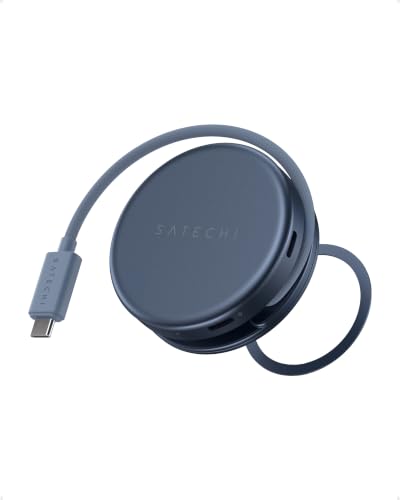 | Satechi OntheGo 5-in-1 USB-C Hub | Best fit: Travel with one screen and an SD card Display: One display, 4K 60Hz HDMI Charging: 60W pass-through Ports: HDMI, 5Gbps USB-A, 5Gbps USB-C, UHS-I SD Seller: Satechi | Check Price on Amazon |
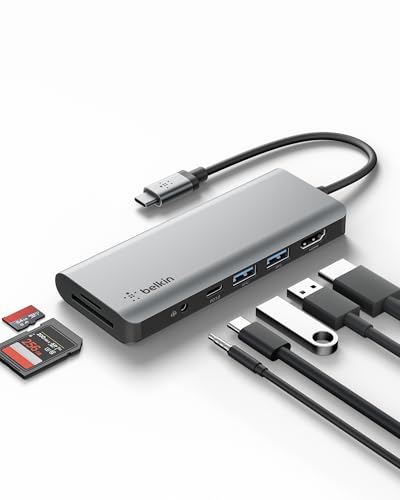 | Belkin USB-C Hub, 7-in-1 MultiPort Docking Station | Best fit: Card slots and a headphone jack Display: One display, up to 4K at 30Hz, HDMI 1.4 Charging: Up to 85W, PD 3.0 Ports: HDMI, 2 USB-A 3.0, USB-C PD, SD, microSD, 3.5mm Seller: Amazon.com | Check Price on Amazon |
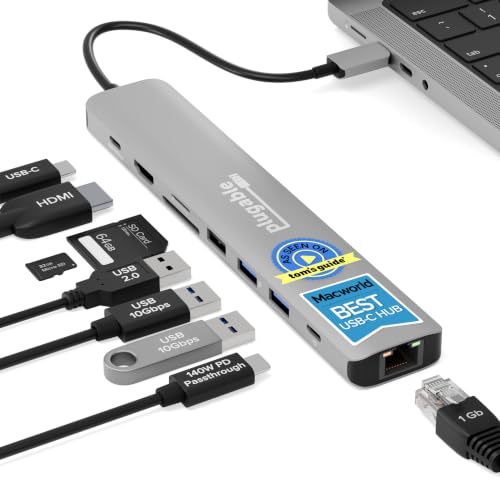 | Plugable 9-in-1 USB-C Hub (USBC-9IN1E) | Best fit: One monitor with Ethernet and fast cards Display: One display, 4K 60Hz HDMI Charging: Up to 125W to laptop with PD 3.1 EPR Ports: Gigabit Ethernet, 10Gbps USB-C and 2 USB-A, USB 2.0, UHS-II SD and microSD Seller: Plugable Technologies | Check Price on Amazon |
 | Satechi USB4 Dual HDMI Adapter | Best fit: Two displays on an M3 or later Mac Display: Two 4K 60Hz on M3 to M6; one on base M1 and M2 Charging: PD 3.1 pass-through up to 140W Ports: 2 HDMI, 2 USB-A and 2 USB-C at 10Gbps Seller: Satechi | Check Price on Amazon |
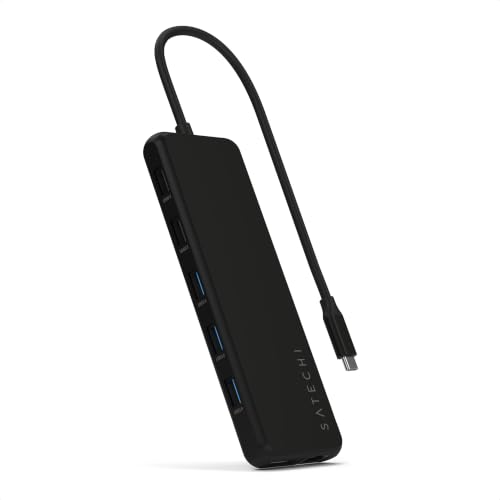 | Satechi 13-in-1 USB-C Multiport Adapter | Best fit: A full desk with Ethernet Display: Up to 3 displays on Windows MST; no Mac count listed Charging: 100W input, 85W output Ports: 2 HDMI 2.0, DisplayPort 1.4, Gigabit Ethernet, 6 USB-A, 2 USB-C, 3.5mm Seller: Satechi | Check Price on Amazon |
1. Apple Digital AV Multiport Adapter — Best for one HDMI screen
Apple’s Amazon listing says the adapter connects a USB-C Mac or a select iPad to an HDMI display, a standard USB device and a USB-C charging cable. You plug it into a USB-C or Thunderbolt 3 (USB-C) port, then run an HDMI cable to a TV or projector. The listing says the adapter supports both video and audio output, and the listing title says 4K video output. Apple gives macOS Mojave 10.14.6 or later as the system requirement.
The standard USB port takes a flash drive, a camera, or a cable for syncing and charging an iOS device. The USB-C port takes a charging cable for a Mac, an iPad or an iPhone. Apple’s listing names no Ethernet port, card reader, second display or refresh rate, so you need the Mac’s own specifications to know what the screen can do. Amazon’s manufacturer field gives a 1 year warranty.
The HDMI cable is sold separately, so buy one with the adapter.Our Take The Apple adapter fits a MacBook that only needs to reach a TV or projector and connect one USB device. A desk that also needs Ethernet and card readers is a better match for the Plugable 9-in-1.
- Apple’s listing says the adapter supports both video and audio output over HDMI, and an HDMI cable then runs to a TV or projector.
- Apple lists one standard USB port for a flash drive, a camera, or a cable that syncs and charges an iOS device.
- Apple lists a USB-C port beside the HDMI and USB connections that takes a charging cable for a Mac, an iPad or an iPhone.
- Apple’s listing says the HDMI cable is sold separately, so you need to buy one with the adapter.
- Apple’s listing names no Ethernet port, card reader, second display or refresh rate, and the Mac’s own specifications have to supply those details.
2. Satechi OntheGo 5-in-1 — Best small hub with an SD card reader
Satechi’s listing says the OntheGo adds a 4K 60Hz HDMI port, 60W pass-through charging, a USB-A port, a USB-C data port and a UHS-I SD card reader to one USB-C port, all active at the same time. Satechi says the hub supports one external display. Satechi lists the USB-A and USB-C data ports at 5Gbps each, and the SD reader at up to 104MB/s for RAW photos and video.
Satechi says the hub is optimized for MacBook Neo and also works with MacBook Air, MacBook Pro, iPad and USB-C Windows laptops. Satechi gives the body as 65 by 65 by 22mm, with an integrated braided cable of 6.5 inches. A magnetic base snaps to an iPhone or mounts to a laptop lid with the included 3M ring, and Satechi states it does not support magnetic or wireless charging. Amazon’s manufacturer field gives a 2 year warranty.
Our Take For a MacBook Neo or Air that travels and needs one screen plus a way to read camera cards, the OntheGo is the fit. A desk that also needs Ethernet calls for the Plugable 9-in-1 instead.
- Satechi lists a UHS-I SD card reader at up to 104MB/s for RAW photos and video.
- Satechi says the 4K 60Hz HDMI port, 60W pass-through charging, USB ports and SD reader are all active at the same time.
- Satechi gives the hub a 65 by 65 by 22mm body with an integrated 6.5 inch cable, a compact shape for a MacBook that travels.
- Satechi says the OntheGo supports one external display, a limit for a desk with two monitors.
- Satechi lists the data ports at 5Gbps, below the 10Gbps that Plugable’s 9-in-1 and both larger Satechi adapters list.
- Satechi states that the magnetic base does not support magnetic or wireless charging.
3. Belkin 7-in-1 USB-C Hub — Best for card slots and an audio jack
Belkin’s listing names seven ports: two USB-A 3.0 ports, a USB-C PD 3.0 port, SD 3.0 and microSD 3.0 card readers, a 3.5mm audio jack and an HDMI 1.4 port. Belkin says power delivery passes up to 85W of charging power to the laptop and lists the data connections at 5Gbps.
Belkin lists up to 4K for a single display at 30Hz, not 60Hz. Belkin says the hub needs only 15W to operate and that all required drivers are already built into a compatible laptop, PC or MacBook. Belkin gives the model as PVC003 and the warranty as 2 years from the manufacturer.
Our Take The Belkin suits a MacBook desk that needs card slots, a headphone jack and one monitor, where a 30Hz picture is acceptable. When the monitor should run at 4K 60Hz, the Plugable 9-in-1 is the one to choose.
- Belkin lists SD 3.0 and microSD 3.0 card readers and a 3.5mm audio jack in one hub, for a desk that needs card slots and audio.
- Belkin lists up to 85W of charging power to the laptop through its USB-C power delivery port.
- Belkin says a compatible laptop, PC or MacBook already has all required drivers built in.
- Belkin lists up to 4K for a single display at a 30Hz refresh rate.
- Belkin lists the data connections at 5Gbps, below the 10Gbps that Plugable’s 9-in-1 and both larger Satechi adapters list.
4. Plugable 9-in-1 USBC-9IN1E — Best for Ethernet and fast card readers
Plugable’s listing names one 4K 60Hz HDMI display, Gigabit Ethernet, one 10Gbps USB-C port, two 10Gbps USB-A ports, a USB 2.0 port meant for a keyboard or mouse, and UHS-II SD and microSD readers. Plugable lists the hub as working with MacBook Neo, MacBook Air and MacBook Pro, and with many other full-featured USB-C laptops running macOS, Windows or ChromeOS.
Charging has two figures. With a PD 3.1 EPR charger and cable, Plugable lists up to 140W in and 125W to the laptop, while it says most PD 3.0 systems typically charge at up to 100W in and 85W to the host. Plugable says the hub uses 15W to power its own ports. It also says HDMI needs a laptop USB-C port with DisplayPort Alt Mode, and that the built-in 7.48 inch cable suits a desk close to the laptop. Plugable gives a 2 year manufacturer limited warranty.
Our Take For a one-monitor MacBook desk with a wired network, SD cards and fast drives, the Plugable is the pick. When a second screen is the reason to buy, choose Satechi’s USB4 Dual HDMI instead.
- Plugable lists Gigabit Ethernet, UHS-II SD and microSD readers and 10Gbps USB ports in one hub, for a desk with a wired network, memory cards and fast drives.
- Plugable lists 4K 60Hz on one HDMI display when the laptop’s USB-C port supports DisplayPort Alt Mode.
- Plugable states up to 125W to the laptop with a PD 3.1 EPR charger and cable, the higher of its two charging figures.
- Plugable names a USB 2.0 port meant for a keyboard or mouse, separate from its 10Gbps ports.
- Plugable lists one HDMI display, so a second screen needs a different adapter.
- Plugable says the hub uses 15W to power its own ports and that actual charging depends on the laptop, charger and cable.
- Plugable says the built-in 7.48 inch cable is best suited to a desk close to the laptop.
5. Satechi USB4 Dual HDMI — Best for two displays on an M3 or later Mac
Satechi’s listing says the adapter drives two extended displays at up to 4K 60Hz each on M3, M4, M5 and M6 Macs and most Windows USB4 devices. Satechi says USB4 native output needs no DisplayLink, drivers or add-on software. Satechi lists two USB-A 3.2 Gen 2 ports and two USB-C 3.2 Gen 2 ports at up to 10Gbps, and USB-C PD 3.1 pass-through charging up to 140W, depending on the charger used.
Satechi names the limits itself. Satechi says base M1 and M2 Macs support a single extended display, and that dual extended display is not supported on iPad, though it lists iPadOS compatibility over USB4. Satechi also lists an attached braided host cable that tucks into a built-in cable slot, and an anodized aluminum housing. Amazon’s manufacturer field gives a 2 year warranty.
Our Take The USB4 adapter fits an M3 or later MacBook that needs two screens from one USB-C port with no driver. When one screen plus Ethernet and card slots is the better fit, choose the Plugable 9-in-1.
- Satechi lists two extended 4K 60Hz displays on M3, M4, M5 and M6 Macs, and says USB4 native output needs no DisplayLink, drivers or add-on software.
- Satechi lists four data ports at up to 10Gbps, split evenly between USB-A and USB-C connectors.
- Satechi lists USB-C PD 3.1 pass-through charging up to 140W, with the figure depending on the charger used.
- Satechi lists a built-in cable slot where the attached braided host cable tucks away.
- Satechi lists a single extended display for base M1 and M2 Macs, against two on M3 through M6.
- Satechi’s listing names no Ethernet port and no card reader, so a desk that needs a wired network or card slots calls for a different adapter.
6. Satechi 13-in-1 USB-C Multiport Adapter — Best for a full desk with Ethernet
Satechi’s listing counts thirteen connections: one USB-A 3.1 port at 10Gbps, three USB-A 3.0 ports at 5Gbps, two USB-A 2.0 ports at 480Mbps, two USB-C ports at 10Gbps with 85W PD, two HDMI 2.0 ports, one DisplayPort 1.4 port, Gigabit Ethernet and a 3.5mm audio jack.
Satechi says the two USB-C PD ports enable up to 100W input and 85W output, and that the adapter is plug and play on supported Windows, macOS, Chrome OS and Linux devices. Satechi gives a 2 year limited warranty.
The display figure comes with a condition. Satechi says that on Windows devices the adapter uses Multi-Stream Transport for up to three extended displays, either one DisplayPort output at up to 8K 30Hz or dual HDMI and DisplayPort at 4K 60Hz. The listing gives no display count for a Mac, so check your MacBook’s own limit before planning around three screens.
Satechi states the three-display figure for Windows MST, not for a Mac.Our Take The 13-in-1 is the one for a permanent desk that needs wired Ethernet, many USB ports and several video outputs. An adapter that has to travel in a bag should be the Satechi OntheGo instead.
- Satechi lists two HDMI 2.0 ports, one DisplayPort 1.4 port, Gigabit Ethernet and a 3.5mm audio jack on one adapter, covering several video outputs and a wired network.
- Satechi lists six USB-A ports at 10Gbps, 5Gbps and 480Mbps, plus two 10Gbps USB-C ports, eight USB connections in all.
- Satechi says the two USB-C PD ports enable up to 100W input and 85W output.
- Satechi states the three-display figure for Windows devices and gives no display count for a Mac, so check the MacBook’s own limit before planning around three screens.
- A separate reader is needed for memory cards, because Satechi’s listing names no SD or microSD card reader.
Buying Guide
1. Count the displays your Mac supports before choosing ports
Six adapters here give three different display answers. Apple, Belkin, Plugable and the OntheGo list one display. Satechi’s USB4 adapter lists two 4K 60Hz displays on M3 through M6 Macs. The 13-in-1 states up to three for Windows MST.
Satechi says base M1 and M2 Macs get a single extended display from the USB4 adapter. Check the limit printed in Apple’s specifications for your exact Mac first, because no listing here changes it. The MacBook Air hub guide covers hubs for the newer Air models.
2. Read each charging figure as a limit, not a result
The listings give 60W for the OntheGo, up to 85W for Belkin, 85W output on the 13-in-1 with 100W input, and up to 140W for Satechi’s USB4 adapter. Plugable lists up to 125W to the laptop with a PD 3.1 EPR charger and cable. Each number is the most the adapter lists, and Apple’s listing gives no wattage.
Plugable and Belkin both say the hub uses 15W for itself, and Satechi says its 140W depends on the charger used. Check the charger and cable against what your MacBook needs, using the MacBook Pro charger guide.
3. Match USB speed and card slots to what you plug in
Plugable’s 9-in-1, Satechi’s USB4 adapter and the 13-in-1 list ports at 10Gbps, while the OntheGo and Belkin list 5Gbps. Satechi describes its 10Gbps ports as meant for moving footage, assets and backups, so use the faster ports for external drives, not for a keyboard or mouse.
Three of the six adapters list a card reader. The OntheGo lists a UHS-I SD reader, Plugable lists UHS-II SD and microSD, and Belkin lists SD 3.0 and microSD 3.0. Apple, the USB4 adapter and the 13-in-1 name no card reader, so check the card type you shoot before picking.
4. Keep every condition attached to its feature
Apple sells its adapter without the HDMI cable. Plugable’s listing says HDMI needs DisplayPort Alt Mode on the laptop’s USB-C port. Satechi’s two-screen figure names M3 through M6 and excludes iPad. Treat a figure without its condition as incomplete, not as a buying fact.
When a hub is not the right shape, other options are in the MacBook Air dock guide and the portable dock guide. Confirm the Mac model, cable, charger and target display together before buying.
FAQ
Is Apple’s Digital AV adapter enough for a MacBook monitor?
Yes, for one HDMI display, one USB device and a charging cable. Apple’s listing says it supports video and audio output, and the HDMI cable it needs is sold separately.
The listing names no Ethernet port, card reader or second display. Choose it when HDMI is the whole job.
Which adapter lists two displays for a MacBook?
Satechi’s USB4 Dual HDMI adapter lists two extended 4K 60Hz displays on M3, M4, M5 and M6 Macs. Satechi lists a single extended display for base M1 and M2 Macs, and no dual mode on iPad.
Check the Mac’s chip before ordering. The 13-in-1 lists up to three displays for Windows MST only.
Can a multiport adapter charge a MacBook?
The adapters here pass power through to the laptop, within the figure each listing gives. The OntheGo lists 60W, Belkin lists up to 85W, the 13-in-1 lists 85W output, and Plugable lists up to 125W to the laptop with PD 3.1 EPR equipment.
Use the lowest limit among the charger, cable, adapter and MacBook. Apple’s listing names no wattage.
Do I need 10Gbps ports?
Only when you move large files to or from an external drive. Plugable and both larger Satechi adapters list 10Gbps ports, while the OntheGo and Belkin list 5Gbps.
Match port speed to the device you attach. A keyboard, mouse or flash drive is a different job from an SSD.
Which adapters have Ethernet or card readers?
Plugable’s 9-in-1 and Satechi’s 13-in-1 list Gigabit Ethernet. Belkin, Plugable and the OntheGo list card readers, while the 13-in-1 and the USB4 adapter name no card reader.
Pick the feature that removes a separate dongle from your bag. Apple’s adapter lists neither.
Bottom Line
Choose the Apple Digital AV Multiport Adapter for one HDMI screen and one USB device. Choose the Plugable 9-in-1 for Ethernet, UHS-II cards and 10Gbps storage on one 4K 60Hz display, and the Satechi USB4 Dual HDMI for two screens on an M3 or later Mac. The OntheGo suits a travel bag. The Belkin adds card slots and an audio jack at 4K 30Hz. The 13-in-1 suits a full desk.