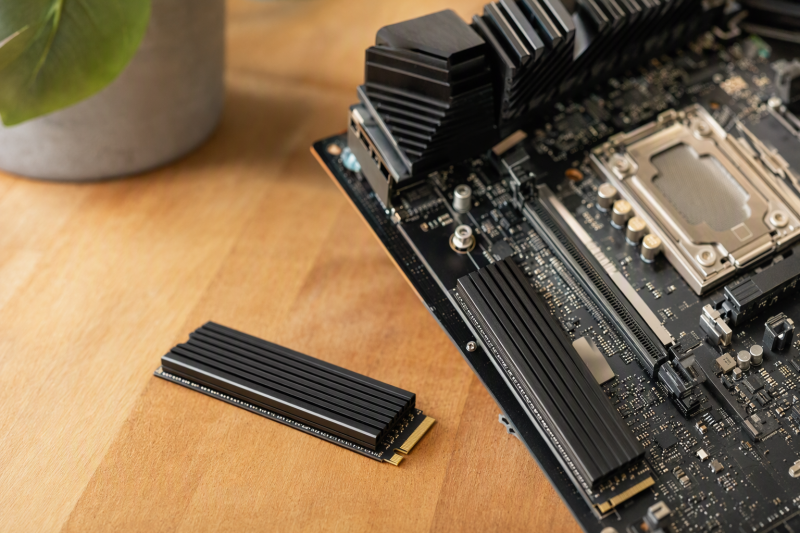
A new M.2 SSD can fit the motherboard slot yet collide with a graphics card, slot cover, or case panel once a heatsink is attached. For workstation storage, clearance and pad contact come before temperature claims. A passive cooler helps only if it fits the actual 2280 drive, touches the intended components, and has airflow around it. If the motherboard already supplies a heatsink, check that assembly before buying a second one.
These six heatsinks include a thin 3 mm top plate, clipped or screwed two-sided designs, heatpipe models, and a click-together assembly. All target M.2 2280 in their listings. Seller claims of 5 to 30°C improvement are not measurements for your workstation or evidence of faster sustained writes.
Measure the empty space above and below the M.2 slot, identify whether the SSD has components on both sides, and check the motherboard’s own thermal cover before choosing a cooler.M.2 SSD Heatsinks Compared
| Image | Product | Details | Check Price |
|---|---|---|---|
 | GLOTRENDS Low-Profile | Drive: M.2 2280 Construction: 3 mm aluminum top Mount: Clips/bands Best fit: Tight slot to measure | Check Price on Amazon |
 | ARCTIC M2 Pro | Drive: M.2 2280 Construction: Two-sided, TP-3 pads Mount: Click mechanism Best fit: Screw-free assembly | Check Price on Amazon |
 | be quiet! MC1 Pro | Drive: M.2 2280 Construction: Aluminum + heatpipe Mount: Two-sided body Best fit: Roomy heatpipe slot | Check Price on Amazon |
 | Thermalright M.2 Pro | Drive: M.2 2280 Construction: 11.7 mm height, heatpipe Mount: Two thermal sheets Best fit: Measured open slot | Check Price on Amazon |
 | MHQJRH SRP-002 | Drive: M.2 2280 Construction: Double-sided aluminum Mount: Adjustable screws Best fit: 12 mm clearance minimum | Check Price on Amazon |
 | SGTKJSJS 2280 | Drive: M.2 2280 Construction: Double-sided clip body Mount: Clip and pad Best fit: Basic open desktop slot | Check Price on Amazon |
1. GLOTRENDS Low-Profile — Best Tight-Slot Starting Point
The GLOTRENDS listing gives a 22 × 70 × 3 mm aluminum top heatsink and includes a thermal pad plus metal clasps and rubber bands. A 3 mm top piece is a useful starting point when an expansion card or motherboard shroud leaves little room, although total installed height also includes the SSD, pad, and fasteners. The seller names M.2 2280 NVMe and SATA drives, but a common length does not guarantee unobstructed space around a particular slot.
Its “5 to 20°C” cooling claim is provided by the seller and depends on the environment, not a measured result for these builds. The listing says it is not for laptops, and a slim workstation chassis may be just as constrained. Check whether clasps or bands would touch nearby electronics or interfere with the motherboard’s latch. If a factory thermal cover is already installed, do not stack this heatsink underneath it without the board maker’s instructions.
Our Take Choose GLOTRENDS as your low-profile candidate if a tall cooler will not fit above the slot. Measure the complete assembly rather than assuming the 3 mm metal dimension is the final clearance.
- 3 mm top-piece dimension stated.
- Pad, clasps, and bands included.
- No fan power required.
- Total installed height is greater than 3 mm.
- Seller excludes laptops.
2. ARCTIC M2 Pro — Best Click-Together Assembly
ARCTIC’s M2 Pro uses two included TP-3 thermal pads and a click mechanism to hold a single- or double-sided M.2 2280 SSD between the heat-spreading pieces. The click design avoids the tiny screws or rubber bands of some alternatives. The listing also claims PS5 compatibility, but PS5 compatibility is a separate check from clearance on a workstation motherboard with a GPU close to the M.2 slot.
Before snapping the parts together, confirm the pad thickness and component heights suit the SSD. Do not force a two-sided cooler around a drive with uneven components or stack it against an existing board heatsink. ARCTIC says the assembly reduces thermal-throttling risk. The actual benefit depends on SSD heat output, case airflow, and pad contact. Buy it for the physical assembly, not for a claimed speed gain.
Our Take Choose the M2 Pro if a screw-free two-sided assembly fits the slot. Check both sides of the motherboard area before treating the click mechanism as universally easy.
- Click-together mounting stated.
- Two TP-3 pads included.
- Single- and double-sided drives listed.
- Two-sided assembly needs underside clearance.
- No measured workstation temperature result.
3. be quiet! MC1 Pro — Best Heatpipe Option
The MC1 Pro is an aluminum M.2 2280 cooler with an integrated heatpipe in the checked listing. It is specified for both single- and double-sided 2280 modules. The heatpipe is a reason to consider it for a workstation that runs long exports or large file transfers, but only if the body fits the chosen slot and has a route to ambient airflow. A tall passive cooler in stagnant air can still perform poorly.
The seller says it helps sustain read and write speed by reducing thermal throttling, but provides no result for your SSD and workload. Inspect motherboard standoffs, GPU backplates, and nearby shrouds before buying. Some motherboards already have a factory M.2 cover. Replacing it may be unnecessary, or it could worsen pad contact if the new pad does not reach the controller. Treat the purchase as a physical fit decision first and a thermal experiment second.
Our Take Choose the MC1 Pro as your heatpipe candidate if the desktop slot is roomy. It is not the default under a crowded GPU or an intact board cooler.
- Integrated heatpipe stated.
- Single- and double-sided 2280 support listed.
- Requires clearance and airflow.
- No independent result for this workstation.
4. Thermalright M.2 Pro — Best Measured-Clearance Check
Thermalright publishes a 75 × 22.7 × 11.7 mm overall size for this aluminum-and-copper heatpipe cooler. The published size gives you a height to compare with the free space around an M.2 2280 slot. The listing names an 8 mm copper heatpipe and two thermal sheets, so the body is probably larger than a flat plate. For a workstation with a free M.2 slot away from the GPU, the stated dimensions may be easier to plan around than an unspecified “high performance” promise.
The seller says it is partly compatible with shorter 2260/2242 drives, but 2280 is the clear target. Do not assume the mounting layout for shorter drives will work on a particular board. The 11.7 mm cooler dimension is also not the whole board-to-card clearance measurement. Include the SSD, the mounting hardware, nearby components, and any graphics-card overhang. A heatpipe design cannot compensate for a pad that fails to touch the controller.
Our Take Choose Thermalright as a candidate if you can measure the slot and deliberately fit a taller passive cooler. The published height is more useful than a generic cooling percentage.
- 75 × 22.7 × 11.7 mm dimensions stated.
- Heatpipe and two pads listed.
- Taller than a low-profile plate.
- Shorter-drive fit is only partial in listing.
5. MHQJRH SRP-002 — Best Adjustable Two-Sided Clamp
MHQJRH’s SRP-002 is a double-sided aluminum M.2 2280 assembly with six adjustable-height screws and a thermal pad in the checked listing. The adjustment is useful in principle when an SSD has different component heights, but the seller’s own dimensions limit where it fits, because it states a minimum installation-height requirement of 12 mm. The minimum height rules out many cramped slots even before you consider a GPU or case panel. The seller targets desktop PC and PS5 use, not thin laptops.
Its “10 to 30°C” reduction is an unverified seller claim that varies with the environment. Do not tighten screws to force pad contact. The SSD board should not bow. Inspect both sides of the module and the M.2 mounting area. If the motherboard already has a base plate or a fixed cover, this two-sided assembly may conflict with it. The adjustable hardware is a fit tool, not a way to bypass physical clearance.
Our Take Choose the SRP-002 if you want a two-sided cooler with adjustable screws and the workstation has room. The stated 12 mm minimum requirement should be checked before anything else.
- Adjustable-height screw assembly.
- Double-sided 2280 construction.
- At least 12 mm installation height stated.
- Seller temperature reduction is unverified here.
6. SGTKJSJS 2280 — Best Basic Clip-On Alternative
This SGTKJSJS listing describes a double-sided clip-style aluminum heatsink for M.2 2280 with a thermal pad. Its approximate 3 × 0.95 × 0.4-inch body is taller than the thin GLOTRENDS plate, so compare it to the free space around the slot. The seller mentions both desktop PC and PS5 and lists familiar Samsung SSD families, but brand-name examples do not prove fit with every component layout or motherboard cover.
The description mentions “all single sided” SSDs and also a double-sided clip design. The exact supported underside configuration is not clearly specified. Check the product photos, pad placement, and the SSD component side before ordering. Ignore the seller’s 10 to 20°C improvement figure as an expected result, because thermal contact and case airflow affect the result. A plain clip is convenient only when it holds evenly without pressing the PCB into a bow.
Our Take Choose SGTKJSJS if you want a basic clip-on cooler for an open 2280 slot. Its broad compatibility wording needs a physical fit check more than a speed promise.
- Clip-style assembly and pad stated.
- Approximate body dimensions provided.
- Single- versus double-sided fit wording is unclear.
- Seller cooling figure is not verified.
Buying Guide: Check the Slot, Contact, and Airflow
Measure total installed clearance
All six products here target M.2 2280, but their mounting systems differ. GLOTRENDS lists a 3 mm top piece, Thermalright lists an 11.7 mm body height, and MHQJRH states a 12 mm minimum installation height. These figures are not necessarily measured from the same point. Measure the distance from the installed SSD and nearby board surface to the first obstruction, then include pads, screws or clips, a GPU backplate, and any slot shroud.
Do not stack an aftermarket cooler under a motherboard’s factory M.2 cover unless the motherboard maker explicitly supports it. Some board covers already include pads. The Crucial installation guide warns against reinstalling a motherboard heatsink over an SSD’s own cooler. If the slot is inaccessible after the GPU goes in, test the physical assembly before final cable routing. Our USB-C docking station guide covers external expansion, not internal M.2 clearance.
Match pad contact to the actual SSD
Thermal pads must touch the intended hot components without bending the SSD. Controller, DRAM, and NAND package heights can differ. Single- and double-sided SSDs also change the underside clearance. ARCTIC includes two pads, MHQJRH uses adjustable hardware, and be quiet! lists single/double-sided compatibility. None of those phrases proves perfect contact on your exact drive. Follow the cooler and SSD makers’ instructions for pad placement and protective-film removal.
The most useful check is whether the assembled SSD sits flat in its M.2 slot and the cooler clears every nearby component. Do not peel an SSD label or crush components just because a generic listing says to do so. If the drive came with a preinstalled heatsink, verify that removing it is permitted and sensible before buying another. Our USB-C hub guide may help with external storage ports, but it will not change internal pad contact.
Decide whether extra cooling is justified
An SSD can throttle under sustained large writes, especially in a warm workstation, but routine office use may never reach that limit. Samsung’s NVMe thermal FAQ describes throttling under extreme transfers. Before adding a cooler, inspect the existing motherboard heatsink, airflow path, and observed SSD temperature or throughput with a tool appropriate to the SSD. A cold-looking heat spreader is not proof the controller is cooler if the pad misses it.
Passive heatsinks need surrounding air movement to shed heat. A heatpipe model such as be quiet! MC1 Pro or Thermalright M.2 Pro may suit a roomy build, while a flat plate may fit a cramped slot. No listing here establishes a guaranteed temperature drop in your machine. Use the fit and contact evidence to select a candidate, then check the installed result rather than relying on an advertised degree range.
Frequently Asked Questions
Can I put one of these on top of my motherboard’s M.2 cover?
Stacking a second heatsink is usually not the intended installation. Two heatsinks stacked without a designed contact path can worsen fit or miss the controller. Check the motherboard manual and the SSD/cooler instructions. In its installation guide, Crucial explicitly warns against reinstalling a motherboard heatsink over an SSD that already has a heatsink.
If the factory cover has a thermal pad and fits the upgraded SSD, it may already solve the physical and cooling job. Decide which single assembly to use, and confirm that the finished SSD sits level in the slot and clears the GPU or case panel.
Does a heatpipe cooler guarantee faster workstation writes?
No. A heatpipe moves heat only when the pad makes good contact and the surrounding air can carry heat away. Performance also depends on the SSD controller, free space, workload, and whether the drive was throttling in the first place. The heatpipe coolers here are passive devices, not measured performance upgrades for your workstation.
Compare sustained behavior before and after only if you can do it safely on noncritical data. Do not interpret a seller’s 10 to 30°C range as your expected improvement. Clearance and proper pad installation remain the first requirements.
Will an M.2 2280 heatsink fit a laptop or a shorter SSD?
Not by default. M.2 2280 specifies a 22 × 80 mm drive, and laptops often have much less height than a desktop workstation slot. GLOTRENDS explicitly excludes laptops. Most other products here describe desktop or PS5 use. Thermalright mentions partial 2260/2242 compatibility, which is not a promise for every board’s mounting position.
Use a laptop-specific cooling part only if the laptop maker’s service documentation allows it. For a shorter module, verify the heatsink’s actual mount points and pad coverage. Forcing an oversized assembly can bend the module or obstruct the case.
Bottom Line
Choose GLOTRENDS for a thin starting point, ARCTIC M2 Pro for a screw-free two-sided assembly, or Thermalright for a roomy slot, since it gives a published height to plan around. Buy only after measuring the whole installed assembly and checking pad contact. No cooler here has a verified temperature result for your workstation.