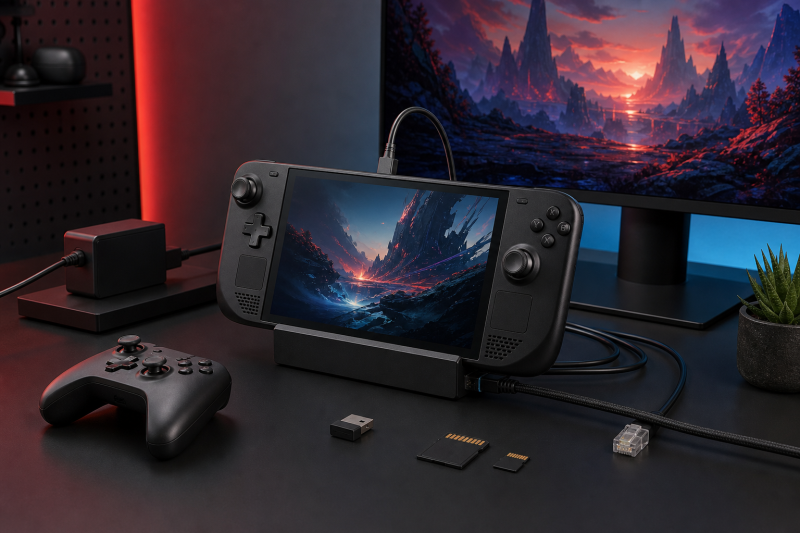
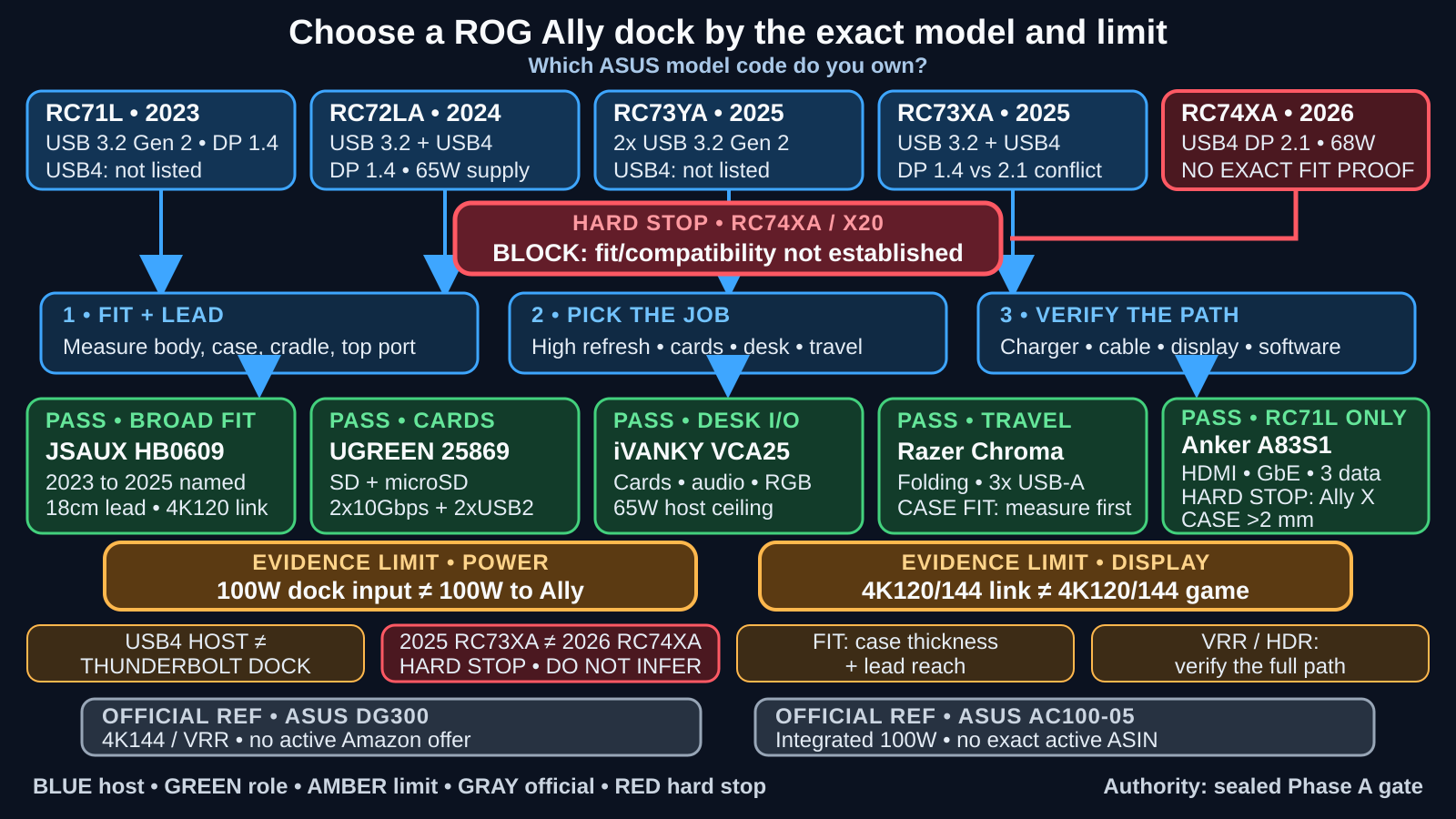
Start with the exact model code printed on your ROG Ally. The code tells you which compatibility evidence applies, though case thickness and lead reach still need checking. For the 2023 to 2025 family, we have five picks. The JSAUX HB0609 bundle has the broadest named Ally compatibility and a high-refresh HDMI link. The UGREEN 25869 is the pick for SD and microSD. The iVANKY VCA25 has the widest desk I/O. The Razer Handheld Dock Chroma is the folding travel option. The Anker A83S1 suits an original 2023 Ally with a thin case or no case. ASUS’s Bulwark DG300 and AC100-05 are useful official references, not affiliate picks here. There is one firm exception. If you own the 2026 ROG XBOX Ally X20 RC74XA, do not buy any of these five yet, because none has exact first-party fit or compatibility proof for that model.
There is no universal winner. We chose these units from current manufacturer specifications, the exact Amazon listings, and attributed independent reviews. We did not test these products ourselves. Vendor display and power figures are ceilings or input ratings, not measured results for every Ally, cable, display, game, and firmware combination.
Quick answer by model and job
| Exact product or boundary | Best for | Verified Ally scope | Display, network, or storage distinction | Charger and package reality | Strongest reason to skip |
|---|---|---|---|---|---|
JSAUX HB0609 bundle, B0DWFSS41L |
Broadest documented 2023 to 2025 fit | First party names all four covered families | HDMI 2.1 to 4K120, Gigabit, three 5Gbps data ports | Amazon title says 100W charger bundle; exact charger, cable, and box are not published | No cards, replaceable lead, or RC74XA proof |
UGREEN 25869, B0CR6JND4M |
SD and microSD workflow | Generic ROG Ally claim; later codes not published | HDMI 2.0 to 4K60, Gigabit, two 10Gbps ports, two USB 2.0 ports, cards | 100W input; host delivery and US package not published | Later fit and official dimensions are unsettled |
iVANKY VCA25, B0DLK8VYXY |
Widest desk I/O | Generic Ally claim; Amazon names 2025 Xbox Ally X | HDMI 2.1 to 4K120, Gigabit, cards, audio, RGB, USB-C data | 100W input, up to 65W host; selected style has no adapter | Thin independent evidence; no RC74XA proof |
Razer Handheld Dock Chroma, B0DS4GDVW2 |
Folding travel setup | Independent fit evidence only on RC72LA |
HDMI 2.0 to 4K60, Gigabit, three USB-A 5Gbps ports | 100W input, up to 85W host; no adapter | Reported cased RC72LA did not sit correctly |
Anker A83S1, B0CS6BWL4Q |
Original 2023 Ally | RC71L only here; Anker excludes Ally X |
HDMI to 4K60, Gigabit, three 5Gbps data ports | 100W input; host delivery and package not published | No Ally X, kickstand case, or case over 2mm |
| ASUS Bulwark DG300 and AC100-05, non-affiliate | Official references | Official Ally language; no RC74XA fit proof |
DG300 adds HDMI 2.1, VRR attribution, Gigabit, audio; AC100-05 integrates power | DG300 has no charger; AC100-05 includes its cable | Neither has the exact active Amazon listing an affiliate pick needs |
RC74XA ROG XBOX Ally X20 (2026) |
No recommendation | Outside scope | USB4 DP 2.1 host path; dock fit not established | 68W supply; regional package varies | Hard stop: no exact product proof |
Comparison matrix 1: identify your ROG Ally before buying
| Exact ASUS device | Software boundary | USB-C and display path | Official adapter and mode boundary | Physical size | Recommendation status |
|---|---|---|---|---|---|
ROG Ally (2023) RC71L |
Windows 11 Home; Armoury Crate SE | One USB 3.2 Gen 2/DP 1.4 path; USB4 not published | 65W, 20V/3.25A; ASUS documents 30W with a suitable 65W-or-higher PD adapter or hub | 28.0 x 11.1 x 2.12 to 3.24cm | Covered with original-Ally fit evidence |
ROG Ally X (2024) RC72LA |
Windows 11 Home; Armoury Crate SE | USB 3.2 Gen 2 DP/PD plus USB4 DP 1.4/PD 3.0 | 65W, 20V/3.25A; mode depends on the complete power path and ASUS software | 28.0 x 11.1 x 2.47 to 3.69cm | Covered with exact or attributed fit evidence |
ROG Xbox Ally (2025) RC73YA |
Windows 11 Home; Armoury Crate SE; Xbox interface | Two USB 3.2 Gen 2 DP/PD ports; no USB4 published | 65W, 20V/3.25A; Xbox says charger/stand included, ASUS says packages vary | 29.0 x 12.1 x 2.75 to 5.09cm | Covered with 2025 naming or a fit check |
ROG Xbox Ally X (2025) RC73XA |
Windows 11 Home; Armoury Crate SE; Xbox interface | USB 3.2 Gen 2 DP/PD plus USB4; ASUS says DP 1.4, Xbox says DP 2.1 | 65W, 20V/3.25A; docked mode not promised | 29.0 x 12.1 x 2.75 to 5.09cm | Covered with 2025 naming or a fit check |
ROG XBOX Ally X20 (2026) RC74XA |
Windows 11 Home; current Xbox software family | USB 3.2 Gen 2 DP/PD plus USB4 DP 2.1/PD 3.0 | 68W, 20V/3.4A; docked mode not established | 30.0 x 12.1 x 2.75 to 5.13cm | Hard stop: no recommendation |
The USB-C connector alone does not tell you what the port carries. Our USB4 explainer covers the host standard, and the USB4 dock guide is the better shopping route if a broader USB4 desktop dock is your actual goal. None of the five picks below becomes a Thunderbolt dock because RC72LA or RC73XA has a USB4 port.
Four decisions to make before choosing
1. Match the model, cradle, case, and host lead
Start with the ASUS code, not the words “Ally” or “Ally X” in a broad listing title. RC71L, RC72LA, RC73YA, and RC73XA have different bodies and port layouts. RC74XA is longer again and uses a different supply. A claim for the 2024 Ally X does not prove fit on either 2025 Xbox model, and a 2025 Xbox Ally X claim does not prove fit on the 2026 X20.
Cradle contact thickness and lead reach can decide whether the dock works as a stand. JSAUX publishes an 18cm attached lead and a below-27mm contact limit, with a vendor FAQ allowing up to a 3mm Ally X case. Razer does not publish lead length, but an independent RC72LA review found that it just reached an uncased unit and that a cased unit did not sit correctly. Anker gives the clearest hard limit: no kickstand cases and no case over 2mm.
Measure where the handheld actually touches the cradle. A wide opening does not help if a grip, kickstand, or thick lower edge keeps the USB-C plug from reaching the top port.
2. Separate dock input, host delivery, and Armoury Crate mode
A “100W dock” often means the PD input can accept up to 100W. It does not mean 100W reaches the Ally. The dock and attached devices draw power first, then USB Power Delivery negotiates what the host can accept. The USB Power Delivery guide explains that negotiation.
The five products publish different evidence. Razer documents up to 85W host delivery from a 100W input. iVANKY separates its 100W input from a 65W host ceiling. JSAUX, UGREEN, and Anker publish a 100W input but do not state the exact figure that reaches the host. A vendor operating-mode claim also depends on the exact Ally, charger, e-marked cable, dock overhead, attached devices, BIOS, and Armoury Crate SE.
Use a charger with the required profile, not just a large number on its label. Our USB-C charger guide helps with adapter selection, while the USB-C cable guide explains why an e-marked power cable may be necessary. The X20’s 68W supply does not clear any of these five docks for RC74XA.
3. Treat display specifications as a complete-path ceiling
The Ally sends a DisplayPort signal over USB-C, and these docks convert it to HDMI. Before assuming a USB-C port can output video, use the DisplayPort Alt Mode check. The dock’s HDMI version and maximum mode are only part of the route.
JSAUX and iVANKY publish HDMI 2.1 ceilings up to 4K120. UGREEN, Razer, and Anker top out at a published 4K60. ASUS rates Bulwark up to 4K144 and attributes VRR to its ROG Ally display route. These are link ceilings, not a promise that the Ally will render a game at 4K120 or 4K144. The game, Windows mode, graphics driver, dock firmware, cable, and the TV or monitor input all shape the result.
High-refresh results also require the right display cable and input. Our high-refresh cable guide covers that last part of the chain. HDMI 2.1 by itself does not prove that every VRR or HDR mode works.
4. Count USB roles, network speed, cards, package, and firmware
Count functions rather than connector shapes. UGREEN has two 10Gbps data ports and two separate USB 2.0 ports for receivers and other low-bandwidth peripherals. iVANKY has one 10Gbps USB-C data port, two 5Gbps USB-A ports, and one USB 2.0 port. JSAUX and Anker each give you three 5Gbps data roles. Razer gives you three USB-A 5Gbps ports but no downstream USB-C data.
All five affiliate picks use Gigabit Ethernet. If your wired-network job truly needs more, compare the 2.5GbE dock options instead of expecting a faster link from these models. UGREEN and iVANKY add SD and microSD/TF. None of the five contains an M.2 bay.
Package and firmware evidence are uneven. JSAUX’s Amazon title names a 100W charger bundle, but the exact charger model, cable rating, and full contents are not published. Razer and the selected iVANKY style include no power adapter. UGREEN and Anker do not publish the exact US box. None of the five publishes a clear dock-firmware updater. Armoury Crate SE updates the Ally system, not necessarily the dock.
ASUS official references: Bulwark DG300 and AC100-05
The ROG Bulwark Dock (2025) DG300 is the official reference when high-refresh output, VRR attribution, and ASUS integration count for more than an affiliate pick. ASUS lists one HDMI 2.1 display up to 4K144 or 8K30, Gigabit Ethernet, three USB-A 10Gbps ports, 3.5mm audio, an adjustable stand, and a 25cm USB-C lead. ASUS also attributes VRR support to the ROG Ally external-display path.
Bulwark accepts up to 140W at its input and documents up to 100W to the host, which are different figures. Its listed package includes the dock, a USB-C cable, a manual, and a warranty card, but no charger. Armoury Crate controls its Aura Sync lighting, and a separate dock-firmware updater is not published. It has no active Amazon offer, so Bulwark stays a non-affiliate reference here, and its exact RC74XA fit is not published.
The ROG 100W Gaming Charger Dock AC100-05 takes the opposite approach. It integrates AC power, supplies up to 100W over USB-C through PD 3.1/PPS, and adds HDMI 2.0 up to 4K60 or 1080p120 plus two USB-A USB 2.0 data ports. ASUS lists a 150cm cable, quick-start material, and a warranty card. It has no Ethernet, handheld stand, or card reader, and we found no exact active Amazon listing for it.
Use these as design baselines, not as hidden sixth and seventh picks. Bulwark shows what an official stand dock can add. AC100-05 shows what an integrated charger can simplify. Neither clears the RC74XA hard stop.
1. JSAUX HB0609: Best documented fit across 2023 to 2025 models
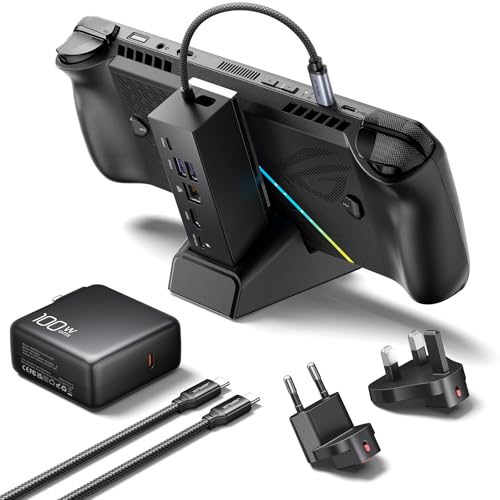
JSAUX comes first because its page names all four covered Ally families. Identity still needs care. Its heading says HB0609B, while its comparison table and the Amazon bundle say HB0609, so do not substitute another HB revision. Buy it for the modular stand, lead reach, higher HDMI link, Gigabit Ethernet, and three 5Gbps ports. Skip it for cards, internal storage, a replaceable lead, or RC74XA.
The attached lead is 18cm. JSAUX sets a below-27mm contact limit and allows an Ally X case up to 3mm. A Windows Central review found that the lead reached an RC72LA without strain. That observation does not cover either 2025 model.
The input accepts 100W. JSAUX ties 30W Turbo on the original Ally and Ally X to a 100W charger and says its 65W bundle does not enable that claim. It attributes 20W Enhanced Mode to the 2025 pair. Exact host delivery is not published.
One HDMI 2.1 output reaches a vendor-rated 4K120 or 1080p240. The independent review needed a suitable HDMI 2.1 cable and input for its higher route, and its package lacked an HDMI cable. Those observations remain configuration-specific.
Networking is Gigabit Ethernet. The downstream ports are one USB-C and two USB-A, all USB 3.2 Gen 1 up to 5Gbps. There is no card reader or internal storage.
The Amazon title says dock and 100W charger, but the exact charger model, cable rating, and full box are not published. JSAUX states a 12-month direct-store warranty, and marketplace claims depend on the seller. Firmware is not published, and no source names RC74XA.
Our Take
Choose HB0609 when you want the strongest named 2023 to 2025 family coverage, an 18cm lead, and a higher HDMI link ceiling without adding card readers. Its main uncertainty is not the port list. It is the exact bundle, delivered-host power, and the unresolved HB0609 versus HB0609B label.
- Names all four covered 2023 to 2025 Ally families
- 18cm attached lead reached an independently reported RC72LA setup
- Three downstream data ports, each rated up to 5Gbps
- HDMI 2.1 link ceiling up to a vendor-rated 4K120
- HB0609 and HB0609B labels conflict on first-party material
- Exact charger model and full bundle are not published
- No card reader, internal storage, or RC74XA proof
2. UGREEN 25869: Best for SD and microSD workflows

UGREEN model and part 25869 is the card-work pick. Buy it for SD, microSD, two fast data ports, and two attached low-bandwidth peripherals. Skip it for exact later-generation proof, HDMI 2.1, or a documented host-power figure.
The folding stand is adjustable, but lead length is not published. UGREEN makes a generic ROG Ally and Turbo-mode claim without naming RC72LA, RC73YA, or RC73XA, so check cradle fit and lead reach on your own unit. RC74XA is not covered.
The input is rated up to 100W. Host delivery and exact Turbo conditions are not established. Trust the current ASUS software indication, not the dock’s input label.
The US page lists one HDMI 2.0 display up to 4K60. Other UGREEN revisions advertise different connectors or ceilings, but those claims do not belong to 25869. Networking is Gigabit Ethernet.
One USB-C port and one USB-A port reach 10Gbps. Two USB-A ports run at USB 2.0 speed. SD and TF/microSD readers are included, but M.2 and 3.5mm audio are not.
UGREEN does not publish the US package, host delivery, or firmware updater. Its US page states a two-year warranty. Official dimensions conflict across regions, so they are omitted and regional packages do not fill US gaps.
Our Take
Pick 25869 when its two 10Gbps data ports, two USB 2.0 peripheral ports, and two card slots match your workflow. Do not buy it because another UGREEN dock advertises DisplayPort or 4K120. Revision discipline is the main purchase rule here.
- SD and microSD readers share one adjustable stand
- One USB-C and one USB-A data port reach 10Gbps
- Two USB 2.0 ports keep low-bandwidth peripherals separate
- Two-year product warranty on the US first-party page
- Exact later-generation fit and lead length are not published
- Host delivery and exact US package are not established
- Official dimensions conflict across regions
3. iVANKY VCA25: Best for the widest desk I/O
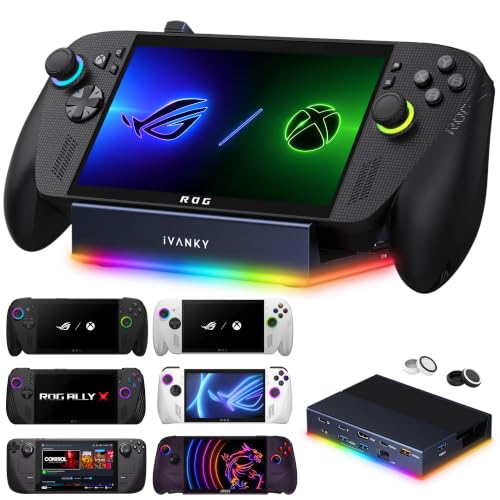
The iVANKY VCA25 is the desk pick for cards, audio, RGB, USB-C data, and several USB-A roles. Skip it if travel, an included adapter, or deep independent evidence is more important to you.
iVANKY publishes generic Ally compatibility, while Amazon names the 2025 RC73XA. That is not code-level fit proof for every body. The braided-lead stand has 0-degree and 45-degree positions, but size, weight, and lead length are not published. Measure the case and route. RC74XA is outside scope.
The dock accepts 100W input and separately limits host charging to 65W. The selected style has no adapter, and no exact Armoury Crate mode is established.
One HDMI 2.1 output reaches a vendor-rated 4K120. That is a link ceiling, with no universal VRR, HDR, or game-result proof.
Data includes one USB-C 10Gbps port, two USB-A 5Gbps ports, and one USB-A 2.0 port. It also has Gigabit Ethernet, SD/TF to a vendor-rated 312Mb/s, 3.5mm audio, and RGB, but no M.2.
The full package and firmware updater are not published. iVANKY states a 24-month warranty. Code-level first-party claims are absent, Amazon supplies only the 2025 RC73XA title boundary, and independent evidence is thin.
Our Take
Choose VCA25 when cards, audio, RGB, USB-C data, and a high-refresh HDMI link belong at one desk. Its 65W host ceiling is clearer than an unexplained 100W input claim, but the fit, package, firmware, and code-level compatibility gaps require a careful listing check.
- Widest mix of cards, audio, RGB, USB-C, and USB-A roles
- Separates 100W input from a 65W host-charging ceiling
- HDMI 2.1 link ceiling up to a vendor-rated 4K120
- Adjustable stand supports flat and angled desk positions
- No adapter in the selected first-party style
- Dimensions, lead length, package, and firmware path are not published
- Independent evidence is thin and RC74XA is not covered
4. Razer Handheld Dock Chroma: Best folding travel dock
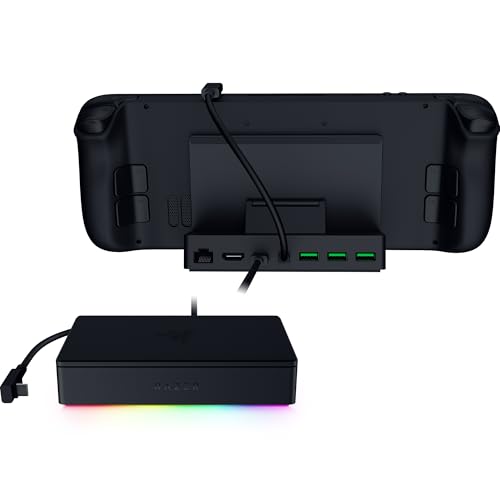
Razer’s exact model and part is RC21-02310100-R3U1. Its folding aluminum body and three equal-speed USB-A ports suit travel with an uncased or measured handheld. Skip it for USB-C data, cards, HDMI 2.1, or a thick case.
Razer publishes generic handheld compatibility, not Xbox codes. A Windows Central RC72LA review found the fixed lead just reached uncased, while a cased unit did not sit correctly. That does not prove RC73YA, RC73XA, or RC74XA fit.
The dock accepts 100W and documents up to 85W to the host. No adapter is included, and no exact Armoury Crate mode is established.
HDMI 2.0 supports one external display up to 4K60. There is no HDMI 2.1 ceiling to pay for and no DisplayPort output. Gigabit Ethernet covers the wired network role.
All three data ports are USB-A 5Gbps. There is no downstream USB-C, USB 2.0-only port, card reader, M.2, or audio. A physical button selects Chroma effects.
Razer lists 133 x 89 x 28.57mm and 290g. Lead length, full package, and firmware updater are not published. The product page says two years, while the broader warranty table is less specific, so verify the claim route.
Our Take
Choose Razer when a folding metal body, three USB-A data ports, and a documented 85W host ceiling outweigh HDMI 2.1, cards, and USB-C data. The RC72LA fit report is valuable, but it also makes the case warning impossible to ignore.
- Collapsible aluminum body packs flatter than fixed cradle designs
- Documents up to 85W host delivery from 100W input
- Three USB-A data ports each run up to 5Gbps
- Independent RC72LA evidence documents reach and case misfit
- Cased RC72LA did not sit correctly in the reported setup
- No charger, USB-C data, card reader, or HDMI 2.1
- Exact Xbox-model fit and firmware path are not published
5. Anker A83S1: Best balanced dock for the original RC71L
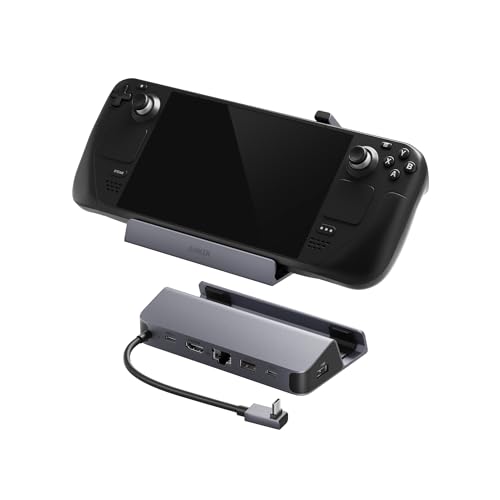
Anker A83S1 is the narrowest pick. Buy it only for the original RC71L when HDMI, Gigabit, and three 5Gbps ports cover the job. Skip every Ally X, kickstand case, and case over 2mm.
The stand has a 90-degree host connector, but lead length is not published. Anker explicitly excludes ROG Ally X and kickstand cases, so do not extend it to RC72LA, RC73YA, RC73XA, or RC74XA.
The input accepts 100W. Anker ties original-Ally 30W Turbo to a 100W PD charger, but host delivery is not published. Check Armoury Crate SE on the actual setup.
HDMI reaches a vendor-rated 4K60. Anker requires HDMI-to-HDMI 2.0/2.1 within its cable limit and excludes HDMI-to-DisplayPort adapters.
Ethernet is Gigabit. Two USB-A and one downstream USB-C port each carry data up to 5Gbps. There is no dedicated USB 2.0 port, card reader, internal storage, or audio jack.
The US box, host delivery, lead length, firmware updater, and precise US warranty are not published. Verify A83S1 and its ASIN because other Anker docks differ.
Our Take
Choose A83S1 for a measured, original RC71L setup that needs one HDMI display, Gigabit Ethernet, and both USB-A and USB-C data. Its hard incompatibilities actually help the decision. If you own an Ally X or use a thick case, move on.
- Clear original-Ally role with HDMI and Gigabit Ethernet
- Two USB-A and one USB-C port each reach 5Gbps
- Integrated stand uses a handheld-friendly 90-degree connector
- Explicit fit limits reduce model and case ambiguity
- Explicitly incompatible with Ally X and kickstand cases
- Cases thicker than 2mm are excluded
- Host delivery, lead length, package, firmware, and warranty remain open
Comparison matrix 2: display and power
| Exact dock | Display path and count | Vendor ceiling and VRR/HDR boundary | PD input versus host delivery | Charger and operating mode | Firmware or conflict |
|---|---|---|---|---|---|
JSAUX HB0609, B0DWFSS41L |
One HDMI 2.1 display | To 4K120 or 1080p240; VRR/HDR not established | 100W in; host figure not published | Amazon title says 100W charger; modes conditional | Firmware not published; HB0609/HB0609B conflict |
UGREEN 25869, B0CR6JND4M |
One HDMI 2.0 display | To 4K60; VRR/HDR not established | 100W in; host figure not published | US package and mode conditions not established | Firmware not published; other revisions differ |
iVANKY VCA25, B0DLK8VYXY |
One HDMI 2.1 display | To 4K120; VRR/HDR not established | 100W in; up to 65W host | No adapter; exact mode not established | Firmware not published; title names 2025 only |
Razer Chroma, B0DS4GDVW2 |
One HDMI 2.0 display | To 4K60; VRR/HDR not established | 100W in; up to 85W host | No adapter; exact mode not established | Firmware not published |
Anker A83S1, B0CS6BWL4Q |
One HDMI display | To 4K60; specific cable route; VRR/HDR not established | 100W in; host figure not published | Original-Ally 30W claim needs 100W charger | Firmware not published |
| ASUS Bulwark DG300, official | One HDMI 2.1 display | To 4K144 or 8K30; ASUS attributes VRR | 140W in; up to 100W host | No charger; ASUS recommends 100W or higher | Aura via Armoury Crate; updater not published |
| ASUS AC100-05, official | One HDMI 2.0 display | To 4K60 or 1080p120; VRR/HDR not established | Integrated AC; up to 100W USB-C | Integrated charger | Firmware path not published |
Comparison matrix 3: data, network, and storage
| Exact dock | USB-C data | USB-A data and USB 2.0 roles | Ethernet | Cards and storage | Audio and RGB | Bandwidth evidence |
|---|---|---|---|---|---|---|
| JSAUX HB0609 | One 5Gbps | Two 5Gbps; no USB 2.0-only port | Gigabit | No cards or storage | Audio/RGB not published | Topology not published |
| UGREEN 25869 | One 10Gbps | One 10Gbps plus two USB 2.0 ports | Gigabit | SD and microSD/TF; no M.2 | Audio/RGB not published | Topology not published |
| iVANKY VCA25 | One 10Gbps | Two 5Gbps plus one USB 2.0 port | Gigabit | SD/TF to 312Mb/s; no M.2 | 3.5mm audio; RGB | Topology not published |
| Razer Chroma | None | Three 5Gbps; no USB 2.0-only port | Gigabit | No cards or storage | Button-controlled Chroma; no audio | Topology not published |
| Anker A83S1 | One 5Gbps | Two 5Gbps; no USB 2.0-only port | Gigabit | No cards or storage | Audio/RGB not published | Topology not published |
| ASUS Bulwark DG300, official | No downstream USB-C data published | Three 10Gbps; one BC 1.2 | Gigabit | Card/M.2 roles not published | 3.5mm audio; Aura Sync | Topology not published |
| ASUS AC100-05, official | USB-C host output | Two USB 2.0 ports at 5W each | None | No cards or storage | No audio or RGB | Topology not published |
Comparison matrix 4: fit, package, support, and generation
| Exact dock | Stand, lead, and case boundary | Verified generation evidence | RC74XA | Package and charger | Firmware and warranty | Strongest reason to skip |
|---|---|---|---|---|---|---|
| JSAUX HB0609 | Modular; 18cm lead; below 27mm contact; Ally X case to 3mm | Names all four covered families; RC72LA fit report |
Not covered | Title says 100W charger; exact charger, HDMI cable, box not published | Firmware not published; 12-month direct warranty; reseller caveat | Suffix and bundle conflict |
| UGREEN 25869 | Folding; lead/case limit not published; dimensions conflict | Generic Ally claim; later codes not published | Not covered | US contents and charger status not published | Firmware not published; two years | Later fit not established |
| iVANKY VCA25 | 0/45-degree stand; braided lead; size, lead, case limit not published | Generic Ally claim; title names 2025 RC73XA |
Not covered | No adapter; full package not published | Firmware not published; 24 months | Thin evidence and open fit |
| Razer Chroma | Folding; fixed lead; uncased RC72LA just reached; cased unit misfit |
Independent RC72LA configuration only |
Not covered | No adapter; full package not published | Firmware not published; product page says two years; seller caveat | Cased and later-model fit |
| Anker A83S1 | Integrated; 90-degree plug; no kickstand or case over 2mm | Original RC71L; Ally X excluded |
Not covered | Box and charger status not published | Firmware and US warranty not published | Hard Ally X/case stop |
| ASUS Bulwark DG300, official | Adjustable; 25cm lead; case limit not published | Official Ally route; code-level fit not established | Not covered | Dock, cable, manual, warranty card; no charger | Aura via Armoury Crate; updater/warranty not established | No active offer or charger |
| ASUS AC100-05, official | Integrated charger; no stand; 150cm cable | Generic official Ally claim | Not covered | Dock, cable, quick-start, warranty card | Firmware/warranty not published | No Ethernet, stand, cards, or exact ASIN |
Decision paths by setup
Original ROG Ally RC71L
Choose Anker A83S1 when the case meets its strict 2mm rule and you want a balanced HDMI, Ethernet, and three-data-port layout. Choose JSAUX for a longer documented lead and a higher HDMI link ceiling. Choose UGREEN or iVANKY when card readers matter.
ROG Ally X RC72LA
JSAUX has the broadest named support and independent lead-reach evidence. Razer has useful independent fit evidence too, but the cased device failed the reported cradle fit. UGREEN and iVANKY need a physical check because code-level fit is not published. Do not use Anker A83S1.
ROG Xbox Ally RC73YA or ROG Xbox Ally X RC73XA
JSAUX explicitly names both 2025 families. iVANKY’s current Amazon title names the 2025 Xbox Ally X, but first-party code-level fit is not published. UGREEN and Razer require careful stand and lead measurement. Anker has no basis for either model.
ROG XBOX Ally X20 RC74XA
Do not buy from these five recommendations yet. The 2026 X20 is a separate 30.0cm device with a 68W supply and a USB4 DP 2.1 route. None of these five products has exact first-party fit or compatibility proof.
TV or high-refresh monitor
JSAUX and iVANKY publish 4K120 link ceilings. Anker, UGREEN, and Razer publish 4K60. ASUS Bulwark is the official 4K144 and VRR reference. Choose by the full host, dock, cable, display, Windows, and game path, not by HDMI labeling alone.
Desk, network, and peripheral setup
iVANKY has the broadest port mix. UGREEN is better when two 10Gbps data roles and two always-attached USB 2.0 peripherals fit the desk. All five affiliate picks stop at Gigabit Ethernet. If the dock is mainly for a full gaming laptop, use the gaming-laptop dock guide instead. For a general office notebook, the USB-C docking-station guide covers that broader job.
Travel and physical fit
Razer folds flat, but a thick case is its main risk. JSAUX has the longest published lead in these five picks. Anker has the clearest hard fit rules. Put a ruler on the case and the distance from the cradle to the top port before ordering.
Card-reader and USB-C peripheral work
Choose UGREEN when SD, microSD, one 10Gbps USB-C port, and one 10Gbps USB-A port cover the workflow. Choose iVANKY when cards need to share the desk with audio and RGB. JSAUX and Anker offer downstream USB-C data but no card reader. Razer has neither.
Already own a dock?
Identify the exact Ally code, dock model and revision, charger, e-marked cable, display cable, selected USB-C port, and any available dock firmware before deciding the dock is wrong. A charging symptom, blank display, missing USB device, or slow Ethernet link needs separate diagnosis. This buying guide does not replace those procedures, and it does not borrow Steam Deck troubleshooting for a Windows Ally setup.
Frequently asked questions
Which dock works with my exact ROG Ally model?
For RC71L, all five roles are possible when fit is checked, with Anker reserved for this original model. For RC72LA, JSAUX and Razer have the strongest exact independent fit evidence, while UGREEN and iVANKY need measurement. For RC73YA and RC73XA, JSAUX has explicit family naming; iVANKY’s Amazon title names the 2025 RC73XA; other fits are not code-level established. For RC74XA, none of these recommendations is cleared.
Does a 100W dock guarantee 30W or another Turbo mode?
No. A 100W figure may describe dock input, not host delivery. The result depends on the exact Ally, charger profiles, e-marked cable, dock overhead, attached devices, BIOS, and Armoury Crate SE. Razer documents up to 85W host delivery and iVANKY up to 65W. The other three do not publish an exact host figure.
Does the original ROG Ally RC71L support USB4?
ASUS publishes one USB 3.2 Gen 2 combo path with DisplayPort 1.4 for RC71L. USB4 is not published. Do not infer USB4 from the Type-C connector or from the later Ally X specifications.
Can ROG Ally X use a Thunderbolt or USB4 dock?
RC72LA and RC73XA have USB4 ports that ASUS calls Thunderbolt 4 compliant, so they can use a suitable USB4 or Thunderbolt peripheral within the exact host and device compatibility rules. That does not turn JSAUX, UGREEN, iVANKY, Razer, or Anker into Thunderbolt docks.
Can a dock make the ROG Ally render games at 4K120 or 4K144?
No dock can promise that game result. JSAUX and iVANKY advertise a 4K120 link ceiling, while ASUS advertises 4K144 for Bulwark. Actual game rendering depends on the Ally model, game, graphics settings, drivers, Windows mode, cable, and display input.
Will VRR and HDR work through every HDMI 2.1 dock?
No. HDMI 2.1 labeling does not establish every VRR or HDR route. ASUS attributes VRR to the Bulwark and ROG Ally path, but the result still depends on the exact host port, dock firmware, cable, display input, driver, and selected Windows mode. The five recommended docks do not have universal VRR or HDR proof.
Do I need a separate 100W charger and e-marked cable?
Often. Razer and the selected iVANKY style do not include a power adapter. JSAUX’s current Amazon title says 100W charger bundle, but the exact charger model and cable rating are not published. UGREEN and Anker do not publish exact US contents. Match charger profiles and cable rating to the dock and Ally rather than assuming every bundle is complete.
Will a Steam Deck dock fit an Ally with a case?
Not automatically. Connector position, lead reach, cradle depth, grip shape, and case thickness all affect the outcome. Anker excludes kickstand cases and cases over 2mm. JSAUX gives an Ally X case limit up to 3mm. Razer’s independently reported cased RC72LA did not sit correctly. A Steam Deck fit statement alone is not Ally proof.
How we selected these docks
We compared current ASUS device specifications, the dock makers’ exact product pages, attributed independent reviews, and a final check of each product’s exact Amazon identity and active offer. Exact evidence is strongest for JSAUX and Razer on RC72LA. It is thinner for UGREEN, iVANKY, and Anker, and the recommendations reflect that difference.
The list stops at five because each product serves a different buyer need and passed our identity checks. Adding an ASUS unit would mean listing one with no active Amazon offer. Adding SABRENT would mean listing one with no current first-party product page. Adding nearby revisions would only create more ways to buy the wrong port map or package.
Checkout checklist
- Confirm
RC71L,RC72LA,RC73YA,RC73XA, or the unsupportedRC74XA. - Match the exact dock model, SKU, revision, and ASIN.
- Recheck that the listing names your model year where required.
- Measure case thickness and the cradle contact point.
- Check that an attached host lead reaches the selected top port.
- Separate PD input from documented host delivery.
- Match charger profiles and use a suitable e-marked cable.
- Check the HDMI cable and the exact TV or monitor input.
- Treat 4K120 or 4K144 as a link ceiling, not a game promise.
- Count USB-C data, USB-A data, USB 2.0, card, audio, and Ethernet roles.
- Verify the exact package, including charger and display cable.
- Find the dock’s firmware path or record that it is not published.
- Verify the seller and warranty route.
Which ROG Ally dock should you buy?
Choose JSAUX HB0609 for the broadest documented 2023 to 2025 family fit, UGREEN 25869 for card readers, iVANKY VCA25 for a dense desk setup, Razer Chroma for folding travel, or Anker A83S1 for a measured original RC71L. ASUS Bulwark and AC100-05 remain useful official references, not affiliate picks.
If your code is RC74XA, none of those conclusions applies. Wait for exact dock fit and compatibility evidence. Everyone else should recheck the exact Ally model, dock model and ASIN, case fit, charger path, and package before buying.