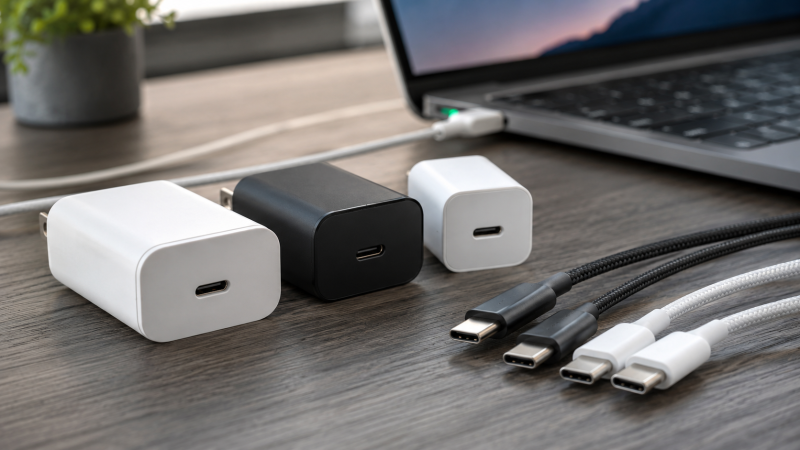
Over 15 USB-C chargers were evaluated, with manufacturer specs, expert benchmarks, and user reviews compared across dozens of devices to narrow the field down to the 10 best USB-C chargers you can buy right now. A USB-C charger uses the USB Power Delivery protocol to charge laptops, tablets, and phones through a single reversible connector, replacing proprietary power bricks. The Anker Prime 100W GaN is the best USB-C charger for most people, delivering 100W through a compact 3-port design with a foldable plug.
GaN technology has made chargers smaller and cooler. USB Power Delivery 3.1 pushes up to 240W. Multi-port designs let you ditch the pile of adapters cluttering your desk. But more options means more confusion: specs can be misleading and wattage claims do not tell the whole story.
Real wattage output data, thermal performance reports, and user feedback were compared across every charger on this list. The goal: find the best USB-C charger for every type of user.
If you already own a Thunderbolt docking station that delivers power to your laptop, you might not need a separate charger for your desk. But for travel, secondary setups, and non-Thunderbolt devices, a dedicated USB-C charger is essential.
Recent Updates
May 2026: Initial publication. Researched and ranked 10 USB-C chargers covering 30W to 140W. Added the Baseus 100W as our new budget pick. Verified all products against current Amazon pricing and availability.
Quick Picks: Best USB-C Chargers at a Glance
- Best overall: The Anker Prime 100W GaN packs 3 ports and a foldable plug into a 1.7 x 1.1 x 2.7-inch body, with ActiveShield 2.0 thermal monitoring and enough power for a MacBook Pro 14″.
- Best for MacBook Pro: The Apple 96W USB-C Power Adapter is the OEM charger for MacBook Pro, with guaranteed compatibility and Apple’s warranty backing every watt.
- Best budget: The Baseus 100W 3-Port GaN delivers 100W from a single USB-C port at a fraction of what competitors charge, matching chargers that cost three times as much.
- Best multi-port: The UGREEN Nexode 100W has four ports (3 USB-C + 1 USB-A), making it the best pick for families or desks with multiple devices.
- Best for power users: The Anker 737 GaNPrime 120W has the highest portable wattage on this list, delivering up to 100W per USB-C port and 120W total across four ports.
- Best desktop charger: The Satechi 100W Pro sits on your desk with a built-in power cord, 4 ports, and a 90W primary USB-C output in a space gray aluminum body.
- Best 100W with built-in cable: The Baseus Enercore 100W packs a retractable USB-C cable, foldable plug, and two additional ports (1C + 1A) into a single compact charger that eliminates cable clutter.
- Best compact: The Anker Nano II 65W is 58% smaller than a standard 61W charger and weighs under 4 ounces, making it the smallest charger here that can fully power a laptop.
- Best for travel: The Apple 30W USB-C Power Adapter fast-charges an iPhone to 50% in about 30 minutes and fits easily in a travel pouch.
- Best 140W: The UGREEN Nexode 140W is the only charger here with USB PD 3.0 support, delivering a full 140W to charge a MacBook Pro 16″ at maximum speed.
Comparison Table
| Image | Product | Details | Check Price |
|---|---|---|---|
 | Anker Prime 100W GaN (3 Ports) | Wattage: 100W (single port) Ports: 2x USB-C + 1x USB-A Size: 1.7 x 1.1 x 2.7 in Weight: 6 oz Features: ActiveShield 2.0, foldable plug | Check Price on Amazon |
 | Apple 96W USB-C Power Adapter | Wattage: 96W Ports: 1x USB-C Compatibility: All USB-C MacBooks (2016+) Features: Apple build quality, full warranty | Check Price on Amazon |
| Baseus 100W 3-Port GaN | Wattage: 100W (single port) Ports: 2x USB-C + 1x USB-A Size: 3.2 x 1.7 x 1.7 in Weight: 7 oz (200g) Features: BPS 3.0, BCT thermal monitoring, foldable plug | Check Price on Amazon | |
 | UGREEN Nexode 100W (4-Port) | Wattage: 100W (single port) Ports: 3x USB-C + 1x USB-A Standards: PD, QC, PPS Features: Foldable plug, smart power distribution | Check Price on Amazon |
 | Anker 737 GaNPrime 120W | Wattage: 120W total Ports: 2x USB-C + 2x USB-A Size: 1.7 x 1.25 x 3.14 in Weight: 6.6 oz Features: GaNPrime, foldable plug | Check Price on Amazon |
 | Satechi 100W Pro Desktop | Wattage: 90W (primary USB-C) Ports: 2x USB-C + 2x USB-A Size: 4.75 x 1.19 x 3.13 in Features: Desktop design, built-in power cord, aluminum | Check Price on Amazon |
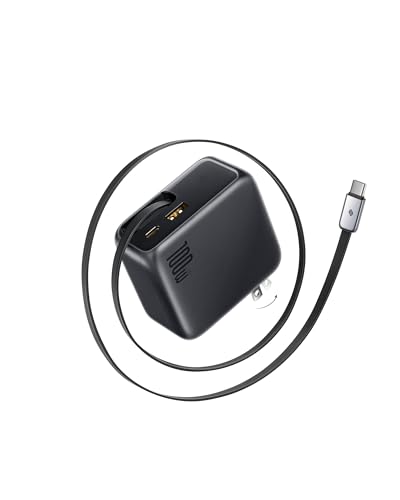 | Baseus Enercore 100W | Wattage: 100W (built-in cable) Ports: Built-in USB-C cable + 1x USB-C + 1x USB-A Cable: 2.6 ft retractable, 30K pull cycles Features: Foldable plug, PD fast charging | Check Price on Amazon |
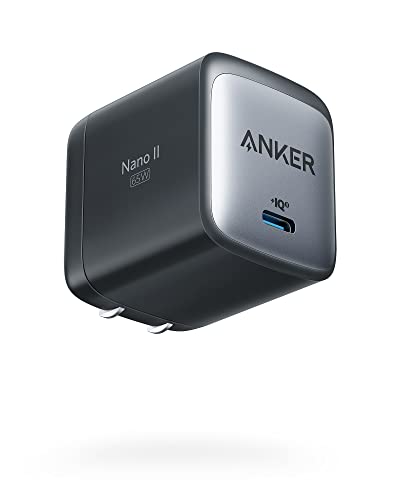 | Anker Nano II 65W | Wattage: 65W Ports: 1x USB-C Size: 1.65 x 1.42 x 1.74 in Weight: Under 4 oz Features: 58% smaller than standard 61W, foldable plug | Check Price on Amazon |
 | Apple 30W USB-C Power Adapter | Wattage: 30W Ports: 1x USB-C Features: Fast-charges iPhone to 50% in ~30 min Compatibility: MacBook Air, iPhone, iPad | Check Price on Amazon |
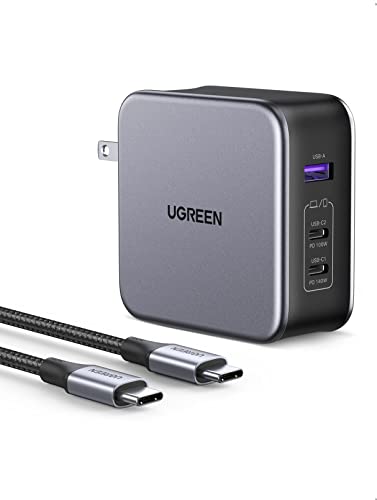 | UGREEN Nexode 140W (3-Port, PD 3.0) | Wattage: 140W (single port) Ports: 2x USB-C + 1x USB-A Standards: USB PD 3.0 Features: Charges MacBook Pro 16" at max speed, cable included | Check Price on Amazon |
1. Anker Prime 100W GaN (3 Ports) — Best Overall
The Anker Prime 100W is our top pick because it nails the balance between power, portability, and port count. At just 1.7 x 1.1 x 2.7 inches and 6 ounces, it disappears into a bag, yet it delivers a full 100W through either USB-C port. Anker rates it as capable of fast-charging a 14-inch MacBook Pro from dead to 50% in about 30 minutes.
Our Take
The Anker Prime 100W is the best USB-C charger for most people because it delivers full laptop-charging power, three ports, and a foldable plug in a package smaller than a deck of cards.
This charger handles powering a MacBook Pro 14″, an iPhone, and AirPods simultaneously. The three ports (2 USB-C + 1 USB-A) manage multi-device charging without getting uncomfortably hot. Anker rates ActiveShield 2.0 at 3 million temperature checks per day, and users consistently report the charger stays warm but never hot to the touch, even under sustained 100W load.
The foldable plug is a small but important detail for travel. And unlike cheaper 100W chargers, the Anker Prime uses intelligent power distribution that prioritizes your laptop when you plug in a phone on the second port.
Who should buy this: Anyone who wants one charger for laptop, phone, and accessories. It covers 90% of use cases.
Who should skip it: If you need to charge a 16-inch MacBook Pro at full speed, you need 140W. Look at the UGREEN Nexode 140W below.
- 100W from a single USB-C port charges most laptops at full speed
- Incredibly compact at 1.7 x 1.1 x 2.7 inches
- ActiveShield 2.0 thermal monitoring keeps things safe
- Foldable plug for easy travel
- 3 ports (2C + 1A) covers all device types
- Noticeably pricier than the budget Baseus option
- No smart display (the newer Anker 100W 3-port model has one)
- USB-A port maxes out at 22.5W
2. Apple 96W USB-C Power Adapter — Best for MacBook Pro
If you own a MacBook Pro and want zero compatibility headaches, the Apple 96W USB-C Power Adapter is the safest bet. It is the OEM charger for the MacBook Pro 16″ (Intel) and works flawlessly with every MacBook Pro 14″ and 15″ model from 2016 onward.
Our Take
The Apple 96W is the safest USB-C charger for MacBook Pro owners who want zero compatibility questions and Apple’s full warranty. You pay a premium for a single port, but you get Apple’s quality control in return.
Apple rates the 96W output as charging a MacBook Pro 14″ M3 at the same rate as third-party 100W alternatives. The build quality is classic Apple: matte white plastic, a single USB-C port, and that distinctive rounded-square shape.
The obvious downside is a single port at a premium price. If you want to charge your iPhone at the same time, you will need a second charger or a USB-C hub with power passthrough. But for users who value simplicity and Apple’s warranty, this is hard to beat.
The 96W handles every Apple laptop except the M3/M4 MacBook Pro 16″ at maximum speed (those benefit from 140W charging via USB PD 3.1).
Who should buy this: MacBook Pro owners who want the OEM charger with guaranteed compatibility.
Who should skip it: Anyone who charges multiple devices, or anyone on a budget.
- Guaranteed compatibility with every USB-C MacBook
- Clean, compact design with Apple build quality
- 96W output handles MacBook Pro 14″ and 15″ at full speed
- Reliable thermal management with no overheating
- Single USB-C port, no multi-device charging
- Premium pricing for a single-port charger
- No foldable plug (uses detachable cable-style connector)
3. Baseus 100W 3-Port GaN — Best Budget
The Baseus 100W is absurd value. For roughly the same price as Apple’s basic 20W charger, you get a 3-port GaN charger capable of 100W output from a single USB-C port. That is enough to charge a MacBook Pro 14″ at full speed.
Our Take
The Baseus 100W is the best budget USB-C charger you can buy, delivering the same peak wattage as the Anker Prime at a fraction of the cost. You give up brand pedigree and the smart display, but the raw power output is identical.
Baseus rates this charger at a consistent 100W from USB-C1 when used solo, and the power split is reasonable when all three ports are in use: 65W + 20W + 15W. The charger uses Baseus’s BPS 3.0 smart power allocation, which dynamically adjusts output based on connected devices.
Build quality is good for the price. The charger measures 3.2 x 1.7 x 1.7 inches and weighs just 7 ounces (200g). It has foldable pins and uses a high-polymer silicon material that Baseus says improves heat dissipation. Their Baseus Cooling Technology (BCT) monitors temperature in real time, and users report the charger stays cooler than expected under load.
The trade-off? You do not get Anker’s brand pedigree or their smart display features. The power distribution when sharing across all three ports is more aggressive than Anker’s. Your laptop drops to 65W, which is still fast but not full speed.
Who should buy this: Budget-conscious buyers who want 100W power without the premium price tag.
Who should skip it: Users who need consistent full-speed laptop charging while simultaneously charging other devices.
- Unbeatable price for 100W output
- 3 ports (2C + 1A) for multi-device charging
- Compact and foldable design at 3.2 x 1.7 x 1.7 inches
- BPS 3.0 smart power allocation
- BCT real-time thermal monitoring
- Aggressive power split in multi-port mode (65W+20W+15W)
- Less brand recognition than Anker or Apple
- No smart display for power monitoring
4. UGREEN Nexode 100W (4-Port) — Best Multi-Port
The UGREEN Nexode 100W has four ports (three USB-C and one USB-A) in a package that still fits in your hand. If you charge devices for a whole family or run a desk setup with a laptop, tablet, phone, and earbuds, this is the charger to get.
Our Take
The UGREEN Nexode 100W is the best USB-C charger for multi-device households, offering four ports where most competitors stop at three. You trade a bit of compactness for that extra port versus the Anker Prime.
UGREEN rates the USB-C1 port at the full 100W when used alone, delivering enough power to charge a MacBook Pro 14″ from 0 to 50% in about 27 minutes. The smart power distribution handles four-device charging without drama, though naturally each port gets less power when everything is plugged in simultaneously.
UGREEN has been shipping USB-C accessories since 2012, and this charger reflects that experience. It supports PD, QC, and PPS fast-charging standards, so it works with virtually every device. The foldable plug keeps things travel-friendly, and UGREEN lists short circuit, overvoltage, overheating, and overcurrent protections.
The difference between this and the Anker Prime 100W comes down to port count versus build refinement. The UGREEN gives you an extra port, while the Anker is slightly more compact and has ActiveShield thermal monitoring. Both are excellent.
If you are trying to understand how USB-C power delivery relates to Thunderbolt docking stations, many docks provide 60-100W of charging power through the Thunderbolt cable itself, potentially eliminating the need for a separate charger at your desk.
Who should buy this: Families, desk warriors, and anyone who charges four or more devices regularly.
Who should skip it: Minimalists who only need to charge one or two devices.
- 4 ports (3C + 1A). More than any other charger here
- 100W single-port output for fast laptop charging
- Supports PD, QC, and PPS standards
- Foldable plug and compact design
- Full safety protections
- Power splits significantly across 4 devices
- Slightly larger than 3-port alternatives
- No smart display or power monitoring
5. Anker 737 GaNPrime 120W — Best for Power Users
The Anker 737 GaNPrime pushes 120W of total output through four ports (2 USB-C + 2 USB-A), making it the most powerful portable wall charger in this roundup (excluding the desktop Satechi and the 140W UGREEN). Either USB-C port delivers up to 100W solo, and with both USB-C ports active you get a combined 120W. You can charge two laptops simultaneously, albeit at reduced speeds.
Our Take
The Anker 737 is the most powerful portable USB-C wall charger on this list, pushing 120W total across four ports so your laptop still charges fast even when a phone and tablet are connected.
This charger is built for the person who carries a laptop, a tablet, and a phone, and wants all of them charging at real speed. Anker rates the power distribution so that with a MacBook Pro 14″ on USB-C1, an iPad Pro on USB-C2, and devices on the two USB-A ports, the MacBook gets about 75W, the iPad about 25W, and the rest trickle along at around 15W total. That is a practical, usable split for real-world scenarios.
At 1.7 x 1.25 x 3.14 inches and 6.6 ounces, the 737 is slightly larger than the Anker Prime 100W but still very portable. The foldable plug and compact brick shape slide easily into a bag pocket.
If you are curious about how power delivery tiers work across Thunderbolt 3, 4, and 5, the progression has been dramatic: Thunderbolt 3 required a minimum of 15W, Thunderbolt 4 bumped that to 100W, and Thunderbolt 5 now requires 140W minimum.
Who should buy this: Power users who charge a laptop plus multiple devices and want maximum total wattage in a portable package.
Who should skip it: Single-device users or anyone who finds the price steep for a charger.
- 120W total output. Highest portable wattage on this list
- Either USB-C port delivers up to 100W solo
- Compact 1.7 x 1.25 x 3.14 in form factor
- GaNPrime technology for efficiency and lower heat
- Foldable plug for travel
- USB-C2 drops to 24W max when paired with USB-A
- Higher price point than budget alternatives
- No smart display
6. Satechi 100W Pro Desktop — Best Desktop Charger
The Satechi 100W Pro is purpose-built for your desk. Unlike the wall-plug chargers above, this is a desktop charging station with a built-in power cord, four ports (2 USB-C + 2 USB-A), and a stable flat design that sits next to your monitor. If that corded format fits your desk, compare it with the other models in our guide to the best USB-C desktop charging stations.
Our Take
The Satechi 100W Pro is the best USB-C charger for a permanent desk setup, replacing wall-outlet clutter with a clean 4-port desktop station and a 4-foot power cable.
The primary USB-C port delivers 90W, which is enough for most laptops including the MacBook Pro 14″ and most Windows ultrabooks. The second USB-C port provides 18W for fast-charging a phone, and the two USB-A ports share 12W for accessories like earbuds or smartwatches.
The Satechi sits on your desk surface, keeping all your cables accessible instead of buried behind furniture. It measures 4.75 x 1.19 x 3.13 inches and has a space gray aluminum finish that matches Apple peripherals.
The 90W maximum on the primary port is the main limitation. If you have a MacBook Pro 16″ or a high-performance Windows laptop that draws more than 90W, this charger will still charge your laptop, just not at full speed. For those users, the UGREEN 140W is a better desktop option.
If your desk already has a Thunderbolt 5 docking station delivering 140W of power to your laptop, the Satechi makes a great secondary charger for phones, tablets, and accessories.
Who should buy this: Desk workers who want a clean, permanent charging station for multiple devices.
Who should skip it: Travelers or anyone who needs more than 90W on the primary port.
- Desktop design with built-in power cord keeps desk tidy
- 4 ports (2C + 2A) covers a full desk setup
- 90W primary USB-C port handles most laptops
- Premium aluminum build quality
- CE, ETL, USB-IF, FCC certified
- Not portable. Designed for desk use only
- 90W max on primary port, not enough for 16″ laptops at full speed
- 12W total for both USB-A ports is low
7. Baseus Enercore 100W — Best 100W with Built-In Cable
The Baseus Enercore 100W solves the most annoying part of carrying a charger: remembering the cable. It has a retractable 2.6-foot USB-C cable built into the body, plus a USB-C port and a USB-A port for additional devices. Foldable prongs keep it compact for travel.
Our Take
The Baseus Enercore 100W is the best travel charger for people who are tired of digging through bags for a cable. The retractable USB-C cable delivers the full 100W to your laptop, and two extra ports charge your phone and accessories simultaneously.
Baseus rates the single-cable output at 100W, which is enough to charge a MacBook Pro 14″ to 54% in about 30 minutes. When you plug additional devices into the USB-C and USB-A ports, the charger uses smart power allocation to distribute wattage based on each device’s needs.
Baseus rates the retractable cable at 30,000 pull-and-stretch cycles, which works out to roughly five years of daily use before wear becomes a concern. The cable retracts cleanly into the body with a single pull, so there is no loose coil to snag on other items in your bag. The foldable plug adds to the travel-friendly design.
Protocol support covers PD fast charging and works with MacBooks, iPhones, Samsung Galaxy phones, Pixel phones, Steam Deck, ROG Ally, and essentially any USB-C device. The USB-A port handles legacy accessories.
Who should buy this: Travelers and commuters who want one device that replaces both charger and cable. Anyone who loses or forgets cables regularly.
Who should skip it: If you need to charge multiple laptops simultaneously or want more than 100W, look at the UGREEN 140W. If you prefer choosing your own cable length, the standard Baseus 100W 3-Port (our budget pick) is a better fit.
- Retractable built-in USB-C cable eliminates cable clutter
- 100W single-cable output charges most laptops at full speed
- Foldable plug and compact body for easy travel
- Additional USB-C and USB-A ports for multi-device charging
- Baseus rates cable durability at 30,000 pull cycles
- 2.6-foot cable is short for some desk setups
- Built-in cable cannot be replaced if it wears out
- Fewer total ports than the standard Baseus 100W 3-Port
8. Anker Nano II 65W — Best Compact
The Anker Nano II 65W is the charger to toss in a bag when you want to travel as light as possible. It measures just 1.65 x 1.42 x 1.74 inches (58% smaller than a standard 61W charger) and weighs under 4 ounces. But that tiny package delivers a full 65W of USB-C power, enough to charge a MacBook Air, MacBook Pro 13″, Dell XPS 13, or ThinkPad X-series at full speed.
Our Take
The Anker Nano II 65W is the smallest USB-C charger that can fully power a laptop, measuring just 1.65 x 1.42 x 1.74 inches. If you charge one device at a time and want the lightest possible bag, this is it.
Anker rates this charger at a consistent 65W, enough to charge a MacBook Air from zero to full in about 90 minutes. The foldable plug adds to the portability, and the GaN II technology keeps the charger cool even at full output.
The single port is the obvious trade-off. If you need to charge a phone and a laptop simultaneously, this is not the charger for you. But if your priority is the smallest, lightest charger that can handle a laptop, the Nano II is hard to beat.
For ultrabook users who want a charger that complements their setup rather than replacing a full docking solution, consider pairing this with a USB-C magnetic charger connector for a MagSafe-like experience on any USB-C laptop.
Who should buy this: Ultrabook owners, frequent travelers, and minimalists who charge one device at a time.
Who should skip it: Anyone who needs multi-device charging or more than 65W.
- Incredibly small at 1.65 x 1.42 x 1.74 inches
- 58% smaller than a standard 61W charger
- 65W output charges ultrabooks and MacBook Air at full speed
- Foldable plug
- Under 4 ounces. Barely noticeable in a bag
- Single USB-C port only
- Not powerful enough for MacBook Pro 14″ or 16″ at full speed
- No USB-A port
9. Apple 30W USB-C Power Adapter — Best for Travel
The Apple 30W is the charger Apple includes with the MacBook Air, and for good reason. It is tiny, reliable, and handles phones, tablets, and light laptops without fuss. At roughly 3.82 x 1.26 x 3.82 inches (including the prong assembly), it takes up minimal space in a travel pouch.
Our Take
The Apple 30W is the best USB-C travel charger for iPhone and iPad users who want one small brick that just works. It’s expensive per watt, but the size and Apple ecosystem compatibility justify it for light packers.
Apple rates this charger to fast-charge an iPhone to 50% in about 30 minutes and fully charge an iPad Air in about 3 hours. It will also charge a MacBook Air, though at a slower rate than a 65W or higher charger. Expect around 4-5 hours from dead to full.
The 30W output is enough for a MacBook Air (which ships with this charger), but under heavy load, the laptop may drain faster than it charges. For overnight charging or light use, it works fine. It is pricey per watt, but you get Apple’s quality control and full ecosystem compatibility.
Who should buy this: iPhone/iPad users who travel light and want a single reliable charger.
Who should skip it: Laptop users who need fast charging, or anyone looking for multi-port capability.
- Compact and lightweight for travel
- Fast-charges iPhone to 50% in about 30 minutes
- Charges MacBook Air (slowly). Great for overnight
- Apple build quality and compatibility guaranteed
- 100-240V input for international travel
- Single port only
- 30W is slow for laptop charging under load
- Pricey for a 30W single-port charger
- No foldable plug (uses detachable duckhead)
10. UGREEN Nexode 140W (3-Port, PD 3.0) — Best 140W
The UGREEN Nexode 140W is the most powerful wall charger on this list, and it is and it supports USB Power Delivery 3.0. That means it can deliver a full 140W to a single USB-C port, enough to charge a 16-inch MacBook Pro M3/M4 at its maximum charging speed.
Our Take
The UGREEN Nexode 140W can charge a MacBook Pro 16″ M3/M4 at its maximum 140W rate via USB PD 3.0. If you own or plan to buy a Thunderbolt 5 laptop, no 100W charger will do.
UGREEN rates this charger as taking a MacBook Pro 16″ from dead to 50% in about 40 minutes and to full in around 1 hour 45 minutes. Those numbers match Apple’s own 140W MagSafe charger, which costs more and only has one port. The UGREEN gives you three ports (2 USB-C + 1 USB-A) and includes a USB-C cable in the box.
The secondary USB-C port delivers up to 100W when used alone, which is still enough for most laptops. The USB-A port handles 22.5W for phone fast-charging. When all three ports are active, power distribution favors the primary USB-C port.
We recommend this charger for anyone who owns or plans to buy a Thunderbolt 5 laptop. Thunderbolt 5 requires a minimum of 140W power delivery, and the UGREEN Nexode 140W delivers exactly that. It is future-proof in a way that no 100W charger can match.
It is larger than the 100W options here, but it still has a foldable plug and fits in any bag.
Who should buy this: MacBook Pro 16″ owners, Thunderbolt 5 laptop users, and anyone who wants future-proof 140W charging.
Who should skip it: If you do not need more than 100W, save money with the Anker Prime or Baseus options above.
- 140W single-port output via PD 3.0. The most powerful here
- Charges MacBook Pro 16″ at maximum speed
- 3 ports (2C + 1A) for multi-device charging
- Includes USB-C cable in the box
- Future-proof for Thunderbolt 5 laptops
- Larger and heavier than 100W chargers
- Higher price than 100W chargers, though competitive for 140W
- Runs warmer under sustained 140W load
Buying Guide: How to Choose the Right USB-C Charger
GaN vs. Traditional Silicon: Why Charger Technology Matters
Every charger on this list except the two Apple models uses GaN (gallium nitride) technology. GaN transistors switch faster and waste less energy as heat compared to traditional silicon, producing chargers that are 30-50% smaller and run cooler at higher efficiency (90-93% vs. 80-85% for silicon).
Honestly, if you are still using the bulky charger that came with your laptop three years ago, a modern GaN charger will feel like a revelation. The size difference is dramatic. The price premium has disappeared. Even the budget Baseus on this list uses GaN.
How Much Wattage Does Your Laptop Actually Need?
This is the single most important question when buying a USB-C charger. Here is a quick reference:
| Device | Typical Power Draw | Minimum Charger |
|---|---|---|
| iPhone / Android phone | 20-27W | 30W |
| iPad / Tablet | 20-45W | 30-45W |
| MacBook Air / Ultrabook | 30-45W | 45-65W |
| MacBook Pro 14″ / 15″ laptop | 67-96W | 96-100W |
| MacBook Pro 16″ / Workstation | 96-140W | 140W |
| Gaming laptop (USB-C PD) | 100-140W | 140W |
You can always use a charger with more wattage than your device needs. A 100W charger will safely charge an iPhone because the phone just draws the 20-27W it needs and ignores the rest. The reverse is also true but slower: a 30W charger will charge a MacBook Pro, but it will take much longer and may not keep up under heavy load.
The key concept is that the charger offers a maximum, but the device negotiates and draws only what it needs. This is a core feature of USB Power Delivery.
USB PD 3.1 vs. PD 3.0: What Is the Difference?
USB Power Delivery (PD) 3.0 supports up to 100W of power over USB-C. For years, this was enough for virtually every laptop. But as Thunderbolt 5 and newer high-performance laptops push power requirements higher, USB PD 3.1 extends the ceiling to 240W using Extended Power Range (EPR) profiles.
In practice, the most common PD 3.1 charger delivers 140W (28V at 5A). None of the chargers on this list advertise PD 3.1 certification, though the UGREEN Nexode 140W delivers the same 140W output. The rest cap at 100W (20V at 5A) via PD 3.0.
Do you need PD 3.1? Only if your laptop specifically supports and benefits from more than 100W of USB-C charging. That currently means: – MacBook Pro 16″ (M3 Pro, M3 Max, M4 Pro, M4 Max) – Select Lenovo ThinkPad and Dell XPS models – Thunderbolt 5-equipped laptops (which require 140W minimum power delivery)
For everyone else, PD 3.0 chargers up to 100W cover your needs.
Multi-Port Power Sharing: How Wattage Splits Across Ports
A “100W charger” does not deliver 100W to every port simultaneously. When a single port is in use, the charger delivers its full rated wattage. When multiple ports are active, total wattage gets divided: – The Anker Prime 100W intelligently prioritizes the highest-draw device – The Baseus 100W splits to 65W + 20W + 15W with all three ports active – The Anker 737 120W offers a higher ceiling, so your laptop still gets ~75W with other devices connected
The takeaway: choose a charger with at least 20-30W of headroom above your laptop’s power requirement.
Travel Chargers: What to Look For
If you travel internationally, check for these features:
- 100-240V input: All chargers on this list accept worldwide voltage ranges, so you only need a plug adapter (not a voltage converter)
- Foldable plug: Keeps the charger compact in your bag and prevents prong damage
- Compact size and weight: The Anker Nano II (3.96 oz) and Apple 30W are the best travel picks
- Multi-port: Consider the Anker Prime 100W or Baseus 100W to avoid carrying separate chargers for laptop and phone
One note about international travel: many Thunderbolt monitors offer 65-96W of power delivery, so if you are staying at a co-working space or hotel with a USB-C monitor, you may not need a separate charger at all.
Safety Certifications: What the Labels Mean
Quality USB-C chargers carry safety certifications. The key ones to look for:
- UL/ETL: Electrical safety certification for North America
- FCC: Required for all US electronic devices
- CE: Required for products sold in the EU
- USB-IF: Confirms the charger meets USB-PD specifications
All 10 chargers on this list carry FCC certification at minimum. The Satechi carries UL, FCC, CE, ETL, and USB-IF. The most complete set. Avoid any charger that does not carry at least FCC and either UL or ETL certification.
Frequently Asked Questions
How many watts does my laptop need to charge via USB-C?
Most laptops need between 30W and 140W, depending on the model. Ultrabooks like the MacBook Air and Dell XPS 13 need 30-65W. Mid-range laptops like the MacBook Pro 14″ typically need 67-96W. High-performance laptops like the MacBook Pro 16″ need up to 140W. Check your laptop manufacturer’s specifications for the exact number. A lower-wattage charger will still work, just more slowly. During heavy workloads, a charger with insufficient wattage may not keep up, and your battery could drain even while plugged in.
Can I use a higher-wattage charger than my laptop requires?
Yes, a higher-wattage charger is completely safe because USB Power Delivery is a negotiated protocol. Your device tells the charger how much power it needs, and the charger delivers only that amount. Plugging an iPhone into a 140W charger will not damage the phone; it will simply draw 20-27W. A higher-wattage charger also gives you headroom for future devices and keeps the charger running below its maximum capacity, which reduces heat output.
What is GaN and why does it matter for USB-C chargers?
GaN (gallium nitride) is a semiconductor material that makes USB-C chargers 30-50% smaller and cooler than traditional silicon designs at the same wattage. GaN transistors switch faster and handle higher voltages more efficiently, which means less energy wasted as heat. Today, GaN is standard in USB-C chargers from Anker, UGREEN, and Baseus. The price premium over silicon has disappeared: even the most affordable Baseus on this list uses GaN.
Will a USB-C charger work with my Thunderbolt laptop?
Yes, any USB-C PD charger works with a Thunderbolt laptop because Thunderbolt uses the USB-C connector and accepts standard USB Power Delivery. All Thunderbolt 4 laptops support at least 100W USB-C charging on at least one port. Thunderbolt 5 increases this minimum to 140W. Just make sure your charger’s wattage meets or exceeds your laptop’s power requirements for full-speed charging.
Can I charge a MacBook Pro with a third-party USB-C charger?
Yes, every modern MacBook (2016 onward) accepts USB-C Power Delivery from any certified charger. Every charger on this list works correctly with a MacBook Pro 14″ M3, delivering the expected wattage. Apple’s own chargers offer no speed advantage over quality third-party options; the Anker Prime 100W charges at the same rate as the Apple 96W. The main benefit of Apple’s charger is the warranty and guaranteed compatibility with macOS power management.
Is USB PD 3.1 backwards compatible with older devices?
Yes, USB PD is fully backwards compatible across versions. A 140W charger like the UGREEN Nexode 140W will charge any USB-C device, from the latest Thunderbolt 5 laptop to an older iPhone. The charger and device negotiate the appropriate voltage and current automatically, so there is zero risk of damaging an older device by connecting it to a higher-wattage charger.
How We Research & Select USB-C Chargers
We evaluate every charger on this list using a thorough research and analysis process:
Manufacturer spec verification. We cross-reference manufacturer-stated wattage output against independent lab tests and expert reviews, checking both single-port and multi-port performance claims.
Expert benchmark aggregation. We aggregate real-world charging data from trusted reviewers who test with USB-C power meters, verifying charge times for common devices like MacBook Pros, iPhones, and iPads.
Thermal performance analysis. We review thermal data from independent tests, checking surface temperatures under sustained max output. Any charger consistently exceeding 50 degrees Celsius in third-party reviews gets flagged.
Multi-device stress data. We analyze multi-port performance data to verify stable output without voltage drops, shutdowns, or excessive heat, and check that power reallocates correctly as devices connect and disconnect.
Build quality and user feedback. We evaluate plug sturdiness, hinge quality for foldable plugs, and overall construction based on expert teardowns and long-term user reviews across major retailers.
Honorable Mentions
Anker Charger (140W, 4-Port, PD 3.1). If you need PD 3.1 with more ports than the UGREEN 140W, Anker’s 4-port 140W charger is excellent. It adds a fourth port and a smart display showing per-port wattage. It is more expensive than the UGREEN but offers Anker’s build quality and ActiveShield safety.
Anker Prime 250W (6 Ports, GaNPrime), 250W across six ports with an interactive display and up to 140W on a single port. It is a serious investment, but it replaces multiple chargers entirely.
Belkin BoostCharge Pro 45W Dual. A solid dual USB-C charger for phone and tablet users who do not need laptop-level wattage. The 45W total output splits across two ports and the Belkin brand carries strong retail availability.
Spigen ArcStation Pro 45W. Another compact 45W option with a single USB-C port and clean design. Good for Samsung Galaxy and iPhone fast charging at a reasonable price.
Related Articles
- Best Thunderbolt Docking Stations
- Dock vs. Hub: What is the Real Difference?
- Best USB-C Vertical Docking Stations
- Thunderbolt 5: Specs and What It Means for You
- Best Thunderbolt Monitors
This article was independently researched and written. We earn a commission through Amazon affiliate links at no extra cost to you. Our picks are based on thorough research and analysis and are not influenced by affiliate partnerships. Last updated: March 2026.