Buy the UGREEN Revodok Max 2131 if your exact Windows or Mac host fits UGREEN’s compatibility matrix and you want three downstream Thunderbolt ports, four USB-A ports, UHS-II card readers, and up to 140W host charging in one desk dock. Skip it if you need native HDMI or DisplayPort, Windows Thunderbolt 3 support, Linux support, or a simple hub for a few peripherals. Do not choose it from the 8K, 120Gbps, or 140W headlines alone.
We keep this review narrower than our Thunderbolt 5 docks comparison. It answers three questions: which host port you have, how your monitor reaches a downstream Thunderbolt port, and whether your laptop can negotiate the advertised charging profile.
ThunderboltLaptop did not test this unit. UGREEN’s manual and support records provide the manufacturer specifications and compatibility ceilings below. ChargerLAB’s independent U715 teardown supplies the attributed measurements. Neither source proves that every host will reach every display, data, or charging ceiling.
Quick verdict
The Revodok Max 2131 is strongest for a fixed desk with a qualified Thunderbolt 5, Thunderbolt 4, or sufficiently capable USB4 host. Its mix is unusual in a useful way: three downstream Thunderbolt branches sit beside two 10Gbps USB-A ports, two 5Gbps USB-A ports, one ordinary front USB-C port, 2.5GbE, two UHS-II card slots, and audio.
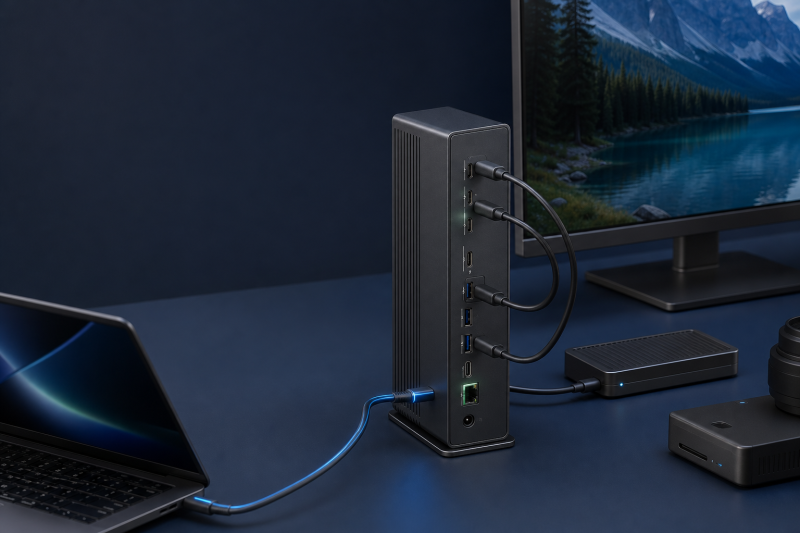
The physical video layout is the first catch. There is no HDMI or DisplayPort socket. Every monitor must connect through one of the rear downstream Thunderbolt ports, directly or through a compatible USB-C video cable or adapter. The front USB-C port cannot output video.
The host matrix is the second catch. Windows Thunderbolt 5 receives the broadest manufacturer display ceilings. Thunderbolt 4 and USB4 paths lose triple-display support, and UGREEN warns that some USB4 laptops do not support two monitors through the dock. Windows Thunderbolt 3 is unsupported. Mac support depends on the exact chip group, with no triple-display promise.
Our Take
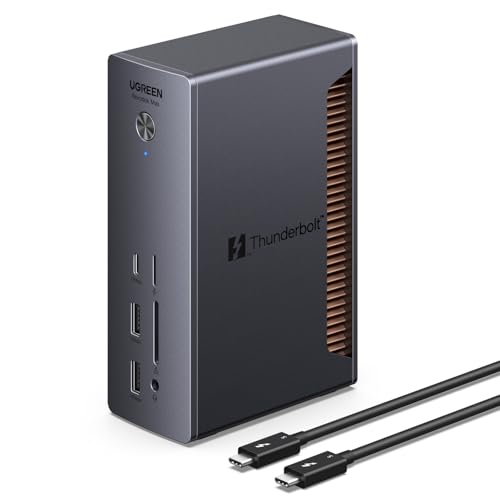
The UGREEN Revodok Max 2131 is a good fit when its rear-only display topology and exact host matrix match your desk. Its three downstream Thunderbolt paths, four USB-A ports, card readers, and high host-charging ceiling are compelling, but the dock asks for more pre-purchase checking than a model with native video connectors.
- Three downstream Thunderbolt 5 ports for display, storage, or expansion paths
- Four USB-A ports plus separate SD and microSD UHS-II readers
- Up to 140W host charging when the laptop, cable, and PD path qualify
- 2.5GbE and a front 20W USB-C charging/data port
- No native HDMI or DisplayPort
- Front USB-C has no video output
- Windows Thunderbolt 3 and Linux are unsupported
- Display and charging headlines require exact host-level checks
Revodok Max 2131 versus 213: verify the exact product
The safe identity for this review is UGREEN Revodok Max 2131, support model U715, US Amazon ASIN B0DCNZNCFH. The current UGREEN support record uses 45790A as the primary SKU and lists 45790 as an active sub-SKU. The US storefront uses SKU 45790, while the UK and EU storefronts use 45790A.
One storefront detail is confusing. The visible US product title currently says “UGREEN Revodok Max Thunderbolt 5 Docking Station” without 2131. The page handle and A+ material retain 2131, the support center and manual identify 2131/U715, and the regional pages also retain 2131. Amazon’s structured record returns model U715. That model match is the safe bridge to the exact US listing. Amazon does not return a 45790 or 45790A model/part field, so it would be wrong to invent one.
The Revodok Max 213 is a different product, not shorthand for the 2131. The older dock is Thunderbolt 4, support code U710, SKU 25054, and US ASIN B0CM2X8ZNS. None of its ports, power behavior, display limits, package details, or support records belongs in this review. Our guide to the differences among Thunderbolt 3, 4, and 5 explains why that generation change is more than a naming detail.
| Identity check | Revodok Max 2131 | Revodok Max 213 |
|---|---|---|
| Technology | Thunderbolt 5 | Thunderbolt 4 |
| Support model | U715 | U710 |
| SKU family | 45790A / 45790 | 25054 |
| US ASIN | B0DCNZNCFH | B0CM2X8ZNS |
| Article 121 rule | Exact subject | Excluded product |
At checkout, use all three identity layers rather than trusting one shortened title. The Amazon listing should return the exact ASIN and U715 model, the manufacturer support material should identify Revodok Max 2131, and the physical label or package should agree when it arrives. A regional 45790A reference is not a reason to reject the US 45790 storefront variant, because UGREEN’s current support record connects both to U715. Conversely, a listing for U710 or 25054 is not a regional 2131 variant. It is the older 213.
Port map: what all 13 connectors do
UGREEN counts 13 functional ports, excluding the DC input and power button. The layout is clearest when you separate the host link, the downstream expansion, and the ordinary peripheral ports.
| Port group | Count | Manufacturer role and ceiling | Purchase-changing limit |
|---|---|---|---|
| Upstream Thunderbolt 5 | 1 | Host data/display link and up to 140W PD | This is the computer connection, not a downstream port |
| Downstream Thunderbolt 5 | 3 | Thunderbolt/USB data, display paths, and device charging | One is up to 30W; two are up to 15W |
| USB-A 10Gbps | 2 | Faster ordinary USB peripherals | Link rate is not a storage benchmark |
| USB-A 5Gbps | 2 | Keyboard, mouse, audio, or slower storage | Shares the dock’s available resources |
| Front USB-C 10Gbps | 1 | Data and up to 20W charging | No video, no Thunderbolt, and not a host input |
| 2.5GbE RJ45 | 1 | 10/100/1000/2500Mbps link modes | UGREEN warns high-speed USB traffic can reduce network performance |
| SD plus TF/microSD | 2 | SD 4.0/UHS-II, up to 312MB/s | Vendor ceiling only; no retained simultaneous-transfer test |
| 3.5mm audio | 1 | Input/output audio | No audio-quality measurement retained |
Keep the upstream host connection separate in your mind. It carries the dock link and advertises the host-charging profiles. The three downstream Thunderbolt ports are where displays, fast storage, or another Thunderbolt device connect. They can all carry data and video when the host and attached device permit it, but their charging roles are unequal. One is listed up to 30W, while the other two are listed up to 15W each.
The front USB-C port is a different class of connector. It is useful for a phone, accessory, or 10Gbps USB device and advertises up to 20W. It cannot send video and it cannot replace the upstream host connection. If all you need is light portable expansion, a USB-C hub may be the cleaner purchase. The distinction between a powered desk dock and a portable hub is covered in our dock versus hub guide.
No native video connector means a monitor with only HDMI or DisplayPort needs the right USB-C-to-video cable or adapter on a rear downstream Thunderbolt port. The adapter, monitor input, cable, host GPU, and OS must all support the intended resolution and refresh rate.
Plan the rear connections before buying. A Thunderbolt display can use a downstream Thunderbolt cable directly. A monitor with USB-C video input needs a cable that supports the required display mode, not a charge-only USB-C cable. An HDMI-only or DisplayPort-only monitor needs an active path that converts the downstream USB-C video signal appropriately. Connecting that adapter to the front USB-C port will not work because the front port has no video output.
Also assign the unequal downstream charging ports deliberately. Put the highest-power downstream device on the port UGREEN rates up to 30W and reserve the two up-to-15W ports for lower-power devices when practical. That does not guarantee those three ceilings at the same time, but it avoids assuming the ports are interchangeable when the manual says they are not.
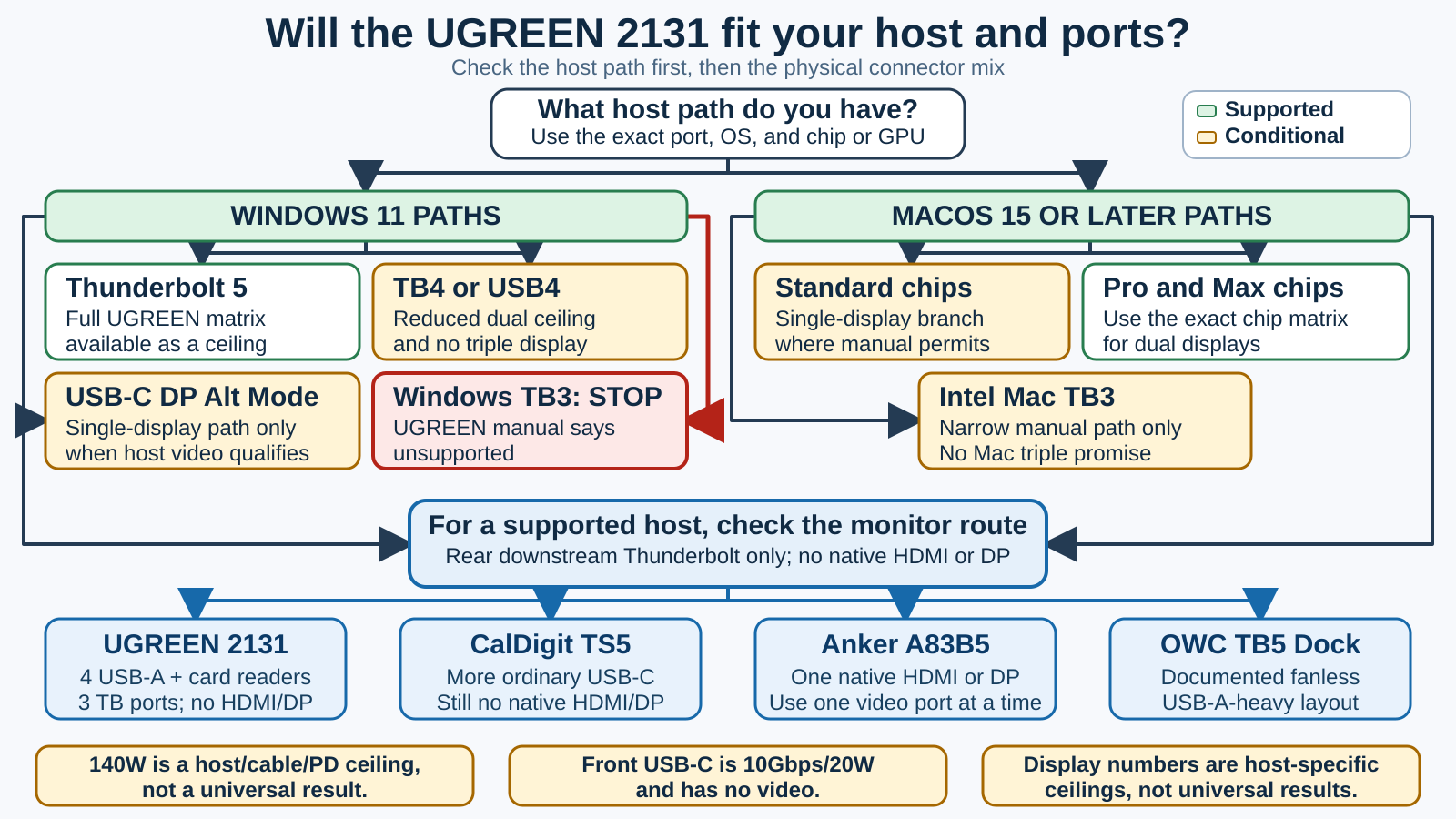
Windows and macOS display support is host-specific
Start by identifying the laptop’s actual port, not its USB-C shape. Our Thunderbolt laptop list can help with the first pass, but the computer manufacturer’s specification remains decisive. The relevant Thunderbolt 5 specifications describe protocol ceilings, not a promise for this dock and every GPU.
UGREEN’s current support record says Windows 11 or later and macOS 15 or later. The manual conflicts with that Windows floor: its general table says Windows 10/11, while troubleshooting asks for “Windows 10 23H2 or newer.” That wording is suspect because the normal Windows 10 feature-release line ends at 22H2. The conservative buying floor is Windows 11. An older-Windows buyer should get written confirmation from UGREEN for the exact host before ordering.
Windows manufacturer ceilings
| Host path | High-resolution ceiling | High-refresh ceiling |
|---|---|---|
| Thunderbolt 5 | 8K60 single, dual 8K60, triple 4K60 | 4K240 single, dual 4K240, triple 4K144 |
| Thunderbolt 4 or USB4 | 8K60 single, dual 6K60, no triple | 4K240 single, dual 2K120, no triple |
| USB-C DP Alt Mode | 4K60 single only | 2K120 single only |
| Windows Thunderbolt 3 | Unsupported | Unsupported |
The table lists UGREEN’s ceilings, not display modes achieved in a ThunderboltLaptop test. UGREEN also says some USB4 laptops do not support dual monitors through the dock, an important caveat when comparing USB4 and Thunderbolt 4.
The manual itself contains a triple-refresh conflict. A prose warning discusses the load from triple 4K120, while its high-refresh table lists triple 4K144 for a Windows Thunderbolt 5 path. That conflict is not evidence of a stable triple 4K144 desk. Treat the lower prose number and higher table number as unresolved manufacturer statements, then verify the exact GPU, monitor inputs, adapters, and workload.
For a Windows purchase, validate the chain in order. First, confirm whether the host port is Thunderbolt 5, Thunderbolt 4, USB4, or only USB-C DP Alt Mode. Second, check how many independent display streams the laptop GPU exposes through that port. Third, confirm DSC support for any mode that depends on compression. Fourth, match each downstream cable or adapter to the monitor’s input, resolution, and refresh rate. Finally, leave room for bandwidth used by fast storage and other attached devices. Passing one step does not override a failure later in the chain.
macOS manufacturer ceilings
UGREEN does not give one universal Mac rule. Its tables separate chip groups:
- M4 Max receives ceilings up to dual 8K60 or dual 4K240.
- M4 Standard/Pro, M3 Pro/Max, M2 Pro/Max, and M1 Pro/Max appear in dual-display rows up to dual 6K60, with chip-specific high-refresh ceilings.
- M4 Standard/Pro is listed up to dual 4K144 in the high-refresh table.
- M3 Pro/Max, M2 Pro/Max, and M1 Pro/Max are listed up to dual 4K120.
- M3, M2, and M1 Standard receive no dual-external-display promise through this dock topology.
- A narrow 2019-era Intel Thunderbolt 3 Mac path is listed up to dual 4K60, with only 1080p120 in its dual high-refresh row.
- No Mac group receives a triple-display promise.
The Intel Mac row does not make Windows Thunderbolt 3 supported. It is a narrow platform-specific path written into UGREEN’s Mac table. The manual’s single-display rows also overlap some chip labels between 8K and 6K entries, so check the exact Mac model and GPU instead of flattening the table into one promise.
For either operating system, DSC support, GPU display streams, cable and adapter capability, monitor input, OS behavior, and other high-bandwidth devices can lower the result. UGREEN warns that demanding dual-8K or triple high-refresh arrangements can impose substantial host load and may cause slow performance or unexpected restarts. A buyer choosing monitors should work backward from the display input and refresh requirement; our Thunderbolt monitor guide can narrow that part of the chain.
On a Mac, the chip name is part of the port specification. “Thunderbolt Mac” is too broad because a Standard chip and a Pro or Max chip can have different external-display allowances even when the connectors look alike. Identify the full Mac model, chip tier, and macOS version, then compare that exact combination with UGREEN’s current table. If the intended layout is not explicitly represented, treat it as unconfirmed rather than borrowing a row from a neighboring chip generation.
What 180W input and 140W charging mean
The included power adapter and the dock’s 21V/8.57A DC input are approximately 180W. That 180W is a budget for the whole dock and everything attached to it, not a figure delivered to the laptop.
The upstream host port advertises up to 140W with these PD profiles: 5V/3A, 9V/3A, 15V/3A, 20V/4.8A, and 28V/5A. Reaching the top profile requires a host that supports the relevant PD 3.1 path and a cable/current path that can carry it. A laptop with proprietary charging behavior may accept less. Firmware, power settings, and thermal conditions can also affect negotiation.
ChargerLAB used a POWER-Z KM003C to report those PD 3.1 profiles on the tested U715, which independently confirms what the port advertises. It is not evidence that every laptop receives 140W, or that the host stays at 140W while every downstream port is at its own maximum.
The downstream numbers must stay separate: one Thunderbolt port is up to 30W, two are up to 15W each, and the front USB-C port is up to 20W. They are individual ceilings, not a guaranteed simultaneous power budget.
Build the power plan around the laptop’s normal demand, not the dock’s largest printed number. A host that normally ships with a lower-wattage USB-C adapter may not need 140W. A performance laptop that relies on a proprietary charger may still need that charger for its highest-power mode. If uninterrupted maximum performance matters, check the laptop maker’s accepted USB PD profiles and whether it permits full operation from third-party PD before treating the dock as the only power source.
Ethernet, cards, package, size, and cooling
UGREEN rates the Ethernet port for 10/100/1000/2500Mbps link modes. The manual warns that high-speed USB data can reduce network performance because resources are shared. There is no retained controlled throughput test, so 2.5GbE describes the port class rather than a measured file-transfer result.
The separate SD and TF/microSD readers support SD 4.0/UHS-II, with UGREEN listing up to 312MB/s. No retained independent benchmark proves that rate or simultaneous full-speed transfers. Photographers should also check card generation and workflow rather than assuming the label guarantees the result.
UGREEN’s current package image shows the dock, manual, 180W GaN adapter, power cord, and a 2.6-foot Thunderbolt 5 cable. ChargerLAB measured the included cable at about 81cm, which is consistent with roughly 2.6 feet. Plug style and package details can vary by market.
UGREEN and ChargerLAB disagree on the dock’s size. UGREEN lists 3.77 x 2.36 x 5.88 inches. ChargerLAB measured about 96 x 52 x 148.2mm, or approximately 3.78 x 2.05 x 5.83 inches, and measured the dock at about 790g. The middle dimension differs materially, so do not average the two sets.
Cooling claims are less settled than the product page suggests. UGREEN’s text describes dual-layer cooling with thermal silicone, while an official image describes a five-layer cooling structure and makes an under-44C comparison without a disclosed method, workload, ambient condition, sensor position, or comparator identity. ChargerLAB’s teardown confirms thermal pads, shielding covers, and heat sinks. It does not provide a controlled surface-temperature or acoustic result. The safe conclusion is that the dock has documented passive heat-spreading components, not that it maintains a specific temperature or noise level.
Compatibility, drivers, firmware, and warranty
Use Windows 11 and macOS 15 as the safe software floors. UGREEN’s manual says Linux is unsupported and Windows Thunderbolt 3 is unsupported. Ordinary USB-C DP Alt Mode is limited to the single-display rows, and an ordinary USB-C host without the required display/data capabilities should not be assumed compatible.
UGREEN tells Windows users to maintain the system BIOS, graphics driver, Thunderbolt driver and firmware, and Ethernet driver. The current U715 support record exposes the exact manual but no separate U715 dock firmware package. That means a buyer should not assume a user-installable dock updater exists. Most troubleshooting paths begin with the host vendor and the exact port/controller configuration.
If a monitor, Ethernet link, or wake sequence behaves differently after a system update, record the host model, OS build, BIOS version, graphics driver, Thunderbolt or USB4 controller, cable, adapter, and display mode before contacting support. That information distinguishes a dock-wide failure from a host, driver, or display-path problem. It also avoids installing a package for a different UGREEN model merely because the family name looks similar.
The US page currently presents a 30-day trial statement and a minimum two-year product warranty for manufacturing defects and workmanship under normal use. Those are current US terms, not a universal promise for every region or seller.
Three alternatives for a mismatched port layout
These are short role-based handoffs, not another roundup. If the UGREEN’s topology is wrong, a broader USB-C docking station comparison or a mature Thunderbolt 4 dock may also fit a host that does not need Thunderbolt 5 expansion.
| Buyer priority | Best-matched role | Main tradeoff to retain |
|---|---|---|
| Four USB-A ports, UHS-II cards, three downstream Thunderbolt paths | UGREEN 2131 | No native HDMI/DP; strict host matrix |
| More ordinary USB-C ports | CalDigit TS5 | Still no native HDMI/DP |
| One native HDMI or DisplayPort route | Anker A83B5 | HDMI and DP are mutually exclusive |
| Documented fanless, USB-A-heavy layout | OWC TB5 Dock | Fewer ordinary USB data ports than UGREEN |
CalDigit TS5: choose more ordinary USB-C
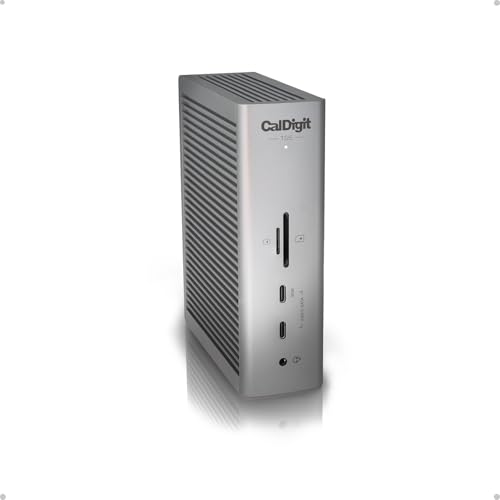
Choose the CalDigit TS5 when ordinary USB-C expansion is more important than UGREEN’s four USB-A ports. CalDigit documents 15 functional ports, including three 10Gbps USB-C ports, three downstream Thunderbolt 5 ports, 2.5GbE, simultaneous SD and microSD UHS-II use, and up to 140W host charging. It still has no native HDMI or DisplayPort, so it does not solve that specific UGREEN limitation.
Anker Prime A83B5: choose one native video route

Choose the Anker Prime A83B5 when one native HDMI 2.1 or one native DisplayPort 2.1 connection avoids an adapter. Anker states that HDMI and DisplayPort are mutually exclusive, so use one at a time. The dock also has two downstream Thunderbolt 5 ports, three 10Gbps USB-A ports, two 10Gbps USB-C ports with a shared 45W budget, 2.5GbE, UHS-I card readers, audio, and up to 140W host charging.
OWC Thunderbolt 5 Dock: choose documented fanless USB-A expansion
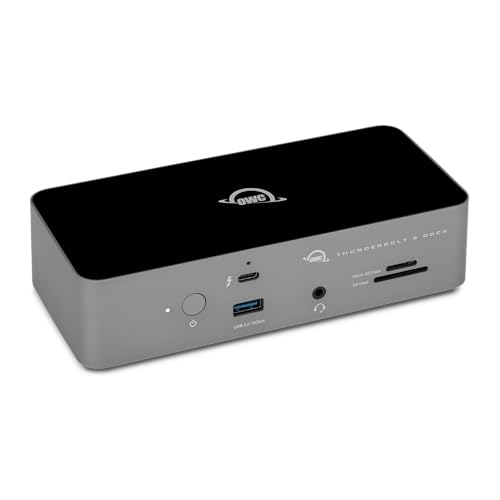
Choose the OWC Thunderbolt 5 Dock when you want a manufacturer-documented fanless design and a USB-A-heavy layout more than the UGREEN’s fifth ordinary USB data port. OWC documents an 11-port dock with three downstream Thunderbolt 5 ports, two 10Gbps and one 5Gbps USB-A port, SD 4.0 UHS-II and microSD readers, 2.5GbE, and up to 140W host charging. OWC says the dock has no fan. That is a manufacturer construction claim, not an independent acoustic measurement.
Who should buy the UGREEN 2131, and who should skip it?
Buy it when all four statements are true:
- Your exact host and OS appear in a supported UGREEN matrix row.
- Your monitor can connect through a rear downstream Thunderbolt port with a suitable cable or adapter.
- You value four USB-A ports, two card readers, and three downstream Thunderbolt paths more than native video sockets or several ordinary USB-C ports.
- Your charging plan remains acceptable even if the laptop negotiates below 140W.
Skip it when any purchase-changing condition fails. Windows Thunderbolt 3 and Linux are direct stops. A native HDMI/DisplayPort requirement points to Anker. A need for more ordinary USB-C points to CalDigit. A manufacturer-documented fanless, USB-A-heavy layout points to OWC. If the desk only needs a few low-bandwidth peripherals, the 2131 may be more dock than the host can use.
The decision is therefore topology-first. Confirm the host, then the display path, then the peripheral mix, and only then compare headline ceilings.
Frequently asked questions
Is the UGREEN Revodok Max 2131 the same as the Revodok Max 213?
No. The 2131 is Thunderbolt 5 model U715 with SKU family 45790A/45790 and US ASIN B0DCNZNCFH. The 213 is a separate Thunderbolt 4 product identified as U710, SKU 25054, and ASIN B0CM2X8ZNS. Its facts do not transfer to this review.
Does the Revodok Max 2131 work with a Windows Thunderbolt 3 PC?
UGREEN’s exact manual says Windows Thunderbolt 3 is unsupported. The narrow Intel Thunderbolt 3 Mac row is platform-specific and does not create a Windows exception.
Can the front USB-C port output video?
No. UGREEN lists the front USB-C port for 10Gbps data and up to 20W charging, with no video output. Connect monitors through the rear downstream Thunderbolt ports.
Does the dock have HDMI or DisplayPort?
No. It has no native HDMI or DisplayPort socket. A monitor must use a compatible downstream Thunderbolt or USB-C video path, including any cable or adapter required by the monitor input.
Can a Mac run three displays through this dock?
UGREEN’s manual does not approve triple displays for any Mac group. Dual-display ceilings depend on the exact Apple chip, while Standard M1/M2/M3 groups receive no dual-display promise through this topology.
Will every compatible laptop charge at 140W?
No. The 140W figure is a host-port ceiling. The laptop must accept the required PD 3.1 profile, and the cable/current path must support it. Proprietary charging behavior, firmware, power settings, and thermal conditions can reduce negotiated power.
What comes in the box?
UGREEN’s current package image shows the dock, manual, 180W GaN adapter, power cord, and a 2.6-foot Thunderbolt 5 cable. ChargerLAB measured the tested cable at about 81cm. Plug and package details may vary by region.
Is Linux supported, and can the U715 firmware be updated?
UGREEN’s manual says Linux is unsupported. The current U715 support record exposes the exact manual but no separate dock firmware package, so do not assume a user-installable U715 updater exists. Keep the host BIOS, graphics, Thunderbolt, and Ethernet software current.
How this review was researched
ThunderboltLaptop did not test the UGREEN Revodok Max 2131. The review prioritizes UGREEN’s current U715 support record, exact manual, and regional product pages. Amazon structured data was used to match the US ASIN to model U715 and to confirm a point-in-time offer gate without importing prices into the article.
ChargerLAB’s teardown is used only for its attributed U715 identity, dimensions, weight, cable length, PD-profile measurements, and internal construction observations. No sustained storage, network, card, display-stability, temperature, acoustic, wake, or long-term reliability result is claimed.