Anker USB-C cables look alike and do different jobs. The six below range from a 100W charging pair that Anker says carries no video to a Thunderbolt 5 cable that Anker lists at 80Gbps. A 240W figure does not say how fast data moves. Anker labels its Prime 240W cable USB 2.0, while its listings for the 515 USB4, Prime Thunderbolt 4 and Prime Thunderbolt 5 also say 240W.
AnkerDirect sells all six on Amazon. Each section below draws on that cable’s own Amazon listing, and Anker’s product pages cover four of them. Decide the data and video job first, then the length.
Anker’s own Prime 240W cable is USB 2.0 at 480Mbps, so check data and video before wattage.Anker USB-C Cables Compared
| Image | Product | Details | Check Price |
|---|---|---|---|
 | Anker 333 USB-C Cable | Best fit: 100W charging, no video Power: Up to 100W Data and video: No video output; no data rate stated Length: Two 6-foot cables Build and certification: Nylon exterior; 5,000-bend lifespan | Check Price on Amazon |
 | Anker 2-in-1 USB-C Cable | Best fit: Laptop and phone from one cable Power: Up to 140W for one device Data and video: Up to 480Mbps; no display output stated Length: 6 feet: 5-foot base and two 1-foot sections Build and certification: Slider; over 10,000 bends; 18-month warranty | Check Price on Amazon |
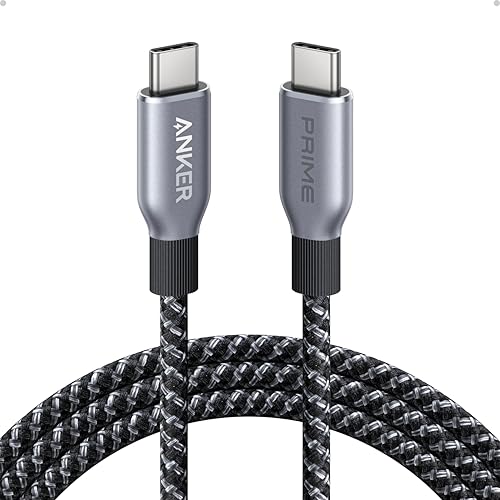 | Anker Prime 240W USB-C Cable | Best fit: 240W charging with USB 2.0 data Power: Up to 240W Data and video: USB 2.0, 480Mbps; no screen mirroring Length: 6 feet Build and certification: Recycled braided nylon; over 300,000 bends | Check Price on Amazon |
 | Anker 515 USB4 Cable | Best fit: USB4 at 40Gbps Power: Up to 240W Data and video: 40Gbps; up to 8K at 60Hz or 4K at 144Hz Length: 3.3 feet Build and certification: 5,000 bends; 18-month warranty | Check Price on Amazon |
 | Anker Prime Thunderbolt 4 Cable | Best fit: Thunderbolt 4-certified at 40Gbps Power: Up to 240W Data and video: 40Gbps; single 8K or dual 4K displays Length: 3.3 feet Build and certification: Thunderbolt 4-certified; USB4-compliant; 18-month warranty | Check Price on Amazon |
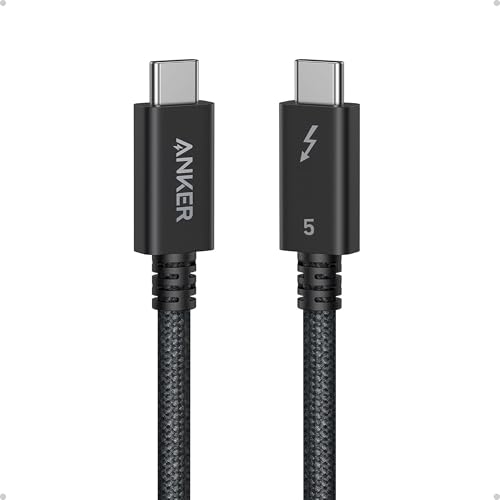 | Anker Prime Thunderbolt 5 Cable | Best fit: Thunderbolt 5 at 80Gbps Power: Up to 240W Data and video: 80Gbps, up to 120Gbps bandwidth; dual 8K at 60Hz Length: 3.3 feet Build and certification: Thunderbolt 5-certified; 18-month warranty | Check Price on Amazon |
1. Anker 333 USB-C Cable — Best 100W Charging Without Video
Anker’s Amazon listing for the 333 sells two 6-foot nylon cables with a hook-and-loop tie and says the cable supports charging up to 100W with a compatible charger. The listing says twice that the cable does not support video output, once in the compatibility bullet and again in a closing note that calls it a data transfer and charging cable. The listing gives no data rate, so the data side is unspecified. Anker lists a 5,000-bend lifespan.
A pair fits a buyer who wants one cable on the desk and one in the laptop bag. The 100W figure is the cable’s ceiling, which is below the 140W and 240W cables further down. A USB-C monitor, dock or fast SSD needs one of the USB4 or Thunderbolt cables further down.
Anker’s 333 listing says in two places that the cable does not carry video.Our Take The 333 is the spare-cable pick, with two lengths of 100W charging in one listing. It is the wrong cable for a display.
- Anker’s 333 listing states that the cable charges up to 100W with a compatible charger, and that figure is the cable’s ceiling.
- Anker sells this pair of 6-foot cables with a hook-and-loop tie, one for the desk and one for the laptop bag.
- Anker lists a nylon exterior and a 5,000-bend lifespan for the pair.
- A monitor needs a different cable, because Anker says the 333 does not support video output.
- Anker’s 333 listing does not state a data-transfer rate, so the data side is unspecified.
2. Anker 2-in-1 USB-C Cable — Best 140W Cable for Charging Two Devices
Anker’s listing describes the 2-in-1 as one USB-C port delivering up to 140W to a laptop, with a split end that can charge a smartphone and a tablet at the same time. The 6 feet is a 5-foot base cable plus two 1-foot sections, adjusted with a slider. Anker lists over 10,000 bends and an 18-month warranty.
Anker’s own page for the 2-in-1 states the limits on sharing. The 140W figure applies when one device is connected. With two devices, the total reaches 130W only if one of them needs more than 100W, and otherwise stays at 100W or less. Anker says both devices must support PD charging and advises against charging two devices from a charger under 45W. The page lists data transfers up to 480Mbps.
Anker puts the 2-in-1’s two-device total at 130W only when one device needs more than 100W.Our Take Pick the 2-in-1 for travel, when one wall charger has to feed a laptop and a phone. Anker’s two-device total tops out at 130W, so a laptop that needs more should have the cable to itself.
- Anker’s page says the 2-in-1 delivers up to 140W to a laptop when one device is connected.
- Anker’s listing says one port feeds a laptop while the split end charges a smartphone and a tablet at the same time.
- Anker makes the 6-foot length from a 5-foot base and two 1-foot sections, adjusted with a slider.
- Anker lists over 10,000 bends and an 18-month warranty.
- Anker’s page caps two-device charging at 100W, or 130W when one device needs more than 100W.
- Anker rates data at up to 480Mbps and its listing does not state display output.
- Anker advises against charging two devices from a charger under 45W.
3. Anker Prime 240W USB-C Cable — Best 240W Charging With USB 2.0 Data
The listing is for the 6-foot Prime 240W cable, model A88E2. Anker’s A88E2 page offers 3-foot and 6-foot options, and its text and photos describe the 3-foot one. Anker’s page calls it a USB-IF certified USB 2.0 cable with a 480Mbps transfer rate and says it does not support screen mirroring. The Amazon title adds a 100-year bend claim, and Anker’s page puts the figure at over 300,000 bends.
Anker’s page lists post-consumer recycled nylon, support for up to 220 pounds, and operation from -40°F to 176°F. The page lists the 16-inch MacBook Pro (2021 and 2022) as compatible with limited charging speeds. A cord organizer comes in the package.
Our Take The Prime 240W is the charging cable here for a laptop that charges at up to 240W, and Anker rates it for 300,000 bends. An external SSD or monitor needs one of the USB4 or Thunderbolt cables below.
- Anker states charging up to 240W in a 6-foot USB-C to USB-C cable.
- Anker’s A88E2 page gives over 300,000 bends and support for up to 220 pounds.
- Anker includes a cord organizer with the Prime 240W.
- Anker rates the Prime 240W as USB 2.0 at 480Mbps, so an external SSD needs one of the USB4 or Thunderbolt cables below.
- Anker says the cable does not support screen mirroring, and a monitor needs a different cable.
- Anker’s page lists the 16-inch MacBook Pro (2021 and 2022) at limited charging speeds.
4. Anker 515 USB4 Cable — Best USB4 40Gbps Cable
Anker’s 515 is a 3.3-foot USB4 cable at 40Gbps. The Amazon listing says it can mirror or extend a laptop screen to a monitor at up to 8K at 60Hz or 4K at 144Hz, and supports up to 240W charging with a compatible charger. Anker lists 5,000 bends in lab tests and an 18-month warranty.
Anker’s own 515 page says the cable is not compatible with Thunderbolt 4 and that, on a Thunderbolt 4 device, performance drops to Thunderbolt 3. The Amazon title’s “Thunderbolt 4/3” wording disagrees with Anker’s page. A buyer whose dock needs Thunderbolt 4 should read the Prime Thunderbolt 4 section. Anker’s page lists the 14-inch MacBook Pro (2021), ThinkPad X1 series and HP Spectre series as fully compatible, and the 16-inch MacBook Pro (2021) at limited charging speeds.
Our Take The 515 is the 40Gbps option for a USB4 laptop, dock or SSD when you also want 240W charging. Skip it for a Thunderbolt 4 device, where Anker’s page says it drops to Thunderbolt 3 performance.
- For a USB4 laptop, dock or SSD, Anker lists 40Gbps transfers on the 515.
- Anker’s listing says the cable mirrors or extends a screen at up to 8K at 60Hz or 4K at 144Hz.
- Anker’s 515 listing states up to 240W charging with a compatible charger.
- Anker lists 5,000 bends in lab tests and an 18-month warranty.
- Anker’s 515 page says the cable is not compatible with Thunderbolt 4 and drops to Thunderbolt 3 performance on a Thunderbolt 4 device.
- Anker’s page lists the 16-inch MacBook Pro (2021) at limited charging speeds.
- At 3.3 feet, the 515 is shorter than the three 6-foot cables here.
5. Anker Prime Thunderbolt 4 Cable — Best Thunderbolt 4-Certified Cable
Anker’s Amazon listing calls the Prime Thunderbolt 4 Thunderbolt 4-certified with USB4 compliance, rated at 40Gbps and 240W charging in a 3.3-foot cable, model A84N0. It lists a single 8K display or dual 4K displays and an 18-month warranty. The listing also claims a 14-inch MacBook Pro (M3) goes from 0 to 50% in 29 minutes.
The listing puts a condition on dual displays by daisy chaining. The laptop and display need a USB-C port that supports DisplayPort Alternate Mode, or a Thunderbolt port version 3 or higher. Next to the 515, the Prime Thunderbolt 4 has the same length, 40Gbps rate and 240W figure in Anker’s listings, and it adds the Thunderbolt 4 certification claim.
Anker’s listing states Thunderbolt 4 certification and USB4 compliance for this 3.3-foot cable.Our Take Pick it over the 515 when a dock or monitor maker asks for a Thunderbolt 4 cable. Thunderbolt 5 is a separate step up in rate, for laptops that support it.
- Anker’s listing states Thunderbolt 4 certification and USB4 compliance.
- Anker lists 40Gbps data and charging up to 240W in the 3.3-foot cable.
- Anker’s listing gives a single 8K display or dual 4K displays.
- Anker spells out the port condition for daisy-chained dual displays.
- Anker says dual displays by daisy chaining need DisplayPort Alternate Mode or a Thunderbolt 3 or newer port on the laptop and display.
- Anker lists 40Gbps here and 80Gbps for the Prime Thunderbolt 5, the step up for laptops that support it.
6. Anker Prime Thunderbolt 5 Cable — Best Thunderbolt 5 Cable at 80Gbps
Anker’s Amazon listing for the Prime Thunderbolt 5 states 80Gbps transfers, up to 120Gbps bandwidth, 240W charging and dual 8K displays at 60Hz, with Thunderbolt 5 certification, in a 3.3-foot cable. Anker’s A84N1 page matches the model and lists three display modes: a single 4K display at 540Hz, dual 8K at 60Hz, or triple 4K at 144Hz. It also lists eGPU support and names docks, external drives, VR headsets and monitors as compatible devices.
Daisy chaining adds a requirement. Anker’s page says each device in the chain must be connected with a Thunderbolt cable, and the package holds one cable. The page also lists the 16-inch MacBook Pro (2021 and 2022) at limited charging speeds. Anker’s page also offers a 1.7-foot option, which is a different size from the 3.3-foot cable on Amazon.
Anker’s A84N1 page says daisy chaining needs a Thunderbolt cable between every device, and one cable comes in the box.Our Take Buy the Prime Thunderbolt 5 when the laptop, dock or monitor lists Thunderbolt 5. It is the one cable in this list that Anker rates above 40Gbps.
- Anker lists Thunderbolt 5 certification, 80Gbps and up to 120Gbps bandwidth.
- Anker’s A84N1 page lists single 4K at 540Hz, dual 8K at 60Hz and triple 4K at 144Hz.
- Anker states 240W charging for the Prime Thunderbolt 5.
- The A84N1 page names eGPUs, external drives, VR headsets and monitors as compatible.
- Anker’s page says each daisy-chained device needs a Thunderbolt cable, and the package holds one.
- Anker’s page lists the 16-inch MacBook Pro (2021 and 2022) at limited charging speeds.
- Amazon’s listing gives this cable a 3.3-foot size, shorter than the three 6-foot cables here.
Buying Guide
1. Separate charging power from connection speed
Anker lists 100W for the 333, 140W from one port for the 2-in-1, and up to 240W for the Prime 240W, 515, Prime Thunderbolt 4 and Prime Thunderbolt 5. How much of each ceiling a cable delivers depends on the charger and the laptop. Anker lists data rates separately, at 480Mbps for the Prime 240W and the 2-in-1, 40Gbps for the 515 and Prime Thunderbolt 4, and 80Gbps for the Prime Thunderbolt 5. The 333 listing gives no data rate.
Find the charger’s wattage and the laptop’s port first, then pick the data rate. A wattage number says nothing about speed or video. The best USB-C cables guide compares charging cables across brands, and the Thunderbolt 4 cables guide covers cables at 40Gbps.
2. Buy a charging cable when the job is charging
Anker says the 333 does not support video output and the Prime 240W does not support screen mirroring. Both suit a laptop that only needs power. The 2-in-1 adds a second small device, and Anker’s page limits that setup to 100W, or 130W when one device needs more than 100W.
A dock, monitor or fast SSD needs a faster cable than one Anker rates at 480Mbps or leaves without a data rate. A 240W label on the Prime 240W sits beside USB 2.0 data in Anker’s own listing, so the label alone does not tell you what the cable can carry.
3. Pick USB4 or Thunderbolt 4 for 40Gbps systems
Anker’s listings give the 515 and the Prime Thunderbolt 4 the same 40Gbps rate, 3.3-foot length and 240W charging figure. They differ on Thunderbolt 4. Anker’s 515 page says the cable is not compatible with Thunderbolt 4 and drops to Thunderbolt 3 performance on a Thunderbolt 4 device, despite the “Thunderbolt 4/3” wording in the Amazon title. The Prime Thunderbolt 4 listing states Thunderbolt 4 certification and USB4 compliance.
For monitors, Anker lists up to 8K at 60Hz or 4K at 144Hz for the 515, and a single 8K or dual 4K display for the Prime Thunderbolt 4, with a port condition for daisy chaining. The mode that works depends on the laptop, dock and display. The USB4 40Gbps cables guide compares more cables at this speed.
4. Move to Thunderbolt 5 only with matching hardware
Anker lists 80Gbps and up to 120Gbps bandwidth for the Prime Thunderbolt 5, twice the 40Gbps Anker lists for the Prime Thunderbolt 4. Anker’s A84N1 page adds single 4K at 540Hz, dual 8K at 60Hz and triple 4K at 144Hz display modes, which need a laptop, dock and monitors that support them.
Daisy chaining needs a Thunderbolt cable for each link, according to Anker’s page, and the Prime Thunderbolt 5 package holds one. Check the laptop’s manual for its Thunderbolt version before paying for 80Gbps. The Thunderbolt 5 cables guide lists other 80Gbps cables.
5. Treat cable length as part of the choice
Amazon’s listings give the 333, 2-in-1 and Prime 240W at 6 feet, and the 515, Prime Thunderbolt 4 and Prime Thunderbolt 5 at 3.3 feet. The 2-in-1’s 6 feet is a 5-foot base plus two 1-foot sections in Amazon’s listing. Anker’s page also offers a 1.7-foot Prime Thunderbolt 5, a different option from the 3.3-foot Amazon listing.
Measure from the port to the dock or charger before ordering. A 3.3-foot cable suits a dock or SSD beside the laptop. None of the three 6-foot cables is listed above 480Mbps, so a longer high-speed run means looking beyond this list.
FAQ
Does a 240W USB-C cable always support Thunderbolt?
No. Anker’s A88E2 page calls the Prime 240W a USB 2.0 cable with a 480Mbps transfer rate. Anker’s listings for the 515, Prime Thunderbolt 4 and Prime Thunderbolt 5 also say 240W, and they add 40Gbps or 80Gbps data rates.
Read the data rate and certification before the wattage. A laptop charger and a 240W cable can work together without any dock or display attached.
Which cable should I use for an external monitor?
Anker lists the 515 at up to 8K at 60Hz or 4K at 144Hz, the Prime Thunderbolt 4 at a single 8K or dual 4K display, and the Prime Thunderbolt 5 at dual 8K at 60Hz. Anker says the 333 does not support video output and the Prime 240W does not support screen mirroring.
The laptop, dock and display must all support the mode you plan to run. For a Thunderbolt 4 dock, Anker’s listing for the Prime Thunderbolt 4 states that certification.
Is the 2-in-1 140W cable a Thunderbolt cable?
No. Anker’s page lists the 2-in-1 at data transfers up to 480Mbps, and its Amazon listing does not state Thunderbolt, USB4 or display output. It does state up to 140W from one USB-C port.
Use it for travel charging of a laptop and a phone. Anker’s page puts the two-device total at 100W, or 130W when one device needs more than 100W, so a high-speed dock or monitor needs one of the 40Gbps or 80Gbps cables.
Are the 3.3-foot high-speed cables too short?
They are shorter than the three 6-foot cables, but Amazon’s listings give 3.3 feet for the 515, Prime Thunderbolt 4 and Prime Thunderbolt 5. A 3.3-foot cable reaches a dock or SSD beside the laptop.
Measure the distance between ports before ordering. The 6-foot cables here carry data at 480Mbps or no stated rate.
Do I need Thunderbolt 5 for a laptop charger?
No. Anker lists 100W for the 333, 140W for the 2-in-1 and 240W for the Prime 240W, all as charging cables without a high-speed data rate. The Prime Thunderbolt 5 also lists 240W, and its 80Gbps rate is the reason to buy it.
Buy Thunderbolt 5 when a laptop, dock or monitor lists Thunderbolt 5. A 240W charger does not need it.
Bottom Line
Anker lists the 333 at 100W with no video, the 2-in-1 at 140W for one device, and the Prime 240W at 240W with USB 2.0 data. For high-speed data, Anker lists 40Gbps for the 515 and the Prime Thunderbolt 4, and 80Gbps for the Prime Thunderbolt 5. Pick the data and video job first, then the wattage and length.