Pick laptop gear by the job it has to do and the port your laptop offers. A fixed desk may need a Thunderbolt dock or a larger monitor. A travel bag may need a compact display dock. Project files may need an external SSD, and a crowded outlet may need one charger. Holiday shopping goes better when the choice starts from the laptop’s ports and the job each item does.
Each of the six items below connects over USB-C or Thunderbolt, according to its maker or its Amazon listing. Display, speed and charging figures come from the maker or the listing, and the page says which.
Laptop Gear Compared
| Image | Product | Details | Check Price |
|---|---|---|---|
 | Plugable TBT-UDM Thunderbolt 4 Dock | Best fit: A MacBook desk with one or two HDMI monitors Gear type: Thunderbolt 4 dock Connection: Thunderbolt 4 or USB4 host Main figures: 13 ports, 100W power delivery, dual 4K HDMI or single 6K Check first: Base M1 and M2 Macs get one display | Check Price on Amazon |
 | UGREEN Revodok Max 208 | Best fit: A desk with several Thunderbolt devices Gear type: Thunderbolt 4 dock Connection: Thunderbolt 4 host, three downstream ports at 40Gbps Main figures: Three USB-A at 10Gbps, Gigabit Ethernet, 85W charging Check first: Works only while connected to its charger | Check Price on Amazon |
 | Lenovo USB-C Dual Display Travel Dock | Best fit: Two screens away from a fixed desk Gear type: USB-C travel dock Connection: USB-C laptop Main figures: Seven ports, integrated cable, two displays at 4K Check first: 65W with the included adapter, 100W with the optional 135W charger | Check Price on Amazon |
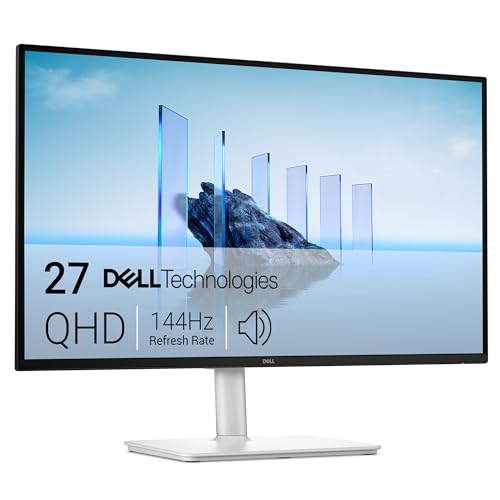 | Dell 27 Plus S2725DC | Best fit: A fixed desk that needs a larger screen Gear type: 27-inch QHD monitor Connection: USB-C, HDMI and DisplayPort 1.4 inputs Main figures: 2560 x 1440 at 144Hz, two 3W speakers Check first: USB-C power delivery is up to 65W | Check Price on Amazon |
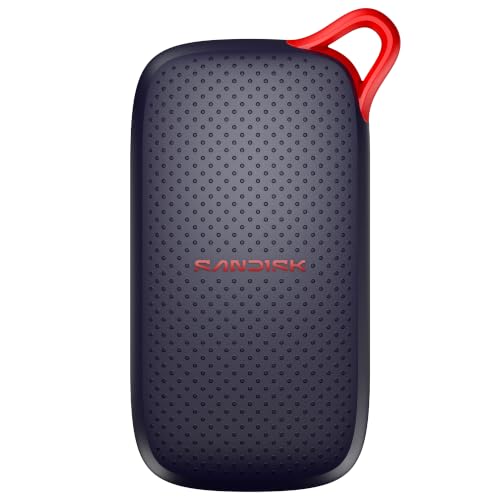 | SanDisk Portable SSD 2TB | Best fit: Carrying project files Gear type: Portable SSD Connection: USB-C Main figures: 2TB, reads up to 1000MB/s, drop protection up to two meters Check first: The listing gives no write speed | Check Price on Amazon |
 | UGREEN Nexode 100W GaN Charger | Best fit: One wall charger for a MacBook, tablet and phone Gear type: Four-port wall charger Connection: Three USB-C ports and one USB-A port Main figures: 100W for a single USB-C device on a 100W 5A cable Check first: UGREEN says Dell and Lenovo laptops cannot charge at full speed | Check Price on Amazon |
1. Plugable TBT-UDM Thunderbolt 4 Dock — Best for a recent MacBook desk
Plugable lists the TBT-UDM as a Thunderbolt 4 dock with two HDMI outputs, one downstream Thunderbolt 4 port at 40Gbps, four USB-A ports, one 10Gbps USB-C port, SD and microSD slots, a combo audio jack and Gigabit Ethernet. Plugable counts 13 ports in all. It states 100W of power delivery to the laptop and describes that figure as 96W certified. Its Amazon listing carries the same 13-port and 100W figures.
The number of displays depends on the Mac chip. Plugable says the two HDMI outputs each run up to 4K at 60Hz on M4 and M5 Macs, on Pro and Max chips, and on base M3 Macs with the lid closed. Base M1 and M2 Macs get one display. A single 6K display (8K on Windows) goes through the Thunderbolt port instead, and two displays is the most the dock drives at once. Plugable also lists Windows 10 and later on Thunderbolt 4 or USB4 laptops.
Choose it for a MacBook with an M4 or M5 chip, or a Pro or Max chip, that needs two HDMI monitors from one cable.Our Take Plugable’s list of display counts by Mac chip lets a MacBook owner check the dock before buying. If you want more Thunderbolt ports instead of more USB ports, the UGREEN dock below is the one to compare.
- Plugable lists display counts by Mac chip.
- Plugable states that the dock delivers 100W to the laptop and describes that figure as 96W certified.
- Plugable backs the dock with a two-year warranty.
- Plugable lists one downstream Thunderbolt 4 port while UGREEN lists three, and the UGREEN dock is the one to compare for a desk with several Thunderbolt peripherals.
2. UGREEN Revodok Max 208 — Best for three downstream Thunderbolt 4 ports
UGREEN’s Amazon listing describes one upstream and three downstream Thunderbolt 4 ports at up to 40Gbps, each downstream port rated 15W. The listing also names three 10Gbps USB-A ports, Gigabit Ethernet and a DC power input. A 140W GaN charger comes in the box, and UGREEN says the dock charges a connected laptop at up to 85W.
The display figures depend on the laptop. On Windows laptops it states two 4K displays at 60Hz or one 8K display at 30Hz. MacBooks with basic M chips get one 4K display at 60Hz, and UGREEN adds that full-featured USB-C laptops support a single display. UGREEN also says the dock must be connected to its charger to work.
The Max 208 fits a desk with several Thunderbolt peripherals, such as drives and monitors, that need their own ports.Our Take Pick the Max 208 when the number of Thunderbolt ports is the deciding detail. Pick the Plugable dock when a recent MacBook needs two HDMI monitors.
- UGREEN lists three downstream Thunderbolt 4 ports at up to 40Gbps, for a desk where drives and monitors need their own ports.
- UGREEN lists three 10Gbps USB-A ports and Gigabit Ethernet in addition to the Thunderbolt ports.
- UGREEN states that the dock charges a connected laptop at up to 85W with the 140W charger in the box.
- UGREEN says the dock must be connected to its charger to work.
- UGREEN lists a single display for MacBooks with basic M chips, and a MacBook owner should check the chip before ordering.
3. Lenovo USB-C Dual Display Travel Dock — Best for a two-screen travel desk
Lenovo’s listing counts seven ports and an integrated cable. It names one USB-A and two USB-C ports at 10Gbps, one DisplayPort 1.4, one HDMI 2.0 and one Gigabit Ethernet port, and it states two displays at 4K. Amazon gives the weight as 0.3 pounds, and Lenovo backs the dock with a three-year warranty.
Charging depends on the model. Lenovo says the version with a power adapter includes a 100W USB-C charger that provides 65W power delivery to the laptop, and an optional 135W charger provides 100W. One of the USB-C ports is always on, delivering 5V at 2.4A to a phone when the laptop is disconnected. Lenovo states compatibility with all USB-C laptops.
Our Take Choose the Lenovo for a bag or a shared desk where two monitors plug into whatever laptop arrives. A Thunderbolt dock suits a fixed workstation with more peripherals.
- Lenovo lists seven ports and an integrated cable, a combination suited to a laptop that moves between desks.
- Lenovo states two displays at 4K through DisplayPort and HDMI from the one attached cable.
- One USB-C port on the Lenovo dock is always on, and Lenovo lists it as charging a phone when the laptop is disconnected.
- Lenovo lists 65W power delivery with the included adapter and 100W only with the optional 135W charger, so the bundle name decides the charging figure.
4. Dell 27 Plus S2725DC — Best for a permanent 27-inch USB-C desk monitor
Dell’s Amazon listing gives the S2725DC a 27-inch QHD (2560 x 1440) panel at 144Hz with a 1ms response time, USB-C, HDMI and DisplayPort 1.4 inputs, and two 3W speakers. The USB-C input is listed at up to 65W power delivery, so one cable can carry the picture and charge a laptop. A pop-out panel adds a USB-C port at up to 15W and a USB-A port.
The stand adjusts for height, tilt, pivot and swivel, and the listing mentions AMD FreeSync and a four-star TÜV eye-comfort rating. Amazon gives the weight as 14.29 pounds, and Dell’s warranty is one year with advanced exchange. A monitor adds screen space, not a full set of ports, so a laptop that needs Ethernet or several USB-A ports needs a dock as well.
Our Take The Dell is the monitor to pick for a fixed desk with a laptop that charges at 65W or less. For a bag, the Lenovo dock is the better fit.
- Dell lists a 27-inch QHD panel at 144Hz, sized for a permanent desk.
- Dell lists USB-C input with up to 65W power delivery for a one-cable laptop setup, plus HDMI and DisplayPort 1.4 inputs.
- Dell lists a pop-out panel with a USB-C port at up to 15W and a USB-A port, a small set of ports on the monitor itself.
- Dell lists up to 65W power delivery, below the 100W Plugable lists for its dock and the 85W UGREEN lists for its dock.
- Dell backs the monitor with a one-year warranty, shorter than the two-year terms listed for the Plugable and UGREEN docks.
5. SanDisk Portable SSD 2TB — Best for a portable project archive
SanDisk’s Amazon listing gives the drive 2TB of capacity, read speeds of up to 1000MB/s, drop protection of up to two meters and no moving parts. The listing calls it USB-C ready, says it needs no drivers or setup, and describes it as compatible with laptops and tablets. Amazon lists the size as 3.35 by 1.77 by 0.39 inches and the weight as 0.07 pounds.
The drive covers storage only. The listing gives a three-year limited manufacturer warranty and does not state a write speed, so a large copy onto the drive has no listed figure to check. Up to 1000MB/s is a read maximum, not a write figure. A dock, monitor or charger solves a different problem and holds no copy of a project.
Our Take Choose the SanDisk when project files travel with the laptop and the laptop’s own drive is full or must stay free. Keep a second copy of anything important.
- SanDisk lists 2TB of capacity as external storage for project files when the laptop’s own drive is full or must stay free.
- SanDisk lists read speeds of up to 1000MB/s as the drive’s read maximum.
- SanDisk lists drop protection of up to two meters and no moving parts for a drive that carries project files with the laptop.
- SanDisk’s Amazon listing gives a three-year limited manufacturer warranty.
- SanDisk lists a read speed and does not list a write speed, so a large copy onto the drive has no listed figure to check.
6. UGREEN Nexode 100W GaN Charger — Best for one compact multi-port charger
UGREEN’s Amazon listing describes a GaN charger with three USB-C ports and one USB-A port, a foldable plug and a 100W maximum. Amazon gives the size as 2.7 by 2.7 by 1.3 inches and the weight as 0.52 pounds. UGREEN says a MacBook Air M3 reaches 55% charge in under 30 minutes.
The 100W figure comes with conditions. UGREEN states it for a single USB-C device on a 100W 5A cable. UGREEN also says the four ports charge devices at the same time, but the listing gives no split of the 100W between ports. UGREEN adds that because of the charging protocol, Dell and Lenovo laptops cannot charge at full speed from it.
The Nexode suits a MacBook, tablet and phone kit that needs one wall charger, and UGREEN says Dell and Lenovo laptops cannot charge at full speed from it.Our Take Choose the Nexode for a MacBook, tablet and phone that share one outlet. Look at a Dell or Lenovo’s own charger first, because UGREEN says those laptops cannot reach full speed on this one.
- UGREEN lists three USB-C ports and one USB-A port in a foldable GaN charger, for a MacBook, tablet and phone that share one outlet.
- UGREEN states 100W for a single USB-C device on a 100W 5A cable.
- UGREEN says a MacBook Air M3 reaches 55% charge in under 30 minutes.
- UGREEN says Dell and Lenovo laptops cannot charge at full speed from this charger, because of the charging protocol.
- When several ports are in use, UGREEN gives no split of the 100W.
Buying Guide
Choose a dock from the laptop and displays
Plugable and UGREEN both list Thunderbolt 4 docks, and their port mixes suit different desks. Plugable lists 13 ports with two HDMI outputs and one downstream Thunderbolt port. UGREEN lists three downstream Thunderbolt 4 ports, three USB-A ports and Ethernet. Count the drives, monitors and other devices that must connect before comparing the two.
How many displays you get depends on the laptop. Plugable lists one display for base M1 and M2 Macs, and UGREEN lists one for basic M-chip MacBooks, so check the Mac chip before ordering. See the Thunderbolt 4 dock guide and the USB-C docking station guide for more models.
Keep permanent and travel desks separate
Lenovo’s dock lists seven ports on an attached cable, and Amazon gives its weight as 0.3 pounds. Its charging figure depends on the adapter model, at 65W with the included charger and 100W with the optional 135W one. Read the bundle name before relying on it to power a laptop.
Dell lists the monitor as a fixed 27-inch panel that charges a laptop at up to 65W. A travel dock adds ports, and a monitor adds screen area. Both can sit in one setup. See the USB-C monitor guide for more panels.
Choose storage by size and speed
SanDisk’s drive lists 2TB and read speeds of up to 1000MB/s. Size it by the library it has to hold, and keep another copy of important work. See the portable SSD guide for more drives.
The listing gives no write speed, so the read figure says nothing about how fast a large copy onto the drive will run. SanDisk’s drop protection of up to two meters is a durability figure and says nothing about transfer speed.
Match the charger to the laptop
UGREEN’s Nexode lists 100W for a single USB-C device and a note that Dell and Lenovo laptops cannot charge at full speed from it. Check the laptop’s own charger rating and the cable before buying, because a dock’s charging rating for the laptop (such as the 85W or 100W figures its maker lists) and a wall charger’s output are separate figures.
When several devices share the charger, the listing gives no split between ports. See the 100W USB-C charger guide for more chargers.
FAQ
Is Thunderbolt 4 required for every dock here?
No. Plugable and UGREEN list Thunderbolt 4 docks, and Plugable also lists Windows laptops with USB4. Lenovo lists a USB-C dock for USB-C laptops and does not mention Thunderbolt.
Match the dock to the laptop’s own port. Check the laptop’s specifications or the logo beside its port, and read the maker’s display list before buying.
Can the Plugable dock run two 4K monitors on every MacBook?
No. Plugable lists two displays on M4 and M5 Macs, Pro and Max chips, and base M3 Macs with the lid closed. Base M1 and M2 Macs get one display.
A single 6K display (8K on Windows) uses the Thunderbolt port, and Plugable says two displays is the most at a time.
Is the Dell monitor a portable monitor?
No. The Dell is a 27-inch monitor, and Amazon gives its weight as 14.29 pounds. Amazon lists USB-C, HDMI and DisplayPort 1.4 inputs.
For a laptop that moves between desks, the Lenovo dock is the lighter option. Pair it with any monitor that has HDMI or DisplayPort.
Does the SanDisk drive replace laptop storage?
No. It adds 2TB of external storage over USB-C and does not change the laptop’s internal drive. SanDisk’s Amazon listing gives a three-year limited manufacturer warranty.
Keep a second copy of anything important.
Can the UGREEN charger give 100W to every device?
No. UGREEN states 100W for a single USB-C device on a 100W 5A cable and gives no split for several ports. It also says Dell and Lenovo laptops cannot charge at full speed from it.
Check the laptop’s accepted charging power first.
Bottom Line
Pick Plugable TBT-UDM for a MacBook desk with two HDMI monitors, UGREEN Revodok Max 208 for three downstream Thunderbolt 4 ports, or Lenovo’s travel dock for two screens from a bag. Pick Dell’s S2725DC for a fixed 27-inch QHD desk, SanDisk’s 2TB drive for carrying project files, or UGREEN Nexode for one wall charger shared by a MacBook and a phone.