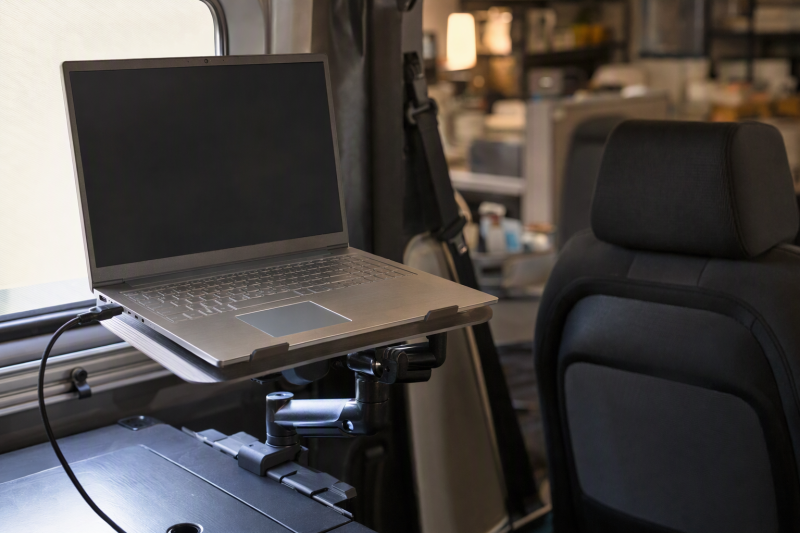
A vehicle laptop mount can turn a parked car, truck, or van into a place for service reports, diagnostics, route planning, and remote calls. The right design depends on whether the setup must disappear after each stop or remain attached for daily field work. Steering-wheel and cup-holder trays are the portable choices. Seat-bolt and seat-post mounts provide a wider adjustment range and stronger device restraint, but they need a compatible anchor and more passenger-side space.
Every mount in this guide is for stationary, parked use. A laptop, tray, arm, or steering-wheel attachment can block controls, reduce visibility, distract the driver, interfere with airbags, or become a projectile while the vehicle moves. Remove portable trays before driving, and move installed arms out of the occupant and airbag zones according to the product instructions and vehicle layout.
VIVO MOUNT-CAR01 is the balanced installed option for laptops up to 17 inches and 11 pounds when exposed passenger-seat bolts are available. SPIRRELAB adds a three-point base, two cooling fans, and a longer articulated work position for a dedicated field vehicle. DICMKY is the simpler portable choice for short parked sessions, while STEERTOP supports laptops up to 17 inches in a foldable steering-wheel or desktop format.
Vehicle Laptop Mount Comparison
| Image | Product | Details | Check Price |
|---|---|---|---|
 | DICMKY DM-H014 | Best fit: Compact portable workstation for parked use Mount: Most round steering wheels Board size: 10.8 x 13 inches Height adjustment: 5 positions Modes: Steering wheel and desktop | Check Price on Amazon |
 | VIVO MOUNT-CAR01 | Best fit: Balanced installed workstation with stated limits Device support: Up to 17 inches and 11 lb Tray size: 14.2 x 11.9 inches Height range: 18.5-26.3 inches Mount: Exposed passenger seat bolts | Check Price on Amazon |
 | Generic Car-desk-707 | Best fit: Tool-free cup-holder workstation Cup-holder range: 2.75-3.85 inches Height range: 4.1-7 inches Rotation: 360 degrees Arm material: Aluminum alloy | Check Price on Amazon |
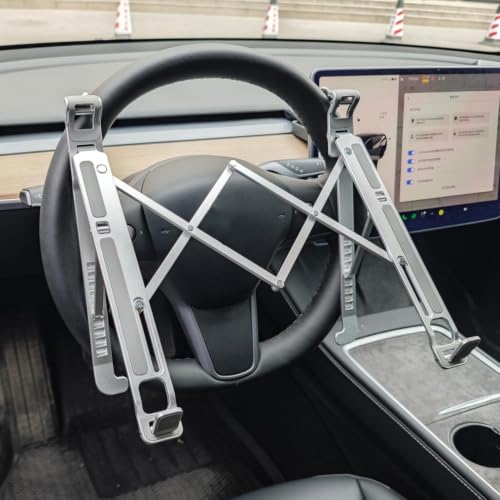 | Inoflexa DNZJ-001 | Best fit: Portable wheel tray needing more height steps Mount: Most round steering wheels Height adjustment: 9 positions Modes: Steering wheel and desktop Storage: Folds flat | Check Price on Amazon |
 | SPIRRELAB No-Drill Mount | Best fit: Dedicated field-service vehicle workstation Device support: 9-17 inches; up to 11 lb Height range: 11.9-20 inches Reach: Up to 13 inches Cooling: 2 USB fans | Check Price on Amazon |
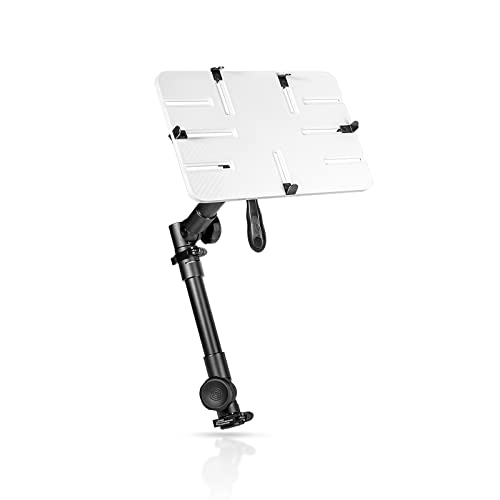 | AA Products T-100AP | Best fit: Tall cabin with a compact laptop Device support: 10-13 inch screens Height range: 24-36 inches Motion: 360-degree rotation; 180-degree tilt Mount: Passenger seat bolt | Check Price on Amazon |
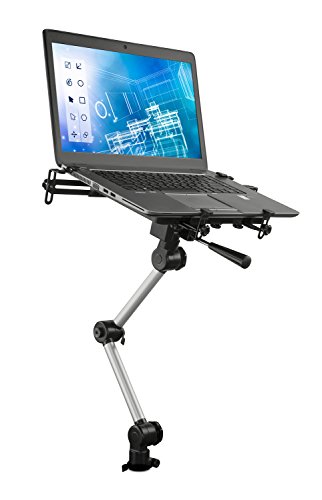 | Mount-It MI-4260 | Best fit: Vehicle with a compatible exposed seat bar Mount: Metal bar beneath passenger seat Adjustment: Height and tray angle Cooling: USB-powered fan Materials: Aluminum and steel | Check Price on Amazon |
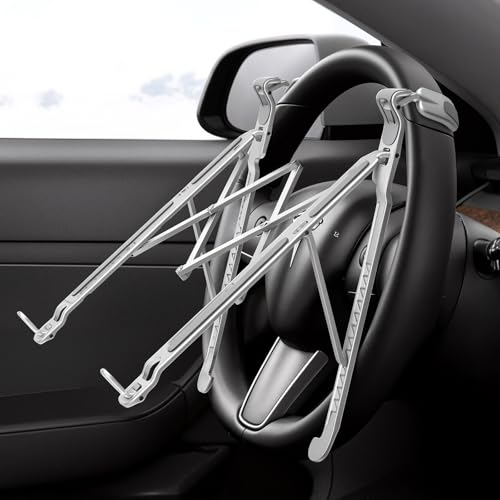 | STEERTOP DNZJ001 | Best fit: Folding aluminum tray for larger laptops Device support: Up to 17 inches stated Mount: Most round steering wheels Frame: Aluminum alloy Modes: Steering wheel and desktop | Check Price on Amazon |
Check the mounting interface before comparing tray features. An exposed floor bolt, an exposed metal seat bar, a round cup holder, and a round steering wheel are four different fit requirements. A product that works in one vehicle may not have a safe anchor in another trim level of the same model.
1. DICMKY DM-H014 — Best Compact Steering-Wheel Tray
DICMKY’s DM-H014 clips to most round steering wheels for parked work and flips into a tabletop stand when the vehicle is no longer the best place to sit. DICMKY specifies the board at 10.8 by 13 inches to support laptops, tablets, or documents. The manufacturer provides five height positions to let the user bring a small screen higher than a flat wheel tray.
No tools are required, and you can slide the folded tray beside a seat or into a briefcase. The dual-mode design is convenient for someone who uses several vehicles and cannot leave hardware installed. The tray must be removed before driving so it does not obstruct the wheel, controls, instrument view, or driver airbag.
Our Take: The DM-H014 is the easy portable pick for a small laptop and brief parked tasks. The compact board and five-step adjustment are useful, but the tray does not offer the reach or fixed restraint of a seat-bolt system.
[su_box title=”PROS” style=”soft” box_color=”#2e7d32″] – Five height positions provide more screen adjustment than a basic flat wheel tray. – The 10.8 by 13 inch board supports compact laptops, tablets, and paperwork. – Steering-wheel and desktop modes extend use beyond one parked vehicle. – Tool-free fitting makes the tray practical for drivers who change vehicles. [/su_box] [su_box title=”CONS” style=”soft” box_color=”#c62828″] – Fit is limited to compatible round steering wheels. – The tray must be removed and stored before the vehicle moves. – A compact surface may not fully support a large laptop’s footprint. [/su_box]2. VIVO MOUNT-CAR01 — Best Balanced Seat-Bolt Workstation
VIVO MOUNT-CAR01 uses exposed passenger-side floor seat bolts and includes three mounting feet for 0, 45, and 90-degree bolt angles. VIVO specifies that the 14.2 by 11.9 inch ventilated tray supports laptops and tablets up to 17 inches and 11 pounds. Flexible clips restrain the device and release when the laptop needs to leave the vehicle.
The telescopic pole is rated to adjust from 18.5 to 26.3 inches, while the arm bracket moves across a 9-inch range. The tilt, swivel, rotation, and height controls give you several ways to place the keyboard and screen for parked work. You can disconnect the upper stand from the base with thumb screws, so the passenger area can return to normal use when the workstation is not needed.
Our Take: MOUNT-CAR01 is the first installed mount to consider when the vehicle has accessible seat bolts and an 11-pound limit is sufficient. It offers the clearest balance of stated capacity, ventilation, articulation, and removal.
[su_box title=”PROS” style=”soft” box_color=”#2e7d32″] – The 17-inch and 11-pound limits provide clear laptop compatibility boundaries. – Three mounting feet cover exposed seat bolts at three common angles. – An 18.5-to-26.3-inch pole combines with tilt, swivel, and rotation controls. – Tray ventilation and flexible clips address cooling and device restraint. [/su_box] [su_box title=”CONS” style=”soft” box_color=”#c62828″] – Installation requires exposed passenger-side floor seat bolts. – The base and pole occupy passenger footwell space even with the top removed. [/su_box]3. Generic Car-desk-707 — Best Cup-Holder Mount
The manufacturer states the Car-desk-707 locks into a round cup holder measuring 2.75 to 3.85 inches across. The expandable base twists into place without drilling, and an aluminum-alloy arm supports the tray. This mounting path avoids the steering wheel and seat hardware, so it is useful for a parked passenger-side setup when the console cup holder has the right shape and enough surrounding clearance.
According to the product listing, height adjusts from 4.1 to 7 inches, and the tray swivels through 360 degrees for driver or passenger reach while parked. The wood-grain composite top is listed for temperatures from -4 to 160 degrees Fahrenheit and can be wiped after spills. The listed tray measures 13 by 9.85 inches, while laptop-size limits and load capacity are not stated, so check those unknowns against the device you plan to use.
Our Take: This mount is the no-drill alternative when a stable round cup holder is available and seat hardware should remain untouched. It lacks the capacity and tray-size detail supplied by the stronger seat-bolt choices.
[su_box title=”PROS” style=”soft” box_color=”#2e7d32″] – The 2.75-to-3.85-inch expanding base installs without tools or drilling. – A 4.1-to-7-inch height range supports several console and seat positions. – Full rotation lets the tray move between parked driver and passenger use. [/su_box] [su_box title=”CONS” style=”soft” box_color=”#c62828″] – The 13 by 9.85 inch tray has no listed laptop-size or load-capacity limit. – An expanding base requires a round cup holder within the listed diameter range. – The mount occupies a cup holder and may crowd shifters or console controls. [/su_box]4. Inoflexa DNZJ-001 — Best Nine-Position Wheel Tray
Inoflexa provides nine height positions, the largest stepped range among the steering-wheel trays here. It attaches to most round steering wheels with a padded clamp for parked work, then flips for use on a flat desktop. The higher number of positions can help align the screen and keyboard when seat height or wheel angle differs between vehicles.
The DNZJ-001 installs without tools and folds flat for storage. Non-slip padding protects the wheel and helps the tray stay in place. The listing does not state board dimensions, laptop-size limits, or a load rating, so judge this model as an adjustable portable surface, not as support for an unspecified heavy computer.
Our Take: Choose Inoflexa when fine stepped height adjustment is more important than documented tray capacity. Remove it before driving and confirm that the wheel shape gives the clamp a stable, padded grip.
[su_box title=”PROS” style=”soft” box_color=”#2e7d32″] – Nine height positions allow finer parked-work adjustment than five-step alternatives. – Wheel and tabletop modes let one folded stand serve two locations. – Non-slip padding protects the wheel and improves clamp grip. – Tool-free installation suits shared or frequently changed vehicles. [/su_box] [su_box title=”CONS” style=”soft” box_color=”#c62828″] – The listing gives no tray dimensions, laptop limit, or weight capacity. – Fit on most round wheels does not guarantee that every steering-wheel profile fits. – The attachment must be removed before driving or using the wheel. [/su_box]5. SPIRRELAB No-Drill Mount — Best Dedicated Field-Vehicle Setup
SPIRRELAB uses a three-point base around compatible passenger-seat bolts, five adjustable clamps, and a 59-inch strap to reduce movement. The tray supports 9-to-17-inch laptops and tablets up to 11 pounds. Two USB-powered fans move air beneath the device during extended parked diagnostics or report writing.
Height adjusts from 11.9 to 20 inches. Two 180-degree articulating arms provide up to 13 inches of reach, while the top also tilts and swivels through 360 degrees. Buyers must verify the bolt type, a 6.6-to-17-inch mounting span, and local clearance. The mount is not for hook-style seat mounts. The upper workstation detaches at its center joint, and the base stays installed.
Our Take: SPIRRELAB is the feature-rich choice for a van or service vehicle that regularly hosts a laptop. Its range and restraint hardware need a more careful fit check than a portable tray does.
[su_box title=”PROS” style=”soft” box_color=”#2e7d32″] – A three-point base, five clamps, and 59-inch strap add device restraint. – The tray supports 9-to-17-inch devices up to a stated 11 pounds. – Two articulating arms supply up to 13 inches of reach and broad positioning. – Dual USB fans move air under the laptop during long parked sessions. – The detachable upper section reduces obstruction when the workstation is unused. [/su_box] [su_box title=”CONS” style=”soft” box_color=”#c62828″] – Fit requires a 6.6-to-17-inch bolt span and excludes hook-style seat mounts. – The remaining three-point base still occupies space after the upper section detaches. – More joints and clamps require careful tightening and clearance checks. [/su_box]6. AA Products T-100AP — Best Tall Seat-Bolt Mount
The T-100AP anchors to a passenger seat bolt without drilling and raises its ABS P-Tray on an aluminum telescopic tube. AA Products specifies the tray’s extendable front and rear brackets fit laptops with 10-to-13-inch screens, so this is a mount for compact laptops, not for the largest notebooks.
Height adjusts from 24 to 36 inches, the tallest stated range in this group. The control arm rotates the tray through 360 degrees and tilts it through 180 degrees. You make adjustments with quick-release knobs and clamps. The tall range can suit trucks or vans with high seating positions, provided the passenger area has room for the pole and tray.
Our Take: T-100AP is the targeted choice for a 10-to-13-inch laptop that must sit high in a truck or van. The screen-size range is narrower than VIVO and SPIRRELAB, but the 24-to-36-inch pole may solve a specific cabin-height problem.
[su_box title=”PROS” style=”soft” box_color=”#2e7d32″] – The 24-to-36-inch pole provides the tallest documented height range here. – Full rotation and 180-degree tilt support several parked viewing positions. – Passenger-seat-bolt installation avoids drilling the vehicle floor. [/su_box] [su_box title=”CONS” style=”soft” box_color=”#c62828″] – The tray is specified only for laptops with 10-to-13-inch screens. – No device weight limit appears in the product details. – A tall pole can intrude into passenger space if it cannot swing away safely. [/su_box]7. Mount-It MI-4260 — Best Seat-Post Bar Mount
Mount-It MI-4260 attaches to an exposed metal bar beneath the passenger seat rather than using a floor bolt. That distinction can make it fit a vehicle whose seat bolts are covered, though the bar must match the bracket shown by the seller. Height and tray angle adjust and lock for parked use.
The tray uses L-brackets to restrain the laptop and includes a USB-powered cooling fan. Aircraft-grade aluminum and steel components are intended for daily vehicle conditions. The listing does not state tray dimensions, laptop-size limits, weight capacity, or adjustment ranges, so confirm the exposed-bar fit and the required device measurements before you buy.
Our Take: MI-4260 is the alternative when an exposed under-seat metal bar is available but a floor-bolt mount is unsuitable. Its sparse dimensional detail makes pre-purchase measurement especially important.
[su_box title=”PROS” style=”soft” box_color=”#2e7d32″] – An exposed-bar attachment offers a different no-drill path from seat-bolt mounts. – Locking teeth and L-brackets secure the chosen tray position and laptop. – A USB-powered fan increases airflow under the computer. – Aluminum and steel construction is intended for repeated vehicle use. [/su_box] [su_box title=”CONS” style=”soft” box_color=”#c62828″] – The vehicle needs a compatible exposed metal bar beneath the passenger seat. – Tray size, laptop range, load limit, and adjustment travel are not stated. – The mount can reduce passenger-seat clearance if it cannot move fully away. [/su_box]8. STEERTOP DNZJ001 — Best Aluminum Folding Wheel Mount
STEERTOP uses an aluminum-alloy frame and adaptive hooks for most round steering wheels. Soft silicone pads protect the contact points. The stand supports laptops up to 17 inches and raises the screen for parked work rather than leaving the computer flat across the driver’s lap.
The DNZJ001 folds for glove-box or door-pocket storage and flips into a tabletop laptop stand outside the vehicle. Its listing does not state a load rating, tray dimensions, or number of height positions. As with every wheel-mounted option, the unit must come off before the vehicle moves because it occupies the primary driving control and airbag zone.
Our Take: STEERTOP is the portable choice for a larger laptop when you want aluminum construction and compact folding. Its 17-inch statement is useful, but buyers still need to confirm footprint support and comfortable wheel fit.
[su_box title=”PROS” style=”soft” box_color=”#2e7d32″] – The listed 17-inch laptop support is the clearest size statement among the portable trays. – Aluminum-alloy construction gives the folding frame a rigid material base. – Silicone-lined adaptive hooks protect compatible round steering wheels. [/su_box] [su_box title=”CONS” style=”soft” box_color=”#c62828″] – No weight rating, tray dimensions, or adjustment-step count is stated. – A 17-inch screen does not guarantee the entire laptop base fits the surface. – The mount must be removed from the wheel before driving. [/su_box]Buying Guide: Choose a Vehicle Laptop Desk Mount
Decide Between Portable and Installed Hardware
Portable mounts suit occasional parked sessions. DICMKY, Inoflexa, and STEERTOP attach to compatible round steering wheels, fold for storage, and double as desktop stands. Car-desk-707 uses a cup holder instead, so the wheel stays clear while parked.
Installed mounts suit recurring field work. VIVO MOUNT-CAR01, SPIRRELAB, and AA Products use seat bolts, while Mount-It needs an exposed seat bar. Store the laptop in a padded laptop briefcase rather than leaving it on any mount while driving.
Verify the Vehicle Anchor
Seat-bolt fit involves angle, span, and hardware style. VIVO supplies feet for 0, 45, and 90-degree bolts. SPIRRELAB specifies a 6.6-to-17-inch mounting span and rejects hook-style seat mounts. AA Products needs an accessible passenger seat bolt.
Seat-post and cup-holder mounts have different tests. Mount-It requires an exposed metal bar under the seat. Car-desk-707 needs a round 2.75-to-3.85-inch cup holder. A camera suction mount is not a substitute for structural laptop support and serves a different vehicle job.
Match the Tray to Laptop Size and Weight
Use stated device limits where available. VIVO and SPIRRELAB accept laptops up to 17 inches and 11 pounds. AA Products narrows its range to 10-to-13-inch screens, while STEERTOP states support up to 17 inches without a weight limit.
Check the base footprint as well as screen size. DICMKY gives a 10.8 by 13 inch board, and VIVO gives a 14.2 by 11.9 inch tray. A laptop can meet a diagonal screen claim yet overhang the support surface. Keep a vertical mouse on a separate stable pad rather than balancing it beside the computer. A thumb trackball can reduce pointer travel when a parked workstation has little spare surface.
Plan Adjustment and Passenger Clearance
Height range must suit the vehicle seat. AA Products spans 24 to 36 inches, VIVO spans 18.5 to 26.3 inches, and SPIRRELAB spans 11.9 to 20 inches. Portable wheel trays use stepped rather than continuous adjustment, with five DICMKY positions and nine Inoflexa positions.
Move installed hardware out of occupant zones. VIVO disconnects with thumb screws, and SPIRRELAB detaches at the center joint. Neither feature makes an installed base safe automatically. A USB headset can simplify parked calls, but its cable must not cross controls or snag the mount. A USB conference speakerphone needs its own stable console or passenger-side surface.
Treat Parked Use as a Hard Safety Rule
Never type, read, or adjust the workstation while driving. Steering-wheel trays block a primary control and driver airbag area, while arms and poles can restrict motion or visibility. Remove portable mounts and secure every loose item before the vehicle moves.
Inspect the installation after adjustment and before travel. Tighten the specified clamps, check seat movement, preserve airbag paths, and stow the laptop. A wireless headset reduces one loose cable during parked work, but it does not make laptop use safe while moving.
Frequently Asked Questions
Can I Use a Vehicle Laptop Mount While Driving?
No, the laptop workstation is for parked use. A screen and keyboard distract the driver, and a tray or arm can block controls, visibility, movement, or airbag deployment. Steering-wheel mounts must be removed before driving.
Installed systems also need a travel position. Detach or swing the upper assembly away as the manufacturer permits, secure the laptop elsewhere, and confirm that the remaining base does not interfere with any occupant or safety system.
Do No-Drill Mounts Fit Every Vehicle?
No-drill describes installation, not universal fit. VIVO needs exposed floor seat bolts and supplies three foot angles. SPIRRELAB needs the correct bolt type, span, and clearance. Mount-It requires an exposed under-seat metal bar.
Portable mounts also have fit limits. DICMKY, Inoflexa, and STEERTOP target most round steering wheels, while Car-desk-707 targets round cup holders from 2.75 to 3.85 inches. Measure the exact vehicle location before ordering.
What Size Laptop Can These Mounts Hold?
The clearest installed limits come from VIVO and SPIRRELAB. Both list up to 17-inch laptops and an 11-pound capacity. AA Products specifies 10-to-13-inch screens, while STEERTOP states up to 17 inches without a weight figure.
Screen size is only one dimension. Compare the laptop base with the tray, locate the center of weight, and verify that clips or clamps do not press buttons or block vents. Do not infer capacity when a listing omits it.
Are Cooling Fans Necessary on a Vehicle Mount?
Fans can help airflow, but they do not replace open vents. SPIRRELAB has two USB fans, Mount-It has one, and VIVO uses a ventilated surface. Their benefit depends on the laptop’s intake layout and the temperature inside the parked vehicle.
Avoid leaving electronics in extreme cabin heat. Car-desk-707 rates its composite surface from -4 to 160 degrees Fahrenheit, but that is not a safe laptop-storage specification. Remove the computer when the workstation is unattended.
Which Mount Is Easiest to Move Between Vehicles?
Tool-free portable trays move most easily. DICMKY, Inoflexa, and STEERTOP fold and attach to compatible round wheels, while Car-desk-707 twists into a compatible cup holder. Each still requires a new fit check in the second vehicle.
Installed mounts favor a persistent base. VIVO and SPIRRELAB detach their upper sections, but the vehicle-specific base remains. If the computer travels often, pair the mount with a USB-C docking-station mount at the office so cables remain organized at both work locations.
Final Recommendation
VIVO MOUNT-CAR01 is the best fit for most dedicated parked workstations when the vehicle has exposed passenger-seat bolts and the laptop stays within 17 inches and 11 pounds. SPIRRELAB is the more involved field-service option with a three-point base, longer articulation, more restraint hardware, and dual fans. For a portable setup, DICMKY handles compact computers, while STEERTOP carries the clearest 17-inch statement.
Choose the anchor before the tray. Confirm seat hardware, cup-holder diameter, or steering-wheel shape. Then check laptop footprint and weight. Finally, plan a travel state that removes the computer and keeps every bracket, pole, cable, and portable tray away from driving controls and occupant safety zones.