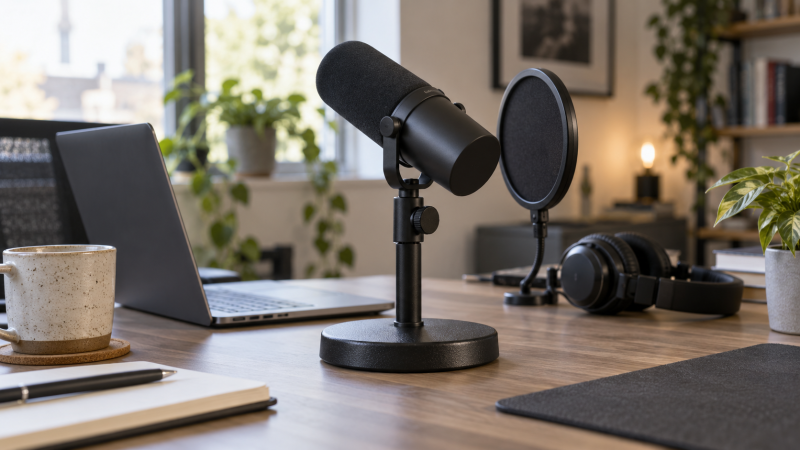
A desk microphone does not always need a clamp-on boom arm. A weighted desktop stand can hold a fixed recording position, move between rooms and avoid a clamp that will not fit a thick or fragile desk edge. The tradeoff is space, because the base sits beside the keyboard and a tall microphone and pop filter can make it easier to tip than the bare mic weight suggests.
These six stands have active New listings and cover a regular adjustable pole, two bundled or offset options, a basic standard-thread model and two low-profile bases. Their dimensions and load figures come from exact listings, not a tip-over or vibration test. Check the microphone’s mount thread, total rig weight and where the singer’s mouth will be before choosing a base by appearance.
Measure the height from desk to mouth, add the microphone and pop-filter weight, and check whether the stand’s base leaves room for your keyboard.Weighted Desktop Stands Compared
| Image | Product | Details | Check Price |
|---|---|---|---|
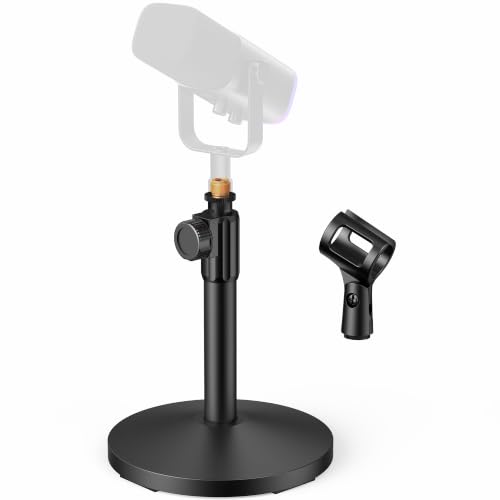 | InnoGear desk stand | Best fit: Adjustable straight stand Base: 5.12 in, 1.85 lb listed Height: 8–12.8 in Rated load: 3.3 lb Included: Clip and thread adapter | Check Price on Amazon |
 | BILIONE desk stand kit | Best fit: Stand plus pop protection Base: 5.1 in, 1.5 lb listed Included: Pop filter, shock mount, clip Shock-mount fit: 1.77–2.05 in listed Adapter: 3/8 to 5/8 in | Check Price on Amazon |
 | CAHAYA weighted boom stand | Best fit: Reach without a desk clamp Base: 4.4 lb listed Height: 8.7–13 in Boom reach: Up to 10.2 in Mode: Boom or straight | Check Price on Amazon |
 | On-Stage DS7200B listing | Best fit: Simple standard clip mount Base: 6 in, 2 lb maker spec Height: 9–13 in Thread: 5/8-27 Format: Confirm seller variant | Check Price on Amazon |
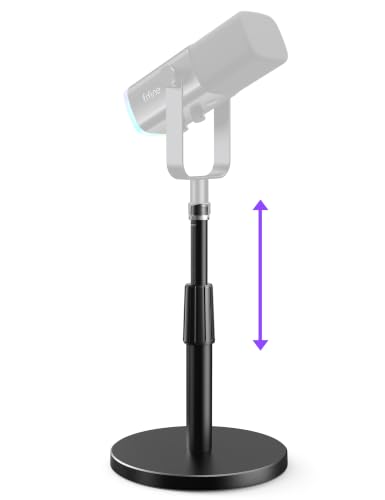 | FIFINE BS1 | Best fit: Low-profile desk position Base: 5.12 in weighted Height: 5.5–8.26 in Thread: 3/8 in plus 5/8 adapter Clip: Not included | Check Price on Amazon |
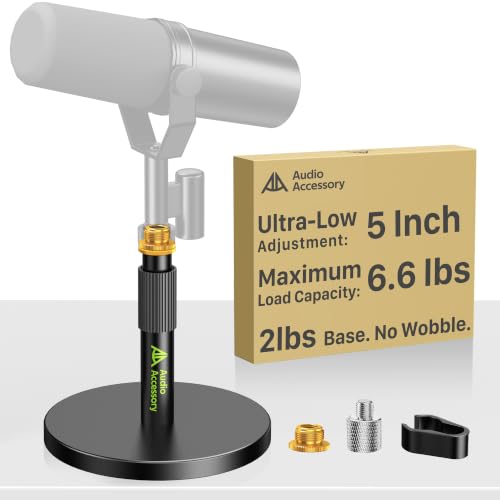 | AA Audio Accessory short stand | Best fit: Heavy mic, low position Base: 900 g listed Height: 5–7.6 in Rated load: 6.6 lb listed Adapters: 1/4, 3/8, 5/8 in | Check Price on Amazon |
1. InnoGear Desk Stand — Best Adjustable Straight Stand
InnoGear lists a 5.12-inch metal base weighing 1.85 lb, an 8 to 12.8-inch height range and a 3.3 lb supported load. The stand includes a thread adapter and mic clip, so it can accommodate several common mounts without buying a clip first. Those numbers make it a reasonable default when a podcaster wants a straight stand at a normal desk height and can keep the mic close enough without an offset arm.
The load figure is a seller rating, not proof that every tall microphone and side-mounted pop filter will remain stable when bumped. Place the combined rig on the stand and gently test it in the intended position before recording. Rubber pads can protect the desktop from scratches, but do not count on them to isolate keyboard impacts. If typing is part of the show, move the stand away from the keyboard or use a separate mount.
The weight rating covers the rig only if the mic, clip and any filter fit the listed stand geometry.Our Take Buy the InnoGear if you want a straightforward adjustable desk stand with clearly listed dimensions and capacity. It is less suitable when the microphone must reach around a monitor or sit far from the base.
- Height, base mass and load rating are listed.
- Clip and 3/8-to-5/8 adapter included.
- Base occupies desk space.
- Straight pole gives no horizontal reach.
2. BILIONE Desk Stand Kit — Best with Pop Protection
BILIONE bundles a weighted straight stand with a double-layer pop filter, shock mount, mic clip and thread adapter. Its listing gives a 5.1-inch, 1.5 lb base. That package is useful if the first podcast microphone arrives without plosive protection or a compatible support. The shock mount fit is stated as roughly 1.77 to 2.05 inches in mic diameter. The mount is not universal, and the seller specifically says it does not fit a Blue Yeti.
Check the microphone diameter before treating the bundled mount as a saving. A pop filter adds weight away from the pole, so position it without pulling the stand toward the speaker. The seller calls the base stable, but an accessory-heavy rig on a small desk still needs a setup check. If you already own a filter and mount, the kit may duplicate parts.
Our Take Pick the BILIONE kit when you need the stand and vocal accessories together and your mic fits the mount. Do not buy it for the shock mount without checking the listed fit range.
- Pop filter, shock mount and clip listed.
- Weighted base avoids a desk-edge clamp.
- Shock mount does not fit every mic.
- Accessory arms can crowd a small desktop.
3. CAHAYA Weighted Boom Stand — Best Reach Without a Clamp
CAHAYA’s stand has a weighted 4.4 lb base and a short boom that extends up to 10.2 inches. The listing says the arm can be detached to make a straight stand, with a listed 8.7 to 13-inch height range. CAHAYA is the unusual choice in the group because it brings the capsule closer to the mouth without clamping an arm to the desk. Reach without a clamp helps when the table edge is inaccessible or a monitor would sit between a straight pole and the speaker.
An offset microphone increases tipping force. CAHAYA states an 8.8 lb capacity with the arm half extended, not at full reach. Measure the mic and mount weight, use only the reach needed and check that the base stays flat. A weighted base can still transmit desk taps. If the mic must swing away often, a separate arm may be easier to move.
Our Take Buy the CAHAYA if you need a little horizontal reach but cannot attach a clamp. Its heavy base takes desk space, so verify room for it.
- Offset reach without a desk clamp.
- Converts between boom and straight modes.
- Heavy base is specified.
- Load rating depends on arm extension.
- 4.4 lb base takes more desk space to move.
4. On-Stage DS7200B — Best Standard Clip Mount
On-Stage specifies a 6-inch, 2 lb base, 9 to 13-inch height range and 5/8-27 threading for its DS7200B straight stand. Amazon’s title names DS7200B, but its Model field says DS7200QRB, which On-Stage lists as a separate quick-release version. Confirm the seller’s variant before ordering; the available listing does not state a supported microphone load.
Without a stated load figure, do not assume it will hold every large broadcast microphone plus a long pop-filter arm. Check the mic and clip weight, install them and test the stand on the actual desk. A straight pole is quick to reposition but its base remains between the user and the keyboard. If the presenter turns to another screen, the capsule may no longer point consistently at the mouth.
The standard 5/8-27 thread is useful; the missing load figure still warrants a setup check.Our Take Buy the DS7200B if you already have a compatible clip and want a simple, standard-thread desk mount. It is not the best documented choice for a very heavy mic with many accessories.
- Standard 5/8-27 threading listed.
- Useful 9–13-inch height range.
- No clear load rating in this listing.
- Needs a compatible clip or mount.
5. FIFINE BS1 — Best Low-Profile Position
FIFINE lists the BS1 with a 5.12-inch weighted base and an adjustable height of 5.5 to 8.26 inches, lower than the InnoGear and On-Stage stands. The FIFINE listing also describes a 3/8-inch thread with a 5/8-inch adapter and says a handheld microphone clip is not included. The lower pole is a better fit for a taller mic body or a desk where a higher pole would push the capsule into a camera frame.
Low height is not automatically a good speaking position. If the microphone ends up below the mouth and the podcaster leans down, the low stand is the wrong choice. Check the mic body height, yoke and mount before buying. The seller’s pad and stability claims are not evidence that a keyboard on the same tabletop will be silent in the recording.
Our Take Buy the BS1 if your mic already stands tall or needs to stay low on camera. Add a suitable clip if the microphone does not screw directly onto the supplied threads.
- Low 5.5–8.26-inch height range.
- Two common thread sizes supported.
- No handheld microphone clip included.
- Too low for some mic-and-chair combinations.
6. AA Audio Accessory Short Stand — Best Heavy-Mic Listing
This short stand’s listing states a 5 to 7.6-inch height range, a 900 g weighted base and a 6.6 lb supported load. It includes 1/4-, 3/8- and 5/8-inch adapters, which can simplify attaching a microphone with a nonstandard yoke. The claimed capacity is attractive for a heavier broadcast mic, but it is a seller rating rather than a tested result in this article.
Check whether the combined mic, shock mount and pop filter fit the stand without moving the center of mass too far from the base. The listing names many popular microphones, but a model name alone does not prove that every included adapter or support position fits your exact generation. If the capsule stays too low at full extension, choose a taller stand rather than leaning toward the microphone.
Our Take Buy this stand if you have a heavier mic that needs a low desk position. Verify the mounting hardware and geometry rather than buying on the 6.6 lb figure alone.
- 6.6 lb listed load capacity.
- Three thread adapters listed.
- Short height range is clear.
- Capacity is a seller claim, not a load test.
- May sit too low for smaller microphones.
Buying Guide
Measure the complete microphone position
Measure from the desk to the speaker’s mouth at a comfortable seated posture. Add the microphone body’s height, clip or shock mount and the stand’s adjustable range. A 5-inch pole might be perfect under a tall broadcast mic and unusable under a shorter handheld mic. Avoid a setup that makes the podcaster lean forward for an hour just to stay on-axis.
Check where the base lands among the keyboard, laptop and notes. A straight stand keeps its base under the mic, while a weighted short boom like CAHAYA moves the mic sideways and increases tipping force. If the desk edge can take a clamp and you need more reach, compare a desktop microphone boom arm instead. This article covers stands that sit on the desk, not arms fixed to it.
Treat rated load as one part of stability
A stand’s load rating must include the microphone and attached accessories. InnoGear lists 3.3 lb, AA Audio Accessory lists 6.6 lb, and CAHAYA lists 8.8 lb only with its boom half extended. These figures are not interchangeable tests, because the height, offset and base geometry differ. Put the assembled rig on the actual desk and check whether ordinary cable movement or a light bump changes its position.
Rubber pads may protect the finish and reduce sliding, but desk impacts can travel through the stand. A shock mount can help if it fits the exact mic. It cannot stop every mechanical thump. Record while typing normally and listen to the raw track. If the presenter types throughout the show, moving the support off the desk may help more than adding another rubber pad.
Confirm clip and thread fit before ordering
A 5/8-27 microphone thread is common on clips, while many yokes and adapters use 3/8-inch or other fittings. The InnoGear, BILIONE, FIFINE and AA Audio Accessory listings describe adapters. The On-Stage model specifies a standard 5/8-27 mount. Check the microphone’s actual yoke or clip rather than assuming every model from a named brand attaches the same way.
Bundles can save a separate purchase when you need the pop filter or shock mount. BILIONE’s shock mount has a stated body-diameter range and excludes Blue Yeti, so the fit check is more useful than its long list of compatible brands. A dynamic XLR microphone for an untreated home studio may include a yoke or require another mount. Inspect that exact mic before choosing a stand.
Frequently Asked Questions
Is a weighted base better than a clamp-on boom arm?
It is better when the desk edge cannot be clamped or the recording position rarely changes. A weighted base can move with a laptop between rooms and needs no installation. It also occupies usable desk space and may sit directly beside the keyboard. A clamp-on arm can clear that space and give more reach if the desk edge and arm are compatible.
Choose by the setup rather than the category. Put a paper circle on the desk the size of the proposed base, sit at the microphone position and see whether it blocks typing or notes. If the mic must swing away for meetings, a fixed base may be the less convenient choice even if it is easier to assemble.
Will the base stop typing noise in my recording?
Not necessarily. Physical impacts travel through the tabletop, base and microphone support. Rubber pads and a shock mount may reduce some vibration, but their effectiveness depends on the desk, mic and mount. A seller’s “anti-vibration” phrase is not a measured result for your keyboard.
Record a short test while typing and moving the mouse at your normal level. Move the stand farther from the keyboard, try an appropriate shock mount or take the support off the desk if thumps remain. Microphone pickup pattern mainly affects airborne sound. It does not solve every structure-borne impact.
What if my microphone is near the stand’s weight limit?
Add the mic, clip, shock mount, filter and cable pull before comparing with a seller’s rating. An offset boom deserves more caution than a straight pole because the weight acts farther from the center of the base. CAHAYA’s 8.8 lb figure explicitly applies at half extension, not every boom position.
Use a shorter reach, heavier or wider base, or a different mount if the rig feels unstable. Do not risk an expensive microphone because a headline load figure looks generous. The test is whether the complete assembly remains upright in the intended place and posture.
Bottom Line
For a regular straight stand, start with InnoGear or the simple On-Stage DS7200B. BILIONE includes more vocal accessories, CAHAYA adds weighted-boom reach, and FIFINE BS1 stays low. The AA Audio Accessory listing claims more load capacity than InnoGear in a short body. Measure mouth height, mounting thread, combined weight and desk footprint before deciding.