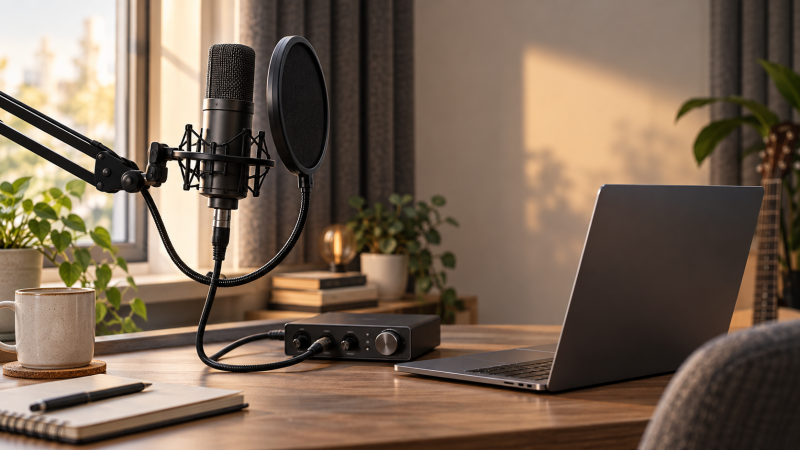
A condenser mic can catch the breath and detail in a vocal take, but it can also catch the room around the singer. Before buying one, check the recording space and the signal path. An XLR condenser needs an audio interface or mixer with phantom power, a cable, a stable mount and a position that does not point the back of the microphone at the singer. The capsule alone is not a complete laptop recording setup.
These six models cover a straightforward studio mic, two accessory bundles, a mic with pad and bass-cut controls, a desktop option and a model sold on a claim of quieter circuitry. Their listings support the product details below, but only a recording through your interface can show which suits your voice.
Check the interface for 48V phantom power, place the singer a consistent distance from the mic, and record the room before chasing a noise-floor number.Condenser XLR Microphones Compared
| Image | Product | Details | Check Price |
|---|---|---|---|
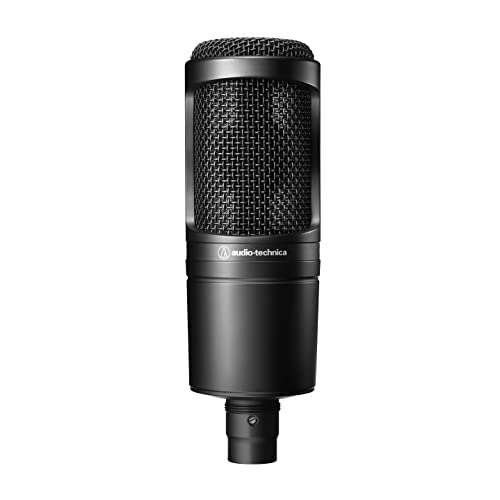 | Audio-Technica AT2020 | Best fit: Simple studio vocal chain Output: XLR Pattern: Cardioid condenser Use: Home/project studio Power: Interface phantom power | Check Price on Amazon |
 | MAONO PM320S | Best fit: Starter recording bundle Output: XLR Pattern: Cardioid condenser Included: Boom arm, pop filter, cable Power: 48V phantom required | Check Price on Amazon |
 | AKG P120 | Best fit: Vocals and louder sources Output: XLR Pattern: Cardioid condenser Controls: -20 dB pad, bass cut Included: Stand adapter | Check Price on Amazon |
 | FIFINE K669C | Best fit: Compact desk setup Output: XLR Pattern: Cardioid condenser Included: Desktop tripod XLR cable: Not included | Check Price on Amazon |
 | SUUNTOK BM018 | Best fit: Accessories in one box Output: XLR Pattern: Cardioid condenser Included: Shock mount, pop filter, cable Power: 48V phantom required | Check Price on Amazon |
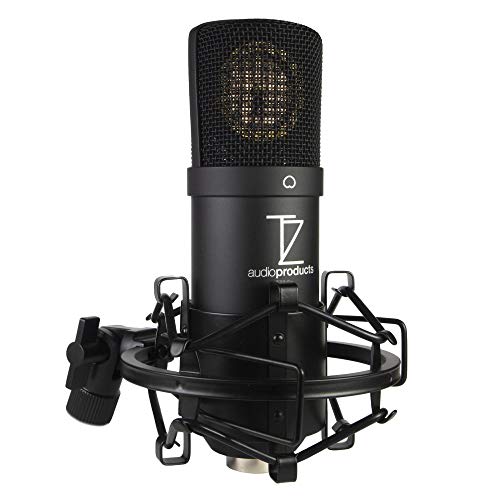 | TZ Stellar X2 | Best fit: Quiet-room detail Output: XLR Pattern: Cardioid condenser Circuit: Low-noise design claimed Power: 48V phantom required | Check Price on Amazon |
1. Audio-Technica AT2020 — Best Simple Studio Chain
The AT2020 is a side-address cardioid condenser listed for home and project studios. Less pickup from the sides and rear can help when a computer sits away from the front of the capsule, but a cardioid pattern cannot remove room reflections. Put the singer in front of the pickup side and test the stand position.
It is a plain XLR microphone, not a USB model or an all-in-one vocal kit. You still need an interface with phantom power, a cable, a stand and, for close sung consonants, suitable pop protection. The listing emphasizes high sound-pressure handling and a low-mass diaphragm, but neither claim tells you how a particular voice will sit in a mix. Start with the recording level and room placement, then decide whether equalization is needed.
Choose the AT2020 when you already own the recording accessories and want the microphone rather than another bundle.Our Take Buy the AT2020 if you already own an interface and want a plain XLR vocal condenser. Its main cost is everything around it: interface, cable, mount, pop filter and a room quiet enough to benefit from a condenser.
- Cardioid pattern suited to a fixed singer position.
- Simple XLR path into an existing interface.
- Not a complete kit for a bare laptop.
- Room reflections remain audible if placement is poor.
2. MAONO PM320S — Best Starter Bundle
The PM320S listing pairs a 16 mm cardioid condenser with a boom arm, shock mount, pop filter, windscreen and XLR-to-XLR cable. A boom arm is useful when the desk has no microphone mount yet, because you can position the capsule near the singer without leaving it on a vibrating desktop tripod. The seller states that the mic needs 48V phantom power, so the included cable does not turn a laptop USB port into a working microphone input.
The pop filter and windscreen are practical for a vocal recorded close to the capsule. The shock mount can reduce vibration that reaches the stand, but it does not stop airborne sound from a fan or reflective wall. Check the boom-arm clamp against the actual desk edge and keep the arm clear of a monitor. The listing’s “studio-grade” sound language is a seller description, not a comparative listening result.
Our Take Buy the PM320S if you need a mount, pop filter and cable at the same time. If you already own those parts, compare the microphone itself rather than counting duplicate accessories as value.
- Boom arm, pop filter, shock mount and cable listed in the box.
- Explicit 48V power requirement makes the setup clear.
- Arm can move the capsule away from desk vibrations.
- Interface and phantom power still required.
- Clamp and arm need usable desk space.
3. AKG P120 — Best for Vocals and Louder Sources
The P120 is a cardioid XLR condenser whose listing specifies a -20 dB attenuation pad and a bass-cut filter. Those controls make it a useful candidate when the same room handles both a voice and louder sources such as an instrument amplifier. The listed stand adapter is helpful, but you still need a compatible stand, cable and phantom-powered microphone input. The listing states a 150 dB maximum sound-pressure figure, the number to check against a loud amplifier.
For a vocal, start with the pad disengaged and set input gain while singing the loudest expected passage. Engage attenuation only when the microphone or input path is overloaded. A bass cut can reduce low-frequency rumble or proximity buildup, but it can also thin a voice if used without listening. Record a short comparison at a fixed distance rather than assuming more switches automatically mean a better take.
Our Take Buy the P120 if one microphone has to cover controlled-room vocals and occasional louder sources. Its controls are useful only when the recording calls for them. Leave settings simple for the first test.
- Listed attenuation pad for louder inputs.
- Bass-cut control for low-frequency cleanup.
- Stand adapter listed in the box.
- Requires an interface and separate stand.
- Extra controls invite wrong settings if not checked.
4. FIFINE K669C — Best Compact Desk Setup
FIFINE’s K669C listing describes a cardioid XLR condenser with a 16 mm capsule, a desktop metal tripod and a threaded adapter for another mount. The tripod makes a compact start for a small recording desk, provided the singer can get the mic at a comfortable height. The seller requires 48V phantom power and says the XLR cable is not included. A tripod and microphone are therefore not enough to record into a laptop by themselves.
A stand on the same desk as a keyboard may transmit bumps through the surface. The listing’s claim that non-slip feet block desk vibration should not be treated as a measurement. If the singer must lean forward to reach the capsule, use a compatible arm instead. The K669C’s listed sound-pressure and frequency figures cannot settle whether it suits a particular voice or room.
Budget for the missing cable and place the tripod away from typing, or mount the mic on a compatible arm.Our Take Buy the K669C if you own an interface and want a compact desktop stand. It is less complete than it first looks because the XLR cable must be supplied separately.
- Desktop tripod and mount adapter listed.
- Clear XLR-only connection path.
- XLR cable is not included.
- Desk stand can pick up physical bumps.
- Still needs 48V phantom power.
5. SUUNTOK BM018 — Best Accessories in One Box
The SUUNTOK BM018 listing describes an XLR cardioid condenser kit with a shock mount, pop filter and XLR cable. It requires 48V phantom power. If you already have an interface but not the pieces that hold the mic and tame plosives, the bundle means fewer separate items to find. Check the box contents before ordering.
The shock mount can help with stand vibration, but it cannot keep an echoing room out of a vocal take. Moving away from the capsule changes the balance even with a cardioid pattern and pop filter.
Our Take Buy the BM018 if you want the basic XLR accessories in one purchase. Its selling point is package completeness, not a proven sound-quality lead over the other microphones.
- Shock mount, pop filter and cable listed.
- 48V power requirement stated.
- Interface still needed.
- Included accessories do not replace room treatment.
6. TZ Stellar X2 — Best Quiet-Room Detail Candidate
The Stellar X2 is a large-diaphragm cardioid XLR condenser. Its seller describes a transformerless JFET circuit and claims a noise floor below 13 dBA. A low noise floor may interest a singer recording quiet passages in a controlled space, but the number is a listing claim, not an independently verified comparison with these other mics. The listing also specifies an interface with 48V phantom power and an XLR-to-XLR cable for computer recording.
Do not equate a lower electronic self-noise claim with a quieter room. A humming computer, road noise or wall reflection can dominate a take even if the mic circuitry is quiet. Set gain for the softest and loudest phrases, then listen to a raw recording. The seller calls its response balanced and not harsh. Test that claim with your voice.
Our Take Buy the Stellar X2 if your room is already quiet and you want a mic sold on a low-noise circuit. It is not a shortcut around a noisy desk or a vocal corner with bare walls.
- Low-noise circuit claim is stated clearly.
- Cardioid XLR format fits a fixed vocal position.
- Claim is not an independent listening result.
- Needs phantom-powered interface and cable.
Buying Guide
Start with room and vocal position
A condenser microphone records the room as well as the voice. In a reflective corner, a more detailed capsule may make the reflections easier to hear, not improve the vocal. Put a stand where the singer can stay roughly the same distance from the pickup side. Move the mic away from a laptop fan or hard wall if possible, then record a few phrases before buying further accessories. Curtains, furnishings and a quieter location can change the recording more than switching among similar cardioid condensers.
Keep the singer’s mouth off the direct line of breath into the capsule. A pop filter gives a repeatable distance cue and helps reduce plosives, but it does not remove all breath noise. Test loud and soft phrases separately. If the singer sways or steps back, the balance of voice to room sound changes. The cause is performance and placement, not necessarily a defect in the microphone.
Match phantom power, gain and mounting
The six picks are XLR microphones for an interface or mixer, not USB microphones that plug straight into a laptop. Confirm the input can supply the phantom power specified for the exact model. Add an XLR cable where the bundle does not include one, and ensure the stand reaches the singer without making the posture awkward. The PM320S and BM018 bundles include accessories, while the K669C requires a separate XLR cable according to its listing.
Set gain while performing the loudest expected passage and watch for clipping on the interface or in the recording app. The AKG P120’s attenuation pad is useful when a strong source overloads the path, but it is not the first fix for low volume. For a complete laptop rig, compare a USB-C audio interface for podcasting and a desktop microphone boom arm by inputs, phantom power and mount compatibility before buying them separately.
Compare kits against the parts you own
A bundle saves shopping only if it supplies the parts missing from your setup. The PM320S lists a boom arm and pop protection. The BM018 lists a shock mount, filter and cable. A kit can make sense for a first studio desk, while an existing stand and cable may make a bare microphone the better fit. Check that the clamp grips your desk and the stand carries the mic at the height the singer needs.
Specifications can narrow the choice but do not select a voice by themselves. Frequency range, maximum SPL and claimed self-noise do not reveal the singer’s room or technique. Confirm power, included parts and controls. Then record at a fixed position. For spoken content in an untreated room, compare a dynamic XLR mic for untreated studios.
Frequently Asked Questions
Can I plug one of these XLR microphones straight into a laptop?
No, an XLR cable does not fit a USB port or provide phantom power. Use an audio interface or mixer with an XLR mic input and the power required by the particular condenser. The PM320S, K669C, BM018 and Stellar X2 listings explicitly call for 48V phantom power. Verify the interface setting before recording.
Connect the microphone to the interface, then connect the interface to the laptop as its maker instructs. Select that interface as the recording input, make a short level test and monitor the raw take. An XLR-to-USB cable is not automatically a substitute for a proper phantom-powered mic preamp.
Will a cardioid condenser reject a noisy room?
A cardioid pattern reduces pickup from some directions when the microphone is aimed correctly. It does not remove noise arriving from the front or reflections that bounce back into the pickup side. If the singer is far away, raising the gain will also raise the room sound. Move the capsule closer at a comfortable angle and keep the noisiest equipment away from its front.
Record a test while the computer fan and ventilation run normally. Compare the take with the mic moved or turned, rather than trusting a seller’s “noise rejection” phrase. If the space cannot be quieted, changing microphone type or location may help more than buying another condenser with similar advertised pattern.
Do I need a pad or a bass-cut switch for singing?
You do not always need either. A pad is for a signal that overloads a microphone or input path. The AKG P120 lists a -20 dB pad, which is useful to have when recording louder sources, but ordinary vocals may not need it. Turn it on only after setting an appropriate distance and checking the input level.
A bass-cut filter reduces low-frequency content, which may include rumble but also some useful vocal weight. Make two otherwise identical recordings and listen before leaving it engaged. Avoid changing both pad and filter at once, because then you cannot tell which adjustment helped or hurt the take.
Bottom Line
For an existing stand and interface, start with the AT2020 as a plain studio chain or the P120 if you want a pad and bass-cut control. The PM320S and BM018 include useful accessories for a desk without them. The K669C has a compact tripod but needs a cable, while the Stellar X2 is a candidate for comparing a seller’s claim of a low-noise circuit in a quiet room. The right mic is the one you can power, position and verify with a raw vocal take.