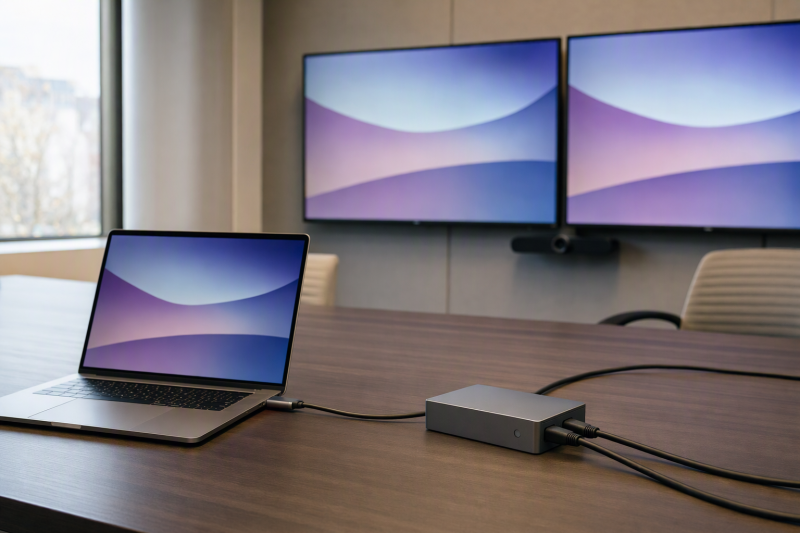
An HDMI splitter does one job. It takes one HDMI picture and duplicates it to two or more displays. It suits a room where the same slide deck must appear on a lectern monitor, a room screen and perhaps a confidence display that faces the presenter. It is not a way to give a laptop two independent extended desktops. For that job, look at a dual-HDMI USB-C adapter or a compatible dock instead.
These six splitters cover rooms with two or four displays at a stated 4K30 or 4K60 ceiling. They differ in output count, EDID handling (what display information the splitter reports to the laptop), power arrangements and support for protected content. Treat seller and maker specifications as limits to verify with the exact laptop and displays before a live event.
Start with the number of mirrored screens and the slowest display. A 4K60 laptop does not make a 4K30 splitter or 1080p projector operate at 4K60.HDMI Splitters Compared
| Image | Product | Details | Check Price |
|---|---|---|---|
 | OREI UHDS-102 | Outputs: 2 mirrored Video: 4K60 stated Power: Supply included Best fit: Two 4K60 screens | Check Price on Amazon |
 | OREI 4K60 1x4 | Outputs: 4 mirrored Video: 4K60 stated Power: External Best fit: Four 4K60 screens | Check Price on Amazon |
 | OREI HDS-102 | Outputs: 2 mirrored Video: 4K30 stated Power: Supply included Best fit: EDID-managed pair | Check Price on Amazon |
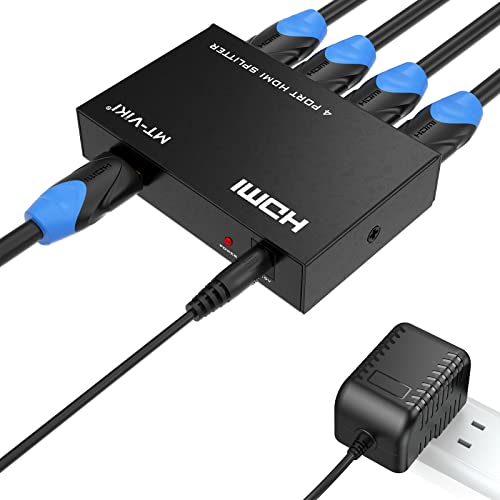 | MT-VIKI MT-SP104M | Outputs: 4 mirrored Video: 4K30 stated Power: Supply included Best fit: Four-screen 4K30 | Check Price on Amazon |
 | avedio links 1x2 | Outputs: 2 mirrored Video: 4K30 stated Power: USB cable only Best fit: Cable-in-box desk | Check Price on Amazon |
 | Amazon Basics 1x2 | Outputs: 2 mirrored Video: 4K30 stated Power: USB cable only Best fit: Simple mirror | Check Price on Amazon |
1. OREI UHDS-102 — Best 4K60 Two-Screen Choice
This exact OREI listing identifies the UHDS-102 as an HDMI mirror with one input, two outputs and a stated 4K at 60 Hz, 18 Gbps path. OREI’s UHDS-102 product page describes HDMI 2.0b, EDID management and a compact metal enclosure. The higher ceiling is a better starting point than a 4K30 box if the laptop and both room screens can accept the same 4K60 mode. It still duplicates one image and does not add an independent workspace.
The listing includes a power supply and warns against HDMI cables longer than 30 feet. OREI says its EDID presets can help a source agree with attached displays, but EDID does not promise that different screens will each keep the resolution they prefer. Check the resolution on both screens with the exact presentation laptop, particularly when one output feeds a projector. Protected streaming content and the way the source and displays agree on a signal were not verified here.
Our Take Buy this splitter if the room has two modern 4K60 displays and you want one the maker documents, not a generic adapter marketed as a second desktop.
- Two 4K60 mirrored outputs stated.
- Maker documents EDID options.
- Power supply included in listing.
- Only two outputs.
- 30-foot cable guidance limits room layouts.
2. OREI 4K60 1×4 — Best for Four 4K60 Screens
This OREI splitter has one input and four outputs, and its listing states 4K60, 18 Gbps and EDID support. Four HDMI outputs are useful when a presenter needs a podium display and several audience screens showing the same deck. The listing explicitly says mirror, not extend. One HDMI feed from the laptop goes into the box and four separate HDMI cables carry it to the screens. The splitter adds no USB-C data path and no separate desktop space.
The seller recommends HDMI cables up to 30 feet for stable operation and describes a metal enclosure. Do not read the broad list of compatible audio formats as a claim that it extracts audio for external speakers. Treat it as a splitter for four video outputs. As with every splitter that shares one source, the source must settle on a mode all connected displays can use. If one older projector is 1080p, test whether your actual source and splitter handle that mix before the meeting, rather than assuming each output gets an independent downscaled signal.
Our Take Buy this OREI for a four-screen room that needs a higher refresh rate. You get four outputs and a 4K60 ceiling, not independent control of the displays.
- Four mirrored HDMI outputs.
- 4K60/18 Gbps stated.
- No independent screens.
- Cable length and mixed-display behavior need a rehearsal.
3. OREI HDS-102 — Best 4K30 EDID Control
OREI’s HDS-102 is a 4K30 mirror with two outputs and a documented EDID switch. The manufacturer description names COPY and AUTO. COPY presents the first output’s display information to the source. AUTO compares the two attached displays and favors a common lower mode. The two settings are useful in a room where a TV and a projector have different capabilities. Still, check the final signal, because EDID results vary with the whole chain from source to screen.
The checked listing includes a power adapter, and OREI calls for quality cables under 30 feet. Its HDMI 1.4/HDCP 1.4 generation is a limit to keep in mind if the same setup must later show protected 4K streaming video. Slides from a laptop are the job this article covers, but do not assume the splitter bypasses content protection, because the listing explicitly says it does not. If all screens support 4K60, the UHDS-102 above has the higher video ceiling.
Our Take Buy this OREI when documented EDID behavior is more useful to you than 4K60. Run the actual laptop and mixed display pair before presenting.
- Maker explains COPY and AUTO EDID.
- Power adapter included.
- 4K limited to 30 Hz.
- HDCP 1.4 only.
- Two outputs only.
4. MT-VIKI MT-SP104M — Best Four-Screen 4K30 Option
The MT-VIKI MT-SP104M takes one HDMI source to four identical screen outputs. Both its Amazon listing and maker page place its ceiling at 4K30 or 1080p60, which suits room displays that do not need 4K60. With its metal case and included power adapter, you avoid a common last-minute problem, a splitter that cannot maintain signal because nobody brought USB power.
The seller advertises long cable reach, including up to 50 feet in and 50 feet out under its stated conditions. Treat the figure as a claim to test, not a guaranteed cable budget in a particular meeting room. Cable quality, distribution hardware and the displays still affect the result. This model is a one-way distributor, not a selector for four laptop inputs and not a dock for extended displays.
Our Take Buy this MT-VIKI for a four-screen presentation room where 1080p60 or 4K30 is enough. The included AC supply is as important as the advertised output count.
- Four mirrored outputs.
- 5 V power adapter included.
- Maker documents 4K30 limit.
- No 4K60.
- Long-cable performance not verified here.
5. avedio links 1×2 — Best with an Included HDMI Cable
This compact avedio links splitter mirrors a single HDMI input to two displays at up to 4K30. The checked package includes a four-foot HDMI cable and a USB power cable, which helps when the laptop sits close to the presentation screen. Its listing says clearly that it cannot extend a laptop desktop, switch two sources into one screen or act as an audio extractor. HDMI boxes that look alike do very different jobs, so these exclusions tell you what this one is not.
You still need a 5 V/1 A power adapter. The USB cable is included, but the adapter is not. The seller gives guidance on cable length of at most 16 feet for 4K and 32.8 feet for 1080p under its stated conditions. It also lists HDCP 1.4 rather than 2.2, so support for modern protected media is not established. For a straightforward slide deck, rehearse at the intended resolution and leave the small box powered throughout the event.
Our Take Buy this avedio links model for a simple two-screen lectern where the short included HDMI cable helps. It comes without a power adapter, which is easy to overlook.
- Four-foot HDMI cable included.
- Compact two-output layout.
- 4K30 ceiling.
- Power adapter not included.
- HDCP 1.4 limit.
6. Amazon Basics 1×2 — Best Simple 4K30 Mirror
Amazon Basics specifies one HDMI input to two identical outputs at up to 4K30, explicitly excluding 4K60 and two different desktop images. That plain specification is enough for a laptop presentation sent to a desk display and a projector when both work at a common mode. The listing says the displayed resolution depends on the lower-resolution monitor, which is a useful reminder when a modern 4K laptop is paired with an older room projector.
The box includes a 3.3-foot USB-A-to-DC power cable, but no USB wall adapter. Have a reliable USB power source ready before plugging in the display cables. The checked product details promise no scaling for individual outputs and no EDID control switch, so choose this for uncomplicated matching screens. If the presenter needs to see notes on the laptop while the audience sees only slides, use the laptop’s own display mode and presentation software. This splitter only duplicates its HDMI output.
Our Take Buy this Amazon Basics model for a simple two-screen 4K30 room. It repeats one signal and does not change or extend a desktop.
- Mirror-only behavior stated plainly.
- Lower-resolution display rule documented.
- No 4K60.
- USB power adapter not included.
Buying Guide: Build the Room Around One Shared HDMI Signal
Decide whether you need a mirror or an extended desktop
A 1×2 splitter makes two copies of one HDMI output, and a 1×4 makes four. A presenter can show the same slides on multiple room displays, but cannot put speaker notes on one splitter output and different slides on another. If the laptop itself has a built-in screen, its own display settings may still keep notes there while the HDMI output is mirrored to the room displays. Test the presentation software and operating system settings ahead of time.
Independent external screens need a different path. A dual-HDMI USB-C adapter or USB-C docking station may support extended displays, depending on the laptop’s display capabilities. A splitter is simpler only when all external outputs must show the same thing. Do not treat a seller’s “dual monitor” wording as proof of extend mode.
Match output count, resolution and EDID
Count every physical audience and confidence display. Two screens need a 1×2 splitter. A lectern monitor plus three room displays needs a 1×4. More HDMI sockets do not make picture quality better. Of these picks, the OREI UHDS-102 and OREI 4K60 1×4 listing state 4K60, while the other four state 4K30. 1080p60 is often sufficient for slides and may be easier for an older projector.
Mixed displays share one source signal unless the splitter itself provides independent scaling. OREI’s HDS-102 describes COPY and AUTO EDID modes. The Amazon Basics listing says to set the source to the lower-resolution screen. Neither fact proves that every mixed pair will behave identically. Connect all displays, power the splitter and inspect the actual mode shown by the laptop. For an important event, test the complete chain after a cold start and after the laptop sleeps and wakes.
Budget power and cable length before the event
A powered splitter needs its stated supply. The avedio links and Amazon Basics packages include USB power cables but not adapters. The checked OREI UHDS-102, OREI HDS-102 and MT-VIKI listings include supplies. Confirm the current box contents when buying. Do not assume a separate distribution box gets power from the laptop’s HDMI port. Label the adapter so it is not left behind after setup.
Cable reach claims are conditional. OREI advises high-quality cables under 30 feet for its reviewed models. For 4K, avedio links gives tighter guidance, and MT-VIKI’s long-run claim depends on its specified setup. Put the box near the source or the center of the cable runs, use strain relief, and test the longest output independently. A live room with long cables or unusual AV routing may need a different distribution system, not simply a cheaper splitter.
Frequently Asked Questions
Can a splitter show notes on one screen and slides on another?
No. Every output on these units gets the same HDMI picture. The laptop may show notes on its own built-in screen while sending a slide show to its HDMI output, but the splitter sends that output to every connected audience screen. Showing notes on the laptop is a software and laptop display setting, not a special ability of the HDMI splitter.
If you need different external images on two external monitors, use the laptop’s supported outputs for extended displays and a compatible dock or adapter. Verify whether that particular laptop can drive the requested number and resolution of independent external screens. A generic 1×2 box cannot change the laptop’s graphics capabilities.
What happens if one room projector is only 1080p?
The source and splitter need a mode every attached display can accept. A 4K screen may display a 1080p signal alongside the older projector. OREI’s HDS-102 offers EDID modes for this situation, and Amazon Basics explicitly advises matching the lower-resolution monitor. Neither is a substitute for trying the exact displays in the room.
For a predictable presentation, set the laptop to 1080p60 before the audience arrives, confirm both outputs and run a short slide sequence. Do not assume a standard splitter delivers simultaneous native 4K to one output and independent 1080p downscaling to the other unless that exact model clearly supports it.
Will these splitters bypass copy protection or replace an audio extractor?
No. An HDMI distribution box does not bypass copy protection. OREI’s HDS-102 listing specifically disclaims bypassing HDCP, and older HDCP 1.4 paths can be a constraint for certain protected 4K content. Ordinary presentation slides are a different case, but HDCP applies if a meeting includes protected streaming video.
These six picks distribute HDMI video and its embedded audio to displays. They were not chosen for a separate analog or optical speaker output. If external powered speakers are the goal, choose a documented audio output path separately. Test the complete source, display and speaker route rather than inferring audio extraction from a splitter’s list of audio formats.
Bottom Line
Choose OREI UHDS-102 for a two-screen 4K60 room or OREI 4K60 1×4 when four outputs need that ceiling. For a four-screen 4K30 presentation, MT-VIKI MT-SP104M includes its adapter. If two matching 4K30 screens are all you need, Amazon Basics 1×2 is the plainest fit. Rehearse the whole cable and power path before an audience is waiting.