The Sabrent Thunderbolt 4 KVM Switch, model SB-TB4K, is built for a specific desk: two compatible Thunderbolt computers need to take turns using one display path and the same high speed peripherals. It can be a clean answer when both hosts qualify, one selected computer at a time is acceptable, and up to 60W of charging is enough. It is a poor fit when either computer has only ordinary USB-C, when you need native HDMI or DisplayPort, or when both laptops must charge from the switch at once.
The most important checkout question is not whether the device has enough ports, but whether both computers satisfy Sabrent’s current Thunderbolt host requirement and whether your display path can run through a downstream Thunderbolt port. The current US Amazon identity is ASIN B0GZX4QRLT. The older ASIN B0C74SWVD5 is not the current primary listing used for this review.
Quick verdict
Buy the SB-TB4K if both computers have a qualifying Thunderbolt connection, your monitor can connect through Thunderbolt or a suitable downstream adapter, and you want three downstream Thunderbolt branches plus four shared USB-A ports. Plan power separately for the inactive host, and check the package for the cable needed to connect the second computer.
Skip it if you need a native video connector, Ethernet, card readers, audio, hotkey switching, a switching app, or documented support for plain USB-C. A conventional dual-monitor KVM or KVM docking station can be the safer choice when your hosts and display connections are mixed.

The exact product and listing to verify
This review covers the Sabrent SB-TB4K Thunderbolt 4 KVM Switch. Sabrent’s current product material identifies SB-TB4K as the model. At the July 28 identity check, the current US Amazon result returned the requested ASIN B0GZX4QRLT and the Sabrent brand. However, the listing’s optional manufacturer, model, part-number, and availability-type fields were blank.
That incomplete structured identity does not prove the serial number, hardware revision, or firmware installed in the unit that will arrive. Before checkout, confirm that the listing, box, and label identify SB-TB4K, then compare the included items with Sabrent’s current package description. Do not substitute the historical B0C74SWVD5 listing just because an older review or saved link points to it.
This is also not a general purpose USB-C KVM switch. Sabrent uses some broader display language in its marketing, but its current warning says both computers must be Thunderbolt certified for full functionality and compatibility. That stricter statement is the practical checkout floor.
Sabrent SB-TB4K decision table
| Checkout question | What Sabrent currently documents | Buyer decision |
|---|---|---|
| What must both hosts have? | Thunderbolt-certified host connections for full functionality and compatibility | Treat ordinary USB-C and unqualified USB4 as unsupported unless Sabrent confirms your exact machines |
| What switches? | One selected host gets the shared downstream Thunderbolt and USB-A path | The inactive computer does not keep the shared devices |
| How does the display connect? | Through downstream Thunderbolt, directly or by a compatible adapter | There is no native HDMI or DisplayPort socket |
| How many displays? | Up to two 4K 60Hz displays on a DP 1.4 capable system, with higher single-display ceilings under qualified conditions | Host, GPU, OS, monitor, cable, adapter, DP, DSC, and MST support all apply |
| Which host charges? | The selected host can receive up to 60W | The inactive host needs its own power plan |
| What ordinary peripherals are shared? | Four USB-A ports, each described up to 10Gbps, with BC1.2 support | There is no documented Ethernet, card reader, or audio port |
| How do you switch? | Tethered switch button with PC1 and PC2 indicators | No hotkey or switching application is documented |
| Are two host cables listed? | The current package list names one 70 cm Thunderbolt 4 cable | Budget for a second verified cable unless the live package clearly includes it |
What the switch actually shares
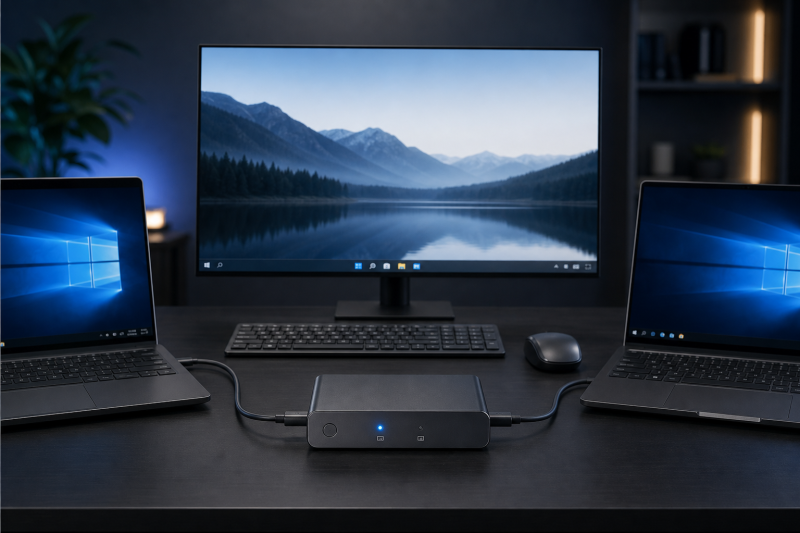
The physical job is simple. Two host inputs, labeled PC1 and PC2 in Sabrent’s documentation, feed one selected downstream side. That downstream side consists of three Thunderbolt 4 ports and four USB-A ports. Sabrent describes this as seven shared downstream ports. The separate 24V/5A DC input powers the system and is not part of that seven-port count.
Only one host is selected at a time. When you press the tethered switch button, the downstream path moves from one computer to the other. The connected monitor, storage, keyboard, mouse, and other shared devices therefore belong to the active host. They are not divided between both computers, and the three Thunderbolt branch rates must not be added together as if each device receives an independent measured 40Gbps.
Sabrent rates each downstream Thunderbolt 4 port up to 40Gbps and each USB-A port up to 10Gbps, and it lists USB-A charging up to 5V/2.4A per port. Those are manufacturer ceilings, not measured results for this article, and no single port is promised its maximum while the others are also loaded. Actual behavior depends on the selected computer, the shared upstream path, device mix, protocol overhead, cables, and workload.
The layout favors a desk with Thunderbolt peripherals. It does not replace a full Thunderbolt 4 docking station if you need built-in networking, storage cards, audio, or native video. Those functions require separate downstream devices, which adds cost, cables, and another compatibility layer.
Both host ports are the first gate
Sabrent’s current product warning is unusually important: both connected computers should be Thunderbolt certified for full functionality and compatibility. The manual documents Windows and macOS operation, but that does not turn every Windows or Mac USB-C port into a supported host connection.
Do not buy on connector shape alone. USB-C describes the connector, not the complete feature set. A port may omit Thunderbolt, display output, charging acceptance, or other capabilities needed by the switch. The differences among Thunderbolt 3, Thunderbolt 4, and Thunderbolt 5 are also relevant because a newer label on one computer does not repair a nonqualifying port on the other.
USB4 is not an automatic pass either. Although USB4 and Thunderbolt can overlap technically, Sabrent’s stricter current compatibility warning controls this purchase. Our USB4 overview explains why a protocol label alone does not settle every optional display, tunneling, and charging behavior. Get written confirmation from Sabrent for the exact two machines if either host is advertised only as USB4 or USB-C.
The safe pre-checkout process is:
- Identify the exact port used on each computer.
- Confirm that both are Thunderbolt-certified host ports.
- Confirm each computer can output the intended display signal through that port.
- Check whether each laptop accepts 60W or less without complaints or reduced operation.
- Plan separate power for the inactive host.
- Confirm the operating systems and any required security permissions.
This review does not promise Linux or ChromeOS support because the current first-party material retained for this product does not establish those paths. It also does not promise that a plain USB-C host will work partially. A checkout review should not turn loose connector language into a compatibility guarantee.
Display support needs a complete path
The SB-TB4K has no native HDMI or DisplayPort output. Your display must connect to a downstream Thunderbolt port, either directly through a compatible Thunderbolt or USB-C monitor path or through an appropriate video adapter. A monitor with only HDMI or DisplayPort therefore adds an adapter to the chain.
Sabrent states a single-display ceiling up to 8K at 60Hz with Display Stream Compression, or 8K at 30Hz without DSC. Its detailed material also lists 5K, 6K, and 8K at 60Hz with DSC, plus 4K at 120Hz or 144Hz with DSC. For two displays, Sabrent states up to dual 4K at 60Hz on a DisplayPort 1.4 capable system.
Every figure is conditional. The selected host must expose the necessary display streams. The GPU and operating system must support the topology. The monitor, resolution, refresh rate, adapter, and cable must fit the same path. DSC and MST support also control the result where Sabrent’s ceiling depends on them. Sabrent additionally states EDID and adaptive-sync support, but those vendor claims do not prove instant switching or the same behavior across every host, monitor, cable, and adapter in your path. The switch cannot manufacture a second display stream that the computer does not provide.
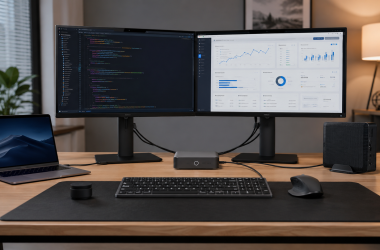
That is why a buyer seeking two ordinary monitors should start with the topology, not the headline resolution. A native-video dual-monitor KVM switch may be easier to validate when the displays already use HDMI or DisplayPort. A monitor from our guide to displays with built-in KVM switching may remove another box from the desk, although its host and peripheral behavior still needs checking.
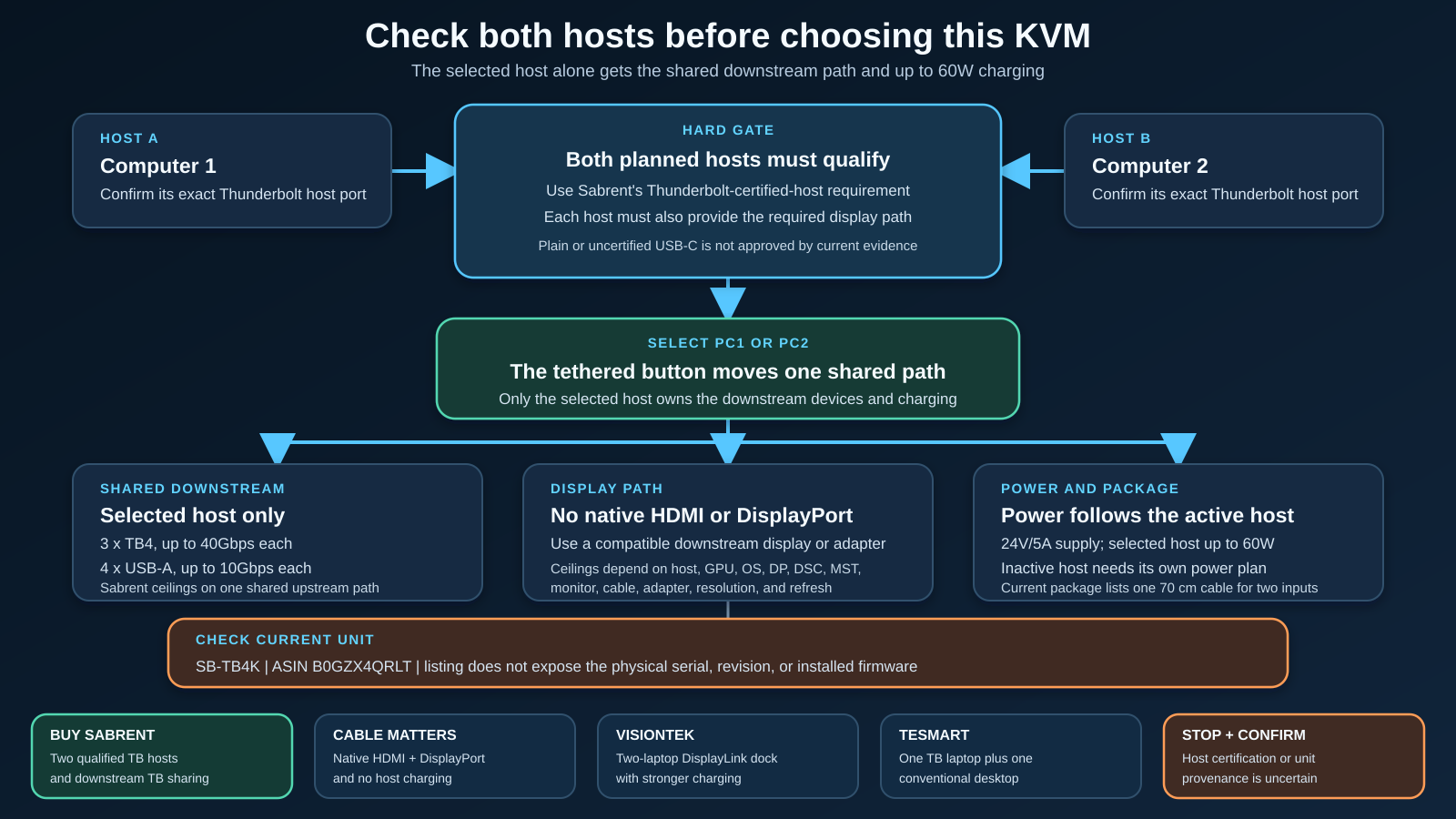
The diagram keeps the order straight: qualify both hosts first, validate the display path second, then check charging and package contents. Starting with a desired resolution and working backward can hide a missing Thunderbolt port or unsupported multi-display path.
Charging belongs only to the selected host
Sabrent rates host charging up to 60W. That power follows the selected host connection. The inactive computer does not continue receiving that shared charging path after you switch away from it.
For two laptops, this creates an easy-to-miss desk requirement. One can receive up to 60W while active. The other needs enough battery reserve or its own charger. If both must remain powered throughout the day, plan two power paths from the start.
The 60W figure is also a ceiling, not a guarantee that every laptop will charge normally. The computer must accept charging over the connected port, and its workload may exceed the available power. A higher-demand notebook can charge slowly, hold its level, drain under load, or display a low-power warning. This article does not measure charging behavior for any host.
The distinction between a KVM switch and a docking station is useful here. The Sabrent combines switching with a compact Thunderbolt peripheral hub, but it does not offer the complete port and power arrangement of many full docks. If charging and broad connectivity are more important than switching, a regular dock may be the better foundation.
One listed host cable for two inputs
Sabrent’s current package list names the switch, a tethered button, a 24V/5A power adapter, one 70 cm Thunderbolt 4 cable, a warranty card, and a user manual. The manual’s package list does not include the warranty card, so the live box contents should be checked rather than treated as immutable.
The practical issue is the single listed Thunderbolt cable. The switch has two host inputs. If the current box still contains one host cable, connecting both computers requires another cable that supports the necessary Thunderbolt, display, and charging functions. A charge-only USB-C cable is not an adequate substitute.
Choose the shortest certified cable that fits the desk without strain. The options in our Thunderbolt 4 cable guide provide a useful starting point, but verify the exact cable certification, length, and charging support before pairing it with this switch.
Sabrent lists the enclosure at 6.3 by 2.76 by 0.71 inches, with a weight of 17.7 ounces. These manufacturer dimensions help with desk planning, but they do not include every connected cable or power brick. Leave space for two host leads, downstream Thunderbolt cables, four USB-A plugs, DC power, and the tethered button.
Missing ports are part of the decision
Sabrent documents no native HDMI, DisplayPort, Ethernet, SD or microSD reader, analog audio port, hotkey, or switching application for the SB-TB4K. None should be inferred from the word KVM or from features found on unrelated models.
The absence of native video is especially important. A downstream video adapter consumes one of the three Thunderbolt branches and adds its own supported-resolution limits. Adding Ethernet, storage cards, or audio requires more peripherals. At some point, a full dock or a different KVM becomes clearer than assembling those functions around the Sabrent.
Buyers who do not need switching should compare conventional USB-C docking stations instead. Buyers who want a display-centered Thunderbolt desk can also consider the connectivity options in our Thunderbolt monitor guide. The right comparison depends on whether sharing two computers or expanding one computer is the primary job.
Firmware and current-unit uncertainty
Sabrent links a current Windows firmware ZIP and a firmware guide. The guide describes a Windows Thunderbolt or USB4 update path through FwUpdateTool, but it refers to the target as a “Sabrent Rocket docking station.” That naming does not match SB-TB4K cleanly. The public material retained for this review also does not provide an exact change log for the current package.
Older support discussion adds context but not certainty. In 2023, a Sabrent representative said revised units were shipping and referred to a newer serial suffix around x1275. That does not prove the revision of a current B0GZX4QRLT purchase, and the current Amazon structured fields do not supply a serial or hardware revision.
The safe approach is to record the label and serial when the unit arrives, ask Sabrent which firmware package applies to that exact unit, and follow only the current instructions supplied for it. Do not assume that a storefront listing, a marketing photo, or an older independent sample establishes the installed firmware.
An independent 2023 teardown is useful historical evidence that earlier hardware existed, but its cable bundle, measured behavior, temperatures, and unit-specific observations cannot be generalized to current units. This article therefore does not claim a switching time, thermal result, wake behavior, reliability result, or installed firmware version.
Warranty boundary
Sabrent’s current warranty policy places hubs, docking stations, and switches under a one-year standard limited warranty. Registration within 90 days can extend total coverage to two years. The policy is subject to its current terms, including original-purchaser, proof-of-purchase, and authorized-seller conditions.
Confirm that the seller qualifies and save the receipt. If you want the extension, complete registration within the stated window and retain the confirmation. This is a policy summary, not a promise that every claim or seller will qualify.
Who should buy the Sabrent SB-TB4K
The Sabrent is a strong conceptual fit when all of these statements are true:
- Both computers have confirmed Thunderbolt-certified host ports.
- Only one computer needs the shared devices at a time.
- The monitor path can run through downstream Thunderbolt or a validated adapter.
- Up to 60W is enough for the selected host.
- The inactive laptop has another power source when needed.
- Three Thunderbolt branches and four USB-A ports cover the shared devices.
- A physical tethered button is preferable to hotkeys or software.
- You are willing to confirm the current unit label, cable bundle, and firmware path.
It deserves extra caution if either computer is known only as USB-C or USB4, if the display plan depends on unverified MST or DSC support, or if the laptop expects more than 60W. Those three conditions determine whether the switch can perform its central job.
Who should skip it
Skip this model if you need both hosts to charge simultaneously, if you need native HDMI or DisplayPort, or if Ethernet, card readers, and audio must be integrated. It is also the wrong choice if one computer lacks a qualifying Thunderbolt connection or if your operating system path is not documented.
Choose another design if you require keyboard hotkeys, a remote, software switching, or EDID behavior documented for a specific workflow. Also choose another design if one of the two computers is a desktop that lacks a qualifying Thunderbolt-certified host connection. The following alternatives solve different problems and are not drop-in equivalents.
Alternative 1: Cable Matters for two USB-C laptops and native video
The Cable Matters Dual 4K USB-C KVM Switch, model 201085-BLK-N3, is the more direct choice when two compatible laptops need native HDMI and DisplayPort connections. It also shares four USB peripherals and supports a physical button plus RF remote.
Its tradeoff is power: Cable Matters says the KVM does not charge the connected laptops. Its dual-display ceiling is up to 4K 60Hz for compatible Windows or Linux MST hosts. On macOS, the documented path is one extended display plus one mirrored display. Cable Matters also says it is not for desktop computers or Chromebooks and does not support EDID emulation.
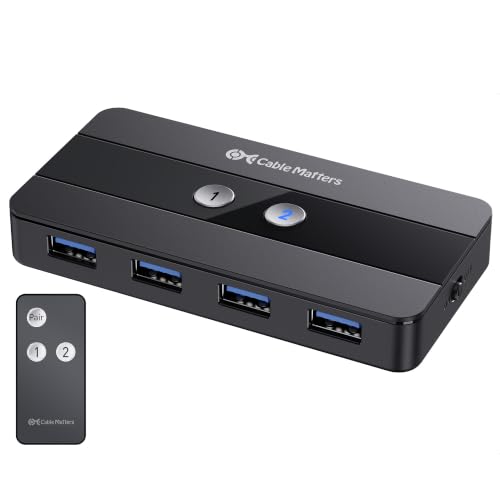
Choose it over Sabrent when native display sockets and two USB-C laptop inputs are more important than Thunderbolt peripheral branches or host charging.
Alternative 2: VisionTek for a docking-station workflow
The VisionTek VT4950 KVM Docking Station, part 901520, is aimed at two laptops that need a broader dock. It provides two DisplayPort outputs through a DisplayLink path, while its HDMI output depends on host DisplayPort Alt Mode. That software and permission requirement is materially different from the Sabrent’s downstream Thunderbolt display path.
VisionTek documents up to 100W charging for each compatible host, a 230W power supply, and integrated Gigabit Ethernet. This makes it more suitable when both connected laptops need a permanent power and network plan. DisplayLink installation and operating-system permissions are part of the checkout decision.
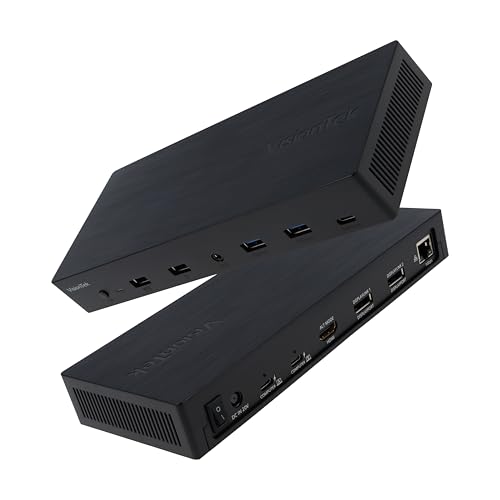
Choose it when a dual-laptop docking station is the actual job and a DisplayLink-based display path is acceptable.
Alternative 3: TESmart for one laptop and one desktop
The TESmart HDC202-X24-USBK uses a different host arrangement: one Thunderbolt laptop and one conventional desktop connected through HDMI, DisplayPort, and USB. Its two HDMI outputs are documented up to 3840 by 2160 at 60Hz, and the product adds EDID emulation, Gigabit Ethernet, USB sharing, audio, button switching, infrared remote control, and hotkeys.
TESmart documents up to 60W for the laptop host only. It warns that a non-20V device may receive only 7.5W and that some ThinkPad models do not accept the full 60W. Those limits need checking against the exact laptop.

Choose it when the desk pairs one laptop with a desktop and native HDMI outputs, Ethernet, audio, remote control, or hotkeys are important. It is not a replacement for switching two Thunderbolt laptops.
Frequently asked questions
Will the Sabrent SB-TB4K work with any USB-C laptop?
Do not assume so. Sabrent’s current warning requires both computers to be Thunderbolt certified for full functionality and compatibility. Plain USB-C and unqualified USB4 hosts need exact written confirmation.
Can it run two 4K monitors?
Sabrent states up to dual 4K at 60Hz for a DisplayPort 1.4 capable system. The host, GPU, operating system, available display streams, monitor, adapters, cables, MST support, and complete topology can lower that ceiling.
Does it have HDMI or DisplayPort?
No native HDMI or DisplayPort connector is documented. Displays use the downstream Thunderbolt path, directly or through a compatible adapter.
Does it charge both laptops?
No. Sabrent states up to 60W for the selected host. The inactive host needs its own power plan.
Are two Thunderbolt host cables included?
The current Sabrent package list names one 70 cm Thunderbolt 4 cable even though there are two host inputs. Confirm the live package and plan a second verified cable if necessary.
Can I switch with a keyboard shortcut?
Sabrent documents a tethered switch button and host indicators. It does not document hotkey switching or a switching application for this model.
Is the current Amazon unit definitely the latest revision?
The current ASIN and brand matched the identity check, but optional manufacturer, model, part-number, and availability-type fields were blank. The listing therefore does not prove a serial, revision, or installed firmware version. Verify the SB-TB4K label and ask Sabrent about the exact unit when revision is important.
Is the historical B0C74SWVD5 listing the same current primary?
It is not the current primary used for this review. The current US ASIN checked here is B0GZX4QRLT. Do not swap between them without confirming the exact product and revision.
Final checkout checklist
Before buying, verify every item below:
- The product is Sabrent SB-TB4K and the listing uses ASIN B0GZX4QRLT.
- Both computers have confirmed Thunderbolt-certified host ports.
- Windows or macOS requirements fit both systems.
- The chosen display topology is supported by each host, GPU, OS, monitor, adapter, and cable.
- Any dual-display plan has the required DP 1.4, stream, and MST support.
- Any high-resolution or high-refresh plan has the required DSC support.
- The selected host can use up to 60W, while the inactive host has separate power.
- The three downstream Thunderbolt and four USB-A ports cover the shared-device plan.
- Missing native video, Ethernet, card reader, audio, hotkey, and app functions are acceptable.
- The live package includes enough suitable host cables, or a second certified cable is ready.
- The box and device labels identify the expected model, and the firmware path is confirmed for that unit.
- The seller and purchase record fit Sabrent’s current warranty terms.
Final recommendation
The Sabrent SB-TB4K is worth considering when the desk is already Thunderbolt-first. Two qualified computers, one downstream Thunderbolt display path, several shared high speed peripherals, and active-host-only charging are the design assumptions. Under those conditions, the physical switch can replace repeated cable changes with one clear selected-host workflow.
It is not the universal KVM its USB-C-shaped ports might suggest. The strict two-host Thunderbolt requirement, indirect display connection, one-cable package listing, 60W active-host charging, and uncertain current-unit revision all need checking before checkout. If those boundaries create workarounds, choose the alternative whose native video, power, and host arrangement matches the desk instead.
Evidence boundary
This review uses current Sabrent product, manual, firmware, support, and warranty material, plus current first-party documentation for the alternatives and the structured identity returned for each selected Amazon listing. Manufacturer bandwidth, display, and power figures are stated as ceilings, not measurements made for this article. Exact compatibility remains dependent on the two hosts and the complete connected path.