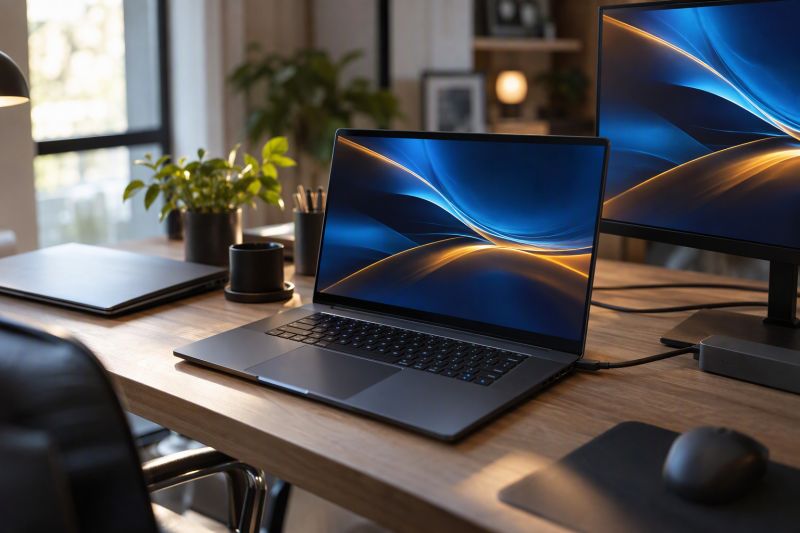
Five laptops share one graphics chip, the RTX 5070 Ti, and little else. Screens run from a 16-inch 144Hz panel to an 18-inch 300Hz panel, and the processors, memory, storage, and cooling designs differ from one laptop to the next.
Pick by the one detail that decides your purchase. Of the five, ASUS is the only 18-inch laptop and the only one with a 300Hz screen, and Acer is the only one that states screen brightness and color coverage. MSI is the only one that names Thunderbolt 5, and GIGABYTE is the only one that states a 19.45 mm chassis and a 180-degree hinge. None of the five Amazon listings gives a port list, so check the maker’s specification before you buy a dock or monitor.
RTX 5070 Ti Laptops Compared
| Image | Product | Details | Check Price |
|---|---|---|---|
 | MSI Vector 16 HX AI A2XWHG-212US | Best fit: Thunderbolt 5 Screen: 16-inch FHD+, 144Hz Processor and graphics: Core Ultra 7-255HX, RTX 5070 Ti Memory and storage: 16GB DDR5, 512GB NVMe SSD, possibly seller configuration Listed connections: Thunderbolt 5, Wi-Fi 6E; no port count stated | Check Price on Amazon |
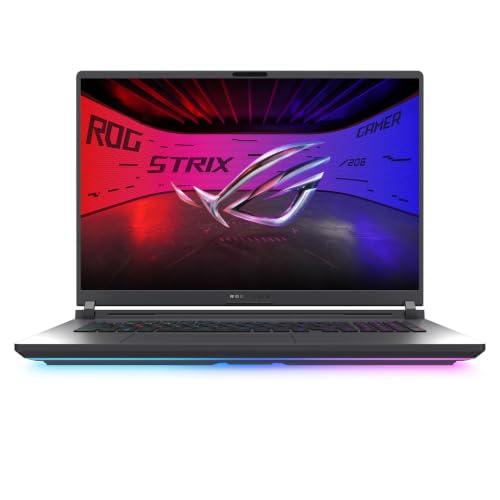 | ASUS ROG Strix G18 G815LR-DB96 | Best fit: 18-inch 300Hz screen Screen: 18-inch 2.5K 16:10, 300Hz, 3ms Processor and graphics: Core Ultra 9 290HX Plus, RTX 5070 Ti Memory and storage: 32GB DDR5-5600, 1TB PCIe Gen 4 SSD Listed connections: Wi-Fi 7; no ports named | Check Price on Amazon |
 | GIGABYTE Gaming A16 PRO DXHG4USCC4SH | Best fit: Slim chassis, 180-degree hinge Screen: 16-inch 2560 x 1600 WQXGA IPS, 165Hz Processor and graphics: Core 7 240H (title says Core Ultra 7 240H), RTX 5070 Ti Memory and storage: 32GB LPDDR5x, 1TB SSD, possibly seller configuration Listed connections: No ports or Wi-Fi standard named | Check Price on Amazon |
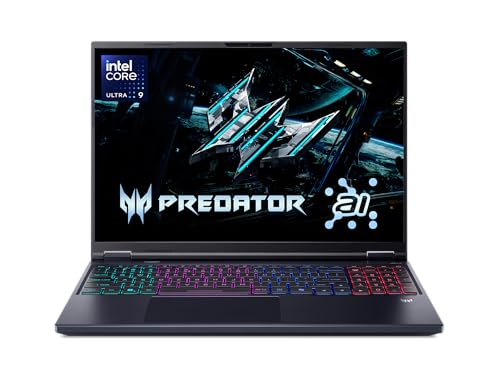 | Acer Predator Helios Neo 16 AI PHN16-73-92B8 | Best fit: 500-nit 240Hz panel Screen: 16-inch WQXGA, 240Hz, 500 nits, 3ms Processor and graphics: Core Ultra 9 275HX, RTX 5070 Ti Memory and storage: 16GB DDR5, 1TB Gen 4 SSD Listed connections: Killer Wi-Fi 6E; no ports named | Check Price on Amazon |
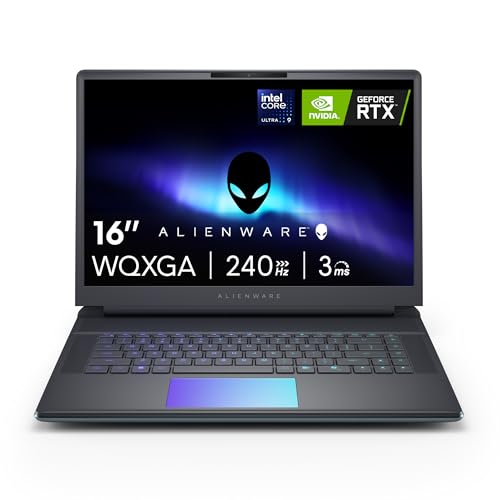 | Alienware 16 Area-51 LAA16250-9475BLU-PUS | Best fit: Cryo-Chamber airflow design Screen: 16-inch 2560 x 1600, 240Hz Processor and graphics: Core Ultra 9 275HX, RTX 5070 Ti Memory and storage: 32GB DDR5, 1TB SSD, possibly seller configuration Listed connections: No ports or Wi-Fi standard named | Check Price on Amazon |
1. MSI Vector 16 HX AI A2XWHG-212US — Best for Thunderbolt 5
The Amazon listing for the MSI Vector 16 HX AI A2XWHG-212US names an RTX 5070 Ti, an Intel Core Ultra 7-255HX, a 16-inch 144Hz FHD+ screen, Thunderbolt 5, Wi-Fi 6E, and an RGB gaming keyboard. It describes Cooler Boost shared-pipe cooling for long gaming and render sessions and says the laptop supports fast external drives, multi-monitor setups, and high-speed networks.
The bullets name DDR5 memory and NVMe storage without a size. The 16GB and 512GB figures appear only in the title and are possibly a seller configuration. The listing gives no Thunderbolt port count, HDMI details, or screen brightness, so check MSI’s specification for A2XWHG-212US before planning a multi-monitor setup.
Our Take Choose the Vector 16 HX AI when Thunderbolt 5 is a requirement. Confirm the memory size, the storage size, and the number of Thunderbolt ports before ordering.
- MSI’s listing is the only one of the five to name Thunderbolt 5, and it says the laptop supports fast external drives, multi-monitor setups, and high-speed networks.
- MSI pairs the RTX 5070 Ti with a Core Ultra 7-255HX in a 16-inch laptop with a 144Hz FHD+ screen.
- For long gaming and render sessions, MSI describes Cooler Boost shared-pipe cooling.
- MSI’s bullets name DDR5 memory and NVMe storage without a size, and the 16GB and 512GB in the title are possibly a seller configuration.
- MSI’s listing gives no Thunderbolt port count, HDMI details, or screen brightness, so a multi-monitor plan needs MSI’s specification first.
2. ASUS ROG Strix G18 G815LR-DB96 — Best 18-Inch 300Hz Screen
The Amazon listing for the ASUS ROG Strix G18 G815LR-DB96 is the only one of the five with an 18-inch screen and the only one with a 300Hz refresh rate. The title adds a 16:10 2.5K ROG Nebula panel with a 3ms response figure, and a bullet says a new ACR film improves contrast and reduces glare.
The listing names a Core Ultra 9 290HX Plus, an RTX 5070 Ti laptop GPU, 32GB of DDR5-5600 memory, a 1TB PCIe Gen 4 SSD with raw throughput up to 7,000MB/s, and Wi-Fi 7.
Cooling is described as an end-to-end vapor chamber, a sandwiched heatsink, and Tri-Fan technology, and a latch on the bottom gives access to the RAM, SSD, and fans. A MUX switch with Advanced Optimus and a full-surround RGB light bar with a Stealth Mode are also named. The listing names no ports, so check ASUS’s specification for G815LR-DB96 before buying a dock or monitor.
The ASUS listing states its 32GB of memory and 1TB SSD in a bullet as well as in the title.Our Take Choose the Strix G18 when you want the largest and fastest screen of the five and are comfortable with an 18-inch laptop. Look up the port list before you buy accessories.
- ASUS’s listing is the only one of the five with an 18-inch screen and a 300Hz refresh rate, so it fits a buyer who wants the largest and fastest screen of the five.
- ASUS’s bullets state 32GB of DDR5-5600 memory and a 1TB PCIe Gen 4 SSD, so the sizes do not rest on the title alone.
- ASUS describes its cooling as an end-to-end vapor chamber, a sandwiched heatsink, and Tri-Fan technology.
- ASUS describes a latch on the bottom that gives access to the RAM, SSD, and fans.
- ASUS’s listing names no ports, Thunderbolt or USB4 support, HDMI version, or Ethernet, so a dock or monitor purchase needs ASUS’s specification first.
3. GIGABYTE Gaming A16 PRO DXHG4USCC4SH — Best Slim Chassis With 180-Degree Hinge
The Amazon listing for the GIGABYTE Gaming A16 PRO DXHG4USCC4SH leads with its build: a laid-flat 180-degree hinge and a 19.45 mm (0.77-inch) chassis. The title gives a 16-inch 2560 x 1600 WQXGA IPS screen at 165Hz. The bullets name an RTX 5070 Ti Laptop GPU with DLSS 4 and NVIDIA Studio, and the GiMATE AI assistant.
The processor is named two ways. A bullet says Intel Core 7 240H, while the title says Core Ultra 7 240H, so confirm the processor with GIGABYTE’s specification for DXHG4USCC4SH. The title lists 32GB LPDDR5x and a 1TB SSD. The bullets give no memory or storage size, so both figures are possibly a seller configuration. The listing names no ports, Thunderbolt or USB4 support, or Wi-Fi standard, so check the port list before you buy accessories.
The GIGABYTE listing states a 19.45 mm chassis and a laid-flat 180-degree hinge.Our Take Choose the Gaming A16 PRO for a slim 16-inch body with a 180-degree hinge. Settle the processor name and the memory and storage sizes before ordering.
- GIGABYTE’s listing states a 19.45 mm chassis and a laid-flat 180-degree hinge for a slim body.
- GIGABYTE’s bullets pair the RTX 5070 Ti Laptop GPU with DLSS 4 and NVIDIA Studio.
- GIGABYTE’s title gives the screen as a 16-inch 2560 x 1600 WQXGA IPS panel at 165Hz.
- GIGABYTE’s title says Core Ultra 7 240H while a bullet says Core 7 240H, and the listing does not settle which is right, so the processor needs confirming with GIGABYTE.
- GIGABYTE’s 32GB LPDDR5x and 1TB SSD appear only in the title and are possibly a seller configuration.
- GIGABYTE’s listing names no ports, Thunderbolt or USB4 support, or Wi-Fi standard, so the port list needs checking before accessories.
4. Acer Predator Helios Neo 16 AI PHN16-73-92B8 — Best 500-Nit 240Hz Panel
The Amazon listing for the Acer Predator Helios Neo 16 AI PHN16-73-92B8 gives the fullest screen description of the five. It states a 16-inch 16:10 WQXGA panel with 500 nits of brightness, up to 100% DCI-P3 color, a 240Hz refresh rate, and 3ms overdrive response time, plus NVIDIA G-SYNC and Advanced Optimus.
Behind the screen, the listing names a Core Ultra 9 275HX with up to 13 NPU TOPS and an RTX 5070 Ti Laptop GPU described at 992 AI TOPS with DLSS 4 Multi Frame Generation. It also names 16GB of DDR5, a 1TB Gen 4 SSD, and Killer Wi-Fi 6E. A bullet states the 16GB and 1TB, matching the title. The listing names no ports, HDMI version, Ethernet, or Thunderbolt or USB4 support, so check Acer’s specification for PHN16-73-92B8 before buying a dock or monitor.
The Acer listing is the only one of the five that states screen brightness and color coverage.Our Take Choose the Helios Neo 16 AI for a 16-inch screen with brightness, color coverage, and response time all stated. Check Acer’s page for the port list first.
- Acer’s listing states 500 nits, up to 100% DCI-P3, 240Hz, and 3ms overdrive for the 16-inch WQXGA panel, the fullest screen description of the five.
- Acer’s listing adds NVIDIA G-SYNC and Advanced Optimus to its screen description.
- Acer’s bullets state 16GB of DDR5 and a 1TB Gen 4 SSD, and both match the title.
- Acer’s listing names no ports, HDMI version, Ethernet, or Thunderbolt or USB4 support, so the port list needs checking on Acer’s page first.
- Acer’s panel runs at 240Hz, which is below the 300Hz of the ASUS G18.
5. Alienware 16 Area-51 LAA16250-9475BLU-PUS — Best Cryo-Chamber Airflow Design
The Amazon listing for the Alienware 16 Area-51 LAA16250-9475BLU-PUS puts the design first. A bullet describes the Cryo-Chamber, which props up the laptop, adds a much larger air intake for more airflow, and has a clear Gorilla Glass panel that shows the AlienFX fans. Another bullet says Area-51 was designed for higher graphics and processor power limits.
The bullets name an RTX 5070Ti with NVIDIA Max-Q and Intel Core Ultra HX processors with a built-in GPU and NPU. The title supplies the rest: a Core Ultra 9 275HX, a 2560 x 1600 display at 240Hz, 32GB DDR5, and a 1TB SSD. The bullets give no memory or storage size, so those two figures are possibly a seller configuration. A Dell bullet describes one year of onsite service. The listing names no ports, brightness, or color coverage, and gives no response time.
Our Take Choose the Area-51 for the Cryo-Chamber design and a 240Hz 2560 x 1600 screen. Confirm the memory, storage, and ports with the seller or Dell before ordering.
- Alienware’s listing describes a Cryo-Chamber with a much larger air intake for more airflow and a clear Gorilla Glass view of the AlienFX fans.
- Alienware’s listing says Area-51 was designed for higher graphics and processor power limits.
- Dell’s bullet describes one year of onsite service for this laptop.
- Alienware’s bullets give no memory or storage size, so the 32GB DDR5 and 1TB SSD in the title are possibly a seller configuration.
- Alienware’s listing names no ports, brightness, or color coverage, and gives no response time, so the ports need confirming with the seller or Dell.
Buying Guide
1. Confirm the RTX 5070 Ti and the full model code
All five listings name an RTX 5070 Ti, and each is a different configuration. The model codes are A2XWHG-212US, G815LR-DB96, DXHG4USCC4SH, PHN16-73-92B8, and LAA16250-9475BLU-PUS. Match the full code when you compare offers or read a specification page, because a similarly named model can carry a different screen or processor.
The processors differ too. The listings name a Core Ultra 7-255HX for the MSI, a Core Ultra 9 290HX Plus for the ASUS, and a Core Ultra 9 275HX for the Acer and the Alienware. The GIGABYTE listing names a Core 7 240H in a bullet and a Core Ultra 7 240H in the title.
2. Choose the screen by size, refresh rate, and stated detail
ASUS is the only 18-inch laptop, with a 2.5K 300Hz panel. Acer states a 16-inch WQXGA screen at 240Hz with 500 nits and up to 100% DCI-P3. Alienware lists 2560 x 1600 at 240Hz, GIGABYTE lists 16-inch WQXGA IPS at 165Hz, and MSI lists 16-inch FHD+ at 144Hz.
Refresh rate is one part of the screen. The ASUS 300Hz panel is also the largest. Acer is the only listing that gives brightness and color coverage, and Alienware gives resolution and refresh rate without either. Decide on size and resolution first, then compare refresh rate and any brightness or color figures the listing gives.
3. Do not assume ports from the GPU or product line
MSI is the only listing that names Thunderbolt 5. The listing gives no port count, so a buyer planning for several Thunderbolt devices needs MSI’s specification for the count. It names Thunderbolt 5 for this model, not for every MSI Vector or RTX 5070 Ti laptop.
The other four listings give no port list. ASUS, GIGABYTE, Acer, and Alienware do not name Thunderbolt, USB4, HDMI, Ethernet, or USB-C speed in the Amazon listing. Check the maker’s specification for the model code before buying a dock, monitor, or cable. The Thunderbolt 5 gaming laptop guide is useful once the host port is verified.
4. Treat title-only memory and storage as possibly a seller configuration
ASUS and Acer state their memory and storage in a bullet as well as the title. ASUS lists 32GB of DDR5-5600 and a 1TB PCIe Gen 4 SSD. Acer lists 16GB of DDR5 and a 1TB Gen 4 SSD.
MSI, GIGABYTE, and Alienware show their sizes only in the title. The MSI title gives 16GB and 512GB, the GIGABYTE title gives 32GB and 1TB, and the Alienware title gives 32GB and 1TB. Each is possibly a seller configuration, so confirm the installed memory and storage with the seller before ordering. The gaming laptop guide compares more gaming laptops.
5. Use a design claim only for the laptop that states it
GIGABYTE is the only listing with a 19.45 mm chassis and a 180-degree hinge. ASUS is the only one that describes a latch for access to the RAM, SSD, and fans. Acer is the only one that gives screen brightness, color coverage, and G-SYNC.
Alienware’s Cryo-Chamber and MSI’s Cooler Boost shared-pipe cooling are separate designs. ASUS names a vapor chamber, a sandwiched heatsink, and Tri-Fan cooling. None of the listings gives a temperature or noise figure, so a cooling description is not a ranking.
FAQ
Which RTX 5070 Ti laptop has the largest screen?
The ASUS ROG Strix G18 has the largest screen, an 18-inch 16:10 2.5K panel at 300Hz. The MSI Vector, GIGABYTE Gaming A16 PRO, Acer Predator Helios Neo 16 AI, and Alienware 16 Area-51 are all 16-inch laptops.
The ASUS listing names no ports, so look up the G815LR-DB96 port list before choosing it for a docked setup.
Which listing states Thunderbolt 5?
The MSI Vector 16 HX AI A2XWHG-212US is the only one of the five. Its title and a bullet both name Thunderbolt 5, along with Wi-Fi 6E and a Core Ultra 7-255HX.
MSI’s listing gives no port count. The other four listings name no Thunderbolt or USB4 standard, so check each maker’s specification before planning a dock setup.
Which 16-inch laptop gives the most screen detail?
The Acer Predator Helios Neo 16 AI states 500 nits, up to 100% DCI-P3, 240Hz, and 3ms overdrive, with G-SYNC and Advanced Optimus.
Alienware also lists 240Hz and 2560 x 1600 but gives no brightness, color coverage, or response time. GIGABYTE lists 165Hz and MSI lists 144Hz FHD+.
Which models list 1TB storage?
ASUS, GIGABYTE, Acer, and Alienware list 1TB SSDs. ASUS and Acer state it in a bullet. GIGABYTE and Alienware show 1TB only in the title and are possibly seller configurations.
The MSI title lists a 512GB NVMe SSD, and its bullets name NVMe storage without a size. Confirm the storage size before ordering when it decides the purchase.
Does every RTX 5070 Ti laptop have the same cooling design?
No. ASUS describes an end-to-end vapor chamber, a sandwiched heatsink, and Tri-Fan technology. MSI describes Cooler Boost shared-pipe cooling, and Alienware describes the Cryo-Chamber with a larger air intake.
The Acer and GIGABYTE listings give no cooling description. Each description comes from a listing, not from a measurement, so none of them ranks the laptops.
Bottom Line
The ASUS ROG Strix G18 G815LR-DB96 suits a buyer who wants the 18-inch 300Hz screen. The Acer Predator Helios Neo 16 AI PHN16-73-92B8 gives the fullest 16-inch screen description, and the MSI Vector 16 HX AI A2XWHG-212US is the only one that names Thunderbolt 5. The GIGABYTE Gaming A16 PRO has the 19.45 mm chassis and 180-degree hinge, and the Alienware 16 Area-51 has the 240Hz screen and the Cryo-Chamber design.