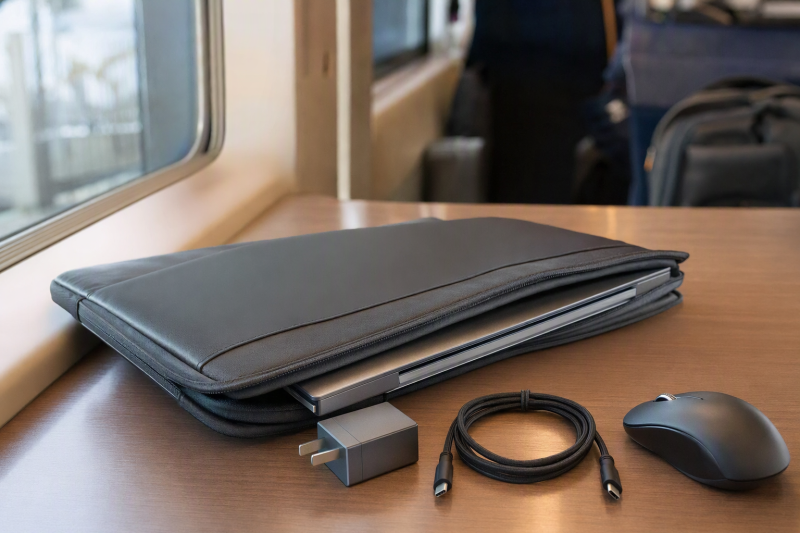
A laptop sleeve with an accessory pocket keeps a short commute lighter than a full backpack and gives the charger, cable, mouse, and pen their own place. A screen-size label does not guarantee that a sleeve fits. Internal length, width, and thickness must match the actual laptop, and the organizer must hold the daily accessories without pressing hard objects against the computer.
The eight options below cover 13-inch through 16-inch machines, from slim handled sleeves to shoulder-carry cases. Lenovo Urban Sleeve is the best overall 14-inch choice because it publishes inner and outer dimensions, weighs 0.57 pounds, has padded compartments, and adds rubber corner bumpers. BAGSMART is the strongest larger shoulder-carry option, and CaseBuy has the most detailed organizer for a 13-to-13.6-inch laptop.
Laptop Sleeve Comparison
| Image | Product | Details | Check Price |
|---|---|---|---|
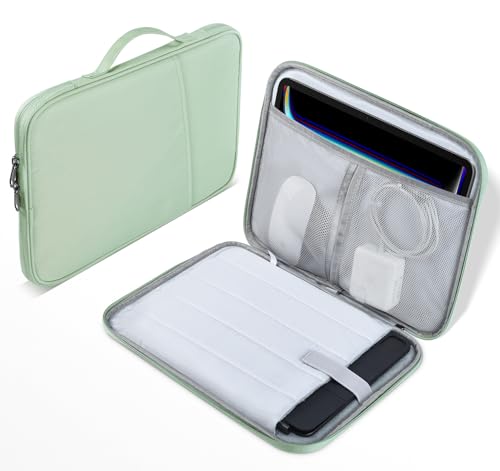 | CaseBuy 13-to-13.6-Inch Sleeve | Best fit: Compact laptop with several small accessories Laptop range: 13-13.6 inches stated Case size: 13.8 x 10 x 1.2 inches Organizer: 2 mesh pockets; large compartment; pen loop; front pocket Opening: 180 degrees | Check Price on Amazon |
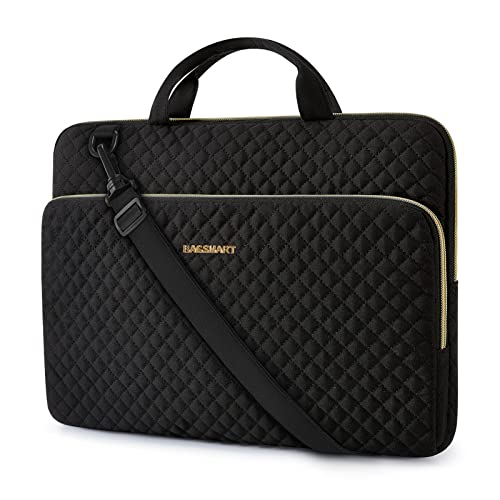 | BAGSMART 15.6-Inch Sleeve | Best fit: Larger laptop with shoulder carry Laptop range: Up to 15.6 inches stated Case size: 16 x 2 x 11 inches Carry: Handles; detachable adjustable shoulder strap Organizer: Front storage pocket | Check Price on Amazon |
 | Ytonet 14-Inch TSA Sleeve | Best fit: Measured 14-inch laptop and wide access Compartment: 13.78 x 9.65 x 0.98 inches Outer size: 14.37 x 10.63 x 1.97 inches Organizer: Separate mesh pocket Opening: Up to 180 degrees | Check Price on Amazon |
 | Ytonet 16-Inch TSA Sleeve | Best fit: Thicker 15-to-16-inch laptop Compartment: 14.6 x 10.6 x 1.6 inches Outer size: 15.7 x 11.2 x 2 inches Organizer: Additional mesh pocket Opening: 90-180 degrees | Check Price on Amazon |
 | SANFAN Three-Pocket Sleeve | Best fit: Commuter using rolling luggage Maximum device: 14.37 x 9.65 x 1 inch stated Internal size: 14.76 x 10.23 x 1 inch Organizer: 3 accessory pockets Carry: Handle; detachable luggage strap | Check Price on Amazon |
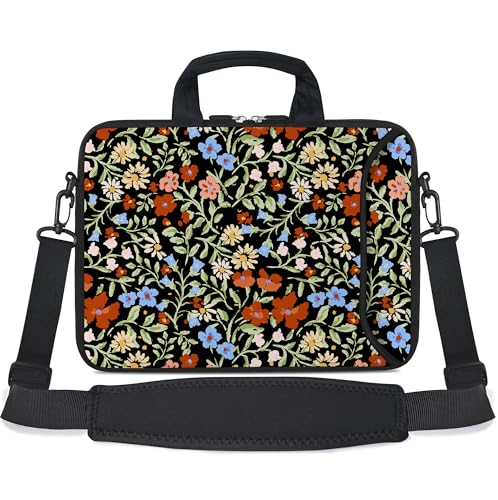 | RICHEN 11-to-13.3-Inch Messenger Sleeve | Best fit: Compact laptop with shoulder carry Laptop range: 11-13.3 inches stated Case size: About 13.2 x 10 inches Material: Neoprene with soft lining Carry: Handle; adjustable shoulder strap | Check Price on Amazon |
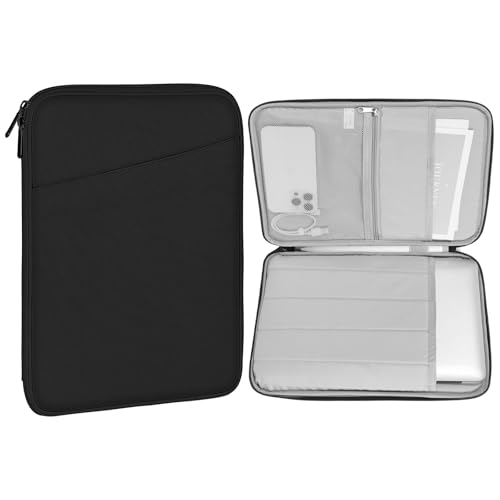 | MoKo 13.3-to-14-Inch Sleeve | Best fit: Bare 13.3-to-14-inch laptop Internal size: 34 x 26 cm Outer size: 36 x 28 x 2.5 cm Organizer: Front accessory pocket Protection: Sponge padding; splash-proof polyester | Check Price on Amazon |
 | Lenovo Urban Sleeve 14 | Best fit: Protective lightweight 14-inch commute Internal size: 14.5 x 9.8 x 1.1 inches Outer size: 14.7 x 10 x 1.2 inches Weight: 0.57 lb Protection: Padded compartments; rubber corner bumpers | Check Price on Amazon |
Measure the closed laptop rather than relying on its advertised screen diagonal. Compare all three device dimensions with the sleeve’s internal measurements, then account for feet, a camera bump, or a hard shell already attached to the computer. A close fit should hold the laptop without bowing the zipper or compressing the screen.
1. CaseBuy 13-to-13.6-Inch Sleeve — Best Organizer for Compact Laptops
CaseBuy’s sleeve measures 13.8 x 10 x 1.2 inches and targets several 13-to-13.6-inch MacBook Air, MacBook Pro, and Surface Laptop models. Shock-absorbing padding and a soft lining surround the primary device area, while the outer material is described as water-resistant.
The organizer is the main reason to choose it: two mesh pockets, one large compartment, a pen loop, and an additional front pocket divide chargers, cables, hubs, a stylus, and earphones. A hand strap supports short carries, and the double zipper opens the sleeve through 180 degrees for broad access.
Our Take: CaseBuy is the best compact option for commuters who want more than one undivided front pocket. Its published outside dimensions help, but the refreshed evidence does not supply a single internal laptop-compartment measurement, so confirm the fit for your laptop model.
[su_box title=”PROS” style=”soft” box_color=”#2e7d32″] – Two mesh pockets, a large compartment, and a pen loop separate small commute gear. – The 13.8 x 10 x 1.2-inch body stays compact for short trips. – A 180-degree zipper opening exposes the organizer without digging through a narrow gap. – Shock-absorbing padding and soft lining separate the laptop from the sleeve exterior. [/su_box] [su_box title=”CONS” style=”soft” box_color=”#c62828″] – No single internal laptop-compartment dimension appears in the refreshed evidence. – The hand strap does not provide the hands-free carry of a shoulder strap. – Water-resistant material should not be treated as submersion protection. [/su_box]2. BAGSMART 15.6-Inch Sleeve — Best Shoulder-Carry Option
BAGSMART lists the dimensions of this polyester sleeve at 16 x 2 x 11 inches and states compatibility with many notebooks up to 15.6 inches, along with a 16-inch MacBook Pro. Soft lining and fabric-wrapped guards protect the laptop edges, while the quilted exterior keeps the design lighter than a rigid briefcase.
A detachable adjustable shoulder strap joins the grab handles for two carry modes. The front storage pocket accepts a mouse, phone, keyboard, power bank, business cards, and other daily items. Those examples show generous organizer capacity, but commuters should avoid overfilling the pocket until hard accessories press against the laptop panel.
Our Take: BAGSMART is the best fit when a larger laptop and charger need hands-free shoulder carry. It offers more space than a slim sleeve, though its two-inch outer depth is bulkier inside another work bag.
[su_box title=”PROS” style=”soft” box_color=”#2e7d32″] – A detachable adjustable strap supports hands-free station and sidewalk transfers. – The specified 16 x 2 x 11-inch case accommodates many larger work laptops. – Front storage is sized for a mouse, power bank, keyboard, and other accessories. – Fabric-wrapped guards add padding around vulnerable laptop edges. [/su_box] [su_box title=”CONS” style=”soft” box_color=”#c62828″] – The two-inch depth takes more space than a basic slip-in sleeve. – A heavily filled front pocket can place charger pressure against the computer. [/su_box]3. Ytonet 14-Inch TSA Sleeve — Best Dimensioned 14-Inch Pick
Ytonet publishes an outer size of 14.37 x 10.63 x 1.97 inches and a laptop compartment of 13.78 x 9.65 x 0.98 inches. Those numbers are more useful than a broad 14-inch label because they let owners compare the actual computer footprint and thickness before ordering.
A separate padded compartment holds the laptop, while a mesh organizer takes a tablet, pens, cables, mouse, earphones, or phone. Water-resistant nylon and polyester foam provide the sleeve layers. Portable handles and top double zippers open through 180 degrees, and the slim case can slide into a backpack or briefcase.
Our Take: This Ytonet is the 14-inch pick for shoppers who want exact internal measurements together with a wide opening. Check that the laptop stays under the 13.78 x 9.65 x 0.98-inch compartment limit rather than trusting screen size alone.
[su_box title=”PROS” style=”soft” box_color=”#2e7d32″] – Exact 13.78 x 9.65 x 0.98-inch compartment dimensions make fit checking practical. – A separate mesh area organizes cables, a mouse, phone, and small tablet. – The 180-degree opening provides broad access at a desk or security checkpoint. [/su_box] [su_box title=”CONS” style=”soft” box_color=”#c62828″] – A thick 14-inch gaming laptop may exceed the 0.98-inch compartment depth. – Handle carry is less comfortable than a shoulder strap over longer walks. – The nearly two-inch outside depth is not the slimmest option here. [/su_box]4. Ytonet 16-Inch TSA Sleeve — Best for Thick 15-to-16-Inch Laptops
Ytonet states the larger sleeve measures 15.7 x 11.2 x 2 inches outside and provides a 14.6 x 10.6 x 1.6-inch laptop compartment. The deeper interior suits thicker 15-to-16-inch work or gaming laptops that do not fit a sleeve under one inch deep. The listing names 16-inch MacBook Pro, ThinkPad, IdeaPad, ASUS, Acer, HP, and Dell examples.
A mesh pocket organizes pens, cables, mouse, earphones, phone, tablet, and other accessories. According to the manufacturer, water-resistant nylon and polyester foam protect against dust, dirt, and scratches. The handle and double zippers support a 90-to-180-degree opening, while the sleeve is designed to slide into another bag.
Our Take: Choose this Ytonet for a larger or thicker machine after confirming the 14.6 x 10.6 x 1.6-inch compartment. It leaves room for both the laptop and the accessories, but its two-inch outer depth is closer to a compact case than an ultra-thin sleeve.
[su_box title=”PROS” style=”soft” box_color=”#2e7d32″] – A 1.6-inch internal depth accommodates thicker laptops than the 14-inch Ytonet. – Published inner and outer measurements reduce model-name fit guesswork. – The wide zipper opening makes the computer and organizer easy to reach. – A dedicated mesh pocket holds cables and a mouse instead of leaving them loose. [/su_box] [su_box title=”CONS” style=”soft” box_color=”#c62828″] – The 15.7 x 11.2 x 2-inch body occupies substantial room in a backpack. – No detachable shoulder strap is listed for hands-free commuting. [/su_box]5. SANFAN Three-Pocket Sleeve — Best with Luggage Strap
SANFAN lists three accessory pockets for a charger, cables, and documents. Its internal space measures 14.76 x 10.23 x 1 inch, while the seller recommends laptops no larger than 14.37 x 9.65 x 1 inch. The smaller device limit is the safer number because it leaves clearance within the stated interior.
A carry handle supports short walks, and a detachable luggage strap secures the sleeve to rolling luggage. The material is described as durable and lightweight, with protection against scratches, bumps, and everyday wear. The listing targets 15-to-15.6-inch laptops and some slim 16-inch models, but actual dimensions decide the fit.
Our Take: SANFAN is the strongest airport companion for travelers who want a luggage strap and three separate pockets for their accessory load. Do not treat the larger interior dimensions as the laptop limit. Use the maker’s smaller figure for the largest laptop it recommends.
[su_box title=”PROS” style=”soft” box_color=”#2e7d32″] – Three pockets separate a charger, cables, and documents during a commute. – A detachable luggage strap attaches the sleeve to a rolling suitcase handle. – The stated 14.37 x 9.65 x 1-inch device limit gives a cautious fit boundary. – A carry handle makes the sleeve usable outside a larger bag. [/su_box] [su_box title=”CONS” style=”soft” box_color=”#c62828″] – Many thick 16-inch laptops exceed the one-inch recommended depth. – The evidence does not describe a shoulder strap or specific water resistance. – Buyers have to tell the internal dimensions apart from the maximum laptop dimensions. [/su_box]6. RICHEN 11-to-13.3-Inch Messenger Sleeve — Best Compact Printed Shoulder Sleeve
RICHEN’s neoprene sleeve measures about 13.2 x 10 inches and targets most 11-to-13.3-inch laptops and tablets. A soft inner lining separates the device from the printed neoprene exterior. The listing describes the material as waterproof, washable, lightweight, and quick to dry.
An external pocket holds a mouse, adapter, or USB accessories. Reinforced dual zippers close the main compartment, and D-ring hooks accept the included adjustable shoulder strap. A soft outer handle gives a second carry method. Buyers should measure side to side because the seller warns against using the diagonal screen dimension to judge bag fit.
Our Take: RICHEN is the compact shoulder-carry choice for a smaller computer and a simple kit of an adapter and a mouse. Its soft neoprene body lacks the structured corner features of Lenovo, but it adds a strap that many slim sleeves omit.
[su_box title=”PROS” style=”soft” box_color=”#2e7d32″] – The included adjustable shoulder strap enables hands-free compact-laptop carry. – A separate external pocket holds an adapter, mouse, or USB accessories. – Reinforced dual zippers close the main neoprene compartment. [/su_box] [su_box title=”CONS” style=”soft” box_color=”#c62828″] – The 13.2 x 10-inch body excludes most larger 14-to-16-inch laptops. – Soft neoprene offers less corner structure than Lenovo’s rubber-bumper design. [/su_box]7. MoKo 13.3-to-14-Inch Sleeve — Best Slim Splash-Resistant Pick
MoKo supplies a main compartment for 13.3-to-14-inch laptops and a front pocket for a phone, charger, USB cables, mouse, power bank, earphones, and cards. The polyester exterior is described as splash-proof, while a soft lining and thick sponge padding protect against scratches and shocks.
The outside measures 36 x 28 x 2.5 cm, and the interior measures 34 x 26 cm. MoKo recommends inserting the bare laptop rather than a computer already inside a thick protective shell. A zipper closes both the device and accessory areas, and the case is sized to slide into another bag.
Our Take: MoKo suits a bare 13.3-to-14-inch laptop with a moderate accessory set and a slim profile. Its warning against a thick shell is useful, though the listing does not provide an internal depth measurement.
[su_box title=”PROS” style=”soft” box_color=”#2e7d32″] – The front pocket has named space for a charger, power bank, mouse, and cables. – Thick sponge padding and soft lining cushion a bare laptop during daily travel. – The 34 x 26 cm interior gives a concrete length and width to check against. – Splash-proof polyester adds an outer barrier against incidental moisture. – A slim profile fits inside a commuter bag instead of replacing it. [/su_box] [su_box title=”CONS” style=”soft” box_color=”#c62828″] – MoKo recommends bare-device use rather than a laptop in a thick hard shell. – The refreshed evidence does not state the internal compartment depth. – No separate shoulder strap or luggage strap is listed. [/su_box]8. Lenovo Urban Sleeve 14 — Best Overall
Lenovo Urban Sleeve measures 14.7 x 10 x 1.2 inches outside and 14.5 x 9.8 x 1.1 inches inside. At 0.57 pounds, it stays light enough to slip into a backpack or briefcase. The polyester exterior is described as durable and water-resistant.
Multiple padded compartments provide dedicated positions for the device and accessories, including cushioning around the zippers. Rubber bumpers protect all four corners and act as shock absorbers against drops and impacts. A sturdy handle supports standalone carry when the sleeve is not packed inside another bag.
Our Take: Lenovo is the most complete 14-inch commuting sleeve here because it combines exact internal dimensions, low listed weight, organizer padding, corner bumpers, and a handle. It is not the highest-capacity accessory case, but its protection details are unusually specific.
[su_box title=”PROS” style=”soft” box_color=”#2e7d32″] – Exact 14.5 x 9.8 x 1.1-inch internal dimensions simplify laptop fit checks. – Four rubber corner bumpers add structure at common impact points. – A 0.57-pound listed weight keeps the empty sleeve light. – Padded device and accessory compartments separate hardware during transit. [/su_box] [su_box title=”CONS” style=”soft” box_color=”#c62828″] – The 1.1-inch interior excludes thicker 14-inch gaming laptops. – No shoulder strap or luggage strap appears in the supplied evidence. – Accessory capacity is less specifically itemized than CaseBuy’s organizer. [/su_box]Buying Guide: Choose a Commuting Sleeve with Accessory Pockets
Measure the laptop in three dimensions
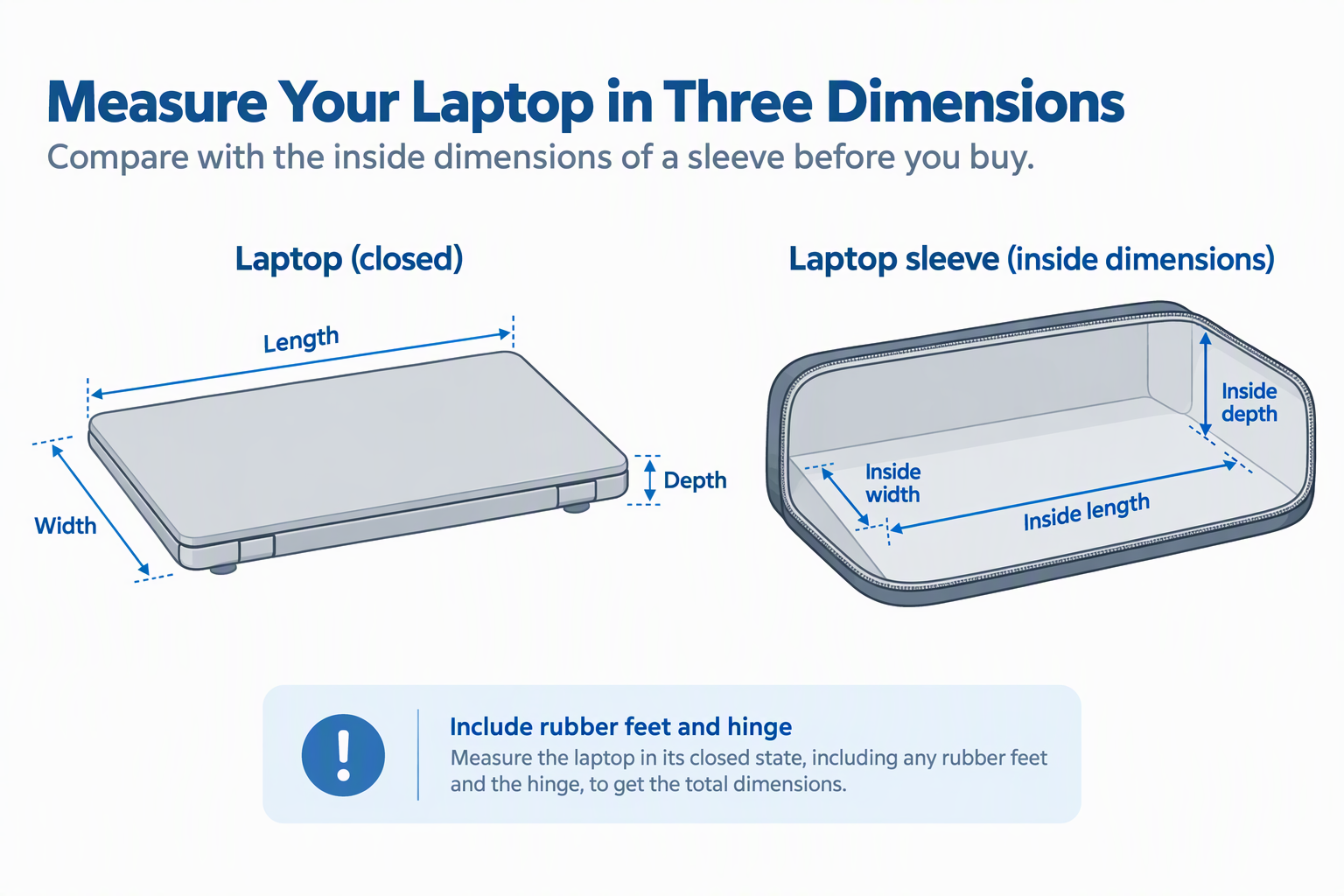
Internal length, width, and depth settle fit. Lenovo lists internal dimensions of 14.5 x 9.8 x 1.1 inches, while Ytonet specifies 13.78 x 9.65 x 0.98 inches for its 14-inch model and 14.6 x 10.6 x 1.6 inches for the 16-inch version. A screen-size label alone cannot show chassis thickness or bezel size.
Measure the laptop closed and use the smaller compartment figure. Include the rubber feet, hinge projection, and any permanently attached shell in the measurement. MoKo recommends bare-device use, while SANFAN publishes a maximum device size smaller than its sleeve interior. If a laptop privacy tent or another bulky workspace accessory travels too, keep it outside the laptop compartment so it cannot distort the padded walls.
Keep hard accessories away from the screen
A separate padded or mesh organizer is safer than one loose cavity. CaseBuy uses two mesh pockets, a large compartment, pen loop, and front pocket. Lenovo pads its accessory compartments, and both Ytonet sizes use separate mesh storage.
Place the charger where its corners cannot press into the display lid. Keep an encrypted USB drive, vertical mouse, and folding phone stand in separate pocket positions rather than between the sleeve and laptop. Coil cables before packing so plugs cannot shift against the computer, and avoid overfilling even when the zipper can still close.
Choose the right carrying method
Handles work for a short walk between home, transit, and office. Most picks supply or describe a handle, and BAGSMART and RICHEN add adjustable shoulder straps. SANFAN’s luggage strap serves a different purpose, attaching the sleeve to a rolling suitcase.
Choose a briefcase when the commute exceeds a sleeve’s carry comfort. A laptop briefcase provides more structure, balanced handles, and space for larger chargers over longer walks. A sleeve is the slimmer choice when it rides inside a tote or backpack. Detachable straps should connect to the supplied attachment points, remain clear of zippers, and be adjusted so the case does not swing into obstacles.
Interpret water-resistance claims carefully
Water-resistant or splash-proof fabric suits incidental exposure, not immersion. CaseBuy, BAGSMART, both Ytonet sizes, MoKo, and Lenovo use water-resistance language, while RICHEN calls its neoprene waterproof. Open zippers, seams, and accessory pockets still affect the complete case.
Use a closed outer bag during sustained rain. Dry the sleeve exterior before opening it over the laptop, and inspect the accessory pocket before placing a charger inside. A wireless charging desk mat belongs at the destination rather than inside a damp sleeve pocket with the charger and cable. If the lining becomes wet, remove the computer and let the empty sleeve dry according to its care instructions.
Balance sleeve thickness against the commute
A slim sleeve packs easily but holds fewer bulky accessories. According to manufacturer specifications, the Lenovo and CaseBuy are 1.2 inches deep outside, while the Ytonet 14 measures 1.97 inches and the BAGSMART measures 2 inches. The extra depth can fit more gear, but it also consumes space inside another bag.
Match pocket depth to the thickest accessory, not just the laptop. For a charger, mouse, and headset, choose an organizer sized for all three without stretching the zipper or bowing the laptop compartment. A USB headset or wireless headset may need a separate protective case if its earcups or boom cannot sit flat. Leaving one bulky item out can preserve the sleeve’s intended slim shape.
Frequently Asked Questions
Should a laptop sleeve fit tightly?
The sleeve should hold the laptop without bending the zipper or compressing the lid. A small amount of clearance supports easy insertion, while too much empty space lets the computer move. Exact internal measurements are the best guide.
Lenovo, Ytonet, SANFAN, and MoKo publish useful dimensions. Compare them with the closed laptop rather than the advertised screen diagonal, especially for thick gaming or workstation models.
Can the charger go in the front pocket?
Yes, every product here includes accessory storage intended for items such as chargers or cables. The charger should sit in a separate pocket without pressing against the screen. A crowded pocket can transfer a hard edge through soft padding.
Coil the cable without forcing the zipper, use internal dividers when available, and move an oversized power brick to the main commuter bag. CaseBuy and Lenovo offer the clearest compartment separation.
Is a sleeve enough protection for public transit?
A padded sleeve protects against scratches, ordinary bumps, and bag contact, but it is not a rigid shipping case. Lenovo adds rubber corner bumpers, while CaseBuy and Ytonet describe shock-absorbing foam or padding.
On crowded transit, keep the sleeve inside a larger closed bag or hold it securely by its designed handle or strap. Do not place it under heavy luggage or leave it where it can slide from a seat.
Does water-resistant mean the laptop can get wet?
No. Water-resistant material is an outer barrier, not permission to expose electronics to water. Zippers, seams, and open pockets can admit moisture even when the main fabric resists splashes.
Use an outer rain-protected bag in sustained weather, wipe the sleeve before opening it, and let a damp case dry fully away from the computer. Follow the maker’s care directions for neoprene, nylon, or polyester.
Which sleeve is best for air travel?
The best airport fit depends on device size and whether the sleeve rides on rolling luggage. Ytonet 14 and Ytonet 16 provide wide 180-degree openings and exact compartment dimensions, while SANFAN adds a luggage strap.
Security procedures can still require removing the laptop or opening the sleeve. Keep documents and cables organized so the computer can be reached without spilling accessories across the checkpoint tray.