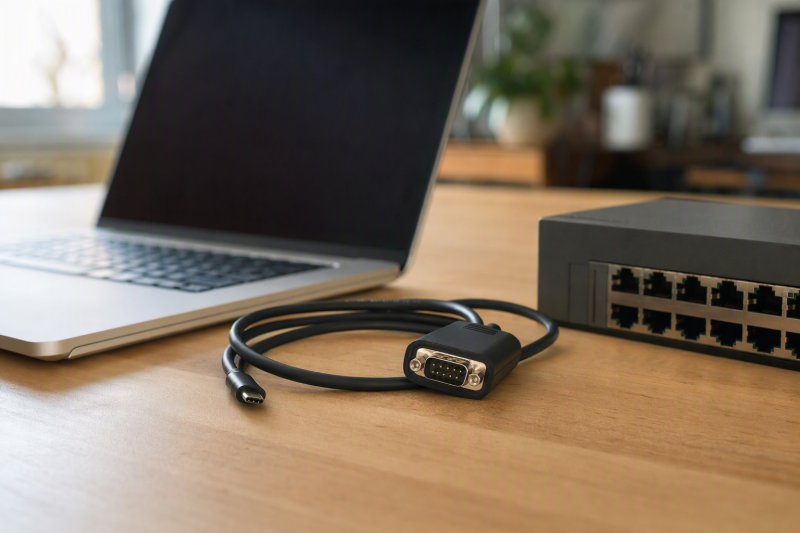
When a switch, PLC or older instrument only exposes a serial port, a modern USB-C laptop needs more than a plug that happens to fit. RS-232 signal levels, DB9 connector gender, device pinout and terminal settings all have to match. A console jack with an RJ45 shape is often serial, not Ethernet, and a USB-C-to-DB9 adapter may still need the correct rollover or gender cable.
This six-adapter selection varies in cable length, status indicators, chipset claims, and stated baud limits. Serial devices, driver releases, and electrical outputs were not independently tested for this guide. Read the target equipment manual first. This list is for RS-232 DB9 work, not direct TTL-UART headers or native RJ45 console cables.
Before shopping, write down the target’s serial standard, DB9 gender or RJ45 pinout, baud/parity/stop-bit settings and host OS. A USB-C connector alone cannot solve a pinout or voltage mismatch.USB-C Serial Adapters Compared
Connector, chipset, and baud details below are manufacturer or seller specifications, not independent device tests.
| Image | Product | Details | Check Price |
|---|---|---|---|
 | StarTech ICUSB232C | Port: Male DB9 RS-232 Cable: About 40 cm Notable: 921.6 Kbps stated Best fit: Documented short lead | Check Price on Amazon |
 | Gearmo FTDI 5ft | Port: DB9 RS-232 Cable: 5 ft Notable: Activity LEDs Best fit: Rack reach | Check Price on Amazon |
 | Keyspan USA-19HS-C | Port: DB9 RS-232 Cable: Detachable 3 ft Notable: 230 Kbps stated Best fit: Replaceable USB lead | Check Price on Amazon |
 | SerialPulseX | Port: DB9 RS-232 Cable: 3 ft Notable: Nine status LEDs Best fit: Signal visibility | Check Price on Amazon |
 | Cable Matters 3ft | Port: Male DB9 RS-232 Cable: 3 ft Notable: Null-modem note Best fit: Plain DB9 connection | Check Price on Amazon |
 | OIKWAN FTDI | Port: Male DB9 RS-232 Cable: USB-C lead Notable: FT232RL claimed Best fit: Basic FTDI-listed | Check Price on Amazon |
1. StarTech ICUSB232C — Best Documented Short Adapter
StarTech’s ICUSB232C has a male DB9 RS-232 port from USB-C with a short roughly 40 cm cable and screw-lock hardware. Its maker documents a maximum 921.6 Kbps baud rate, 512-byte FIFO and configurable data, stop, parity and flow-control options. Those specifications are useful when a lab instrument or console uses more than the familiar 9600 8-N-1 setting. The device being connected must still accept RS-232 on the matching DB9 pins.
The manufacturer’s page identifies a Prolific PL2303GT chipset, operating-system information and driver downloads. Check that page for the current host OS rather than assuming “driverless” applies to every system image. This short lead is tidy beside a laptop but may not reach a rack console port. An appropriately wired serial extension could be needed. It is not a direct RJ45 console lead.
Our Take Buy StarTech as a DB9 starting point with clear maker documentation. Its exact cable length and male connector are as important as its baud ceiling.
- Maker publishes protocol and chipset details.
- 921.6 Kbps ceiling stated.
- Screw-lock male DB9.
- Short lead may not reach a rack.
- RJ45 consoles require another correctly wired cable.
2. Gearmo FTDI 5ft — Best Longer Cable with Activity LEDs
Gearmo lists a five-foot USB-C-to-DB9 RS-232 adapter with an FTDI chipset claim and dual-color status LEDs. The extra length can be useful when a network rack or machine console is not beside the laptop. The seller describes a DTE-mode RS-232 interface and ±15 kV ESD protection for its RS-232 I/O. Those electrical and protection claims were not independently tested, so treat them as specifications, not proof of resilience in use.
Its listing names Windows, macOS and Linux versions, but driver behavior can change with OS releases. Install and enumerate the adapter on the intended laptop before a maintenance window. LEDs may reveal that traffic is present, but they do not tell you whether transmit/receive pins are crossed correctly or whether the terminal baud matches the device. Confirm the DB9 gender and target DTE/DCE arrangement.
Our Take Buy Gearmo when the RS-232 gear is not beside the laptop. The LEDs are useful for diagnosis only after the cable and terminal settings are right.
- Five-foot lead.
- Status LEDs.
- FTDI chipset stated.
- ESD and chipset claims not tested here.
- Long lead is less tidy at a desk.
3. Keyspan USA-19HS-C — Best Detachable Cable Workflow
Tripp Lite’s Keyspan USA-19HS-C lists a DB9 RS-232 port, full modem-control lines and hardware/software flow control. Its stated data rate is up to 230 Kbps, lower than some headline baud ceilings here but plenty for many console text sessions. More valuable is the detachable three-foot USB-C cable. The checked listing says it can work with another USB-C cable up to 16 feet, subject to the maker’s compatibility limits.
The adapter has a three-year warranty in its listing and names Windows Server and macOS compatibility. Verify the current driver path and OS release before deploying it on a managed laptop. A past working machine is not proof of a future update. The detachable cable also adds one connection point that should be seated before blaming the target console. As with every DB9 choice here, an RJ45 console jack needs the right separate wiring.
Our Take Buy Keyspan when a replaceable or longer USB-C side counts for more than the highest baud rate. Check current host support first.
- Detachable USB-C cable.
- Modem and flow-control lines listed.
- Three-year warranty stated.
- 230 Kbps stated ceiling.
- Current driver compatibility needs checking.
4. SerialPulseX — Best Nine-Signal Visibility
SerialPulseX has a three-foot lead and nine status LEDs for RS-232 signal activity. The LEDs can help a technician see whether a line is asserted while troubleshooting an instrument or serial link. The listing names a PL2303 chipset, a 512-byte FIFO, up to 921.6 Kbps and several data/parity settings. The chipset, FIFO size, baud rate and settings are seller specifications; LED states and individual pins were not independently tested for this guide.
The seller explicitly says Windows on ARM is not supported, while listing other Windows, macOS and Linux environments with available drivers. That exclusion is a concern for a newer Arm-based laptop. It also rules out some nonstandard serial peripherals and serial mice. LEDs cannot fix a wrong voltage standard or crossover. Check the DB9 screws, gender and required flow-control pins before choosing this adapter for a deployment cart.
Our Take Buy SerialPulseX for visibility into several serial signals. It is not the safe choice for a console laptop that runs Windows on Arm.
- Nine signal LEDs listed.
- 921.6 Kbps and FIFO specified.
- Three-foot reach.
- Windows on ARM excluded.
- Signal LEDs are not a pinout test.
5. Cable Matters 3ft — Best Standard DB9 Cable
Cable Matters offers a three-foot USB-C-to-male-DB9 RS-232 cable for equipment with a female DB9 port. Its listing tells buyers to add a gender changer when the equipment port differs and a null-modem adapter for direct computer-to-computer serial connections. Matching the physical shell is only the first step, and the RS-232 transmit/receive path must be wired for the two endpoints.
The seller points to downloadable drivers and names recent Windows and macOS versions, while warning that some equipment needs separate proprietary software. For a managed switch with an RJ45 console, this DB9 cable alone is not enough. Follow the switch manual’s rollover/adapter pinout. No particular chipset or maximum baud figure was established from the checked listing, so neither is a reason to rank it above the more documented choices.
Our Take Buy Cable Matters as a plain DB9 cable that calls out gender and null-modem needs. Bring the correct additional cable for an RJ45 console.
- Three-foot DB9 reach.
- Gender and null-modem needs called out.
- Not a direct RJ45 console lead.
- Driver and equipment software may be needed.
6. OIKWAN FTDI — Best Basic FTDI-Listed Option
OIKWAN lists a USB-C male to DB9 male RS-232 adapter and says it uses an FT232RL chipset. The listing emphasizes checking nine-pin DB9 gender before ordering. A DB9 port is not a fifteen-pin VGA connector despite the superficially similar D-sub shape. The seller names several Windows versions, macOS and Linux and says one-time driver installation may be required. A seller chipset assertion should not replace checking the actual driver/device ID on the laptop.
The product copy describes a serial data rate up to 1 Mbps, but that broad number is not proof of every baud divisor or target device’s support. Console access usually needs correct wiring and terminal parameters more than high throughput. OIKWAN is a basic adapter for someone with a known DB9 RS-232 device. It does not include a verified RJ45 rollover path or TTL-level header connection.
Our Take Buy OIKWAN as a basic DB9 option listed with an FTDI chipset. Use it only after confirming DB9 gender, signal standard and the intended host driver.
- FT232RL chipset claimed.
- DB9 male identity clear.
- Driver may need installation.
- No direct RJ45 or TTL use established.
- Chipset not physically verified here.
Buying Guide: Trace the Serial Path End to End
Verify voltage, connector and pinout first
RS-232 and TTL UART are different electrical interfaces. An FT232-family USB UART chip can sit behind an RS-232 level converter. FTDI’s FT232R data sheet illustrates that distinction. Do not connect a DB9 RS-232 adapter directly to a low-voltage TTL header on a development board. Check the target’s manual for signal standard and voltage before attaching anything.
An RJ45 console socket is not necessarily an Ethernet port. Cisco’s terminal-connection guidance gives one example using a rollover cable and DB9 adapter. Other vendors or models can wire their console ports differently. None of the six products here is itself a direct RJ45 plug. Plan the correct device-specific adapter, crossover and gender. Never treat a normal network cable as a universal console cable.
Confirm driver and terminal settings before the outage
The laptop must enumerate a serial port, and the terminal program must open the right one with the device’s baud, data bits, parity, stop bits and flow control. StarTech and Gearmo provide different chipset documentation. SerialPulseX excludes Windows on ARM. Test the exact laptop/OS combination while the network is still working, because downloading a driver during a console-only recovery can be awkward.
A silent terminal is not automatically a bad USB adapter. The wrong COM device, a missing null-modem crossover, mismatched baud or an unpowered target can all produce a blank screen. A few status LEDs may narrow the search, but do not prove pinout or voltage. Keep the target manual and a known-good cable in the kit. Our USB-C hub guide can help with crowded laptop ports, but it does not change serial wiring.
Choose the right reach and backup path
Short leads avoid cable clutter, while rack work may need distance. StarTech’s roughly 40 cm lead is tidy by a laptop. Gearmo’s five-foot cable reaches farther, and Keyspan has a detachable USB-C side. Do not extend an unknown serial run without checking signal requirements and connector strain. Screw-lock DB9 hardware helps keep a session from dropping during an update.
Record the working settings before leaving a site. Note the device model, console pinout, terminal profile, host driver version and known-good adapter. A serial cable can restore access when management over the network is unavailable, but it is not a network interface. For network-port needs, see our USB-C docking station guide rather than assuming an RJ45 serial console acts like Ethernet.
Frequently Asked Questions
Can I plug a USB-C-to-DB9 adapter straight into an RJ45 console port?
No. The DB9 and RJ45 connectors differ, and an RJ45 serial console can require a specific rollover/pinout adapter. Cisco’s published example uses a rollover cable and DB9 adapter, but one example is not a guarantee for every switch or router. An RJ45 socket on network equipment can be Ethernet, serial console, or another dedicated function.
Find the model’s console-port documentation and match the wiring exactly. Check DB9 gender and DTE/DCE expectations as well. A generic DB9-to-RJ45 shell adapter may have the wrong pin order even though both ends fit, so test it before a maintenance window.
Is this the same as a USB-C TTL programming cable?
No. The six selected adapters are sold as RS-232 DB9 devices. TTL UART headers commonly use lower logic voltages and a different connector. A USB-to-UART chip does not by itself tell you what voltage appears at the adapter’s external pins. An RS-232 product can include level conversion.
Use the target hardware documentation to identify TX, RX, ground and voltage before choosing a cable. Do not attach a DB9 RS-232 plug to an exposed TTL header through improvised wiring. For a microcontroller task, buy a purpose-built adapter with the stated TTL level.
Which setting should I try when a console screen is blank?
Start with the device maker’s documented terminal profile rather than a guessed default. Check the selected serial port, baud rate, data bits, parity, stop bits and flow control. Many consoles use familiar settings, but not all. Confirm the device is powered and the physical cable is the one intended for its console pinout.
If the host cannot see a serial port, check the driver and USB connection. If it sees a port but receives nothing, check wiring and the target settings. Status LEDs may show activity, yet they cannot prove that bytes are correctly decoded or that the console is ready to respond.
Bottom Line
StarTech ICUSB232C is the clearest short DB9 choice, and Gearmo FTDI 5ft provides reach and LEDs. Keyspan USA-19HS-C suits a replaceable USB-C cable, and SerialPulseX shows more line activity. None substitutes for the right RS-232 pinout, connector and terminal settings.