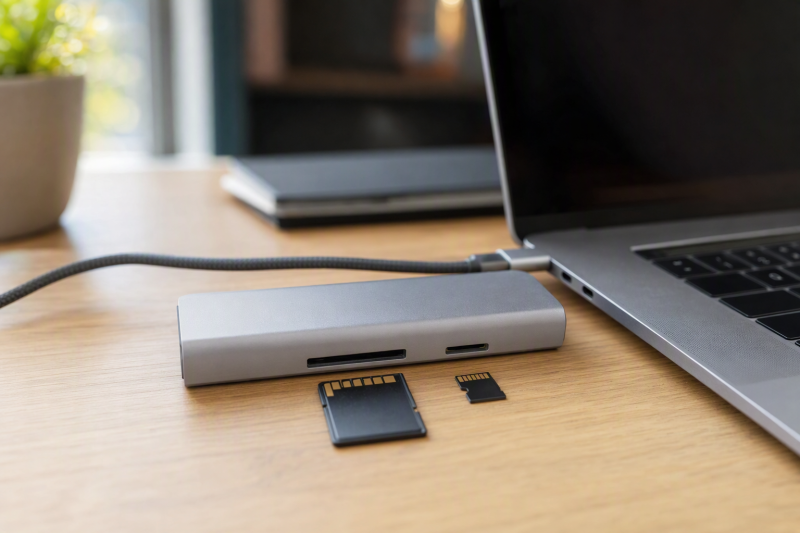
Shooting on cameras that take full-size SD and drones or action cams that take microSD? Our best choice for getting both readers into one dock is the OWC 11-Port Thunderbolt 5 Dock. OWC documents separate UHS-II slots for the two formats, plus three downstream Thunderbolt 5 branches, 2.5GbE, audio, and up to 140W host charging. For a 10GbE workstation the CalDigit TS5 Plus is the better match, and the UGREEN Revodok Max 213 covers the Thunderbolt 4 alternative. Where two card formats are only a bonus, our general USB-C dock guide is the better fit.
Be clear about what this page ranks: physical access to both formats, not simultaneous speed. No retained source proves that either reader pair sustains both interface ceilings at the same time. UHS-II and UHS-I name reader classes, not measured transfer results. The card, file workload, host, operating system, other active devices, and shared upstream connection all remain part of the outcome.
Quick picks
- OWC 11-Port Thunderbolt 5 Dock: Best overall dual UHS-II reader dock.
- CalDigit TS5 Plus: Best dual-reader Thunderbolt 5 dock with 10GbE.
- Plugable TBT-UDT3: Best when three downstream Thunderbolt 5 ports matter more than native display outputs.
- UGREEN Revodok Max 213: Best Thunderbolt 4 dual-format alternative.
- Anker Prime A83B5: Best retained UHS-I dual-format option with Thunderbolt 5.
Compare docks with dual SD and microSD readers
| Image | Product | Details | Check Price |
|---|---|---|---|
 | OWC 11-Port Thunderbolt 5 Dock | Reader pair: Separate SDXC and microSDXC UHS-II Required host path: Qualifying Thunderbolt 5 host Creator-side expansion: Three downstream TB5 branches and 2.5GbE Laptop charging: Up to 140W Buyer check: No simultaneous reader-throughput proof | Check Price on Amazon |
 | CalDigit TS5 Plus | Reader pair: Separate SD 4.0 and microSD UHS-II Required host path: Qualifying Thunderbolt 5 host Creator-side expansion: Ten 10Gbps USB ports and 10GbE Laptop charging: Up to 140W Buyer check: No simultaneous reader-throughput proof | Check Price on Amazon |
 | Plugable TBT-UDT3 | Reader pair: Separate SD and microSD UHS-II Required host path: Thunderbolt 5; not Thunderbolt 3 Creator-side expansion: Three downstream TB5 ports and 2.5GbE Laptop charging: Up to 140W Buyer check: No native HDMI or DisplayPort | Check Price on Amazon |
 | UGREEN Revodok Max 213 | Reader pair: Separate SD and TF 4.0 readers Required host path: Thunderbolt 4 Creator-side expansion: Two downstream TB4 ports and 2.5GbE Laptop charging: Up to 90W; supply included Buyer check: No concurrent reader-throughput proof | Check Price on Amazon |
 | Anker Prime Thunderbolt 5 Docking Station A83B5 | Reader pair: UHS-I full-size and microSD readers Required host path: Qualifying Thunderbolt 5 host Creator-side expansion: TB5, 2.5GbE and audio Laptop charging: Up to 140W Buyer check: HDMI and DisplayPort are mutually exclusive | Check Price on Amazon |
1. OWC 11-Port Thunderbolt 5 Dock — best overall dual UHS-II reader dock
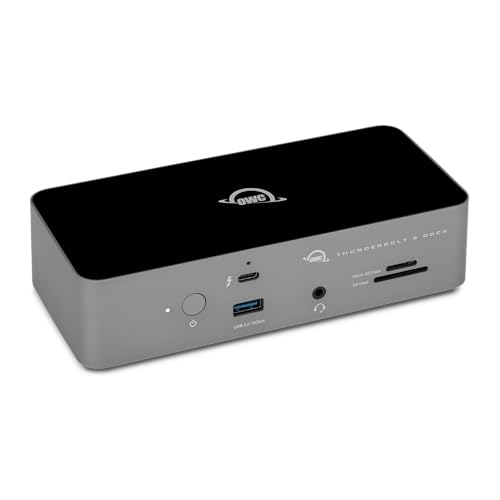
Both formats get their own slot here, and both are documented at the higher class. OWC documents separate full-size SDXC and microSDXC UHS-II readers, and its retained manual gives each an interface ceiling up to 312MB/s in half-duplex mode while also describing the corresponding full-duplex mode. Beyond cards, the dock provides three downstream Thunderbolt 5 branches, 2.5GbE, audio, and up to 140W host charging. When both card sizes and TB5 expansion sit at the center of the purchase, this is the most direct fit.
Those interface figures are not measured card transfers, and the evidence does not establish simultaneous full-rate operation from both slots. The host connection also stays shared with displays, Ethernet, and downstream devices. Two Windows details belong in the plan as well: OWC records an SDXC re-recognition caveat after safe removal and says Windows Ethernet requires a Realtek driver. Display ceilings vary by host.
Our Take
Buy the OWC when separate UHS-II readers and several TB5 branches define the desk. Keep its Windows setup notes in the plan, and do not count on concurrent maximum transfers.
- Separate SDXC and microSDXC UHS-II readers
- Three downstream Thunderbolt 5 branches
- 2.5GbE and up to 140W charging
- No simultaneous reader-throughput proof
- Windows driver and SDXC caveats apply
2. CalDigit TS5 Plus — best dual-reader dock with 10GbE
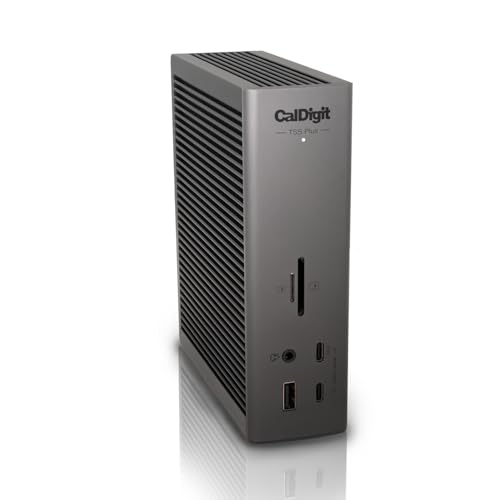
CalDigit documents separate SD 4.0 UHS-II and microSD UHS-II readers as part of a 20-port Thunderbolt 5 dock. The TS5 Plus wraps ten 10Gbps USB ports, 10GbE, DisplayPort 2.1, downstream Thunderbolt expansion, and up to 140W host charging around that pair. One requirement moves it ahead of OWC: a wired network that has to run at 10GbE rather than 2.5GbE.
A 10GbE dock port only helps when the switch, cabling, server, and storage behind it can use that link. The two card slots also share the dock’s upstream connection with every other device. CalDigit provides no retained evidence of simultaneous full-speed reader use, and its higher display and TB5 modes require a qualifying host. Demanding laptops may still need direct proprietary power.
Our Take
Choose the TS5 Plus when dual UHS-II formats meet a real 10GbE requirement. With a slower network and only occasional card access, it is more dock than the desk can use.
- Separate SD and microSD UHS-II readers
- 10GbE and ten 10Gbps USB ports
- Up to 140W host charging
- No simultaneous reader-throughput proof
- Full capability needs a qualifying TB5 host
3. Plugable TBT-UDT3 — best downstream TB5 expansion

Plugable documents separate full-size SD and microSD UHS-II slots with a retained 312MB/s bus rating, then surrounds them with three downstream Thunderbolt 5 ports, 2.5GbE, and up to 140W host charging. That downstream topology earns its place on a desk where card ingestion sits beside Thunderbolt storage or USB-C displays and fixed video connectors are simply not needed.
The 312MB/s figure is a bus rating, not a measured transfer result, and it establishes nothing about simultaneous performance from both readers. This dock has no native HDMI or DisplayPort either, so a display with only those inputs needs an appropriate adapter. The retained compatibility evidence excludes Thunderbolt 3, and every active display remains host dependent.
Our Take
Pick Plugable when two UHS-II formats and three downstream TB5 connections top the requirement list. Where direct HDMI or DisplayPort belongs on the desk, choose another model.
- Separate SD and microSD UHS-II slots
- Three downstream Thunderbolt 5 ports
- 2.5GbE and up to 140W charging
- No native HDMI or DisplayPort
- Bus rating does not prove simultaneous transfers
4. UGREEN Revodok Max 213 — best TB4 dual-format alternative

UGREEN documents separate SD and TF 4.0 readers on the Revodok Max 213, so full-size and microSD media each get a dedicated physical slot. The official specification also retains a Thunderbolt 4 host connection, two downstream Thunderbolt 4 ports, USB-A, USB-C, audio, 2.5GbE, an included supply, and up to 90W charging.
A Thunderbolt 4 laptop that cannot use the newer TB5 features of the first three picks lands here, and sensibly so. The retained evidence still does not prove concurrent card-reader throughput. One shopping note travels with it: the evidence records official SKU 25054 while the accepted Amazon listing may carry a marketplace suffix, so use the stable Revodok Max 213 family name, because the suffix does not establish a separate model. Confirm that 90W suits the laptop.
Our Take
Choose the Revodok Max 213 for two card formats on a balanced Thunderbolt 4 desk. What it trades away is the higher host path and charging ceiling of the TB5 picks.
- Separate SD and TF 4.0 readers
- Two downstream Thunderbolt 4 ports
- Included supply, 2.5GbE, and up to 90W charging
- No concurrent reader-throughput proof
- 90W may not suit a high-power laptop
5. Anker Prime Thunderbolt 5 Docking Station A83B5 — best UHS-I dual-format TB5 option

Anker documents the A83B5 with UHS-I card readers for the retained full-size and microSD roles, Thunderbolt 5 expansion, 2.5GbE, audio, and up to 140W host charging. It earns its place for buyers who need both card formats but have no requirement for the UHS-II reader class used by the four higher-ranked products.
Keep that distinction firmly in mind, because UHS-I is not UHS-II, and the frozen evidence does not establish simultaneous reader performance. Anker also states that HDMI and DisplayPort are mutually exclusive, so those connectors cannot be counted as two simultaneous display routes. Higher Thunderbolt 5 and display modes require a qualifying host, and the 140W figure remains a charging ceiling rather than a guarantee for every laptop workload.
Our Take
Buy the Anker only when two physical card formats matter more to you than UHS-II qualification. Its display-output exclusivity has to fit the exact monitor plan before this one makes sense.
- Retained full-size and microSD reader roles
- Thunderbolt 5, 2.5GbE, and audio
- Up to 140W host charging
- UHS-I rather than UHS-II
- HDMI and DisplayPort are mutually exclusive
How to choose a dual-reader dock
Confirm two physical formats
Admission to this page takes one full-size SD slot and one microSD or TF slot. A listing that advertises two card slots without naming the formats does not clear that bar. The exact manufacturer page controls the qualification, because a marketplace title or product photo cannot safely fill in missing specification text.
Choose UHS-II or UHS-I deliberately
OWC, CalDigit, and Plugable document UHS-II reader pairs. UGREEN documents SD and TF 4.0 readers in the retained evidence. Anker is the UHS-I option, and that is exactly why it ranks fifth. Where the cards and workflow do not need UHS-II, Anker still solves the physical two-format problem, but nobody should describe it as an equivalent reader class.
Treat simultaneous use as unknown
Two slots save adapters and card swaps, which is the real win. What no frozen source proves is simultaneous maximum throughput. OWC and Plugable bus figures apply as interface ceilings, never as a two-card measured result. Pull from both formats at once and the shared dock and host topology will make itself felt. This guide promises no concurrent copy rate.
Verify host, display, and power
The top three and Anker need a qualifying Thunderbolt 5 host for their higher modes, which leaves UGREEN as the Thunderbolt 4 alternative. On the video side, Plugable lacks native HDMI and DisplayPort, while Anker makes HDMI and DisplayPort mutually exclusive. Counting sockets never gives you an active-display count. Use our dual-monitor dock guide for the display branch.
Power divides the group the same way. The TB5 products document charging ceilings up to 140W, while UGREEN documents up to 90W with an included supply. Weigh that delivered role against the laptop’s needs, and keep the normal adapter where the computer requires more or the maker instructs it.
Match networking to storage location
CalDigit TS5 Plus documents 10GbE, while OWC, Plugable, UGREEN, and Anker document 2.5GbE. Copy cards straight to network storage and the entire network path comes into play, since a 10GbE dock cannot increase the switch or server speed. See the 2.5GbE dock roundup for network-first selection.
Final recommendation
The OWC 11-Port Thunderbolt 5 Dock is the best overall dual-reader choice because both retained slots are UHS-II and the dock also provides downstream TB5 and 2.5GbE. After that, one requirement picks each alternative: CalDigit TS5 Plus for 10GbE, Plugable for three downstream TB5 ports, UGREEN for Thunderbolt 4, Anker when UHS-I is sufficient. Whichever you choose, buy it for access to both formats and the surrounding dock topology, not for an unsupported simultaneous-speed promise.